2017 CHEVROLET BOLT EV change time
[x] Cancel search: change timePage 130 of 361
Chevrolet Bolt EV Owner Manual (GMNA-Localizing-U.S./Canada/Mexico-
10122739) - 2017 - CRC - 10/3/16
Instruments and Controls 129
Select Weekday or
Weekend.
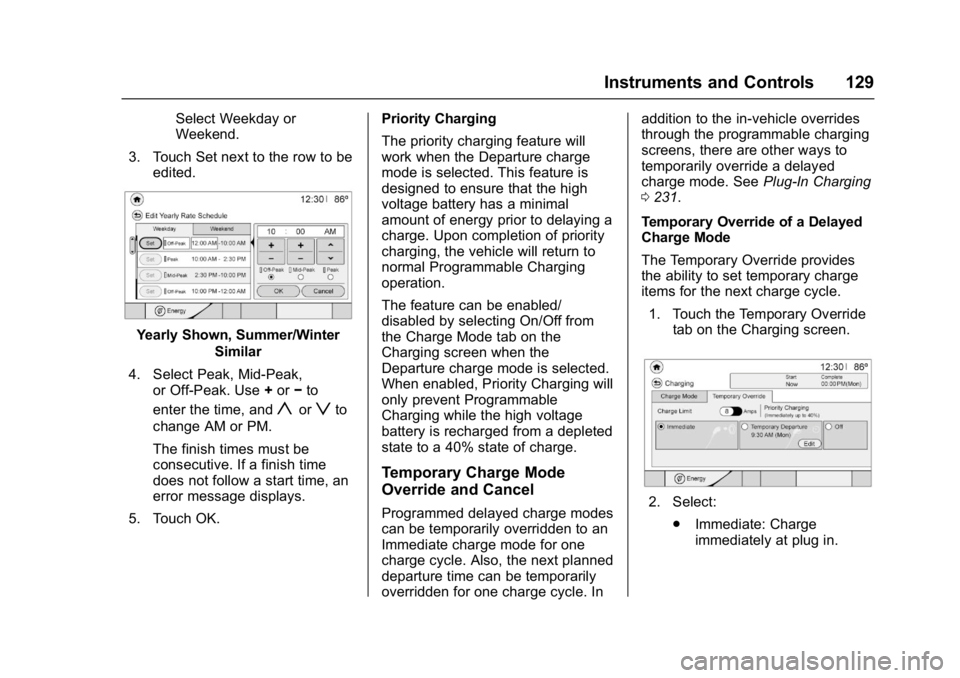
3. Touch Set next to the row to be edited.
Yearly Shown, Summer/Winter
Similar
4. Select Peak, Mid-Peak, or Off-Peak. Use +or −to
enter the time, and
yorzto
change AM or PM.
The finish times must be
consecutive. If a finish time
does not follow a start time, an
error message displays.
5. Touch OK. Priority Charging
The priority charging feature will
work when the Departure charge
mode is selected. This feature is
designed to ensure that the high
voltage battery has a minimal
amount of energy prior to delaying a
charge. Upon completion of priority
charging, the vehicle will return to
normal Programmable Charging
operation.
The feature can be enabled/
disabled by selecting On/Off from
the Charge Mode tab on the
Charging screen when the
Departure charge mode is selected.
When enabled, Priority Charging will
only prevent Programmable
Charging while the high voltage
battery is recharged from a depleted
state to a 40% state of charge.
Temporary Charge Mode
Override and Cancel
Programmed delayed charge modes
can be temporarily overridden to an
Immediate charge mode for one
charge cycle. Also, the next planned
departure time can be temporarily
overridden for one charge cycle. In addition to the in-vehicle overrides
through the programmable charging
screens, there are other ways to
temporarily override a delayed
charge mode. See
Plug-In Charging
0 231.
Temporary Override of a Delayed
Charge Mode
The Temporary Override provides
the ability to set temporary charge
items for the next charge cycle. 1. Touch the Temporary Override tab on the Charging screen.2. Select:
.Immediate: Charge
immediately at plug in.
Page 131 of 361
Chevrolet Bolt EV Owner Manual (GMNA-Localizing-U.S./Canada/Mexico-
10122739) - 2017 - CRC - 10/3/16
130 Instruments and Controls
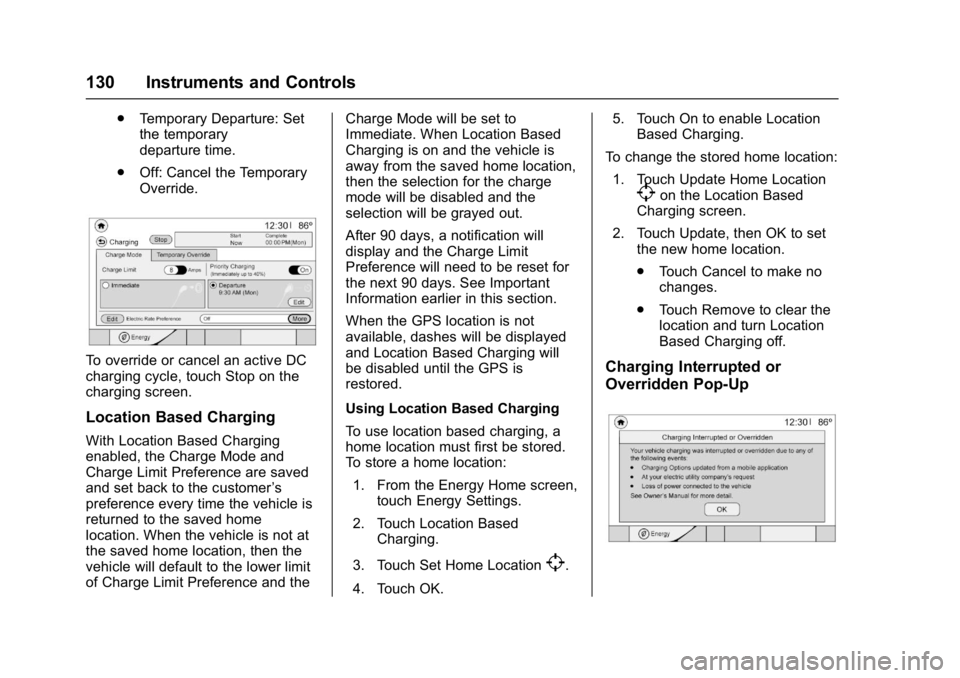
.Temporary Departure: Set
the temporary
departure time.
. Off: Cancel the Temporary
Override.
To override or cancel an active DC
charging cycle, touch Stop on the
charging screen.
Location Based Charging
With Location Based Charging
enabled, the Charge Mode and
Charge Limit Preference are saved
and set back to the customer ’s
preference every time the vehicle is
returned to the saved home
location. When the vehicle is not at
the saved home location, then the
vehicle will default to the lower limit
of Charge Limit Preference and the Charge Mode will be set to
Immediate. When Location Based
Charging is on and the vehicle is
away from the saved home location,
then the selection for the charge
mode will be disabled and the
selection will be grayed out.
After 90 days, a notification will
display and the Charge Limit
Preference will need to be reset for
the next 90 days. See Important
Information earlier in this section.
When the GPS location is not
available, dashes will be displayed
and Location Based Charging will
be disabled until the GPS is
restored.
Using Location Based Charging
To use location based charging, a
home location must first be stored.
To store a home location:
1. From the Energy Home screen, touch Energy Settings.
2. Touch Location Based Charging.
3. Touch Set Home Location
[.
4. Touch OK. 5. Touch On to enable Location
Based Charging.
To change the stored home location: 1. Touch Update Home Location
[on the Location Based
Charging screen.
2. Touch Update, then OK to set the new home location.
.Touch Cancel to make no
changes.
. Touch Remove to clear the
location and turn Location
Based Charging off.
Charging Interrupted or
Overridden Pop-Up
Page 135 of 361

Chevrolet Bolt EV Owner Manual (GMNA-Localizing-U.S./Canada/Mexico-
10122739) - 2017 - CRC - 10/3/16
134 Instruments and Controls
Trip and Average Electrical
Energy Economy :The Trip display
shows the current distance traveled,
in either kilometers (km) or
miles (mi), since the trip odometer
was last reset. The trip odometer
can be reset by pressing and
holding
Vwhile this display is
active.
The Average Electrical Energy
Economy display shows the
approximate average kWh per
100 kilometers (kWh/100 km) or
miles per kWh. This number is
calculated based on the number of
kWh/100 km recorded since the last
time this menu item was reset. This
number reflects only the
approximate average electrical
energy economy that the vehicle
has right now, and will change as
driving conditions change. The
Average Electrical Energy Economy
can be reset along with the trip
odometer by pressing and holding
Vwhile this display is active. Tire Pressure :
Shows the
approximate pressures of all four
tires. Tire pressure is displayed in
either kilopascal (kPa) or in pounds
per square inch (psi). If the pressure
is low, the value for that tire is
shown in amber.
Average Speed : Shows the
average speed of the vehicle in
kilometers per hour (km/h) or miles
per hour (mph). This average is
calculated based on the various
vehicle speeds recorded since the
last reset of this value. The average
speed can be reset by pressing and
holding
Vwhile this display is
active. Timer :
This display can be used as
a timer. To start the timer, press
V
while this display is active. The
display will show the amount of time
that has passed since the timer was
last reset. To stop the timer, press
V
briefly while this display is active
and the timer is running. To reset
the timer to zero, press and hold
V
while this display is active.
Follow Distance Indicator : The
current follow time and distance to
the vehicle ahead is displayed as a
time and distance value on
this page.
Blank Page : The Blank Page
display allows for no information to
be displayed in the cluster info
display areas.
Page 139 of 361

Chevrolet Bolt EV Owner Manual (GMNA-Localizing-U.S./Canada/Mexico-
10122739) - 2017 - CRC - 10/3/16
138 Instruments and Controls
Lamp Messages
AUTO LIGHT CONTROL
ON/OFF
A message will display when the
automatic light control has been
turned on or off.
CHECK LAMP or LAMP
FAILURE
Depending on the lamp, one of
these messages may display.
TURN INDICATORS FAILURE
This messages displays when the
turn signal has gone out and needs
to be replaced. Take the vehicle to
your dealer.
TURN SIGNAL ON
This message displays if the turn
signal has been left on. Turn off the
turn signal.
Object Detection System
Messages
FORWARD COLLISION
SYSTEM OFF
This message displays when
Forward Automatic Braking (FAB)
has been turned off.
FORWARD COLLISION
SYSTEM REDUCED
This message displays when
Forward Automatic Braking (FAB)
has been set to the Alert setting.
FORWARD COLLISION
SYSTEM UNAVAILABLE
This message displays when
Forward Automatic Braking (FAB)
has been unavailable for some time.
FAB does not need service. This
message can display under the
following conditions:
.The front of the vehicle or
windshield is not clean. Keep
these areas clean and free of
mud, dirt, snow, ice, and slush. .
Heavy rain or snow is interfering
with the object detection
performance.
This message may also be
displayed if there is a problem with
the StabiliTrak system.
LANE CHANGE ALERT
SYSTEM OFF
This message indicates that the
driver has turned the Side Blind
Zone Alert (SBZA) and Lane
Change Alert (LCA) systems off.
LANE KEEP ASSIST SYSTEM
or LANE DEPARTURE
WARNING UNAVAILABLE
This message displays when the
Lane Keep Assist (LKA) and Lane
Departure Warning (LDW) system is
temporarily unavailable. The LKA
system does not need service.
This message could be due to the
camera being blocked. Clean the
outside of the windshield behind the
rearview mirror.
Page 140 of 361

Chevrolet Bolt EV Owner Manual (GMNA-Localizing-U.S./Canada/Mexico-
10122739) - 2017 - CRC - 10/3/16
Instruments and Controls 139
PARK ASSIST OFF
This message displays when the
Parking Assist system has been
turned off or when there is a
temporary condition causing the
system to be disabled.
SERVICE FORWARD
COLLISION SYSTEM
If this message displays, see your
dealer for service. Forward Collision
Alert (FCA) and/or Forward
Automatic Braking (FAB) may not
work. Do not use these systems
until the vehicle has been repaired.
SERVICE PARK ASSIST
SYSTEM
This message displays if there is a
problem with the Parking Assist
system. Do not use this system to
help you park. See your dealer for
service.
SERVICE FRONT CAMERA
If this message remains on after
continued driving, the vehicle needs
service. Take the vehicle to your
dealer. Do not use the Front
Pedestrian Braking (FPB), ForwardCollision Alert (FCA), Forward
Automatic Braking (FAB), Lane
Keep Assist (LKA), and Lane
Departure Warning (LDW) features.
SERVICE SIDE DETECTION
SYSTEM
If this message remains on after
continued driving, the vehicle needs
service. Side Blind Zone Alert
(SBZA), Lane Change Alert (LCA),
and Rear Cross Traffic Alert (RCTA)
features will not work. See your
dealer for service.
SIDE DETECTION
TEMPORARILY UNAVAILABLE
This message indicates that Lane
Change Alert (LCA), and Rear
Cross Traffic Alert (RCTA) are
disabled either because the sensor
is blocked and cannot detect
vehicles in the blind zone, or the
vehicle is passing through an open
area, such as the desert, where
there is insufficient data for
operation. This message may also
activate during heavy rain or due to
road spray. The vehicle does not
need service.
TAKE STEERING
If LKA does not detect active driver
steering, an alert and chime may be
provided. Move the steering wheel
to dismiss. See
Lane Keep Assist
(LKA) 0229.
Propulsion Power
Messages
PROPULSION POWER IS
REDUCED
This message displays when the
propulsion power is reduced and
can affect the ability to accelerate.
If this message is on, but there is no
reduction in performance, proceed
to your destination. The
performance may be reduced the
next time the vehicle is driven. The
vehicle may be driven at a reduced
speed while this message is on, but
maximum acceleration and speed
may be reduced.
This message is most commonly
displayed when the high voltage
battery charge level is low. The
vehicle is limiting power to maximize
range.
Page 149 of 361

Chevrolet Bolt EV Owner Manual (GMNA-Localizing-U.S./Canada/Mexico-
10122739) - 2017 - CRC - 10/3/16
148 Lighting
Lighting
Exterior Lighting
Exterior Lamp Controls . . . . . . . 148
Exterior Lamps OffReminder . . . . . . . . . . . . . . . . . . . 150
Headlamp High/Low-Beam Changer . . . . . . . . . . . . . . . . . . . . 150
Flash-to-Pass . . . . . . . . . . . . . . . . 150
Daytime Running Lamps (DRL) . . . . . . . . . . . . . . . 150
Automatic Headlamp System . . . . . . . . . . . . . . . . . . . . . . 150
Hazard Warning Flashers . . . . . 151
Turn and Lane-Change Signals . . . . . . . . . . . . . . . . . . . . . . 151
Interior Lighting
Instrument Panel IlluminationControl . . . . . . . . . . . . . . . . . . . . . . 152
Courtesy Lamps . . . . . . . . . . . . . . 152
Dome Lamps . . . . . . . . . . . . . . . . . 152
Reading Lamps . . . . . . . . . . . . . . 153
Lighting Features
Entry Lighting . . . . . . . . . . . . . . . . 153
Exit Lighting . . . . . . . . . . . . . . . . . . 153
Battery Power Protection . . . . . 154
Exterior Lighting
Exterior Lamp Controls
The exterior lamp control is on the
instrument panel to the left of the
steering column.
P: Turns the exterior lamps on
and off.
AUTO : Turns the exterior lamps on
and off automatically depending on
outside lighting.
;: Turns on the parking lamps
including all lamps, except the
headlamps. The instrument panel
lights also turn on.
5: Turns on the headlamps
together with the parking lamps and
instrument panel lights.
IntelliBeam®System
If equipped, this system turns the
vehicle's high-beam headlamps on
and off according to surrounding
traffic conditions.
The system turns the high-beam
headlamps on when it is dark
enough and there is no other traffic
present.
This light comes on in the
instrument cluster when the
IntelliBeam system is enabled.
Page 151 of 361

Chevrolet Bolt EV Owner Manual (GMNA-Localizing-U.S./Canada/Mexico-
10122739) - 2017 - CRC - 10/3/16
150 Lighting
.The vehicle is loaded such that
the front end points upward,
causing the light sensor to aim
high and not detect headlamps
and taillamps.
. Driving on winding or hilly roads.
The IntelliBeam system may need to
be disabled if any of the above
conditions exist.
Exterior Lamps Off
Reminder
A warning chime sounds if the driver
door is opened while the vehicle is
off and the exterior lamps are on.
Headlamp High/
Low-Beam Changer
Push the turn signal lever away
from you and release, to turn the
high beams on. To return to low
beams, push the lever again or pull
it toward you and release.
This indicator light turns on in the
instrument cluster when the
high-beam headlamps are on.
Flash-to-Pass
To flash the high beams, pull the
turn signal lever toward you, and
release.
Daytime Running
Lamps (DRL)
DRL can make it easier for others to
see the front of your vehicle during
the day. Fully functional DRL are
required on all vehicles first sold in
Canada.
The DRL system comes on in
daylight when the following
conditions are met:
. The power button is on. .
The exterior lamp control is
in AUTO.
. The light sensor determines it is
daytime.
. The vehicle is not in P (Park).
When the DRL are on, the taillamps,
sidemarker lamps, instrument panel
lights, and other lamps will not
be on.
The DRL turn off when the
headlamps are turned to
Por the
vehicle is off.
For vehicles first sold in Canada,
the DRL can only be turned off
when the electric drive unit is in
P (Park).
Automatic Headlamp
System
The headlamps come on
automatically when the exterior
lamp control is set to AUTO and it is
dark enough outside.
Page 152 of 361

Chevrolet Bolt EV Owner Manual (GMNA-Localizing-U.S./Canada/Mexico-
10122739) - 2017 - CRC - 10/3/16
Lighting 151
There is a light sensor on top of the
instrument panel. Do not cover the
sensor, otherwise the headlamps
will come on when they are not
needed.
The system may also turn on the
headlamps when driving through a
parking garage or tunnel.
When it is bright enough outside,
the headlamps will turn off or may
change to Daytime Running
Lamps (DRL).
The automatic headlamp system
turns off when the exterior lamp
control is turned to
Por the vehicle
is off.
Lights On with Wipers
If the windshield wipers are
activated in daylight with the vehicle
on, and the exterior lamp control is
in AUTO, the headlamps, parking
lamps, and other exterior lamps
come on. The transition time for the
lamps coming on varies based on
wiper speed. When the wipers are
not operating, these lamps turn off.
Move the exterior lamp control to
P
or;to disable this feature.
Hazard Warning Flashers
The hazard warning flasher button
is on the center stack.
|: Press to make the front and
rear turn signal lamps flash on and
off. This warns others that you are
having trouble. Press the button
again to turn the flashers off.
When the hazard warning flashers
are on, the turn signals will
not work.
Turn and Lane-Change
Signals
Move the lever all the way up or
down to signal a turn.
An arrow on the instrument cluster
flashes in the direction of the turn or
lane change.