2017 CHEVROLET BOLT EV USB
[x] Cancel search: USBPage 160 of 361
Chevrolet Bolt EV Owner Manual (GMNA-Localizing-U.S./Canada/Mexico-
10122739) - 2017 - CRC - 10/3/16
Infotainment System 159
2. Touch Phone, then touch5on
the infotainment display,
or press
gon the steering
wheel controls.
Settings
1. Press
{, then touchT.
2. Touch Settings, then select an item from the menu and adjust
the settings by selecting from
the available options. See
Settings 0177.
Gallery
1. Press
{, then touchT.
2. Touch Gallery, then touch
'
menu to view picture files
contained in the USB storage
device.
Software Updates
Over-the-Air Software Updates
If equipped, the infotainment system
can download and install software
updates over a wireless connection.
The system will prompt high priority
updates to be downloaded and installed, while others can be
manually accessed. To manually
check for updates:
1. Press
{, then touchT.
2. Touch Settings, then Software Information.
3. Touch Software Update and follow the on-screen prompts.
Steps for downloading and
installing updates may vary by
vehicle.
Downloading Over-the-Air software
updates requires Internet
connectivity, which can be accessed
through the vehicle’ s OnStar Wi-Fi
hotspot, if equipped. Optionally, a
secured Wi-Fi hotspot such as a
mobile device hotspot, a home
hotspot, or a public hotspot can be
used. To connect the infotainment
system to a secured mobile device
hotspot, home hotspot, or public
hotspot:
1. Press
{, then touchT.
2. Touch Settings, then Wi-Fi. 3. Touch Manage Wi-Fi Networks,
then select the appropriate
Wi-Fi network and follow the
on-screen prompts.
Download speeds may vary.
On most mobile devices,
activation of the Wi-Fi hotspot
is in the Settings menu under
Mobile Network Sharing,
Personal Hotspot, Mobile
Hotspot, or similar.
Availability of Over-the-Air software
updates varies by vehicle and
country. In the U.S., see
my.chevrolet.com/learn. In Canada,
see my.chevrolet.ca. In Mexico see
your dealer.
Page 165 of 361
Chevrolet Bolt EV Owner Manual (GMNA-Localizing-U.S./Canada/Mexico-
10122739) - 2017 - CRC - 10/3/16
164 Infotainment System
Audio Players
USB Port
The USB ports are in the center
console and are for data and
charging. If equipped, there are two
USB charge ports in the rear of the
center console. The infotainment
system can play the music files
contained in the USB storage
device or a device that supports
MTP or iPod/iPhone devices.
Before Using the Audio
System
Supported Audio File Formats
.MP3 (MPEG-1 Layer 3,
MPEG-2 Layer 3)
Constant Bit Rate (CBR)
between 8 and 320 kbps
Variable Bit Rate (VBR)
Sampling frequencies of 8,
11.025, 12, 16, 22.05, 24, 32,
44.1, and 48 kHz .
Windows Media Audio
Windows Media Audio 10
CBR between 32 and 768 kbps
VBR (Standard), Professional,
Lossless, or higher according to
Microsoft specifications
Sampling frequencies of 8, 12,
16, 22, 32, 44.1, and 48 kHz
. AAC (MPEG-4 AAC, Low
Complexity Profile) and AAC+
CBR between 8 and 320 kbps
. OGG Vorbis
. Waveform (WAV –PCM
Windows format)
. Audio Interchange File
Format (AIFF)
. 3GPP (Generally used for
mobile devices)
. Audio Books (MP3, WMA,
AAC, AA)
Guidelines for Using a USB
Storage Device and iPod/iPhone
. Operation cannot be guaranteed
if the HDD built-in USB mass
storage device or CF or SD memory card is connected by
using a USB adaptor. Use a
USB or flash memory type
storage device.
. Avoid static electricity discharge
when connecting or
disconnecting the USB.
If connection and disconnection
are repeated many times in a
short time, this may cause a
problem in using the device.
. Operation is not guaranteed if
the connecting terminal of the
USB device is not metal.
. Connection with i-Stick Type
USB storage devices may be
faulty due to vehicle vibration.
. Do not touch the USB
connecting terminal with an
object or any part of your body.
. The USB storage device can
only be recognized when it is
formatted in FAT16/32, NTFS,
HFS+. exFAT and other file
systems cannot be recognized.
Page 166 of 361

Chevrolet Bolt EV Owner Manual (GMNA-Localizing-U.S./Canada/Mexico-
10122739) - 2017 - CRC - 10/3/16
Infotainment System 165
.According to the type and
capacity of the USB storage
device and the type of the stored
file, the time it takes to recognize
the files may differ.
. Files in some USB storage
devices may not be recognized
due to compatibility problems.
. Do not disconnect the USB
storage device while it is being
played. This may cause damage
to the device or may affect the
performance of the USB device.
. The infotainment system can
only support two USB devices
for the front USB ports.
. Disconnect the connected USB
storage device when the vehicle
is off. If the vehicle is turned on
while the USB storage device is
connected, the USB storage
device may be damaged or may
not operate normally.
. USB storage devices can only
be connected to this device for
the purpose of playing music,
viewing photo files,
or upgrading. .
The USB terminal of the device
should not be used to charge
USB accessory equipment since
the heat generation using the
USB terminal may cause
performance issues or damage
to the device.
. When the logical drive is
separated from a mass USB
storage device, only the files
from the top-level logical drive
can be played for USB music
files. For this reason, store
music files to be played in the
top-level drive of the device.
Music files in a particular USB
storage device may not play
normally if an application is
loaded by partitioning a separate
drive inside the USB device.
. Music files to which DRM (Digital
Right Management) is applied
cannot be played.
. The infotainment system can
support USB storage devices
that are in capacity with a limit of
5,000 files (music and photo),
and 15 stages of folder structure. Normal usage cannot
be guaranteed for storage
devices that exceed this limit.
The iPod/iPhone can play all
music files supported. The music
file lists display up to 5,000 files
on the screen in alphabetical
order.
. Some iPod/iPhone devices may
not support the connectivity or
functionality of the infotainment
system.
. Only connect the iPod/iPhone
with connection cables
supported by iPod/iPhone
devices. Other connection
cables cannot be used.
. In rare cases, the iPod/iPhone
device may be damaged if the
power is turned on when it is
connected to the infotainment
system.
When the iPod/iPhone device is
not being used, keep it
disconnected from the USB port
when the vehicle is off.
Page 167 of 361
Chevrolet Bolt EV Owner Manual (GMNA-Localizing-U.S./Canada/Mexico-
10122739) - 2017 - CRC - 10/3/16
166 Infotainment System
.Connect the iPod/iPhone to the
USB port by using the iPod/
iPhone cable to play the music
files on the iPod/iPhone. When
the iPod/iPhone is connected to
the AUX port, the music files are
played, but not controlled by
MyLink.
. iPod/iPhone movie file playback
is not supported.
. The playback functions and the
information display items of the
iPod/iPhone used with this
infotainment system may be
different from the iPod/iPhone in
terms of play order, method, and
information displayed.
. See the manufacturer for
information related to the search
function provided by the iPod/
iPhone device.
USB Player
Playing USB Storage Device
Music Files
Connect the USB storage device
containing the music files to the
USB port.
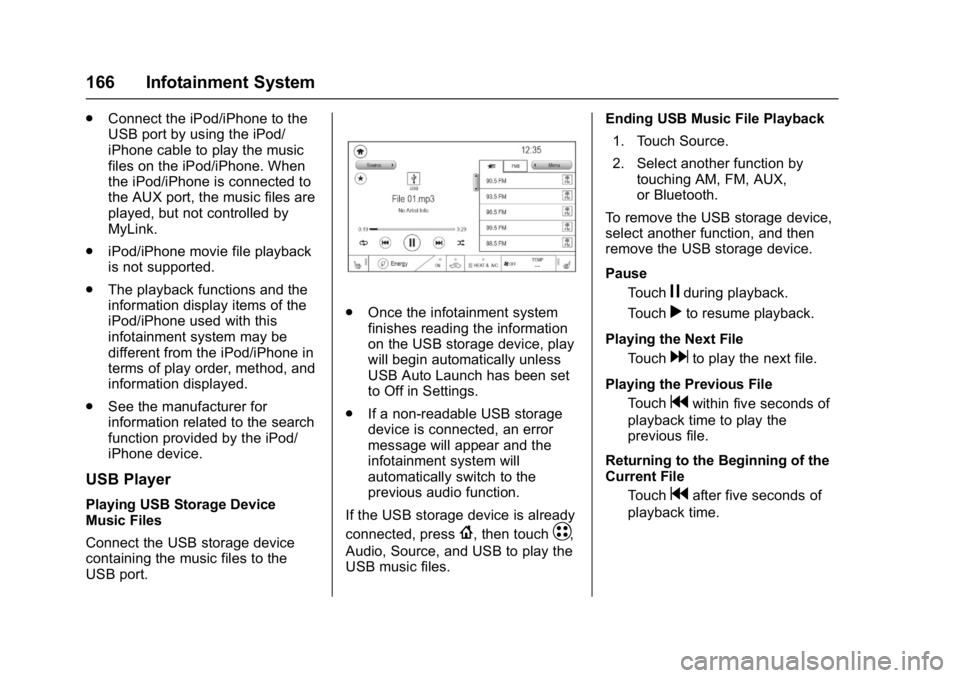
.Once the infotainment system
finishes reading the information
on the USB storage device, play
will begin automatically unless
USB Auto Launch has been set
to Off in Settings.
. If a non-readable USB storage
device is connected, an error
message will appear and the
infotainment system will
automatically switch to the
previous audio function.
If the USB storage device is already
connected, press
{, then touchT,
Audio, Source, and USB to play the
USB music files. Ending USB Music File Playback
1. Touch Source.
2. Select another function by touching AM, FM, AUX,
or Bluetooth.
To remove the USB storage device,
select another function, and then
remove the USB storage device.
Pause Touch
jduring playback.
Touch
rto resume playback.
Playing the Next File Touch
dto play the next file.
Playing the Previous File Touch
gwithin five seconds of
playback time to play the
previous file.
Returning to the Beginning of the
Current File Touch
gafter five seconds of
playback time.
Page 168 of 361

Chevrolet Bolt EV Owner Manual (GMNA-Localizing-U.S./Canada/Mexico-
10122739) - 2017 - CRC - 10/3/16
Infotainment System 167
Scanning Forward or BackwardTouch and hold
gordduring
playback to rewind or fast
forward. Release
gordto
resume playback at normal
speed.
Playing Files Randomly Touch
Zduring playback.
Touch
Zagain to return to
normal playback.
Playing Files Repeatedly
1. Touch
"during playback.
2. Touch the desired option. .Repeat All: Plays all files
repeatedly.
. Repeat Song: Plays a
current file repeatedly.
. Repeat Off: Cancels the
repeat function.
Searching for a File by Using the
Favorites
Saving Favorites 1. Select the desired file. 2. Touch
q, or touch and hold the
favorite in the list to overwrite.
3. To delete it from the Favorites list, touch
q, or swipe the file
from the list on the right.
Up to 15 media files can be
saved in the Favorites list.
Listening to Favorites Directly 1. Touch the Favorites menu to see the Favorites list.
2. Touch the desired favorite to listen.
General Operation of the USB
Music Menu 1. Touch Menu on the USB music screen.
2. Touch the desired menu to select the item or to display the
item’s detailed menu.
3. Touch
qNow Playing to return
to the previous screen. Browse Music
1. From the USB music menu, touch Browse Music.
2. Touch the desired item: Playlists, Folders, Artists,
Songs, Albums, Genres, and
Composers.
3. Touch the desired music to listen.
The Infotainment Module will
recognize playlist files by the
extensions .asx, m3u, pls, wpl,
b4s, and .xspf.
Tone Settings
Set up sound features from the
Tone Settings menu. See “Tone
Settings” under“AM-FM Radio”
previously in this section.
Auto Volume
See “Auto Volume” under“AM-FM
Radio” previously in this section.
Page 169 of 361

Chevrolet Bolt EV Owner Manual (GMNA-Localizing-U.S./Canada/Mexico-
10122739) - 2017 - CRC - 10/3/16
168 Infotainment System
MTP (Media Transfer Protocol)
Player
Playing Music from a Supported
MTP Device
Connect the supported MTP device
containing music files to the
USB port.
.Once the infotainment system
finishes reading the information
on the device that supports MTP
(Media Transfer Protocol), it will
be automatically played. If USB
Auto Launch is set to Off in
Settings, it will not be
automatically played.
. If a non-readable device that
supports MTP is connected, then
an error message will appear
and the infotainment system will
automatically switch to the
previous audio function.
. Depending on the connected
device, some files may not play.
. File loading may take a few
minutes depending on the type
of MTP device or the number of
files/folders stored in the MTP
device. .
When connecting the MTP
device, the infotainment system
scans audio files first, and then
picture files. While scanning
picture files, these files may not
be available until the loading
indicator on the audio screen
disappears even if the audio file
in the MTP device is playing.
. If connecting an MTP device that
has external memory, it may be
recognized as USB1/USB2.
. Other operations are the same
as the USB player. See “USB
Player” under“USB Port”
previously in this section.
. The USB connection setting on
the device may need to be
changed to MTP.
iPod/iPhone Player
This is limited to devices supporting
the iPod/iPhone connection.
Playing iPod/iPhone Music Files
Use an Apple certified cord to
connect the iPod/iPhone containing
the music files to the USB port. .
Once the infotainment system
finishes reading the information
on the iPod/iPhone, it will be
automatically played from the
previously played point. If Auto
Launch in Settings is set to Off,
it will not be automatically
played.
If the iPod/iPhone is already
connected, press
{, then touchT,
Audio, Source, then iPod to play the
iPod/iPhone.
Ending iPod/iPhone Playback
1. Touch Source.
2. Select another function by touching AM, FM, AUX,
or Bluetooth, or unplug the
iPod/iPhone.
To remove the iPod/iPhone, select
another function, and then remove
the iPod/iPhone.
Pause Touch
jduring playback.
Touch
rto resume playback.
Playing the Next Song Touch
dto play the next song.
Page 170 of 361

Chevrolet Bolt EV Owner Manual (GMNA-Localizing-U.S./Canada/Mexico-
10122739) - 2017 - CRC - 10/3/16
Infotainment System 169
Playing the Previous SongTouch
gwithin two seconds of
playback time to play the
previous song.
Returning to the Beginning of the
Current Song Touch
gafter two seconds of
playback time.
Scanning Forward or Backward Hold
gordduring playback
to rewind or fast forward.
Release
gordto resume
playback at normal speed.
Playing Files Randomly Touch
Zduring playback.
Touch
Zagain to return to
normal playback.
General Operation of the iPod
Music Menu 1. Touch Menu on the iPod music screen.
2. Touch the desired menu to select the item or to display the
item’s detailed menu. 3. Touch
qNow Playing to return
to the previous screen.
Browse Music 1. From the iPod music menu, touch Browse Music.
2. Touch the desired music.
Tone Settings
Set up sound features from the
Tone Settings menu. See “Tone
Settings” under“AM-FM Radio”
previously in this section.
Auto Volume
Volume will be automatically
controlled. See “Auto Volume”under
“AM-FM Radio” previously in this
section.
Gallery (Pictures)
The infotainment system can view
picture files contained in the USB
storage device.
Before Using the Picture
System
. Only the following file extensions
are supported: *.jpg, *.bmp,
*.png, *.gif. .
Animated GIF is not supported.
. Some files may not operate due
to a different format or the
condition of the file.
Viewing a Picture
1. Connect the USB storage
device containing the picture
files to the USB port.
2. Press
{, thenT.
3. Touch Gallery, then select the desired picture folder.
4. Select the desired file.
. Touch the screen to hide the
control bar. Touch the screen
again to show the control bar.
. Some features are disabled
while the vehicle is in motion.
Viewing a Slide Show
.Touchzfrom the picture screen
and the slide show will play.
. Touch the screen to cancel the
slide show during slide show
playback.
Page 171 of 361

Chevrolet Bolt EV Owner Manual (GMNA-Localizing-U.S./Canada/Mexico-
10122739) - 2017 - CRC - 10/3/16
170 Infotainment System
Viewing a Previous or Next
Picture
From the picture screen, touchSor
Tto view the previous or next
picture.
Rotating a Picture
From the picture screen, touchwto
rotate the picture.
Enlarging a Picture
From the picture screen, touchTto
enlarge the picture.
Using the USB Picture Menu
1. From the picture screen, touch Menu.
2. Touch the desired menu. .Slide Show Time: Select
the slide show interval.
. Clock/Temp Display: To
display the clock and
temperature on the full
screen, select On or Off.
. Display Settings: Adjust the
brightness and contrast. 3. After the setting is complete,
touch
0.
Auxiliary Devices
The AUX port is in the center
console. The infotainment system
can play auxiliary music connected
by the auxiliary device.
Playing Music from an
Auxiliary Device
Connect the auxiliary device
containing the music source to the
AUX port. Once connected with the
infotainment system, music can be
played from the device.
.If the auxiliary device is already
connected, press
{, then
touch
T, Audio, Source, then
AUX to play music from the
auxiliary device.
. Use an AUX cable with a
3.5 mm (1/8 in) type connector.
Tone Settings
From the AUX screen, touch Tone.
See “Tone Settings” under“AM-FM
Radio” previously in this section.
Bluetooth Audio
Bluetooth Music
If equipped, music may be played
from a paired Bluetooth device.
Refer to the Phone section for help
pairing a device.
Before Playing Bluetooth Music
.
The paired bluetooth device
must support Bluetooth profiles:
A2DP or AVRCP.
. Bluetooth music may not be
supported depending on the
mobile phone or Bluetooth
device.
. From the mobile phone or
Bluetooth device, find the
Bluetooth device type to set/
connect the item.
. A♪will appear on the screen to
indicate a successful Audio
Bluetooth connection.
. The sound played by the
Bluetooth device is delivered
through the infotainment system.