2017 CADILLAC XTS Infotainment
[x] Cancel search: InfotainmentPage 161 of 314
Cadillac XTS Owner Manual (GMNA-Localizing-MidEast-10292881) - 2017 -
crc - 7/1/16
160 CLIMATE CONTROLS
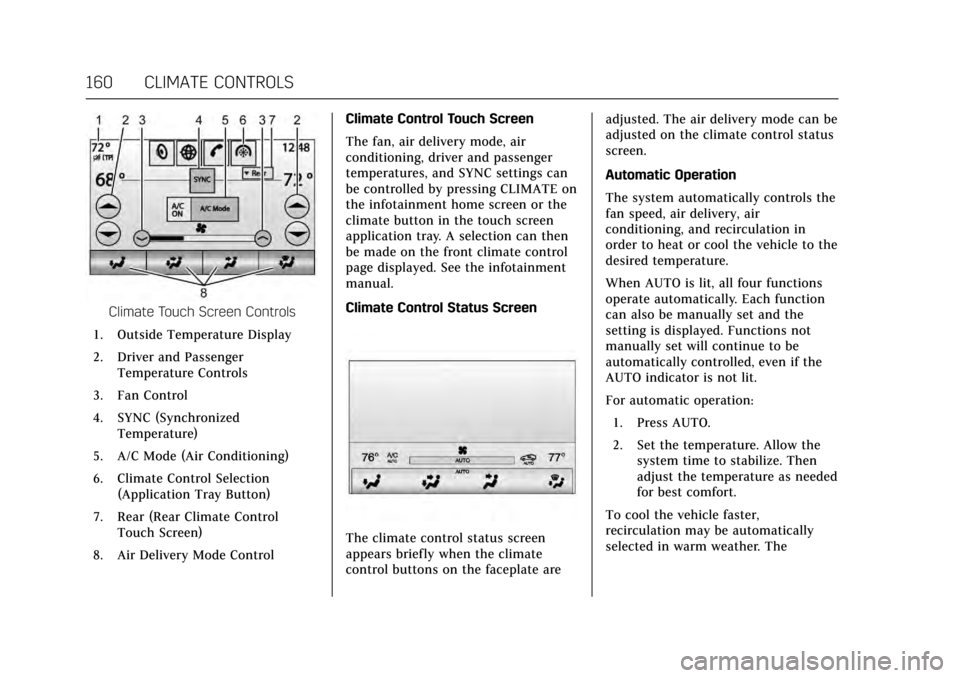
Climate Touch Screen Controls
1. Outside Temperature Display
2. Driver and Passenger Temperature Controls
3. Fan Control
4. SYNC (Synchronized Temperature)
5. A/C Mode (Air Conditioning)
6. Climate Control Selection (Application Tray Button)
7. Rear (Rear Climate Control Touch Screen)
8. Air Delivery Mode Control Climate Control Touch Screen
The fan, air delivery mode, air
conditioning, driver and passenger
temperatures, and SYNC settings can
be controlled by pressing CLIMATE on
the infotainment home screen or the
climate button in the touch screen
application tray. A selection can then
be made on the front climate control
page displayed. See the infotainment
manual.
Climate Control Status Screen
The climate control status screen
appears briefly when the climate
control buttons on the faceplate are adjusted. The air delivery mode can be
adjusted on the climate control status
screen.
Automatic Operation
The system automatically controls the
fan speed, air delivery, air
conditioning, and recirculation in
order to heat or cool the vehicle to the
desired temperature.
When AUTO is lit, all four functions
operate automatically. Each function
can also be manually set and the
setting is displayed. Functions not
manually set will continue to be
automatically controlled, even if the
AUTO indicator is not lit.
For automatic operation:
1. Press AUTO.
2. Set the temperature. Allow the system time to stabilize. Then
adjust the temperature as needed
for best comfort.
To cool the vehicle faster,
recirculation may be automatically
selected in warm weather. The
Page 181 of 314

Cadillac XTS Owner Manual (GMNA-Localizing-MidEast-10292881) - 2017 -
crc - 7/1/16
180 DRIVING AND OPERATING
clears the extra gasoline from the
engine. Do not race the engine
immediately after starting it.
Operate the engine and
transmission gently until the oil
warms up and lubricates all
moving parts.
Retained Accessory
Power (RAP)
These vehicle accessories can be used
for up to 10 minutes after the engine
is turned off:
.Infotainment System
. Power Windows
. Sunroof (If Equipped)
. Accessory Power Outlets
Power to the infotainment system will
continue to operate for up to
10 minutes or until the driver door is
opened.
Power to the power windows and
sunroof will continue to operate for
up to 10 minutes or until any door is
opened. All of these features will work when
the ignition is in ON/RUN or ACC/
ACCESSORY.
Shifting Into Park
1. Hold the brake pedal down and
apply the parking brake. See
Electric Parking Brake 0186.
2. Move the shift lever into P (Park) by pushing the lever all the way
toward the front of the vehicle.
3. Turn the ignition off.
Leaving the Vehicle with the
Engine Running
{Warning
It can be dangerous to leave the
vehicle with the engine running.
It could overheat and catch fire.
It is dangerous to get out of the
vehicle if the shift lever is not fully
in P (Park) with the parking brake
firmly set. The vehicle can roll. (Continued)
Warning (Continued)
Do not leave the vehicle when the
engine is running. If you have left
the engine running, the vehicle can
move suddenly. You or others could
be injured. To be sure the vehicle
will not move, even when you are
on fairly level ground, always set
the parking brake and move the
shift lever to P (Park). See Shifting
Into Park 0180. If you are towing a
trailer, see Driving Characteristics
and Towing Tips 0215.
If you have to leave the vehicle with
the engine running, be sure the
vehicle is in P (Park) and the parking
brake is firmly set before you leave it.
After you have moved the shift lever
into P (Park), hold down the regular
brake pedal. See if you can move the
shift lever away from P (Park) without
first pulling it toward you. If you can,
it means that the shift lever was not
fully locked into P (Park).
Page 203 of 314

Cadillac XTS Owner Manual (GMNA-Localizing-MidEast-10292881) - 2017 -
crc - 7/1/16
202 DRIVING AND OPERATING
Audible or Safety Alert Seat
Some driver assistance features alert
the driver of obstacles by beeping. To
change the volume of the warning
chime, see“Comfort and Convenience ”
under Vehicle Personalization 0144.
If equipped with the Safety Alert Seat,
the driver seat cushion may provide a
vibrating pulse alert instead of
beeping. To change this, see
“Collision/Detection Systems” under
Vehicle Personalization 0144.
Assistance Systems for
Parking or Backing
If equipped, the Rear Vision Camera
(RVC), Rear Parking Assist (RPA),
Front Parking Assist (FPA), Surround
Vision, Front Vision Camera, Reverse
Automatic Braking (RAB) and Backing
Warning System, and Rear Cross
Traffic Alert (RCTA) may help the
driver park or avoid objects. Always
check around the vehicle when
parking or backing. Rear Vision Camera (RVC)
When the vehicle is shifted into
R (Reverse), the RVC displays an
image of the area behind the vehicle
in the infotainment display. The
previous screen displays when the
vehicle is shifted out of R (Reverse)
after a short delay. To return to the
previous screen sooner, press a button
on the infotainment system, shift into
P (Park), or, while in D (Drive), reach a
vehicle speed of 8 km/h (5 mph).
1. View Displayed by the
Camera
1. View Displayed by the
Camera
2. Corners of the Rear Bumper
Displayed images may be farther or
closer than they appear. The area
displayed is limited and objects that
are close to either corner of the
bumper or under the bumper do not
display.
A warning triangle may display to
show that RPA has detected an object.
This triangle changes from amber to
red and increases in size the closer
the object.
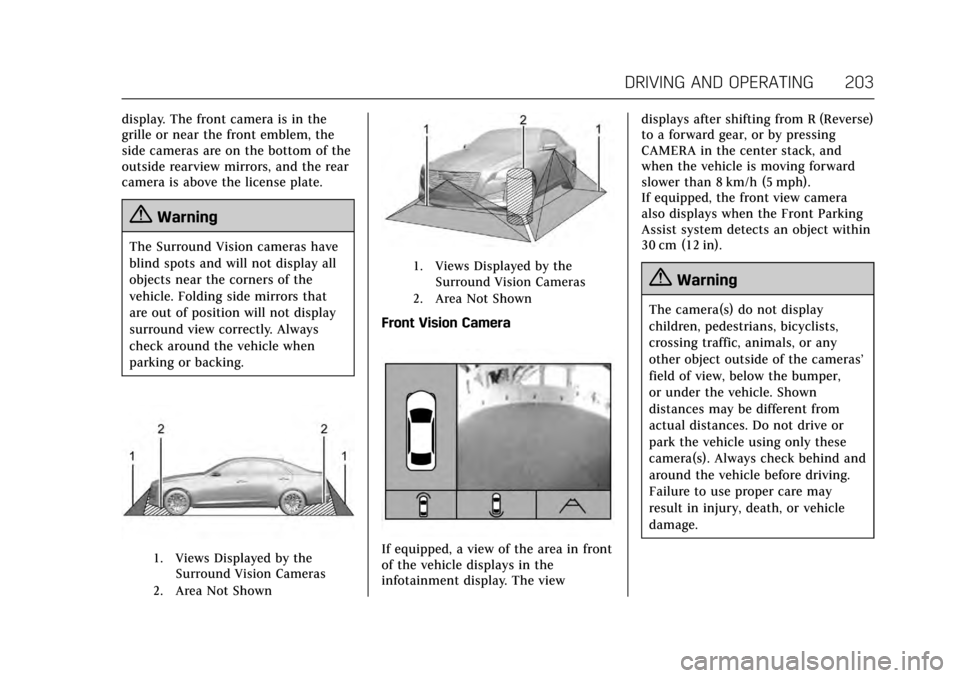
Surround Vision
If equipped, Surround Vision displays
an image of the area surrounding the
vehicle, along with the front or rear
camera views in the infotainment
Page 204 of 314
Cadillac XTS Owner Manual (GMNA-Localizing-MidEast-10292881) - 2017 -
crc - 7/1/16
DRIVING AND OPERATING 203
display. The front camera is in the
grille or near the front emblem, the
side cameras are on the bottom of the
outside rearview mirrors, and the rear
camera is above the license plate.
{Warning
The Surround Vision cameras have
blind spots and will not display all
objects near the corners of the
vehicle. Folding side mirrors that
are out of position will not display
surround view correctly. Always
check around the vehicle when
parking or backing.
1. Views Displayed by theSurround Vision Cameras
2. Area Not Shown
1. Views Displayed by the Surround Vision Cameras
2. Area Not Shown
Front Vision Camera
If equipped, a view of the area in front
of the vehicle displays in the
infotainment display. The view displays after shifting from R (Reverse)
to a forward gear, or by pressing
CAMERA in the center stack, and
when the vehicle is moving forward
slower than 8 km/h (5 mph).
If equipped, the front view camera
also displays when the Front Parking
Assist system detects an object within
30 cm (12 in).
{Warning
The camera(s) do not display
children, pedestrians, bicyclists,
crossing traffic, animals, or any
other object outside of the cameras’
field of view, below the bumper,
or under the vehicle. Shown
distances may be different from
actual distances. Do not drive or
park the vehicle using only these
camera(s). Always check behind and
around the vehicle before driving.
Failure to use proper care may
result in injury, death, or vehicle
damage.
Page 213 of 314

Cadillac XTS Owner Manual (GMNA-Localizing-MidEast-10292881) - 2017 -
crc - 7/1/16
212 DRIVING AND OPERATING
Warning (Continued)
or death could occur. Always keep
the windshield, headlamps, and
camera sensors clean and in good
repair. Do not use LDW in bad
weather conditions.
How the System Works
The LDW camera sensor is on the
windshield ahead of the rearview
mirror.
To turn LDW on and off, press
@on
the center stack to the left of the
infotainment screen. The control
indicator will light when LDW is on.
When LDW is on,@is green if LDW
is available to warn of a lane
departure. If the vehicle crosses a
detected lane marking without using the turn signal in that direction,
@
changes to amber and flashes.
Additionally, there will be three beeps,
or the driver seat will pulse three
times, on the right or left, depending
on the lane departure direction.
When the System Does Not
Seem to Work Properly
The system may not detect lanes as
well when there are:
.
Close vehicles ahead.
. Sudden lighting changes, such as
when driving through tunnels.
. Banked roads.
If the LDW system is not functioning
properly when lane markings are
clearly visible, cleaning the windshield
may help.
LDW alerts may occur due to tar
marks, shadows, cracks in the road,
temporary or construction lane
markings, or other road imperfections.
This is normal system operation; the
vehicle does not need service. Turn
LDW off if these conditions continue.
Fuel
Use the recommended fuel for proper
vehicle maintenance.
For the LFX 3.6L V6 engine, use
unleaded petrol with a posted octane
rating of 91 RON or higher, otherwise
an audible knocking noise may be
heard. If heavy knocking is heard
when using gasoline rated at 91 RON
or higher, the engine needs service.
For the LF3 3.6L V6 twin turbo engine,
use unleaded petrol with a posted
octane rating of 95 RON or higher.
If the octane is less than 95 RON, the
engine could be damaged and repairs
would not be covered by the vehicle
warranty. If heavy knocking is heard
when using petrol rated at 95 RON
octane, the engine needs service.
Page 252 of 314

Cadillac XTS Owner Manual (GMNA-Localizing-MidEast-10292881) - 2017 -
crc - 7/1/16
VEHICLE CARE 251
RelaysUsage
10 Cooling fan
11 Headlamp washer
13 Cooling fan
14 Low-beam headlamps
15 Run/Crank
17 Rear window defogger
Instrument Panel Fuse
Block
The instrument panel fuse block is in
the instrument panel, on the driver
side of the vehicle. To access the
fuses, open the fuse panel door by
pulling down at the top.
Press in on the sides of the door to
release it from the instrument panel.
Pull the door toward you to release it
from the hinge.
The vehicle may not be equipped with
all of the fuses, relays, and features
shown. Fuses Usage
1 Wireless charger module Fuses Usage
2 Body control module 7
3 Body control module 5
4 Radio
5 Infotainment center stack displays/
Head-up display/
Instrument cluster/
Rear seat
entertainment
6 Power outlet 1
7 Power outlet 2
8 Body control module 1
9 Body control module 4
10 Body control module 8
11 Front HVAC blower
12 Passenger Seat
13 Driver seat
Page 303 of 314

Cadillac XTS Owner Manual (GMNA-Localizing-MidEast-10292881) - 2017 -
crc - 7/1/16
302 CUSTOMER INFORMATION
Customer
Information
Vehicle Data Recording and
Privacy
Vehicle Data Recording andPrivacy . . . . . . . . . . . . . . . . . . . . . . . . . . . 302
Event Data Recorders . . . . . . . . . . . . 302
Infotainment System . . . . . . . . . . . . . 303
Vehicle Data Recording
and Privacy
The vehicle has a number of
computers that record information
about the vehicle’s performance and
how it is driven. For example, the
vehicle uses computer modules to
monitor and control engine and
transmission performance, to monitor
the conditions for airbag deployment
and deploy them in a crash, and,
if equipped, to provide antilock
braking to help the driver control the
vehicle. These modules may store data
to help the dealer technician service
the vehicle. Some modules may also
store data about how the vehicle is
operated, such as rate of fuel
consumption or average speed. These
modules may retain personal
preferences, such as radio presets, seat
positions, and temperature settings.
Event Data Recorders
This vehicle is equipped with an event
data recorder (EDR). The main
purpose of an EDR is to record, in
certain crash or near crash-like situations, such as an airbag
deployment or hitting a road obstacle,
data that will assist in understanding
how a vehicle's systems performed.
The EDR is designed to record data
related to vehicle dynamics and safety
systems for a short period of time,
typically 30 seconds or less. The EDR
in this vehicle is designed to record
such data as:
.
How various systems in your
vehicle were operating.
. Whether or not the driver and
passenger safety belts were
buckled/fastened;
. How far (if at all) the driver was
depressing the accelerator and/or
brake pedal; and
. How fast the vehicle was traveling.
These data can help provide a better
understanding of the circumstances in
which crashes and injuries occur.
Note
EDR data are recorded by your vehicle
only if a non-trivial crash situation
occurs. No data are recorded by the
EDR under normal driving conditions
and no personal data (e.g., name,
Page 304 of 314

Cadillac XTS Owner Manual (GMNA-Localizing-MidEast-10292881) - 2017 -
crc - 7/1/16
CUSTOMER INFORMATION 303
gender, age, and crash location) are
recorded. However, other parties, such
as law enforcement, could combine
the EDR data with the type of
personally identifying data routinely
acquired during a crash investigation.
To read data recorded by an EDR,
special equipment is required, and
access to the vehicle or the EDR is
needed. In addition to the vehicle
manufacturer, other parties, such as
law enforcement, that have the special
equipment, can read the information
if they have access to the vehicle or
the EDR.
GM will not access these data or share
it with others except: with the consent
of the vehicle owner or, if the vehicle
is leased, with the consent of the
lessee; in response to an official
request of police or similar
government office; as part of GM's
defense of litigation; or, as required by
law. Data that GM collects or receives
may also be used for GM research
needs or may be made available to
others for research purposes, where a
need is shown and the data is not tied
to a specific vehicle or vehicle owner.Infotainment System
Using the navigation system may
result in the storage of destinations,
addresses, telephone numbers, and
other trip information. See the
infotainment manual for information
on stored data and for deletion
instructions.