2017 CADILLAC ESCALADE instrument cluster
[x] Cancel search: instrument clusterPage 144 of 354

Cadillac Escalade Owner Manual (GMNA-Localizing-MidEast-10293077) -
2017 - crc - 8/24/16
INSTRUMENTS AND CONTROLS 143
Speed View :This display gives the
speedometer reading (in English or
metric units), speed limit, Adaptive
Cruise Control speed, Lane Departure
Warning, and vehicle ahead indicator.
Some information only appears on
vehicles that have these features, and
when they are active.
Audio/Phone View : This displays the
speed view along with audio/phone
information. The current radio station,
media type, and incoming calls will be
displayed.
All HUD views may briefly display
audio information when the driver
uses the steering wheel controls to
adjust the audio settings appearing in
the instrument cluster.
Incoming phone calls appearing in the
instrument cluster may also display in
any HUD view.
Navigation View : This displays the
speed view along with Turn-by-Turn
Navigation information. The compass
heading is displayed when navigation
routing is not active.
Navigation Turn-by-Turn Alerts
shown in the instrument cluster may
also be displayed in any HUD view.
Performance View : This displays the
speedometer reading, rpm reading,
transmission positions, and gear shift
indicator.
Care of the HUD
Clean the inside of the windshield to
remove any dirt or film that could
reduce the sharpness or clarity of the
HUD image.
Clean the HUD lens with a soft cloth
sprayed with glass cleaner. Wipe the
lens gently, then dry it.
HUD Troubleshooting
Check that:
. Nothing is covering the HUD lens.
. HUD brightness setting is not too
dim or too bright.
. HUD is adjusted to the proper
height.
. Polarized sunglasses are not worn.
. Windshield and HUD lens are
clean.
If the HUD image is not correct,
contact your dealer.
The windshield is part of the HUD
system. See Windshield
Replacement 0275.
Page 166 of 354

Cadillac Escalade Owner Manual (GMNA-Localizing-MidEast-10293077) -
2017 - crc - 8/24/16
LIGHTING 165
Thisblight comes on in the
instrument cluster when the
IntelliBeam system is enabled.
Turning On and Enabling IntelliBeam
To enable the IntelliBeam system,
with the turn signal lever in the
neutral position, turn the exterior
lamp control to AUTO. The blue
high-beam on light appears on the
instrument cluster when the high
beams are on.
Driving with IntelliBeam
The system only activates the high
beams when driving over 40 km/h
(25 mph).
There is a sensor near the top center
of the windshield, which automatically
controls the system. Keep this area of
the windshield clear of debris to allow
for best system performance.
The high-beam headlamps remain on,
under the automatic control, until one
of the following situations occurs:
. The system detects an
approaching vehicle's headlamps.
. The system detects a preceding
vehicle's taillamps. .
The outside light is bright enough
that high-beam headlamps are not
required.
. The vehicle's speed drops below
20 km/h (12 mph).
. The turn signal lever is
moved forward to the high-beam
position or the Flash-to-Pass
feature is used. See Headlamp
High/Low-Beam Changer 0166 and
Flash-to-Pass 0166.
. The IntelliBeam system is disabled
by the high/low-beam changer or
the Flash-to-Pass feature. If this
happens, the high/low-beam
changer must be activated two
times within five seconds to
reactivate the IntelliBeam system.
The instrument cluster light will
come on to indicate the
IntelliBeam is reactivated.
See Headlamp High/Low-Beam
Changer 0166 and
Flash-to-Pass 0166.
The high beams may not turn off
automatically if the system cannot
detect other vehicle's lamps because
of any of the following: .
The other vehicle's lamps are
missing, damaged, obstructed from
view, or otherwise undetected.
. The other vehicle's lamps are
covered with dirt, snow, and/or
road spray.
. The other vehicle's lamps cannot
be detected due to dense exhaust,
smoke, fog, snow, road spray, mist,
or other airborne obstructions.
. The vehicle's windshield is dirty,
cracked, or obstructed by
something that blocks the view of
the light sensor.
. The vehicle is loaded such that the
front end points upward, causing
the light sensor to aim high and
not detect headlamps and
taillamps.
. The vehicle is being driven on
winding or hilly roads.
The automatic high-beam headlamps
may need to be disabled if any of the
above conditions exist.
Page 167 of 354

Cadillac Escalade Owner Manual (GMNA-Localizing-MidEast-10293077) -
2017 - crc - 8/24/16
166 LIGHTING
Exterior Lamps Off
Reminder
If a door is open, a reminder chime
sounds when the headlamps or
parking lamps are manually turned on
and the ignition is off. To turn off the
chime, turn the exterior lamp control
to off or AUTO and then back on,
or close and re-open the door. In the
AUTO mode, the headlamps turn off
once the ignition is off or remain on
until the headlamp delay ends (if
enabled in the DIC). See“Exit
Lighting” underVehicle
Personalization 0154.
Headlamp High/Low-Beam
Changer
Push the turn signal lever toward the
instrument panel to change the
headlamps from low to high beam.
Pull the turn signal lever toward you
and release it to return to low-beam
headlamps.
When the high-beam headlamps are
on, this indicator light on the
instrument cluster will also be on.
Flash-to-Pass
This feature lets you use the
high-beam headlamps to signal a
driver in front of you that you want to
pass. It works even if the headlamps
are in the automatic position.
To use it, pull the turn signal lever
toward you, then release it.
If the headlamps are in the automatic
position or on low beam, the
high-beam headlamps will turn on.
They will stay on as long as you hold
the lever toward you. The high-beam
indicator on the instrument cluster
will come on. Release the lever to
return to normal operation.
Daytime Running
Lamps (DRL)
DRL can make it easier for others to
see the front of the vehicle during
the day.
The DRL system comes on when the
following conditions are met:
.
The ignition is on.
. The exterior lamp control is
in AUTO.
. The transmission is not in
P (Park).
. The light sensor determines it is
daytime.
When the DRL system is on, only the
DRL are on. The taillamps, sidemarker
lamps, instrument panel lights, and
other lamps will not be on.
When it begins to get dark, the
automatic headlamp system switches
from DRL to the headlamps.
To turn off the DRL, turn the exterior
lamp control to the off position and
then release.
Page 168 of 354
Cadillac Escalade Owner Manual (GMNA-Localizing-MidEast-10293077) -
2017 - crc - 8/24/16
LIGHTING 167
Automatic Headlamp
System
When it is dark enough outside, the
automatic headlamp system turns on
the headlamps at the normal
brightness, along with the taillamps,
sidemarker, parking lamps, and the
instrument panel lights. The radio
lights will also be dim.
To turn off the automatic headlamp
system, turn the exterior lamp control
to
Pand then release it.
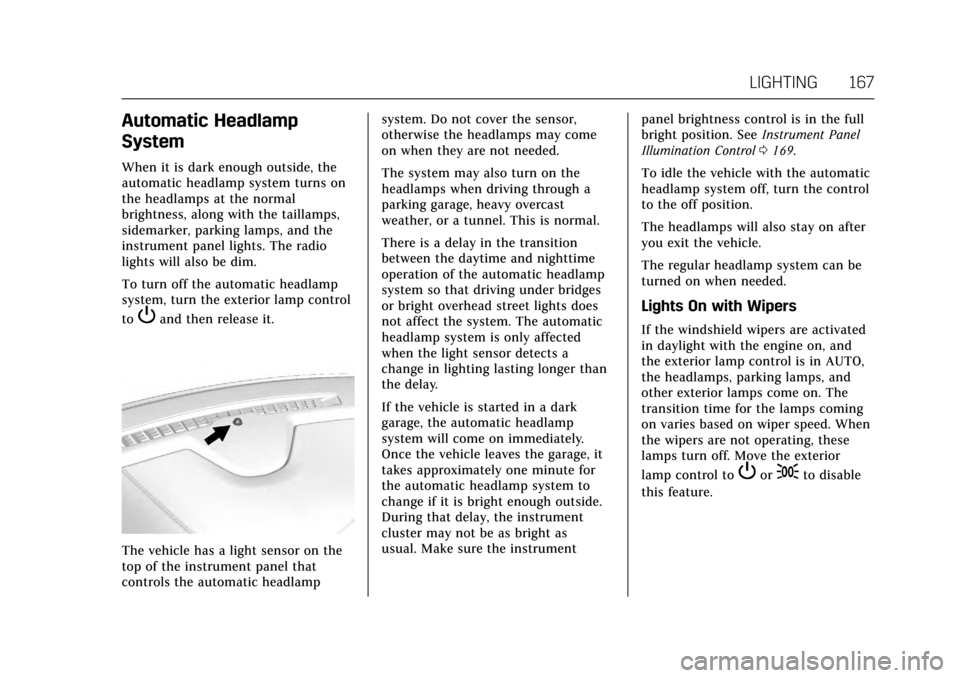
The vehicle has a light sensor on the
top of the instrument panel that
controls the automatic headlampsystem. Do not cover the sensor,
otherwise the headlamps may come
on when they are not needed.
The system may also turn on the
headlamps when driving through a
parking garage, heavy overcast
weather, or a tunnel. This is normal.
There is a delay in the transition
between the daytime and nighttime
operation of the automatic headlamp
system so that driving under bridges
or bright overhead street lights does
not affect the system. The automatic
headlamp system is only affected
when the light sensor detects a
change in lighting lasting longer than
the delay.
If the vehicle is started in a dark
garage, the automatic headlamp
system will come on immediately.
Once the vehicle leaves the garage, it
takes approximately one minute for
the automatic headlamp system to
change if it is bright enough outside.
During that delay, the instrument
cluster may not be as bright as
usual. Make sure the instrument
panel brightness control is in the full
bright position. See
Instrument Panel
Illumination Control 0169.
To idle the vehicle with the automatic
headlamp system off, turn the control
to the off position.
The headlamps will also stay on after
you exit the vehicle.
The regular headlamp system can be
turned on when needed.
Lights On with Wipers
If the windshield wipers are activated
in daylight with the engine on, and
the exterior lamp control is in AUTO,
the headlamps, parking lamps, and
other exterior lamps come on. The
transition time for the lamps coming
on varies based on wiper speed. When
the wipers are not operating, these
lamps turn off. Move the exterior
lamp control to
Por;to disable
this feature.
Page 169 of 354

Cadillac Escalade Owner Manual (GMNA-Localizing-MidEast-10293077) -
2017 - crc - 8/24/16
168 LIGHTING
Hazard Warning Flashers
|:Press to make the front and rear
turn signal lamps flash on and off.
Press again to turn the flashers off.
When the hazard warning flashers are
on, the vehicle's turn signals will
not work.
Turn and Lane-Change
Signals
An arrow on the instrument cluster
flashes in the direction of the turn or
lane change.
Move the turn signal lever all the way
up or down to signal a turn.
Raise or lower the lever for less than
one second until the arrow starts to
flash to signal a lane change. This
causes the turn signals to
automatically flash three times. It will
flash six times if Tow/Haul Mode is
active. Holding the turn signal lever
for more than one second will cause
the turn signals to flash until the
lever is released. The lever returns to its starting
position whenever it is released.
If after signaling a turn or a lane
change the arrows flash rapidly or do
not come on, a signal bulb could be
burned out.
Replace any burned out bulbs. If a
bulb is not burned out, check the fuse.
See
Fuses 0278.
Turn Signal On Chime
If the turn signal is left on for more
than 1.2 km (0.75 mi), a chime sounds
at each flash of the turn signal. The
message TURN SIGNAL ON will also
appear in the Driver Information
Center (DIC). To turn the chime and
message off, move the turn signal
lever to the off position.
Page 175 of 354

Cadillac Escalade Owner Manual (GMNA-Localizing-MidEast-10293077) -
2017 - crc - 8/24/16
174 CLIMATE CONTROLS
7. Rear (Rear Climate ControlTouch Screen)
8. Air Delivery Mode Control
Climate Control Touch Screen
The fan, air delivery mode, air
conditioning, driver and passenger
temperatures, and SYNC settings can
be controlled by pressing CLIMATE on
the infotainment home screen or the
climate button in the touch screen
application tray. A selection can then
be made on the front climate control
page displayed. See the infotainment
manual.
Climate Control Status ScreenThe climate control status screen
appears briefly when the climate
control buttons on the faceplate are
adjusted. The air delivery mode can be
adjusted on the climate control status
screen.
Automatic Operation
The system automatically controls the
fan speed, air delivery, air
conditioning, and recirculation in
order to heat or cool the vehicle to the
desired temperature.
When the indicator light is on or
AUTO is displayed on the touch
screen, the system is in full automatic
operation. If the air delivery mode or
fan setting is manually adjusted, the
auto indicator turns off and the
display will show the selected settings.
Auto operation can be turned off
individually for climate settings.
For automatic operation: 1. Press AUTO.
2. Set the temperature. Allow the system time to stabilize. Then
adjust the temperature as needed
for best comfort. To improve fuel efficiency and to cool
the vehicle faster, recirculation may be
automatically selected in warm
weather. The recirculation light will
not come on. Press
@to select
recirculation; press it again to select
outside air.
English units can be changed to
metric units through the instrument
cluster. See “Cluster Settings Menu ”
under Instrument Cluster 0124.
OFF (Fan) : Press the OFF button to
turn the fan on or off. The
temperature control and air delivery
mode can still be adjusted with the
fan off.
w/x(Driver and Passenger
Temperature Controls) : The
temperature can be adjusted
separately for the driver and the
passenger. Press to increase or
decrease the temperature. Press and
hold to rapidly increase or decrease
the temperature.
The driver and passenger
temperatures can also be adjusted by
pressing the controls on the touch
screen.
Page 205 of 354

Cadillac Escalade Owner Manual (GMNA-Localizing-MidEast-10293077) -
2017 - crc - 8/24/16
204 DRIVING AND OPERATING
Automatic Transmission
If equipped, there is an electronic shift
lever position indicator within the
instrument cluster. This display comes
on when the ignition is turned to the
ON/RUN position.
There are several different positions
for the shift lever.
See“Range Selection Mode ”under
Manual Mode 0206.
P : This position locks the rear wheels.
It is the best position to use when
starting the engine because the
vehicle cannot move easily. When
parked on a hill, especially when the
vehicle has a heavy load, you might
notice an increase in the effort to shift
out of P (Park). See “Torque Lock”
under Shifting Into Park 0200.
{Warning
It is dangerous to get out of the
vehicle if the shift lever is not fully
in P (Park) with the parking brake
firmly set. The vehicle can roll.
Do not leave the vehicle when the
engine is running. If you have left
the engine running, the vehicle can
move suddenly. You or others could
be injured. To be sure the vehicle
will not move, even when you are
on fairly level ground, always set
the parking brake and move the
shift lever to P (Park). See Shifting
Into Park 0200 and Driving
Characteristics and Towing
Tips 0245.
{Warning
If you have four-wheel drive, the
vehicle will be free to roll —even if
the shift lever is in P (Park) —if the
transfer case is in N (Neutral). So,
(Continued)
Warning (Continued)
be sure the transfer case is in a
drive gear, Two-Wheel Drive High
or Four-Wheel Drive High or
Four-Wheel Drive Low—not in
N (Neutral). See Shifting Into
Park 0200.
R : Use this gear to back up.
Caution
Shifting to R (Reverse) while the
vehicle is moving forward could
damage the transmission. The
repairs would not be covered by the
vehicle warranty. Shift to
R (Reverse) only after the vehicle is
stopped.
To rock the vehicle back and forth to
get out of snow, ice, or sand without
damaging the transmission, see If the
Vehicle Is Stuck 0191.
N : In this position, the engine does
not connect with the wheels. To
restart when you are already moving,
Page 209 of 354

Cadillac Escalade Owner Manual (GMNA-Localizing-MidEast-10293077) -
2017 - crc - 8/24/16
208 DRIVING AND OPERATING
L2 using Range Selection Mode. This
will limit torque to the wheels and
help to prevent the tires from
spinning.
Tow/Haul Mode
The Tow/Haul Mode adjusts the
transmission shift pattern to reduce
shift cycling. This provides increased
performance, vehicle control, and
enhanced transmission and engine
cooling when driving down steep hills
or mountain grades, towing,
or hauling heavy loads.The selector button is on the end of
the shift lever. Turn the Tow/Haul
Mode on and off by pressing the
button. When the Tow/Haul Mode is
enabled, a light on the instrument
cluster will come on.
See
Tow/Haul Mode Light 0133 and
Hill and Mountain Roads 0190.
Also see “Tow/Haul Mode ”under
Driver Mode Control 0217.
Tow/Haul Mode Grade Braking
Tow/Haul Mode Grade Braking is only
enabled while the Tow/Haul Mode is
selected and the vehicle is not in the
Range Selection Mode. See “Tow/Haul
Mode ”listed previously and Manual
Mode 0206. Tow/Haul Mode Grade
Braking assists in maintaining desired
vehicle speeds when driving on
downhill grades by using the engine
and transmission to slow the vehicle.
To disable or enable Tow/Haul Grade
Braking within the current ignition
cycle, press and hold the Tow/Haul
button for five seconds. When the
button is released, the requested mode change is made. A DIC message is
displayed. See
Transmission
Messages 0152.
See Towing Equipment 0249.
For other forms of grade braking, see
Automatic Transmission 0204 and
Cruise Control 0220.