2017 CADILLAC CTS radio
[x] Cancel search: radioPage 177 of 352

Cadillac CTS/CTS-V Owner Manual (GMNA-Localizing-MidEast-10293089) -
2017 - crc - 6/22/16
176 CLIMATE CONTROLS
The rear window defogger can be set
to automatic operation. See“Climate
and Air Quality” underVehicle
Personalization 0149. When Auto Rear
Defog is selected, the rear window
defogger turns on automatically when
the interior temperature is about 4 °C
(40 °F) and below.
The upper gridlines on the rear
window are antenna lines and are not
intended to heat when the defogger is
activated.
The heated outside rearview mirrors
turn on when the rear window
defogger button is on and help to
clear fog or frost from the surface of
the mirrors.
Caution
Do not try to clear frost or other
material from the inside of the
front windshield and rear window
with a razor blade or anything else
that is sharp. This may damage the
rear window defogger grid and
affect the radio's ability to pick up
(Continued)
Caution (Continued)
stations clearly. The repairs would
not be covered by the vehicle
warranty.
Driver and Passenger Heated and
Ventilated Seats : If equipped, press
Jorzto heat the driver or
passenger seat cushion and seatback.
Press
Cor{to ventilate the driver
or passenger seat.
The vehicle also has auto heated seats
that turn on when the vehicle is on.
The seats will activate at the level
required by the vehicle’s interior
temperature. To turn off, press
Jor
z. The auto heated seats can be
turned on or off. See Vehicle
Personalization 0149 and Heated and
Ventilated Seats 013.
Remote Start Climate Control
Operation : If equipped with the
remote start feature, the climate
control system may run when the
vehicle is started remotely. The system
uses the driver’s previous settings to heat or cool the inside of the vehicle.
The rear defog may come on during
remote start based on cold ambient
conditions. The rear defog indicator
light does not come on during a
remote start. If equipped with heated
or ventilated seats, they may come on
during a remote start. See
Remote
Vehicle Start 034 and Heated and
Ventilated Seats 013.
Sensor
The solar sensor, on top of the
instrument panel near the windshield,
monitors the solar heat.
Page 183 of 352

Cadillac CTS/CTS-V Owner Manual (GMNA-Localizing-MidEast-10293089) -
2017 - crc - 6/22/16
182 DRIVING AND OPERATING
Driving Information
Distracted Driving
Distraction comes in many forms and
can take your focus from the task of
driving. Exercise good judgment and
do not let other activities divert your
attention away from the road. Many
local governments have enacted laws
regarding driver distraction. Become
familiar with the local laws in
your area.
To avoid distracted driving, keep your
eyes on the road, keep your hands on
the steering wheel, and focus your
attention on driving.
.Do not use a phone in demanding
driving situations. Use a
hands-free method to place or
receive necessary phone calls.
. Watch the road. Do not read, take
notes, or look up information on
phones or other electronic devices.
. Designate a front seat passenger
to handle potential distractions. .
Become familiar with vehicle
features before driving, such as
programming favorite radio
stations and adjusting climate
control and seat settings. Program
all trip information into any
navigation device prior to driving.
. Wait until the vehicle is parked to
retrieve items that have fallen to
the floor.
. Stop or park the vehicle to tend to
children.
. Keep pets in an appropriate carrier
or restraint.
. Avoid stressful conversations
while driving, whether with a
passenger or on a cell phone.
{Warning
Taking your eyes off the road too
long or too often could cause a
crash resulting in injury or death.
Focus your attention on driving. See the infotainment manual for
information on that system or the
navigation system, if equipped,
including pairing and using a cell
phone.
Defensive Driving
Defensive driving means
“always
expect the unexpected.” The first step
in driving defensively is to wear the
safety belt. See Safety Belts064.
. Assume that other road users
(pedestrians, bicyclists, and other
drivers) are going to be careless
and make mistakes. Anticipate
what they might do and be ready.
. Allow enough following distance
between you and the driver in
front of you.
. Focus on the task of driving.
Control of a Vehicle
Braking, steering, and accelerating are
important factors in helping to control
a vehicle while driving.
Page 197 of 352

Cadillac CTS/CTS-V Owner Manual (GMNA-Localizing-MidEast-10293089) -
2017 - crc - 6/22/16
196 DRIVING AND OPERATING
.Check engine oil with every
refueling and add if necessary. Oil
and fuel consumption may be
higher than normal during the
first 2 400 km (1,500 mi).
. To break in new tires, drive at
moderate speeds and avoid hard
cornering for the first
300 km (200 mi). New tires do not
have maximum traction and may
tend to slip.
. New brake linings also need a
break–in period. Avoid making
hard stops during the first
300 km (200 mi). This is
recommended every time brake
linings are replaced.
Composite Materials
This vehicle may be equipped with
parts containing carbon fiber,
sheet-molding compound or other
composite materials. Dealer-installed
accessories may also contain
composite materials. These parts and
accessories may include the splitter or
rocker extensions.
{Warning
Exposed edges of parts containing
carbon fiber and other composite
materials can be sharp. Contact
with these parts could result in
injury. Use caution to avoid
contacting these parts, including
when washing the vehicle. If the
parts are damaged, replace the
parts promptly with replacements
from your dealer.
{Warning
Rocker extensions may break under
pressure, resulting in property
damage or injury. Do not stand on
the rocker extension or use it as
a step.
Ignition Positions
The vehicle has an electronic keyless
ignition with pushbutton start.
Pressing the button cycles it through
three modes: ACC/ACCESSORY, ON/
RUN/START, and Stopping the
Engine/OFF.
The Remote Keyless Entry (RKE)
transmitter must be in the vehicle for
the system to operate. If the
pushbutton start is not working, the
vehicle may be near a strong radio
antenna signal causing interference to
the Keyless Access system. See Remote
Keyless Entry (RKE) System
Operation 029.
Page 285 of 352
Cadillac CTS/CTS-V Owner Manual (GMNA-Localizing-MidEast-10293089) -
2017 - crc - 6/22/16
284 VEHICLE CARE
FusesUsage
18 –
19 Auxiliary power outlet
20 Lighter
21 Wireless charger
22 Sensing diagnostic module/ Automatic
occupant sensing
23 Radio/DVD/HVAC control
24 Display
25 Heated steering wheel
26 Wireless charger
27 Steering wheel switches
28 –
29 Visor
30 –
31 –
32 Retained accessory power Fuses
Usage
33 Front HVAC blower
CB1 Accessory power outlet
CB7 –
K10 Retained accessory power
K605 Logistics
K644 Retained accessory power/Glove box
releaseRear Compartment Fuse
Block
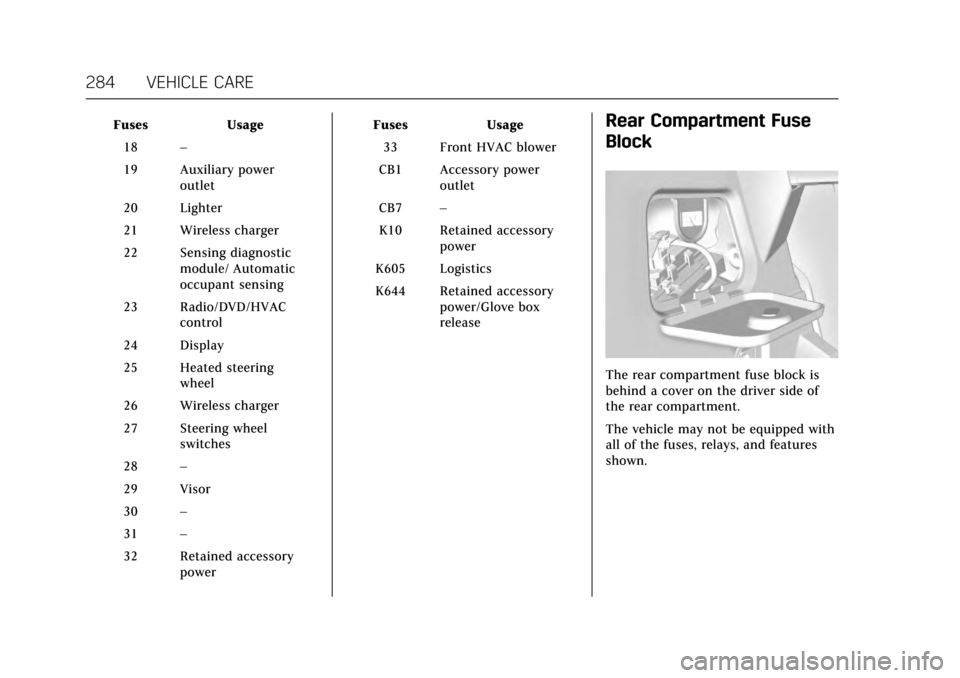
The rear compartment fuse block is
behind a cover on the driver side of
the rear compartment.
The vehicle may not be equipped with
all of the fuses, relays, and features
shown.
Page 287 of 352

Cadillac CTS/CTS-V Owner Manual (GMNA-Localizing-MidEast-10293089) -
2017 - crc - 6/22/16
286 VEHICLE CARE
FusesUsage
*17 RUN relay
*18 Logistics relay
*19 –
20 Rear window defogger relay
21 Mirror window module
22 –
23 Canister vent
24 Body control module 2
*25 Rear vision camera
*26 Front ventilated seats
*27 SBZA/LDW/EOCM
*28 Trailer/Sunshade
*29 Rear heated seats
*30 Semi-active damping system
*31 Traction control module/Rear control
drive module Fuses
Usage
32 Theft deterrent module/Universal
garage door opener/
Rain sensor
*33 UPA
*34 Radio/DVD
35 Exhaust valve
*36 Trailer 37 Fuel pump/Fuel system control
module
38 Fuel pump
39 –
40 Exhaust valve
41 Run/Crank 2
*42 Memory seat module
43 Body control module 3
44 –
45 Battery regulated voltage control
46 Engine control module/Battery Fuses
Usage
47 –
48 –
*49 Trailer module 50 Door lock security
51 Rear closure release
52 Rear closure
53 –
54 Door lock security
55 –
*56 Fuel door
* Optional
Page 293 of 352

Cadillac CTS/CTS-V Owner Manual (GMNA-Localizing-MidEast-10293089) -
2017 - crc - 6/22/16
292 VEHICLE CARE
Sustained operation at speeds over
160 km/h (100 mph) requires a load
limit of the driver and one passenger,
with no additional cargo. When loaded
above this level, up to the GVW, do
not operate the vehicle above
160 km/h (100 mph).
Return the tires to the recommended
cold tire inflation pressure when
high-speed driving has ended. See
Vehicle Load Limits0192 and Tire
Pressure 0290.
Tire Pressure Monitor
System
Caution
Modifications made to the Tire
Pressure Monitor System (TPMS) by
anyone other than an authorized
service facility may void
authorization to use the system.
The Tire Pressure Monitor System
(TPMS) uses radio and sensor
technology to check tire pressure
levels. The TPMS sensors monitor the air pressure in your vehicle's tires and
transmit tire pressure readings to a
receiver located in the vehicle.
Each tire, including the spare (if
provided), should be checked monthly
when cold and inflated to the
inflation pressure recommended by
the vehicle manufacturer on the
vehicle placard or tire inflation
pressure label. (If your vehicle has
tires of a different size than the size
indicated on the vehicle placard or tire
inflation pressure label, you should
determine the proper tire inflation
pressure for those tires.)
As an added safety feature, your
vehicle has been equipped with a tire
pressure monitoring system (TPMS)
that illuminates a low tire pressure
telltale when one or more of your tires
is significantly under-inflated.
Accordingly, when the low tire
pressure telltale illuminates, you
should stop and check your tires as
soon as possible, and inflate them to
the proper pressure. Driving on a
significantly under-inflated tire causes
the tire to overheat and can lead to
tire failure. Under-inflation alsoreduces fuel efficiency and tire tread
life, and may affect the vehicle's
handling and stopping ability.
Please note that the TPMS is not a
substitute for proper tire maintenance,
and it is the driver's responsibility to
maintain correct tire pressure, even if
under-inflation has not reached the
level to trigger illumination of the
TPMS low tire pressure telltale.
Your vehicle has also been equipped
with a TPMS malfunction indicator to
indicate when the system is not
operating properly. The TPMS
malfunction indicator is combined
with the low tire pressure telltale.
When the system detects a
malfunction, the telltale will flash for
approximately one minute and then
remain continuously illuminated. This
sequence will continue upon
subsequent vehicle start-ups as long
as the malfunction exists.
When the malfunction indicator is
illuminated, the system may not be
able to detect or signal low tire
pressure as intended. TPMS
malfunctions may occur for a variety
of reasons, including the installation
Page 295 of 352

Cadillac CTS/CTS-V Owner Manual (GMNA-Localizing-MidEast-10293089) -
2017 - crc - 6/22/16
294 VEHICLE CARE
Caution (Continued)
caused by using an incorrect tire
sealant is not covered by the
vehicle warranty. Always use only
the GM approved tire sealant
available through your dealer or
included in the vehicle.
Factory-installed Tire Inflator Kits use
a GM approved liquid tire sealant.
Using non-approved tire sealants
could damage the TPMS sensors. See
Tire Sealant and Compressor Kit 0303
for information regarding the inflator
kit materials and instructions.
TPMS Malfunction Light and
Message
The TPMS will not function properly if
one or more of the TPMS sensors are
missing or inoperable. When the
system detects a malfunction, the low
tire warning light flashes for about
one minute and then stays on for the
remainder of the ignition cycle. A DIC
warning message also displays. The
malfunction light and DIC warning
message come on at each ignition cycle until the problem is corrected.
Some of the conditions that can cause
these to come on are:
.
One of the road tires has been
replaced with the spare tire. The
spare tire does not have a TPMS
sensor. The malfunction light and
DIC message should go off after
the road tire is replaced and the
sensor matching process is
performed successfully. See “TPMS
Sensor Matching Process ”later in
this section.
. The TPMS sensor matching
process was not done or not
completed successfully after
rotating the tires. The malfunction
light and the DIC message should
go off after successfully
completing the sensor matching
process. See "TPMS Sensor
Matching Process" later in this
section.
. One or more TPMS sensors are
missing or damaged. The
malfunction light and the DIC
message should go off when the
TPMS sensors are installed and the sensor matching process is
performed successfully. See your
dealer for service.
. Replacement tires or wheels do
not match the original equipment
tires or wheels. Tires and wheels
other than those recommended
could prevent the TPMS from
functioning properly. See Buying
New Tires 0298.
. Operating electronic devices or
being near facilities using radio
wave frequencies similar to the
TPMS could cause the TPMS
sensors to malfunction.
If the TPMS is not functioning
properly it cannot detect or signal a
low tire condition. See your dealer for
service if the TPMS malfunction light
and DIC message comes on and
stays on.
TPMS Sensor Matching Process
Each TPMS sensor has a unique
identification code. The identification
code needs to be matched to a new
tire/wheel position after rotating the
vehicle’s tires or replacing one or more
of the TPMS sensors. The TPMS
Page 321 of 352

Cadillac CTS/CTS-V Owner Manual (GMNA-Localizing-MidEast-10293089) -
2017 - crc - 6/22/16
320 VEHICLE CARE
Caution
To prevent scratching, never use
abrasive cleaners on automotive
glass. Abrasive cleaners or
aggressive cleaning may damage
the rear window defogger.
Cleaning the windshield with water
during the first three to six months of
ownership will reduce tendency to fog.
Speaker Covers
Vacuum around a speaker cover
gently, so that the speaker will not be
damaged. Clean spots with just water
and mild soap.
Coated Moldings
Coated moldings should be cleaned.
. When lightly soiled, wipe with a
sponge or soft lint-free cloth
dampened with water.
. When heavily soiled, use warm
soapy water.
Fabric/Carpet/Suede
Start by vacuuming the surface using
a soft brush attachment. If a rotating
brush attachment is being used during
vacuuming, only use it on the floor
carpet. Before cleaning, gently remove
as much of the soil as possible using
one of the following techniques:
.
Gently blot liquids with a paper
towel. Continue blotting until no
more soil can be removed.
. For solid soils, remove as much as
possible prior to vacuuming.
To clean: 1. Saturate a clean lint-free colorfast cloth with water.
Microfiber cloth is recommended
to prevent lint transfer to the
fabric or carpet.
2. Remove excess moisture by gently wringing until water does
not drip from the cleaning cloth.
3. Start on the outside edge of the soil and gently rub toward the
center. Fold the cleaning cloth to a clean area frequently to
prevent forcing the soil in to the
fabric.
4. Continue gently rubbing the soiled area until there is no
longer any color transfer from
the soil to the cleaning cloth.
5. If the soil is not completely removed, use a mild soap
solution followed only by plain
water.
If the soil is not completely removed,
it may be necessary to use a
commercial upholstery cleaner or spot
lifter. Test a small hidden area for
colorfastness before using a
commercial upholstery cleaner or spot
lifter. If ring formation occurs, clean
the entire fabric or carpet.
Following the cleaning process, a
paper towel can be used to blot excess
moisture.
Cleaning High Gloss Surfaces
and Vehicle Information and
Radio Displays
For vehicles with high gloss surfaces
or vehicle displays, use a microfiber
cloth to wipe surfaces. Before wiping