2017 CADILLAC CT6 radio
[x] Cancel search: radioPage 161 of 337

Cadillac CT6 Owner Manual (GMNA-Localizing-MidEast-10293390) - 2017 -
CRC - 6/21/16
160 INSTRUMENTS AND CONTROLS
Universal Remote
System
Universal Remote System
Programming
If equipped, these buttons are in the
overhead console.
This system can replace up to three
remote control transmitters used to
activate devices such as garage door
openers, security systems, and home
automation devices. These
instructions refer to a garage door
opener, but can be used for other
devices.Do not use the Universal Remote
system with any garage door opener
that does not have the stop and
reverse feature. This includes any
garage door opener model
manufactured before April 1, 1982.
Read these instructions completely
before programming the Universal
Remote system. It may help to have
another person assist with the
programming process.
Keep the original hand-held
transmitter for use in other vehicles
as well as for future programming.
Erase the programming when vehicle
ownership is terminated. See
“Erasing
Universal Remote System Buttons”
later in this section.
To program a garage door opener,
park outside directly in line with and
facing the garage door opener receiver.
Clear all people and objects near the
garage door.
Make sure the hand-held transmitter
has a new battery for quick and
accurate transmission of the
radio-frequency signal.
Programming the Universal
Remote System
The Universal Remote system is
compatible with radio-frequency
devices operating between 433–
434 MHz.
Programming involves time-sensitive
actions, and may time out causing the
procedure to be repeated.
To program up to three devices:
1. Hold the end of the hand-held transmitter about 3 to 8 cm (1 to
3 in) away from the Universal
Remote system buttons with the
indicator light in view. The
hand-held transmitter was
supplied by the manufacturer of
the garage door opener receiver.
2. At the same time, press and hold both the hand-held transmitter
button and one of the three
Universal Remote system
buttons to be used to operate the
garage door. Do not release either
button until the indicator light
changes from a slow to a rapid
flash. Then release both buttons.
Page 171 of 337

Cadillac CT6 Owner Manual (GMNA-Localizing-MidEast-10293390) - 2017 -
CRC - 6/21/16
170 INFOTAINMENT SYSTEM
Infotainment System
Introduction
Infotainment . . . . . . . . . . . . . . . . . . . . . 170
Introduction
Infotainment
See the infotainment manual for
information on the radio, audio
players, rear seat infotainment, phone,
navigation system, and voice or
speech recognition. It also includes
information on settings.
Page 176 of 337
Cadillac CT6 Owner Manual (GMNA-Localizing-MidEast-10293390) - 2017 -
CRC - 6/21/16
CLIMATE CONTROLS 175
Caution
Do not try to clear frost or other
material from the inside of the
front windshield and rear window
with a razor blade or anything else
that is sharp. This may damage the
rear window defogger grid and
affect the radio's ability to pick up
stations clearly. The repairs would
not be covered by the vehicle
warranty.
Driver and Passenger Heated and
Ventilated Seats (If Equipped) :
Press
Ior+to heat the driver or
passenger seatback only.
Press
Jorzto heat the driver or
passenger seat cushion and seatback.
Press
Cor{to ventilate the driver
or passenger seat. See Heated and
Ventilated Front Seats 062. Remote Start Climate Control
Operation :
If equipped with the
remote start feature, the climate
control system may run when the
vehicle is started remotely. The system
uses the driver’s previous settings to
heat or cool the inside of the vehicle.
The rear defog may come on during
remote start based on cold ambient
conditions. The rear defog indicator
light does not come on during a
remote start. If equipped with heated
or ventilated seats, they may come on
during a remote start. See Remote
Vehicle Start 034 and Heated and
Ventilated Front Seats 062.
Sensor
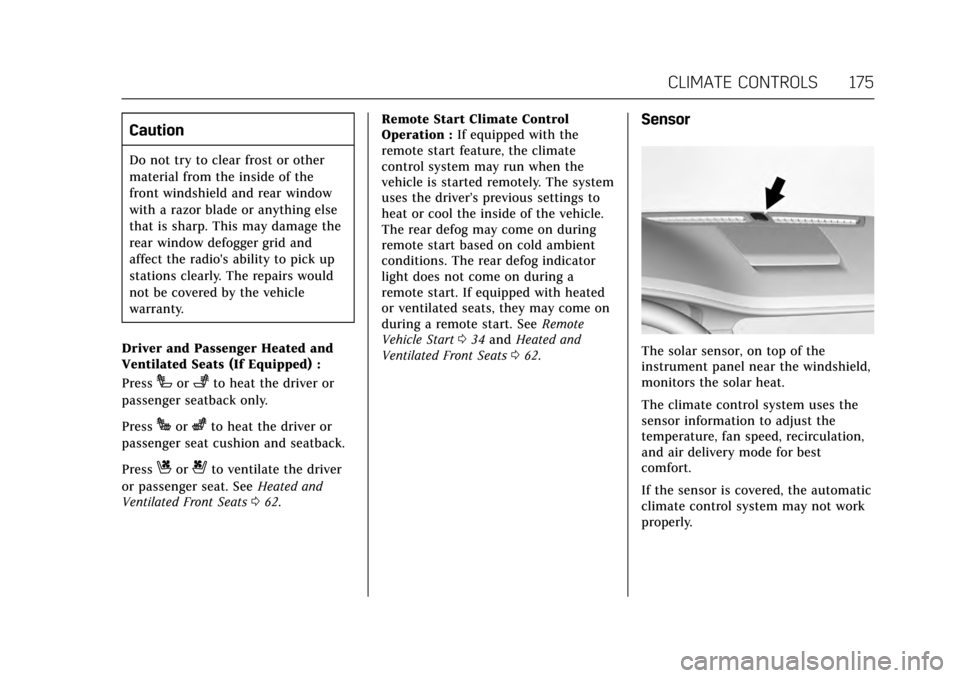
The solar sensor, on top of the
instrument panel near the windshield,
monitors the solar heat.
The climate control system uses the
sensor information to adjust the
temperature, fan speed, recirculation,
and air delivery mode for best
comfort.
If the sensor is covered, the automatic
climate control system may not work
properly.
Page 182 of 337

Cadillac CT6 Owner Manual (GMNA-Localizing-MidEast-10293390) - 2017 -
CRC - 6/21/16
CLIMATE CONTROLS 181
Pressing this button cancels automatic
recirculation. Press AUTO to return to
automatic operation; recirculation
runs automatically as needed.
Manual recirculation mode is not
available when in Defrost or Defog
modes.
Auto Defog :The climate control
system may have a sensor to
automatically detect high humidity
inside the vehicle. When high
humidity is detected, the climate
control system may adjust to outside
air supply and turn on the air
conditioner. If the climate control
system does not detect possible
window fogging, it returns to normal
operation. To turn Auto Defog off or
on, see “Climate and Air Quality”
under Vehicle Personalization 0152.
Ionizer : If equipped with an ionizer,
this feature helps to clean the air
inside the vehicle and remove
contaminants; such as pollen, odors,
and dust. If the climate control
system is on and the ionizer is
enabled, the ionizer status indicator
will be lit on the climate control touch screen. To turn the ionizer on or off,
see
“Climate and Air Quality” under
Vehicle Personalization 0152.
Rear Window Defogger
K:Press to turn the rear window
defogger on or off.
The rear window defogger can be set
to automatic operation. See “Climate
and Air Quality” underVehicle
Personalization 0152. When Auto Rear
Defog is selected, the rear window
defogger turns on automatically when
the interior temperature is cold and
the outside temperature is about 4 °C
(40 °F) and below.
The upper grid lines on the rear
window are antenna lines and are not
intended to heat when the defogger is
activated.
The heated outside rearview mirrors
turn on when the rear window
defogger button is on and help to
clear fog or frost from the surface of
the mirrors.
Caution
Do not try to clear frost or other
material from the inside of the
front windshield and rear window
with a razor blade or anything else
that is sharp. This may damage the
rear window defogger grid and
affect the radio's ability to pick up
stations clearly. The repairs would
not be covered by the vehicle
warranty.
Driver and Passenger Heated and
Ventilated Seats (If Equipped) :
Press
Ior+to heat the driver or
passenger seatback only.
Press
Jorzto heat the driver or
passenger seat cushion and seatback.
Press
Cor{to ventilate the driver
or passenger seat. See Heated and
Ventilated Front Seats 062.
Page 186 of 337

Cadillac CT6 Owner Manual (GMNA-Localizing-MidEast-10293390) - 2017 -
CRC - 6/21/16
DRIVING AND OPERATING 185
Driving Information
Distracted Driving
Distraction comes in many forms and
can take your focus from the task of
driving. Exercise good judgment and
do not let other activities divert your
attention away from the road. Many
local governments have enacted laws
regarding driver distraction. Become
familiar with the local laws in
your area.
To avoid distracted driving, keep your
eyes on the road, keep your hands on
the steering wheel, and focus your
attention on driving.
.Do not use a phone in demanding
driving situations. Use a
hands-free method to place or
receive necessary phone calls.
. Watch the road. Do not read, take
notes, or look up information on
phones or other electronic devices.
. Designate a front seat passenger
to handle potential distractions. .
Become familiar with vehicle
features before driving, such as
programming favorite radio
stations and adjusting climate
control and seat settings. Program
all trip information into any
navigation device prior to driving.
. Wait until the vehicle is parked to
retrieve items that have fallen to
the floor.
. Stop or park the vehicle to tend to
children.
. Keep pets in an appropriate carrier
or restraint.
. Avoid stressful conversations
while driving, whether with a
passenger or on a cell phone.
{Warning
Taking your eyes off the road too
long or too often could cause a
crash resulting in injury or death.
Focus your attention on driving. See the infotainment manual for
information on that system or the
navigation system, if equipped,
including pairing and using a cell
phone.
Defensive Driving
Defensive driving means
“always
expect the unexpected.” The first step
in driving defensively is to wear the
safety belt. See Safety Belts067.
. Assume that other road users
(pedestrians, bicyclists, and other
drivers) are going to be careless
and make mistakes. Anticipate
what they might do and be ready.
. Allow enough following distance
between you and the driver in
front of you.
. Focus on the task of driving.
Control of a Vehicle
Braking, steering, and accelerating are
important factors in helping to control
a vehicle while driving.
Page 196 of 337

Cadillac CT6 Owner Manual (GMNA-Localizing-MidEast-10293390) - 2017 -
CRC - 6/21/16
DRIVING AND OPERATING 195
Ignition Positions
The vehicle has an electronic keyless
ignition with pushbutton start.
Pressing the button cycles it through
three modes: ACC/ACCESSORY, ON/
RUN/START, and Stopping the
Engine/OFF.
The Remote Keyless Entry (RKE)
transmitter must be in the vehicle for
the system to operate. If the
pushbutton start is not working, the
vehicle may be near a strong radio
antenna signal causing interference to
the Keyless Access system. SeeRemote
Keyless Entry (RKE) System
Operation 029. To shift out of P (Park), the vehicle
must be in ACC/ACCESSORY or ON/
RUN, and the brake pedal must be
applied.
Stopping the Engine/OFF (No
Indicator Lights) :
When the vehicle
is stopped, press ENGINE START/
STOP once to turn the engine off.
If the vehicle is in P (Park), the
ignition will turn off, and Retained
Accessory Power (RAP) will remain
active. See Retained Accessory Power
(RAP) 0198.
If the vehicle is not in P (Park), the
ignition will return to ACC/
ACCESSORY and display a message in
the Driver Information Center (DIC).
See Transmission Messages 0151.
When the vehicle is shifted into
P (Park), the ignition system will
switch to OFF.
Do not turn the engine off when the
vehicle is moving. This will cause a
loss of power assist in the brake and
steering systems and disable the
airbags. If the vehicle must be shut off in an
emergency:
1. Brake using a firm and steady pressure. Do not pump the
brakes repeatedly. This may
deplete power assist, requiring
increased brake pedal force.
2. Shift the vehicle to N (Neutral). This can be done while the
vehicle is moving. After shifting
to N (Neutral), firmly apply the
brakes and steer the vehicle to a
safe location.
3. Come to a complete stop, shift to P (Park), and turn off the
ignition.
4. Set the parking brake. See Electric Parking Brake 0205.
{Warning
Turning off the vehicle while
moving may cause loss of power
assist in the brake and steering
systems and disable the airbags.
While driving, only shut the vehicle
off in an emergency.
Page 276 of 337

Cadillac CT6 Owner Manual (GMNA-Localizing-MidEast-10293390) - 2017 -
CRC - 6/21/16
VEHICLE CARE 275
FuseUsage
F11 Driver memory seat module
F12 –
F13 –
F14 Right rear seat
F15 Left front amplifier
F16 Right front seat
F17 Rear heated seat
F18 Regulated voltage control battery
F19 Door mirror switch
F20 –
F21 Vehicle integration control module
F22 –
F23 Rear closure
F24 –
F25 Left motorized safety belt pretensioner
F26 Rear defogger
F27 Right front amplifier Fuse
Usage
F28 Amplifier
F29 Sunroof
F30 Body control module 2
F31 Body control module 6
F32 Exterior heated mirrors
F33 Right window
F34 Power trunk module
F35 On-board charging module
F36 Alarm siren module
F37 DC AC inverter
F38 Rear blower
F39 Fuel pump power
F40 –
F41 Rear seat power outlet
F42 Left rear memory seat
F43 – Fuse
Usage
F44 Rear closure
F45 Auxiliary audio/ Video/Radio
F46 External object calculating/Side blind
zone alert/Radar
short range sensor
F47 –
F48 Right front seat
F49 Memory bolster module
F50 Body control module 1
F51 Transmission control module
F52 Parking assist
F53 Ventilated seats
F54 Headliner
F55 Front memory seat module
F56 Evaporative emissions leak check
module
Page 281 of 337

Cadillac CT6 Owner Manual (GMNA-Localizing-MidEast-10293390) - 2017 -
CRC - 6/21/16
280 VEHICLE CARE
inflation pressure is low, add air
until the recommended pressure is
reached. If the inflation pressure
is high, press on the metal stem in
the center of the tire valve to
release air.
Recheck the tire pressure with the
tire gauge.
Put the valve caps back on the
valve stems to keep out dirt and
moisture and prevent leaks. Use
only valve caps designed for the
vehicle by GM. TPMS sensors
could be damaged and would not
be covered by the vehicle
warranty.
Tire Pressure for
High-Speed Operation
{Warning
Driving at high speeds, 160 km/h
(100 mph) or higher, puts additional
strain on tires. Sustained
high-speed driving causes excessive(Continued)
Warning (Continued)
heat buildup and can cause sudden
tire failure. This could cause a
crash, and you or others could be
killed. Some high-speed rated tires
require inflation pressure
adjustment for high-speed
operation. When speed limits and
road conditions allow the vehicle to
be driven at high speeds, make sure
the tires are rated for high-speed
operation, are in excellent
condition, and are set to the correct
cold tire inflation pressure for the
vehicle load.
Vehicles with 235/50R18 97V or
245/45R19 98V size tires require
inflation pressure adjustment when
driving the vehicle at speeds of
160 km/h (100 mph) or higher. Set the
cold inflation pressure for all four
tires to 270 kPa (39 psi).
Vehicles with 245/40R20 95W size
tires require inflation pressure
adjustment when driving the vehicle at speeds of 160 km/h (100 mph) or
higher. Set the cold inflation pressure
to 290 kPa (42 psi).
Return the tires to the recommended
cold tire inflation pressure when
high-speed driving has ended. See
Vehicle Load Limits
0191 and Tire
Pressure 0279.
Tire Pressure Monitor
System
Caution
Modifications made to the Tire
Pressure Monitor System (TPMS) by
anyone other than an authorized
service facility may void
authorization to use the system.
The Tire Pressure Monitor System
(TPMS) uses radio and sensor
technology to check tire pressure
levels. The TPMS sensors monitor the
air pressure in your vehicle's tires and
transmit tire pressure readings to a
receiver located in the vehicle.