2017 BUICK REGAL Shift
[x] Cancel search: ShiftPage 179 of 344

Buick Regal Owner Manual (GMNA-Localizing-U.S./Canada/Mexico-
9804381) - 2017 - crc - 8/30/16
178 Driving and Operating
Warning (Continued)
You could lose control and hit
people or objects. Do not shift
into a drive gear while the engine
is running at high speed.
Caution
Shifting out of P (Park) or
N (Neutral) with the engine
running at high speed may
damage the transmission. The
repairs would not be covered by
the vehicle warranty. Be sure the
engine is not running at high
speed when shifting the vehicle.
D : This position is for normal
driving. It provides the best fuel
economy. If more power is needed
for passing, and the vehicle is:
. Going less than 56 km/h
(35 mph), push the accelerator
pedal about halfway down. .
Going about 56 km/h (35 mph) or
more, push the accelerator all
the way down.
Caution
If the vehicle does not shift gears,
the transmission could be
damaged. Have the vehicle
serviced right away.
Operating Modes
The transmission may operate in a
lower gear than normal to improve
vehicle performance. The engine
speed may be higher and there may
be an increase in noise during the
following conditions:
. When climbing a grade.
. When driving downhill.
. When driving in hot
temperatures or at high altitude.
Manual Mode
Driver Shift Control (DSC)
Caution
Driving with the engine at a high
rpm without upshifting while using
Driver Shift Control (DSC), could
damage the vehicle. Always
upshift when necessary while
using DSC.
Page 180 of 344

Buick Regal Owner Manual (GMNA-Localizing-U.S./Canada/Mexico-
9804381) - 2017 - crc - 8/30/16
Driving and Operating 179
DSC allows you to shift an
automatic transmission similar to a
manual transmission. To use the
DSC feature:1. Move the shift lever to the left from D (Drive) into the side
gate marked with (+) and (−).
2. Press the shift lever forward to upshift or rearward to
downshift.
While using the DSC feature, the
vehicle will have firmer, quicker
shifting. You can use this for sport
driving or when climbing or
descending hills, to stay in gear
longer, or to downshift for more
power or engine braking.
The transmission will only allow you
to shift into gears appropriate for the
vehicle speed and engine
revolutions per minute (rpm). The
transmission will not automatically
shift to the next lower gear if the
engine rpm is too high, nor to the
next higher gear when the maximum
engine rpm is reached. While in the DSC mode, the
transmission will automatically
downshift when the vehicle comes
to a stop. This will allow for more
power during take-off.
When accelerating the vehicle from
a stop in snowy and icy conditions,
you may want to shift into second
gear. A higher gear allows the
vehicle to gain more traction on
slippery surfaces. Vehicles with a
turbocharged engine may also start
in third gear.Drive Systems
All-Wheel Drive
If equipped, this feature transfers
torque to the rear wheels as
required. It is fully automatic, and
adjusts itself as needed for road
conditions.
All-Wheel Drive (AWD) performance
is automatically reduced when you
use the compact spare. To restore
full AWD performance, and prevent
excessive wear to the clutch in the
AWD system, replace the compact
spare tire with a full-size tire as
soon as possible. See
Compact
Spare Tire 0277.
Page 188 of 344

Buick Regal Owner Manual (GMNA-Localizing-U.S./Canada/Mexico-
9804381) - 2017 - crc - 8/30/16
Driving and Operating 187
4. Remove foot from theaccelerator.
The cruise control indicator on the
instrument cluster turns green after
cruise control has been set to the
desired speed. See Instrument
Cluster (Uplevel Cluster) 0104 or
Instrument Cluster (Base Cluster)
0 101.
Resuming a Set Speed
If the cruise control is set at a
desired speed and then the brakes
are applied or
*is pressed, the
cruise control is disengaged without
erasing the set speed from memory.
Once the vehicle reaches about
40 km/h (25 mph) or more, press
RES+ up briefly. The vehicle returns
to the previous set speed.
Increasing Speed While Using
Cruise Control
If the cruise control system is
already activated:
. Press and hold RES+ up until
the desired speed is reached,
then release it. .
To increase vehicle speed in
small increments, press RES+
up briefly. For each press, the
vehicle goes about 1.6 km/h
(1 mph) faster.
The speedometer reading can be
displayed in either English or metric
units. See Instrument Cluster
(Uplevel Cluster) 0104 or
Instrument Cluster (Base Cluster)
0 101. The increment value used
depends on the units displayed.
Reducing Speed While Using
Cruise Control
If the cruise control system is
already activated:
. Press and hold SET− down until
the desired lower speed is
reached, then release it.
. To slow down in small
increments, press SET− down
briefly. For each press, the
vehicle goes about 1.6 km/h
(1 mph) slower. The speedometer reading can be
displayed in either English or metric
units. See
Instrument Cluster
(Uplevel Cluster) 0104 or
Instrument Cluster (Base Cluster)
0 101. The increment value used
depends on the units displayed.
Passing Another Vehicle While
Using Cruise Control
Use the accelerator pedal to
increase vehicle speed. When you
take your foot off the pedal, the
vehicle will slow down to the
previous set cruise speed. While
pressing the accelerator pedal or
shortly following the release to
override cruise control, briefly
pressing SET− will result in cruise
set to the current vehicle speed.
Using Cruise Control on Hills
How well the cruise control works
on hills depends on the vehicle
speed, the load, and the steepness
of the hills. When going up steep
hills, you might have to step on the
accelerator pedal to maintain your
speed. When going downhill, you
might have to brake or shift to a
Page 189 of 344

Buick Regal Owner Manual (GMNA-Localizing-U.S./Canada/Mexico-
9804381) - 2017 - crc - 8/30/16
188 Driving and Operating
lower gear to keep your speed
down. If the brake pedal is applied,
the cruise control will disengage.
Ending Cruise Control
There are four ways to end cruise
control:
.To disengage cruise control,
step lightly on the brake pedal.
. Press
*.
. Shift the transmission to
N (Neutral).
. To turn off the cruise control,
press
5.
Erasing Speed Memory
The cruise control set speed is
erased from memory if
5is pressed
or the ignition is turned off.
Adaptive Cruise Control
If equipped with Adaptive Cruise
Control (ACC), it allows for selecting
the cruise control set speed and
following gap. Read this entire
section before using this system.
ACC uses a camera and radar sensors to detect other vehicles.
See
Radio Frequency Statement
0 319. The following gap is the
following time (or distance) between
your vehicle and a vehicle detected
directly ahead in your path, moving
in the same direction. If no vehicle
is detected in your path, ACC works
like regular cruise control.
If a vehicle is detected in your path,
ACC can speed up the vehicle or
apply limited, moderate braking to
maintain the selected following gap.
To disengage ACC, apply the brake.
If the Traction Control System (TCS)
or StabiliTrak
®electronic stability
control system activates while ACC
is engaged, ACC may automatically
disengage. See Traction Control/
Electronic Stability Control 0183.
When road conditions allow ACC to
be safely used, ACC can be turned
back on. ACC will not engage if the
TCS or StabiliTrak electronic
stability control system is disabled.
{Warning
ACC has limited braking ability
and may not have time to slow
the vehicle down enough to avoid
a collision with another vehicle
you are following. This can occur
when vehicles suddenly slow or
stop ahead, or enter your lane.
Also see “Alerting the Driver” in
this section. Complete attention is
always required while driving and
you should be ready to take
action and apply the brakes. See
Defensive Driving 0157.
{Warning
ACC will not detect or brake for
children, pedestrians, animals,
or other objects.
Do not use ACC when:
. On winding and hilly roads
or when the sensors are
blocked by snow, ice, or dirt.
(Continued)
Page 193 of 344

Buick Regal Owner Manual (GMNA-Localizing-U.S./Canada/Mexico-
9804381) - 2017 - crc - 8/30/16
192 Driving and Operating
braking may feel or sound different
than if the brakes were applied
manually. This is normal.
Stationary or Very Slow-Moving
Objects
{Warning
ACC may not detect and react to
stopped or slow-moving vehicles
ahead of you. For example, the
system may not brake for a
vehicle it has never detected
moving. This can occur in
stop-and-go traffic or when a
vehicle suddenly appears due to
a vehicle ahead changing lanes.
Your vehicle may not stop and
could cause a crash. Use caution
when using ACC. Your complete
attention is always required while
driving and you should be ready
to take action and apply the
brakes.ACC Automatically Disengages
ACC may automatically disengage
and the driver will need to manually
apply the brakes to slow the
vehicle when:
.
The sensors are blocked.
. The traction control system
(TCS) or electronic stability
control system has activated or
been disabled.
. No traffic or other objects are
being detected.
. There is a fault in the system.
A message indicating that cruise is
disengaging will appear on the DIC
and the ACC active symbol will not
be displayed when ACC is no longer
active.
Notification to Resume ACC
ACC will maintain a follow gap
behind a detected vehicle and slow
your vehicle to a stop behind that
vehicle.
If the stopped vehicle ahead has
driven away and ACC has not
resumed, the vehicle ahead
indicator will flash as a reminder to check traffic ahead before
proceeding. In addition, three beeps
will sound. See
“Go Notifier”in
“Collision/Detection Systems” under
Vehicle Personalization 0134.
When the vehicle ahead drives
away, press RES+ or the
accelerator pedal to resume cruise
control. If stopped for more than
two minutes or if the driver door is
opened and the driver safety belt is
unbuckled, the ACC automatically
applies the electric parking brake to
hold the vehicle. The electric
parking brake status light will turn
on. See Parking Brake 0181. To
resume ACC and release the
electric parking brake, press the
accelerator pedal.
A DIC warning message may
display indicating to shift to P (Park)
before exiting the vehicle. See
Vehicle Messages 0125.
Page 197 of 344
Buick Regal Owner Manual (GMNA-Localizing-U.S./Canada/Mexico-
9804381) - 2017 - crc - 8/30/16
196 Driving and Operating
Warning (Continued)
Complete attention is always
required while driving, and you
should be ready to take action
and apply the brakes and/or steer
the vehicle to avoid crashes.
Audible Alert
Some driver assistance features
alert the driver of obstacles by
beeping. To change the volume of
the warning chime, see “Comfort
and Convenience” underVehicle
Personalization 0134.
Assistance Systems for
Parking or Backing
If equipped, the Rear Vision Camera
(RVC), Rear Parking Assist (RPA),
Front Parking Assist (FPA), and
Rear Cross Traffic Alert (RCTA) may
help the driver park or avoid objects.
Always check around the vehicle
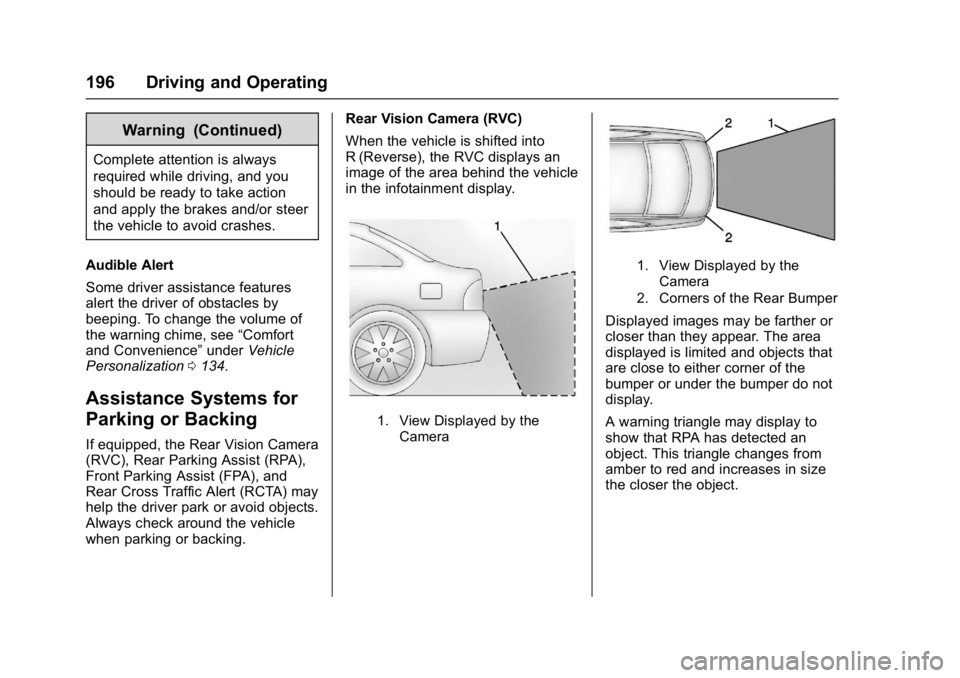
when parking or backing. Rear Vision Camera (RVC)
When the vehicle is shifted into
R (Reverse), the RVC displays an
image of the area behind the vehicle
in the infotainment display.
1. View Displayed by the
Camera
1. View Displayed by theCamera
2. Corners of the Rear Bumper
Displayed images may be farther or
closer than they appear. The area
displayed is limited and objects that
are close to either corner of the
bumper or under the bumper do not
display.
A warning triangle may display to
show that RPA has detected an
object. This triangle changes from
amber to red and increases in size
the closer the object.
Page 212 of 344

Buick Regal Owner Manual (GMNA-Localizing-U.S./Canada/Mexico-
9804381) - 2017 - crc - 8/30/16
Vehicle Care 211
Vehicle Care
General Information
General Information . . . . . . . . . . 212
California Proposition65 Warning . . . . . . . . . . . . . . . . . 212
California Perchlorate Materials Requirements . . . . . 212
Accessories and Modifications . . . . . . . . . . . . . . . . 213
Vehicle Checks
Doing Your OwnService Work . . . . . . . . . . . . . . . 213
Hood . . . . . . . . . . . . . . . . . . . . . . . . . 214
Engine Compartment Overview . . . . . . . . . . . . . . . . . . . . 215
Engine Oil . . . . . . . . . . . . . . . . . . . . 218
Engine Oil Life System . . . . . . . 220
Automatic Transmission Fluid . . . . . . . . . . . . . . . . . . . . . . . . 221
Engine Air Cleaner/Filter . . . . . . 222
Cooling System . . . . . . . . . . . . . . 223
Engine Coolant . . . . . . . . . . . . . . . 224
Engine Overheating . . . . . . . . . . 227
Washer Fluid . . . . . . . . . . . . . . . . . 228
Brakes . . . . . . . . . . . . . . . . . . . . . . . 229
Brake Fluid . . . . . . . . . . . . . . . . . . . 230
Battery - North America . . . . . . 231
All-Wheel Drive . . . . . . . . . . . . . . . 232 Starter Switch Check . . . . . . . . . 232
Automatic Transmission Shift
Lock Control Function
Check . . . . . . . . . . . . . . . . . . . . . . . 232
Ignition Transmission Lock
Check . . . . . . . . . . . . . . . . . . . . . . . 233
Park Brake and P (Park) Mechanism Check . . . . . . . . . . 233
Wiper Blade Replacement . . . . 233
Headlamp Aiming
Headlamp Aiming . . . . . . . . . . . . 234
Bulb Replacement
Bulb Replacement . . . . . . . . . . . . 234
Halogen Bulbs . . . . . . . . . . . . . . . . 234
High Intensity Discharge (HID) Lighting . . . . . . . . . . . . . . . . . . . . . 235
Headlamps, Front Turn Signal and Parking Lamps . . . . . . . . . 235
Fog Lamps . . . . . . . . . . . . . . . . . . . 235
Taillamps, Turn Signal, Stoplamps, and Back-Up
Lamps . . . . . . . . . . . . . . . . . . . . . . 236
License Plate Lamp . . . . . . . . . . 236
Replacement Bulbs . . . . . . . . . . . 237
Electrical System
High Voltage Devices and Wiring . . . . . . . . . . . . . . . . . . . . . . . 237
Electrical System Overload . . . 238
Fuses and Circuit Breakers . . . 238 Engine Compartment Fuse
Block . . . . . . . . . . . . . . . . . . . . . . . . 239
Instrument Panel Fuse Block . . . . . . . . . . . . . . . . . . . . . . . . 241
Wheels and Tires
Tires . . . . . . . . . . . . . . . . . . . . . . . . . . 243
All-Season Tires . . . . . . . . . . . . . . 244
Winter Tires . . . . . . . . . . . . . . . . . . 244
Low-Profile Tires . . . . . . . . . . . . . 244
Summer Tires . . . . . . . . . . . . . . . . 245
Tire Sidewall Labeling . . . . . . . . 245
Tire Designations . . . . . . . . . . . . . 247
Tire Terminology andDefinitions . . . . . . . . . . . . . . . . . . 248
Tire Pressure . . . . . . . . . . . . . . . . . 251
Tire Pressure for High-Speed Operation . . . . . . . . . . . . . . . . . . . 252
Tire Pressure Monitor System . . . . . . . . . . . . . . . . . . . . . . 252
Tire Pressure Monitor Operation . . . . . . . . . . . . . . . . . . . 253
Tire Inspection . . . . . . . . . . . . . . . . 257
Tire Rotation . . . . . . . . . . . . . . . . . 257
When It Is Time for New Tires . . . . . . . . . . . . . . . . . . . . . . . . 258
Buying New Tires . . . . . . . . . . . . . 259
Different Size Tires and Wheels . . . . . . . . . . . . . . . . . . . . . . 260
Uniform Tire Quality Grading . . . . . . . . . . . . . . . . . . . . . 261
Page 229 of 344

Buick Regal Owner Manual (GMNA-Localizing-U.S./Canada/Mexico-
9804381) - 2017 - crc - 8/30/16
228 Vehicle Care
Warning (Continued)
off and get everyone away from
the vehicle until it cools down.
Wait until there is no sign of
steam or coolant before you open
the hood.
If you keep driving when the
engine is overheated, the liquids
in it can catch fire. You or others
could be badly burned. Stop the
engine if it overheats, and get out
of the vehicle until the engine
is cool.
If No Steam Is Coming from
the Engine Compartment
If an engine overheat warning is
displayed but no steam can be seen
or heard, the problem may not be
too serious. Sometimes the engine
can get a little too hot when the
vehicle:
.Climbs a long hill on a hot day.
. Stops after high-speed driving.
. Idles for long periods in traffic. If the overheat warning is displayed
with no sign of steam:
1. Turn the air conditioning off.
2. Turn the heater on to the highest temperature and to the
highest fan speed. Open the
windows as necessary.
3. When it is safe to do so, pull off the road, shift to P (Park) or
N (Neutral), and let the
engine idle.
If the engine coolant temperature
gauge is no longer in the overheat
zone or the engine coolant
temperature warning light no longer
displays, the vehicle can be driven.
Continue to drive the vehicle slowly
for about 10 minutes. Keep a safe
vehicle distance from the vehicle in
front. If the warning does not come
back on, continue to drive normally
and have the cooling system
checked for proper fill and function.
If the warning continues, pull over,
stop, and park the vehicle
right away. If there is no sign of steam, idle the
engine for three minutes while
parked. If the warning is still
displayed, turn off the engine until it
cools down.
Washer Fluid
What to Use
When windshield washer fluid is
needed, be sure to read the
manufacturer's instructions before
use. If operating the vehicle in an
area where the temperature may fall
below freezing, use a fluid that has
sufficient protection against
freezing.
Adding Washer Fluid