2017 BUICK LACROSSE remote
[x] Cancel search: remotePage 40 of 346

Buick LaCrosse Owner Manual (GMNA-Localizing-U.S./Canada-9803782) -
2017 - crc - 9/7/16
Keys, Doors, and Windows 39
Warning (Continued)
highest setting. See
“Climate Control Systems”
in the Index.
. If the vehicle has a power
liftgate, disable the power
liftgate function.
For more information about
carbon monoxide, see Engine
Exhaust 0180.
Remote Trunk Release
.
To open the trunk, press|on
the driver door when the vehicle
is off or in P (Park).
. To open the trunk from outside
the vehicle, press
Xtwice
quickly on the Remote Keyless
Entry (RKE) transmitter.
. Press the bottom of the emblem
above the license plate when all
doors are unlocked or when the
transmitter is within 1 m (3 ft) of
the rear of the vehicle.
Emergency Trunk Release
Handle
Caution
Do not use the emergency trunk
release handle as a tie-down or
anchor point when securing items
in the trunk as it could damage
the handle.
There is a glow-in-the-dark
emergency trunk release handle on
the trunk lid. This handle will glow
following exposure to light. Pull the
release handle to open the trunk
from the inside.
Page 43 of 346

Buick LaCrosse Owner Manual (GMNA-Localizing-U.S./Canada-9803782) -
2017 - crc - 9/7/16
42 Keys, Doors, and Windows
The system has one or more
transmitters matched to an
immobilizer control unit in the
vehicle. Only a correctly matched
transmitter will start the vehicle.
If the transmitter is ever damaged,
you may not be able to start the
vehicle.
When trying to start the vehicle, the
security light comes on briefly when
the ignition is turned on.
If the vehicle does not start and the
security light stays on, there is a
problem with the system. Turn the
vehicle off and try again.
If the RKE transmitter appears to be
undamaged, try another transmitter,
or place the transmitter in the
transmitter pocket. See“Starting the
Vehicle with a Low Transmitter
Battery” underRemote Keyless
Entry (RKE) System Operation 027. If the vehicle does not start with the
other transmitter or when the
transmitter is in the transmitter
pocket, the vehicle needs service.
See your dealer who can service
the theft-deterrent system and have
a new transmitter programmed to
the vehicle.
Do not leave the transmitter or
device that disarms or deactivates
the theft-deterrent system in the
vehicle.Exterior Mirrors
Convex Mirrors
{Warning
A convex mirror can make things,
like other vehicles, look farther
away than they really are. If you
cut too sharply into the right lane,
you could hit a vehicle on the
right. Check the inside mirror or
glance over your shoulder before
changing lanes.
The passenger side mirror is convex
shaped. A convex mirror's surface is
curved so more can be seen from
the driver seat.
Page 56 of 346

Buick LaCrosse Owner Manual (GMNA-Localizing-U.S./Canada-9803782) -
2017 - crc - 9/7/16
Seats and Restraints 55
Obstructions
If something has blocked the driver
seat while recalling a memory
position, the recall may stop.
Remove the obstruction. Then do
one of the following:
.If automatically or manually
recalling the stored memory
position, press and hold the
appropriate manual control for
two seconds. Try recalling again
by pressing the appropriate
memory button. If automatically
recalling the position, try
recalling again by opening the
driver door and pressing
Kon
the RKE transmitter.
. If recalling the exit position,
press and hold the appropriate
manual control for the exit
feature not recalling for
two seconds. Then try recalling
the exit position again.
If the memory position is still not
recalling, see your dealer for
service.
Heated and Ventilated
Front Seats
Heated and Ventilated Seat
Buttons Shown, Heated Seat Buttons Similar
If equipped, the buttons are near the
climate controls on the center stack.
To operate, the ignition must be in
ON/RUN.
Press
MorLto heat the driver or
passenger seat cushion. Press
Cor{, if equipped, to
ventilate the driver or passenger
seat. A ventilated seat has a fan
that pulls or pushes air through the
seat. The air is not cooled.
Press the button once for the
highest setting. With each press of
the button, the seat will change to
the next lower setting, and then to
the off setting. The lights near the
heated or ventilated seat symbol on
the button indicate three for the
highest setting and one for the
lowest.
Remote Start Heated and
Ventilated Seats
During a remote start, the heated or
ventilated seats, if equipped, can be
turned on automatically. When it is
cold outside, the heated seats turn
on, and when it is hot outside the
ventilated seats turn on. The heated
or ventilated seats are canceled
when the ignition is turned on. Press
the heated or ventilated seat button
to use the heated or ventilated seats
after the vehicle is started.
Page 57 of 346

Buick LaCrosse Owner Manual (GMNA-Localizing-U.S./Canada-9803782) -
2017 - crc - 9/7/16
56 Seats and Restraints
The heated or ventilated seat
indicator lights do not turn on during
a remote start.
The temperature performance of an
unoccupied seat may be reduced.
This is normal.
The heated or ventilated seats may
be enabled or disabled in the
vehicle personalization menu.
SeeRemote Vehicle Start 033 and
Vehicle Personalization 0138.Massage
If equipped, the ignition must be on
to use the massage feature.
If equipped, press the massage
button to use the massage feature.
To stop massage, press this button
again.
The massage feature will turn off
after approximately 10 minutes.
Press the massage button to restart
the massage feature.
Rear Seats
Rear Seat Reminder
If equipped, the message REAR
SEAT REMINDER LOOK IN REAR
SEAT displays under certain
conditions indicating there may be
an item or passenger in the rear
seat. Check before exiting the
vehicle.
This feature will activate when a
second row door is opened while
the vehicle is on or up to 10 minutes
before the vehicle is turned on,
including if the vehicle was started
remotely. There will be an alert
when the vehicle is turned off. The
alert does not directly detect objects
in the rear seat; instead, under
certain conditions, it detects when a
rear door is opened and closed,
indicating that there may be
something in the rear seat.
The feature is active only once each
time the vehicle is turned on and off,
and will require reactivation by
opening and closing the second row
doors. There may be an alert even
when there is nothing in the rear
Page 102 of 346
Buick LaCrosse Owner Manual (GMNA-Localizing-U.S./Canada-9803782) -
2017 - crc - 9/7/16
Instruments and Controls 101
Tire Messages . . . . . . . . . . . . . . . . 136
Transmission Messages . . . . . . 136
Vehicle ReminderMessages . . . . . . . . . . . . . . . . . . . 137
Vehicle Speed Messages . . . . . 137
Window Messages . . . . . . . . . . . 137
Vehicle Personalization
Vehicle Personalization . . . . . . . 138
Universal Remote System
Universal Remote System . . . . 145
Universal Remote System
Programming . . . . . . . . . . . . . . . 145
Universal Remote System Operation . . . . . . . . . . . . . . . . . . . 147
Controls
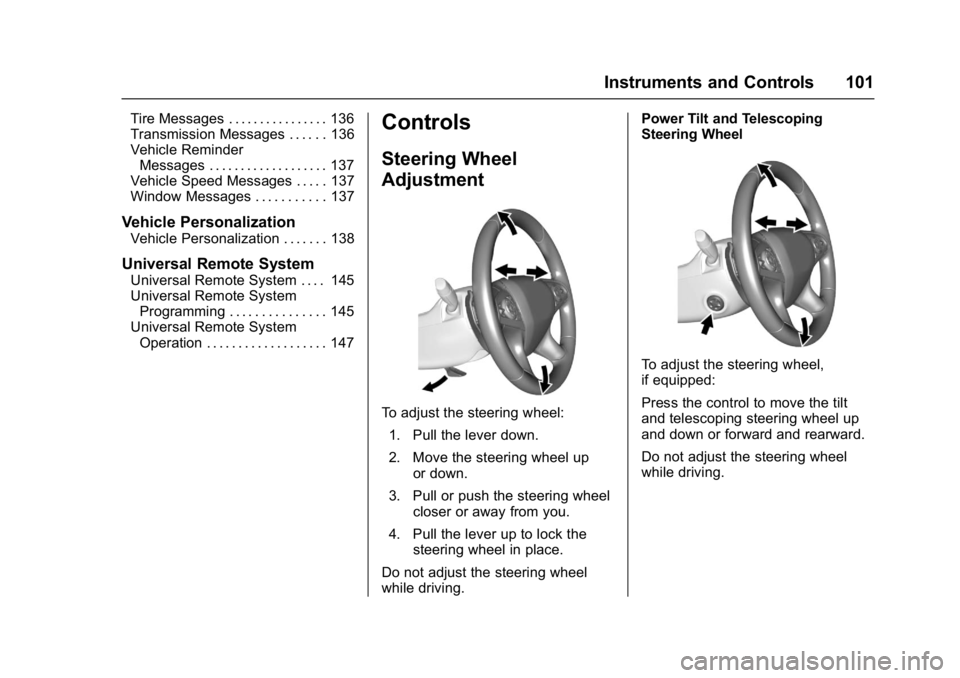
Steering Wheel
Adjustment
To adjust the steering wheel:
1. Pull the lever down.
2. Move the steering wheel up or down.
3. Pull or push the steering wheel closer or away from you.
4. Pull the lever up to lock the steering wheel in place.
Do not adjust the steering wheel
while driving. Power Tilt and Telescoping
Steering Wheel
To adjust the steering wheel,
if equipped:
Press the control to move the tilt
and telescoping steering wheel up
and down or forward and rearward.
Do not adjust the steering wheel
while driving.
Page 106 of 346

Buick LaCrosse Owner Manual (GMNA-Localizing-U.S./Canada-9803782) -
2017 - crc - 9/7/16
Instruments and Controls 105
Power Outlet 110/120 Volt
Alternating Current
The vehicle may have a power
outlet that can be used to plug in
electrical equipment with a
maximum limit of 150 watts.
The power outlet is on the rear of
the center console.
An indicator light on the outlet
comes on when in use. The light
comes on when the ignition is in
ON/RUN, equipment requiring less
than 150 watts is plugged into the
outlet, and no system fault is
detected.The indicator light does not come on
when the ignition is in LOCK/OFF or
if the equipment is not fully seated
into the outlet.
If you try to connect equipment
using more than 150 watts or a
system fault is detected, the
equipment may operate for a short
period and turn itself off.
A protection circuit shuts off the
power supply and the indicator light
turns off. To reset the circuit, unplug
the item and plug it back in or turn
the Remote Accessory Power (RAP)
off and then back on. See
Retained
Accessory Power (RAP) 0178.
Prolonged use of the power outlet at
the maximum load of 150 watts may
cause the outlet to overheat and
automatically shut down. The power
restarts when equipment that
operates within the limit is plugged
into the outlet and a system fault is
not detected. The power outlet is not designed for
the following equipment, and may
not work properly if any of the
following is plugged in:
.
Equipment with high initial peak
wattage, such as
compressor-driven refrigerators
and electric power tools.
. Other equipment requiring an
extremely stable power supply,
such as
microcomputer-controlled
electric blankets, and touch
sensor lamps.
. Medical equipment.
Page 133 of 346

Buick LaCrosse Owner Manual (GMNA-Localizing-U.S./Canada-9803782) -
2017 - crc - 9/7/16
132 Instruments and Controls
OIL PRESSURE LOW—STOP
ENGINE
This message displays if low oil
pressure levels occur. Stop the
vehicle as soon as safely possible
and do not operate it until the cause
of the low oil pressure has been
corrected. Check the oil as soon as
possible and have the vehicle
serviced by your dealer.
Engine Power Messages
ENGINE POWER IS REDUCED
This message displays when the
vehicle's engine power is reduced.
Reduced engine power can affect
the vehicle's ability to accelerate.
If this message is on, but there is no
reduction in performance, proceed
to your destination. The
performance may be reduced the
next time the vehicle is driven. The
vehicle may be driven at a reduced
speed while this message is on, but
maximum acceleration and speed
may be reduced. Anytime this
message stays on, or displays repeatedly, the vehicle should be
taken to your dealer for service as
soon as possible.
Fuel System Messages
FUEL LEVEL LOW
This message displays when the
vehicle is low on fuel. Refuel as
soon as possible.
Key and Lock Messages
NO REMOTE DETECTED
This message displays when the
transmitter battery may be weak.
See
“Starting the Vehicle with a Low
Transmitter Battery” underRemote
Keyless Entry (RKE) System
Operation 027.
NO REMOTE DETECTED
PRESS BRAKE TO RESTART
This message displays when
attempting to turn off the vehicle
and the RKE transmitter is no longer
detected. Restarting is allowed
without the RKE transmitter for five minutes. Press the brake pedal
and ENGINE START/STOP to
restart the vehicle.
NO REMOTE KEY WAS
DETECTED PLACE KEY IN
TRANSMITTER POCKET THEN
START YOUR VEHICLE
This message displays when trying
to start the vehicle if an RKE
transmitter is not detected. The
transmitter battery may be weak.
See
“Starting the Vehicle with a Low
Transmitter Battery” underRemote
Keyless Entry (RKE) System
Operation 027.
REMOTE LEFT IN VEHICLE
This message displays when
leaving the vehicle with the RKE
transmitter still inside.
REPLACE BATTERY IN
REMOTE KEY
This message displays when the
battery in the RKE transmitter needs
to be replaced.
Page 140 of 346

Buick LaCrosse Owner Manual (GMNA-Localizing-U.S./Canada-9803782) -
2017 - crc - 9/7/16
Instruments and Controls 139
Radio
To manage the radio features, see
“Radio Setup”under“Setting Radio
Preferences” in the infotainment
manual.
Vehicle
Select and the following may be
displayed:
. Climate and Air Quality
. Collision/Detection Systems
. Comfort and Convenience
. Lighting
. Power Door Locks
. Remote Lock, Unlock, Start
Climate and Air Quality
Select and the following may be
displayed:
. Auto Fan Speed
. Air Quality Sensor
. Auto Defog
. Auto Rear Defog Auto Fan Speed
This feature will set the auto fan
speed.
Select Low, Medium, or High.
Air Quality Sensor
This feature may operate the
recirculation mode automatically.
Select Off, Low Sensitivity, or High
Sensitivity.
Auto Defog
If equipped, the front defog will
automatically react to temperature
and humidity conditions that may
cause fogging.
Select Off or On.
Auto Rear Defog
This allows the Auto Rear Defog to
be turned on or off. This feature will
automatically turn on the rear
window defogger when it is cold
outside.
Select Off or On.
Collision/Detection Systems
Select and the following may be
displayed:
.
Alert Type
. Forward Collision System
. Front Pedestrian Detection
. Rear Cross Traffic Alert
. Go Notifier or Adaptive Cruise
Go Notifier
. Lane Change Alert
. Side Blind Zone Alert
Alert Type
This feature allows the alert type to
be changed for the Safety
Alert Seat.
Select Beeps or Safety Alert Seat.
Forward Collision System
This feature will turn on or off the
Forward Collision Alert (FCA) and
Forward Automatic Braking (FAB).
The Off setting disables all FCA and
FAB functions. With the Alert and
Brake setting, both FCA and FAB