2017 BUICK LACROSSE transmission
[x] Cancel search: transmissionPage 137 of 346

Buick LaCrosse Owner Manual (GMNA-Localizing-U.S./Canada-9803782) -
2017 - crc - 9/7/16
136 Instruments and Controls
Steering System
Messages
STEERING ASSIST IS
REDUCED DRIVE WITH CARE
This message may display if a
problem occurs with the electric
power steering system. If this
message appears, steering effort
may be slightly higher than normal.
The vehicle is still safe to drive. Use
caution while in reduced assist
mode. If this message is persistent
or appears repeatedly, take the
vehicle to your dealer for service.
SeeSteering 0165.
Starting the Vehicle
Messages
PRESS BRAKE TO START
This message is displayed when
attempting to start the vehicle
without first pressing the brake
pedal.
SERVICE KEYLESS START
SYSTEM
This message is displayed if there is
a problem with the pushbutton start
system. Take the vehicle to your
dealer for service.
Tire Messages
SERVICE TIRE MONITOR
SYSTEM
This message displays if there is a
problem with the Tire Pressure
Monitor System (TPMS). See Tire
Pressure Monitor Operation 0264.
TIRE LEARNING ACTIVE
This message displays when the
system is learning new tires. See
Tire Pressure Monitor Operation
0264.
TIRE PRESSURE LOW ADD
AIR TO TIRE
On vehicles with the Tire Pressure
Monitor System (TPMS), this
message displays when the
pressure in one or more of the
vehicle's tires is low. The low tire pressure warning light
will also come on. See
Tire
Pressure Light 0119.
If a tire pressure message displays,
inflate the tires until the tire pressure
is equal to the values shown on the
Tire and Loading Information label.
See Tires 0254, Vehicle Load
Limits 0170, and Tire Pressure
0 261.
More than one tire pressure
message can be received at a time.
The DIC also shows the tire
pressure values. See Driver
Information Center (DIC) 0122.
Transmission Messages
SERVICE TRANSMISSION
There may be a problem with the
transmission. See your dealer.
SERVICE TRANSMISSION
NOW UNABLE TO
SHIFT SOON
The transmission needs service.
Unless the vehicle is serviced, the
transmission will be unable to be
Page 138 of 346

Buick LaCrosse Owner Manual (GMNA-Localizing-U.S./Canada-9803782) -
2017 - crc - 9/7/16
Instruments and Controls 137
shifted out of P (Park) soon. Have
the vehicle serviced as soon as
possible.
SERVICE SHIFTER SEE
OWNER’S MANUAL
The shift lever needs service. Have
the vehicle serviced as soon as
possible. If the vehicle is
automatically shifting into P (Park),
check to see if the P (Park) button
on top of the shifter is stuck. To
operate the vehicle, hold the shift
lever in the desired gear,
R (Reverse) or D (Drive), until
vehicle speed exceeds 15 km/h
(10 mph), then release the shift
lever.
SHIFT DENIED
This message displays when
attempting to shift to a gear not
appropriate for the vehicle speed
and engine revolutions per
minute (rpm).
SHIFT TO PARK
This message displays when the
transmission needs to be shifted to
P (Park). This may appear when
turning the ignition off if the vehicle
is not in P (Park).
TRANSMISSION HOT—IDLE
ENGINE
This message displays and a chime
sounds if the transmission fluid in
the vehicle gets hot. Driving with the
transmission fluid temperature high
can cause damage to the vehicle.
Stop the vehicle and let it idle to
allow the transmission to cool. This
message clears when the fluid
temperature reaches a safe level.
Vehicle Reminder
Messages
REAR SEAT REMINDER LOOK
IN REAR SEAT
This message displays under
certain conditions indicating there
may be an item or passenger in the
rear seat. Check before exiting the
vehicle.
Vehicle Speed Messages
SPEED LIMIT EXCEEDED
This message is displayed when the
vehicle speed is greater than the
speed warning speed. See "Speed
Warning" under Instrument Cluster
0 108.
SPEED LIMIT SET TO XXX
This message is displayed when the
speed warning is set. See "Speed
Warning" under Instrument Cluster
0 108.
Window Messages
OPEN, THEN CLOSE DRIVER/
PASSENGER WINDOW
This message is displayed when the
window needs to be reprogrammed.
If the vehicle's battery has been
discharged or disconnected, you
may need to program each front
window for the express-up feature to
work. See Power Windows 045.
Page 146 of 346
Buick LaCrosse Owner Manual (GMNA-Localizing-U.S./Canada-9803782) -
2017 - crc - 9/7/16
Instruments and Controls 145
Universal Remote
System
SeeRadio Frequency Statement
0 321.
Universal Remote System
Programming
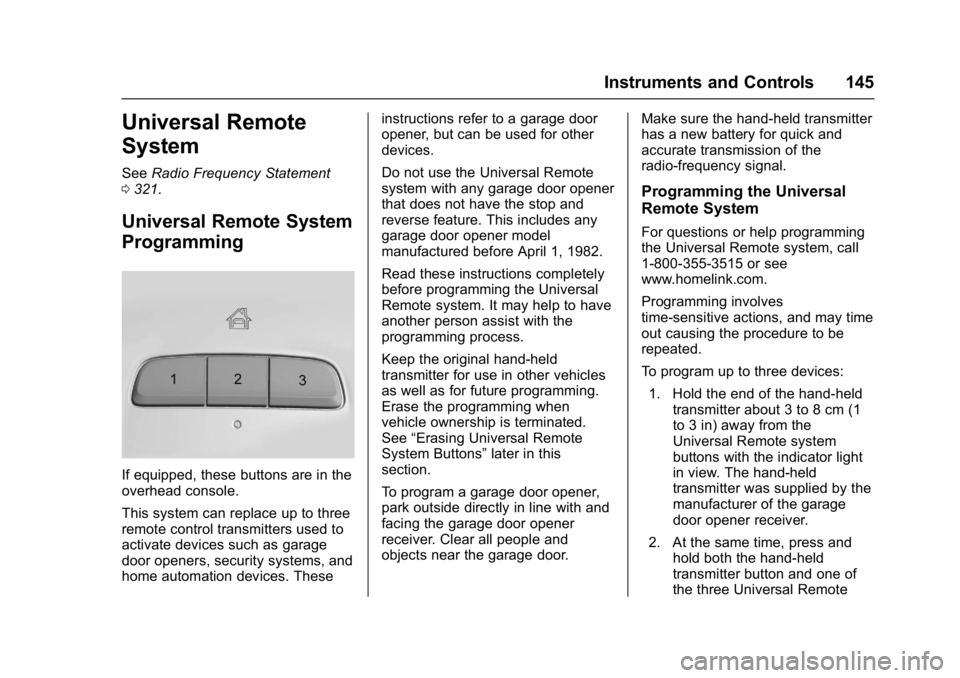
If equipped, these buttons are in the
overhead console.
This system can replace up to three
remote control transmitters used to
activate devices such as garage
door openers, security systems, and
home automation devices. These instructions refer to a garage door
opener, but can be used for other
devices.
Do not use the Universal Remote
system with any garage door opener
that does not have the stop and
reverse feature. This includes any
garage door opener model
manufactured before April 1, 1982.
Read these instructions completely
before programming the Universal
Remote system. It may help to have
another person assist with the
programming process.
Keep the original hand-held
transmitter for use in other vehicles
as well as for future programming.
Erase the programming when
vehicle ownership is terminated.
See
“Erasing Universal Remote
System Buttons” later in this
section.
To program a garage door opener,
park outside directly in line with and
facing the garage door opener
receiver. Clear all people and
objects near the garage door. Make sure the hand-held transmitter
has a new battery for quick and
accurate transmission of the
radio-frequency signal.
Programming the Universal
Remote System
For questions or help programming
the Universal Remote system, call
1-800-355-3515 or see
www.homelink.com.
Programming involves
time-sensitive actions, and may time
out causing the procedure to be
repeated.
To program up to three devices:
1. Hold the end of the hand-held transmitter about 3 to 8 cm (1
to 3 in) away from the
Universal Remote system
buttons with the indicator light
in view. The hand-held
transmitter was supplied by the
manufacturer of the garage
door opener receiver.
2. At the same time, press and hold both the hand-held
transmitter button and one of
the three Universal Remote
Page 148 of 346
Buick LaCrosse Owner Manual (GMNA-Localizing-U.S./Canada-9803782) -
2017 - crc - 9/7/16
Instruments and Controls 147
Radio Signals for Canada and
Some Gate Operators
For questions or programming help
call 1-800-355-3515 or see
www.homelink.com.
Canadian radio-frequency laws and
some U.S. gate operators require
transmitter signals to time out or
quit after several seconds of
transmission. This may not be long
enough for the Universal Remote
system to pick up the signal during
programming.
If the programming did not work,
replace Step 2 under“Programming
the Universal Remote System” with
the following:
Press and hold the Universal
Remote system button while
pressing and releasing the
hand-held transmitter button every
two seconds until the signal has
been successfully accepted by the
Universal Remote system. The
Universal Remote system indicator
light will flash slowly at first and then
rapidly. Proceed with Step 3 under
“Programming the Universal Remote
System” to complete.
Universal Remote System
Operation
Using the Universal Remote
System
Press and hold the appropriate
Universal Remote system button for
at least one-half second. The
indicator light will come on while the
signal is being transmitted.
Erasing Universal Remote
System Buttons
Erase all programmed buttons when
vehicle ownership is terminated.
To erase:
1. Press and hold the two outside buttons until the indicator light
begins to flash. This should
take about 10 seconds.
2. Release both buttons.
Reprogramming a Single
Universal Remote System
Button
To reprogram any of the system
buttons: 1. Press and hold any one of the buttons. Do not release the
button.
2. The indicator light will begin to flash after 20 seconds. Without
releasing the button, proceed
with Step 1 under
“Programming the Universal
Remote System.”
Page 150 of 346

Buick LaCrosse Owner Manual (GMNA-Localizing-U.S./Canada-9803782) -
2017 - crc - 9/7/16
Lighting 149
5:Turns on the headlamps
together with the parking lamps and
instrument panel lights.
Exterior Lamps Off
Reminder
A warning chime sounds if the driver
door is opened while the ignition is
off and the exterior lamps are on.
Headlamp High/
Low-Beam Changer
Push the turn signal lever away
from you and release to turn the
high beams on. To return to low
beams, push the lever again or pull
it toward you and release.
This indicator light turns on in the
instrument cluster when the
high-beam headlamps are on.
Flash-to-Pass
To flash the high beams, pull the
turn signal lever toward you, and
release.
Daytime Running
Lamps (DRL)
DRL can make it easier for others to
see the front of your vehicle during
the day. Fully functional DRL are
required on all vehicles first sold in
Canada.
If equipped with High Intensity
Discharge (HID) headlamps, the
dedicated DRL will come on when
all of the following conditions
are met:
. The ignition is on.
. The exterior lamps control is
in AUTO.
. The light sensor determines it is
daytime.
. The parking brake is released or
the vehicle is not in P (Park). When the DRL are on, the taillamps,
sidemarker lamps, instrument panel
lights, and other lamps will not
be on.
The DRL turn off when the
headlamps are turned to
Oor the
ignition is off. For vehicles first sold
in Canada, the DRL can only be
turned off when the transmission is
in P (Park).
This vehicle may have a DRL
disabling function. When the DRL
are on and a turn signal is activated,
the DRL on that side will be off until
the turn signal goes off.
Automatic Headlamp
System
When the exterior lamp control is
set to AUTO and it is dark enough
outside, the headlamps come on
automatically.
Page 151 of 346

Buick LaCrosse Owner Manual (GMNA-Localizing-U.S./Canada-9803782) -
2017 - crc - 9/7/16
150 Lighting
There is a light sensor on top of the
instrument panel. Do not cover the
sensor; otherwise the headlamps
will come on when they are not
needed.
The system may also turn on the
headlamps when driving through a
parking garage or tunnel.
When it is bright enough outside,
the headlamps will turn off or may
change to Daytime Running
Lamps (DRL).
The automatic headlamp system
turns off when the exterior lamp
control is turned to
Oor the ignition
is off.
Adaptive Forward
Lighting (AFL)
If equipped, the AFL pivots the
headlamps horizontally to provide
greater road illumination while
turning. To enable AFL, set the
exterior lamp control to the AUTO
position. Moving the switch out of
the AUTO position deactivates the
system. AFL operates when the
vehicle speed is greater than 3 km/h
(2 mph). AFL does not operate
when the transmission is in
R (Reverse). AFL is not immediately
operable after starting the vehicle;
driving a short distance is required
to calibrate the AFL. See Exterior
Lamp Controls 0148.
Hazard Warning Flashers
|:Press to make the front and
rear turn signal lamps flash on and
off. Press again to turn the
flashers off.
The hazard warning flashers turn on
automatically if the airbags deploy.
Page 163 of 346

Buick LaCrosse Owner Manual (GMNA-Localizing-U.S./Canada-9803782) -
2017 - crc - 9/7/16
162 Driving and Operating
Driving and
Operating
Driving Information
Distracted Driving . . . . . . . . . . . . 163
Defensive Driving . . . . . . . . . . . . . 164
Drunk Driving . . . . . . . . . . . . . . . . . 164
Control of a Vehicle . . . . . . . . . . . 164
Braking . . . . . . . . . . . . . . . . . . . . . . . 164
Steering . . . . . . . . . . . . . . . . . . . . . . 165
Off-Road Recovery . . . . . . . . . . . 165
Loss of Control . . . . . . . . . . . . . . . 166
Driving on Wet Roads . . . . . . . . 166
Hill and Mountain Roads . . . . . 167
Winter Driving . . . . . . . . . . . . . . . . 168
If the Vehicle Is Stuck . . . . . . . . 169
Vehicle Load Limits . . . . . . . . . . . 170
Starting and Operating
New Vehicle Break-In . . . . . . . . . 173
Ignition Positions . . . . . . . . . . . . . 173
Starting the Engine . . . . . . . . . . . 175
Engine Heater . . . . . . . . . . . . . . . . 177
Retained AccessoryPower (RAP) . . . . . . . . . . . . . . . . 178
Shifting Into Park . . . . . . . . . . . . . 179
Shifting out of Park . . . . . . . . . . . 179
Parking over Things That Burn . . . . . . . . . . . . . . . . . . . 180 Extended Parking . . . . . . . . . . . . 180
Engine Exhaust
Engine Exhaust . . . . . . . . . . . . . . 180
Running the Vehicle While
Parked . . . . . . . . . . . . . . . . . . . . . . 181
Automatic Transmission
Automatic Transmission . . . . . . 181
Manual Mode . . . . . . . . . . . . . . . . . 185
Drive Systems
All-Wheel Drive . . . . . . . . . . . . . . . 186
Brakes
Antilock BrakeSystem (ABS) . . . . . . . . . . . . . . . 186
Electric Parking Brake . . . . . . . . 187
Brake Assist . . . . . . . . . . . . . . . . . . 188
Automatic Vehicle Hold (AVH) . . . . . . . . . . . . . . . . . . 189
Ride Control Systems
Traction Control/ElectronicStability Control . . . . . . . . . . . . . 190
Selective Ride Control . . . . . . . . 192
Cruise Control
Cruise Control . . . . . . . . . . . . . . . . 192
Adaptive Cruise Control . . . . . . 194
Driver Assistance Systems
Driver Assistance Systems . . . 202 Assistance Systems for
Parking or Backing . . . . . . . . . . 203
Assistance Systems for Driving . . . . . . . . . . . . . . . . . . . . . . 206
Forward Collision Alert (FCA)
System . . . . . . . . . . . . . . . . . . . . . . 207
Forward Automatic Braking (FAB) . . . . . . . . . . . . . . . 209
Front Pedestrian Braking (FPB) System . . . . . . . . . . . . . . . 210
Side Blind Zone Alert (SBZA) . . . . . . . . . . . . . . . . 212
Lane Change Alert (LCA) . . . . . 213
Lane Departure Warning (LDW) . . . . . . . . . . . . . 215
Lane Keep Assist (LKA) . . . . . . 215
Fuel
Fuel . . . . . . . . . . . . . . . . . . . . . . . . . . 217
California Fuel Requirements . . . . . . . . . . . . . . . 217
Fuels in Foreign Countries . . . 218
Fuel Additives . . . . . . . . . . . . . . . . 218
Filling the Tank . . . . . . . . . . . . . . . 218
Filling a Portable Fuel Container . . . . . . . . . . . . . . . . . . . 219
Trailer Towing
General TowingInformation . . . . . . . . . . . . . . . . . . 220
Page 168 of 346
Buick LaCrosse Owner Manual (GMNA-Localizing-U.S./Canada-9803782) -
2017 - crc - 9/7/16
Driving and Operating 167
Warning (Continued)
After driving through a large
puddle of water or a car/vehicle
wash, lightly apply the brake
pedal until the brakes work
normally.
Flowing or rushing water creates
strong forces. Driving through
flowing water could cause the
vehicle to be carried away. If this
happens, you and other vehicle
occupants could drown. Do not
ignore police warnings and be
very cautious about trying to drive
through flowing water.
Hydroplaning
Hydroplaning is dangerous. Water
can build up under the vehicle's
tires so they actually ride on the
water. This can happen if the road is
wet enough and you are going fast
enough. When the vehicle is
hydroplaning, it has little or no
contact with the road.There is no hard and fast rule about
hydroplaning. The best advice is to
slow down when the road is wet.
Other Rainy Weather Tips
Besides slowing down, other wet
weather driving tips include:
.
Allow extra following distance.
. Pass with caution.
. Keep windshield wiping
equipment in good shape.
. Keep the windshield washer fluid
reservoir filled.
. Have good tires with proper
tread depth. See Tires0254.
. Turn off cruise control.
Hill and Mountain Roads
Driving on steep hills or through
mountains is different than driving
on flat or rolling terrain. Tips include:
.
Keep the vehicle serviced and in
good shape.
. Check all fluid levels and brakes,
tires, cooling system, and
transmission. .
Shift to a lower gear when going
down steep or long hills.
{Warning
Using the brakes to slow the
vehicle on a long downhill slope
can cause brake overheating, can
reduce brake performance, and
could result in a loss of braking.
Shift the transmission to a lower
gear to let the engine assist the
brakes on a steep downhill slope.
{Warning
Coasting downhill in N (Neutral)
or with the ignition off is
dangerous. This can cause
overheating of the brakes and
loss of steering. Always have the
engine running and the vehicle
in gear.
. Drive at speeds that keep the
vehicle in its own lane. Do not
swing wide or cross the
center line.