2017 BUICK ENCLAVE Rear radio
[x] Cancel search: Rear radioPage 168 of 366

Buick Enclave Owner Manual (GMNA-Localizing-U.S./Canada/Mexico-
9955666) - 2017 - crc - 8/4/16
Infotainment System 167
compressed audio file. The empty
folder(s) are not displayed or
numbered.
No Folder
When the CD only contains
compressed audio files without any
folders or playlists, all files are
under the root folder.
File System and Naming
The song titles, artists, albums, and
genres are taken from the file's ID3
tag and are only displayed if present
in the tag. If a song title is not
present in the ID3 tag, the radio
displays the file name as the
track name.
Preprogrammed Playlists
The radio recognizes
preprogrammed playlists; however,
there is no editing capability. These
playlists are treated as special
folders containing compressed
audio song files.Auxiliary Devices
The vehicle has a 3.5 mm (1/8 in)
auxiliary input jack on the faceplate
and a USB port in the center stack.
If equipped, there are two USB
ports on the rear of the center
console that can be used for
charging only. They can charge
devices that draw 2.1 amps or less.
See the device’s owner manual for
the specification.
Using the 3.5 mm (1/8 in)
Auxiliary Input Jack
This is not an audio output; do not
plug a headphone set into the front
auxiliary input jack. Connect an
auxiliary input device such as an
iPod, laptop computer, MP3 player,
CD player, or cassette tape player
to the auxiliary input jack for use as
another source for audio listening.
Drivers are encouraged to set up
any auxiliary device while the
vehicle is in P (Park). See
Defensive Driving 0189 for more
information on driver distraction. To use an auxiliary input device,
connect a 3.5 mm (1/8 in) cable to
the radio's front auxiliary input jack.
Press SRCE to select the device.
Using the USB Port
The USB port can control a USB
storage device or an iPod using the
radio buttons and knobs.
USB Supported Devices
.
USB Flash Drives
. Portable USB Hard Drives
. Fifth generation or later iPod
. iPod classic
®(6th generation)
. iPod nano
®(3G, 4G, 5G,
and 6G)
. iPod touch
®(1G, 2G, 3G,
and 4G)
. iPhone
®(2G, 3G, 3GS, 4, and 5)
. iPad
®(1G, 2G)
Not all iPods and USB drives are
compatible with the USB port.
Page 170 of 366
Buick Enclave Owner Manual (GMNA-Localizing-U.S./Canada/Mexico-
9955666) - 2017 - crc - 8/4/16
Infotainment System 169
Rear Seat
Infotainment
Rear Seat Audio (RSA)
System
If equipped with RSA, rear seat
passengers can listen to and control
any of the music sources: radio,
CDs, DVDs, or other auxiliary
sources. The rear seat passengers
can only control the music sources
the front seat passengers are not
listening to (except on some radios
where dual control is allowed). For
example, rear seat passengers can
control a CD and listen to it through
the headphones, while the driver
listens to the radio through the front
speakers. The rear seat passengers
have control of the volume for each
set of headphones.
To turn the RSA off from the front,
press and hold the radio power
button for more than two seconds.
Press the power button on the RSA
to turn it back on.The RSA functions operate even
when the main radio is off. The front
audio system displays
Xwhen the
RSA is on, and disappears from the
display when it is off.
Audio can be heard through wired
headphones (not included) plugged
into the jacks on the RSA. If the
vehicle has this feature, audio can
also be heard on Channel 2 of the
wireless headphones.
The audio system mutes the rear
speakers when the RSA audio is
active through the headphones.
To listen to an iPod or portable
audio device through the RSA,
attach the iPod or portable audio
device to the front auxiliary input (if
available), located on the front audio
system. Turn the iPod on, then
choose the front auxiliary input with
the RSA SRCE button.
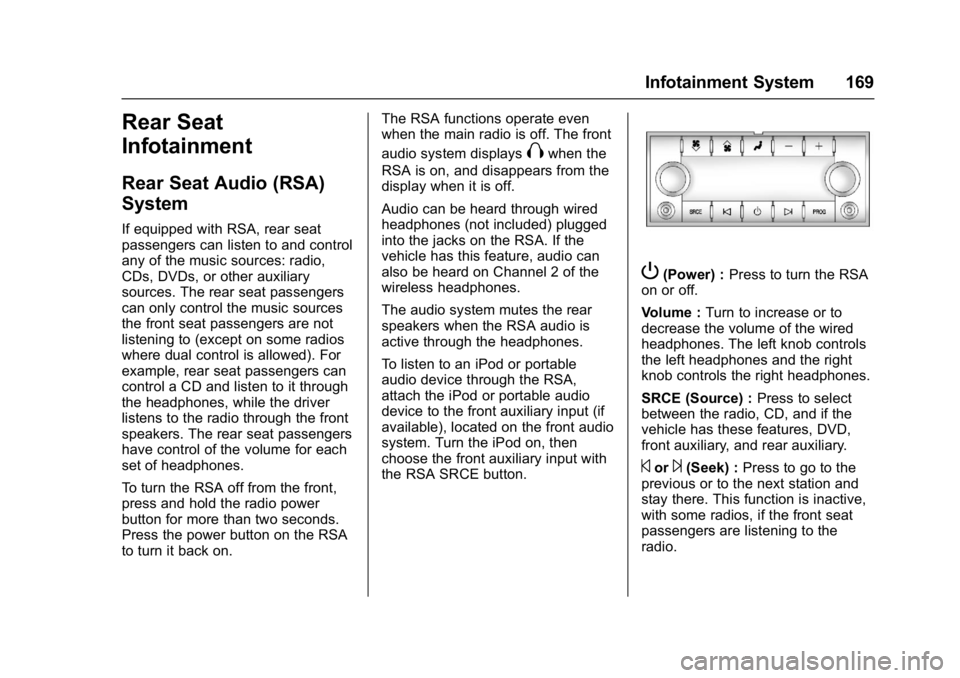
P(Power) : Press to turn the RSA
on or off.
Volume : Turn to increase or to
decrease the volume of the wired
headphones. The left knob controls
the left headphones and the right
knob controls the right headphones.
SRCE (Source) : Press to select
between the radio, CD, and if the
vehicle has these features, DVD,
front auxiliary, and rear auxiliary.
©or¨(Seek) : Press to go to the
previous or to the next station and
stay there. This function is inactive,
with some radios, if the front seat
passengers are listening to the
radio.
Page 224 of 366

Buick Enclave Owner Manual (GMNA-Localizing-U.S./Canada/Mexico-
9955666) - 2017 - crc - 8/4/16
Driving and Operating 223
SBZA can be disabled through the
Driver Information Center (DIC). See
Driver Information Center (DIC)
0122. If SBZA is disabled by the
driver, the SBZA mirror displays will
not light up.
When the System Does Not
Seem to Work Properly
SBZA displays may not come on
when passing a vehicle quickly, for
a stopped vehicle, or when towing a
trailer. Keep in mind the SBZA
detection zones that extend back
from the side of the vehicle do not
move further back when a trailer is
towed. Use extra caution while
changing lanes when towing a
trailer. SBZA may alert you to
objects attached to the vehicle, such
as a trailer, bicycle, or object
extending out to either side of the
vehicle. This is normal system
operation; the vehicle does not need
service.
SBZA may not always alert the
driver to vehicles in the side blind
zone, especially in wet conditions.
The system does not need to be
serviced. The system may light up due to guardrails, signs, trees,
shrubs, and other non-moving
objects. This is normal system
operation; the vehicle does not need
service.
SBZA may not operate when the
SBZA sensors in the left or right
corners of the rear bumper are
covered with mud, dirt, snow, ice,
or slush, or in heavy rainstorms. For
cleaning instructions, see "Washing
the Vehicle" under
Exterior Care
0 304. If the DIC still displays the
system unavailable message after
cleaning both sides of the vehicle
toward the rear corners of the
vehicle, see your dealer.
If the SBZA displays do not light up
when vehicles are in the blind zone
and the system is clean, the system
may need service. Take the vehicle
to your dealer.
When SBZA is disabled for any
reason other than the driver turning
it off, the Side Blind Zone Alert ON
option will not be available on the
DIC menu.
FCC Information
See Radio Frequency
Statement 0340.
Lane Departure
Warning (LDW)
If equipped, LDW may help avoid
crashes due to unintentional lane
departures. It may provide an alert if
the vehicle is crossing a lane
without using a turn signal in that
direction. LDW uses a camera
sensor to detect the lane markings
at speeds of 56 km/h (35 mph) or
greater.
{Warning
The LDW system does not steer
the vehicle. The LDW system
may not:
. Provide enough time to
avoid a crash.
. Detect lane markings under
poor weather or visibility
conditions. This can occur if
(Continued)
Page 267 of 366

Buick Enclave Owner Manual (GMNA-Localizing-U.S./Canada/Mexico-
9955666) - 2017 - crc - 8/4/16
266 Vehicle Care
FusesUsage
DRL/
LO BEAM Daytime running
lamps relay/
Low-beam
headlamp relay
DSPLY Display
FRT WSW Front windshield washer
HTD/
COOL SEAT Heated/Cooled
seats
HVAC HVAC
INADV PWR INT LAMPS Inadvertent power/
Interior lamps
INFOTMNT/ MSM Infotainment/
Memory seat
module
LT TRN SIG Left turn signal lamp
OBS
DET/URS Rear park assist/
Side blind zone
alert/Forward
collision alert/
Universal remote
system
PDM Power mirrors/ Liftgate release Fuses
Usage
PWR MODE Power mode PWR MIR Power mirrors
RDO Radio
REAR WPR Rear wiper
RT TRN SIG Right turn signal lamp
STR WHL ILLUM Steering wheel
illumination
USB CHRG USB charging
Relay Side
Page 280 of 366

Buick Enclave Owner Manual (GMNA-Localizing-U.S./Canada/Mexico-
9955666) - 2017 - crc - 8/4/16
Vehicle Care 279
TPMS sensors are installed and
the sensor matching process is
performed successfully. See
your dealer for service.
. Replacement tires or wheels do
not match the original equipment
tires or wheels. Tires and wheels
other than those recommended
could prevent the TPMS from
functioning properly. See Buying
New Tires 0282.
. Operating electronic devices or
being near facilities using radio
wave frequencies similar to the
TPMS could cause the TPMS
sensors to malfunction.
If the TPMS is not functioning
properly, it cannot detect or signal a
low tire condition. See your dealer
for service if the TPMS malfunction
light and DIC message comes on
and stays on.
TPMS Sensor Matching
Process
Each TPMS sensor has a unique
identification code. The identification
code needs to be matched to a new
tire/wheel position after rotating the tires or replacing one or more of the
TPMS sensors. The TPMS sensor
matching process should also be
performed after replacing a spare
tire with a road tire containing the
TPMS sensor. The malfunction light
and the DIC message should go off
at the next ignition cycle. The
sensors are matched to the tire/
wheel positions, using a TPMS
relearn tool, in the following order:
driver side front tire, passenger side
front tire, passenger side rear tire,
and driver side rear. See your
dealer for service or to purchase a
relearn tool. A TPMS relearn tool
can also be purchased. See Tire
Pressure Monitor Sensor Activation
Tool at
www.gmtoolsandequipment.com or
call 1-800-GM TOOLS
(1-800-468-6657).
There are two minutes to match the
first tire/wheel position, and
five minutes overall to match all four
tire/wheel positions. If it takes
longer, the matching process stops
and must be restarted.
The TPMS sensor matching process
is outlined below:
1. Set the parking brake.
2. Turn the ignition to ON/RUN with the engine off.
3. Press the Remote Keyless Entry (RKE) transmitter's
Q
andKbuttons at the same
time for approximately
five seconds. The horn sounds
twice to signal the receiver is in
relearn mode and TIRE
LEARNING ACTIVE message
displays on the DIC screen.
4. Start with the driver side front tire.
5. Place the relearn tool against the tire sidewall, near the valve
stem. Then press the button to
activate the TPMS sensor.
A horn chirp confirms that the
sensor identification code has
been matched to this tire and
wheel position.
6. Proceed to the passenger side front tire, and repeat the
procedure in Step 5.
Page 362 of 366

Buick Enclave Owner Manual (GMNA-Localizing-U.S./Canada/Mexico-
9955666) - 2017 - crc - 8/4/16
Index 361
Operating ModeOverheated Engine
Protection . . . . . . . . . . . . . . . . . . . 251
Operation Infotainment System . . . . . . . . . . 156
Ordering Service Publications . . . . . . . . . . 339
Outlets Power . . . . . . . . . . . . . . . . . . . . . . . . 108
Overheated Engine Protection Operating Mode . . . . 251
Overheating, Engine . . . . . . . . . . . . 250
Overview . . . . . . . . . . . . . . . . . . . . . . . 156
P
Parade Dimming . . . . . . . . . . . . . . . . 152
Park Shifting Into . . . . . . . . . . . . . . . . . . . 204
Shifting Out of . . . . . . . . . . . . . . . . 205
Tilt Mirrors . . . . . . . . . . . . . . . . . . . . . . 41
Parking
Brake . . . . . . . . . . . . . . . . . . . . . . . . . .211
Brake and P (Park)Mechanism Check . . . . . . . . . . 257
Over Things That Burn . . . . . . . 205
Parking Assist . . . . . . . . . . . . . . . . . . 218
Passenger Airbag Status
Indicator . . . . . . . . . . . . . . . . . . . . . . 114 Passenger Compartment Air
Filter . . . . . . . . . . . . . . . . . . . . . . . . . . 186
Passenger Sensing System . . . . . 72
Perchlorate Materials Requirements, California . . . . . . 237
Personalization Vehicle . . . . . . . . . . . . . . . . . . . . . . . 136
Phone Bluetooth . . . . . . . . . . . . . . . . . . . . . 170
Power Door Locks . . . . . . . . . . . . . . . . . . . . . 33
Mirrors . . . . . . . . . . . . . . . . . . . . . . . . . . 40
Outlets . . . . . . . . . . . . . . . . . . . . . . . 108
Protection, Battery . . . . . . . . . . . . 153
Retained Accessory (RAP) . . . 203
Seat Adjustment . . . . . . . . . . . . . . . . 48
Steering Fluid . . . . . . . . . . . . . . . . . 252
Windows . . . . . . . . . . . . . . . . . . . . . . . 42
Pregnancy, Using Safety Belts . . . 63
Privacy Vehicle Data Recording . . . . . . . 341
Program Courtesy Transportation . . . . . . 336
Proposition 65 Warning,
California . . . . . . . . . . . .237, 255, 297
R
Radio Frequency Statement . . . . 340
Radio Reception . . . . . . . . . . . . . . . . 162
RadiosAM-FM Radio . . . . . . . . . . . . . . . . . 159
Satellite . . . . . . . . . . . . . . . . . . . . . . . 162
Reading Lamps . . . . . . . . . . . . . . . . . 151
Rear Climate Control System . . . . . . . . . . . . . . . . . . . 184, 185
Rear Seat Audio (RSA)
System . . . . . . . . . . . . . . . . . . . . . . . . 169
Rear Seats . . . . . . . . . . . . . . . . . . . . . . 53
Rear Vision Camera (RVC) . . . . . 216
Rear Window Washer/Wiper . . . . 105
Rearview Mirrors Automatic Dimming . . . . . . . . . . . . . 41
Reclining Seatbacks . . . . . . . . . . . . . 49
Recommended Fluids and Lubricants . . . . . . . . . . . . . . . . . . . . . 324
Records Maintenance . . . . . . . . . . . . . . . . . . 326
Recreational Vehicle Towing . . . . 300
Reimbursement Program, GM Mobility . . . . . . . . . . . . . . . . . . . 334
Remote Keyless Entry (RKE) System . . . . . . . . . . . . . . . . . . . . . . . . . 29
Remote Vehicle Start . . . . . . . . . . . . 31
Replacement Bulbs . . . . . . . . . . . . . 260
Page 363 of 366

Buick Enclave Owner Manual (GMNA-Localizing-U.S./Canada/Mexico-
9955666) - 2017 - crc - 8/4/16
362 Index
Replacement PartsAirbags . . . . . . . . . . . . . . . . . . . . . . . . . 77
Maintenance . . . . . . . . . . . . . . . . . . 325
Replacing Airbag System . . . . . . . . 77
Replacing LATCH System Parts after a Crash . . . . . . . . . . . . . 91
Replacing Safety Belt System
Parts after a Crash . . . . . . . . . . . . . 65
Reporting Safety Defects Canadian Government . . . . . . . . 341
General Motors . . . . . . . . . . . . . . . 341
U.S. Government . . . . . . . . . . . . . 340
Restraints Where to Put . . . . . . . . . . . . . . . . . . . 84
Retained Accessory Power (RAP) . . . . . . . . . . . . . . . . . . 203
Ride Control Systems Messages . . . . . . . . . . . . . . . . . . . . 132
Roads Driving, Wet . . . . . . . . . . . . . . . . . . 192
Roadside Assistance
Program . . . . . . . . . . . . . . . . . . . . . . . 334
Roof Sunroof . . . . . . . . . . . . . . . . . . . . . . . . . 44
Roof Rack System . . . . . . . . . . . . . . 100
Rotation, Tires . . . . . . . . . . . . . . . . . . 280 Routing, Engine Drive Belt . . . . . . 329
Running the Vehicle While
Parked . . . . . . . . . . . . . . . . . . . . . . . . 206
S
Safety Belts . . . . . . . . . . . . . . . . . . . . . 57Care . . . . . . . . . . . . . . . . . . . . . . . . . . . . 64
Extender . . . . . . . . . . . . . . . . . . . . . . . . 64
How to Wear Safety Belts
Properly . . . . . . . . . . . . . . . . . . . . . . . 58
Lap-Shoulder Belt . . . . . . . . . . . . . . 59
Reminders . . . . . . . . . . . . . . . . . . . . .113
Replacing after a Crash . . . . . . . . 65
Use During Pregnancy . . . . . . . . . . 63
Safety Defects Reporting Canadian Government . . . . . . . . 341
General Motors . . . . . . . . . . . . . . . 341
U.S. Government . . . . . . . . . . . . . 340
Safety Locks . . . . . . . . . . . . . . . . . . . . . 34
Safety System Check . . . . . . . . . . . . 64
Satellite Radio . . . . . . . . . . . . . . . . . . 162
Scheduling Appointments . . . . . . . 336
Seats Head Restraints . . . . . . . . . . . . . . . . 47
Lumbar Adjustment, Front . . . . . . 49
Memory . . . . . . . . . . . . . . . . . . . . . . . . . 50
Power Adjustment, Front . . . . . . . 48 Seats (cont'd)
Rear . . . . . . . . . . . . . . . . . . . . . . . . . . . . 53
Reclining Seatbacks . . . . . . . . . . . . 49
Third Row Seat . . . . . . . . . . . . . . . . . 55
Securing Child Restraints . . . . 92, 94
Security Light . . . . . . . . . . . . . . . . . . . . . . . . . . 121
Messages . . . . . . . . . . . . . . . . . . . . 133
OnStar
®. . . . . . . . . . . . . . . . . . . . . . 345
Vehicle . . . . . . . . . . . . . . . . . . . . . . . . . 37
Vehicle Alarm . . . . . . . . . . . . . . . . . . . 37
Service . . . . . . . . . . . . . . . . . . . . . . . . . 187 Accessories andModifications . . . . . . . . . . . . . . . . 237
Doing Your Own Work . . . . . . . . 238
Engine Soon Light . . . . . . . . . . . . .116
Maintenance Records . . . . . . . . 326
Maintenance, General Information . . . . . . . . . . . . . . . . . . 314
Parts Identification Label . . . . . 327
Publications Ordering Information . . . . . . . . . . . . . . . . . . 339
Scheduling Appointments . . . . . 336
Vehicle Messages . . . . . . . . . . . . 133
Services Special Application . . . . . . . . . . . 321
Servicing the Airbag . . . . . . . . . . . . . 76
Settings . . . . . . . . . . . . . . . . . . . . . . . . 177