2017 BMW X3 buttons
[x] Cancel search: buttonsPage 137 of 265
▷When fast approaching standing vehicles.
There is a risk of injury or danger to life. Watch
traffic closely and actively intervene in the re‐
spective situations.◀
Overview
Buttons on the steering wheel
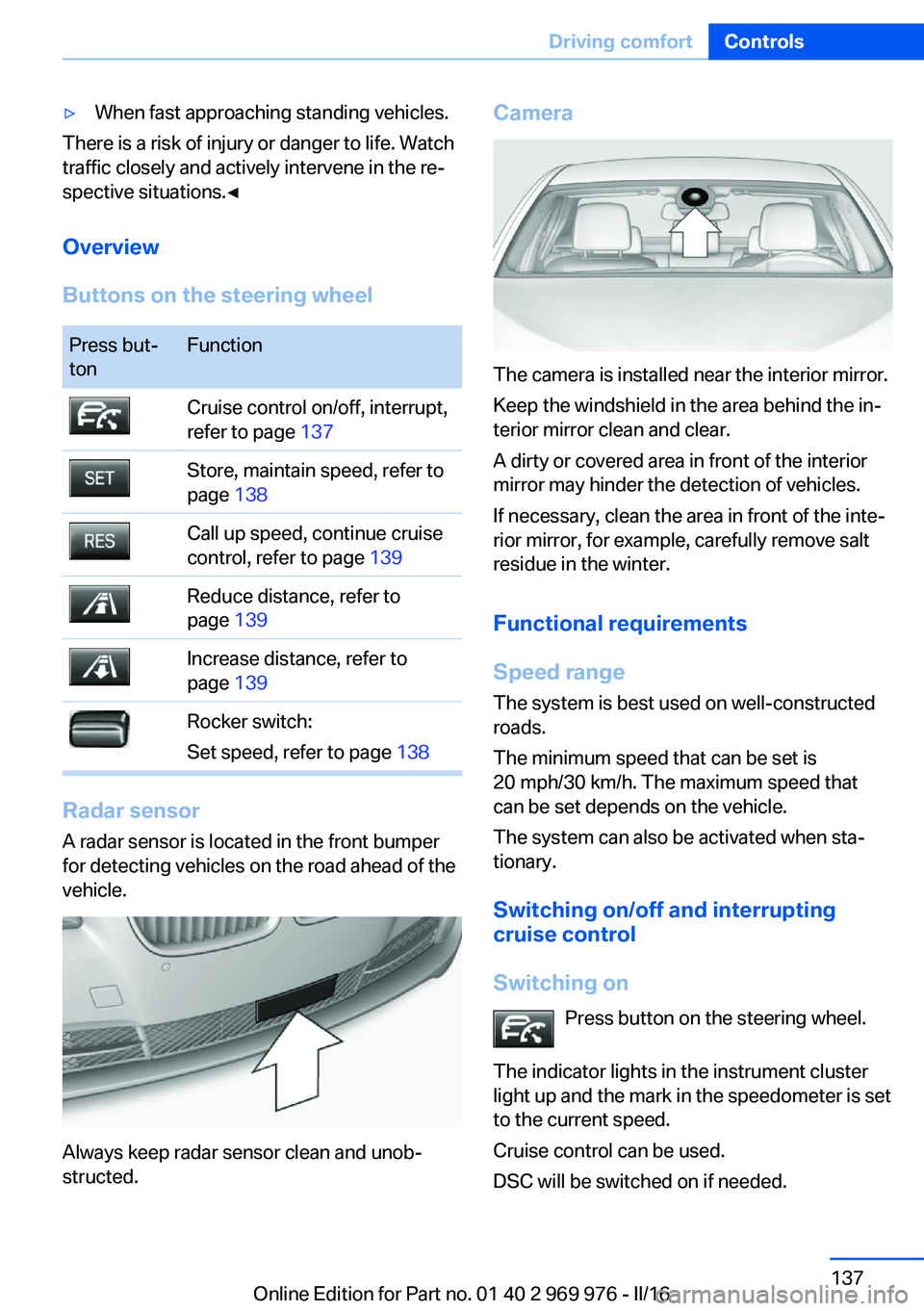
Press but‐
tonFunctionCruise control on/off, interrupt,
refer to page 137Store, maintain speed, refer to
page 138Call up speed, continue cruise
control, refer to page 139Reduce distance, refer to
page 139Increase distance, refer to
page 139Rocker switch:
Set speed, refer to page 138
Radar sensor
A radar sensor is located in the front bumper
for detecting vehicles on the road ahead of the
vehicle.
Always keep radar sensor clean and unob‐
structed.
Camera
The camera is installed near the interior mirror.
Keep the windshield in the area behind the in‐
terior mirror clean and clear.
A dirty or covered area in front of the interior
mirror may hinder the detection of vehicles.
If necessary, clean the area in front of the inte‐
rior mirror, for example, carefully remove salt
residue in the winter.
Functional requirements
Speed range The system is best used on well-constructed
roads.
The minimum speed that can be set is
20 mph/30 km/h. The maximum speed that
can be set depends on the vehicle.
The system can also be activated when sta‐
tionary.
Switching on/off and interrupting
cruise control
Switching on Press button on the steering wheel.
The indicator lights in the instrument cluster
light up and the mark in the speedometer is set
to the current speed.
Cruise control can be used.
DSC will be switched on if needed.
Seite 137Driving comfortControls137
Online Edition for Part no. 01 40 2 969 976 - II/16
Page 142 of 265

Weather
In the event of unfavorable weather and light conditions, e. g. if there is rain, snowfall, slush,
fog or glare, this may result in poorer recogni‐
tion of vehicles as well as short-term interrup‐
tions for vehicles that are already detected. Drive attentively, and react to the current trafficsituation. If necessary, intervene actively, for
example by braking, steering or evading.
Engine power The desired speed is also maintained downhill,but may not be maintained on uphill grades if
engine power is insufficient.
Malfunction
The system cannot be activated if the radar
sensor is not aligned correctly. This may be
caused by damage incurred during parking, for
example.
A Check Control message is displayed if the
system fails.
The function for detecting and responding
when approaching stationary vehicles may be
limited in the following situations:▷During calibration of the camera immedi‐
ately after vehicle delivery.▷If the camera is malfunctioning or dirty. A
Check Control message is displayed.
Cruise control
The concept Using this system, a desired speed can be ad‐
justed using the buttons on the steering wheel.
The system maintains the desired speed. The
system accelerates and brakes automatically
as needed.
General information
Depending on the driving settings, the features
of the cruise control can change in certain
areas.
Information
WARNING
The system does not release from the
personal responsibility to correctly assess the
traffic situation. Based on the limits of the sys‐
tem, it cannot independently react to all traffic
situations. There is risk of an accident. Adjust
the driving style to the traffic conditions. Watch
traffic closely and actively intervene in the re‐
spective situations.◀
WARNING
The use of the system can lead to an in‐
creased risk of accidents in the following situa‐
tions:▷On winding roads.▷In heavy traffic.▷On slippery roads, in fog, snow or rain, or
on a loose road surface.
There is risk of accidents or risk of property
damage. Only use the system if driving at con‐
stant speed is possible.◀
WARNING
The desired speed can be incorrectly ad‐
justed or called up by mistake. There is risk of
an accident. Adjust the desired speed to the
traffic conditions. Watch traffic closely and ac‐
tively intervene in the respective situations.◀
Overview
Buttons on the steering wheel
Press but‐
tonFunctionCruise control on/off, interrupt‐
ing, refer to page 143.Store speed, refer to
page 143.Seite 142ControlsDriving comfort142
Online Edition for Part no. 01 40 2 969 976 - II/16
Page 161 of 265

Air flow, manualTurn the ring to set the desired
air flow.
The higher the rate, the more ef‐
fective the heating or cooling
will be.
The air flow of the automatic climate control
may be reduced automatically to save battery
power.
Manual air distribution
Press buttons repeatedly to select a program:▷Windows.▷Upper body region.▷Floor area.
You may combine these programs as needed.
Defrosts windows and removes
condensation
Press button.
Ice and condensation are quickly re‐
moved from the windshield and the front side
windows.
Adjust air flow with the program active.
If the windows are fogged over, you can also
switch on the cooling function to dehumidify
the air.
Rear window defroster Press button.
The rear window defroster switches
off automatically after a certain period of time.
Microfilter
In external and recirculated air mode the mi‐
crofilter filters dust and pollen from the air.
This filter should be replaced during scheduled
maintenance, refer to page 226, of your vehi‐
cle.Seite 161Climate controlControls161
Online Edition for Part no. 01 40 2 969 976 - II/16
Page 167 of 265
Interior equipmentVehicle features and optionsThis chapter describes all standard, country-
specific and optional features offered with the
series. It also describes features that are not
necessarily available in your car, e. g., due to
the selected options or country versions. This
also applies to safety-related functions and
systems. The respectively applicable country
provisions must be observed when using the
respective features and systems.
Universal Integrated Remote Control
The concept The Universal Integrated Remote Control can
operate up to 3 functions of remote-controlled
systems such as garage door drives or lighting
systems. The Universal Integrated Remote
Control replaces up to 3 different hand-held
transmitters. To operate the remote control,
the buttons on the interior mirror must be pro‐
grammed with the desired functions. The
hand-held transmitter for the particular system
is required in order to program the remote con‐
trol.
Before selling the vehicle, delete the stored
functions for the sake of security.
Information WARNING
Body parts can be jammed when operat‐
ing remote-controlled systems, e.g., the ga‐
rage door, using the integrated universal re‐
mote control. There is a risk of injury or risk of
property damage. Make sure that the area of
movement of the respective system is clear
during programming and operation. Also followthe safety instructions of the hand-held trans‐
mitter.◀
Compatibility If this symbol is printed on the packag‐
ing or in the owner's manual of the sys‐
tem to be controlled, the system is
generally compatible with the Universal Inte‐
grated Remote Control.
If you have any questions, please contact:▷A dealer’s service center or another quali‐
fied service center or repair shop.▷www.homelink.com on the Internet.
HomeLink is a registered trademark of Gentex
Corporation.
Control elements on the interior mirror
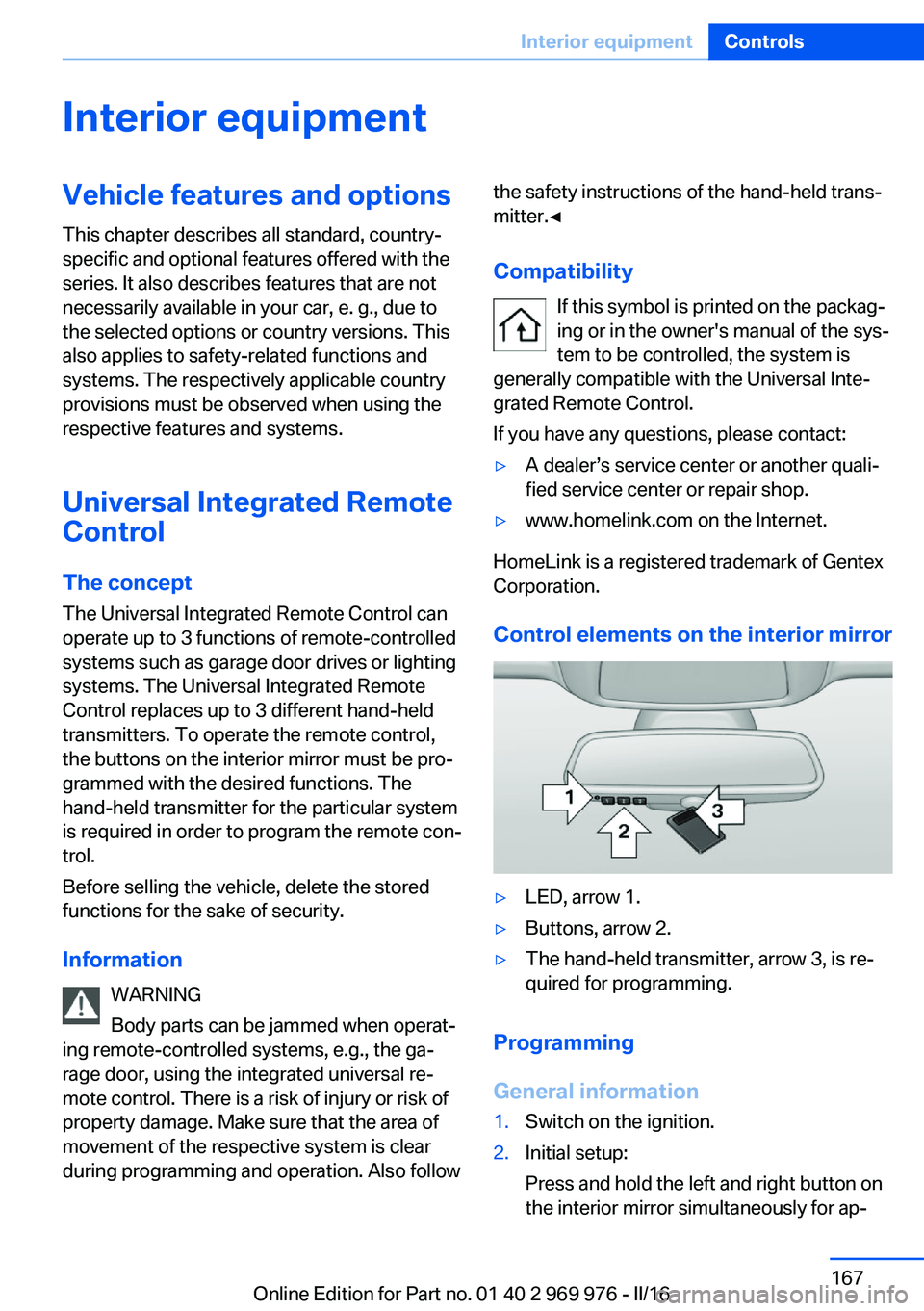
▷LED, arrow 1.▷Buttons, arrow 2.▷The hand-held transmitter, arrow 3, is re‐
quired for programming.
Programming
General information
1.Switch on the ignition.2.Initial setup:
Press and hold the left and right button on
the interior mirror simultaneously for ap‐Seite 167Interior equipmentControls167
Online Edition for Part no. 01 40 2 969 976 - II/16
Page 168 of 265
proximately 20 seconds until the LED on
the interior mirror flashes. This erases all
programming of the buttons on the interior
mirror.3.Hold the hand-held transmitter for the sys‐
tem to be controlled approx. 1 to 3 in‐
ches/2.5 to 8 cm away from the buttons of
the interior mirror. The required distance
depends on the manual transmitter.4.Simultaneously press and hold the button
of the desired function on the hand-held
transmitter and the button to be program‐
med on the interior mirror. The LED on the
interior mirror will begin flashing slowly.5.Release both buttons as soon as the LED
flashes more rapidly. The LED flashing
faster indicates that the button on the inte‐
rior mirror has been programmed.
If the LED does not flash faster after at
least 60 seconds, change the distance be‐
tween the interior mirror and the hand-held
transmitter and repeat the step. Several
more attempts at different distances may
be necessary. Wait at least 15 seconds be‐
tween attempts.
Canada: if programming with the hand-
held transmitter was interrupted, hold
down the interior mirror button and repeat‐
edly press and release the hand-held
transmitter button for 2 seconds.6.To program other functions on other but‐
tons, repeat steps 3 to 5.
The systems can be controlled using the inte‐
rior mirror buttons.
Special feature of the alternating-code wireless system
If you are unable to operate the system after
repeated programming, please check if the
system to be controlled features an alternat‐
ing-code radio system.
Read the system's owner's manual, or press
the programmed button on the interior mirror
longer. If the LED on the interior mirror starts
flashing rapidly and then stays lit constantly for
2 seconds, the system features an alternating-
code radio system. Flashing and continuous il‐
lumination of the LED will repeat for approxi‐
mately 20 seconds.
For systems with an alternating-code radio
system, the universal remote control and the
system also have to be synchronized.
Please read the owner's manual to find out
how to synchronize the system.
Synchronizing is easier with the aid of a sec‐
ond person.
Synchronizing the universal remote control
with the system:1.Park the vehicle within range of the re‐
mote-controlled system.2.Program the relevant button on the interior
mirror as described.3.Locate and press the synchronizing button
on the system being programmed. You
have approx. 30 seconds for the next step.4.Hold down the programmed button on the
interior mirror for approximately 3 seconds
and then release it. If necessary, repeat this
step up to three times in order to finish
synchronization. Once synchronization is
complete, the programmed function will be
carried out.
Reprogramming individual buttons
1.Switch on the ignition.2.Press and hold the interior mirror button to
be programmed.3.As soon as the interior mirror LED starts
flashing slowly, hold the hand-held trans‐
mitter for the system to be controlled ap‐
prox. 1 to 3 inches/2.5 to 8 cm away from
the buttons of the interior mirror. The re‐
quired distance depends on the manual
transmitter.Seite 168ControlsInterior equipment168
Online Edition for Part no. 01 40 2 969 976 - II/16
Page 169 of 265
4.Likewise, press and hold the button of the
desired function on the hand-held trans‐
mitter.5.Release both buttons as soon as the inte‐
rior mirror LED flashes more rapidly. The
LED flashing faster indicates that the but‐
ton on the interior mirror has been pro‐
grammed. The system can then be con‐
trolled by the button on the interior mirror.
If the LED does not flash faster after at
least 60 seconds, change the distance and
repeat the step. Several more attempts at
different distances may be necessary. Wait
at least 15 seconds between attempts.
Canada: if programming with the hand-
held transmitter was interrupted, hold
down the interior mirror button and repeat‐
edly press and release the hand-held
transmitter button for 2 seconds.
Controls
WARNING
Body parts can be jammed when operat‐
ing remote-controlled systems, e.g., the ga‐
rage door, using the integrated universal re‐
mote control. There is a risk of injury or risk of
property damage. Make sure that the area of
movement of the respective system is clear
during programming and operation. Also follow
the safety instructions of the hand-held trans‐
mitter.◀
The system, such as the garage door, can be
operated using the button on the interior mirror
while the engine is running or when the ignition is started. To do this, hold down the button
within receiving range of the system until the
function is activated. The interior mirror LED
stays lit while the wireless signal is being
transmitted.
Deleting stored functions Press and hold the left and right button on the
interior mirror simultaneously for approxi‐
mately 20 seconds until the LED flashes rap‐
idly. All stored functions will be deleted. The
functions cannot be deleted individually.
Sun visor Glare shieldFold the sun visor down or up.
Glare shield from the side
Folding out1.Fold the sun visor down.2.Unhook it from the holder and swing it to
the side.3.Move it back to the desired position.
Folding up
Proceed in the reverse order to close the sun
visor.
Vanity mirror A vanity mirror is located in the sun visor be‐
hind a cover. When the cover is opened, the
mirror lighting switches on.
Ashtray/cigarette lighter
Ashtray
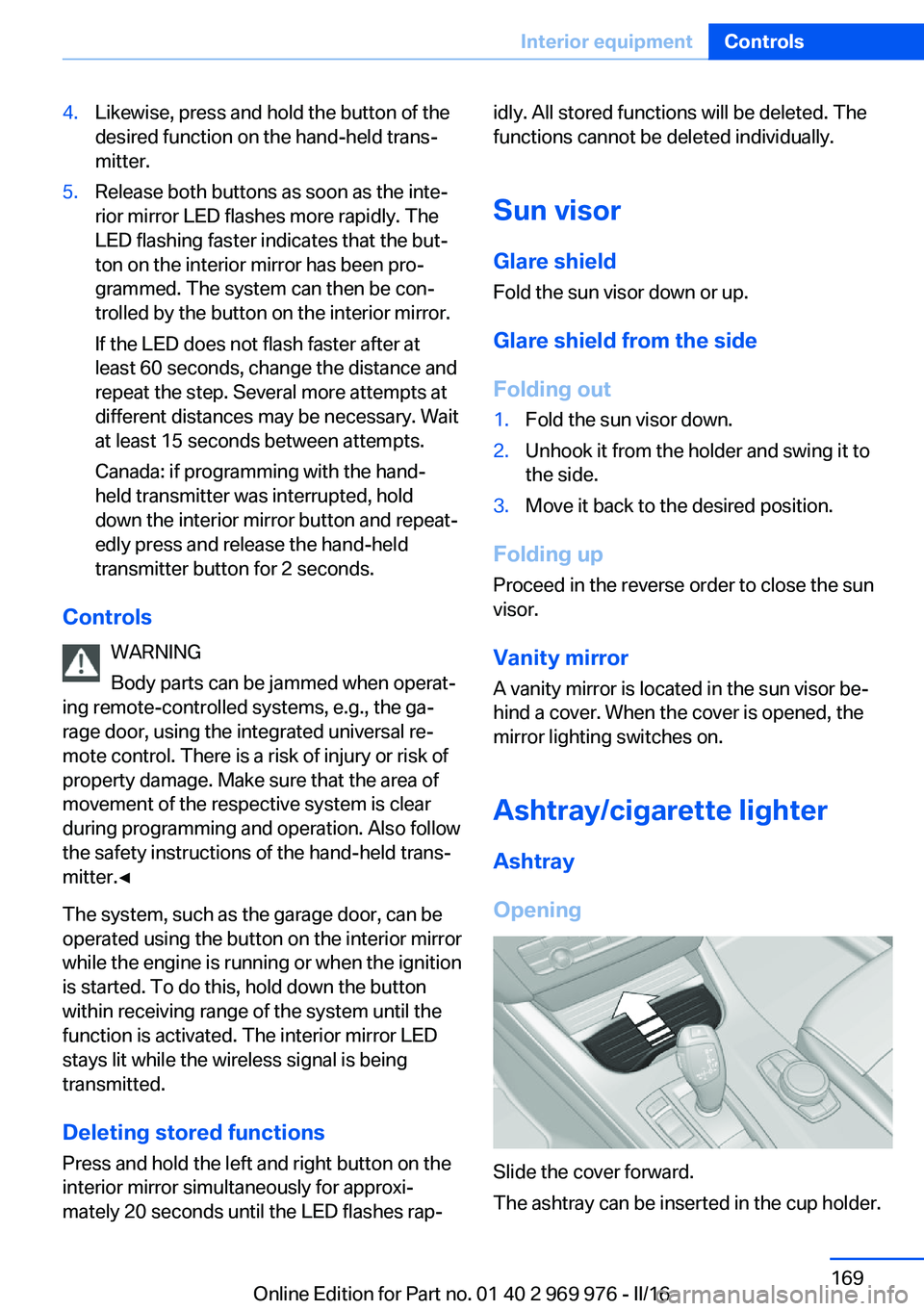
Opening
Slide the cover forward.
The ashtray can be inserted in the cup holder.
Seite 169Interior equipmentControls169
Online Edition for Part no. 01 40 2 969 976 - II/16
Page 259 of 265

LATCH child restraint fixingsystem 66
Launch Control 82
Leather, care 244
LEDs, light-emitting di‐ odes 229
Letters and numbers, enter‐ ing 25
Light 100
Light-alloy wheels, care 245
Light control 102
Light-emitting diodes, LEDs 229
Lighter 169
Lighting 100
Lights and bulbs 229
Light switch 100
Load 187
Loading 186
Lock, door 39
Locking/unlocking via door lock 39
Locking/unlocking with re‐ mote control 38
Locking, automatic 46
Locking, settings 46
Lock, power window 50
Locks, doors, and win‐ dows 67
Low beams 100
Low beams, automatic, see High-beam Assistant 102
Lower back support 55
Low-Sulfur Diesel 201
Luggage rack, see Roof- mounted luggage rack 188
Lumbar support 55
M
Maintenance 226
Maintenance require‐ ments 226
Maintenance, service require‐ ments 91 Maintenance system,
BMW 226
Make-up mirror 169
Malfunction displays, see Check Control 85
Manual air distribu‐ tion 161, 164
Manual air flow 161, 164
Manual brake, see Parking brake 72
Manual mode, Steptronic transmission 80
Manual operation, door lock 39
Manual operation, exterior mirrors 61
Manual operation, Park Dis‐ tance Control PDC 146
Manual operation, rearview camera 148
Manual operation, Top View 151
Marking, run-flat tires 212
Master key, see Remote con‐ trol 34
Maximum cooling 163
Maximum speed, display 92
Maximum speed, winter tires 211
Measurement, units of 97
Medical kit 238
Memory, seat, mirror 60
Menu, EfficientDynamics 192
Menu in instrument clus‐ ter 93
Menus, operating, iDrive 18
Menus, see iDrive operating concept 20
Messages, see Check Con‐ trol 85
Microfilter 161, 164
Minimum tread, tires 210
Mirror 61
Mirror memory 60
Mobile communication devi‐ ces in the vehicle 184 Mobility System 212
Modifications, technical, see Own Safety 7
Moisture in headlight 229
Monitor, see Control Dis‐ play 18
Mounting of child restraint systems 65
Moving sun visor 169
Multifunction steering wheel, buttons 14
N Navigation, see Owner's Manual for Navigation, En‐
tertainment and Communi‐
cation
Neck restraints, front, see Head restraints 58
Neck restraints, rear, see Head restraints 59
Neutral cleaner, see wheel cleaner 245
New wheels and tires 210
O OBD Onboard Diagnosis 227
OBD, see OBD Onboard Di‐ agnosis 227
Obstacle marking, rearview camera 149
Octane rating, see Recom‐ mended fuel grade 201
Odometer 89
Office, see Owner's Manual for Navigation, Entertain‐
ment and Communication
Offroad trips 182
Oil 220
Oil, adding 221
Oil additives 222
Oil change 223
Oil change interval, service requirements 91 Seite 259Everything from A to ZReference259
Online Edition for Part no. 01 40 2 969 976 - II/16