2017 BMW X3 window
[x] Cancel search: windowPage 44 of 265

Unlocking
Grasp the door handle on the driver's or front
passenger door completely, arrow.
This corresponds with pressing the button
on the remote control.
Locking
Touch the surface on the door handle of the
driver's or front passenger door, arrow, with
your finger for approx. 1 second without grasp‐
ing the door handle.
This corresponds with pressing the button
on the remote control.
To save battery power, ensure that the ignition
and all power consumers are deactivated be‐
fore locking the vehicle.
Convenient closing WARNING
With convenient closing, body parts can
be jammed. There is a risk of injury. Make sure
that the area of movement of the doors is clear
during convenient closing.◀
Touch the surface on the door handle of the
driver's or front passenger door, arrow, with
your finger and hold it there without grasping
the door handle.
This corresponds with pressing and holding
the button
on the remote control.
In addition to locking, the windows and the
glass sunroof close and the exterior mirrors
fold in.
Unlocking the tailgate separately
Press button on tailgate's exterior.
This corresponds with pressing the button
on the remote control.
The situation of the doors does not change.
Take the remote control with you and do not
leave it in the cargo area; otherwise, the re‐
mote control is locked inside the vehicle when
the tailgate is closed.
CAUTION
The tailgate swings back and up when it
opens. There is a risk of property damage.
Make sure that the area of movement of the
tailgate is clear during opening and closing.◀
Opening and closing the tailgate with
no-touch activation
General information The tailgate can be opened with no-touch acti‐
vation using the remote control you are carry‐
ing. With automatic tailgate operation, it can also be closed with no-touch activation. Two
sensors detect a forward-directed foot motion
Seite 44ControlsOpening and closing44
Online Edition for Part no. 01 40 2 969 976 - II/16
Page 48 of 265

Indicator lamp on the interior mirror▷The indicator lamp flashes briefly every
2 seconds:
The alarm system is switched on.▷Indicator lamp flashes for approx. 10 sec‐
onds, then it flashes briefly every 2 sec‐
onds:
Interior motion sensor and tilt alarm sensor
are not active, as doors, hood, or tailgate
are not correctly closed. Correctly closed
access points are secured.
When the still open access points are
closed, interior motion sensor and tilt alarm
sensor will be switched on.▷The indicator lamp goes out after unlock‐
ing:
The vehicle has not been tampered with.▷The indicator lamp flashes after unlocking
until the engine ignition is switched on, but
no longer than approx. 5 minutes:
An alarm has been triggered.
Tilt alarm sensor The tilt of the vehicle is monitored.
The alarm system responds in situations such
as attempts to steal a wheel or when the car is
towed.
Interior motion sensor The windows and glass sunroof must be
closed for the system to function properly.
Avoiding unintentional alarms
The tilt alarm sensor and interior motion sen‐
sor can be switched off together, such as in
the following situations:▷In automatic car washes.▷In duplex garages.▷During transport on trains carrying vehi‐
cles, at sea or on a trailer.▷With animals in the vehicle.
Switching off the tilt alarm sensor and
interior motion sensor
Press the remote control button again
within 10 seconds as soon as the vehicle
is locked.
The indicator lamp lights up for approx. 2 sec‐
onds and then continues to flash.
The tilt alarm sensor and interior motion sen‐
sor are turned off until the vehicle is locked
again.
Switching off the alarm
▷Unlock vehicle with the remote control or
switch on the ignition, if needed through
emergency detection of remote control, re‐
fer to page 35.▷With Comfort Access: if you are carrying
the remote control on your person, grasp
the driver side or front passenger side door
handle completely.
Power windows
Information WARNING
Unattended children or animals can
cause the vehicle to move and endanger them‐
selves and traffic, e.g., due to the following ac‐
tions:
▷Pressing the Start/Stop button.Seite 48ControlsOpening and closing48
Online Edition for Part no. 01 40 2 969 976 - II/16
Page 49 of 265

▷Releasing the parking brake.▷Opening and closing the doors or win‐
dows.▷Engaging selector lever position N.▷Using vehicle equipment.
There is risk of accidents or injuries. Do not
leave children or animals unattended in the ve‐
hicle. Take the remote control with you when
exiting and lock the vehicle.◀
Overview
Power windows
Safety switch
Opening
▷ Press the button to the resistance
point.
The window opens while the switch is held.▷ Press the switch beyond the resist‐
ance point.
The window opens automatically. Pressing
the switch again stops the motion.
See also: Convenient opening, refer to
page 38, via remote control.
Closing
WARNING
When operating the windows, body parts
and objects can be jammed. There is a risk of
injury or risk of property damage. Make sure that the area of movement of the windows is
clear during opening and closing.◀▷ Pull the switch to the resistance
point.
The window closes while the switch is
held.▷ Pull the switch beyond the resistance
point.
The window closes automatically. Pulling
again stops the motion.
See also: closing by means of Comfort Access,
refer to page 43.
Pinch protection system WARNING
When operating the windows, body parts
and objects can be jammed. There is a risk of
injury or risk of property damage. Make sure
that the area of movement of the windows is
clear during opening and closing.◀
WARNING
Accessories on the windows such as an‐
tennas can impact jam protection. There is a
risk of injury. Do not install accessories in the
area of movement of the windows.◀
If closing force exceeds a specific threshold as
a window closes, closing is interrupted.
The window reopens slightly.
Seite 49Opening and closingControls49
Online Edition for Part no. 01 40 2 969 976 - II/16
Page 50 of 265

Closing without the pinch protection
system
WARNING
When operating the windows, body parts
and objects can be jammed. There is a risk of
injury or risk of property damage. Make sure
that the area of movement of the windows is
clear during opening and closing.◀
In case of danger from the outside or if ice
might prevent normal closing, proceed as fol‐
lows:1.Pull the switch past the resistance point
and hold it there.
The pinch protection is limited and the
window opens slightly if the closing force
exceeds a certain threshold.2.Pull the switch past the resistance point
again within approx. 4 seconds and hold it
there.
The window closes without jam protection.
Safety switch
General information
The safety switch in the driver's door can be
used to prevent children, for example, from
opening and closing the rear windows using
the switches in the rear.
Information WARNING
When operating the windows, body parts
and objects can be jammed. There is a risk of
injury or risk of property damage. Make sure
that the area of movement of the windows is
clear during opening and closing.◀
In order to prevent uncontrolled closing of the
windows, press the safety switch, for example
if children or animals are carried in the rear.
If an accident of a certain severity occurs, the
safety function is switched off automatically.
Switching on and off
Press button.
The LED lights up if the safety func‐
tion is switched on.
Roller sunblinds Roller sunblinds for the rear side
windows
Pull out the roller sunblind at the loop and hook
it onto the bracket.
WARNING
With closed roller sunblinds and open
windows, the roller sunblinds can be loaded
heavily while driving due to the wind. The roller
sunblinds can be damaged and compromise
the passengers. There is a risk of injuries. Do
not open the windows while driving if the roller
sunblinds are closed.◀
Panoramic glass sunroof
General information The glass sunroof and the sliding visor can be
operated together or separately, using the
same switch.
The glass sunroof is operational when the igni‐
tion is switched on.Seite 50ControlsOpening and closing50
Online Edition for Part no. 01 40 2 969 976 - II/16
Page 66 of 265
Locking the safety belt1.Pull out the belt strap completely.2.Secure the child restraint system with the
safety belt.3.Allow the belt strap to be pulled in and pull
it tight against the child restraint system.
The safety belt is locked.Unlocking the safety belt1.Unbuckle the belt buckle.2.Remove the child restraint system.3.Allow the belt strap to be pulled in com‐
pletely.
LATCH child restraint fixing system
Information
LATCH: Lower Anchors and Tether for Chil‐
dren.
Pay attention to the operating and safety infor‐
mation of the child restraint system manufac‐
turer when installing and using LATCH child
restraint fixing system.
Mounts for the lower LATCH anchors The lower anchors may be used to attach the
CRS to the vehicle seat up to a combined child
and CRS weight of 65 lb/30 kg when the child
is restrained by the internal harnesses.
Information WARNING
If the LATCH child restraint fixing sys‐
tems are not correctly engaged, the protective
effect of the LATCH child restraint fixing sys‐
tem can be limited. There is a risk of injury or
danger to life. Make sure that the lower an‐
chors are securely engaged and that the
LATCH child restraint fixing system fits se‐
curely against the backrest.◀
Position The corresponding symbol shows the
mounts for the lower LATCH anchors.
Seats equipped with lower anchors are
marked with a pair, 2, of LATCH sym‐
bols. It is not recommended to use the
inner lower anchors of standard outer
LATCH positions to fasten a child restraintsystem on the middle seat. Use the vehicle
seat belt instead for the middle seat.
Before installing LATCH child
restraint fixing systems
Pull the safety belt away from the area of the
child restraint system.
Assembly of LATCH child restraint
fixing systems1.Install child restraint system, see manufac‐
turer's information.2.Ensure that both LATCH anchors are prop‐
erly connected.
Child restraint system with a tether
strap
Mounting points The respective symbol shows the an‐
chor for the upper retaining strap.
Seats with an upper Top Tether are
marked with this symbol. It can be found on
the rear seat backrest or the rear window shelf.
Information ATTENTION
The mounting points for the upper re‐
taining straps of child restraint systems are
only provided for these retaining straps. When
other objects are mounted, the anchors can be
damaged. There is a risk of damage to prop‐
Seite 66ControlsTransporting children safely66
Online Edition for Part no. 01 40 2 969 976 - II/16
Page 67 of 265
erty. Only mount child restraint systems to the
upper retaining straps.◀
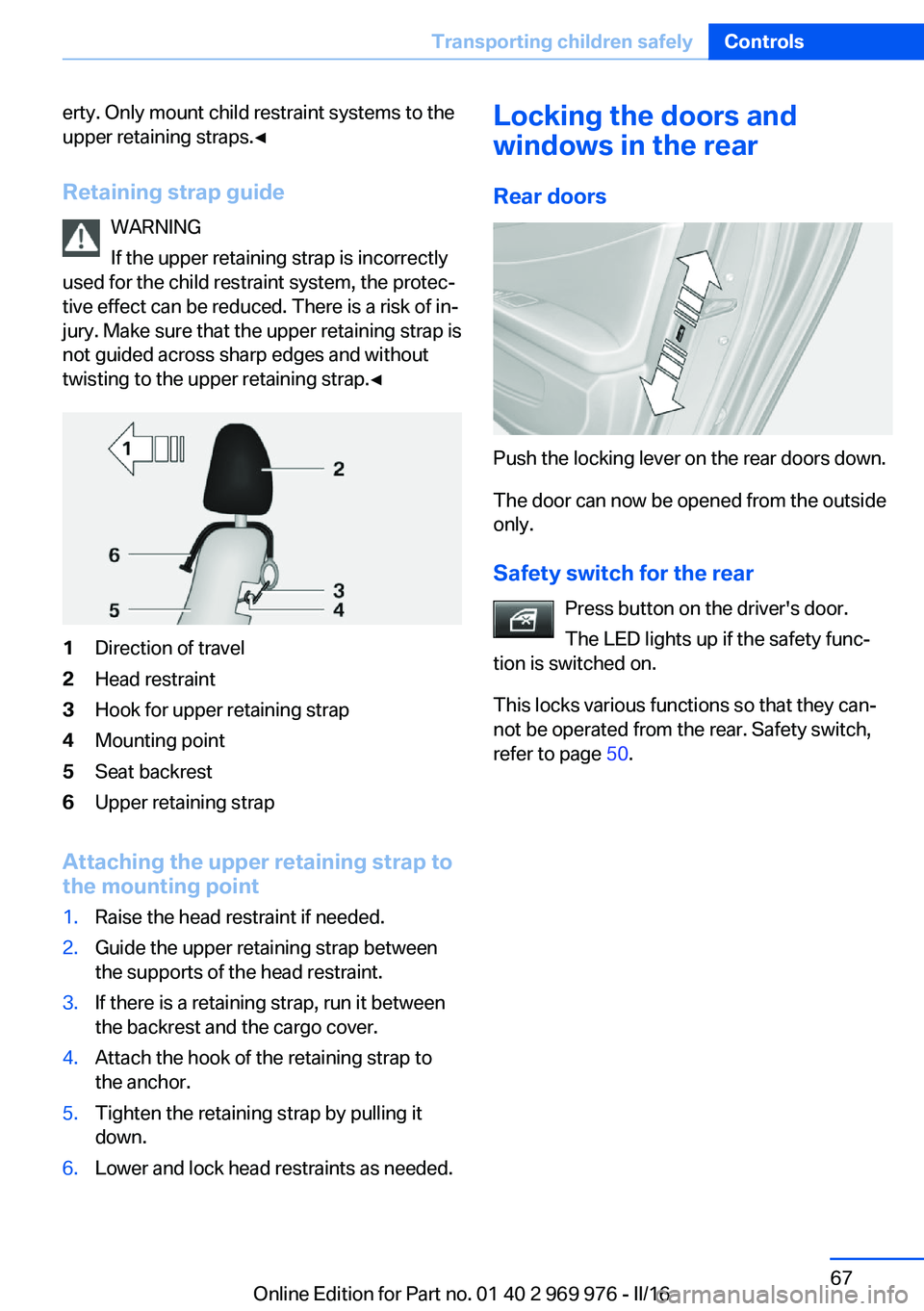
Retaining strap guide WARNING
If the upper retaining strap is incorrectly
used for the child restraint system, the protec‐
tive effect can be reduced. There is a risk of in‐
jury. Make sure that the upper retaining strap is
not guided across sharp edges and without
twisting to the upper retaining strap.◀1Direction of travel2Head restraint3Hook for upper retaining strap4Mounting point5Seat backrest6Upper retaining strap
Attaching the upper retaining strap to
the mounting point
1.Raise the head restraint if needed.2.Guide the upper retaining strap between
the supports of the head restraint.3.If there is a retaining strap, run it between
the backrest and the cargo cover.4.Attach the hook of the retaining strap to
the anchor.5.Tighten the retaining strap by pulling it
down.6.Lower and lock head restraints as needed.Locking the doors and
windows in the rear
Rear doors
Push the locking lever on the rear doors down.
The door can now be opened from the outside
only.
Safety switch for the rear Press button on the driver's door.
The LED lights up if the safety func‐
tion is switched on.
This locks various functions so that they can‐
not be operated from the rear. Safety switch,
refer to page 50.
Seite 67Transporting children safelyControls67
Online Edition for Part no. 01 40 2 969 976 - II/16
Page 71 of 265

▷The car's interior has not yet been heated
or cooled to the required level.▷The engine is not yet at operating temper‐
ature.▷The wheels are at a sharp angle or the
steering wheel is being turned.▷After driving in reverse.▷Fogging of the windows when the auto‐
matic climate control is switched on.▷Vehicle battery is heavily discharged.▷At higher elevations.▷The engine compartment lid is unlocked.▷HDC Hill Descent Control is activated.▷The parking assistant is activated.▷Stop-and-go traffic.▷Selector lever in selector lever position N,
M/S or R.▷Use of fuel with high ethanol content.
Starting the engine
The engine starts automatically under the fol‐
lowing conditions:
▷Steptronic transmission: by releasing the
brake pedal.
When Automatic Hold is activated: press
the accelerator pedal.
After the engine starts, accelerate as usual.
Safety mode
After the engine switches off automatically, it
will not start again automatically if any one of
the following conditions are met:
▷The driver's safety belt is unbuckled and
the driver's door is open.▷The hood was unlocked.
Some indicator lights light up for a varied
length of time.
The engine can only be started via the Start/
Stop button.
Functional limitations
Even if driving off was not intended, the deacti‐
vated engine starts up automatically in the fol‐
lowing situations:▷Excessive warming of the car's interior
when the cooling function is switched on.▷The steering wheel is turned.▷Steptronic transmission: change from se‐
lector lever position D to R, N or M/S.▷Steptronic transmission: change from se‐
lector lever position P to N, D, R or M/S.▷Fogging of the windows when the auto‐
matic climate control is switched on.▷Vehicle battery is heavily discharged.▷Excessive cooling of the car's interior when
the heating is switched on.
Activating/deactivating the system
manually
Using the button
Press button.
▷LED comes on: Auto Start/Stop function is
deactivated.
The engine is started during an automatic
engine stop.
The engine can only be stopped or started
via the Start/Stop button.▷LED goes out: Auto Start/Stop function is
activated.Seite 71DrivingControls71
Online Edition for Part no. 01 40 2 969 976 - II/16
Page 77 of 265

When wipers are frozen to windshield, wiper
operation is deactivated.
ATTENTION
If the rain sensor is activated, the wipers
can accidentally start moving in vehicle
washes. There is a risk of damage to property.
Deactivate the rain sensor in vehicle washes.◀
Setting the frequency or sensitivity of
the rain sensor
Turn the thumbwheel to adjust the frequency
or sensitivity of the rain sensor.
Up: short interval or high sensitivity of the rain
sensor.
Down: long interval or low sensitivity of the rain
sensor.
Clean the windshield, headlamps
Pull the wiper lever towards you.
The system sprays washer fluid on the wind‐
shield and activates the wipers briefly.
In addition, the headlamps are cleaned at regu‐
lar intervals when the vehicle's lights are acti‐
vated.
WARNING
The washer fluid can freeze onto the win‐
dow at low temperatures and obstruct the
view. There is risk of an accident. Only use the
washer systems, if the washer fluid cannot
freeze. Use antifreeze, if needed.◀
ATTENTION
When the washer fluid reservoir is empty,
the wash pump cannot work as intended.
There is a risk of damage to property. Do not
use the washer system when the washer fluid
reservoir is empty.◀
Windshield washer nozzles
The windshield washer nozzles are automati‐
cally heated while the ignition is switched on.
Rear window wiper
Switching on the rear window wiper
Turn the switch from idle position 0 upward,
arrow 1: interval mode. When reverse gear is
engaged, the system switches to continuous
operation.
Cleaning rear window
In interval mode: turn the switch further, ar‐
row 2. The switch automatically returns to its
interval position when released.
Seite 77DrivingControls77
Online Edition for Part no. 01 40 2 969 976 - II/16