2017 BMW X3 towing
[x] Cancel search: towingPage 240 of 265

corresponding engine or body ground of
the vehicle to be started.
Starting the engine
Never use spray fluids to start the engine.
1.Start the engine of the assisting vehicle
and let it run for several minutes at an in‐
creased idle speed.
If the vehicle to be started has a diesel en‐
gine: let the engine of the assisting vehicle
run for approx. 10 minutes.2.Start the engine of the vehicle that is to be
started in the usual way.
If the first starting attempt is not success‐
ful, wait a few minutes before making an‐
other attempt in order to allow the dis‐
charged battery to recharge.3.Let both engines run for several minutes.4.Disconnect the jumper cables in the re‐
verse order.
Check the battery and recharge if needed.
Tow-starting and towing Information WARNING
Due to system limits, individual functions
can malfunction during tow-starting/towing
with the Intelligent Safety systems activated,
e.g., approach control warning with light brak‐
ing function. There is risk of an accident.
Switch all Intelligent Safety systems off prior to
tow-starting/towing.◀
Steptronic transmission: transporting
the vehicle
Information
The vehicle is not permitted to be towed.
ATTENTION
The vehicle can be damaged when tow‐
ing the vehicle with a single lifted axle. There is
a risk of damage to property. The vehicle
should only be transported on a loading plat‐
form.◀
Tow truck
The vehicle should only be transported on a
loading platform.
ATTENTION
When lifting the vehicle by the tow fitting
or body and chassis parts; damage can occur
on vehicle parts. There is a risk of damage to
property. Lift vehicle using suitable means.◀
Use tow fitting located in the front only for po‐
sitioning the vehicle.
Pushing vehicle To maneuver vehicle from the danger area,
electronically unlock the transmission lock, re‐
fer to page 82, if needed.
Towing other vehicles
Information WARNING
If the approved gross vehicle weight of
the towing vehicle is lighter than the vehicle to
be towed, the tow fitting can tear off or it will
not be possible to control the vehicle's re‐
sponse. There is risk of an accident! Make sure
Seite 240MobilityBreakdown assistance240
Online Edition for Part no. 01 40 2 969 976 - II/16
Page 241 of 265
that the gross vehicle weight of the towing ve‐
hicle is heavier than the vehicle to be towed.◀
ATTENTION
If the tow bar or tow rope is attached in‐
correctly, damage to other vehicle parts can
occur. There is a risk of damage to property.
Correctly attach the tow bar or tow rope to the
tow fitting.◀▷Switch on the hazard warning system, de‐
pending on local regulations.▷If the electrical system has failed, clearly
identify the vehicle being towed by placing
a sign or a warning triangle in the rear win‐
dow.
Tow bar
The tow fittings used should be on the same
side on both vehicles.
Should it prove impossible to avoid mounting
the tow bar at an offset angle, please observe
the following:
▷Maneuvering capability is limited going
around corners.▷The tow bar will generate lateral forces if it
is secured with an offset.
Tow rope
When starting to tow the vehicle, make sure
that the tow rope is taut.
To avoid jerking and the associated stresses
on the vehicle components when towing, al‐
ways use nylon ropes or nylon straps.
Tow fitting
General information
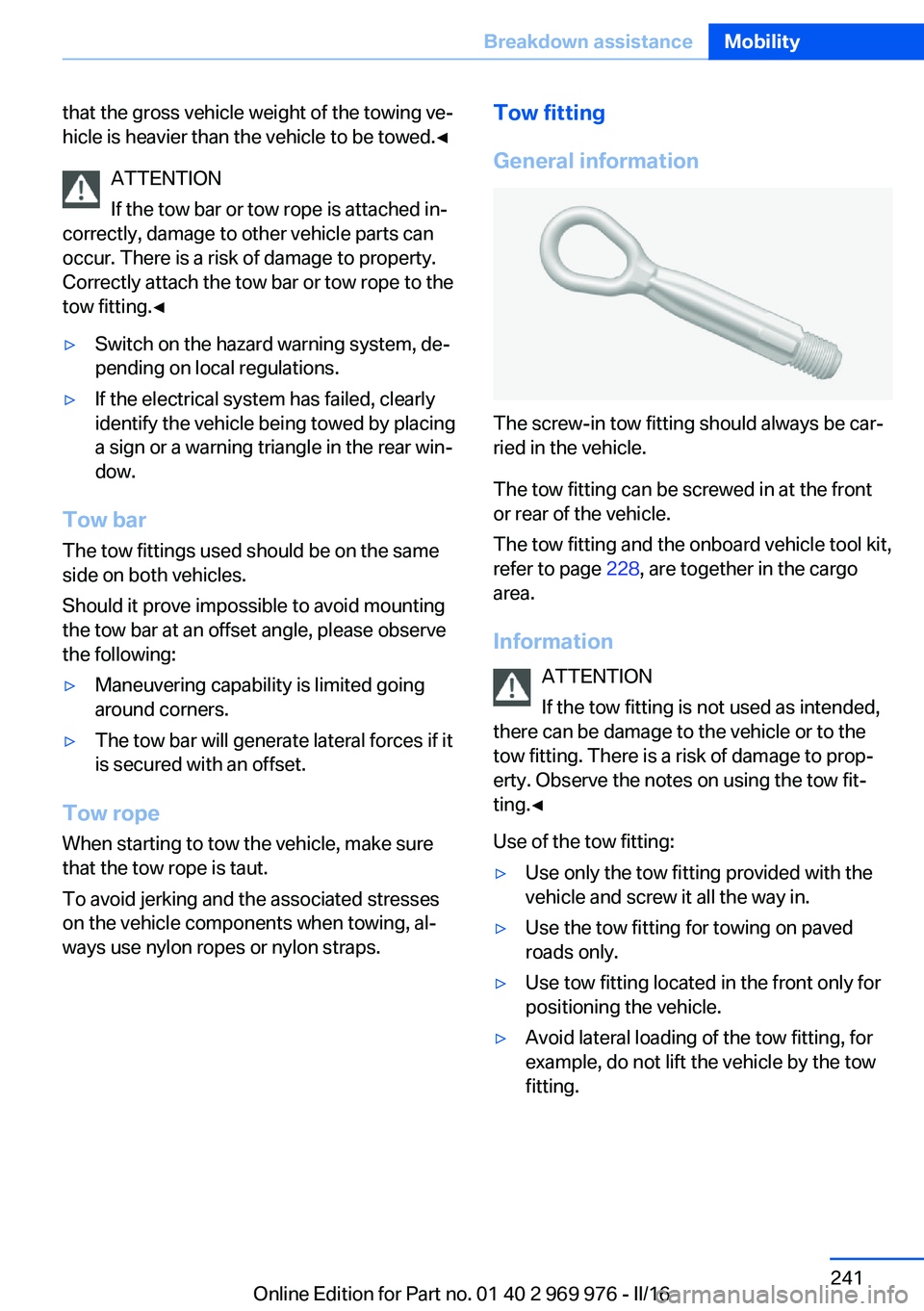
The screw-in tow fitting should always be car‐
ried in the vehicle.
The tow fitting can be screwed in at the front
or rear of the vehicle.
The tow fitting and the onboard vehicle tool kit,
refer to page 228, are together in the cargo
area.
Information ATTENTION
If the tow fitting is not used as intended,
there can be damage to the vehicle or to the
tow fitting. There is a risk of damage to prop‐
erty. Observe the notes on using the tow fit‐
ting.◀
Use of the tow fitting:
▷Use only the tow fitting provided with the
vehicle and screw it all the way in.▷Use the tow fitting for towing on paved
roads only.▷Use tow fitting located in the front only for
positioning the vehicle.▷Avoid lateral loading of the tow fitting, for
example, do not lift the vehicle by the tow
fitting.Seite 241Breakdown assistanceMobility241
Online Edition for Part no. 01 40 2 969 976 - II/16
Page 254 of 265

Everything from A to Z
IndexA ABS, Antilock Brake Sys‐ tem 129
ACC, Active Cruise Control with Stop&Go function 136
Acceleration Assistant, refer to Launch Control 82
Accessories and parts 8
Activated-charcoal filter 164
Active Blind Spot Detec‐ tion 126
Active Cruise Control with Stop&Go function,
ACC 136
Adaptive brake lights, see Brake force display 128
Adaptive Light Control 102
Additional information, iDrive 23
Additives, oil 222
Adjustments, seats/head re‐ straints 53
After washing vehicle 244
Airbags 105
Airbags, indicator/warning light 106
Air circulation, see Recircu‐ lated-air mode 160, 163
Air, dehumidifying, see Cool‐ ing function 160, 163
Air distribution, man‐ ual 161 , 164
Air flow, automatic climate control 161, 164
Air pressure, tires 205
Air vents, see Ventilation 165
Alarm system 47
Alarm, unintentional 48
All around the center con‐ sole 16 All around the roofliner 17
All around the steering wheel 14
All-season tires, see Winter tires 211
All-wheel-drive 131
Alternating-code hand-held transmitter 168
Alternative oil types 222
Ambient light 104
Antifreeze, washer fluid 78
Antilock Brake System, ABS 129
Anti-slip control, see DSC 129
App, BMW Driver’s Guide 6
Approved axle load 251
Armrest, see Center arm‐ rest 177
Arrival time 95
Ash tray 169
Assistance, Roadside Assis‐ tance 238
Assistance when driving off 135
Assist system, see Intelligent Safety 114
AUTO H button 73
AUTO H button, see Auto‐ matic Hold 73
AUTO intensity 163
Automatic car wash 243
Automatic climate con‐ trol 159
Automatic cruise control with Stop&Go function 136
Automatic Curb Monitor 61
Automatic deactivation, Front-seat passenger air‐
bags 107 Automatic headlamp con‐
trol 101
Automatic Hold 73
Automatic locking 46
Automatic recirculated-air control 163
Automatic tailgate 41
Automatic transmission, see Steptronic transmission 79
AUTO program, automatic cli‐ mate control 163
AUTO program, climate con‐ trol 160
AUTO program, intensity 163
Auto Start/Stop function 70
AUX-IN port, general informa‐ tion 171
Average fuel consumption 94
Average speed 94
Axle loads, weights 251
B Backrest curvature, see Lum‐ bar support 55
Backrest, width 56
Bad road trips 182
Band-aids, see First-aid kit 238
Battery replacement, vehicle battery 235
Battery replacement, vehicle remote control 35
Battery, vehicle 235
Being towed, see Tow-start‐ ing and towing 240
Belts, safety belts 56
Beverage holder, cup holder 177
Biodiesel 201
Blinds, sun protection 50 Seite 254ReferenceEverything from A to Z254
Online Edition for Part no. 01 40 2 969 976 - II/16
Page 258 of 265

Head airbags 105
Headlamp control, auto‐ matic 101
Headlight courtesy delay fea‐ ture 101
Headlight courtesy delay fea‐ ture via remote control 39
Headlight flasher 75
Headlight flasher, bulb re‐ placement 230
Headlight glass 229
Headlights 230
Headlights, care 244
Head restraints 53
Head restraints, front 58
Head restraints, rear 59
Head-up Display 98
Head-up Display, care 246
Heavy cargo, stowing 187
High-beam Assistant 102
High beams 75
High beams/low beams, see High-beam Assistant 102
High beams, bulb replace‐ ment 230
Hill Descent Control HDC 131
Hills 185
Hill start assistant, see Drive- off assistant 135
Holder for beverages 177
Homepage 6
Hood 217
Horn 14
Hot exhaust system 183
HUD Head-up Display 98
Hydroplaning 184
I Ice warning, see External temperature warning 89
Icy roads, see External tem‐ perature warning 89
Identification marks, tires 208 Identification number, see Ve‐
hicle identification num‐
ber 10
iDrive 18
Ignition key, see Remote con‐ trol 34
Ignition off 68
Ignition on 68
Indication of a flat tire 110 , 113
Indicator and alarm lamps, see Check Control 85
Indicator lamp, see Check Control 85
Individual air distribu‐ tion 161, 164
Individual settings, see Per‐ sonal Profile 36
Inflation pressure, tires 205
Inflation pressure warning, tires 112
Info display, see On-Board computer 94
Information 6
Initialize, Tire Pressure Moni‐ tor TPM 109
Initializing, Flat Tire Monitor FTM 113
Instrument cluster 84
Instrument cluster, electronic displays 84
Instrument lighting 104
Integrated key 34
Integrated Owner's Manual in the vehicle 30
Intelligent emergency call 237
Intelligent Safety 114
Intensity, AUTO pro‐ gram 163
Interior equipment 167
Interior lights 104
Interior lights during unlock‐ ing 38
Interior lights with the vehicle locked 38 Interior mirror, automatic dim‐
ming feature 62
Interior mirror, manually dim‐ mable 62
Interior motion sensor 48
Internet page 6
Interval display, service re‐ quirements 91
Interval mode 76
J
Jacking points for the vehicle jack 235
Joystick, Steptronic transmis‐ sion 80
Jump-starting 238
K
Key/remote control 34
Keyless Go, see Comfort Ac‐ cess 43
Key Memory, see Personal Profile 36
Kickdown, Steptronic trans‐ mission 79
Knee airbag 106
L Label on recommended tires 211
Lamp in the exterior mirror, see Active Blind Spot De‐
tection 126
Lamp replacement 229
Lamp replacement, front 230
Lamp replacement, rear 233
Lane departure warning 124
Lane margin, warning 124
Language on Control Dis‐ play 97
Lashing eyes, securing cargo 187 Seite 258ReferenceEverything from A to Z258
Online Edition for Part no. 01 40 2 969 976 - II/16
Page 262 of 265

SYNC program, automatic cli‐mate control 164
T Tachometer 89
Tailgate, automatic 41
Tailgate closing 41
Tailgate, closing with no- touch activation 44
Tailgate opening 41
Tailgate, opening with no- touch activation 44
Tailgate via remote con‐ trol 38
Tail lamps 233
Technical changes, see Own Safety 7
Technical data 250
Telephone, see Owner's Manual for Navigation, En‐
tertainment and Communi‐
cation
Temperature, automatic cli‐ mate control 160, 162
Temperature display for ex‐ ternal temperature 89
Temperature, engine oil 89
Terminal, starting aid 239
Text messages, supplemen‐ tary 88
Theft alarm system, see Alarm system 47
Thigh support 55
Tilt alarm sensor 48
Time of arrival 95
Tire damage 210
Tire identification marks 208
Tire inflation pressure 205
Tire inflation pressure moni‐ tor, see FTM 112
Tire Pressure Monitor TPM 108
Tire repair kit, see Mobility System 212
Tires, changing 210 Tire sealant, see Mobility
System 212
Tires, everything on wheels and tires 205
Tires, run-flat tires 212
Tire tread 210
Tone, see Owner's Manual for Navigation, Entertainment
and Communication
Tool 228
Top View 150
Total vehicle weight 251
Touchpad 21
Towing 240
Tow-starting 240
TPM Tire Pressure Moni‐ tor 108
Traction control 130
TRACTION, driving dynam‐ ics 130
Transmission lock, electronic unlocking 82
Transmission, Steptronic transmission 79
Transporting children safely 64
Tread, tires 210
Triple turn signal activa‐ tion 75
Trip odometer 89
Trip onboard computer 95
Trip recorder, see Trip odom‐ eter 89
Turning circle lines, rearview camera 149
Turn signals, operation 75
U
Unintentional alarm 48
Units of measurement 97
Universal remote control 167
Unlock button, Steptronic transmission 80
Unlocking/locking via door lock 39 Unlocking/locking with re‐
mote control 38
Unlocking, settings 46
Unpaved roads, cross-coun‐ try trips 182
Updates made after the edito‐ rial deadline 7
Upholstery care 245
USB interface, general infor‐ mation 171
USB port, see USB inter‐ face 171
V
Vanity mirror 169
Variable sport steering 132
Vehicle battery 235
Vehicle battery, replac‐ ing 235
Vehicle, break-in 182
Vehicle care 244
Vehicle care products 244
Vehicle features and op‐ tions 7
Vehicle identification num‐ ber 10
Vehicle jack 235
Vehicle paint 244
Vehicle position, GPS loca‐ tion 97
Vehicle storage 246
Vehicle wash 243
Ventilation 165
Ventilation, see Parked-car ventilation 165
VIN, see Vehicle identification number 10
Voice activation system 27
W Warning and indicator lamps, see Check Control 85
Warning displays, see Check Control 85 Seite 262ReferenceEverything from A to Z262
Online Edition for Part no. 01 40 2 969 976 - II/16