2017 BMW X3 interior lights
[x] Cancel search: interior lightsPage 93 of 265

Speed limit detection can also be displayed in
the Head-up Display.
System limits The system may not be fully functional and
may provide incorrect information in the fol‐
lowing situations:▷In heavy fog, rain or snowfall.▷When signs are fully or partially concealed
by objects, stickers or paint.▷When driving very close to the vehicle in
front of you.▷When driving toward bright lights or strong
reflections.▷When the windshield behind the interior
mirror is fogged over, dirty or covered by a
sticker, etc.▷In the event of incorrect detection by the
camera.▷If the speed limits stored in the navigation
system are incorrect.▷In areas not covered by the navigation sys‐
tem.▷When roads differ from the navigation,
such as due to changes in road routing.▷When passing buses or trucks with a
speed sticker.▷If the traffic signs are non-conforming.▷During calibration of the camera immedi‐
ately after vehicle delivery.▷When signs are detected valid for a parallel
road.
Selection lists in the
instrument cluster
The concept Depending on your vehicle's optional features,
the following can be displayed or operated us‐
ing the buttons and the thumbwheel on the
steering wheel as well as the displays in the in‐
strument cluster and the Head-up Display:▷Current audio source.▷Redial phone feature.▷Turn on voice activation system.
Display
Depending on your vehicle's optional features,
the list in the instrument cluster can differ from
the illustration shown.
Activating a list and adjusting the
setting
On the right side of the steering wheel, turn
the thumbwheel to activate the corresponding
list.
Using the thumbwheel, select the desired set‐
ting and confirm it by pushing the thumbwheel.
Seite 93DisplaysControls93
Online Edition for Part no. 01 40 2 969 976 - II/16
Page 103 of 265

speed range, the high beams are not switched
on by the system.
General information The system responds to light from oncoming
traffic and traffic driving ahead of you, and to
adequate illumination, for example, in towns
and cities.
The driver can intervene at any time and switch
the high beams on and off as usual.
Activating1.Depending on the equipment, turn the light
switch into position
or .
2.Press button on the turn signal lever, ar‐
row.
The indicator lamp in the instrument
cluster is illuminated, when the low
beams are switched on.
The high beams are switched on and off auto‐
matically.
The blue indicator lamp in the instru‐
ment cluster lights up when the system
switches on the high beams.
Deactivating The High-beam Assistant is deactivated when
manually switching the high beams on and off,
refer to page 75. To reactivate the High-beam
Assistant, press the button on the turn signal
lever.
System limits
The High-beam Assistant cannot serve as a
substitute for the driver's personal judgment of
when to use the high beams. Therefore, man‐
ually switch off the high beams in situations
where required to avoid a safety risk.
The system is not fully functional in the follow‐
ing situations, and driver intervention may be
necessary:▷In very unfavorable weather conditions,
such as fog or heavy precipitation.▷When detecting poorly-lit road users such
as pedestrians, cyclists, horseback riders
and wagons; when driving close to train or
ship traffic; and at animal crossings.▷In tight curves, on hilltops or in depres‐
sions, in cross traffic or half-obscured on‐
coming traffic on highways.▷In poorly-lit towns and cities and in the
presence of highly reflective signs.▷When the windshield behind the interior
mirror is fogged over, dirty or covered with
stickers, etc.
Fog lights
Front fog lights
The parking lights or low beams must be
switched on.
Press button. The green indicator
lamp lights up.
If the automatic headlamp control, refer to
page 101, is activated, the low beams will
come on automatically when you switch on the
front fog lights.
When the high beams or headlight flasher are
activated, the front fog lights are not switched
on.
Seite 103LightsControls103
Online Edition for Part no. 01 40 2 969 976 - II/16
Page 104 of 265

Instrument lightingAdjusting The parking lights or low beams
must be switched on to adjust
the brightness.
Adjust the brightness with the
thumbwheel.
Interior lights
General information
Depending on the equipment, the interior
lights, footwell lights, entry lamps, and cour‐
tesy lamps are controlled automatically.
Thumb wheel for the instrument lighting con‐
trols brightness of some of these features.
Overview1Interior lights2Reading lights
Switching the interior lights on and off Press button.
To switch off permanently: press the button for
approx. 3 seconds.
Switch back on: press button.
Switching the reading lamps on and
off manually
Press button.
Reading lights are located at the front and rear
next to the interior lights.
Ambient light Depending on the equipment, the lighting can
be individually adjusted in the interior for some
lights.
Selecting color scheme
On the Control Display:1."Settings"2."Lighting"3."Ambient:"4.Select desired setting.
Setting the brightness
On the Control Display:
1."Settings"2."Lighting"3."Brightness:"4.Adjust the brightness.Seite 104ControlsLights104
Online Edition for Part no. 01 40 2 969 976 - II/16
Page 115 of 265

WARNING
Due to system limits, individual functions
can malfunction during tow-starting/towing
with the Intelligent Safety systems activated,
e.g., approach control warning with light brak‐
ing function. There is risk of an accident.
Switch all Intelligent Safety systems off prior to
tow-starting/towing.◀
Overview
Button in the vehicle
Intelligent Safety button
Switching on/off Some Intelligent Safety systems are automati‐
cally active after every departure. Some Intelli‐
gent Safety systems activate according to the
last setting.
Press button briefly:
▷The menu for the intelligent safety
system is displayed. The systems
are individually switched off ac‐
cording to their respective set‐
tings.▷LED lights up orange or goes out respec‐
tive to their individual settings.
Adjust as needed. Individual settings are
stored for the profile currently used.
Press button again:
▷All Intelligent Safety systems are
activated.▷The LED lights up green.
Hold down button:
▷All Intelligent Safety systems are
turned off.▷The LED goes out.
Front-end collision warning
Depending on the equipment, the collision
warning system consists of one of the two sys‐
tems:
▷Front-end collision warning with City Brak‐
ing function, refer to page 115.▷Front-end collision warning with braking
function, refer to page 118
Front-end collision warning
with City Braking function
The concept The system can help prevent accidents. If an
accident cannot be prevented, the system will
help reduce the collision speed.
The system sounds a warning before an immi‐
nent collision and actuates brakes independ‐
ently if needed.
The automatic braking intervention is done
with limited force and duration.
A camera in the area of the interior mirror con‐
trols the system.
The front-end collision warning is available
even if cruise control has been deactivated.
With the vehicle approaching another vehicle
intentionally, the collision warning and braking
are delayed in order to avoid false system re‐
actions.
General information
The system warns at two levels of an imminent
danger of collision at speeds from approx.
Seite 115SafetyControls115
Online Edition for Part no. 01 40 2 969 976 - II/16
Page 125 of 265

cording to their respective set‐
tings.▷LED lights up orange or goes out respec‐
tive to their individual settings.
Adjust as needed. Individual settings are
stored for the profile currently used.
Press button again:
▷All Intelligent Safety systems are
activated.▷The LED lights up green.
Hold down button:
▷All Intelligent Safety systems are
turned off.▷The LED goes out.
Display in the instrument cluster
▷Lines: system is activated.▷Arrows: at least one lane marking
was detected and warnings can be
issued.
Issued warning
If you leave the lane and if a lane marking has
been detected, the steering wheel begins vi‐
brating.
If the turn signal is set before changing the
lane, a warning is not issued.
End of warning
The warning is canceled in the following situa‐
tions:
▷Automatically after approx. 3 seconds.▷When returning to your own lane.▷When braking hard.▷When using the turn signal.System limits
Information WARNING
The system can react incorrectly or not
at all due to the system limits. There is risk of
accidents or risk of property damage. Observe
the information regarding the system limits
and actively intervene, if needed.◀
Functional limitations
The system may not be fully functional in the
following situations:▷In heavy fog, rain or snowfall.▷In the event of missing, worn, poorly visi‐
ble, merging, diverging, or multiple lane
markings such as in construction areas.▷When lane markings are covered in snow,
ice, dirt or water.▷In tight curves or on narrow lanes.▷When the lane markings are covered by
objects.▷When driving very close to the vehicle in
front of you.▷When driving toward bright lights.▷When the windshield in front of the interior
mirror is fogged over, dirty or covered with
stickers, etc.▷During calibration of the camera immedi‐
ately after vehicle delivery.Seite 125SafetyControls125
Online Edition for Part no. 01 40 2 969 976 - II/16
Page 137 of 265
▷When fast approaching standing vehicles.
There is a risk of injury or danger to life. Watch
traffic closely and actively intervene in the re‐
spective situations.◀
Overview
Buttons on the steering wheel
Press but‐
tonFunctionCruise control on/off, interrupt,
refer to page 137Store, maintain speed, refer to
page 138Call up speed, continue cruise
control, refer to page 139Reduce distance, refer to
page 139Increase distance, refer to
page 139Rocker switch:
Set speed, refer to page 138
Radar sensor
A radar sensor is located in the front bumper
for detecting vehicles on the road ahead of the
vehicle.
Always keep radar sensor clean and unob‐
structed.
Camera
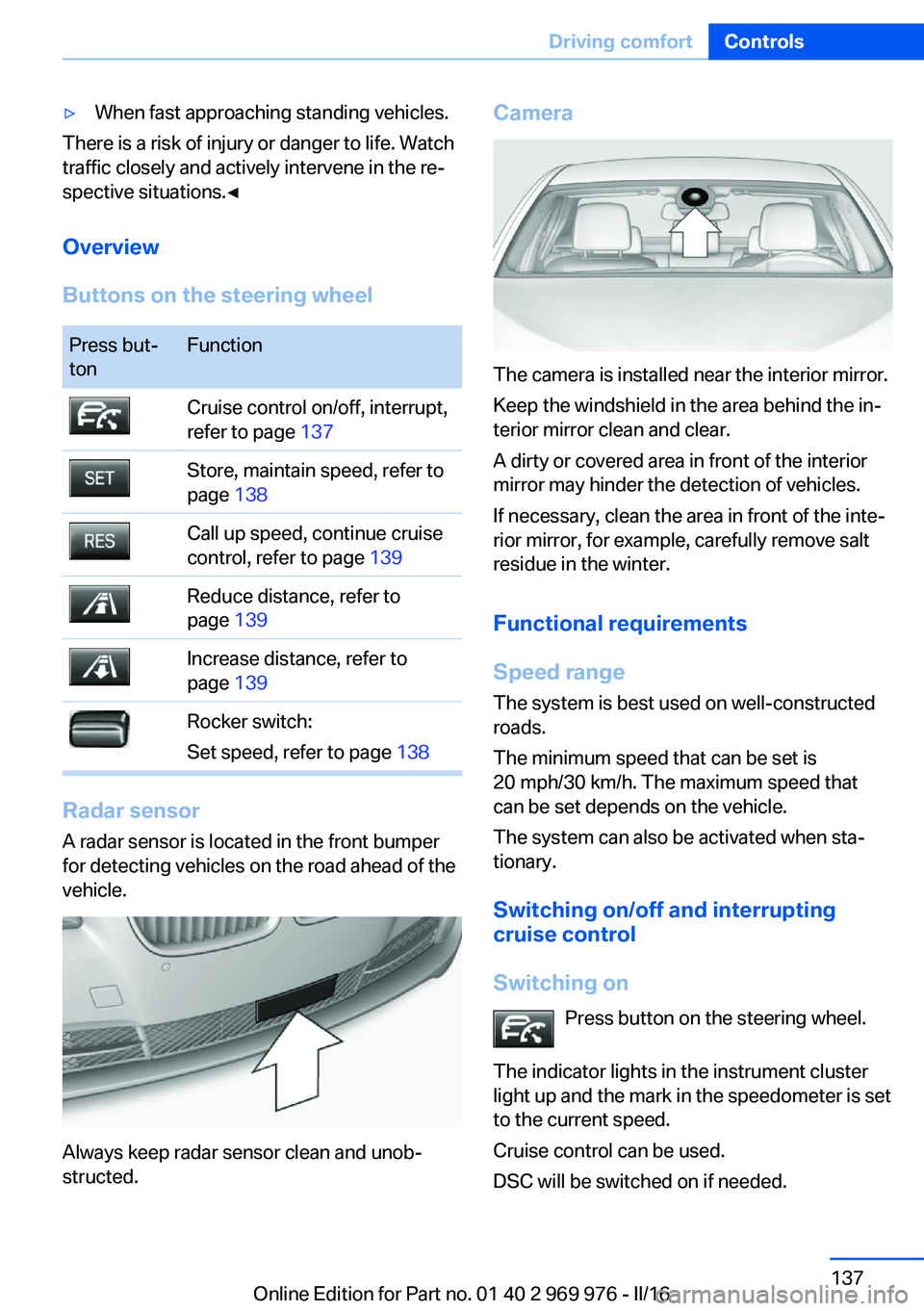
The camera is installed near the interior mirror.
Keep the windshield in the area behind the in‐
terior mirror clean and clear.
A dirty or covered area in front of the interior
mirror may hinder the detection of vehicles.
If necessary, clean the area in front of the inte‐
rior mirror, for example, carefully remove salt
residue in the winter.
Functional requirements
Speed range The system is best used on well-constructed
roads.
The minimum speed that can be set is
20 mph/30 km/h. The maximum speed that
can be set depends on the vehicle.
The system can also be activated when sta‐
tionary.
Switching on/off and interrupting
cruise control
Switching on Press button on the steering wheel.
The indicator lights in the instrument cluster
light up and the mark in the speedometer is set
to the current speed.
Cruise control can be used.
DSC will be switched on if needed.
Seite 137Driving comfortControls137
Online Edition for Part no. 01 40 2 969 976 - II/16
Page 172 of 265

USB interface in the center consoleIn addition to the USB storage devices descri‐
bed above, additional mobile devices with USB
port can be connected to the USB interface in
the center console.▷Mobile phones supported by the USB in‐
terface.
The snap-in adapter features a separate
USB port that is automatically connected
when a compatible mobile phone is in‐
serted.▷Audio devices with USB port, for example
MP3 player.
This allows further uses:
▷Playing music files via USB audio.▷Playing video films via USB video.
Information about compatible USB devices can
be found at www.bmwusa.com/bluetooth.
Information Observe the following when connecting:
▷Do not use force when plugging the con‐
nector into the USB interface.▷Use a flexible adapter cable.▷Protect the USB device against mechanical
damage.▷Due to the large number of USB devices
available on the market, it cannot be guar‐
anteed that every device is operable on the
vehicle.▷Do not expose USB devices to extreme en‐
vironmental conditions, such as very high
temperatures; refer to the owner's manual
of the device.▷Due to the many different compression
techniques, proper playback of the media
stored on the USB device cannot be guar‐
anteed in all cases.▷A connected USB device is supplied with
charging current via the USB interface, as‐
suming this is supported by the device.▷To ensure proper transmission of the
stored data, do not charge an USB device
via the onboard socket, when it is con‐
nected to the USB interface.▷Depending on how the USB device should
be used, settings may be required on the
USB device, refer to the owner's manual of
the device.
Not suitable USB devices:
▷USB hard drives.▷USB hubs.▷USB memory card readers with multiple in‐
serts.▷HFS-formatted USB devices.▷MTP devices.▷Devices such as fans or lights.
Overview
The USB interface and the AUX-IN port are lo‐
cated in the center armrest.
The USB interface is located in the glove com‐
partment.
Seite 172ControlsInterior equipment172
Online Edition for Part no. 01 40 2 969 976 - II/16
Page 256 of 265

Configuring driving pro‐gram 134
Confirmation signal 46
ConnectedDrive, see Owner's Manual for Navigation, En‐
tertainment and Communi‐
cation
ConnectedDrive Services
Connecting electrical devi‐ ces 170
Container for washer fluid 78
Continued driving with a flat tire 111 , 114
Control Display 18
Control Display, settings 96
Controller 19
Control systems, driving sta‐ bility 129
Convenient opening with the remote control 38
Coolant 224
Coolant temperature 89
Cooling function 160, 163
Cooling, maximum 163
Cooling system 224
Cornering light 102
Corrosion on brake discs 185
Cosmetic mirror 169
Courtesy lamps during un‐ locking 38
Courtesy lamps with the vehi‐ cle locked 38
Cruise control 142
Cruise control, active with Stop&Go function 136
Cruise control with distance control, see active cruise
control, ACC 136
Cruise control without dis‐ tance control, see cruise
control 142
Cruising range 90
Cup holder 177
Current fuel consumption 90 D
Damage, tires 210
Damping control, dy‐ namic 132
Data, technical 250
Date 90
Daytime running lights 102
Daytime running lights, bulb replacement 230
Defrosting, see Windows, de‐ frosting 161, 164
Dehumidifying, air 160, 163
Deleting personal data 25
Deletion of personal data 25
Destination distance 95
Diesel exhaust fluid, at low temperatures 202
Diesel exhaust fluid, having refilled 202
Diesel exhaust fluid, on mini‐ mum 202
Diesel exhaust fluid, replen‐ ishing yourself 202
Diesel fuel 201
Diesel particulate filter 183
Digital clock 89
Dimensions 250
Dimmable exterior mirrors 62
Dimmable interior mirror 62
Direction indicator, see Turn signals 75
Display, electronic, instru‐ ment cluster 84
Display in windshield 98
Display lighting, see Instru‐ ment lighting 104
Displays, cleaning 246
Disposal, coolant 225
Disposal, vehicle battery 236
Distance control, see PDC 145
Distance to destination 95
Divided screen view, split screen 24
Door lock 39 Door lock, see Remote con‐
trol 34
Downhill control 131
Drive-off assistant 135
Drive-off assistant, see DSC 129
Driving Dynamics Con‐ trol 133
Driving instructions, break- in 182
Driving mode 133
Driving notes, general 183
Driving on bad roads 182
Driving on racetracks 185
Driving stability control sys‐ tems 129
Driving tips 183
DSC Dynamic Stability Con‐ trol 129
DTC Dynamic Traction Con‐ trol 130
Dynamic Damping Con‐ trol 132
Dynamic Stability Control DSC 129
Dynamic Traction Control DTC 130
E
ECO PRO 190
ECO PRO, bonus range 191
ECO PRO display 190
ECO PRO driving mode 190
ECO PRO mode 190
ECO PRO Tip - driving in‐ struction 192
EfficientDynamics 192
Electronic displays, instru‐ ment cluster 84
Electronic oil measure‐ ment 220
Electronic Stability Program ESP, see DSC 129
Emergency detection, remote control 35 Seite 256ReferenceEverything from A to Z256
Online Edition for Part no. 01 40 2 969 976 - II/16