2017 BMW X3 Engine compartment
[x] Cancel search: Engine compartmentPage 219 of 265
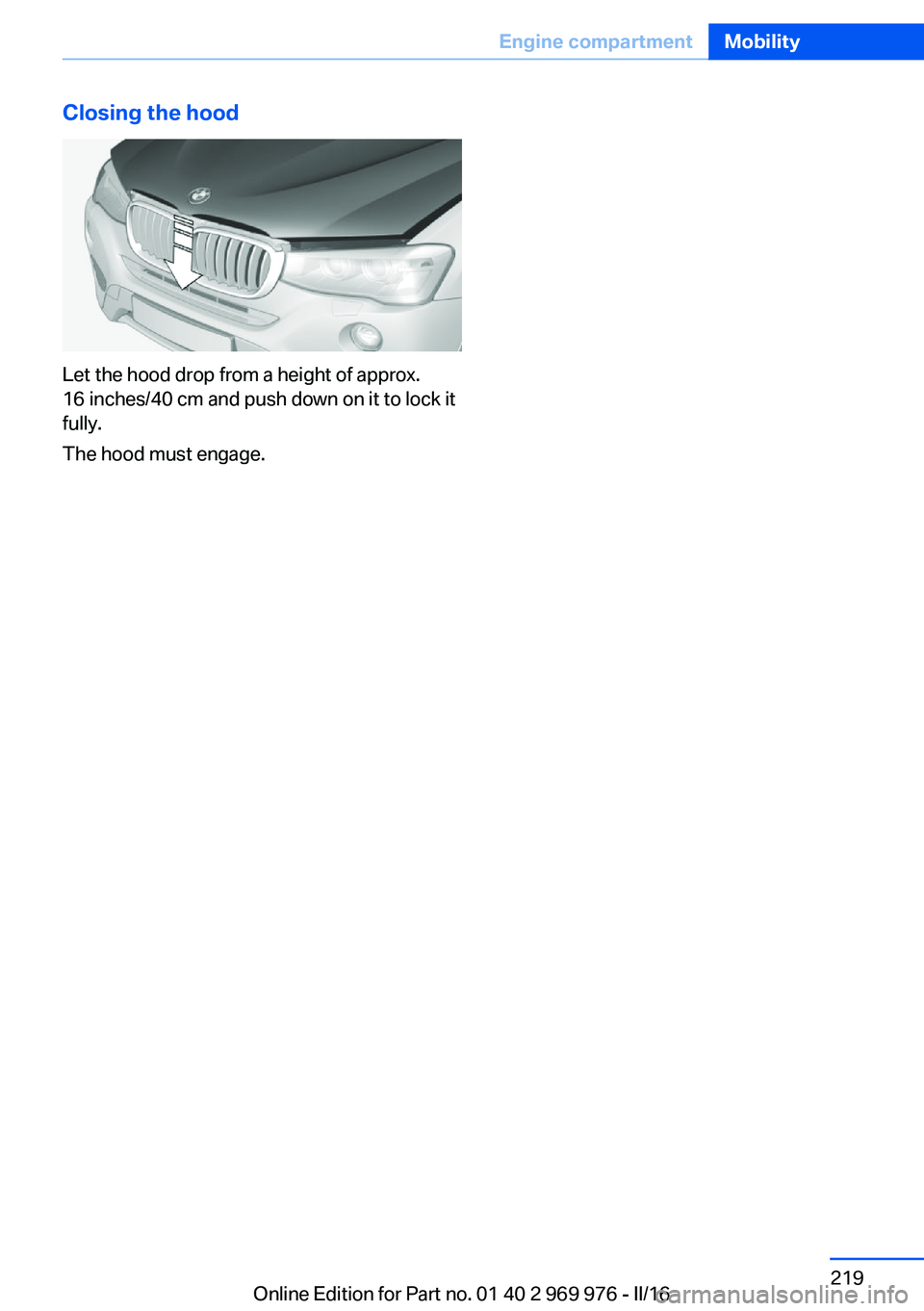
Closing the hood
Let the hood drop from a height of approx.
16 inches/40 cm and push down on it to lock it
fully.
The hood must engage.
Seite 219Engine compartmentMobility219
Online Edition for Part no. 01 40 2 969 976 - II/16
Page 224 of 265

CoolantVehicle features and optionsThis chapter describes all standard, country-
specific and optional features offered with the
series. It also describes features that are not
necessarily available in your car, e. g., due to
the selected options or country versions. This
also applies to safety-related functions and
systems. The respectively applicable country
provisions must be observed when using the
respective features and systems.
Information WARNING
With the engine hot and the cooling sys‐
tem open, coolant can escape and lead to
scalding. There is a a risk of injury. Only open
the cooling system with the engine cooled
down.◀
WARNING
Additives are harmful and incorrect addi‐
tives can damage the engine. There is a risk of
injury and risk of property damage. Do not al‐
low additives to come into contact with skin,
eyes or articles of clothing. Use suitable addi‐
tives only.◀
Coolant consists of water and additives.
Not all commercially available additives are
suitable for the vehicle. Information about suit‐
able additives is available from a dealer’s serv‐
ice center or another qualified service center or
repair shop.Coolant level
Overview
Depending on the engine installation, the cool‐
ant reservoir is located on the right side or the
left side of the engine compartment.
Checking1.Let the engine cool.2.Turn the lid of the coolant reservoir slightly
counterclockwise to allow any excess
pressure to dissipate, then open it.3.Open the coolant reservoir lid.4.The coolant level is correct if it lies be‐
tween the minimum and maximum marks
in the filler neck.Seite 224MobilityCoolant224
Online Edition for Part no. 01 40 2 969 976 - II/16
Page 232 of 265

In the case of a malfunction, contact a dealer’s
service center or another qualified service cen‐
ter or repair shop.
LED headlightsLight-emitting diodes (LEDs)
With LED headlights, all front lights and side
indicators are designed with LED technology.
If an LED fails, switch on the front fog lamps
and continue the trip with great care. Comply
with local regulations.
In the case of a malfunction, contact a dealer’s
service center or another qualified service cen‐
ter or repair shop.
Front fog lights
Follow general instructions, refer to page 229.
35-watt bulb, H8.1.Insert the screwdriver from the onboard
vehicle tool kit, with the flat side on the clip,
arrow 1.2.Turn the screwdriver by 90°, arrow 2.3.Remove the front fog lamp toward the
front.4.Detach the connector.5.Turn the bulb bracket and remove it.6.Remove the bulb and replace it.7.Proceed in reverse order to insert the front
fog lamp. Note the guide rails in doing so.
LED front fog lights
These front fog lights are made using LED
technology. In the case of a malfunction, con‐
tact a dealer’s service center or another quali‐
fied service center or repair shop.
Turn signal
Information
Follow general instructions, refer to page 229.
The turn signals are located next to each low
beam in the engine compartment.
21-watt bulb, PY 21W.
Seite 232MobilityReplacing components232
Online Edition for Part no. 01 40 2 969 976 - II/16
Page 235 of 265

Changing wheels/tiresGeneral information
When using run-flat tires or sealants, a tire
does not need to be changed immediately in
the event of pressure loss due to a flat tire.
No spare tire is provided with your vehicle.
If needed, the tools for changing wheels are
available as accessories from a dealer’s service
center or another qualified service center or re‐
pair shop.
Jacking points for the vehicle jack
The jacking points for the vehicle jack are lo‐
cated at the positions shown.
Vehicle battery Maintenance
The battery is maintenance-free.
The added amount of acid is sufficient for the
service life of the battery.
More information about the battery can be re‐
quested from a dealer’s service center or an‐
other qualified service center or repair shop.
Battery replacement ATTENTION
Vehicle batteries that are not compatible
can damage vehicle systems and impair vehi‐
cle functions. There is a risk of personal and
property damage. Only vehicle batteries that
are compatible with your vehicle type should
be installed in your vehicle. Information on
compatible vehicle batteries is available at your
dealer’s service center.◀
After a battery replacement, the manufacturer
of your vehicle recommends that the vehicle
battery be registered on the vehicle by a
dealer’s service center or another qualified
service center or repair shop to ensure that all
comfort features are fully available and that any
Check Control messages of these comfort fea‐
tures are no longer displayed.
Charging the battery
General information
Make sure that the battery is always suffi‐
ciently charged to guarantee that the battery
remains usable for its full service life.
The battery may need to be charged in the fol‐
lowing cases:▷When making frequent short-distance
drives.▷If the vehicle is not used for more than a
month.
Information
ATTENTION
Battery chargers for the vehicle battery
can work with high voltages and currents,
which means that the 12 volt on-board net‐
work can be overloaded or damaged. There is
a risk of damage to property. Only connect
battery chargers for the vehicle battery to the
starting aid terminals in the engine compart‐
ment.◀
Starting aid terminals In the vehicle, only charge the battery via the
starting aid terminals, refer to page 239, in the
engine compartment with the engine off.
Seite 235Replacing componentsMobility235
Online Edition for Part no. 01 40 2 969 976 - II/16
Page 255 of 265

BMW Advanced Diesel 202
BMW Assist, see Owner's Manual for Navigation, En‐
tertainment and Communi‐
cation
BMW Driver’s Guide app 6
BMW Homepage 6
BMW Internet page 6
BMW maintenance sys‐ tem 226
Bonus range, ECO PRO 191
Bottle holder, see Cup holder 177
Brake assistant 129
Brake discs, break-in 182
Brake force display 128
Brake lights, adaptive 128
Brake lights, brake force dis‐ play 128
Brake pads, break-in 182
Braking, information 184
Breakdown assis‐ tance 237, 238
Break-in 182
Brightness of Control Dis‐ play 97
Bulb replacement 229
Bulb replacement, front 230
Bulb replacement, rear 233
Bulbs and lights 229
Button, RES 139
Button, Start/Stop 68
Bypassing, see Jump-start‐ ing 238
C
California Proposition 65 Warning 8
Calling up mirror adjust‐ ment 47
Calling up seat adjust‐ ment 47
Camera lenses, care 246
Camera, rearview cam‐ era 148 Camera, Side View 153
Camera, Top View 151
Can holder, see Cup holder 177
Car battery 235
Care, displays 246
Care, vehicle 244
Cargo 186
Cargo area 173
Cargo area, enlarging 173
Cargo area partition net 174
Cargo area, storage compart‐ ments 178
Cargo cover 173
Cargo straps, securing cargo 187
Car key, see Remote con‐ trol 34
Carpet, care 246
Car wash 243
Catalytic converter, see Hot exhaust system 183
CBS Condition Based Serv‐ ice 226
CD/Multimedia, see Owner's Manual for Navigation, En‐
tertainment and Communi‐
cation
Center armrest 177
Center console 16
Central locking system 40
Central screen, see Control Display 18
Changes, technical, see Own Safety 7
Changing parts 228
Changing wheels 235
Changing wheels/tires 210
Chassis number, see Vehicle identification number 10
Check Control 85
Checking the oil level elec‐ tronically 220
Children, seating position 64
Children, transporting safely 64 Child restraint fixing system
LATCH 66
Child restraint system 64
Child restraint systems, mounting 65
Child safety locks 67
Child seat, mounting 65
Child seats 64
Chrome parts, care 245
Cigarette lighter 169
Cleaning displays 246
Climate control 159, 162
Clock 89
Closing/opening via door lock 39
Closing/opening with remote control 38
Closing the tailgate with no- touch activation 44
Clothes hooks 178
Coasting 193
Coasting with engine decou‐ pled, coasting 193
Coasting with idling en‐ gine 193
Cockpit 14
Cold starting, see Starting the engine 69
Combination switch, see Turn signals 75
Combination switch, see Wiper system 75
Comfort Access 43
COMFORT program, Dy‐ namic Driving Control 134
Compartments in the doors 177
Compass 95
Compressor 212
Condensation on win‐ dows 161, 164
Condensation under the vehi‐ cle 185
Condition Based Service CBS 226 Seite 255Everything from A to ZReference255
Online Edition for Part no. 01 40 2 969 976 - II/16
Page 257 of 265

Emergency Request 237
Emergency service, see Roadside Assistance 238
Emergency start function, en‐ gine start 35
Emergency unlocking, trans‐ mission lock 82
Energy Control 90
Energy recovery 90
Engine, automatic Start/Stop function 70
Engine, automatic switch- off 70
Engine compartment 217
Engine compartment, work‐ ing in 217
Engine coolant 224
Engine idling when driving, coasting 193
Engine oil 220
Engine oil, adding 221
Engine oil additives 222
Engine oil change 223
Engine oil filler neck 221
Engine oil temperature 89
Engine oil types, alterna‐ tive 222
Engine oil types, suitable 222
Engine start during malfunc‐ tion 35
Engine start, jump-start‐ ing 238
Engine start, see Starting the engine 69
Engine stop 69
Engine temperature 89
Entering a car wash 243
Equipment, interior 167
Error displays, see Check Control 85
ESP Electronic Stability Pro‐ gram, see DSC 129
Exchanging wheels/tires 210
Exhaust system 183
Exterior mirror, automatic dimming feature 62 Exterior mirrors 61
External start 238
External temperature dis‐ play 89
External temperature warn‐ ing 89
Eyes for securing cargo 187
F
Failure message, see Check Control 85
False alarm, see Unintentional alarm 48
Fan, see Air flow 161, 164
Filler neck for engine oil 221
Fine wood, care 245
First-aid kit 238
Flat tire, changing wheels 235
Flat Tire Monitor FTM 112
Flat tire, repairing 212
Flat tire, Tire Pressure Moni‐ tor TPM 108
Flat tire, warning lamp 110, 113
Flooding 184
Floor carpet, care 246
Floor mats, care 246
Fold-away position, wiper 78
Folding back rear seat backr‐ ests 173
Foot brake 184
Front airbags 105
Front-end collision warning with braking function 118
Front-end collision warning with City Braking func‐
tion 115
Front fog lamps, , LED, bulb replacement 232
Front fog lights 103
Front fog lights, front, bulb re‐ placement 232
Front lights 230 Front-seat passenger airbags,
automatic deactivation 107
Front-seat passenger airbags, indicator lamp 107
FTM Flat Tire Monitor 112
Fuel 200
Fuel cap 198
Fuel consumption, see Aver‐ age fuel consumption 94
Fuel filler flap 198
Fuel gauge 89
Fuel quality 200
Fuel recommendation 200
Fuel, tank capacity 252
Fuse 236
G
Garage door opener, see Uni‐ versal Integrated Remote
Control 167
Gasoline 200
Gear change, Steptronic transmission 80
Gear shift indicator 91
General driving notes 183
Glare shield 169
Glass sunroof, refer to Panor‐ amic glass sunroof 50
Glove compartment 176
GPS location, vehicle posi‐ tion 97
Gross vehicle weight, ap‐ proved 251
H
Halogen headlights, bulb re‐ placement 230
Handbrake, see Parking brake 72
Hand-held transmitter, alter‐ nating code 168
Hazard warning flashers 237
HDC Hill Descent Con‐ trol 131 Seite 257Everything from A to ZReference257
Online Edition for Part no. 01 40 2 969 976 - II/16
Page 261 of 265

Roller sunblinds 50
RON recommended fuel grade 201
Roofliner 17
Roof load capacity 251
Roof-mounted luggage rack 188
RSC Run Flat System Com‐ ponent, see Run-flat
tires 212
Rubber components, care 245
Run-flat tires 212
S Safe braking 184
Safety belt reminder for driv‐ er's seat and front passen‐
ger seat 58
Safety belts 56
Safety belts, care 246
Safety switch, windows 50
Safety systems, airbags 105
Saving fuel 189
Screen, see Control Dis‐ play 18
Screwdriver, see Onboard ve‐ hicle tool kit 228
Sealant 212
Seat and mirror memory 60
Seat belts, see Safety belts 56
Seat heating, front 56
Seat heating, rear 56
Seating position for chil‐ dren 64
Seats 53
Securing cargo 187
Selection list in instrument cluster 93
Selector lever, Steptronic transmission 80
Sensors, care 246
Service and warranty 8 Service requirements, Condi‐
tion Based Service
CBS 226
Service requirements, dis‐ play 91
Service, Roadside Assis‐ tance 238
Services, ConnectedDrive
Servotronic 133
SET button, see Active Cruise Control, ACC 136
SET button, see Cruise con‐ trol 142
Settings, locking/unlock‐ ing 46
Settings on Control Dis‐ play 96
Settings, storing for seat, mir‐ ror 60
Shift paddles on the steering wheel 81
Side airbags 105
Side View 152
Signaling, horn 14
Signals when unlocking 46
Sitting safely 53
Size 250
Ski and snowboard bag 175
Slide/tilt glass roof 50
Snow chains 215
Socket 170
Socket, OBD Onboard Diag‐ nostics 227
Soot particulate filter 183
SOS button 237
Spare fuse 236
Speed, average 94
Speed limit detection 92
Speed limit detection, com‐ puter 95
Speed limits, display 92
Speed warning 96
Split screen 24
SPORT+ - program, Dynamic Driving Control 133 Sport displays, torque dis‐
play, performance dis‐
play 95
SPORT program, Dynamic Driving Control 134
Sport program, transmis‐ sion 80
Sport steering, variable 132
Stability control systems 129
Standard equipment 7
Start/stop, automatic func‐ tion 70
Start/Stop button 68
Start function during malfunc‐ tion 35
Starting the engine 69
Status control display, tires 109
Status of Owner's Manual 7
Steering assistance 133
Steering wheel, adjusting 62
Steering wheel heating 63
Steptronic Sport transmis‐ sion, see Steptronic trans‐
mission 79
Steptronic transmission 79
Stopping the engine 69
Storage compartments 176
Storage compartments, loca‐ tions 176
Storage, tires 212
Storing the vehicle 246
Suitable engine oil types 222
Summer tires, tread 210
Sun visor 169
Supplementary text mes‐ sages 88
Surround View 147
Switch for Dynamic Driv‐ ing 133
Switch-on times, parked-car ventilation 166
Switch, see Cockpit 14
Symbols 6
Symbols in the status field 23 Seite 261Everything from A to ZReference261
Online Edition for Part no. 01 40 2 969 976 - II/16