2017 BMW 6 SERIES GRAN COUPE engine
[x] Cancel search: enginePage 76 of 261
After the wipers are folded back down, the
wiper system must be reactivated.1.Switch on the ignition.2.Push wiper lever down. Wipers return to
their resting position and are ready again
for operation.
Washer fluid
General information All washer nozzles are supplied from one res‐
ervoir.
Prepare a mixture of tap water, windshield
washer concentrate, and possibly antifreeze
prior to filling.
Recommended minimum fill quantity:
0.2 US gal/1 liter.
Information WARNING
Some antifreeze agents can contain
harmful substances and are flammable. There
is risk of fire and a risk of injury. Observe the
instructions on the containers. Keep antifreeze
away from ignition sources. Do not refill oper‐
ating materials into different bottles. Store op‐
erating materials out of reach of children.
United States: The washer fluid mixture ratio is
regulated by the U.S. EPA and many individual
states; do not exceed the allowable washer
fluid dilution ratio limits that apply. Follow the
usage instructions on the washer fluid con‐
tainer.
Use of BMW’s Windshield Washer Concen‐
trate or the equivalent is recommended.◀
WARNING
Washer fluid can ignite and catch fire on
contact with hot engine parts. There is a risk of
injury or risk of property damage. Only add
washer fluid when the engine is cooled down.
Next, fully close the lid of the washer fluid res‐
ervoir.◀
ATTENTION
Silicon-containing additives in the
washer fluid for the water-repelling effect on
the windows can lead to damage to the wash‐
ing system. There is a risk of damage to prop‐
erty. Do not add silicon-containing additives to
the washer fluid.◀
ATTENTION
Mixing different windshield washer con‐
centrates or antifreeze agents can damage the
washing system. There is a risk of damage to
property. Do not mix different windshield
washer concentrates or antifreeze agents. Ob‐
serve the information and mixing ratios pro‐
vided on the containers.◀
The use of undiluted windshield washer con‐
centrate or alcohol-based antifreeze can lead
to incorrect readings at temperatures below
+ 5 ℉/- 15 ℃.
Overview
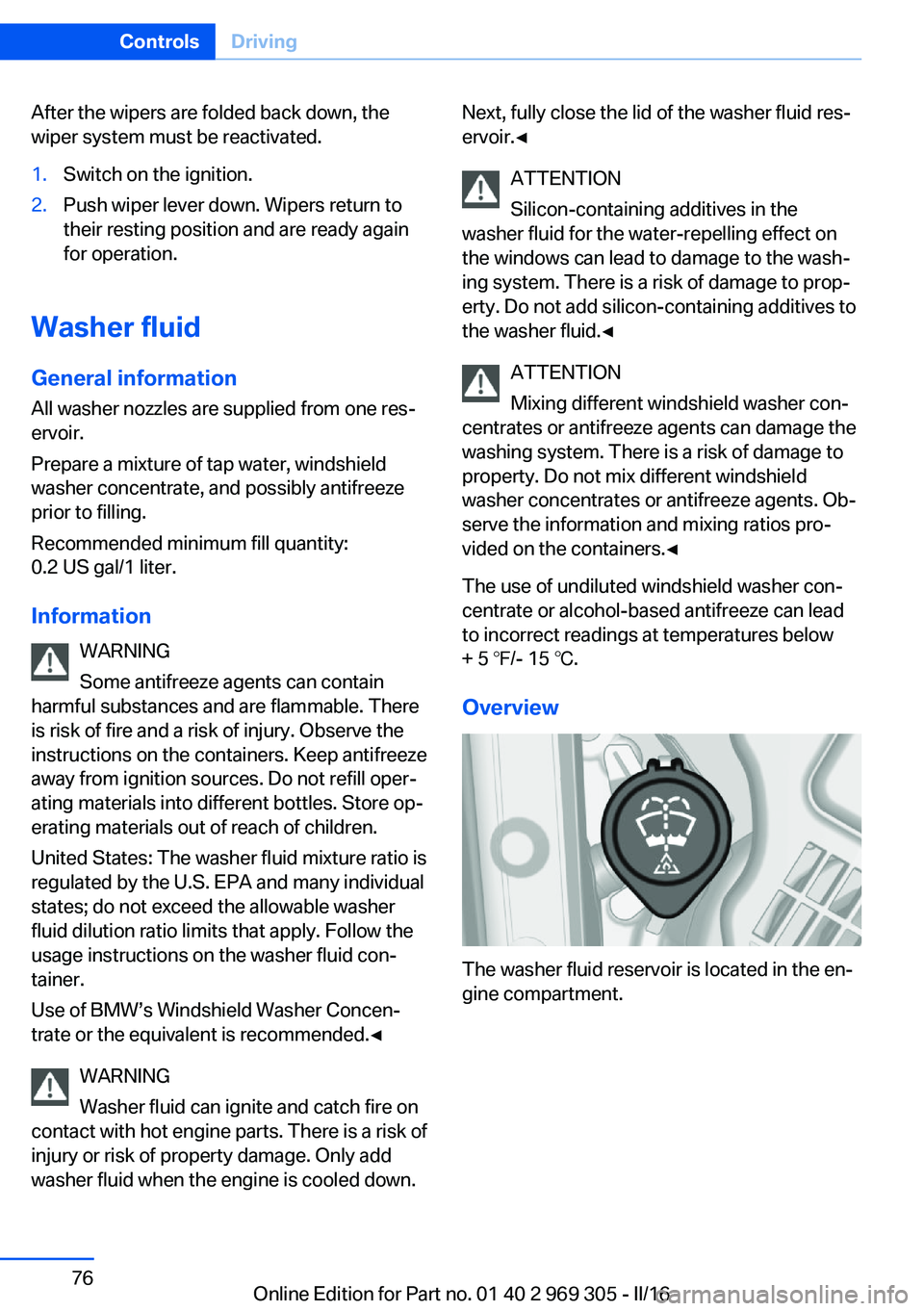
The washer fluid reservoir is located in the en‐
gine compartment.
Seite 76ControlsDriving76
Online Edition for Part no. 01 40 2 969 305 - II/16
Page 77 of 261

Steptronic transmission
Information WARNING
An unsecured vehicle can begin to move
and possibly roll away. There is risk of an acci‐
dent. Before exiting, secure the vehicle against
rolling.
In order to ensure that the vehicle is secured
against rolling away, observe the following:▷Set the parking brake.▷On uphill grades or on a downhill slope,
turn the front wheels in the direction of the
curb.▷On uphill grades or on a downhill slope,
also secure the vehicle, e.g., with a wheel
chock.◀
Selector lever positions
D Drive
Selector lever position for normal vehicle oper‐
ation. All gears for forward travel are activated
automatically.
R Reverse Select only when the vehicle is stationary.
N Neutral
The vehicle may roll in selector lever posi‐
tion N, e.g. in car washes.
When the ignition is switched off, refer to
page 66, selector lever position P is engaged
automatically.
P Park Select only when the vehicle is stationary. The
drive wheels are blocked.
Selector lever position P is engaged automati‐
cally in the following situations:
▷After the engine is switched off when the
vehicle is in radio-ready state, refer topage 66, or when the ignition is switched
off, refer to page 66, and when selector
lever position R or D is set.▷With the ignition off, if selector lever posi‐
tion N is engaged.▷If the driver's safety belt is unbuckled, the
driver's door is opened, and the brake
pedal is not pressed while the vehicle is
stationary and selector lever position D
or R is engaged.
Kickdown
Kickdown is used to achieve maximum driving
performance. Step on the accelerator pedal
beyond the resistance point at the full throttle
position.
Engaging selector lever positions General information To prevent the vehicle from creeping after you
select a gear, maintain pressure on the brake
pedal until you are ready to start.
▷It is not possible to shift out of selector
lever position P until the engine is running
and the brake is applied.▷With the vehicle stationary, depress the
brake pedal before shifting out of selector
lever position P or N; otherwise, the shift
block will not be deactivated and the shift
command will not be executed.
Selector lever lock
A lock prevents the inadvertent switching to
selector lever position R or the inadvertent
change from selector lever position P.
Seite 77DrivingControls77
Online Edition for Part no. 01 40 2 969 305 - II/16
Page 78 of 261
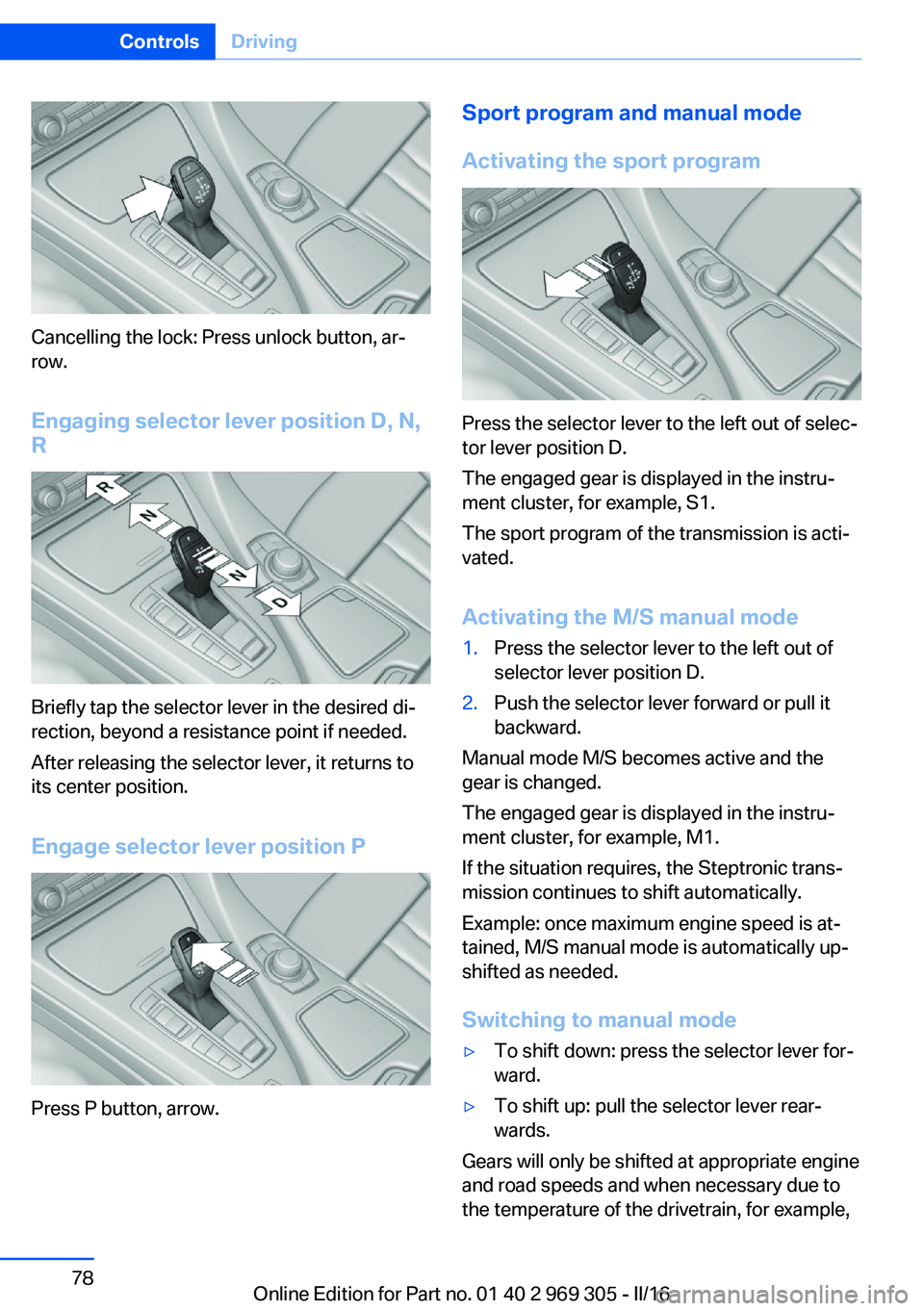
Cancelling the lock: Press unlock button, ar‐
row.
Engaging selector lever position D, N,
R
Briefly tap the selector lever in the desired di‐
rection, beyond a resistance point if needed.
After releasing the selector lever, it returns to
its center position.
Engage selector lever position P
Press P button, arrow.
Sport program and manual mode
Activating the sport program
Press the selector lever to the left out of selec‐
tor lever position D.
The engaged gear is displayed in the instru‐
ment cluster, for example, S1.
The sport program of the transmission is acti‐
vated.
Activating the M/S manual mode
1.Press the selector lever to the left out of
selector lever position D.2.Push the selector lever forward or pull it
backward.
Manual mode M/S becomes active and the
gear is changed.
The engaged gear is displayed in the instru‐
ment cluster, for example, M1.
If the situation requires, the Steptronic trans‐
mission continues to shift automatically.
Example: once maximum engine speed is at‐
tained, M/S manual mode is automatically up‐
shifted as needed.
Switching to manual mode
▷To shift down: press the selector lever for‐
ward.▷To shift up: pull the selector lever rear‐
wards.
Gears will only be shifted at appropriate engine
and road speeds and when necessary due to
the temperature of the drivetrain, for example,
Seite 78ControlsDriving78
Online Edition for Part no. 01 40 2 969 305 - II/16
Page 79 of 261
downshifting is not possible if the engine
speed is too high.
The selected gear is briefly displayed in the in‐
strument cluster, followed by the currently se‐
lected gear.
Steptronic Sport transmission: avoid automatic upshifting in M/S manual
mode
The Steptronic Sport transmission does not
automatically upshift in M/S manual mode
once the maximum speed is reached, if one of
the following conditions is met:▷DSC deactivated.▷TRACTION activated.▷SPORT+ activated.
In addition, there is no downshifting for kick‐
down.
Ending the sport program/manual
mode
Push the selector lever to the right.
D is displayed in the instrument cluster.
Shift paddles
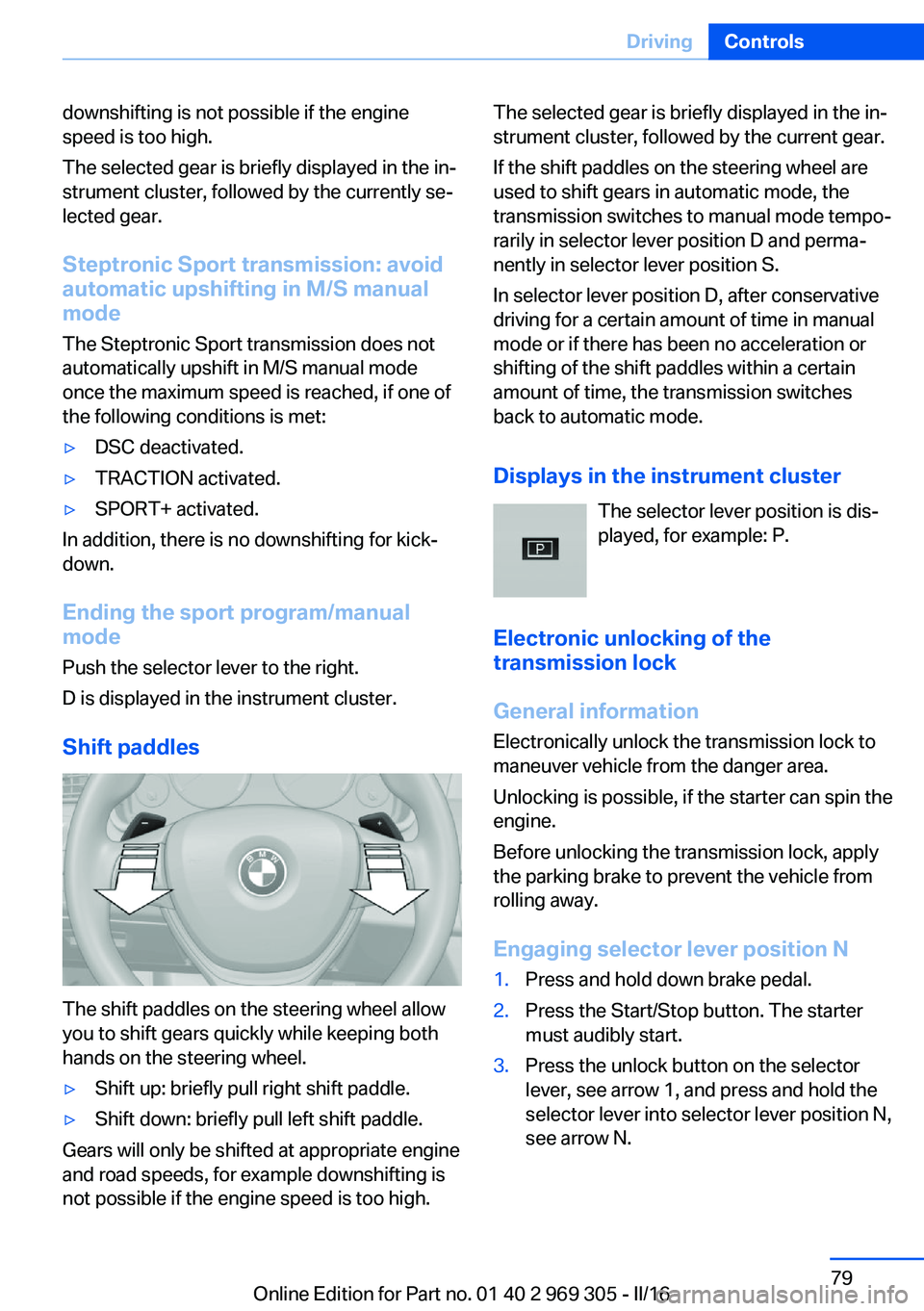
The shift paddles on the steering wheel allow
you to shift gears quickly while keeping both
hands on the steering wheel.
▷Shift up: briefly pull right shift paddle.▷Shift down: briefly pull left shift paddle.
Gears will only be shifted at appropriate engine
and road speeds, for example downshifting is
not possible if the engine speed is too high.
The selected gear is briefly displayed in the in‐
strument cluster, followed by the current gear.
If the shift paddles on the steering wheel are
used to shift gears in automatic mode, the
transmission switches to manual mode tempo‐
rarily in selector lever position D and perma‐
nently in selector lever position S.
In selector lever position D, after conservative
driving for a certain amount of time in manual
mode or if there has been no acceleration or
shifting of the shift paddles within a certain
amount of time, the transmission switches
back to automatic mode.
Displays in the instrument cluster The selector lever position is dis‐played, for example: P.
Electronic unlocking of the
transmission lock
General information
Electronically unlock the transmission lock to
maneuver vehicle from the danger area.
Unlocking is possible, if the starter can spin the
engine.
Before unlocking the transmission lock, apply
the parking brake to prevent the vehicle from
rolling away.
Engaging selector lever position N1.Press and hold down brake pedal.2.Press the Start/Stop button. The starter
must audibly start.3.Press the unlock button on the selector
lever, see arrow 1, and press and hold the
selector lever into selector lever position N,
see arrow N.Seite 79DrivingControls79
Online Edition for Part no. 01 40 2 969 305 - II/16
Page 80 of 261

A corresponding Check Control message
is displayed.4.Release the selector lever and press it
again into selector lever position N within
approx. 6 seconds.
Selector lever position N is displayed in the
instrument cluster.5.Release brake, as soon as the starter
stops.6.Maneuver the vehicle from the danger area
and secure it against moving on its own.
For further information, see the Tow-starting
and towing chapter.
Steptronic Sport transmission:
Launch Control
The concept Launch Control enables optimum acceleration
on surfaces with good traction.
General information
The use of Launch Control causes premature
component wear since this function represents
a very heavy load for the vehicle.
Do not use Launch Control during the break-in,
refer to page 184, period.
To increase vehicle stability, activate DSC
again as soon as possible.
An experienced driver may be able to achieve
better acceleration values in DSC OFF mode.
Requirements
Launch Control is available when the engine is
warmed up, that is, after uninterrupted driving
of at least 6 miles/10 km.
To start with Launch Control do not steer the
steering wheel.
Start with launch control While the engine is running:1. Press button or select Sport+ with
the Driving Dynamics Control.
TRACTION is displayed in the instrument
cluster and the indicator lamp for DSC OFF
lights up.2.Engage selector lever position S.3.With the left foot, forcefully press down on
the brake.4.Press and hold down the accelerator pedal
beyond the resistance point at the full
throttle position, kickdown.
A flag symbol is displayed in the instru‐
ment cluster.5.The starting engine speed adjusts. Within
3 seconds, release the brake.
Before using Launch Control again, allow the
transmission to cool down for approx. 5 mi‐
nutes.
Launch Control adjusts to the surrounding
conditions, for example, wet pavement, when
used again.
Seite 80ControlsDriving80
Online Edition for Part no. 01 40 2 969 305 - II/16
Page 81 of 261

DisplaysVehicle features and optionsThis chapter describes all standard, country-
specific and optional features offered with the
series. It also describes features that are not
necessarily available in your car, e. g., due tothe selected options or country versions. This
also applies to safety-related functions and
systems. The respectively applicable country
provisions must be observed when using the
respective features and systems.
Overview, instrument cluster
1Fuel gauge 892Speedometer3Messages, for example, Check Control4Tachometer 895Engine oil temperature 896Current fuel consumption7Electronic displays 818Reset miles 89
Electronic displays
▷Selection lists, refer to page 93.▷External temperature, refer to page 89.▷Auto Start/Stop function, refer to page 68.▷Onboard computer, refer to page 94.▷Date, refer to page 90.▷Energy recovery, refer to page 91.▷Transmission display, refer to page 79.▷Miles/trip miles, refer to page 89.Seite 81DisplaysControls81
Online Edition for Part no. 01 40 2 969 305 - II/16
Page 82 of 261

▷Messages, e.g. Check Control, refer to
page 85.▷Current fuel consumption, refer to
page 90.▷Navigation display, see Owner's Manual for
Navigation, Entertainment and Communi‐
cation.▷Range, refer to page 90.▷Status, Driving Dynamics Control, refer to
page 137.▷Service requirements, refer to page 91.▷Speed limit detection, refer to page 92.▷Time, refer to page 90.
Multifunctional instrument display
The concept
The instrument display is a variable display. In
the event of a program change, the display
rendition adapts to the respective program
through the Driving Dynamics Control. The
change of the display type can be deactivated
via iDrive.Some of the displays in the instrument display
may differ from the way they are shown in this
Owner's Manual.
Overview
1Fuel gauge 892Indicator/warning lights 853Speedometer4Variable displays5Tachometer 89
Selection lists 93
ECO PRO displays 1916Engine oil temperature 89Seite 82ControlsDisplays82
Online Edition for Part no. 01 40 2 969 305 - II/16
Page 85 of 261

Display in the instrument display▷Current engine speed is displayed in the
tachometer.▷Arrow 1: successive yellow illuminated
fields indicate an increase in the speed.▷Arrow 2: successive orange illuminated
fields indicate the upcoming shift moment.▷Arrow 3: fields are illuminated in red. Do
not wait any further to shift.
When the maximum possible speed is
reached, the entire display flashes. When the
maximum speed is exceeded, the supply of
fuel is interrupted in order to protect the en‐
gine.
Check Control The conceptThe Check Control system monitors functions
in the vehicle and notifies you of malfunctions
in the monitored systems.
A Check Control message is displayed as a
combination of indicator or warning lights and
text messages in the instrument cluster and in
the Head-up Display.
In addition, an acoustic signal may sound and a
text message may appear on the Control Dis‐
play.
Indicator/warning lights
General information
The indicator and warning lights in the instru‐
ment cluster can light up in a variety of combi‐
nations and colors.
Several of the lights are checked for proper
functioning and light up temporarily when the
engine is started or the ignition is switched on.
Red lights
Safety belt reminder Safety belt on the driver's side is not
buckled. For some country-specific
models: passenger belt is not worn or
objects are detected on the front passenger
seat.
Flashing or illuminated: safety belt on the
driver or passenger side is not buckled. The
safety belt reminder can also be activated if
objects are placed on the front passenger seat.
Make sure that the safety belts are positioned
correctly.
Airbag system Airbag system and belt tensioner are
not working.
Have the vehicle checked immediately
by a dealer’s service center or another quali‐
fied service center or repair shop.
Parking brake The parking brake is set.
For additional information, refer to Re‐
lease parking brake, refer to page 71.
Brake systemSeite 85DisplaysControls85
Online Edition for Part no. 01 40 2 969 305 - II/16