2017 AUDI A8 lock
[x] Cancel search: lockPage 89 of 354

0 co .... N ,..._
N .... 0 0 :c '
R PM is reached.
A WARNING
Please note that the wheels could spin on
slick or slippery roads when kick-down is ac
tive.
Overboost
Applies to: S8 plus
The max imum engine torque is tempo rar ily in
creased in ove rboost . Overboost is activated
when nearing full throttle in the S position and
when the engine is at operat ing temperat ure.
A WARNING
Ple as e note th at the wheel s co uld s pin o n
s lick or sli ppery roads when over boost is ac
t ive.
Transmission malfunction
Transmission: selector lever in drive!
-
If t h e se lec to r l ever is not in the P posi tion when
you o pen t he dr iver's door, the ve hicle could roll.
Selec t the P se lector lever posi tion.
rm Transmission : Please press brake pedal and
select gear again
Press the brake pedal and se lect t he des ired se
lecto r lever pos it io n aga in. You can t hen continue
d riving.
rm Transm ission over heating : Please dr ive con
servatively
The transm ission temperature has increased s ig
n ificantly due to the sporty driving manne r. Drive
in a less sporty manner until the temperature re
turns to the normal range and the ind icator light
sw itches o f.
rm Transmission malfunction: You can continue
driving
There is a system malfunct ion in the t ransmis
sion. Yo u may continue dr iving. D rive to your au
thor iz ed Audi dealer or author ized A udi Service
Faci lity soon to have the ma lfu nction co rrected.
D riving
rm Ii) Transmission malfunct ion: You can con
tinue driving in
D until engine is off
T he re is a syste m malfu ncti on in t he tra ns mis
s io n. The tran sm ission is swi tc hi ng to eme rge ncy
mode . If you tu rn the engine
off , you w ill not be
able to se lect any othe r se lector lever positions
a fter starting the engine a ga in . Drive to an a u
t h ori zed Audi dea le r or a uthori zed Audi Service
Fac ility immed iate ly to have the ma lfunction cor
rected .
rm Transmission malfunction: You can continue
driving with limited functionality
T he re is a system malfunction in t he transmis
s io n. The transmission is switc hing to eme rgency
mode. Th is mode only sh ifts into ce rtain gears or
will no longer shift at a ll. The eng ine may sta ll.
Drive to an authorized A udi dealer or authorized
Audi Service Facility immed iate ly to have the
malfu nction corrected.
rm ffl Transmiss ion malfunction: No reverse
gear. You can continue driv ing
T he re is a system malfunction in the transmis
s io n. The transmission is switc hing to eme rgency
m ode. Th is mode only shifts into ce rtain gears or
will no longer sh ift at a ll. The eng ine may sta ll.
Yo u cannot engage the reve rse gear. Dr ive to an
a utho rized Aud i dea le r o r auth orized Aud i Serv ice
Fac ility immed iate ly to hav e the ma lfunction co r
r ec ted .
[O] Vehicle may roll! Cannot shift to P. Please
apply parking brake
- The parking lock was re leased using the emer
ge ncy release¢
page 88. Or
- The pa rking loc k can no longer be engage d.
Dr ive to an a uth ori zed Audi dea ler or author
ized Aud i Service Fac ility immediately to have
the ma lfu nction corrected .
rm Transmission malfunction: Stop vehicle and
shift to park.
Do not continue dr iving. Select t he P selector lev
er posit io n and contact an authorized A udi dealer
o r authorized Audi Serv ice Facility fo r ass istance.
87
Page 90 of 354

Driving
Parking lock emergency release
The parking lock must be released using the
emergency release before towing the vehicle .
®
Fig . 99 Driver's side footwell: releas ing the parking lock
using the emergency release
Fig . 100 D river 's side footwell: resetting the parking lock
~ N M 0 ± ... a,
The emergency release is located under the floor
mat on the d river's s ide . You operate the eme r
gency release from the drive r's seat.
Releasing the parking lock using the
emergency release
.,. To prevent the vehicle from rolling unintention
ally, set the par king brake<®>
q page 81 or
press the b rake peda l.
.,. The re are two s lits o n the cove r. Po sition the
screw driver from the vehicle tool kit in one o f
the slits on t he cover and pry the cover off .
.,. Pu ll the band @ in the direction of the arrow
u nt il the release lever locks in place
qfig. 99 .
.,. Fold the upper section of the release lever
down into the recess.
Resetting the parking lock
.,. Press the b utton @ and the release lever at t he
same time. Yo u can now push the lever back i n
to its orig inal position. Make su re the lever
locks in p lace
qfig. 100.
88
.,. Install the cover .
When the parking lo ck emergen cy release is
u sed, the
l'i1 indi cator light and the N selec to r
l ever posit io n turn on in the instr ument cluster .
The message
Vehicle may roll! Cannot shift to P.
Please appl y parking brake
also appears .
A WARNING
-
If you release the parking lock using the
emergency release, secure yo ur vehicle with
the park ing brake or the brake peda l if the
parking brake is not wo rking. The veh icle can
ro ll away if it is no t secured and cause a cras h.
Page 93 of 354

0 co .... N ,..._
N .... 0 0 :c '
When driv ing with a trailer, activate the trailer
mode of the air suspension. Switch the air sus
pension trailer mode on when you are towing a
trailer. This will limit the regulation by the air
suspension while driving. Select in the MMI:
ICARI function button > (Ca r)* systems control
button
> Vehicle settings > Air susp.: towing >
On.
Coolant temperature
The coolant temperature gauge¢ page 9 must
be observed carefully . The coolant temperature
can increase if you drive on long inclines in a low
gear at high engine speeds. Reduce your speed
i mmed iately if the LEDs in the top part of the dis
p lay turn on.
For more information about indicator lights, re
fer to. ¢
page 20.
A WARNING
Anyone not properly restrained in a moving
vehicle is at a much greater risk in an acci
de nt. Never let anyone ride in you r car who is
not properly wearing the restraints p rovided
by Audi.
Trailer mode notes
Important to know -
Your veh
icle handles differently when tow ing a
tra iler because of the additional weight and d if
ferent weight distr ibut ion. Safety, performance
and economy will greatly depend on how careful
ly yo u load you r trailer and operate your rig.
Before you actually tow your trailer, practice
turning, stopp ing and back ing up in a n area away
from traffic. Keep practicing until you have be
come completely fami liar with the way your vehi
cle-trailer comb inat io n behaves and responds.
Backing up is difficult and requires pract ice.
Backing up with a trailer gene rally requires steer
ing action opposite to tha t when backing up your
ve hicl e without a trailer .
Maintain a greater d istance between your vehicle
and the one in front of you . You w ill need more
Trailer mode
room to stop . To compensate for the trailer, you
will need a larger than normal turning radius .
When passing, remember that you cannot accel
erate as fast as you normally wo uld because of
the added load. Make sure you have enough room
to pass. After passing, allow p lenty of room for
your trailer before changing lanes again .
Avo id jerky starts, sharp turns or rapid lane
changes.
(D Tips
- Do not tow a trailer during the break-in peri
od of your veh icle.
-If you tow a trailer, your Audi may requ ire
more frequent maintenance due to the ex
tra load ¢
page 336.
Parking on a slope
Do not park on a slope with a trailer. If it cannot
be avoided, do so only after doing the following:
When parking:
" Apply the foot brake .
" Have someone place chocks under both the ve
hicle and the trailer wheels.
"W ith chocks in place, slowly release the brakes
until the wheel chocks absorb the load.
" Tur n the whee ls towards the curb.
" App ly the parking brake.
" Select the P selector lever position.
When restarting after parking:
"App ly the foot brake.
" Start the engine .
"S elect the D selector lever position .
" Release the parking brake and slowly pull out
and away from the wheel chocks.
" Stop and have someone retrieve the wheel
chocks.
(D Tips
If you move the selector lever of the automat
i c transmission to P before applying the park
in g brake and before blocking the wheels, you
may have to use more force later to move the
lever out of the P posit ion.
91
Page 118 of 354

Parking system s
Rearview camera
Introduction
Applies to: vehicles with rearview camera
, I
F ig. 132 Illustration : Cross parking
Fig. 133 Illustration : pa rallel parking
The rearview camera gives you two views: you can
use
Cross parking to park in a parking space or a
ga rage, for example ¢
fig. 132 . You can use par
allel parking
i f you would l ike to park on the s ide
of the road
¢ fig. 133.
General information
Applies to: vehicles with rearview camera
Fig . 134 Area cove red @ and area not cove red @ by the
r earv ie w ca mera .
116
rym
AU l:J ,.
Fig. 135 Lu ggage compa rtmen t lid : locatio n of the rear
v iew camera
The rearview camera is located above the rear li
cense p late bracket. Make sure that the lens for
the rearview camera ¢
fig. 135 is not covered by
deposits or any other obstructions because this
can impair the function of the parking system .
For information on cleaning, refer to
¢ page 306.
The rearview camera coverage area corresponds
to
(j)¢ fig . 134 . Only this area is shown in the In
fota inment display . Objects that are outside of
th is area @are not displayed.
A WARNING
- Always read and follow the app licab le warn
ings ¢&.
in General information on
page 114 .
- If the position and the installa tion angle of
the rearview camera was changed, fo r ex
ample after a collision, do not con tinue to
use the system for safety reasons . Have it
checked by an authorized Aud i dea ler or au
thorized Audi Service Fac ility.
- On ly use the rearv iew camera to ass ist you if
it shows a good, clear picture . For example ,
the image may be affected by the sun shin ing into the lens, dirt on the lens, or if there
is a malfunction .
- Use the rearv iew camera on ly if the luggage
compartment lid is completely closed . Make
sure a ny objects you may have mo unted on
the l uggage compa rtment lid do not b lock
the re arview camera.
- The camera lens enlarges and distorts the
fie ld of vision . The object appears bot h al
tered and inac curate o n the screen.
Page 128 of 354

Intelligent Technology
Intelligent Technology
Electronic Stabilization
Control (ESC)
Description
The ESC increases driving safety . It reduces the
risk of s lipping and improves driving stabi lity.
ESC detects critical situations such as when the
veh icle is oversteer ing and understeering or the
wheels are spinning. The vehicle is stabilized by
apply ing the brakes or reducing eng ine torque .
When ESC engages, the
Ji] ind icator light blinks
in the inst rument cluste r.
The fo llow ing systems are integrated in the ESC:
Anti -lock b raking system (ABS)
ABS prevents the whee ls from locking when brak
i n g . The vehicle can sti ll be steered even d uring
hard brak ing. Apply steady press ure to the brake
pedal. Do not pump the pedal. A puls ing in the
brake pedal indicates that the system is acting to
stabilize the vehicle.
Brake a ssi st sy stem
The brake assist system can dec rease braking dis
tance. It increases brak ing power when the driver
presses the brake pedal quick ly in emergency sit
uations . You must press and hold the brake pedal
until the dangerous situat io n is over . In veh icles
w ith adapt ive c ruise control*, the bra ke assis t
system is more sensitive if the distance detected
to the veh icle dr iv ing ahead is too small. On
ve hicles w ith act ivated and functi oni ng night vi
sion assist*, the brake assist system can respond
more sensit ively if there is a warning .
Anti-slip regulation (ASR)
A SR red uces eng ine power when the d rive wheels
begin s pinning and ad apts the force to the road
conditions. This makes it easier to sta rt, acceler
ate and dr ive up hi lls.
Electronic differential lock (EDL )
EDL applies the brakes to a wheel that sta rts
sp inning and t ransfe rs t he d rive powe r to t he
o ther d riving w heels. This f unct ion is not av aila
b le at higher speeds .
126
In extreme cases, ED L automat ically switches off
to keep the b rake on the braked whee l from over
heating. The veh icle is still working correct ly. ED L
will switc h on again automatically when condi
tions have returned to normal.
Steering recommendat ion
The E SC he lps to stabili ze the vehicle by changing
the steering torque.
I n veh icles with dyna mic steer ing*, ESC a lso
helps to sta bilize the s teer ing in cr it ica l situa
tions.
Selective wheel torque control
Se lective wheel to rque cont rol is used when d riv
i ng on curves.
The fro nt wheel on the ins ide of the curve or bo th
whee ls on the inside of the curve are braked se
l ectively as needed. This allows more pre cise d riv
i ng in cu rves. The applicab le system may no t ac ti
vate when dr iv ing in we t or snowy condi tio ns.
Automatic post -collision braking system
The "automat ic post-coll is io n braking system"
can help to reduce the risk of sl iding and of addi
tiona l co llisions after an acc iden t. If the a irbag
c ontro l modu le detects a collision above a cer tain
vehicle speed, the ve hicle is braked by the ESC.
The veh icle does not b rake automatically if:
- the drive r presses the acce lerator pedal, or
- the bra king force generate d by the pressed
brake pedal is greater than the b raking force
that would be in itiated by the system, or
- the ESC, the bra ke system or the vehicle electri
cal system are not functioning.
A WARNING
- The ESC and its integ rated systems can not
overcome the lim its imposed by natura l
p hys ica l laws. Th is is es pec ially impor tan t
on s lippery or wet roads. If the system s be
g in a cting to stabilize yo ur vehicle, you
should immedi ately alte r your speed to
match the road and tra ffi c conditions. Do
not let t he i ncreased safety provi ded tempt
Page 194 of 354

Playing med ia
Parent al control
Req uirement: a video DVD must be p laying and
the password must be entered (the password set
at the factory is "1234 ").
Playback of v ideo DVDs can be rest ric ted us ing
pa rental control. Se lect and confirm the content
rating (such as
Le vel 5 ). Eight diffe rent Content
rating s
can be set fo r parenta l control. For exam
p le, if you select Level S* for the parental contro l
level, all DVDs from level 1-5 can be played. Vid
eo DVDs with a higher level will not play. All re
str ictions are canceled when the function is
sw itched
O ff .
You can change the current password using the
Change pa ssword function.
(D Tips
- Not all video DVDs have parental control.
- The
Repeat option s and Random playback
functions switch off automatically when the
source changes in the
Media menu.
- Password entry will be locked for approxi
mately one m inute if you enter the incorrect
password three times in a row. On ly your
authorized Audi dea ler can reset the paren
tal contro l password .
- The
Tra ck displ ay function is not available
for the Jukebox or a connected iPod
<=:> page 191.
- The DVD drive only supports the DTS (D igi
tal Theater Systems) audio format.
192
Page 198 of 354
Rear Seat Entertainment
Restarting the RSE
(reset)
Applies to: ve hicles w ith Rear Seat Ente rta inment
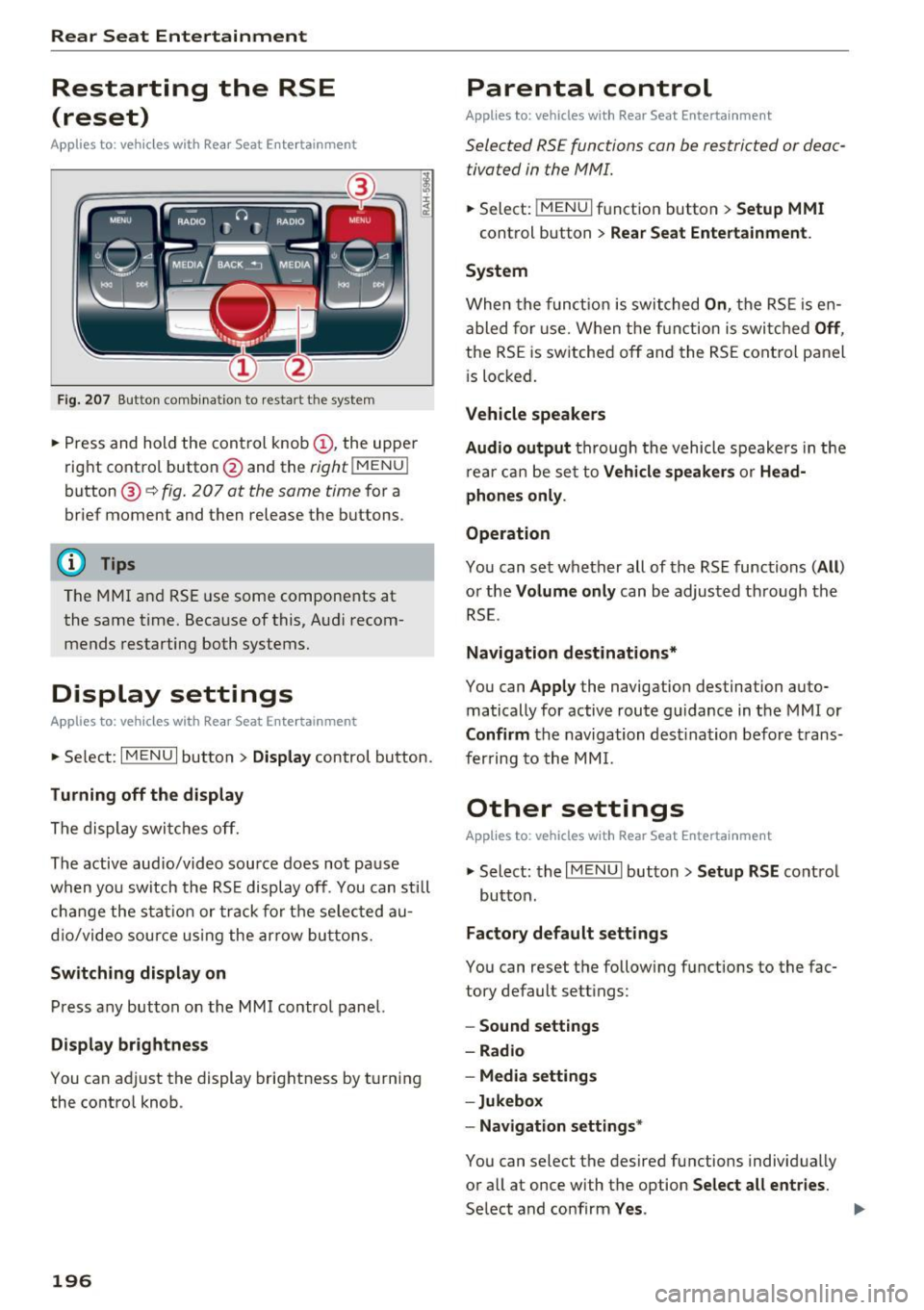
F ig. 207 Button combination to restart th e system
... Press and hold the control knob (D , the upper
right control button @and the
righ t!MENUI
button ® c:::> fig. 207 at the same time for a
brief moment and then release the buttons .
@ Tips
The MMI and RSE use some components at
the same time. Because of this, Audi recom
mends restarting both systems.
Display settings
Applies to: vehicles with Rear Seat Enterta inment
... Se lect: I MENU I button > Display control button.
Turning off the display
The display switches off.
The active aud io/video source does not pause
when yo u switch the RSE display off . You can still
change the stat ion or track for the selected au
dio/video source using the arrow buttons.
Switching display on
Press any button on the MMI control panel.
Display brightness
You can adjust the display brightness by turning
the control knob .
196
Parental control
Applies to: ve hicles with Rear Seat Entertainment
Selected RSE functions can be restricted or deac
tivated in the MMI.
... Select: I MEN u I fu nction button > Setup MMI
control button > Rear Seat Entertainment.
System
When the function is switched On, the RSE is en
abled for use. When the function is switched
Off,
the RSE is switched off and the RSE control panel
i s locked.
Vehicle speakers
Audio output
through the vehicle speakers in the
rear can be set to
Vehicle speakers or Head
phones only.
Operation
You can set whether all of the RSE functions (All)
or the Volume only can be adjusted through the
RSE.
Navigation destinations*
You can Apply the navigation destination auto
matically for active route guidance in the MMI or
Confirm the navigation dest ination before trans
ferring to the MMI.
Other settings
App lies to: vehicles with Rear Seat Enterta inment
.,. Select: the I MENU I button> Setup RSE control
button.
Factory default settings
You can reset the following functions to the fac
tory default settings:
- Sound settings
- Radio
- Media settings
-Jukebox
- Navigation settings*
You can select the desired functions individually
or all at once with the option
Select all entries.
Select and confirm Yes . .,,.
Page 206 of 354

System settings
System settings
Setting the time and
date
You can set the clock time manually or using the
CPS.
Fig. 215 Sett ing a time zone
.,. Select : the I MENU I button > the upper left Time
control button (D <=> fig . 215.
Time source
GPS
'ti: the Time and Date are set by GPS based
on the
Time zone that was se lected manually. Al
ways remember to set the new
Time zone i n the
MMI when the vehicle enters a different t ime
zone.
Manual : you can set the Time and Date manually
using the respective function . Press the control
knob. Set the
Time or the Date manually by turn
ing and pressing the control knob.
Automatic daylight saving time*
When daylight saving time is sw itched On , the
time is moved forward or back automatically by
one hour when daylight sav ing time begins or
ends.
Man. daylight sav. time
When this function is switched On , an hour is
added to the set
Time.
Time zone
When selecting the appropriate time zone, a
sampling of countr ies in this zone will be listed .
204
Time format
If you select 24h , the clock will display, for ex
amp le,
13:00. If you select AM/PM , the clock
will display, for example,
1:00 PM.
Date format
If you select DD.MM , the date will display, fo r ex
ample,
31.12 . If you sele ct MM/DD , the date
will display, for example,
12/31.
Adjusting the sound
The sound distribution and volume of the MMI
can be adjusted individually. The settings depend
on vehicle equipment .
Fig. 216 Sound settings
Fig. 217 Adjusti ng the ba la n ce/fader
.,. Select: !T ONEI button.
(D GALA*/ DSP* / DSP [BOSE]*/ DSP [Bang
& Olufsen]*
- GALA (Speed-dependent volume increase) *:
select and confirm Active /Inactive for the ad
justment of playback volume to the level of
noise inside the vehicle.
-Sound focus (adjusting the sound distribu
tion) *:
select and confirm All (symmetrical