2017 AUDI A6 lane assist
[x] Cancel search: lane assistPage 90 of 280

Assist
Audi adaptive cruise
control
Description
Applies to: vehicles with Audi adapt ive cruise control
F ig. 89 Detection range
The adaptive cruise control system is a combina
tion of speed and distance regulation.
It assists
the driver by both regulating the speed and
maintaining a distance to the vehicle driving
ahead, within the limits of the system .
If the sys
tem detects and object ahead, adaptive cruise
control can brake and acce lerate your vehicle.
This makes driving more comfortable both on long stretches of highway and in stop-and-go
traffic.
What can adaptive cruise control do?
The adaptive cruise contro l system uses video, ra
dar and ultrasound . Objects driving ahead can be
recognized up to 650 feet (200 m) away.
On open roads with no traffic, it functions
like a
cruise control system . The stored speed is main
tained. When approaching an object ahead, the
adaptive cruise control system automatically
brakes to match that object's speed and then
maintains t he stored distance . As soon as the
system does not detect an object ahead, adaptive
cru ise control acce lerates up to the stored speed .
In stop-and-go traffic, adaptive cru ise control can
brake until the vehicle is stat ionary and then be
g in driving aga in under certain conditions
¢page 91.
Audi braking guard can warn you about an im
pending collision and initiate braking maneuvers
¢page 93.
88
Which functions can be controlled?
When you switch adaptive cruise control on, you
can set the current speed as the "control speed"
¢ page 90, Switching on/off.
When driving, you can stop cruise control
¢page 92 or cha nge the speed ¢ page 91 at
any time.
You can also set the distance to the object mov
ing ahead and set the driving mode of the adap
tive cruis e con trol
¢p age 92.
General information
Applies to: vehicles with Audi adaptive cruise control
Fig. 90 Front of the vehicle: sensors and video camera
The areas that contain the radar and ultrasonic
senso rs and the video camera ¢
fig. 90 must not
be covered by stickers, deposits or other objects
because they can interfere with the function of
the adapt ive cruise control system and braking
guard. For information on clea ning, refer to
¢ page 231. The same applies for any modif ica
tions made in the front area.
The function of the adaptive cruise control sys
tem and braking guard is limited under some
conditions.
- Objects can only be detected when they are
with in the sensor range
¢p age 88, fig. 89.
- Th e system has a limit ed ability to detect ob
jects that are a sho rt distance ahead, off to the
side of your vehicle or moving into your lane.
- Objects that are difficult to detect such as mo
torcycles, vehicles with high ground clearance
or an overhanging load are detected late or not
detected at all.
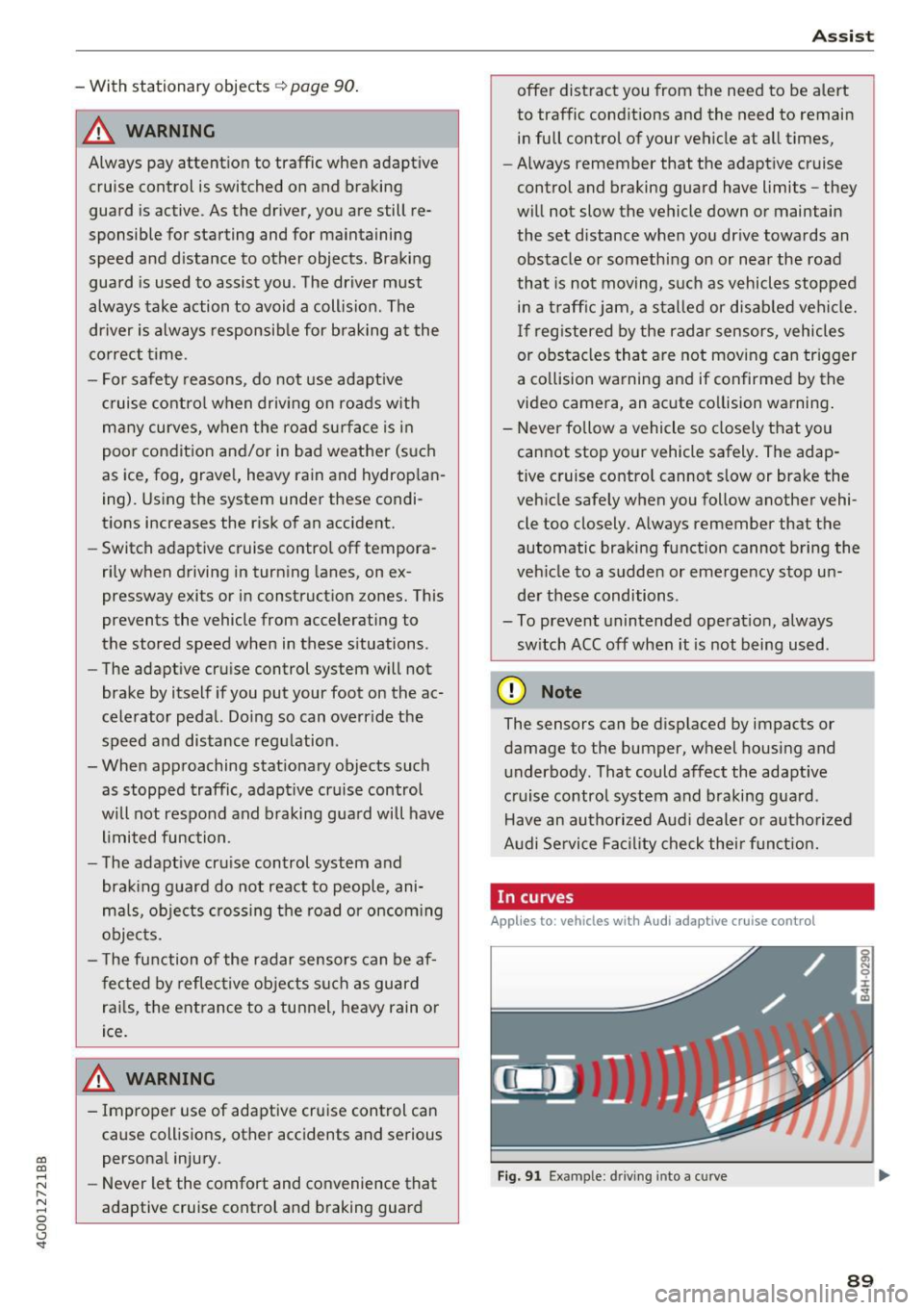
- When driving through curves¢
page 89. ll>
Page 91 of 280
co
co
.... N
" N .... 0 0 <.,;) 'SI"
- With stationary objects~ page 90.
A WARNING
Always pay attention to traffic when adapt ive
cruise control is switched on and braking
guard is active . As the dr iver, you are still re
sponsible for starting and for maintaining
speed and d istance to other objects. Braking
guard is used to assist you . The driver must
always take action to avoid a collision . The
driver is always responsib le for brak ing at the
co rrect time .
- For safety reasons, do not use adapt ive
cruise co ntro l when driv ing on ro ads w ith
many curves, when the road su rface is in
poor condit ion and/or in bad weather (s uch
as ice, fog, grave l, heavy rain and hydrop la n
ing). Using the system under these condi
t ions increases the risk of an accident.
- Switch adaptive cruise contro l off tempora
rily when driving in turning lanes, on ex
pressway exits or in construction zones. This
prevents the vehicle from accelerating to
the stored speed when in these situations .
- The adapt ive cru ise control system will not
brake by itself if you put your foot on the ac
celerator pedal. Doing so can overr ide the
speed and distance regulation .
- When approaching stat ionary objects such
as stopped traffic, adapt ive cru ise control
will not respo nd and braking gua rd will have
l imited func tion .
- The adapt ive cru ise control system and
bra king g uard do not react to people, ani
mals, objects crossing the road or oncom ing
objects.
- T he function of the radar sensors can be af
fec ted by reflec tive objects s uch as guard
rai ls, the ent rance to a tunnel, heavy rain or
ice.
& WARNING
- Improper use of adaptive cruise control can cause collisions, other accidents and serious
persona l injury.
- Never let the comfort and convenience that
adaptive cruise cont rol and braking guard
A ss ist
offe r dist ract you from the need to be alert
to traffic cond itions and the need to remain
in full control of your vehicle at all times,
- Always remember that the adaptive cruise
control and braking guard have limits -they
will not slow the vehicle down or maintain
the set distance when you dr ive towa rds an
obstacle or something on or near the road
that is not moving, s uch as vehicles stopped
in a t raff ic jam, a stalled or disab led vehicle.
If r eg istered by the radar sensors, vehicles
or obsta cles that are not moving ca n trigger
a co llision wa rning and if confirmed by the
video came ra, an acute co llision wa rning .
- Never fo llow a vehicle so closely that you
cannot stop your vehicle safely . The adap
tive cruise contro l cannot slow or brake the
veh icle safely w hen you follow another vehi
cle too closely. A lways remember that the
automatic braking function cannot bring the
veh icle to a sudde n or emergency stop u n
der these conditions .
- To prevent unintended operat ion , always
sw itch ACC off when it is not being used .
(D Note
The sensors can be d isplaced by impacts or
damage to the bumper, wheel housing and
underbody. That could affect the adaptive
cruise contro l system and braking gua rd .
Have an au thorized Audi dealer o r autho rized
A udi Service Fac ility check the ir funct ion.
In curves
Applies to: vehicles with Audi adaptive cruise control
I
F ig. 91 Exa mpl e: dri ving into a c urve
89
Page 98 of 280

Ass is t
D oor open
The adaptive c ruise contro l system cannot sw itch
on when a door is open.
Stat ionar y obj ect ah ead
This message appears if you would like to switch
adapt ive cruise control on and there is a station
ary object or obstacle directly ahead of your vehi
cle .
Audi active Lane assist
Description
Appl ies to: ve hicles w ith Audi active lane assist
Active lane assist detects lane marker lines with
in the limits of the system using a camera in the
windshield. If you are approaching a detected lane marker line and it appears likely that you
will leave the lane, the system will warn you with
correct ive steering . You can ove rride th is steer ing
at any time . If you pass over a line, the steer ing
wheel will v ibrate l ightly. In order for this warn
ing vib ration to occur, it must fi rst be sw itched
on in the Infotainment sys tem . Active lane assist
is ready for operation when the lane marker line
is detected on at least one side of the vehicle .
The system is designed for driving on express
ways and highways and therefore only activates
at speeds above approximately 40 mph (65 km/
h).
A pp lies to: ve hicles w ith s ide assist
If you activate a turn sig na l when active lane as
sist is ready and it classifies a lane change as crit
ical because of vehicles traveling alongside you or
approaching you, there will be noticeab le correc
tive steering shortly before you leave the lane.
This will attempt to keep your vehicle in the lane.
A ppl ies to: ve hicles w ithout s ide ass ist
The system will not warn you before crossing a
lane marker line if yo u have activated the tu rn
signa l. In this case, it ass umes that you are
changing lanes intentiona lly .
A ppl ies to: ve hicles with adaptive cruise co ntrol
The corrective stee ring is targeted based on the
driving situat ion . In addition to the lane marker
96
li nes, the system can a lso take into account other
objects such as guard rails. If they are detected in close prox imity to the ve hicle, active lane assist
helps prevent the vehicle from dr iving too close
to them. There is a lso pass ing ass istance. The
system does not provide any corrective steering if i t detects that you are pass ing another vehicle .
A WARNING
-The system warns the drive r that the vehicle
is leaving the lane using cor rect ive steering.
The drive r is always responsible fo r keeping
the vehicle within the lane.
- The system can help you keep the vehicle in
the lane, but it does not drive by itse lf. Al
ways keep your hands on the steering
wheel.
- Cor rective steering m ay no t occur in certain
si tuations, such as during heavy braking.
- There may be cases where t he camera does
not recognize all lane marker lines . Correc
tive steering can only take place on the s ide
of the vehicle where lane marker lines are
detected.
- Other road structures or objects could possi
bly be identified unintent ionally as lane
marker lines. As a result, corrective steering
may be unexpected or may not occur.
- The camera view can be restricted, for ex
ample by vehicles driving ahead or by rain,
snow, heavy spray or light shining into the
camera . This can result in active lane ass ist
not detecting the lane marker lines or de
tect ing them inco rrectly .
- Under certain cond it ions such as ruts in the
road, a banked roadway or crosswinds, the
corrective steer ing alone may not be enough
to keep the vehicle in the m iddle of the lane.
- For safety reasons, act ive la ne assist must
no t be use d when there are poor road and/
or weather condi tions such as slippery
roads, fog, gravel, heavy rain, snow and the potential for hydrop laning. Using active lane
assist under these conditions may increase
the risk of a crash.
Page 99 of 280

Switching on/off
A ppl ies to: ve hicles with Audi active lane assist
Fig. 100 Turn s ig n al lever: button for active lane ass ist
F ig. 101 Windsh ield: camera window fo r ac tive lane assist
... Press the button to switch the system on and
off ¢fig . 100 . The. or. indicator light in
the instrument cluster turns on o r off .
Indicator lights
• Ready: the indicator light turns on when the
system is ready for use. The system can now be
operated .
., Not ready: the indicator light turns on if the
system is switched on but is inoperab le. Th is may
be due to the following reasons:
- The re is no lane marker line.
- T he relevan t lane marker lines are not detected
(for example, mark ings in a construction zone
or because they are obstructed by snow, dirt,
water or lighting).
- The vehicle speed is below the activation speed
of approx imately 40 mph (65 km/h) .
- The lane is too narrow or too wide.
- The curve is too narrow.
co ~ - The driver's hands are not on the stee ring
~ wheel. N .... 0 0 <.,;) 'SI"
Assist
(D Tips
Make sure the camera's field of view
¢ fig. 101 is not obstructed by stickers or any
thing else. For information on clean ing, refer
to
¢page 231.
View in instrument cluster display
App lies to: vehicles with Audi a ctive la ne ass ist
Fig. 102 Instrument cluster: active lane ass ist is sw itc hed
on and providing warnings
Fig. 103 Instrument cluste r: act ive lane ass ist is sw itc hed
on b ut not ready to provide warnings
You can call up the active lane assist display us
ing the b uttons in the mu ltifunction steering
wheel
¢ page 21 .
An additional indicato r appears i n the Head-up
display*.
White line(s) Active lane assist is act ivated
and ready to provide warn ings .
Red line(s) Active lane assist warns you
(left or right) before leav ing a lane
¢fig . 102. In addition, the
steering wheel vibrates lightly.
Gray line(s) Active lane assist is activated,
but not ready to give warning
¢fig. 103 .
97
Page 100 of 280

Ass is t
Messag es in the instrument cluster display
If the active lane ass ist switches off automatica l
ly, the indicator lig ht in the display turns off and
one of the follow ing messages appears:
Audi acti ve lan e ass ist : Cur rently un availabl e.
No camera vie w
This message appears if the camera is unable to
detect the lines. This co uld happen if :
- The camera field of view
9 page 97, fig . 101 is
dirty or cove red in ice . Clean this area on the
windshield .
- The camera field of v iew is fogged over . Wait
unt il the fog has cleared before sw itch ing the
active lane assist on again .
- The system has been unable to detect the lanes for an extended period of time d ue to road con
ditions . Switch a ctive lane assist back on when
the lines are mo re visible .
Audi acti ve lan e ass ist : Cu rrently un available
There is a temporary active lane assist ma lf u nc
tion . Try sw itching the ac tive lane assist on aga in
la ter.
Audi active lane a ssist : System fault!
Dr ive to an a utho rized Aud i dea le r or a uthorized
Aud i Serv ice Facility immediately to have t he
malfunction corrected.
Audi active lane a ssist : Please take over steering
This message appea rs if you are not steering by
yourself . If th is is the case, active lane assist does
no t swi tch off, but it is "not ready " to provide a
warn ing . The system ca n he lp you keep the veh i
cle in the lane . However, yo u are responsib le for
d riving the vehicle and must steer it yo ursel f.
Adju sting the vibrat ion warning
Applies to: ve hicles with Audi active lane assist
.,. Se lect : th e ICARI function button > (Car )* Sys
tems
control button > Drive r assist ance > Audi
acti ve lane assist .
V ibrat ion warning
You can switch the additional vibration warni ng
in the steer ing wheel o n or off.
98
@ Tips
Your settings are automatically stored and as
signed to the remote contro l key being used.
Audi side assist
Description
App lies to: vehicles with Aud i side ass ist
Fi g. 10 4 Senso r detect ion ra nge
Fig. 10 5 Dis pla y on t he exterio r mirr or
Side assist helps you monitor your blind spot and
traffic behind your vehicle. W ithin the limits of
the system, it warns you abo ut vehicles that are
coming closer or th at a re t raveling wit h you with
i n senso r range @
9 fig. 104: if a lane change is
classified as cri tical, the disp lay @ in the exte rior
mirror
9 fig. 105 turns on .
The disp lay in the left exte rio r mirror prov ides as
s ista nce when making a lane change to the left ,
whi le the display in the r igh t exterior m irror pro
vides assistance w hen making a lane c hange to
the right.
Information stage
As long as you do not a ct iva te the t urn signal,
side ass ist
informs yo u about vehicle s th at are
detected a nd classified as c rit ical. The di splay in
t he mirror turns on, but is dim. ""
Page 101 of 280

co
co
.... N
" N .... 0 0 <.,;) 'SI"
The display remains dim in the information stage
so that your view toward the front is not distur
bed .
Warning stage
If the d isplay i n a m irror blinks br igh tly when yo u
activate a turn signal, side assist is
warning you
about detected vehicles that it has classified as
cr itical. If this happens, check traffic by g lancing
in the exterior m irrors and over your shoulder
c::> .& in General informa tion on page 100.
Applies to: vehicles with active la ne assist
The display in the mirror can a lso b link if you
have not act ivated a turn signa l: if you are ap
proaching a detected lane marker line and it ap
pears you w ill be leaving the lane , side assis t will
warn you about detected vehicles that it has clas sified as critical.
@ Tips
You can adjust the brightness on of the dis play on the rearview mirror
c::> page 101.
General information
Applies to: veh icles with Audi side assist
®
®
©
Fig. 1 06 Drivi ng sit ua tions
A ss ist
~ AU D I
• •
Fig. 107 Rea r of the ve hi cle: pos it io n of t he se nso rs
S ide assist funct ions at speeds above approxi
mately 19 mph (30 km/h) .
@ Vehicles that are approaching
In certain cases, a vehicle will be classified as
critical for a lane change even if it is still some
what far away . The faster a vehicle approaches,
the sooner the display in the exterior m irror will
tu rn o n.
@ Vehicles traveling with you
Vehicles traveling with yo u are indicated in the
exter ior mirror if they are classified as cr itical for
a lane change . A ll vehicles detected by side assist
are ind icated by the t ime they ente r you r "blind
spot" , at the latest .
© Vehicles you are passing
If you s lowly pass a veh icle that s ide ass ist has
detected (the difference in speed between the
vehicle and your vehicle is less than 9 mph (15
k m/h)), the display in the exte rior m irror turns
o n as soon as t he veh icle enters your b lind spot .
The display w ill not t urn on if you quickly pass a
vehicle that side ass ist has de tected (the differ
ence in speed is greater than 9 mph (15 km/ h)).
Function al limitat ions
The radar sensors are designed to detect the left
and right ad jacent lanes when the road lanes are
t h e normal width. In some situations, the display
in the exterior mirror may turn on even though
t h e re is no veh icle located in the area tha t is criti
ca l for a lane change . For ex ample :
- If the lanes are na rrow or if your are drivi ng on
the edge of you r lane . If th is is the case, the ..,_
99
Page 102 of 280

Assist
system may have detected a vehicle in another
lane that is
not adjacent to your current lane.
- If you are driving through a curve. Side assist
may react to a vehicle that is one lane over
from the adjacent lane.
- If side assist reacts to other objects (such as
high or displaced guard rails).
- In poor weather conditions. The side assist
functions are limited.
Do not cover the radar sensors <=>
fig. 107 with
stickers, deposits, bicycle wheels or other ob
jects, because they will impair the function. Do not use side assist when towing a trailer. For in
formation on cleaning, see <=>
page 231.
A WARNING
-Always pay attention to traffic and to the
area around your vehicle. Side assist cannot
replace a driver's attention. The driver alone
is always responsible for lane changes and
similar driving maneuvers.
- In some situations, the system may not
function or its function may be limited. For
example:
- If vehicles are approaching or being left
behind very quickly. The display may not
turn on in time.
- In poor weather conditions such as heavy
rain, snow or heavy mist.
- On very wide lanes, in tight curves, or if
there is a rise in the road surface. Vehicles
in the adjacent lane may not be detected
because they are outside of the sensor
range.
- Audi side assist cannot detect all vehicles under all conditions, which can increase the
risk of accidents.
- Please note that side assist only displays ap proaching vehicles or vehicles in your blind
spot if your vehicle is traveling at least
19 mph (30 km/h).
- In certain situations, the system may not
work or its function may be limited. For ex
ample:
- The display may not turn on at the right
time if veh ides are approaching or passing
very quickly.
100
-
-In poor weather conditions, such as heavy
rain, snow or fog.
- In very wide lanes, in tight curves or when
there are slopes in the roadway, vehicles
in the neighboring lanes may not be de
tected because they a re outside of the
sensor range.
(D Note
The sensors can be displaced by impacts or
damage to the bumper, wheel housing and
underbody. This can impair the system. Have
an authorized Audi dealer or authorized Audi
Service Facility check their function .
@ Tips
If the window glass in the driver's door or
front passenger's door has been tinted, the display in the exterior mirror may be incor
rect.
- For an explanation on conformity with the
FCC regulations in the United States and the
Industry Canada regulations, see
~page 262.
Switching on and off
Appl ies to : vehicles wi th Audi side ass ist
Fig. 108 Driver's door: side assist button
"" Press the button to switch the system on and
off <=>.&
in General information on page 100.
The LED in the button turns on when side assist
is switched on.
Page 265 of 280

co
co
.... N ,..._
N .... 0 0 <..:l -
Symbols
4-zone deluxe automatic climate control 60
Air vents . . . . . . . . . . . . . . . . . . . . . . . . . . . . 64
Key recognition . . . . . . . . . . . . . . . . . . . . . . 60
Operation . . . . . . . . . . . . . . . . . . . . . . . . . . . 62
Res idual heat . . . . . . . . . . . . . . . . . . . . . . . . 64
Synchronizing . . . . . . . . . . . . . . . . . . . . . . . . 64
A
A/C (4-zone deluxe automatic climate
control) . . . . . . . . . . . . . . . . . . . . . . . . . . . . . . 63
A/C (deluxe automatic climate control) 61
ABS
refer to Anti-Lock Braking System . . . . . . 120
Accessories . . . . . . . . . . . . . . . . . . . . . . . 55, 261
Active lane assist . . . . . . . . . . . . . . . . . . . . . . 96
Adjusting the vibration warning . . . . . . . . . 98
Cleaning the camera area . . . . . . . . . . . . . 232
Indicator light . . . . . . . . . . . . . . . . . . . . . . . 97
Messages . . . . . . . . . . . . . . . . . . . . . . . . . . . 97
Switching on/off . . . . . . . . . . . . . . . . . . . . . 97
Adaptive air suspension . . . . . . . . . . . . . . . . 104
Adaptive cruise control . . . . . . . . . . . . . . . . . . 88
braking guard . . . . . . . . . . . . . . . . . . . . . . . . 93
Cleaning the sensor . . . . . . . . . . . . . . . . . . 232
Messages . . . . . . . . . . . . . . . . . . . . . . . . . . . 95
Request for driver intervention . . . . . . . . . . 93
Stop -and -go traffic . . . . . . . . . . . . . . . . . . . 91
AdBlue. ... .. .. ................ ..... . 194
Me ssages . . . . . . . . . . . . . . . . . . . . . . . . . . 195
Opening the tank door . . . . . . . . . . . . . . . . 195
Refilling . . . . . . . . . . . . . . . . . . . . . . . . . . . 195
Adjusting air distribution (4-zone deluxe auto
matic climate control) . . . . . . . . . . . . . . . . . . 63
Adjusting a ir distribution (deluxe automatic
climate control) . . . . . . . . . . . . . . . . . . . . . . . 61
Adjusting the temperature (4-zone deluxe au
tomatic climate control) . . . . . . . . . . . . . . . . 63
Adjusting the temperature (deluxe automatic
climate control) . . . . . . . . . . . . . . . . . . . . . . . 61
advanced key
refer to Convenience key . . . . . . . . . . . . . . . 70
Airbag . . . . . . . . . . . . . . . . . . . . . . . . . . . . . . 147
Index
Airbag system . . . . . . . . . . . . . . . . . . . . . . . . 167
Advanced Airbag-System . . . . . . . . . . . . . . 151
Advanced Airbag System components . . . 154
Care . . . . . . . . . . . . . . . . . . . . . . . . . . . . . . 162
Children . . . . . . . . . . . . . . . . . . . . . . . . . . . 173
Child restraints . . . . . . . . . . . . . . . . . . . . . 173
Components (front airbags) . . . . . . . . . . . 154
Danger of fitting a child seat on the front
passenger seat . . . . . . . . . . . . . . . . . . . . . . 148
Disposal . . . . . . . . . . . . . . . . . . . . . . . . . . . 162
Front airbags .... .. ............. 151, 152
How do the front airbags work? . . . . . . . . 157
How many airbags does my vehicle have? 154
How the Advanced Airbag System compo-
nents work together . . . . . . . . . . . . . . . . . 156
Important information . . . . . . . . . . . . . . . 147
Impo rtant safety instructions on the knee
airbag system . . . . . . . . . . . . . . . . . . . . . . . 165
Knee airbags. . . . . . . . . . . . . . . . . . . . . . . . 163
Monitoring . . . . . . . . . . . . . . . . . . . . . . . . . 159
PASSENGER A IR BAG OFF light . . . . . . . . . 159
Repairs . . . . . . . . . . . . . . . . . . . . . . . . . . . . 162
Safety instructions . . . . . . . . . . . . . . . . . . . 161
Side airbags . . . . . . . . . . . . . . . . . . . . . . . . 165
S ide curta in airbags . . . . . . . . . . . . . . . . . . 168
Warning/Indicator lights . . . . . . . . . . . . . 159
When must the system be inspected? 159
Air pressure (tire pressure monitoring
system) . . . . . . . . . . . . . . . . . . . . . . . . . . . . . 229
Air suspension . . . . . . . . . . . . . . . . . . . . . . . 104
Alignment pin (tire changing) . . . . . . . . . . . 236
All season tires . . . . . . . . . . . . . . . . . . . . . . . 225
All weather lights . . . . . . . . . . . . . . . . . . . . . . 41
All wheel drive . . . . . . . . . . . . . . . . . . . . . . . 124
Alternator
refer to A lternator (indicator light) . . . . . . 14
Alternator (indicator light) . . . . . . . . . . . . . . 14
Amb ient lighting . . . . . . . . . . . . . . . . . . . . . . 44
Anti-freeze Windsh ield washer system . . . . . . . . . . . . 208
Anti -lock braking system
Indicator light . . . . . . . . . . . . . . . . . . . . . . . 16
Anti-Lock Braking System . . . . . . . . . . . . . . 120
Anti-s lip regulat ion
Indicator light . . . . . . . . . . . . . . . . . . . . . . . 16
Anti-Slip Regulation . . . . . . . . . . . . . . . . . . . 120
Armrest . . . . . . . . . . . . . . . . . . . . . . . . . . . . . . 51
263