2017 Alfa Romeo MiTo warning
[x] Cancel search: warningPage 147 of 212
IMPORTANT Do not operate the
windscreen wiper with the blades lifted
from the windscreen.
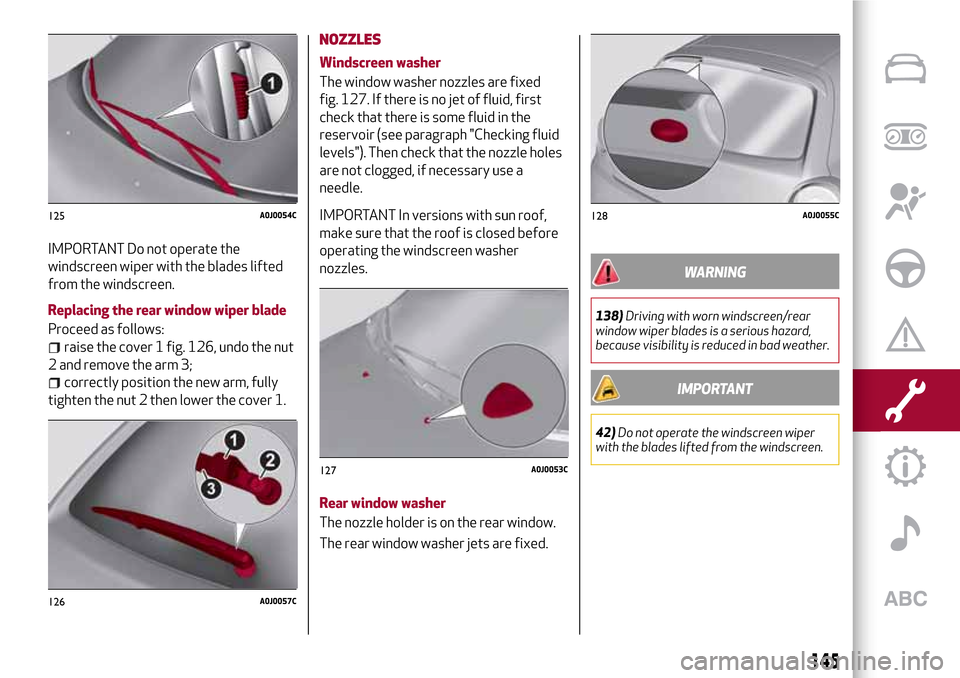
Replacing the rear window wiper blade
Proceed as follows:
raise the cover 1 fig. 126, undo the nut
2 and remove the arm 3;
correctly position the new arm, fully
tighten the nut 2 then lower the cover 1.
NOZZLES
Windscreen washer
The window washer nozzles are fixed
fig. 127. If there is no jet of fluid, first
check that there is some fluid in the
reservoir (see paragraph "Checking fluid
levels"). Then check that the nozzle holes
are not clogged, if necessary use a
needle.
IMPORTANT In versions with sun roof,
make sure that the roof is closed before
operating the windscreen washer
nozzles.
Rear window washer
The nozzle holder is on the rear window.
The rear window washer jets are fixed.
WARNING
138)Driving with worn windscreen/rear
window wiper blades is a serious hazard,
because visibility is reduced in bad weather.
IMPORTANT
42)Do not operate the windscreen wiper
with the blades lifted from the windscreen.
125A0J0054C
126A0J0057C
127A0J0053C
128A0J0055C
145
Page 148 of 212
BATTERY
The battery 6 (see previous pages) does
not require the electrolyte to be topped
up with distilled water. A periodic check
carried out at an Alfa Romeo Dealership
is, however, necessary to check
efficiency.
INSPECTING THE CHARGE AND THE
ELECTROLYTE LEVEL
139) 140) 141) 142)
43)
4)
If necessary, replace the battery with
another original battery with the same
specifications. Follow the battery
manufacturer's instructions for
maintenance.
USEFUL ADVICE FOR EXTENDING THE
LIFE OF YOUR BATTERY
To avoid draining your battery and make
it last longer, observe the following
instructions:
when you park the car, ensure that the
doors, tailgate and bonnet are closed
properly, to prevent any lights from
remaining on inside the passenger's
compartment;
switch off all roof lights inside the car:
the car is however equipped with a
system which switches all internal lights
off automatically;
do not keep accessories (e.g. radio,
hazard warning lights, etc.) switched on
for a long time when the engine is not
running;
before performing any operation on
the electrical system, disconnect the
negative battery cable.
IMPORTANT If the charge level remains
under 50% for a long time, the battery is
damaged by sulphation, reducing its
capacity and efficiency at start-up.
The battery will also be more at risk of
freezing (this can happen as early as
-10°C). Refer to the "Vehicle inactivity"
paragraph in "Starting and driving"
chapter if the vehicle is left parked for a
long time.
If, after purchasing the car, you wish to
install electrical accessories which
require permanent electrical supply (e.g.
alarm, etc.) or accessories which
influence the electrical supply
requirements, contact an Alfa Romeo
Dealership, whose qualified staff will
evaluate the overall electrical
consumption.
WARNING
139)Battery fluid is poisonous and
corrosive. Avoid contact with the skin and
eyes. Keep open flames away from the
battery and do not use objects that might
create sparks: risk of explosion and fire.
140)Using the battery with insufficient
fluid irreparably damages the battery and
may cause an explosion.
141)If the vehicle must remain unused for a
long time at a very low temperature, remove
the battery and take it to a warm place, to
avoid freezing.
142)When performing any operation on the
battery or near it, always protect your eyes
with special goggles.
IMPORTANT
43)Incorrect installation of electric and
electronic devices may cause severe damage
to your car. After purchasing your vehicle, if
you wish to install any accessories (e.g.
anti-theft, radio phone, etc.), go to an Alfa
Romeo Dealership, which will suggest the
most suitable devices and advise you
whether a higher capacity battery needs to
be installed.
146
SERVICING AND MAINTENANCE
Page 149 of 212
IMPORTANT
4)Batteries contain substances which are
very dangerous for the environment. For
battery replacement, contact an Alfa Romeo
Dealership.
LIFTING THE VEHICLE
If the car needs to be jacked up, go to an
Alfa Romeo Dealership which is equipped
with shop jacks and jack arms.
IMPORTANT Be careful when positioning
the arm of the lift for versions with side
skirts.
BODYWORK
PRESERVING THE BODYWORK
44)
5)
Paint
Touch up abrasions and scratches
immediately to prevent the formation of
rust. Maintenance of paintwork consists
of washing the car: the frequency
depends on the conditions and
environment where the car is used. For
example, it is advisable to wash the
vehicle more often in areas with high
levels of atmospheric pollution or salted
roads.
On some versions the car may be
equipped, on request, with an exclusive
opaque paint on the roof which, in order
to be maintained intact, requires special
care: see the instructions in the warning.
45)
To correctly wash the vehicle, follow
these instructions:
if the vehicle is washed remove the
aerial from the roof;
if high pressure jets or cleaners are
used to wash the car, keep a distance of
at least 40 cm from the bodywork to
avoid damage or alteration. Bear in mind
that a build up of water could cause
damage to the car in the long term;
147
Page 151 of 212
INTERIOR
143) 144) 145)
Periodically check the cleanliness of the
interior, beneath the mats, which could
cause oxidation of the sheet metal.
SEATS AND FABRIC PARTS
Remove dust with a soft brush or a
vacuum cleaner. It is advisable to use a
moist brush on velvet upholstery. Rub the
seats with a sponge moistened with a
solution of water and neutral detergent.
CLEANING ALCANTARA SEATS
Alcantara trim can be treated and
cleaned easily in the same way as the
other trims. The same indications given
for cleaning fabrics are also therefore
applicable for this trim.
LEATHER SEATS
(where provided)
Remove the dry dirt with a chamois or
slightly damp cloth, without exerting too
much pressure. Remove any liquid or
grease stains using an absorbent dry
cloth, without rubbing. Then clean with a
soft cloth or buckskin cloth dampened
with water and mild soap. If the stain
persists, use specific products and
observe the instructions carefully.
IMPORTANT Never use alcohol. Make
sure that the cleaning products usedcontain no alcohol or alcohol derivatives,
even in small quantities.
PLASTIC AND COATED PARTS
46)
Clean interior plastic parts with a damp
cloth (if possible made from microfibre),
and a solution of water and neutral,
non-abrasive detergent. To clean oily or
persistent stains, use specific products
free from solvents and designed to
maintain the original appearance and
colour of the components.
Remove any dust using a microfibre
cloth, if necessary moistened with water.
The use of paper tissues is not
recommended as these may leave
residues.
GENUINE LEATHER PARTS
(where provided)
Use only water and mild soap to clean
these parts. Never use alcohol or
alcohol-based products. Before using a
specific product for cleaning interiors,
make sure that it does not contain
alcohol and/or alcohol based substances.
WARNING
143)Never use flammable products, such as
petrol ether or rectified petrol to clean the
inside of the car. The electrostatic charges
which are generated by rubbing during the
cleaning operation may cause a fire.
144)Do not keep aerosol cans in the car:
they might explode. Aerosol cans must not
be exposed to a temperature exceeding
50°C. When the vehicle is exposed to
sunlight, the internal temperature can
greatly exceed this value.
145)There must be no obstacles on the
floor underneath the pedals; make sure that
mats are always flat and do not interfere
with the pedals.
IMPORTANT
46)Never use alcohol, petrols and
derivatives to clean the dashboard and
instrument panel lens.
149
Page 166 of 212
SNOW CHAINS
47)
The use of snow chains should be in
compliance with local regulations. The
snow chains may be applied only onto the
front wheel (drive wheels).
Check the tension of the snow chains
after the first few metres have been
driven.
Use low-clearance snow chains: for tyres
185/65 R15 88H (where provided),
195/55 R16 and 205/55 R16, use
low-clearance snow chains with a
maximum projection beyond the tyre
profile of 9 mm.
IMPORTANT The space-saver wheel
cannot be fitted with snow chains. If a
front (drive) wheel is punctured and snow
chains must be used, you must remove a
normal wheel from the rear axle and
replace it with the space-saver wheel. In
this way, with two normal drive wheels, it
is possible to use snow chains.
WARNING
146)The maximum speed for snow tyres
marked “Q” is 160 km/h, while it is 190 km/h
for “T” tyres and 210 km/h for "H" tyres. The
highway code speed limits must however
always be complied with.147)DO NOT fit wheel hub caps when using
integral hub caps fixed (with springs) to the
steel rim and after sale tyres provided with
Rim Protector. Use of unsuitable tyres and
wheel caps may cause sudden decrease of
tyre pressure.
IMPORTANT
47)Keep the vehicle's speed down when
snow chains are fitted; never exceed
50 km/h. Avoid potholes, steps and
pavements and avoid driving long distances
on roads not covered with snow to avoid
damaging the car and the roadbed.
164
TECHNICAL SPECIFICATIONS
Page 184 of 212
TIPS, CONTROLS AND GENERAL
INFORMATION
TIPS
148) 149)
49) 50)
Road safety
Learn how to use the various system
functions before setting off.
Read the instructions for the system
carefully before setting off.
Reception conditions
Reception conditions change constantly
while driving. Reception may be
interfered with by the presence of
mountains, buildings or bridges,
especially when you are far away from
the broadcaster.
IMPORTANT The volume may be
increased when receiving traffic
information and news
Care and maintenance
Observe the following precautions to
ensure the system is fully operational:
never use alcohol, petrol or
petroleum-based solvents to clean the
display screen;
the display is sensitive to scratching,
liquids and detergents. The display
should not come into contact with
pointed or rigid objects which coulddamage its surface. Do not press on the
display when cleaning it;
prevent any liquid from entering the
system: this could damage it beyond
repair.
SAFETY SETTINGS
Look at the screen only and when it is
necessary and safe. If you need to look at
the screen for a long time, pull over to a
safe place so as not to be distracted
while driving.
Immediately stop using the system in the
event of a fault. Otherwise the system
might be damaged. Contact an Alfa
Romeo Dealership as soon as possible to
have the system repaired.
WARNING
148)Follow the safety rules here below:
otherwise serious injuries may occur to the
occupants or the system may be damaged.
149)If the volume is too loud this can be
dangerous. Adjust the volume so that you
can still hear background noises (e.g. horns,
ambulances, police vehicles, etc.).
IMPORTANT
49)Only clean the front panel and the
display lens with a soft, clean, dry, anti-static
cloth. Cleaning and polishing products may
damage the surface. Never use alcohol,
petrols and derivatives.
50)Do not use the display as a base for
supports with suction pads or adhesives for
external navigators or smartphones or
similar devices
182
MULTIMEDIA
Page 195 of 212

versions, the access toUconnect™LIVE
services enables the use of “Live”
services.
Efficient Drive
(where provided)
The Efficient Drive application allows you
to display your driving behaviour in real
time, in order to help you reach a more
efficient driving style as far as
consumption and emissions are
concerned.
Driving style is evaluated by means of
four indices which monitor the following
parameters: acceleration, deceleration,
gearchange, speed
Display of the Efficient Drive
(where provided)
Press the Efficient Drive button to
interact with the function.
On theUconnect™display, a screen will
appear showing 4 indices: “Acceleration”,
“Deceleration”, “Speed” and “Gear”. These
indices are grey until the system has
enough data to evaluate the driving style.
Once sufficient data are available, the
indices will have 5 colours depending on
the evaluation: dark green (very good),
light green, yellow, orange and red (very
bad).
In the event of extended inactivity the
display will show the average of the
indices up to that moment (“Averageindex”) then the indices will be coloured
again in real time as soon as the vehicle is
restarted.
my:Car
my:Car application allows you to keep the
condition of your vehicle always under
control.
my:Car can detect malfunction in real
time and inform the driver about the
expiry of the servicing interval. Press the
"my:Car" button to interact with the
application.
The display will show a screen with the
"care:Index" section, which provides all
the detailed information about the status
of the vehicle. Press the "Active
warnings" button to show (if present) the
details of the vehicle's faults which
caused a warning light to switch on.
SETTINGS
Press SETTINGS button on the front
panel (versions withUconnect™5” Radio
LIVE) or APPS button and the graphic
button “Settings” (versions with
Uconnect™5” Radio Nav LIVE) on the
display to view the “Settings” main menu
NOTE The menu items displayed vary
according to the versions.
Display;
Voice (where provided);
Measurement unit (where provided);
Clock & Date;
Safety/Assistance (where provided);
Lights (where provided);
Doors and Door lock;
Audio;
Phone/Bluetooth;
Radio;
Restore Default Settings;
Clear personal data;
Restore apps;
DNA messages.
VOICE COMMANDS
Using voice commands
The
button on the steering wheel
activates the “Phone” voice recognition
mode, there is a "beep" and the display
shows a suggestion screen inviting the
user to say a command.
If the
button is pressed during a
system voice message, it activates the
“Radio/Media” voice recognition mode
that controls the radio and he
USB/iPod/CD and MP3 players.
Please follow the suggestions below to
be sure that the voice commands are
always recognised by the system:
speak at a normal volume;
always wait for the "beep" (warning
sound) before speaking;
if possible, try and keep the noise in
the passenger compartment to a
minimum. It is also advisable to close the
windows and sunroof (where provided).
193
Page 196 of 212
for optimum operation, it is advisable
to close the windows and the sun roof
(where provided) to avoid external
interference;
IMPORTANT Voice commands must
always be given in safe driving
conditions, in compliance with the laws in
force in the country where you are driving
and using the mobile phone correctly.
Multiple choice
In a few specific cases the system cannot
unambiguously identify the given voice
command and asks the user to choose
between a maximum of four alternatives.
The system will propose a numbered list
of the available alternatives, asking the
user to say the associated number.
ANTITHEFT PROTECTION
The system is equipped with an anti-theft
protection system based on the
exchange of information with the
electronic control unit (Body Computer)
on the vehicle. This guarantees maximum
safety and prevents the secret code from
being entered after the power supply has
been disconnected. If the check has a
positive outcome, the system will start to
operate.
If the comparison codes are not the same
or if the electronic control unit (Body
Computer) is replaced, the system will
ask the user to enter the secret codeaccording to the procedure described in
the paragraph below.
Entering the secret code
When the system is switched on, if the
code is requested, the display will show
"Please enter Anti-Theft Code" followed
by the screen showing a keypad to enter
the secret code.
The secret code is made up of four digits,
from 1 to 9: to insert the first number of
the code press the corresponding key on
the display. Enter the other code digits in
the same way. After entering the fourth
digit, the system begins operating. If an
incorrect code is entered, the system
displays "Incorrect Code" to notify the
user of the need to enter the correct
code.
After the 3 available attempts to enter
the code, the system displays "Incorrect
Code. Radio locked. Please wait
30 minutes” (the waiting time is
displayed). After the text has
disappeared it is possible to start the
code entering procedure again.
Vehicle radio passport
This document certifies ownership of the
system. The vehicle radio passport shows
the system model, serial number and
secret code.
In the event that the radio passport is
lost, contact an Alfa Romeo Dealership,taking an ID document and the car
ownership documents.
IMPORTANT Keep the vehicle radio
passport in a safe place so that you can
give the information to the relevant
authorities if the system is stolen.
WARNING
150)When inserting a device (USB or iPod)
in the USB port, make sure that it does not
obstruct the operation of the handbrake
lever.
WARNING
151)When inserting a device in the AUX
socket, make sure that it does not obstruct
the operation of the handbrake lever.
194
MULTIMEDIA