Page 248 of 553
247
uuAudio System Basic Operation uSiri Eyes Free
Features
Siri Eyes Free
You can talk to Siri using the Talk bu tton on the steering wheel when your
compatible iPhone is paired to Bluetooth ® HandsFreeLink®.
2Phone Setup P. 285
■Using Siri Eyes Free
iPhone only
1Siri Eyes Free
Siri is a trademark of Apple Inc.
Check Apple Inc. website for features available for
Siri.
We recommend against using Si ri other than in Siri
Eyes Free while operating a vehicle.
1 Using Siri Eyes Free
Some commands work only on specific phone
features or apps. (Hang-up/back) button:
Press to deactivate Siri.
(Talk) button:
Press and hold until the display
changes as shown.While in Siri Eyes Free:
The display remains the same.
No feedback or commands
appear. Appears when Siri is
activated in Siri Eyes
Free
17 ACURA TLX-31TZ36200.book 247 ページ 2016年6月10日 金曜日 午後6時39分
Page 279 of 553

278
Features
Bluetooth® HandsFreeLink ®
Bluetooth® HandsFreeLink ® (HFL) allows you to place and receive phone calls using
your vehicle’s navigation*/audio system, without handling your cell phone.
Using HFL
(Pick-up) button: Press to go to the Speed Dial/Call History on the multi-
information display or to answer an incoming call.
(Hang-up/back) button: Press to end a call, to cancel a command or to clear
the phone information on the multi-information display.
(Talk) button: Press to give HFL voice commands.
PHONE button: Press to go directly to the Phone screen.
Interface dial: Rotate to select an item on the screen, then press . Move ,
, or to select secondary menu.
■HFL Buttons
1 Bluetooth ® HandsFreeLink ®
Place your phone where y ou can get good reception.
To use HFL, you need a Bluetooth-compatible cell
phone. For a list of compatible phones, pairing
procedures, and special feature capabilities:
•U.S.: Visit www.acura.com/handsfreelink , or call 1-
888-528-7876.
•Canada: Visit www.handsfreelink.ca , or call 1-888-
528-7876.
To use HFL, the Bluetooth setting must be On.
2 Customized Features P. 257
Voice control tips:
•Aim the vents away from the ceiling and close the
windows, as noise coming fr om them may interfere
with the microphone.
•Press and release the but ton when you want to
call a number using a stored voice tag, a
phonebook name, or a numbe r. Speak clearly and
naturally after a beep.
•If the microphone picks up vo ices other than yours,
the command may be misinterpreted.
•To change the volume level, use the audio system’s
volume knob or the remote audio controls on the
steering wheel.
State or local laws may pr ohibit the operation of
handheld electronic devi ces while operating a
vehicle.
If you receive a call while using the audio system, the
system resumes its operation an after ending the call.
Talk Button
Volume up
Microphone
Hang-up/Back Button
Pick-up
Button
Volume down
Interface
DialPHONE
Button
* Not available on all models
17 ACURA TLX-31TZ36200.book 278 ページ 2016年6月10日 金曜日 午後6時39分
Page 303 of 553
uuBluetooth ® HandsFreeLink ®u HFL Menus
302
Features
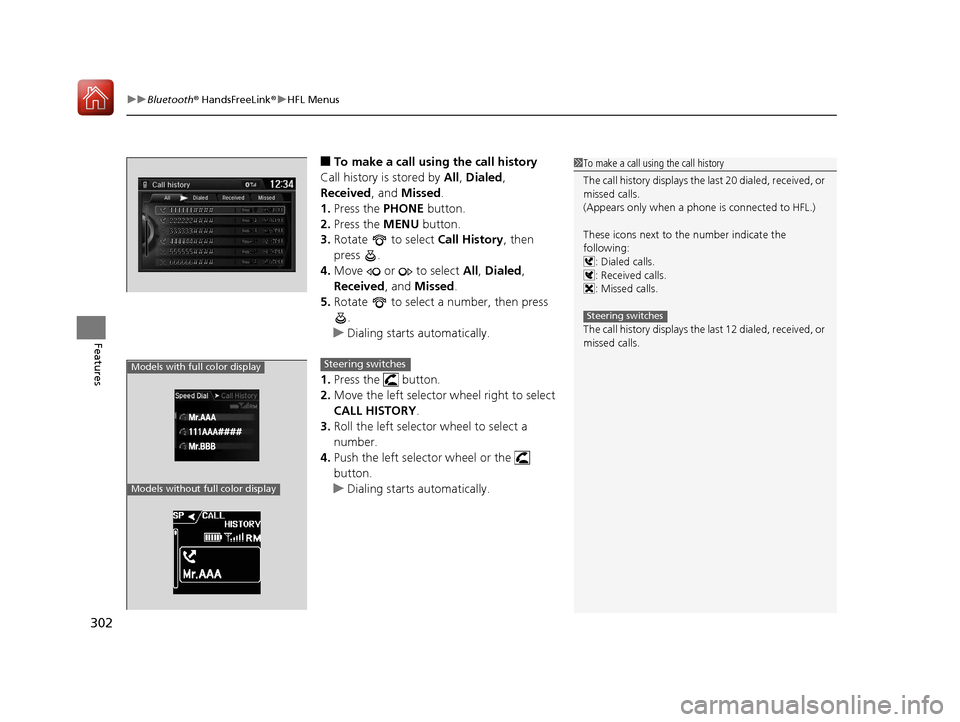
■To make a call using the call history
Call history is stored by All, Dialed ,
Received, and Missed.
1. Press the PHONE button.
2. Press the MENU button.
3. Rotate to select Call History, then
press .
4. Move or to select All, Dialed ,
Received , and Missed .
5. Rotate to select a number, then press
.
u Dialing starts automatically.
1. Press the button.
2. Move the left selector wheel right to select
CALL HISTORY.
3. Roll the left selector wheel to select a
number.
4. Push the left selector wheel or the
button.
u Dialing starts automatically.1To make a call using the call history
The call history disp lays the last 20 dialed, received, or
missed calls.
(Appears only when a phone is connected to HFL.)
These icons next to the number indicate the
following:
: Dialed calls.
: Received calls.
: Missed calls.
The call history disp lays the last 12 dialed, received, or
missed calls.
Steering switches
Models with full color display
Models without full color display
111AAA#### Mr.AAA
Mr.BBB
Steering switches
17 ACURA TLX-31TZ36200.book 302 ページ 2016年6月10日 金曜日 午後6時39分
Page 304 of 553
Continued303
uuBluetooth ® HandsFreeLink ®u HFL Menus
Features
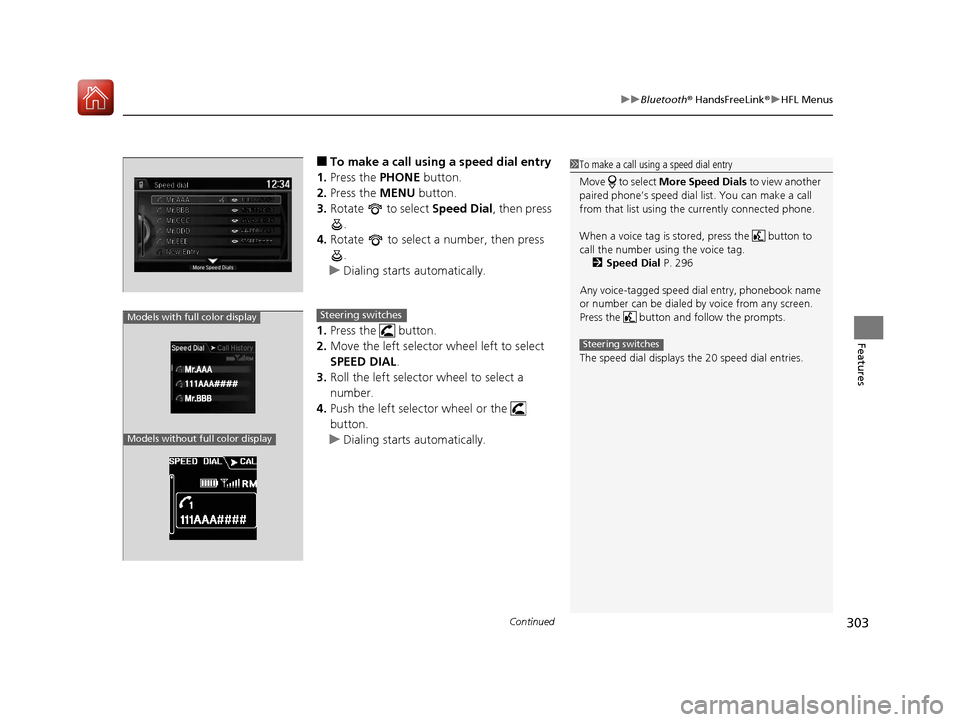
■To make a call using a speed dial entry
1. Press the PHONE button.
2. Press the MENU button.
3. Rotate to select Speed Dial, then press
.
4. Rotate to select a number, then press
.
u Dialing starts automatically.
1. Press the button.
2. Move the left selector wheel left to select
SPEED DIAL.
3. Roll the left selector wheel to select a
number.
4. Push the left selector wheel or the
button.
u Dialing starts automatically.1To make a call using a speed dial entry
Move to select More Speed Dials to view another
paired phone’s speed dial list. You can make a call
from that list using th e currently connected phone.
When a voice tag is stored, press the button to
call the number using the voice tag. 2 Speed Dial P. 296
Any voice-tagged speed di al entry, phonebook name
or number can be dialed by voice from any screen.
Press the button and follow the prompts.
The speed dial displays the 20 speed dial entries.
Steering switches
111AAA#### Mr.AAA
Mr.BBB
Models with full color display
Models without full color display
Steering switches
17 ACURA TLX-31TZ36200.book 303 ページ 2016年6月10日 金曜日 午後6時39分
Page 318 of 553

Continued317
uuBefore Driving uDriving Preparation
Driving
• Store or secure all items on board properly.
u Carrying too much cargo, or improperly storing it, can affect your vehicle’s
handling, stability, sto pping distance, and tires, and make it unsafe.
2Maximum Load Limit P. 319
•Do not pile items higher than the seat height.
u They can block your view and may be thrown forward in the event of sudden
braking.
• Do not place anything in the front seat footwells. Make sure to secure the floor
mat.
u An object or unsecured floor mat can in terfere with your brake and accelerator
pedal operation while driving.
• If you have any animals on board, do not let them move around in the vehicle.
u They may interfere with driv ing and a crash could occur.
• Securely close and lock all doors and the trunk.
2 Locking/Unlocking the Doors from the Inside P. 148
•Adjust your seating position properly.
u Adjust the head restraint, too.
2Adjusting the Seats P. 179
2 Adjusting the Front and Rear Outer Head Restraint Positions P. 181
•Adjust the mirrors and steering wh eel properly for your driving.
u Adjust them while sitting in the proper driving position.
2 Adjusting the Mirrors P. 177
2 Adjusting the Steering Wheel P. 176
■Interior Checks1Interior Checks
The headlight aim is set by the factory, and does not
need to be adjusted. Howeve r, if you regularly carry
heavy items in the trunk ha ve the aiming readjusted
at a dealer or by a qualified technician.
17 ACURA TLX-31TZ36200.book 317 ページ 2016年6月10日 金曜日 午後6時39分
Page 327 of 553

uuWhen Driving uStarting the Engine
326
Driving
■To stop the engine
Press and hold the button
for one second.
Go within the range,
and try again.
Amber LED: Blinks when any
button is pressed. Red LED:
●Comes on for one second to let you
know that the engine has stopped.
●Blinks when the remote is out of
the keyless access system range.
The engine will not stop.
1
Remote Engine Start with Vehicle Feedback*
•The engine oil pressure is low.•The engine coolant temper ature is extremely high.
•The telematics unit malfunctions.
•The security system alarm is not set.
Before starting the engine, make sure to check the
door lock status using the remote. When you press
the button, wait for the green LED to blink. If
the red LED turns on, the doors and trunk did not
lock, and the engine does not start.
While the engine is running, the vehicle will
automatically preconditi on inside the vehicle.
When it is warm outside:
•The air conditioning is acti vated in recirculation
mode.
•The seat ventilation is activated*.
When it is cold outside:
•The defroster is activated at a moderately warm
temperature.
•The rear defogger and door mirror heaters are
activated.
•The seat and heated steering wheel are activated*.
2 Heated Steering Wheel* P. 195
2 Front Seat Heaters and Seat
Ventilation
* P. 196
* Not available on all models
17 ACURA TLX-31TZ36200.book 326 ページ 2016年6月10日 金曜日 午後6時39分
Page 330 of 553
329
uuWhen Driving uPrecautions While Driving
Continued
Driving
Precautions While Driving
Avoid driving in deep water and on flooded roads. This can damage the engine,
driveline, or cause electrical component failure.
■In Rain1Precautions While Driving
NOTICE
Do not change the gear position while pressing the
accelerator pedal. You could damage the
transmission.
NOTICE
The following can dama ge the under spoiler:
•Parking the vehicle by a parking block•Parallel parking along the road shoulder
•Driving toward the bottom of a hill
•Driving up or down to a different surface level
(such as a road shoulder)
•Driving on a rutted or bumpy road
•Driving on a road with potholes.
NOTICE
If you repeatedly turn the steering wheel at an
extremely low speed, or hold the steering wheel in
the full left or right position for a while, the electric
power steering (EPS) system heats up. The system
goes into a protective mode, and limits its
performance. The steering wheel becomes harder
and harder to operate. Once the system cools down,
the EPS system is restored.
Repeated operation under these conditions can
eventually damage the system.
If the power mode is set to ACCESSORY or VEHICLE
OFF (LOCK) while driving, the engine will shut down
and all steering and brake pow er assist functions will
stop, making it difficult to control the vehicle.
17 ACURA TLX-31TZ36200.book 329 ページ 2016年6月10日 金曜日 午後6時39分
Page 337 of 553

336
uuWhen Driving uShifting
Driving
Use the paddle shifters to change between 1st and 9th gears without removing your
hands from the steering wheel. The transmiss ion will switch to the sequential mode.
■When the transmission is in (D:
The vehicle will go into the sequential mo de momentarily, and the sequential mode
gear selection indicator will come on.
Once you start traveling at a constant sp eed, the sequential mode will automatically
switch off, and the sequential mode gear selection indicator will go off.
Hold the
(+ paddle shifter for two seconds or push (D button to return to normal
drive.
■When the transmission is in (D with Sport+ mode:
The vehicle will go into th e sequential mode, and the M (sequential mode) indicator
and sequential mode gear selection indicator will come on.
If the vehicle speed increases and the engi ne speed reaches near the tachometer’s
red zone, the transmission automatica lly shifts up to the next gear.
You can cancel this mode by pressing Inte grated Dynamics System button to select
other than Sport+ mode or push
(D button to return to normal drive Sport+ mode.
When the sequential mode is cancel ed, the sequential mode indicator and
sequential mode gear selection indicator go off.
■Sequential Mode
17 ACURA TLX-31TZ36200.book 336 ページ 2016年6月10日 金曜日 午後6時39分
