Page 267 of 553
266
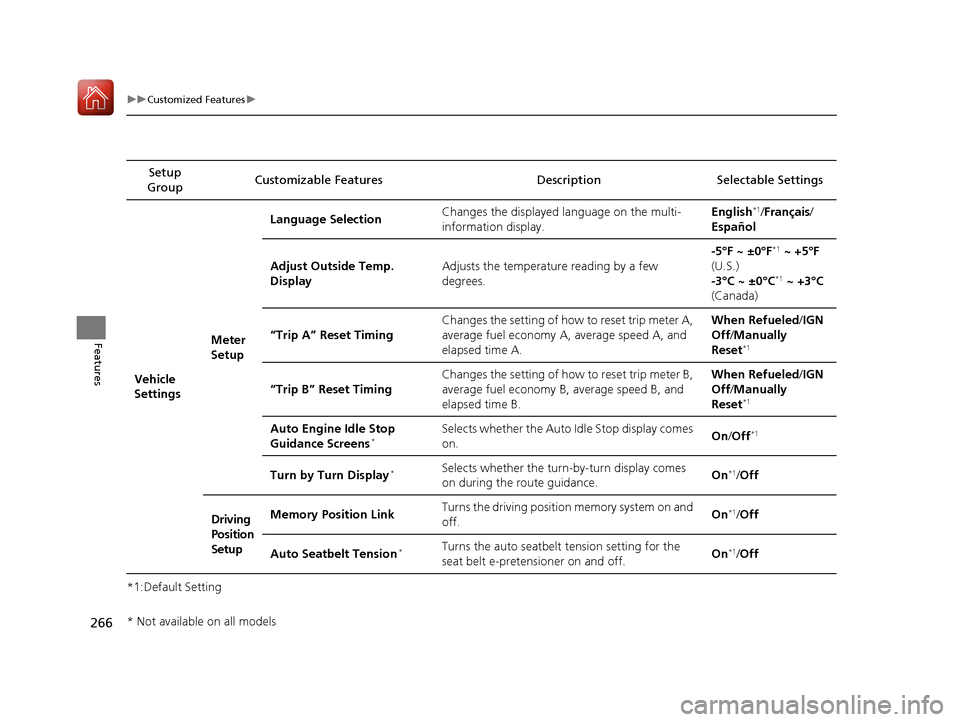
uuCustomized Features u
Features
*1:Default SettingSetup
Group Customizable Features Descri
ption Selectable Settings
Vehicle
Settings Meter
SetupLanguage Selection
Changes the displayed language on the multi-
information display. English
*1/
Français /
Español
Adjust Outside Temp.
Display Adjusts the temperature reading by a few
degrees. -5°F ~ ±0°F
*1
~ +5°F
(U.S.)
-3°C ~ ±0°C
*1 ~ +3°C
(Canada)
“Trip A” Reset Timing Changes the setting of how to reset trip meter A,
average fuel economy A,
average speed A, and
elapsed time A. When Refueled
/IGN
Off /Manually
Reset
*1
“Trip B” Reset Timing Changes the setting of how to reset trip meter B,
average fuel economy B,
average speed B, and
elapsed time B. When Refueled
/IGN
Off /Manually
Reset*1
Auto Engine Idle Stop
Guidance Screens*Selects whether the Auto Idle Stop display comes
on. On
/Off*1
Turn by Turn Display*Selects whether the turn-by-turn display comes
on during the route guidance. On*1/
Off
Driving
Position
Setup Memory Position Link
Turns the driving position memory system on and
off.
On
*1/
Off
Auto Seatbelt Tension
*Turns the auto seatbelt tension setting for the
seat belt e-pretensioner on and off. On*1/
Off
* Not available on all models
17 ACURA TLX-31TZ36200.book 266 ページ 2016年6月10日 金曜日 午後6時39分
Page 268 of 553

267
uuCustomized Features u
Continued
Features
*1:Default SettingSetup
Group Customizable Features Description Selectable Settings
Vehicle
SettingsKeyless
Access
Setup
Door Unlock Mode
Changes which doors unlock when you grab the
driver’s door handle. Driver Door Only
*1/
All Doors
Keyless Access Beep
Volume Changes the beep volume.
High
*1/Low
Keyless Access Light Flash Causes some exterior lights to flash when you
unlock/lock the doors. On
*1/
Off
Keyless Access Beep Causes the beeper to
sound when you unlock/
lock the doors. On
*1/
Off
Remote Start System On/
Off
*Turns the remote engine start feature on and off. On*1/Off
Lighting
Setup Interior Light Dimming
Time
Changes the length of time the interior lights stay
on after you close the doors. 60seconds
/
30seconds
*1/
15seconds
Headlight Auto Off Timer Changes the length of time the exterior lights
stay on after you close the driver’s door. 60seconds
/
30seconds /
15seconds
*1/
0seconds
Auto Light Sensitivity Changes the timing for the headlights to come
on. Max
/High /Mid
*1/
Low /Min
* Not available on all models
17 ACURA TLX-31TZ36200.book 267 ページ 2016年6月10日 金曜日 午後6時39分
Page 269 of 553

268
uuCustomized Features u
Features
*1:Default SettingSetup
Group Customizable Features Descri
ption Selectable Settings
Vehicle
Settings Door
SetupAuto Door Lock
Changes the setting for the automatic locking
feature. With Vehicle
Speed
*1/
Shift from P/
Off
Auto Door Unlock Changes the setting for when the doors unlock
automatically. All Doors When
Driver’s Door
Opens
*1/
All Doors
When Shifted to
Park /All Doors When
Ignition Switched
Off /Off
Key And Remote Unlock
Mode Sets up either the driver
’s door or all doors to
unlock on the first push of the remote or built-in
key. Driver Door
*1/
All
Doors
Keyless Lock Answer Back LOCK/UNLOCK- The exterior lights flash.
LOCK (2nd push)- The beeper sounds.
On
*1/
Off
Security Relock Timer Changes the time it takes for the doors to relock
and the security system to set after you unlock
the vehicle without opening any door. 90seconds/
60seconds/
30seconds
*1
IDS
Setup
Preferred IDS Mode Changes the Integrated
Dynamics System mode
setting for when you set the power mode to ON. Last Used*1/
Econ /
Normal /Sport
17 ACURA TLX-31TZ36200.book 268 ページ 2016年6月10日 金曜日 午後6時39分
Page 288 of 553
Continued287
uuBluetooth ® HandsFreeLink ®u HFL Menus
Features
■To change the pairing code setting
1. Press the SETTINGS button.
2. Rotate to select System Settings, then
press .
u Repeat the procedure to select Edit
pairing code .
3. Rotate to select Fixed or Random ,
then press .1 To change the pairing code setting
The pairing code may be si x or four digits depending
on your phone.
The default pair ing code is 0000 until you change the
setting.
To create your own, select Fixed, and delete the
current code, then enter a new one.
For a randomly generated pa iring code each time you
pair a phone, select Random .
17 ACURA TLX-31TZ36200.book 287 ページ 2016年6月10日 金曜日 午後6時39分
Page 362 of 553
361
uuWhen Driving uAdaptive Cruise Control (ACC) with Low Speed Follow (LSF)*
Continued
Driving
Press the (distance) button to change the
ACC with LSF foll owing-interval.
Each time you press th e button, the following-
interval (the interval behind a vehicle detected
ahead of you) setting cycles through short,
middle, long, and extra long following-
intervals.
Determine the most appropriate following-
interval setting based on your specific driving
conditions. Be sure to adhere to any
following-interval requirements set by local
regulation.
■To Set or Change Following-interval
Distance Button
17 ACURA TLX-31TZ36200.book 361 ページ 2016年6月10日 金曜日 午後6時39分
Page 386 of 553
Continued385
uuWhen Driving uLane Keeping Assist System (LKAS)*
Driving
3. Keep your vehicle near the center of the
lane while driving.
u The dotted outer lines change to solid
ones once the system starts operating
after detecting the left and right lane
markings.
To cancel the LKAS:
Press the MAIN or LKAS button.
The LKAS is turned off every time you stop the
engine, even if you turned it on the last time
you drove the vehicle.
Models with ACC is shown.
■To cancel
1 When the System can be Used
The LKAS temporarily deactivates when it fails to
detect lane lines. When the system detects the lines
again, it comes back on automatically.
1To cancel
Pressing the MAIN button also turns ACC with LSF
on and off.
Pressing the MAIN button also turns cruise control
on and off.
Models with ACC
Models without ACC
MAIN Button
LKAS Button
17 ACURA TLX-31TZ36200.book 385 ページ 2016年6月10日 金曜日 午後6時39分
Page 395 of 553

uuWhen Driving uBlind spot information (BSI) System*
394
Driving
■When the system detects a vehicle1Blind spot inform ation (BSI) System*
You can change the setting for BSI.
2 Customized Features P. 126, 257
BSI may be adversel y affected when:
•Objects (guard rails, poles, trees, etc,.) are
detected.
•An object that does not re flect radio waves well,
such as a motorcycle, is in the alert zone.
•Driving on a curved road.
•A vehicle is moving from a far lane to the adjacent
lane.
•The system picks up external electrical interference.
•The rear bumper or the sens ors have been improperly
repaired or the rear bu mper has been deformed.
•The orientation of the sensors has been changed.
•In bad weather (Heavy rain, snow, and fog).
For a proper BSI use:
•Always keep the rear bumper corner area clean.
•Do not cover the rear bumper corner area with
labels or sticke rs of any kind.
•Take your vehicle to a dealer if you need the rear
bumper corner area or th e radar sensors to be
repaired, or the rear bumper corner area is strongly
impacted.
Comes on when:●A vehicle enters the ale rt zone from behind
to overtake you with a speed difference of
no more than 31 mph (50 km/h) from your
vehicle.
●You pass a vehicle with a speed difference
of no more than 12 mph (20 km/h).
BSI Alert Indicator: Located near the outside
rearview mirror on both sides.
Blinks and a beeper sounds when:
You move the turn signal
lever in the direction
of the detected vehicle. The beeper sounds
three times. Comes On
Blinks
* Not available on all models
17 ACURA TLX-31TZ36200.book 394 ページ 2016年6月10日 金曜日 午後6時39分
Page 427 of 553

426
Driving
Multi-View Rear Camera
About Your Multi-View Rear Camera
The audio/information screen can display your vehicle’s rear view. The display
automatically changes to th e rear view when the gear position is changed to
(R.
You can view three different camera angl es on the rearview display. Press the
interface dial to switch the angle.
If Top View is last used before you turn the power mode to OFF, Wide mode is
selected next time you turn the power mode to ON and change to
(R.
■Multi-View Rear Camera Display Area
1 About Your Multi-View Rear Camera
The rear camera view is restricted. You cannot see
the corner ends of the bum per or what is underneath
the bumper. Its unique le ns also makes objects
appear closer or farther than they actually are.
Visually confirm that it is safe to drive before backing
up. Certain conditions (such as weather, lighting, and
high temperatures) may also re strict the rear view. Do
not rely on the rearview display which does not give
you all information about conditions at the back of
your vehicle.
If the camera lens is cove red with dirt or moisture,
use a soft, moist cloth to keep the lens clean and free
of debris.
You can change the Fixed Guideline and Dynamic
Guideline settings. 2 Customized Features P. 257
Fixed Guideline
On : Guidelines appear when you change the gear
position to
( R.
Off : Guidelines do not appear.
Dynamic Guideline
On : Guidelines move according to the steering wheel
direction.
Off : Guidelines do not move.
Top Down View Mode Normal View Mode Wide View Mode
Guidelines
Bumper
Camera
Approx. 118 inches (3 m)Approx. 79 inches (2 m)Approx. 39 inches (1 m)
Approx. 20 inches (50 cm)
17 ACURA TLX-31TZ36200.book 426 ページ 2016年6月10日 金曜日 午後6時39分


