Page 79 of 449
78
uuIndicators u
Instrument Panel
IndicatorNameOn/BlinkingExplanationMessage
Lane Departure
Warning (LDW)
Indicator
●Comes on for a few seconds when
you change the power mode to ON,
then goes off.
●Comes on if there is a problem with
the LDW system.
●Stays on constantly - Have your vehicle
checked by a dealer.
●Comes on when the LDW system
shuts itself off.●Stays on - The temperature inside the
camera is too high.
Use the climate control system to cool down
the camera.
The system activates when the temperature
inside the camera cools down.
2 Front Sensor Camera* P. 282
●Stays on - The area around the camera is
blocked by dirt, mud, etc. Stop your vehicle
in a safe place, and wipe it off with a soft
cloth.
●Have your vehicle checked by a dealer if the
indicator and message come back on after
you cleaned the area around the camera.
2 Front Sensor Camera* P. 282
Models with LDW
* Not available on all models
Page 80 of 449
79
uuIndicators u
Continued
Instrument Panel
IndicatorNameOn/BlinkingExplanationMessage
Adaptive Cruise
Control (
ACC)
Indicator (Amber)*
●Comes on for a few seconds when
you set the power mode to ON, then
goes off.
●Comes on if there is a problem with
ACC.
●Comes on while driving - Have your
vehicle checked by a dealer.
Adaptive Cruise
Control (
ACC)
Indicator (Green)*
●Comes on when you press the MAIN
button.
2 Adaptive Cruise Control (ACC)* P. 284—
Lane Keeping
Assist System
(LKAS ) Indicator
(Amber)
*
●Comes on for a few seconds when
you set the power mode to ON, then
goes off.
●Comes on if there is a problem with
the LKAS.
●Stays on constantly - Have your vehicle
checked by a dealer.
Lane Keeping
Assist System
( LKAS ) Indicator
(Green)
*
●Comes on when you press the MAIN
button.
2 Lane Keeping Assist System (LKAS)*
P. 301—
* Not available on all models
Page 81 of 449
80
uuIndicators u
Instrument Panel
IndicatorNameOn/BlinkingExplanationMessage
Collision
Mitigation
Braking System
TM
(CMBSTM)
Indicator
●Comes on for a few seconds when
you change the power mode to ON,
then goes off.
●Comes on when you deactivate the
CMBSTM. A multi-information display
message appears for five seconds.
●Comes on if there is a problem with
the CMBSTM.
●Stays on constantly without the
CMBSTM off - Have your vehicle checked by
a dealer.
2 Collision Mitigation Braking SystemTM
(CMBSTM)* P. 322
Models with CMBSTM
* Not available on all models
Page 82 of 449
81
uuIndicators u
Instrument Panel
IndicatorNameOn/BlinkingExplanationMessage
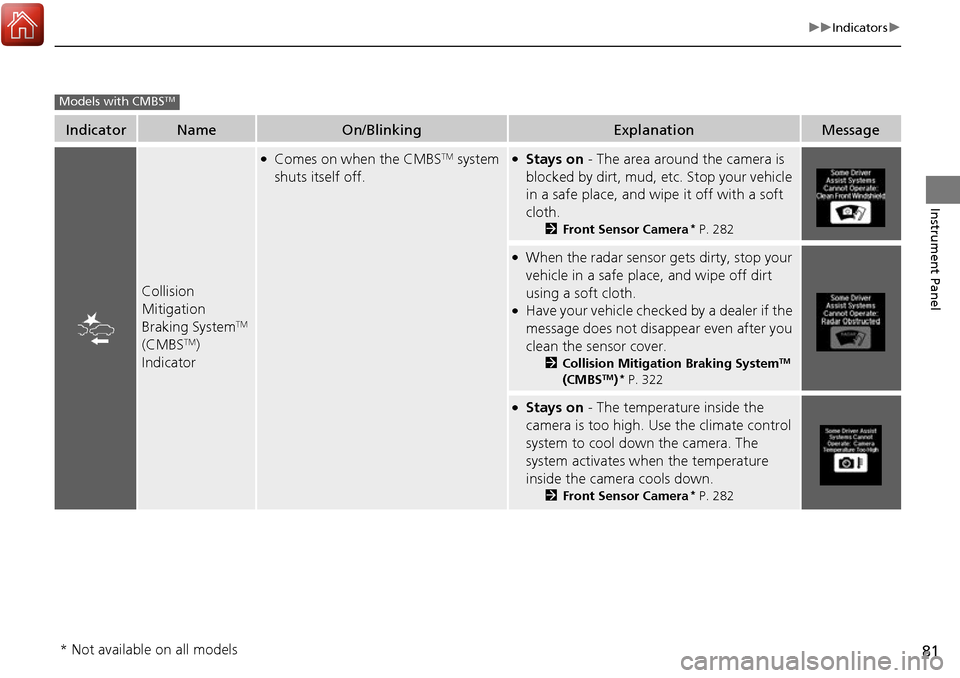
Collision
Mitigation
Braking System
TM
(CMBSTM)
Indicator
●Comes on when the CMBSTM system
shuts itself off.●Stays on - The area around the camera is
blocked by dirt, mud, etc. Stop your vehicle
in a safe place, and wipe it off with a soft
cloth.
2 Front Sensor Camera* P. 282
●When the radar sensor gets dirty, stop your
vehicle in a safe place, and wipe off dirt
using a soft cloth.
●Have your vehicle checked by a dealer if the
message does not disappear even after you
clean the sensor cover.
2Collision Mitigation Braking SystemTM
(CMBSTM)* P. 322
●Stays on - The temperature inside the
camera is too high. Us e the climate control
system to cool down the camera. The
system activates wh en the temperature
inside the camera cools down.
2 Front Sensor Camera* P. 282
Models with CMBSTM
* Not available on all models
Page 92 of 449
91
uuIndicators uMulti-Information Display Warning and Information Messages
Continued
Instrument Panel
MessageConditionExplanation
●Appears when the vehicle is driving out of a detected
lane. The beeper sounds simultaneously.
●Beeps and a warning display alert you that the vehicle is
drifting out of a detected lane.
●Keep the vehicle within the lane you are driving.●The color of either line changes from white to amber as
the vehicle gets closer to that side of the lane line.
●Blinks when you fail to steer the vehicle. The beeper
sounds simultaneously.●Operate the steering wheel to resume the LKAS.
●Appears when the LKAS is in operation, or the LKAS
button is pressed, but there is a problem with a system
related to the LKAS. The LKAS cancels automatically.
The beeper sounds simultaneously.●If any other system indicators come on, such as the
VSA ®, ABS and brake system, take appropriate action.
Models with LKAS
Page 100 of 449

Continued99
uuGauges and Multi-Information Display uMulti-Information Display
Instrument Panel
Shows the estimated distance you can travel on the remaining fuel. This distance is
estimated from the fuel economy of your previous trips.
Shows the time elapsed since Trip A or Trip B was reset.
Shows the average speed in mph (U.S.) or km/h (Canada) since Trip A or Trip B was
reset.
Shows you turn-by-turn driv ing directions to your destination linked with the
navigation system.
2 Refer to the Navigation System Manual
Shows each tire’s pressure.
2Tire Pressure Monitoring System (TPMS) P. 314
Shows the remaining oil life and Maintenance MinderTM.
2Maintenance MinderTM P. 347
■Range
■Elapsed Time
■Average Speed
■Turn-by-Turn Directions*
■Tire Pressure Monitor
■Engine Oil Life
1Elapsed Time
You can change when to reset the elapsed time.
2 Customized Features P. 100, 106
1Average Speed
You can change when to reset the average speed.
2 Customized Features P. 100, 106
1Turn-by-Turn Directions*
The multi-information disp lay shows a compass when
the route guidance is not used.
You can select whether the turn-by-turn display
comes on or not during the route guidance. 2 Customized Features P. 106
2 Refer to the Navigation System Manual
* Not available on all models
Page 102 of 449
101
uuGauges and Multi-Information Display uMulti-Information Display
Continued
Instrument Panel
■Customization flow
Press the / button.
VEHICLE SETTINGS
METER SETUP
DRIVING POSITION SETUP
KEYLESS ACCESS SETUP
LIGHTING SETUP
DOOR SETUP
“TRIP A” RESET TIMING
ADJUST OUTSIDE TEMP. DISPLAY
LANGUAGE SELECTION
“TRIP B” RESET TIMING
MEMORY POSITION LINK
KEYLESS ACCESS LIGHT FLASH
DOOR UNLOCK MODE
KEYLESS ACCESS BEEP
HEADLIGHT AUTO OFF TIMER
INTERIOR LIGHT DIMMING TIME
AUTO LIGHT SENSITIVITY
DOOR LOCK MODE
AUTO DOOR UNLOCK
AUTO DOOR LOCK
KEYLESS LOCK ACKNOWLEDGMENT
SECURITY RELOCK TIMER
SEL/RESET
SEL/RESET
SEL/RESET
SEL/RESET
SEL/RESET
SEL/RESET
DRIVER ASSIST SYSTEM SETUP*BLIND SPOT INFOSEL/RESET
* Not available on all models
Page 104 of 449

103
uuGauges and Multi-Information Display uMulti-Information Display
Continued
Instrument Panel
■List of customizable options
*1:Default Setting Setup Group Customizable Features
Description Selectable Settings
DRIVER
ASSIST
SYSTEM
SETUP
*
BLIND SPOT INFOChanges the setting for the blind spot information.AUDIBLE AND VISUAL
ALERT*1/VISUAL ALERT /OFF
METER
SETUP LANGUAGE SELECTION
Changes the displayed language. ENGLISH
*1/Francais /Español
ADJUST OUTSIDE TEMP.
DISPLAY Adjusts the temperature reading by a few degrees. -5°F ~
±0°F
*1 ~ +5°F (U.S.)
-3°C ~ ±0°C
*1 ~ +3°C (Canada)
“TRIP A” RESET TIMING Changes the setting of how to reset trip meter A,
average fuel economy A,
average speed A, and
elapsed time A. WITH REFUEL/
IGN OFF/
MANUALLY RESET
*1
“TRIP B” RESET TIMING Changes the setting of ho
w to reset trip meter B,
average fuel economy B, average speed B, and
elapsed time B. WITH REFUEL/
IGN OFF/
MANUALLY RESET*1
DRIVING
POSITION
SETUP
MEMORY POSITION LINKChanges the driver’s seat position to a stored
setting.ON*1/ OFF
* Not available on all models