Page 332 of 357
331
Reference Information
System Initialization..............................332
Entering the Security Code ....................332
Acquiring GPS Information ....................332
Startup Confirmation Screen .................333
Map Matching ......................................333
System Limitations ................................334
GPS System...........................................334
Address Calculation ..............................334
Database ..............................................334
Client Assistance ....................................336
Resolving Problems ...............................336
Acura Client Relations Contact Information ... 336
Visiting Your Dealer ..............................336
Map Coverage ......................................337 Obtaining a Navigation Update ............ 337
Traffic Information ............................... 338
Operation in Alaska, Hawaii, Canada, Puerto
Rico, and Mexico ...................................... 338
Legal Information ................................. 339
Copyrights ........................................... 339
User Agreements ................................. 339
As required by the FCC ........................ 344
16 ACURA RDX NAVI-31TX48300.book 331 ページ 2015年8月5日 水曜日 午後4時12分
Page 333 of 357
332
Reference Information
System Initialization
The navigation system must be initialized if
power to the navigation system is
interrupted for any reason (e.g., the battery
was disconnected).
Entering the Security Code
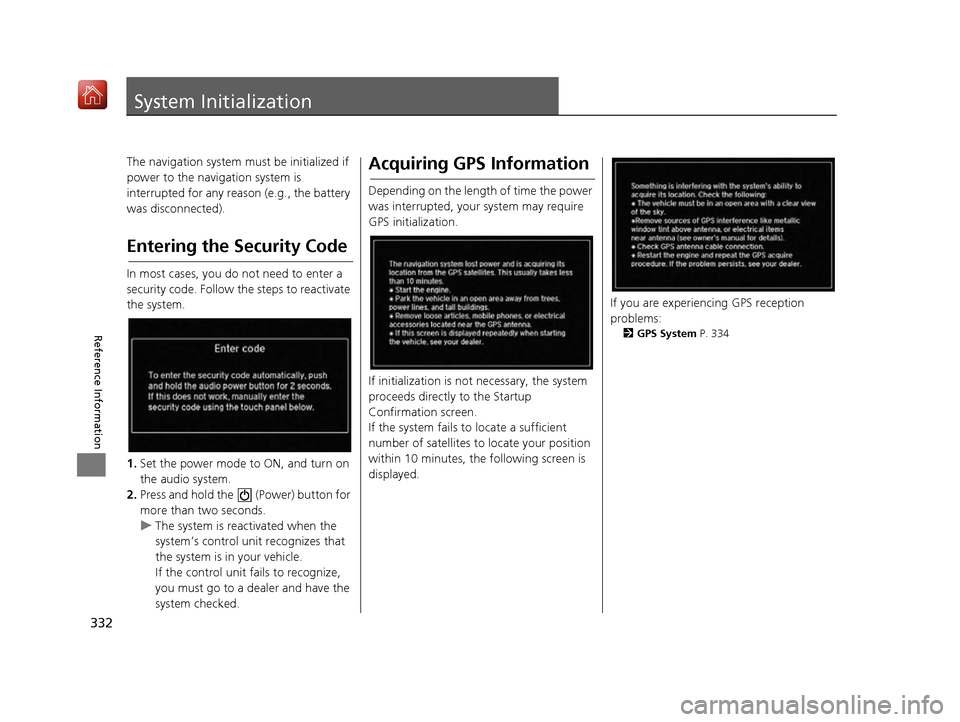
In most cases, you do not need to enter a
security code. Follow the steps to reactivate
the system.
1. Set the power mode to ON, and turn on
the audio system.
2. Press and hold the (Power) button for
more than two seconds.
u The system is reactivated when the
system’s control unit recognizes that
the system is in your vehicle.
If the control unit fa ils to recognize,
you must go to a dealer and have the
system checked.
Acquiring GPS Information
Depending on the length of time the power
was interrupted, your system may require
GPS initialization.
If initialization is not necessary, the system
proceeds directly to the Startup
Confirmation screen.
If the system fails to locate a sufficient
number of satellites to locate your position
within 10 minutes, the following screen is
displayed.
If you are experiencing GPS reception
problems:
2 GPS System P. 334
16 ACURA RDX NAVI-31TX48300.book 332 ページ 2015年8月5日 水曜日 午後4時12分
Page 354 of 357

353
Index
Scale ......................................................... 81
MENU Button
Changing Route...................................... 159
Entering a Destination............................. 116
Microphone .............................................. 252
MODE Button ........................................... 179
Multi-View Rear Camera ......................... 314
Music Search
HDD ....................................................... 217
How to Select a File fro m the Music Search List
(MP3/WMA/AAC).................................. 209
iPod ........................................................ 230
Song By Voice ......................................... 232
USB ........................................................ 246
N
NAV Button .......................................... 10, 63
Navigation Menu (Destination) .............. 116
Navigation Menu (Route Option) ........... 159
Night Mode
Color ........................................................ 73
Switching Display Mode ............................ 74
Non-map Screens ....................................... 66
O
On Demand Multi-Use DisplayTM
Basic Operation........................................... 5
Customizing Audio Source ...................... 178
Screen Settings ......................................... 87
Shortcuts .................................. 44, 177, 265
Sound ..................................................... 183
P
Pairing a Phone........................................ 255
Pandora® ................................................... 237
Personal Information ................................. 38
PHONE Button .......................................... 252
Phone Settings .......................................... 273
Phonebook Importing ................................................ 261
Making a Call .......................................... 279
PIN Numbers ............................................... 47
Place Category Address Book ............................................ 39
Setting Destination .................................. 127
Place Name
Address Book ............................................ 39
Setting Destination .................................. 131
Place Phone Number
Address Book ............................................ 39
Setting Destination .................................. 134
Postal Code ............................................... 120
Previous Destinations Address Book ............................................ 39
Deleting .................................................... 48
Setting Destination .................................. 126
R
Radio
FM/AM .................................................... 184
SiriusXM ®................................................ 190
Random
Disc ......................................................... 207 HDD ........................................................ 215
USB Flash Drive ....................................... 244
Rearview Camera ..................................... 314
Repeat Disc ......................................................... 207
HDD ........................................................ 215
iPod ........................................................ 228
USB Flash Drive ....................................... 244
Resuming Your Trip ................................. 171
Roadside Assistance ................................. 292
Route Preference ........................................ 54
Routing ....................................................... 53
S
Scan
Disc ......................................................... 207
FM/AM Radio .................................. 188, 189
HDD ........................................................ 215
SiriusXM ® Radio ...................................... 200
USB Flash Drive ....................................... 244
Scenic Route ............................................. 136
Schedule Calendar ................................................. 311
Search Along ............................................ 162
Search Around .......................................... 162
Search by Name ........................................ 128
Search by name Place Category ........................................ 127
Search Nearby ........................................... 168
Security PIN Code ..................................... 332
SETTINGS Button .......................................... 4
Show Icon on Map ..................................... 71
16 ACURA RDX NAVI-31TX48300.book 353 ページ 2015年8月5日 水曜日 午後4時12分