Page 292 of 581
291
uuCustomized Features u
Continued
Features
■List of customizable options
*1:Default Setting Setup
Group Customizable Features Descri
ption Selectable Settings
System
Settings
Display
Sync Display Brightness
Selects whether the display brightness
synchronizes with the instrument panel
brightness.
On*1/Off
BrightnessChanges the brightness of the audio/
information screen.—
ContrastChanges the contrast of the audio/
information screen.—
Black LevelChanges the black level of the audio/
information screen.—
Bluetooth
Bluetooth StatusTurns the Bluetooth® on and off.On*1/Off
Bluetooth Device List
Pairs a new phone to HFL, edits and deletes a
paired phone, and creates a security PIN.
2 Phone Setup P. 317
—
Edit Pairing CodeChanges a pairing code.
2To change the pairing code setting P. 319Random/Fixed*1
Voice RecoVoice PromptTurns the voice prompt on and off.Beginner*1/Expert
17 ACURA MDX-31TZ56300.book 291 ページ 2016年5月13日 金曜日 午後7時46分
Page 299 of 581

298
uuCustomized Features u
Features
*1:Default SettingSetup
Group Customizable Features Description Selectable Settings
Vehicle
Settings Door
SetupAuto Door Lock
Changes the setting for the automatic locking
feature. With Vehicle
Speed
*1/
Shift from
P /Off
Auto Door Unlock Changes the setting
for when the doors
unlock automatically. All Doors When
Driver’s Door
Opens
*1/
All Doors
When Shifted to
Park /All Doors
When Ignition
Switched Off /Off
Key And Remote Unlock
Mode Sets up either the driver’s
door or all doors to
unlock on the first push of the remote or built-
in key. Driver Door
*1/
All
Doors
Keyless Lock Answer Back LOCK/UNLOCK- The exterior lights flash.
LOCK (2nd push)- The beeper sounds.
On
*1/
Off
Security Relock Timer Changes the time it takes for the doors to
relock and the security system to set after you
unlock the vehicle without opening any door. 90seconds/
60seconds/
30seconds
*1
Auto Folding Door Mirror*Changes how you can fold the door mirrors.
Auto Fold
With
Keyless*1/ Manual
Only
* Not available on all models
17 ACURA MDX-31TZ56300.book 298 ページ 2016年5月13日 金曜日 午後7時46分
Page 304 of 581
303
uuCustomized Features u
Continued
Features
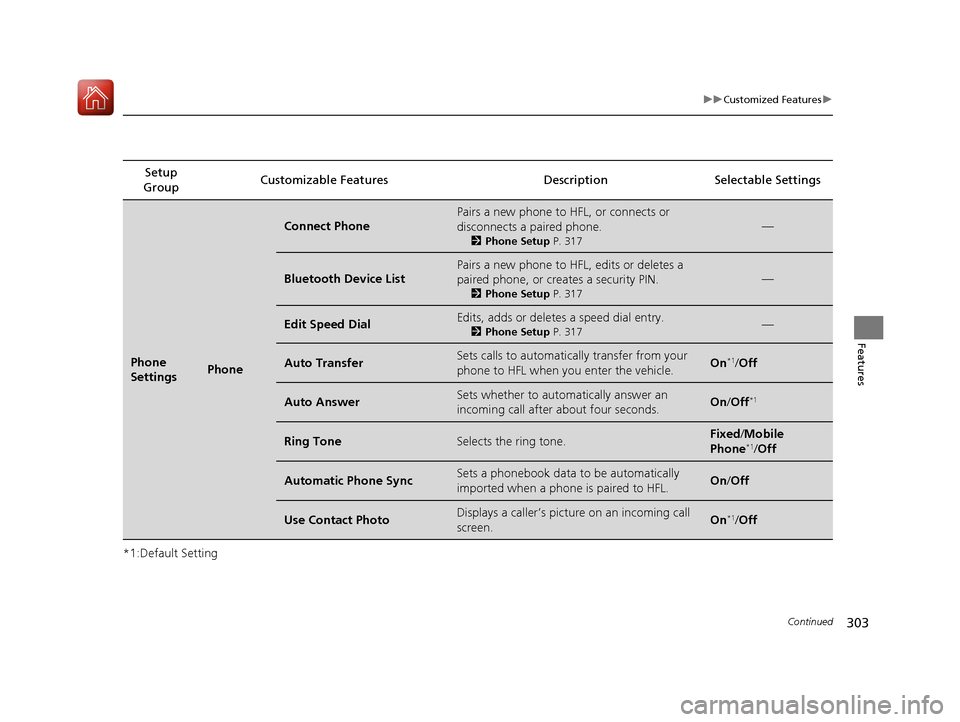
*1:Default SettingSetup
Group Customizable Features Descri
ption Selectable Settings
Phone
SettingsPhone
Connect Phone
Pairs a new phone to HFL, or connects or
disconnects a paired phone.
2Phone Setup P. 317
—
Bluetooth Device List
Pairs a new phone to HFL, edits or deletes a
paired phone, or cr eates a security PIN.
2Phone Setup P. 317
—
Edit Speed DialEdits, adds or deletes a speed dial entry.
2Phone Setup P. 317—
Auto TransferSets calls to automatica lly transfer from your
phone to HFL when you enter the vehicle.On*1/ Off
Auto AnswerSets whether to automatically answer an
incoming call after about four seconds.On /Off*1
Ring ToneSelects the ring tone.Fixed /Mobile
Phone*1/ Off
Automatic Phone SyncSets a phonebook data to be automatically
imported when a phon e is paired to HFL.On/Off
Use Contact PhotoDisplays a caller’s pict ure on an incoming call
screen.On*1/ Off
17 ACURA MDX-31TZ56300.book 303 ページ 2016年5月13日 金曜日 午後7時46分
Page 308 of 581
307
Features
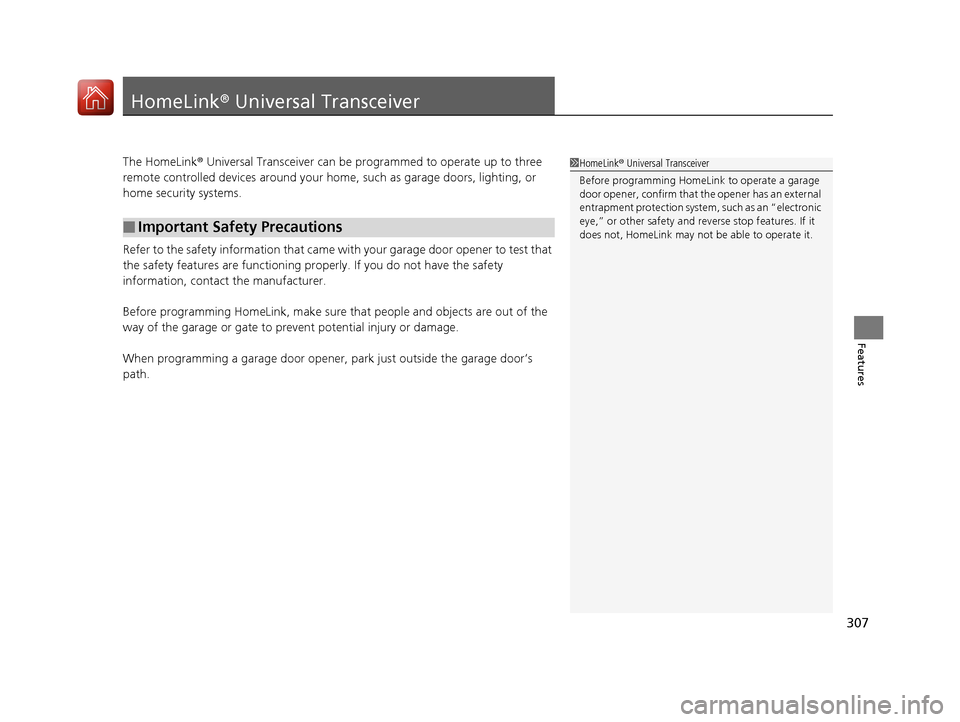
HomeLink® Universal Transceiver
The HomeLink ® Universal Transceiver can be programmed to operate up to three
remote controlled devices around your home, such as garage doors, lighting, or
home security systems.
Refer to the safety information that came wi th your garage door opener to test that
the safety features are functioning properly. If you do not have the safety
information, contact the manufacturer.
Before programming HomeLink, make sure that people and objects are out of the
way of the garage or gate to prevent potential injury or damage.
When programming a garage door opener, park just outside the garage door’s
path.
■Important Safety Precautions
1 HomeLink ® Universal Transceiver
Before programming HomeLi nk to operate a garage
door opener, confirm that the opener has an external
entrapment protection system, such as an “electronic
eye,” or other safety and re verse stop features. If it
does not, HomeLink may not be able to operate it.
17 ACURA MDX-31TZ56300.book 307 ページ 2016年5月13日 金曜日 午後7時46分
Page 313 of 581

312
uuBluetooth ® HandsFreeLink ®u HFL Menus
Features
HFL Menus
The power mode must be in ACCESSORY or ON to use HFL.
■Phone Settings screen
1.Press the SETTINGS button.
2. Rotate to select Phone Settings, then
press .
1 HFL Menus
To use HFL, you must first pair your Bluetooth-
compatible cell phone to th e system while the vehicle
is parked.
Some functions are limited while driving. A message
appears on the screen when the vehicle is moving
and the operation is canceled.
PhoneConnect Phone
Bluetooth
Device List
(Existing
entry list)
Add Bluetooth Device
Disconnect a paired phone from the system.Connect a phone to the system.
*1: Appears only when a pho ne is connected to HFL.Disconnect
(Existing entry list)
Pair a phone to the system.
Add Bluetooth
DevicePair a phone to the system.
Replace This Device
Edit PIN Create a security PIN for a paired phone.
Replace a previously paired phone with a
new phone.
Delete This DeviceDelete a previously paired phone.
17 ACURA MDX-31TZ56300.book 312 ページ 2016年5月13日 金曜日 午後7時46分
Page 321 of 581
uuBluetooth ® HandsFreeLink ®u HFL Menus
320
Features
■To replace an already-paired phone
with a new phone
1. Press the SETTINGS button.
2. Rotate to select Phone Settings, then
press .
u Repeat the procedure to select
Bluetooth Device List.
3. Rotate to select a paired phone you
want to replace, then press .
4. Rotate to select Replace This Device,
then press .
5. HFL enters the pairing process and searches
a new phone.
u Follow the prompts to pair a new phone.
6. A notification appears on the screen if
pairing is successful.1To replace an already-pair ed phone with a new phone
The replaced phone will keep the same speed dial
entries, and security PIN information from the
previously paired phone.
17 ACURA MDX-31TZ56300.book 320 ページ 2016年5月13日 金曜日 午後7時46分
Page 325 of 581

uuBluetooth ® HandsFreeLink ®u HFL Menus
324
Features
You can protect each of the six cell phones with a security PIN.
1.Press the SETTINGS button.
2. Rotate to select Phone Settings, then
press .
u Repeat the procedure to select
Bluetooth Device List.
3. Rotate to select a phone you want to
add a security PIN to, then press .
4. Rotate to select Edit PIN, then press .
5. Enter a new four-digit number.
u Rotate to select, then press .
Move to delete. Rotate to select
OK to enter the security PIN.
u You can also enter a number using the
icons.
6. Re-enter the four-digit number.
u The screen returns to the screen in step
4.
■To Create a Security PIN1 To Create a Security PIN
If the phone is already secu rity PIN protected, you
need to enter the current security PIN before clearing
the PIN or creating a new one.
Audio/information screen
On Demand Multi-Use DisplayTM
Audio/information screen
On Demand Multi-Use DisplayTM
17 ACURA MDX-31TZ56300.book 324 ページ 2016年5月13日 金曜日 午後7時46分
Page 349 of 581

348
Driving
Before Driving
Driving Preparation
Check the following items before you start driving.
• Make sure there are no obstructions on th e windows, door mirrors, exterior
lights, or other parts of the vehicle.
u Remove any frost, snow, or ice.
u Remove any snow on the roof, as this can slip down and obstruct your field of
vision while driving. If frozen solid , remove ice once it has softened.
u When removing ice from around the wheel s, be sure not to damage the wheel
or wheel components.
• Make sure the hood is securely closed.
u If the hood opens while driving, your front view will be blocked.
• Make sure the tires are in good condition.
u Check air pressure, and check for damage and excessive wear.
2 Checking and Maintaining Tires P. 490
•Make sure there are no people or ob jects behind or around the vehicle.
u There are blind spots from the inside.
■Exterior Checks1Exterior Checks
NOTICE
When doors are frozen s hut, use warm water around
the door edges to melt any ice. Do not try to force
them open, as this can damage the rubber trim
around the doors. When done, wipe dry to avoid
further freezing.
Do not pour warm water into the key cylinder.
You will be unable to insert the key if the water
freezes in the hole.
Heat from the engine and exhaust can ignite
flammable material s left under the hood, causing a
fire. If you’ve parked y our vehicle for an extended
period, inspect and remove any debris that may have
collected, such as dried grass and leaves that have
fallen or have been carried in for use as a nest by a
small animal. Also check under the hood for leftover
flammable materials after you or someone else has
performed maintenance on your vehicle.
17 ACURA MDX-31TZ56300.book 348 ページ 2016年5月13日 金曜日 午後7時46分

