Page 84 of 581
83
uuIndicators u
Continued
Instrument Panel
IndicatorNameOn/BlinkingExplanationMessage
Vehicle Stability
Assist (VSA ®)
System Indicator
●Comes on for a few seconds
when you set the power mode to
ON, then goes off.
●Blinks when VSA ®, or trailer
stability assist is active.
●Comes on if there is a problem
with the VSA ®, hill start assist,
trailer stability assist or brake
lighting system.
●Stays on constantly - Have your vehicle
checked by a dealer.
2 Vehicle Stability Assist (VSA® ), aka
Electronic Stability Control (ESC), System
P. 418
2 Trailer Stability Assist P. 362
2 Hill start assist system P. 371
●When Trailer Stability Assist Problem is
displayed on the MID, the VSA ® does not
activate.
VSA ® OFF
Indicator
●Comes on for a few seconds
when you set the power mode to
ON, then goes off.
●Comes on when you partially
disable VSA®.
2 VSA ® On and Off P. 419—
17 ACURA MDX-31TZ56300.book 83 ページ 2016年5月13日 金曜日 午後7時46分
Page 101 of 581

100
uuIndicators uMulti-Information Display (MID) Warning and Information Messages
Instrument Panel
MessageConditionExplanation
●Appears when the power mode is in ACCESSORY.
—
●Appears after the driver’s door is opened when the
power mode is in ACCESSORY.●Press the ENGINE START/STOP button twice with your
foot off the brake pedal to change the power mode to
VEHICLE OFF (LOCK).
●Appears when you close the door with the power mode
is in ON without the keyless access remote inside the
vehicle.●Disappears when you bring the keyless access remote
back inside the vehicle and close the door.
2 Keyless Access Remote Reminder P. 165
●Appears when the keyless access remote battery
becomes weak.●Replace the battery as soon as possible.
2Replacing the Button Battery P. 501
●Appears if the keyless access remote’s battery is too
weak to start the engine or the key is not within
operating range to start the engine.
The beeper sounds six times.●Bring the keyless access remote in front of the ENGINE
START/STOP button to be touched with.
2 If the Keyless Access Remote Battery is Weak P. 535
17 ACURA MDX-31TZ56300.book 100 ページ 2016年5月13日 金曜日 午後7時46分
Page 102 of 581

101
uuIndicators uMulti-Information Display (MID) Warning and Information Messages
Continued
Instrument Panel
MessageConditionExplanation
●Appears when you attempt to change to another gear
position with the transmission in
(P and the engine
OFF.
●To select another gear position while in (P the engine
must be ON.
●Appears when you try to change the gear position after
the position has automatically been changed to
(P with
the driver’s door open and the driver’s seat belt
unfastened.
●Press the (P button If you leave the vehicle.
●Appears when the vehicle is stopped with the driver’s
seat belt unfastened and there is a chance that the
vehicle may roll unintentionally.●Press the (P button before release the brake pedal
when idling, parking or exiting the vehicle.
2 Shift Operation P. 376
●Appears when the engine stops without the
transmission in
(P, and does not restart automatically.●Appears if you open the hood while Auto Idle Stop
activates.
●If you want to set the power mode to ON, change the
gear position to
(P.●If you want to start the engine, follow the normal
procedure.
2Starting the Engine P. 367
●Appears when you change to (N, then release the (N
button.
2 If you want to keep the transmission in (N
position [car wash mode] P. 378
Models with Auto Idle StopModels with Auto Idle Stop
17 ACURA MDX-31TZ56300.book 101 ページ 2016年5月13日 金曜日 午後7時46分
Page 103 of 581
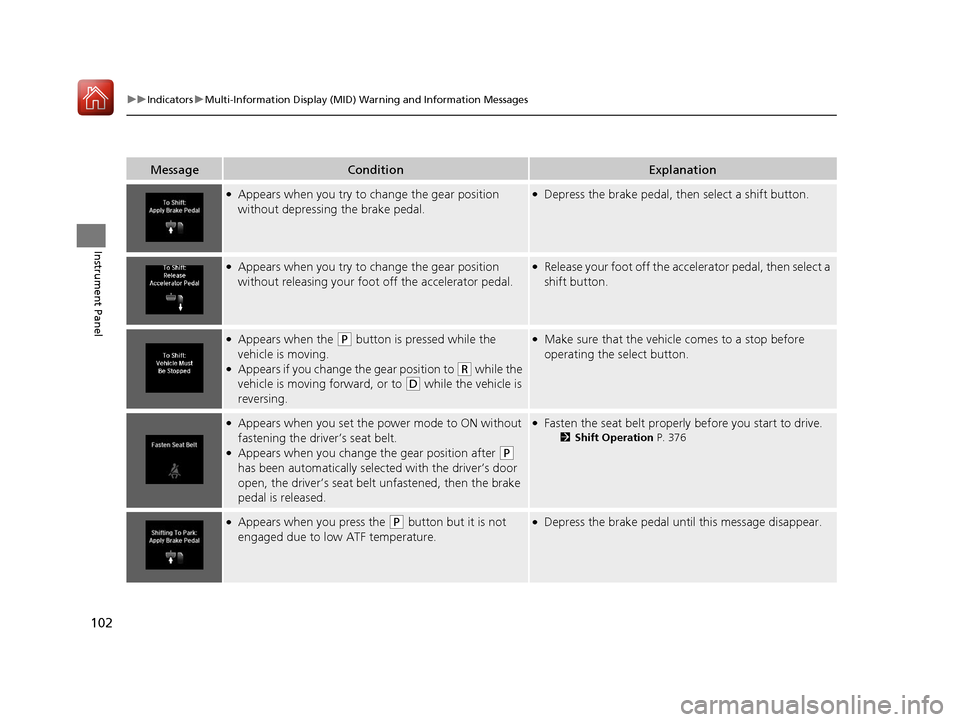
102
uuIndicators uMulti-Information Display (MID) Warning and Information Messages
Instrument Panel
MessageConditionExplanation
●Appears when you try to ch ange the gear position
without depressing the brake pedal.●Depress the brake pedal, then select a shift button.
●Appears when you try to ch ange the gear position
without releasing your foot off the accelerator pedal.●Release your foot off the accelerator pedal, then select a
shift button.
●Appears when the (P button is pressed while the
vehicle is moving.
●Appears if you change the gear position to (R while the
vehicle is moving forward, or to
(D while the vehicle is
reversing.
●Make sure that the vehicle comes to a stop before
operating the select button.
●Appears when you set the po wer mode to ON without
fastening the driver’s seat belt.
●Appears when you change the gear position after (P
has been automatically select ed with the driver’s door
open, the driver’s seat belt unfastened, then the brake
pedal is released.
●Fasten the seat belt properly before you start to drive.
2 Shift Operation P. 376
●Appears when you press the (P button but it is not
engaged due to low ATF temperature.●Depress the brake pedal until this message disappear.
17 ACURA MDX-31TZ56300.book 102 ページ 2016年5月13日 金曜日 午後7時46分
Page 105 of 581
104
uuIndicators uMulti-Information Display (MID) Warning and Information Messages
Instrument Panel
MessageConditionExplanation
●Appears if the automatic br ake hold is automatically
canceled while it is in operation.●Immediately depress the brake pedal.
●Appears when the automati c brake hold system is
turned off.
2 Automatic Brake Hold P. 432
●Appears when the automatic brake hold button is
pressed without wearing the driver’s seat belt.●Fasten the driver’s seat belt.
2Automatic Brake Hold P. 432
●Appears when the automatic brake hold button is
pressed without depressing the brake pedal while the
automatic brake hold is in operation.●Press the automatic brake hold button with the brake
pedal depressed.
2Automatic Brake Hold P. 432
●Appears when the parking brake is applied
automatically while it is in operation.
2Automatic Brake Hold P. 432
2 Parking Brake P. 428
17 ACURA MDX-31TZ56300.book 104 ページ 2016年5月13日 金曜日 午後7時46分
Page 107 of 581
106
uuIndicators uMulti-Information Display (MID) Warning and Information Messages
Instrument Panel
MessageConditionExplanation
●Flashes when the system sens es a likely collision with a
vehicle in front of you.●Take the appropriate means to prevent a collision (apply
the brakes, change lanes, etc.)
2 Collision Mitigation Braking SystemTM (CMBSTM)
P. 436
2 Adaptive Cruise Control (ACC) with Low Speed
Follow (LSF) P. 390
17 ACURA MDX-31TZ56300.book 106 ページ 2016年5月13日 金曜日 午後7時46分
Page 110 of 581
109
uuIndicators uMulti-Information Display (MID) Warning and Information Messages
Continued
Instrument Panel
MessageConditionExplanation
●Appears when the vehicle is stopped on a very steep
slope while ACC with LSF is in operation.●ACC with LSF has been automatically canceled.
2 Adaptive Cruise Control (ACC) with Low Speed
Follow (LSF) P. 390
●Appears when pressing the RES/+/SET/– switch down
while the vehicle is stoppe d on a very steep slope.●ACC with LSF cannot be set.
2Adaptive Cruise Control (ACC) with Low Speed
Follow (LSF) P. 390
●Appears when pressing the RES/+/SET/– switch down
while the parking brake is applied.●ACC with LSF cannot be set.
2Adaptive Cruise Control (ACC) with Low Speed
Follow (LSF) P. 390
2 Parking Brake P. 428
17 ACURA MDX-31TZ56300.book 109 ページ 2016年5月13日 金曜日 午後7時46分
Page 111 of 581
110
uuIndicators uMulti-Information Display (MID) Warning and Information Messages
Instrument Panel
MessageConditionExplanation
●Appears if ACC with LSF is canceled while your vehicle
is automatically stopped by ACC with LSF. The beeper
sounds.●Immediately depress the brake pedal.
●Appears when pressing the RES/+/SET/– switch down
while the vehicle is moving and the brake pedal is
depressed.●ACC with LSF cannot be set.
2 Adaptive Cruise Control (ACC) with Low Speed
Follow (LSF) P. 390
17 ACURA MDX-31TZ56300.book 110 ページ 2016年5月13日 金曜日 午後7時46分


