Page 126 of 581
125
uuGauges and Multi-Info rmation Display (MID)uMID
Continued
Instrument Panel
Exit
Door Setup
Dynamic Mode Setup
Default All
Lighting Setup
Key And Remote Unlock Mode
Auto Door Lock
Auto Door Unlock
Keyless Lock Answer Back
Auto Folding Door Mirror*
Interior Ligh t Dimming Time
Headlight Auto Off Timer
Auto Light Sensitivity
Roll
Push
Push
Roll
Roll
Roll
Roll
Roll
Roll
Power Tailgate SetupPush
Power Open By Outer Handle
Keyless Open Mode
Push
Maintenance Info.
Roll
PushPreferred Dynamic Mode
Roll
Roll
Roll
PushMaintenance Reset
Security Relock Timer
* Not available on all models
17 ACURA MDX-31TZ56300.book 125 ページ 2016年5月13日 金曜日 午後7時46分
Page 131 of 581
130
uuGauges and Multi-Information Display (MID) uMID
Instrument Panel
*1: Default SettingSetup Group Customizable Features
Description Selectable Settings
Power
Tailgate SetupKeyless Open ModeChanges the keyless setting for when the power
tailgate opens.Anytime*1/When Unlocked
Power Open By Outer
HandleChanges the setting to open power tailgate by
tailgate outer handle.Off (Manual Only) /On
(Power/Manual)*1
Dynamic
Mode SetupPreferred Dynamic
ModeChanges the Dynamic Mode setting for when you
set the power mode to ON.Last Used*1/ Comfort /
Normal /Sport
Maintenance
Info.Maintenance ResetResets/Cancels the engine oil life display when you
have performed the maintenance service. Cancel /Reset
Default All —Cancels/Resets all the
customized settings as
default. Cancel
/Set
17 ACURA MDX-31TZ56300.book 130 ページ 2016年5月13日 金曜日 午後7時46分
Page 279 of 581

278
uuAudio Error Messages uPandora®
Features
Pandora ®
If an error occurs while playing Pandora ®, you may see the following error messages.
If you cannot clear the error message, contact a dealer.
Error MessageSolution
Incompatible USB Device
Please Check Owner’s ManualAppears when an incompatible device is connected. Disconnect
the device. Then turn the audio system off, and turn it again. Do
not reconnect the device that caused the error.
No stations have been created.
Please create a station on the device.Appears when there is no station list on the device. Use the device
to create a station.
No active station.
Music licenses force us to limi t the number of tracks you may
skip each hour.Appears when you try to skip a song or select Dislike over the
predetermined number of times in an hour.
Unable to save rating.
Unable to save bookmark.
or
Unable to skip.
Appears when the commanded operation is failed. Try again later.
No dataAppears when no data is available with Pandora® activated.
Reboot the app and reconnect the device.
PANDORA App version is not supported.Appears when Pandora ® version is not supported. Update
Pandora® to the latest version.
PANDORA system maintenance.Appears when the Pandora ® server is in maintenance. Try again
later.
U.S. models
17 ACURA MDX-31TZ56300.book 278 ページ 2016年5月13日 金曜日 午後7時46分
Page 289 of 581
288
uuCustomized Features u
Features
Fixed Guideline
Dynamic Guideline
Default
Maintenance ResetMaintenance Info.
Keyless Open Mode
Power Open By Outer Handle
Power
Tailgate Setup
Camera
Settings*1
Preferred Dynamic ModeDynamic Mode Setup
Key And Remote Unlock Mode
Keyless Lock Answer Back
Security Relock Timer
Auto Door Lock
Auto Door Unlock
Door
Setup
*1: Models without Cross Traffic Monitor
Interior Light Dimming Time
Headlight Auto Off Timer
Auto Light Sensitivity
Lighting
Setup
Auto Folding Door Mirror*
* Not available on all models
17 ACURA MDX-31TZ56300.book 288 ページ 2016年5月13日 金曜日 午後7時46分
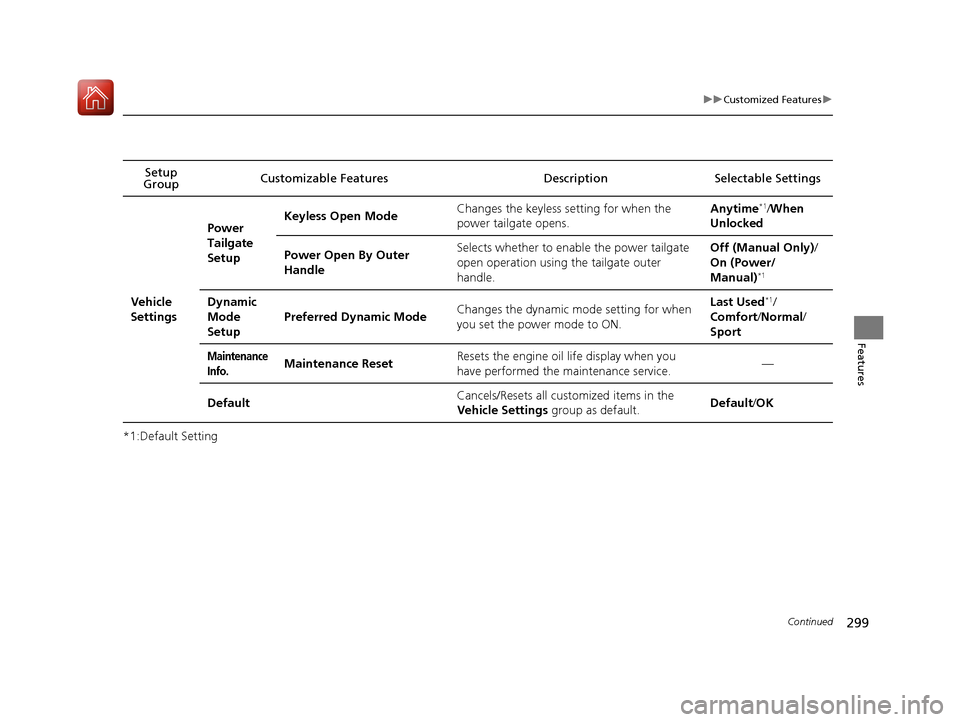
Page 300 of 581
299
uuCustomized Features u
Continued
Features
*1:Default SettingSetup
Group Customizable Features Descri
ption Selectable Settings
Vehicle
Settings Power
Tailgate
Setup
Keyless Open Mode
Changes the keyless setting for when the
power tailgate opens. Anytime
*1/
When
Unlocked
Power Open By Outer
Handle Selects whether to enable the power tailgate
open operation using the tailgate outer
handle. Off (Manual Only)
/
On (Power/
Manual)
*1
Dynamic
Mode
Setup Preferred Dynamic Mode
Changes the dynamic mode setting for when
you set the power mode to ON. Last Used*1/
Comfort /Normal /
Sport
Maintenance
Info.Maintenance Reset Resets the engine oil life display when you
have performed the maintenance service. —
Default Cancels/Resets all customized items in the
Vehicle Settings
group as default. Default
/OK
17 ACURA MDX-31TZ56300.book 299 ページ 2016年5月13日 金曜日 午後7時46分
Page 349 of 581

348
Driving
Before Driving
Driving Preparation
Check the following items before you start driving.
• Make sure there are no obstructions on th e windows, door mirrors, exterior
lights, or other parts of the vehicle.
u Remove any frost, snow, or ice.
u Remove any snow on the roof, as this can slip down and obstruct your field of
vision while driving. If frozen solid , remove ice once it has softened.
u When removing ice from around the wheel s, be sure not to damage the wheel
or wheel components.
• Make sure the hood is securely closed.
u If the hood opens while driving, your front view will be blocked.
• Make sure the tires are in good condition.
u Check air pressure, and check for damage and excessive wear.
2 Checking and Maintaining Tires P. 490
•Make sure there are no people or ob jects behind or around the vehicle.
u There are blind spots from the inside.
■Exterior Checks1Exterior Checks
NOTICE
When doors are frozen s hut, use warm water around
the door edges to melt any ice. Do not try to force
them open, as this can damage the rubber trim
around the doors. When done, wipe dry to avoid
further freezing.
Do not pour warm water into the key cylinder.
You will be unable to insert the key if the water
freezes in the hole.
Heat from the engine and exhaust can ignite
flammable material s left under the hood, causing a
fire. If you’ve parked y our vehicle for an extended
period, inspect and remove any debris that may have
collected, such as dried grass and leaves that have
fallen or have been carried in for use as a nest by a
small animal. Also check under the hood for leftover
flammable materials after you or someone else has
performed maintenance on your vehicle.
17 ACURA MDX-31TZ56300.book 348 ページ 2016年5月13日 金曜日 午後7時46分
Page 367 of 581

366
uuOff-Highway Driving Guidelines uAvoiding Trouble
Driving
Avoiding Trouble
• Check Out Your Vehicle before you leave the pavement and make sure that all
scheduled maintenance has been comple ted. Pay special attention to the
condition of the tires, an d check the tire pressures.
• Remember the route you choose presents limit s (too steep or bumpy), you have
limits (driving skill and comfort), and your vehicle has limits (traction, stability, and
power). Failing to recognize these limits will likely put you and your passengers in
a hazardous situation.
• Accelerating and Braking should be done slowly and gradually. Trying to start
or stop too fast can cause a loss of traction and you could lose control.
• Avoiding Obstacles and Debris in the road reduces the likelihood of a rollover
or damage to your suspension or other components.
• Driving on Slopes increases your risk of a rollover, particularly if you attempt to
drive across a slope that is too steep. Going straight up or down a slope is usually
the safest. If you can’t clearly see all cond itions or obstacles on a slope, walk it
before you drive it. If there is any doubt whether you can safely pass, don’t try it.
Find another route. If you get stuck when climbing, do not try to turn around.
Back down slowly following the same route you took up the hill.
• Crossing a Stream - Avoid driving through deep water. If you encounter water
in your route (a small stream or large pu ddle, for example), evaluate it carefully
before going ahead. Make sure it is shallow, flowing slowly, and has firm ground
underneath. If you are not sure of the depth or the ground, turn around and find
another route. Driving through deep water can also damage your vehicle. The
water can get into the transmission and differential, diluting the lubricant and
causing an eventual failure. It can also wash the grease out of the wheel bearings.
• If You Get Stuck , carefully go in the direction that you think will get you
unstuck. Do not spin the tires as this will only make things worse and could
damage the transmission. If you are unable to free yourself, your vehicle will need
to be towed. Front and rear tow hooks are provided for this purpose.
17 ACURA MDX-31TZ56300.book 366 ページ 2016年5月13日 金曜日 午後7時46分
Page 428 of 581

427
uuWhen Driving uTire Pressure Monitoring System (TPMS) - Required Federal Explanation
Driving
Please note that the TPMS is not a substitute for proper tire
maintenance, and it is the driver ’s responsibility to maintain
correct tire pressure, even if un der-inflation has not reached the
level to trigger illumination of th e TPMS low tire pressure telltale.
Your vehicle has also been equi pped with a TPMS malfunction
indicator to indicate when the system is not operating properly.
The TPMS malfunction indicator is combined with the low tire
pressure telltale. When the syst em detects a malfunction, the
telltale will flash fo r approximately one minute and then remain
continuously illumina ted. This sequence will continue upon
subsequent vehicle start-ups as long as the malfunction exists.
When the malfunction indicator is illuminated, the system may
not be able to detect or signal low tire pressure as intended.
TPMS malfunctions may occur for a variety of reasons, including
the installation of replacement or alternate tires or wheels on the
vehicle that prevent the TPMS from functioning properly.
Always check the TPMS malfunction telltale after replacing one or
more tires or wheels on your vehicle to ensure that the
replacement or alternate tires and wheels allow the TPMS to
continue to function properly.
17 ACURA MDX-31TZ56300.book 427 ページ 2016年5月13日 金曜日 午後7時46分