Page 48 of 453

47
uuAirbags uAirbag System Components
Safe DrivingAirbags can pose serious hazards. To do their job, airbags must inflate with
tremendous force. So, while airbags help sa ve lives, they can cause burns, bruises,
and other minor injuries, sometimes even fatal ones if occupants are not wearing
their seat belts properl y and sitting correctly.
What you should do: Always wear your seat belt properly, and sit upright and as
far back from the steering wheel as possi ble while allowing full control of the
vehicle. A front passenger should move their seat as far back from the dashboard as
possible.
Remember, however, that no safety system ca n prevent all injuries or deaths that
can occur in a severe crash, even when s eat belts are properly worn and the airbags
deploy.
Do not place hard or sharp objects between yourself and a front airbag.
Carrying hard or sharp objects on your lap, or driving with a pipe or other sharp
object in your mouth, can result in in juries if your front airbag inflates.
Do not attach or place objects on the front and driver’s knee airbag covers.
Objects on the covers marked SRS AIRBAG could interfere with the proper
operation of the airbags or be propelled inside the vehicle and hurt someone if the
airbags inflate.
■Important Facts About Your Airbags1 Important Facts About Your Airbags
Do not attempt to deactivate your airbags. Together,
airbags and seat belts pr ovide the best protection.
When driving, keep hands and arms out of the
deployment path of the fro nt airbag by holding each
side of the steering wheel. Do not cross an arm over
the airbag cover.
17 ACURA MDX E-AWD-31TRX6000.book 47 ページ 2017年1月20日 金曜日 午後2時5 3分
Page 49 of 453

48
uuAirbags uTypes of Airbags
Safe Driving
Types of Airbags
Your vehicle is equipped with four types of airbags:
• Front airbags: Airbags in front of the driver ’s and front passenger’s seats.
• Driver’s knee airbag: Airbag under the steering column.
• Side airbags: Airbags in the driver’s and front passenger’s seat-backs.
• Side curtain airbags: Airbags above the side windows.
Each is discussed in the following pages.
Front Airbags (SRS)
The front SRS airbags inflate in a moderate-to -severe frontal collision to help protect
the head and chest of the driver and/or front passenger.
SRS (Supplemental Restraint System) indicates that the airbags are designed to
supplement seat belts, not replace them. Seat belts are the occupant’s primary
restraint system.
The front airbags are housed in the center of the steering wheel for the driver, and
in the dashboard for the front pass enger. Both airbags are marked SRS AIRBAG.
■Housing Locations
1Types of Airbags
The airbags can inflate whenever the power mode is
in ON.
After an airbag inflates in a crash, you may see a
small amount of smoke. This is from the combustion
process of the infl ator material and is not harmful.
People with respiratory pr oblems may experience
some temporary discomfort. If this occurs, get out of
the vehicle as soon as it is safe to do so.
1 Front Airbags (SRS)
During a frontal crash severe enough to cause one or
both front airbags to deploy, the airbags can inflate
at different rates, dependi ng on the severity of the
crash, whether or not the se at belts are latched, and/
or other factors. Frontal airbags are designed to
supplement the seat belts to help reduce the
likelihood of head and chest injuries in frontal
crashes.
17 ACURA MDX E-AWD-31TRX6000.book 48 ページ 2017年1月20日 金曜日 午後2時5 3分
Page 92 of 453
91
uuIndicators u
Continued
Instrument Panel
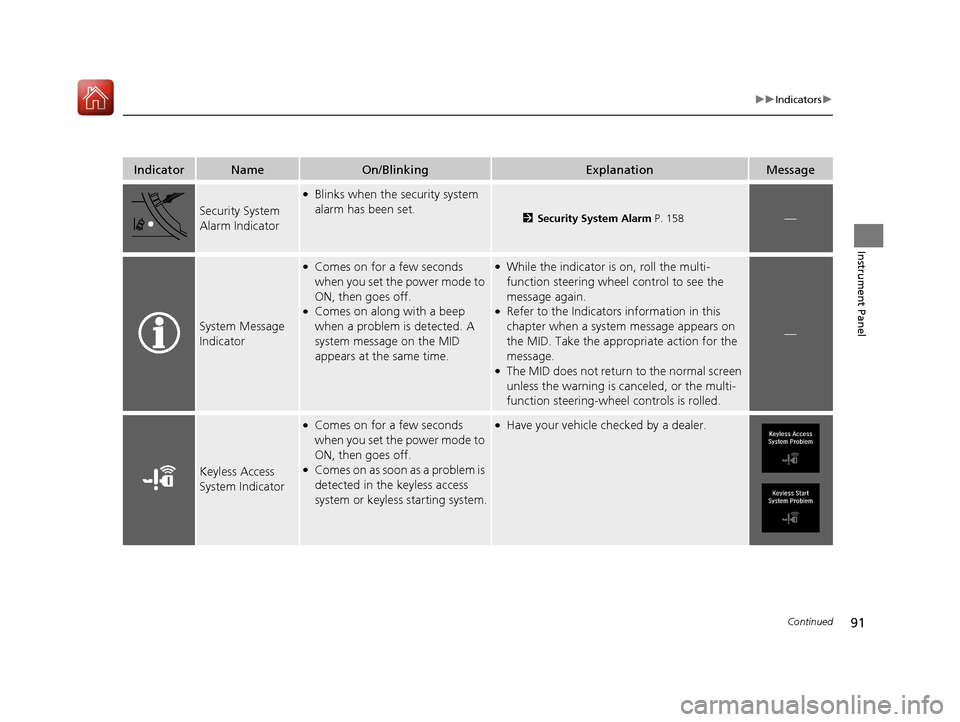
IndicatorNameOn/BlinkingExplanationMessage
Security System
Alarm Indicator
●Blinks when the security system
alarm has been set.
2Security System Alarm P. 158—
System Message
Indicator
●Comes on for a few seconds
when you set the power mode to
ON, then goes off.
●Comes on along with a beep
when a problem is detected. A
system message on the MID
appears at the same time.
●While the indicator is on, roll the multi-
function steering wheel control to see the
message again.
●Refer to the Indicators information in this
chapter when a system message appears on
the MID. Take the appropriate action for the
message.
●The MID does not return to the normal screen
unless the warning is canceled, or the multi-
function steering-wheel controls is rolled.
—
Keyless Access
System Indicator
●Comes on for a few seconds
when you set the power mode to
ON, then goes off.
●Comes on as soon as a problem is
detected in the keyless access
system or keyless starting system.
●Have your vehicle checked by a dealer.
17 ACURA MDX E-AWD-31TRX6000.book 91 ページ 2017年1月20日 金曜日 午後2時5 3分
Page 100 of 453
99
uuIndicators uMulti-Information Display (MID) Warning and Information Messages
Continued
Instrument Panel
Multi-Information Display (MID) Wa rning and Information Messages
The following messages appear only on the MID. Roll the multi-function steering-wheel controls to see the message again with the system
message indicator on.
MessageConditionExplanation
●Appears if any door or the tailgate is not completely
closed.●Goes off when all doors and the tailgate are closed.
●Appears when the hood is opened.●Close the hood.
17 ACURA MDX E-AWD-31TRX6000.book 99 ページ 2017年1月20日 金曜日 午後2時5 3分
Page 117 of 453

116
uuIndicators uMulti-Information Display (MID) Warning and Information Messages
Instrument Panel
MessageConditionExplanation
●Appears when the vehicle is driving out of a detected
lane. Rapid vibrations on the steering wheel.
●Appears when the vehicle is driving out of a detected
lane.
-Rapid vibrations on the steering wheel when the
vehicle is drifting out of a detected lane.
- Rapid vibrations on the steering wheel with steering
assist when the vehicle is drifting out of a detected
lane.
●Keep the vehicle within the lane you are driving.●The color of either line chan ges from white to amber as
the vehicle gets closer to th at side of the lane line.
2Lane Keeping Assist System (LKAS) P. 279
2 Road Departure Mitigation (RDM) System P. 274
●Blinks when you fail to steer the vehicle. The beeper
sounds simultaneously if selected by customization.●Operate the steering wheel to resume the LKAS.
●Appears when the LKAS is in operation, or the LKAS
button is pressed, but there is a problem with a system
related to the LKAS. The LK AS cancels automatically.
The beeper sounds simultaneously if selected by
customization.●If any other system indicators come on, such as the
VSA ®, ABS and brake system, take appropriate action.
2Indicators P. 78
Lane Keeping Assist System (LKAS)
Road Departure Mitigation (RDM) System
When you selected Warning Only
When you selected Normal or Wide
17 ACURA MDX E-AWD-31TRX6000.book 116 ページ 2017年1月20日 金曜日 午後2時 53分
Page 120 of 453
119
uuGauges and Multi-Info rmation Display (MID)uMID
Continued
Instrument Panel
MID
The MID shows the odometer, trip meter, ou tside temperature indicator, and other
gauges. It also displays important messag es such as warnings and other helpful
information.
■Main displays
Roll the multi-function steering-wheel controls to change the display.
■Switching the Display
BlankInstant Fuel
Economy/
Average Fuel
Economy Range
Elapsed Time Average Speed
SH-AWD®/
Dynamic Mode
Vehicle
Settings Tire Pressure
for Each Tire Engine Oil Life Turn-by-Turn
Directions
Multi-function Steering-
wheel Controls Compass
17 ACURA MDX E-AWD-31TRX6000.book 119 ページ 2017年1月20日 金曜日 午後2時
53分
Page 124 of 453
Continued123
uuGauges and Multi-Info rmation Display (MID)uMID
Instrument Panel
The indicators on the display show the
amount of torque being transferred to the
right front, left front, right rear, and left rear
wheels.
2 SPORT HYBRID Super Handling-All Wheel
DriveTM (SPORT HYBRID SH-AWD® ) P. 290
Shows the current mode for Dynamic Mode.
2 Integrated Dynamics System P. 256
Shows you turn-by-turn driving directions to your destination linked with the
navigation system.
2 Refer to the navigation system
■SH-AWD ® Torque Distribution Monitor
■Current Mode for Dynamic Mode
■Turn-by-Turn Directions1 Turn-by-Turn Directions
The multi-information disp lay shows a compass when
the route guidance is not used.
You can select whether the turn-by-turn display
comes on or not during the route guidance.
2 Customized Features P. 125
2 Refer to the navigation system
17 ACURA MDX E-AWD-31TRX6000.book 123 ページ 2017年1月20日 金曜日 午後2時 53分
Page 126 of 453
Continued125
uuGauges and Multi-Info rmation Display (MID)uMID
Instrument Panel
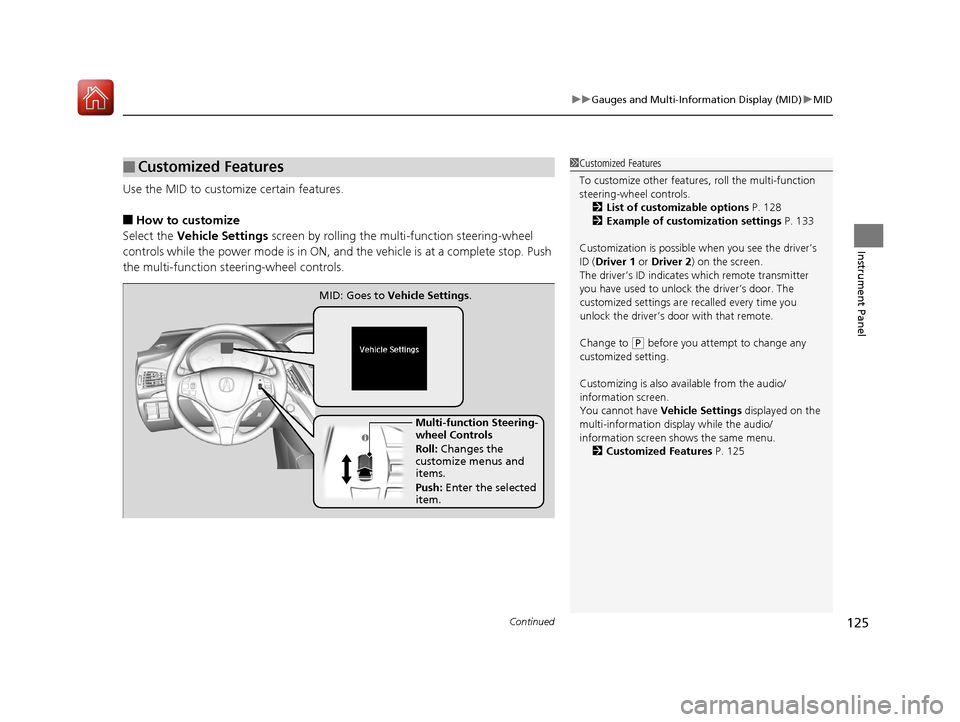
Use the MID to custom ize certain features.
■How to customize
Select the Vehicle Settings screen by rolling the mu lti-function steering-wheel
controls while the power mode is in ON, an d the vehicle is at a complete stop. Push
the multi-function steering-wheel controls.
■Customized Features1 Customized Features
To customize other features , roll the multi-function
steering-wheel controls.
2 List of customizable options P. 128
2 Example of customization settings P. 133
Customization is possible when you see the driver’s
ID ( Driver 1 or Driver 2 ) on the screen.
The driver’s ID indicates which remote transmitter
you have used to unlock the driver’s door. The
customized settings are recalled every time you
unlock the driver’s door with that remote.
Change to
( P before you attempt to change any
customized setting.
Customizing is also av ailable from the audio/
information screen.
You cannot have Vehicle Settings displayed on the
multi-information display while the audio/
information screen shows the same menu. 2 Customized Features P. 125
Multi-function Steering-
wheel Controls
Roll: Changes the
customize menus and
items.
Push: Enter the selected
item.
MID: Goes to
Vehicle Settings.
17 ACURA MDX E-AWD-31TRX6000.book 125 ページ 2017年1月20日 金曜日 午後2時 53分


