Page 252 of 521
251
uuCustomized Features*u
Continued
Features
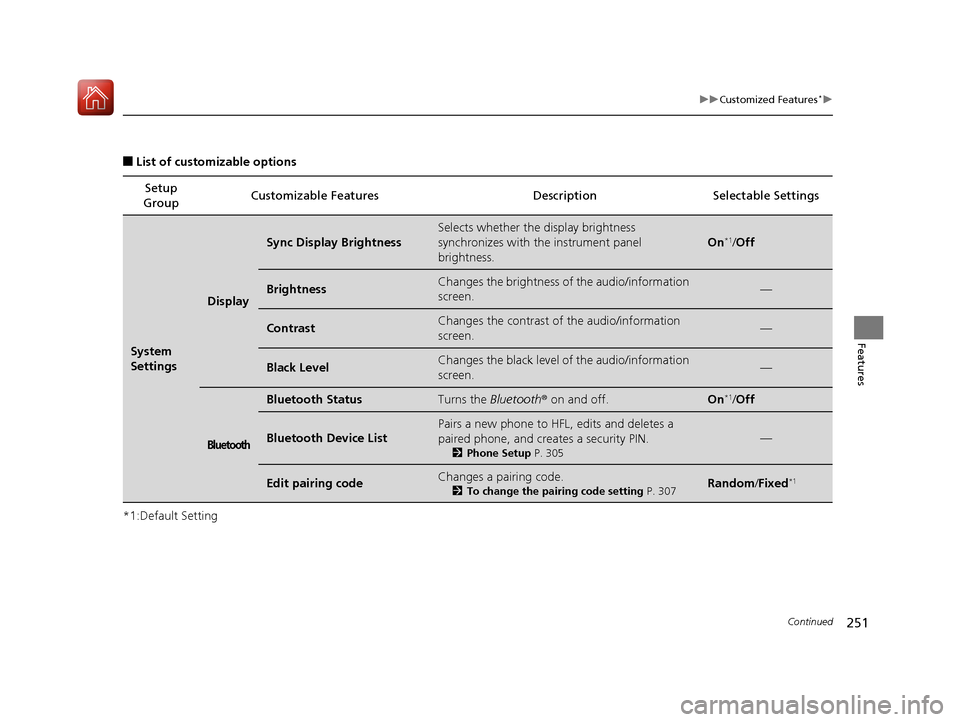
■List of customizable options
*1:Default Setting Setup
Group Customizable Features Description Selectable Settings
System
Settings
Display
Sync Display Brightness
Selects whether the
display brightness
synchronizes with the instrument panel
brightness.
On*1/ Off
BrightnessChanges the brightness of the audio/information
screen.—
ContrastChanges the contrast of the audio/information
screen.—
Black LevelChanges the black level of the audio/information
screen.—
Bluetooth
Bluetooth StatusTurns the Bluetooth® on and off.On*1/Off
Bluetooth Device List
Pairs a new phone to HFL, edits and deletes a
paired phone, and creates a security PIN.
2 Phone Setup P. 305
—
Edit pairing codeChanges a pairing code.
2To change the pairing code setting P. 307Random/Fixed*1
17 ACURA ILX-31TX66400.book 251 ページ 2016年3月15日 火曜日 午後5時0分
Page 254 of 521
253
uuCustomized Features*u
Continued
Features
*1:Default SettingSetup
Group Customizable Features Description Selectable Settings
System
SettingsOthers
LanguageChanges the display language.English*1/
Français /
Español
Display Operation
Restriction Tips*
Alerts you when manual co ntrol of the system is
disabled to prevent distraction while driving. Only
voice commands are available.
On*1/ Off
Background Color
Changes the background color of the audio/
information screen an d the On Demand Multi-
Use Display
TM.
Blue*1/ Amber /Red /
Green
Header Clock DisplaySelects whether the clock display comes on.On*1/ Off
Factory Data ResetResets all the settings to their factory default.
2 Defaulting All the Settings P. 265—
DefaultCancels/Resets all customized items in the
System Settings group as default.Default/OK
* Not available on all models
17 ACURA ILX-31TX66400.book 253 ページ 2016年3月15日 火曜日 午後5時0分
Page 260 of 521
259
uuCustomized Features*u
Continued
Features
*1:Default SettingSetup
Group Customizable Features Description Selectable Settings
Audio
SettingsSXM
SportsFlashTM *
NotificationTurns on and off the sports alert function.
Disable*1/
Enable /
Enable(one time)
Beep Causes the system to beep
when the sports alert
is notified. On
*1/
Off
Favorite
Teams Selects your favorite sport teams.
2
Live Sports Alert P. 216On*1/Off
Play Song from Beginning Turns on and off the Tune Start function.
On
*1/Off
Bluetooth
Bluetooth Device List Edits or deletes a Bluetooth
® Audio device paired
to HFL. —
Connect Bluetooth Audio
Device Connects, disconnects or pairs a
Bluetooth®
Audio device to HFL. —
SiriusXM
® mode
SiriusXM ® mode
Bluetooth ® Audio, Pandora ®* or
AhaTM mode
Bluetooth ® Audio, Pandora ®* or
AhaTM mode
* Not available on all models
17 ACURA ILX-31TX66400.book 259 ページ 2016年3月15日 火曜日 午後5時0分
Page 261 of 521
260
uuCustomized Features*u
Features
*1:Default SettingSetup
Group Customizable Features Descri
ption Selectable Settings
Audio
SettingsOthers
Source Select Popup
Selects whether the list of selectable audio
sources comes on when the
AUDIO button is
pressed. On
/Off*1
HD Radio Mode*
Selects whether the audio system automatically
switches to the digital radio waves or receives the
analogue waves only. Auto*1/
Analog
Cover Art Turns on and off the cover art display.
On
*1/Off
Default Cancels/Resets all cust
omized items in the Audio
Settings group as default. Default
/OK
FM/AM mode
iPod, USB, Pandora ®* or AhaTM
mode
* Not available on all models
17 ACURA ILX-31TX66400.book 260 ページ 2016年3月15日 火曜日 午後5時0分
Page 265 of 521
264
uuCustomized Features*u
Features
*1:Default SettingSetup
Group Customizable Features Descri
ption Selectable Settings
App
SettingsDisplay Adjustment Brightness
Changes the brightness of the audio/information
screen. —
Contrast Changes the contrast of the audio/information
screen.
—
Black Level Changes the black level of the audio/information
screen. —
Color Changes the color of the audio/information
screen. —
Tint Changes the tint of the audio/information screen. —
Guidance Volume Adjusts the guidance volume level with
navigation app.
0
~ 9
*1 ~ 11
Sync Clock w/ Smartphone Selects whether the clock links to the device you
connect. On
/Off
*1
Default Cancels/Resets all cust
omized items in the App
Settings group as default. Default
/OK
17 ACURA ILX-31TX66400.book 264 ページ 2016年3月15日 火曜日 午後5時0分
Page 266 of 521
265
uuCustomized Features*uDefaulting All the Settings
Features
Defaulting All the Settings
You can reset all the menu and customiz ed settings as the factory defaults.
1. Press the SETTINGS button.
2. Rotate to select System Settings, then
press .
3. Move or to select the Others tab.
4. Rotate to select Factory Data Reset ,
then press .
u The pop-up menu appears on the screen.
5. Rotate to select Yes, then press .
u The confirmation message will appear.
6. Rotate to select Yes, then press
again to reset the settings.
u The confirmation message will appear.
Press to select OK.1Defaulting All the Settings
When you transfer the vehicle to a third party, reset
all settings to default a nd delete all personal data.
The following settin gs will be reset:
•Audio preset settings•Phonebook entries
•Other display and each item settings.
17 ACURA ILX-31TX66400.book 265 ページ 2016年3月15日 火曜日 午後5時0分
Page 270 of 521

269Continued
Features
Bluetooth® HandsFreeLink ®
Bluetooth® HandsFreeLink ® (HFL) allows you to place and receive phone calls using
your vehicle's audio system, without handling your cell phone.
Using HFL
(Pick-up) button: Press to go directly to the Phone screen or to answer an
incoming call.
(Hang-up) button: Press to end a call.
(Talk) button: Press to call a number with a stored voice tag.
(Back) button: Press to cancel a command.
PHONE button: Press to go directly to the Phone screen.
Selector knob: Rotate to select an item on the screen, then press .
■HFL Buttons
1Bluetooth ® HandsFreeLink ®
Place your phone where y ou can get good reception.
To use HFL, you need a Bluetooth-compatible cell
phone. For a list of compatible phones, pairing
procedures, and special feature capabilities:
•U.S.: Visit www.acura.com/handsfreelink , or call 1-
888-528-7876.
•Canada: Visit www.handsfreelink.ca , or call 1-888-
528-7876.
Models with one display
1 Using HFL
Voice control tips
•Aim the vents away from the ceiling and close the
windows, as noise coming fr om them may interfere
with the microphone.
•Press the button when you want to call a
number using a stored voic e tag. Speak clearly and
naturally after a beep.
•If the microphone picks up vo ices other than yours,
the command may be misinterpreted.
•To change the volume level, use the audio system's
volume knob or the remote audio controls on the
steering wheel.
State or local laws may pr ohibit the operation of
handheld electronic devi ces while operating a
vehicle.
If you receive a call while using the audio system, the
system resumes its operati on after ending the call.
Microphone
Pick-up
Button
Selector
KnobPHONE
Button
Hang-up ButtonVolume up
Volume
down
Back Button Talk Button
17 ACURA ILX-31TX66400.book 269 ページ 2016年3月15日 火曜日 午後5時0分
Page 271 of 521

uuBluetooth ® HandsFreeLink ®u Using HFL
270
Features
The audio/information screen notifies you
when there is an incoming call.
Certain manual functions are disabled or
inoperable while the vehi cle is in motion. You
cannot select a grayed-out option until the
vehicle is stopped.
Only previously stored speed dial entries with
voice tags can be called using voice
commands while the ve hicle is in motion.
2Speed Dial P. 286
■HFL Status Display1Using HFL
Bluetooth ® Wireless Technology
The Bluetooth ® word mark and logos are registered
trademarks owned by Blue tooth SIG, Inc., and any
use of such marks by Honda Motor Co., Ltd., is under
license. Other trademarks and trade names are those
of their respective owners.
HFL Limitations
An incoming call on HFL will interrupt the audio
s y s te m wh e n it is p la y i n g . It wi ll re s u m e w h en t h e c a l l
is ended.
Signal Strength
HFL Mode Battery Level Status Roam Status
Caller Name
Bluetooth IndicatorComes on when your
phone is connected to HFL.
■Limitations for Manual Operation
1 HFL Status Display
The information that appears on the audio/
information screen vari es between phone models.
You can change the system language. 2 Language Selection P. 174
Disabled option
17 ACURA ILX-31TX66400.book 270 ページ 2016年3月15日 火曜日 午後5時0分