2017.75 VAUXHALL CROSSLAND X ignition
[x] Cancel search: ignitionPage 92 of 245

90Instruments and controlsFlashes yellowThe remaining driving range is
between 0 and 600 km.
Top-up the AdBlue® as soon as
possible to avoid a breakdown by a
qualified workshop. You can add up
to 10 litres of AdBlue® to its tank.
Deflation detection system
w illuminates or flashes yellow.
Illuminates
Tyre pressure loss in one or more wheels. Stop immediately and check
tyre pressure.
Flashes
Fault in system. Consult a workshop.
Engine oil pressure I illuminates red.
Illuminates when the ignition is
switched on and extinguishes shortly
after the engine starts.Illuminates when the engine is
runningCaution
Engine lubrication may be
interrupted. This may result in
damage to the engine and/or
locking of the drive wheels.
1. Depress clutch.
2. Select neutral gear.
3. Move out of the flow of traffic as quickly as possible without
impeding other vehicles.
4. Switch off ignition.
9 Warning
When the engine is off,
considerably more force is needed
to brake and steer.
During an Autostop, the brake
servo unit will still be operational.
Do not remove key until vehicle is stationary, otherwise the steeringwheel lock could engage
unexpectedly.
Check oil level before seeking
assistance of a workshop 3 177.
Low fuel
o illuminates yellow.
Level in fuel tank is too low.
Refuelling 3 167.
Bleeding the diesel fuel system
3 181.
Autostop
D illuminates or flashes green.
Illuminates green
Engine is in an Autostop.
Flashes green
Autostop is temporarily unavailable,
or Autostop mode is invoked
automatically.
Stop-start system 3 131.
Exterior light
8 illuminates green.
The exterior lights are on 3 106.
Page 96 of 245

94Instruments and controlsDisplay of average speed. The
measurement can be reset at any
time.
Average fuel consumption
Display of average consumption. The measurement can be reset at any
time and starts with a default value.
Distance travelled
Displays the current distance for trip
2 since a certain reset.
The values of trip 2 page can be reset
by pressing SET/CLR for a few
seconds.
Digital speed page
Digital display of the instantaneous
speed.
Stop and Start time counter
A time counter calculates the time
spent in STOP mode during a
journey. It resets to zero every time
the ignition is switched on.
Compass page
Displays the geographic direction of
driving.Blank page
No trip/fuel information is displayed.
Info display
The Info-Display is located in the
instrument panel near the instrument
cluster.
Depending on the vehicle
configuration the vehicle has a
● Graphic-Info-Display
or
● 7'' Colour-Info-Display with
touchscreen functionality
or
● 8'' Colour-Info-Display with
touchscreen functionality
The Info displays can indicate: ● time 3 77
● outside temperature 3 76
● date 3 77
● Infotainment system, see description in the Infotainment
manual
● indication of rear view camera 3 162● indication of panoramic view
system 3 160
● indication of parking assist instructions 3 150
● navigation, see description in the
Infotainment manual
● vehicle and system messages 3 97
● settings for vehicle personalisation 3 99
Graphic-Info-Display
Press X to switch on the display.
Press MENU to select main menu
page.
Page 104 of 245
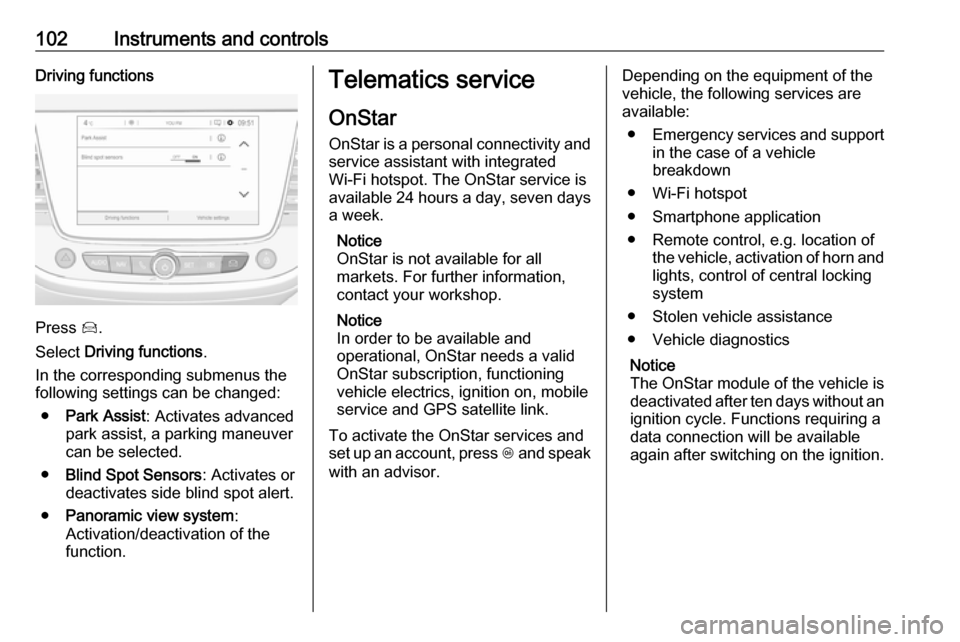
102Instruments and controlsDriving functions
Press Í.
Select Driving functions .
In the corresponding submenus the
following settings can be changed:
● Park Assist : Activates advanced
park assist, a parking maneuver can be selected.
● Blind Spot Sensors : Activates or
deactivates side blind spot alert.
● Panoramic view system :
Activation/deactivation of the
function.
Telematics service
OnStar
OnStar is a personal connectivity and service assistant with integrated
Wi-Fi hotspot. The OnStar service is
available 24 hours a day, seven days
a week.
Notice
OnStar is not available for all
markets. For further information,
contact your workshop.
Notice
In order to be available and
operational, OnStar needs a valid
OnStar subscription, functioning
vehicle electrics, ignition on, mobile
service and GPS satellite link.
To activate the OnStar services and
set up an account, press Z and speak
with an advisor.Depending on the equipment of the
vehicle, the following services are
available:
● Emergency services and support
in the case of a vehicle
breakdown
● Wi-Fi hotspot
● Smartphone application
● Remote control, e.g. location of the vehicle, activation of horn and
lights, control of central locking
system
● Stolen vehicle assistance
● Vehicle diagnostics
Notice
The OnStar module of the vehicle is
deactivated after ten days without an ignition cycle. Functions requiring a
data connection will be available
again after switching on the ignition.
Page 113 of 245

Lighting111The vehicle rear fog light is
deactivated when towing a trailer or a
plug is connected with the socket, e. g. when a bicycle carrier is used.
Parking lights
When the vehicle is parked, the
parking lights on one side can be
activated:
1. Switch off ignition.
2. Move turn signal lever all the way up (right parking lights) or down
(left parking lights).
Confirmed by a signal and the
corresponding turn signal control
indicator.
Reversing lights
The reversing light comes on when
the ignition is on and reverse gear is
selected.
Misted light covers
The inside of the light housing may
mist up briefly in poor, wet and cold weather conditions, in heavy rain or
after washing. The mist disappears
quickly by itself; to help switch on the
headlights.Interior lighting
Instrument panel illumination control
Brightness of the following lights can
be adjusted in position AUTO when
the light sensor detects night
conditions, or in position 8 or 9:
● instrument panel illumination
● Info-Display
● illuminated switches and operation elements
Turn thumb wheel A and hold until
the desired brightness is obtained.
Page 115 of 245

Lighting113Lighting features
Centre console lighting A spotlight integrated in the overheadconsole illuminates the centre
console when headlights are
switched off.
Entry lighting
Welcome lighting
Some or all of the following lights are
switched on for a short time by
unlocking the vehicle with the radio
remote control:
● headlights
● tail lights
● number plate lights
● instrument panel light
● interior lights
The number of activated lights
depends on the surrounding light
conditions.
The lighting switches off immediately
when the ignition is switched on.
Starting off 3 17.This function can be activated or
deactivated in the vehicle
personalisation.
Vehicle personalisation 3 99.
The following lights will additionally
switch on when the driver's door is
opened:
● illumination of some switches
● Driver Information Centre
● door pocket lights
Exit lighting The following lights are switched on if
the key is removed from the ignition
switch:
● interior lights
● instrument panel light
They will switch off automatically after
a delay. This function works only in
the dark. Theatre lighting is activated
if the driver's door is opened during
this time.Battery discharge protection
Vehicle battery state of charge
function
The function guarantees longest
vehicle battery life via a generator with controllable power output and
optimised power distribution.
To prevent discharge of the vehicle
battery when driving, the following
systems are reduced automatically in two stages and finally switched off:
● auxiliary heater
● heated rear window and mirrors ● heated seats
● fan
In the second stage, a message
which confirms the activation of the
vehicle battery discharge protection
will be displayed in the Driver
Information Centre.
Switching off electric lights
To prevent discharge of the vehicle
battery when the ignition is switched
off, some interior lights are switched
off automatically after some time.
Page 128 of 245

126Driving and operatingDriving and
operatingDriving hints ............................... 127
Control of the vehicle ...............127
Steering ................................... 127
Starting and operating ...............127
New vehicle running-in ............127
Ignition switch positions ...........127
Power button ........................... 128
Power saving mode .................129
Starting the engine ..................130
Overrun cut-off ........................ 131
Stop-start system ....................131
Parking .................................... 134
Engine exhaust .......................... 135
Diesel particle filter ..................135
Catalytic converter ...................136
AdBlue ..................................... 136
Automatic transmission ..............139
Transmission display ...............139
Selector lever .......................... 139
Manual mode ........................... 140
Electronic driving programmes 141
Fault ........................................ 141
Interruption of power supply ....141Manual transmission ..................142
Brakes ........................................ 143
Antilock brake system .............143
Parking brake .......................... 144
Brake assist ............................. 144
Hill start assist ......................... 144
Ride control systems .................145
Electronic Stability Control and Traction Control system .........145
Driver assistance systems .........146
Cruise control .......................... 146
Speed limiter ........................... 148
Parking assist .......................... 150
Advanced parking assist .........153
Side blind spot alert .................158
Panoramic view system ...........160
Rear view camera ...................162
Lane departure warning ..........164
Driver alert ............................... 165
Fuel ............................................ 166
Fuel for petrol engines .............166
Fuel for diesel engines ............167
Refuelling ................................ 167
Fuel consumption - CO 2-
Emissions .............................. 168
Trailer hitch ................................ 169
General information .................169Driving characteristics and
towing tips .............................. 169
Trailer towing ........................... 170
Towing equipment ...................170
Page 129 of 245

Driving and operating127Driving hints
Control of the vehicle
Never coast with engine not
running
Many systems will not function in this
situation ( e.g. brake servo unit, power
steering). Driving in this manner is a danger to yourself and others.
All systems function during an
Autostop.
Stop-start system 3 131.
Idle boost
If charging of the vehicle battery is
required due to battery condition, the
power output of the generator must be increased. This will be achieved by an idle boost which may be audible.
A message appears in the Driver
Information Centre.
Pedals
To ensure the pedal travel is
uninhibited, there must be no mats in
the area of the pedals.Use only floor mats, which fit properly and are fixed by the retainers on the
driver side.
Steering If power steering assist is lost
because the engine stops or due to a system malfunction, the vehicle can
be steered but may require increased
effort.Starting and operating
New vehicle running-in Do not brake unnecessarily hard for
the first few journeys.
During the first drive, smoke may
occur because of wax and oil
evaporating off the exhaust system. Park the vehicle in the open for a
while after the first drive and avoid
inhaling the fumes.
During the running-in period, fuel and engine oil consumption may be
higher.
Additionally, the cleaning process of
the diesel particle filter may take
place more often.
Diesel particle filter 3 135.
Autostop may be inhibited to allow
charging of the vehicle battery.
Ignition switch positions Turn key:
Page 130 of 245

128Driving and operating0:ignition off: Some functions
remain active until key is
removed or driver's door is
opened, provided the ignition was
on previously1:ignition on power mode: Ignition
is on, diesel engine is preheating. Control indicators illuminate and
most electrical functions are
operable2:engine start: Release key after
after engine has been started
Steering wheel lock
Remove key from ignition switch and
turn steering wheel until it engages.
9 Danger
Never remove the key from
ignition switch during driving as
this will cause steering wheel lock.
Power button
Electronic key must be inside the
vehicle.
Engine start
Operate clutch pedal (manual
transmission) or brake pedal
(automatic transmission) and press
Start/Stop . Release button after
starting procedure begins. Diesel
engine starts after preheating.Ignition on power mode without
starting the engine
Press Start/Stop without operating
clutch or brake pedal. Control
indicators illuminate and most
electrical functions are operable.Engine and ignition off
Press Start/Stop briefly in each mode
or when engine is running and vehicle
is stationary. Some functions remain
active until driver's door is opened,
provided the ignition was on
previously.Emergency shut off during driving
Press Start/Stop for five seconds
3 130. Steering wheel locks as soon
as vehicle is stationary.
Steering wheel lock
The steering wheel lock activates
automatically when:
● The vehicle is stationary.
● The ignition has been switched off.
To release steering wheel lock, open
and close driver's door and switch on accessory mode or start the engine
directly.