2017.5 OPEL AMPERA E 117
[x] Cancel search: 117Page 88 of 265
86Instruments and controlsOpen source software
System settings 3 117.
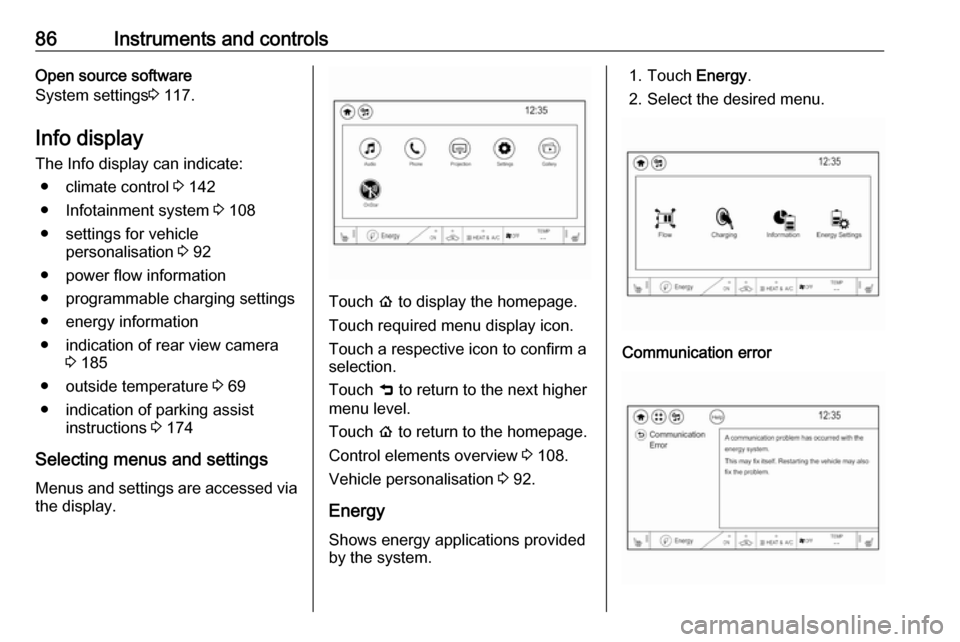
Info display
The Info display can indicate: ● climate control 3 142
● Infotainment system 3 108
● settings for vehicle personalisation 3 92
● power flow information
● programmable charging settings
● energy information
● indication of rear view camera 3 185
● outside temperature 3 69
● indication of parking assist instructions 3 174
Selecting menus and settings
Menus and settings are accessed via the display.
Touch p to display the homepage.
Touch required menu display icon.
Touch a respective icon to confirm a
selection.
Touch 9 to return to the next higher
menu level.
Touch p to return to the homepage.
Control elements overview 3 108.
Vehicle personalisation 3 92.
Energy
Shows energy applications provided by the system.
1. Touch Energy.
2. Select the desired menu.Communication error
Page 94 of 265

92Instruments and controlsVehicle personalisationThe vehicle's behaviour can be
personalised by changing the settings in the Info display.
Depending on vehicle equipment and
country-specific regulations some of
the functions described below may
not be available.
Some functions are only displayed or
active when the vehicle is on.
Personal settings
Touch p and then touch 1.
The following settings can be
selected by touching the icon or the
button on the touch screen:
● Time and date
● Language
● Radio settings
● Vehicle settings
● Devices
● Device Remote Access
● Apple CarPlay
● Android Auto
● KeyPass
● USB Auto Launch
● Wi-Fi
● Display Settings
● Rear camera
● Return to factory settings
● Audible touch feedback
● Text scroll
● Software information
In the corresponding submenus, the
following settings can be changed:
Time and date
Clock 3 69.Language
Selection of the desired language.
System settings 3 117.
Radio settings
Volume settings 3 116.
Vehicle settings ● Climate and air quality
Auto fan speed : Modifies the
level of the cabin airflow of the
climate control in automatic
mode.
Auto heated seats : Automatically
activates the seat heating.
Auto demist : Supports
windscreen dehumidification by
automatically selecting the
necessary settings and
automatic air conditioning mode.
● Comfort and convenience
Chime volume : Changes the
volume of warning chimes.
Personalisation by driver :
Activates or deactivates the
personalisation function.
Auto wipe in reverse gear :
Activates or deactivates
Page 96 of 265

94Instruments and controlsPassive door unlock: Changes
the configuration to unlock only the driver's door or the whole
vehicle whilst unlocking.
Relock remotely unlocked doors :
Activates or deactivates the
passive locking function. This
feature locks the vehicle
automatically after several
seconds if all doors have been
closed and an electronic key has been removed from the vehicle.
Remote start auto heat seats :
Activates or deactivates
automatically the heated seats
when using remote start.
Passive door unlock : Changes
the configuration to unlock only
the driver's door or the whole
vehicle whilst unlocking.
Passive door lock : Activates or
deactivates the passive locking
function. This feature locks the
vehicle automatically after
several seconds if all doors have been closed and an electronic
key has been removed from the
vehicle.Remote left in vehicle alert :
Activates or deactivates the
warning chime when the
electronic key remains in the
vehicle.
Devices
External devices 3 126.
Device remote access
Smartphone remote function 3 26
Apple CarPlay
Using smartphone applications
3 132.
Android Auto
Using smartphone applications
3 132.
KeyPass
Smartphone remote function 3 26
USB Auto Launch
External devices 3 126.
Wi-Fi
System settings 3 117.
Display Settings
System settings 3 117.Rear camera
Symbols : Activates or deactivates the
symbols.
Guidelines : Activates or deactivates
the guiding lines.
Return to factory settings
Reset vehicle settings : Resets all
settings to the default settings.
Clear all private data : Deletes all
private information from the vehicle.
Restore radio settings : Resets all
radio settings to the default settings.
System settings 3 117.
Audible touch feedback
Usage 3 110.
Text scroll
System settings 3 117.
Software information
System settings 3 117.
Page 108 of 265

106Infotainment systemInfotainment systemIntroduction................................ 106
General information .................106
Theft-deterrent feature ............107
Control elements overview ......108
Usage ...................................... 110
Basic operation .......................... 113
Tone settings ........................... 115
Volume settings .......................116
System settings .......................117
Radio ......................................... 120
Usage ...................................... 120
Station search ......................... 121
Radio data system (RDS) ........123
Digital audio broadcasting .......124
External devices ........................126
General information .................126
Playing audio ........................... 128
Displaying pictures ..................130
Playing movies ........................ 131
Using smartphone applications ............................ 132
Speech recognition ....................133
General information .................133
Usage ...................................... 133Phone........................................ 134
General information .................134
Bluetooth connection ...............134
Emergency call ........................136
Operation ................................. 137
Mobile phones and CB radio equipment ............................... 140Introduction
General information
The Infotainment system provides
you with state-of-the-art in-car
infotainment.
Using radio tuner functions, you can
listen to a great number of different
radio stations.
You can connect external data
storage devices to the Infotainment
system as further audio sources;
either via cable or via Bluetooth.
The Infotainment system is equipped
with a phone portal that allows for
comfortable and safe use of your
mobile phone in the vehicle.
You can also operate specific
smartphone applications via the
Infotainment system.
Optionally, the Infotainment system
can be operated using the touch
screen and buttons on the control
panel, the controls on the steering wheel, or - if provided by your mobile
phone - via speech recognition.
Page 119 of 265

Infotainment system117To adjust the degree of volume
adaptation, select one of the options
in the list.
Off : no enhancement of volume with
increasing vehicle speed.
High : maximum enhancement of
volume with increasing vehicle
speed.
Audible touch feedback function
If the audible touch feedback function
is activated, each touch of a screen
button or menu item is indicated by a
beeping sound.
Press p and then select 1 in the top
left corner of the screen to display the application overview screen.
Select Settings and then scroll
through the list to Audible touch
feedback .
Touch the screen button next to
Audible touch feedback to activate or
deactivate the function.
Audio Cues Audio cues are short sound effects
indicating certain system actions.
Configuration
Press p and then select 1 in the top
left corner of the screen to display the
application overview screen.
Select Settings and then Radio
settings . Activate or deactivate Audio
Cues .
Audio Cues Volume
Press p and then select 1 in the top
left corner of the screen to display the application overview screen.
Select Settings and then Radio
settings . Select Audio Cues Volume
to display the respective submenu.
Adjust the volume as desired.
Note
The Audio Cues Volume setting is
only available if Audio Cues is
activated.
Volume of traffic announcements
To adjust the volume of traffic
announcements, set the desired
volume while a traffic announcement
is given out by the system. The
respective setting is then stored by
the system.
System settings
The following settings concern the
whole system. All other settings are
described by theme in the respective
chapters of this manual.
Page 231 of 265

Vehicle care229The instrument panel fuse block is on
the left side of the instrument panel.
To access the fuses, open the fuse
panel door by pulling out.NumberUsage1Video processing module2Indicator light solar sensor3Side blind zone alert4Passive entry, passive start5Central gateway module6Body control module 47Body control module 38Body control module 29Body control module 110Trailer interface module 111Amplifier12Body control module 813Data link connector 114Automatic parking assist15Data link connector 2NumberUsage16Single power inverter
module 117Body control module 618Body control module 519–20–21–22–23USB24Wireless charging module25Reflected LED alert display26Heated steering wheel27–28Instrument cluster 229Trailer interface module 230Headlight levelling device31OnStar32–NumberUsage33Heating, ventilation, and air
conditioning module34–35Instrument panel cluster 136Regen on demand37–38–39–40–41–42–43Body control module 744Sensing and diagnostic
module45Front camera module46Vehicle integration control
module47Single power inverter
module 2
Page 262 of 265

260Recommended fluids andlubricants ................................ 244
Regenerative braking ...........77, 160
Regional ..................................... 123
Regionalisation ........................... 123
Registered trademarks ...............253
Retained power off .....................151
Reversing lights .........................103
Ride control systems ..................162
Ring tone Changing the ring tone ............137
Ring tone volume ....................116
Roof load ...................................... 63
Roof rack ..................................... 63
S Safety belts ................................... 43
Seat adjustment ............................. 5 Seat belt ........................................ 6
Seat belt reminder .......................78
Seat belts ..................................... 43 Seat heating Seat heating, front .....................42
Seat heating, rear .....................43
Seat position ................................ 39
Self-sealing tyres ........................230
Service ............................... 147, 243
Service display ............................ 78
Service information ....................243
Service vehicle soon .................... 80Side airbag system ......................49
Side blind spot alert ....................181
Sidelights ...................................... 99
Side turn signal lights ................221
Smartphone ................................ 126
Phone projection .....................132
Smartphone remote function ........26
Software acknowledgement .......251
Software update ......................... 253
Speech recognition .....................133
Speed dial numbers ...................137
Speed limiter......................... 82, 165
Speedometer ............................... 75
Sport mode .................................. 81
Starting and operating ................149
Starting and stopping the vehicle 151
Starting off ................................... 14
Station search............................. 121
Steering wheel adjustment ......7, 66
Steering wheel audio controls ....108
Steering wheel controls ...............66
Storage ......................................... 58
Storage compartments .................58
Sunvisor lights ........................... 104
Sun visors .................................... 36
Switching the Infotainment system on ................................ 110
Symbols ......................................... 3
System settings .......................... 117T
Tail lights ................................... 221
Temporary charge mode cancel. 197
Temporary charge mode override ................................... 197
Theft-deterrent feature ..............107
Three-point seat belt .................... 44
Tone settings .............................. 115
Tools .......................................... 230
Total vehicle range .......................78
Touch beep volume ....................116
Towing ................................ 209, 239
Towing another vehicle .............240
Towing the vehicle .....................239
TP volume .................................. 116
Traction Control system ............. 162
Traction Control system off........... 81
Traffic sign assistant .............82, 188
Tread depth ............................... 235
Turn and lane-change signals ...102
Turn signal ................................... 78
Tyre chains ................................ 236
Tyre designations ......................231
Tyre pressure ............................ 231
Tyre pressure monitoring system ............................... 81, 233
Tyre pressures ........................... 250
Tyres .......................................... 230