Page 65 of 192

4-26
4
Rebound damping force
Turn the rebound damping force adjusting
screw in direction (a) to increase the rebound
damping force and thereby harden the damp-
ing, and in direction (b) to decrease the re-
bound damping force and thereby soften the
damping.Compression damping force
Compression damping force (for fast com-
pression damping)To increase the compression damping force
and thereby harden the compression damp-
ing, turn the compression damping force ad-
justing bolt in direction (a). To decrease the
compression damping force and thereby
soften the compression damping, turn the
adjusting bolt in direction (b).
Tightening torque:
Locknut:30 Nm (3.0 m·kgf, 22 ft·lbf)1. Rebound damping force adjusting screw
1
(a)
(b)
Rebound damping setting: Minimum (soft):30 click(s) in direction (b)*
Standard: 13 click(s) in direction (b)*
Maximum (hard): 1 click(s) in direction (b)*
* With the adjusting screw fully turned in di- rection (a)
UBN57AE0.book Page 26 Tuesday, November 24, 2015 1:42 PM
Page 68 of 192

4-29
4
and screw, the rebound damping force
adjusting screw or the oil reservoir with
your bare hand or skin until suspension
components have cooled.
Always adjust the shock absorber as-
semblies on the left and right side to the
same setting. Uneven adjustment can
cause poor handling and loss of stability,
which could lead to an accident. NOTICEECB00091Never turn an adjusting mechanism be-
yond the minimum and maximum settings. TIPAlthough the total number of clicks or turns of
a damping force adjusting mechanism may
not exactly match the following specifications
due to small differences in production, the ac-
tual number of clicks or turns always repre-
sents the entire adjusting range. To obtain a
precise adjustment, it would be advisable to check the number of clicks or turns of each
damping force adjusting mechanism and to
modify the specifications as necessary.
Spring preload
1. Loosen the locknut.
2. Turn the spring preload adjusting nut in direction (a) to increase the spring pre-
load and thereby harden the suspension,
and in direction (b) to decrease the spring
preload and thereby soften the suspen-
sion.
UBN57AE0.book Page 29 Tuesday, November 24, 2015 1:42 PM
Page 69 of 192
4-30
4
TIPA special wrench can be obtained at a
Yamaha dealer to make this adjustment.
The spring preload setting is determined by
measuring distance A, shown in the illustra-
tion. The shorter distance A is, the higher
the spring preload; the longer distance A is,
the lower the spring preload. With each
complete turn of the adjusting nut, distance
A is changed by 1.5 mm (0.06 in).
3. Tighten the locknut to the specified
torque. NOTICE: Always tighten the
locknut against the adjusting nut, and
then tighten it to the specified torque.
[ECB00082]
1. Locknut
2. Spring preload adjusting nut
3. Special wrench
1
3
2
(a)
(b)
Spring preload setting: Minimum (soft):Distance A = 386.0 mm (15.20 in)
Standard: Distance A = 378.0 mm (14.88 in)
Maximum (hard): Distance A = 372.0 mm (14.65 in)1. Distance A
1
UBN57AE0.book Page 30 Tuesday, November 24, 2015 1:42 PM
Page 70 of 192

4-31
4
Rebound damping force
Turn the rebound damping force adjusting
screw in direction (a) to increase the rebound
damping force and thereby harden the damp-
ing, and in direction (b) to decrease the re-
bound damping force and thereby soften the
damping.Compression damping force
Compression damping force (for fast com-
pression damping)To increase the compression damping force
and thereby harden the compression damp-
ing, turn the compression damping force ad-
justing bolt in direction (a). To decrease the
compression damping force and thereby
soften the compression damping, turn the
adjusting bolt in direction (b).
Tightening torque:
Locknut:30 Nm (3.0 m·kgf, 22 ft·lbf)1. Rebound damping force adjusting screw
1
(a)
(b)
Rebound damping setting:Minimum (soft):30 click(s) in direction (b)*
Standard: 14 click(s) in direction (b)*
Maximum (hard): 1 click(s) in direction (b)*
* With the adjusting screw fully turned in di- rection (a)
UBN57AE0.book Page 31 Tuesday, November 24, 2015 1:42 PM
Page 81 of 192

5-7
5
EBU31790Accelerator pedalCheck to see that the accelerator pedal oper-
ates correctly. It must operate smoothly and
spring back to the idle position fully when re-
leased. Have a Yamaha dealer repair as nec-
essary for proper operation.EBU31800Seat beltsMake sure that the seat belts are not frayed,
torn, stretched, or damaged. The seat belts
must move smoothly when pulled out and re-
tract on its own when released. The seat belts
must also lock up when quickly pulled out.
The latch plate should click securely into the
buckle and release when the release button is
pushed firmly. Wash off any dirt or mud that
could affect operation. Have a Yamaha dealer
repair as necessary for proper operation.
A crash can damage the restraint systems in
your vehicle. A damaged restraint system
may not properly protect the person using it,
resulting in serious injury or death in a crash.To help make sure your restraint systems are
working properly after a crash, have them in-
spected and any necessary replacements
made as soon as possible.
EBU31810Passenger handholdCheck that the handhold bar and its supports
are in good condition. Confirm that the lock-
ing pins are securely fastened, and then push
and pull on the handhold to make sure that it
is not loose.EBU31820SteeringPark on level ground. Turn the steering wheel
right and left. Check for excessive free play,
abnormal noises, or a rough feeling. Have a
Yamaha dealer repair as necessary for proper operation.
UBN57AE0.book Page 7 Tuesday, November 24, 2015 1:42 PM
Page 89 of 192
6-5
6
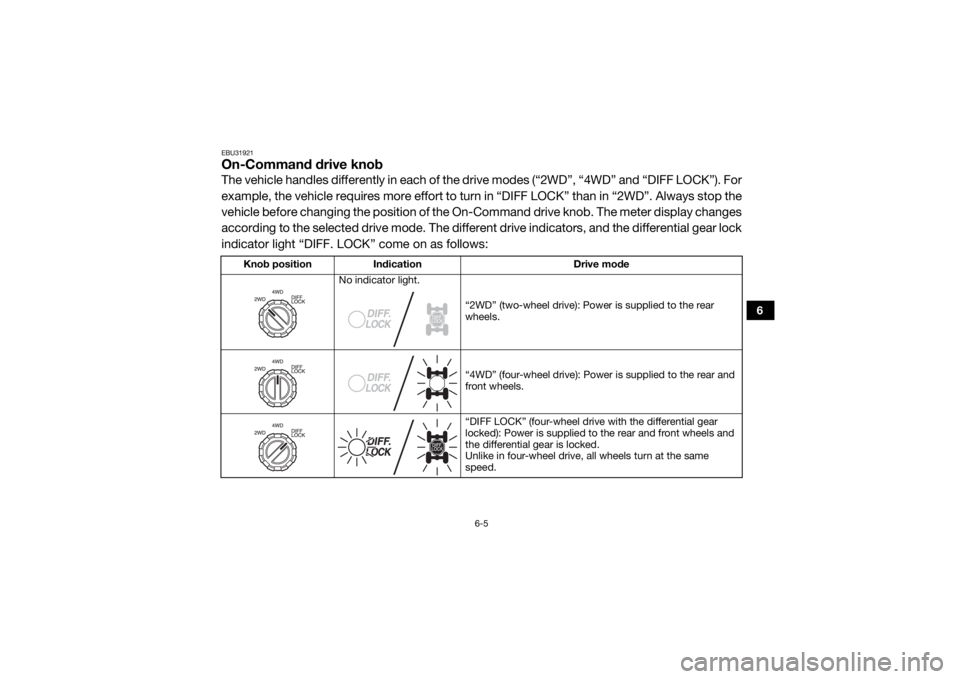
EBU31921On-Command drive knobThe vehicle handles differently in each of the drive modes (“2WD”, “4WD” and “DIFF LOCK”). For
example, the vehicle requires more effort to turn in “DIFF LOCK” than in “2WD”. Always stop the
vehicle before changing the position of the On -Command drive knob. The meter display changes
according to the selected drive mode. The different drive indicators, and the differential gear lock
indicator light “DIFF. LOCK” come on as follows:
Knob position Indication Drive mode
No indicator light.
“2WD” (two-wheel drive): Power is supplied to the rear
wheels.
“4WD” (four-wheel drive): Power is supplied to the rear and
front wheels.
“DIFF LOCK” (four-wheel drive with the differential gear
locked): Power is supplied to the rear and front wheels and
the differential gear is locked.
Unlike in four-wheel drive, all wheels turn at the same
speed.
UBN57AE0.book Page 5 Tuesday, November 24, 2015 1:42 PM
Page 90 of 192
6-6
6
TIPWhen the knob is set to “DIFF LOCK” or “4WD”, the differential gear lock indicator and indica-
tor light will flash until the differential gear is completely locked or unlocked.
When the indicator and indicator light are flas hing, turning the steering wheel back and forth
will help the differential gear lock to engage or disengage.
Riding before the differential gear is properly engaged or disengaged (e.g., when the indicator
and indicator light are flashing) will cause the vehicle speed to be limited until the differential
gear is completely engaged or disengaged. UBN57AE0.book Page 6 Tuesday, November 24, 2015 1:42 PM
Page 102 of 192
7-9
7
Adjusting the handhold positionThe handhold can be adjusted to one of three
positions to suit the passenger’s preference.Adjust the handhold position as follows.
1. Remove the locking pins.
2. Slide the handhold to the desired position
and align the holes in the handhold bar
with the holes in the handhold supports.
1. Passenger handhold
2. Locking pin2
1
UBN57AE0.book Page 9 Tuesday, November 24, 2015 1:42 PM