2016 YAMAHA FJR1300A fuel
[x] Cancel search: fuelPage 30 of 120

Instrument and control functions
3-16
3
NOTICE
ECA15474
If there is a malfunction, “– –.–” will
b e continuously displaye d. Have a
Yamaha dealer check the vehicle.
Instantaneous fuel consumption dis-
play:
The instantaneous fuel consumption
display modes “km/L”, “L/100km” or
“MPG” show the fuel consumption un-
der the current riding conditions.
The “km/L” display shows the dis-
tance that can be traveled on 1.0 L
of fuel.
The “L/100km” display shows the
amount of fuel necessary to travel
100 km.
The “MPG” display shows the dis-
tance that can be traveled on
1.0 Imp.gal of fuel.
TIP
If traveling at speeds under 10 km/h (6
mi/h), “_ _._” will be displayed.
NOTICE
ECA15474
If there is a malfunction, “– –.–” will
be continuously displaye d. Have a
Yamaha dealer check the vehicle.
Settin g mo de
TIP
The transmission must be in neu-
tral and the vehicle must be
stopped to change settings in this
mode.
Shifting the transmission into gear
and starting off, or turning the key
to “OFF”, saves all settings made,
then exits the setting mode.
Push the “MENU” switch for 2 seconds
to enter the setting mode. To exit the
setting mode and return to the normal
display, push the “MENU” switch
again for at least 2 seconds.
12.3
CRNT FUEL km/L
1. Setting mode display
Display Description This function allows you to
set the low, middle, and
high settings to 10 tem-
perature levels.
This function allows you to
check and reset the “OIL”
oil change interval (dis-
tance traveled), and the
“FREE-1” and “FREE-2”
maintenance intervals.
MENUGrip WarmerMaintenanceTime TripUnitDisplayBrightnessClock
1
Grip Warmer
Maintenance
UB88E0E0.book Page 16 Friday, October 16, 2015 11:59 AM
Page 31 of 120

Instrument and control functions
3-17
3
Adjusting the temperature levels of the
grip warmer settings
1. Use the select switch to highlight “Grip Warmer”. 2. Push the “MENU” switch. The grip
warmer setting display will be
shown and “High” will flash in the
display.
3. Push the “MENU” switch. The temperature level for the high set-
ting will start flashing.
Use the select switch to set the
temperature level, and then push
the “MENU” switch. “High” will
start flashing.
This function allows you to
check and reset the
“TIME–2” and “TIME–3”
functions. These time trips
show the total elapsed
time that the key has been
in the “ON” position. When
the key is turned to “OFF”,
the trip times stop count-
ing but are not reset. The
maximum time that can be
shown is 99:59.
When the time trips reach
99:59, they automatically
reset to 0:00 and continue
counting.
This function allows you to
switch the display units
between kilometers and
miles. When kilometers are
selected, the fuel con-
sumption units can be
switched between
“L/100km” and “km/L”.
This function allows you to
change the items shown in
3 information displays.
This function allows you to
adjust the brightness of
the multi-function meter
unit panel to suit the out-
side lighting conditions.
This function allows you to
set the clock.
This function allows you to
reset all items, except the
odometer and the clock.
Time Trip
Unit
Display
Brightness
Clock
All Reset
MENU
Grip Warmer
Maintenance
Time Trip
Unit
Display
Brightness
Clock
Grip Warmer
Hig
h
10
Middle
5
Low
1
Grip Warmer
Hi g
h
10
Middle
5
Low
1
UB88E0E0.book Page 17 Friday, October 16, 2015 11:59 AM
Page 33 of 120

Instrument and control functions
3-19
3
3. While the selected item is flashing,
push the “RESET” button for 2
seconds.
4. Push the “MENU” switch to return to the setting mode menu.
Selecting the units
1. Use the select switch to highlight “Unit”.
2. Push the “MENU” switch. The unit setting display will be shown and
“km or mile” will flash in the dis-
play. 3. Push the “MENU” switch. “km” or
“mile” will flash in the display.
4. Use the select switch to select “km” or “mile”, and then push the
“MENU” switch.
TIP
When “km” is selected, “L/100km” or
“km/L” can be set as the fuel con-
sumption units. To set the fuel con-
sumption units, proceed as follows. If
“mile” was selected, skip steps 5 and
6.
5. Use the select switch to select“km/L or L/100km”.
6. Push the “MENU” switch, use the select switch to select “L/100km”
or “km/L”, and then push the
“MENU” switch again.
7. Use the select switch to highlight “ ”, and then push the
“MENU” switch to return to the
setting mode menu.
TIME-20:07
TIME-30:07
Time Trip
MENU
Grip Warmer
Maintenance
Time Trip
Unit
Display
Brightness
Clock
Unit
km or mile
km
km/L or L/100km
km/L
Unit
km or mile
km
km/L or L/100km
km/L
Unit
km or mile
km
km/L or L/100km
km/L
UB88E0E0.book Page 19 Friday, October 16, 2015 11:59 AM
Page 42 of 120

Instrument and control functions
3-28
3
Resettin g
The traction control system will be dis-
abled in the following conditions: The rear wheel is rotated with the
centerstand down and the key in
the “ON” position.
Either the front wheel or rear wheel
comes off the ground while riding.
Excessive rear wheel spinning.
If the traction control system has been
disabled, both the “TCS” indica-
tor/warning light and the engine trou-
ble warning light come on.
To reset the traction control system
Turn the key to “OFF”. Wait at least 1
second, then turn the key back to
“ON”. The “TCS” indicator/warning
light should go off and the system will
be enabled. The engine trouble warn-
ing light should go off after the motor-
cycle reaches at least 20 km/h (12
mi/h). If the “TCS” indicator/warning
light and/or engine trouble warning
light still remain on after resetting, the
motorcycle may still be ridden; howev-
er, have a Yamaha dealer check the
motorcycle as soon as possible.
EAU13075
Fuel tank cap
To open the fuel tank cap
Open the fuel tank cap lock cover, in-
sert the key into the lock, and then turn
it 1/4 turn clockwise. The lock will be
released and the fuel tank cap can be
opened.
To close the fuel tank cap 1. Push the fuel tank cap into posi- tion with the key inserted in the
lock.
2. Turn the key counterclockwise to the original position, remove it,
and then close the lock cover.
TIP
The fuel tank cap cannot be closed un-
less the key is in the lock. In addition,
the key cannot be removed if the cap is
not properly closed and locked.
WARNING
EWA11092
Make sure that the fuel tank cap is
properly closed after filling fuel.
Leakin g fuel is a fire hazar d.
1. “TCS” button
2. Traction control system indicator/warning
light “TCS”
12
1. Unlock.
2. Fuel tank cap lock cover
2
1
UB88E0E0.book Page 28 Friday, October 16, 2015 11:59 AM
Page 43 of 120

Instrument and control functions
3-29
3
EAU13222
Fuel
Make sure there is sufficient gasoline in
the tank.
WARNING
EWA10882
Gasoline an d gasoline vapors are
extremely flammab le. To avoid fires
an d explosions an d to re duce the
risk of injury when refueling , follow
these instructions.
1. Before refueling, turn off the en- gine and be sure that no one is sit-
ting on the vehicle. Never refuel
while smoking, or while in the vi-
cinity of sparks, open flames, or
other sources of ignition such as
the pilot lights of water heaters
and clothes dryers.
2. Do not overfill the fuel tank. When refueling, be sure to insert the
pump nozzle into the fuel tank filler
hole. Stop filling when the fuel
reaches the bottom of the filler
tube. Because fuel expands when
it heats up, heat from the engine or
the sun can cause fuel to spill out
of the fuel tank. 3. Wipe up any spilled fuel immedi-
ately. NOTICE: Immediately
wipe off spille d fuel with a clean,
d ry, soft cloth, since fuel may
d eteriorate painte d surfaces or
plastic parts.
[ECA10072]
4. Be sure to securely close the fuel tank cap.
WARNING
EWA15152
Gasoline is poisonous an d can
cause injury or death. Han dle gaso-
line with care. Never siphon gasoline
b y mouth. If you shoul d swallow
some gasoline or inhale a lot of gas-
oline vapor, or get some gasoline in
your eyes, see your d octor immedi-
ately. If g asoline spills on your skin,
wash with soap an d water. If g aso-
line spills on your clothin g, chan ge
your clothes.
EAU49743
NOTICE
ECA11401
Use only unlea ded g asoline. The use
of lead ed g asoline will cause severe
d amag e to internal en gine parts,
such as the valves an d piston rin gs,
as well as to the exhaust system.
Your Yamaha engine has been de-
signed to use regular unleaded gaso-
line with a research octane number of
1. Fuel tank filler tube
2. Maximum fuel level
Recommen ded fuel:
Regular unleaded gasoline (Gasohol
[E10] acceptable)
Fuel tank capacity: 25 L (6.6 US gal, 5.5 Imp.gal)
Fuel reserve amount:
5.5 L (1.45 US gal, 1.21 Imp.gal)
UB88E0E0.book Page 29 Friday, October 16, 2015 11:59 AM
Page 44 of 120
Instrument and control functions
3-30
3 95 or higher. If knocking (or pinging)
occurs, use a gasoline of a different
brand or premium unleaded fuel. Use
of unleaded fuel will extend spark plug
life and reduce maintenance costs.
Gasohol
There are two types of gasohol: gaso-
hol containing ethanol and that con-
taining methanol. Gasohol containing
ethanol can be used if the ethanol con-
tent does not exceed 10% (E10). Gas-
ohol containing methanol is not
recommended by Yamaha because it
can cause damage to the fuel system
or vehicle performance problems.
EAU72970
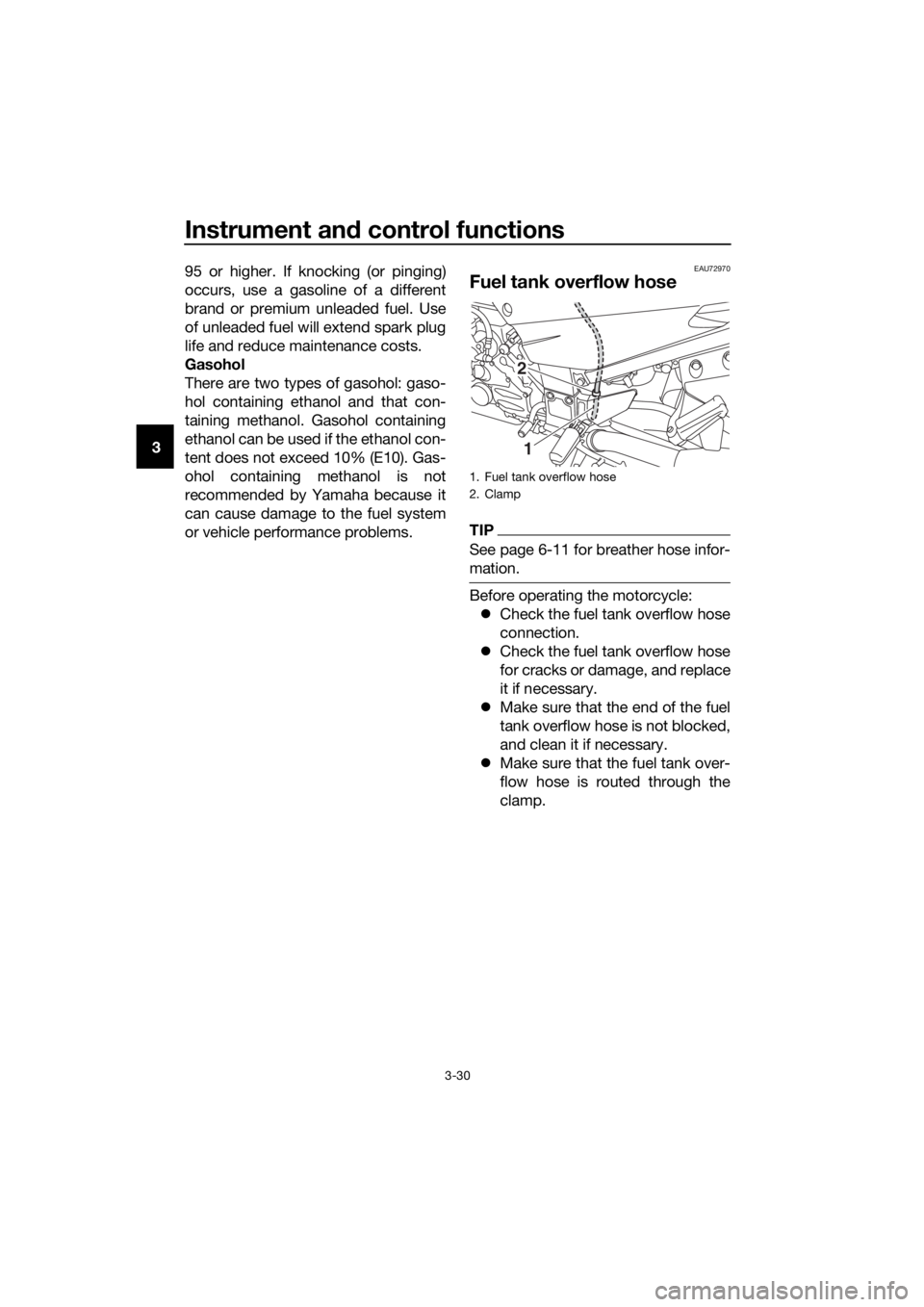
Fuel tank overflow hose
TIP
See page 6-11 for breather hose infor-
mation.
Before operating the motorcycle:
Check the fuel tank overflow hose
connection.
Check the fuel tank overflow hose
for cracks or damage, and replace
it if necessary.
Make sure that the end of the fuel
tank overflow hose is not blocked,
and clean it if necessary.
Make sure that the fuel tank over-
flow hose is routed through the
clamp.
1. Fuel tank overflow hose
2. Clamp
2
1
UB88E0E0.book Page 30 Friday, October 16, 2015 11:59 AM
Page 61 of 120

For your safety – pre-operation checks
4-1
4
EAU63440
Inspect your vehicle each time you use it to make sure the vehicle is in safe oper-
ating condition. Always follow the inspection and maintenance procedures and
schedules described in the Owner’s Manual.
WARNING
EWA11152
Failure to inspect or maintain the vehicle properly increases the possibility
of an acci dent or equipment d amage. Do not operate the vehicle if you fin d
any prob lem. If a pro blem cannot be corrected b y the proce dures provi ded
in this manual, have the vehicle inspecte d b y a Yamaha d ealer.
Before using this vehicle, check the following points:
ITEM CHECKSPAGE
Fuel • Check fuel level in fuel tank.
• Refuel if necessary.
• Check fuel line for leakage.
• Check fuel tank overflow hose for obstructions, cracks
or damage, and check hose connection. 3-29,
3-30
En gine oil • Check oil level in engine.
• If necessary, add recommended oil to specified level.
• Check vehicle for oil leakage. 6-11
Final gear oil • Check vehicle for oil leakage. 6-14
Coolant • Check coolant level in reservoir.
• If necessary, add recommended coolant to specified
level.
• Check cooling system for leakage. 6-15
Front brake • Check operation.
• If soft or spongy, have Yamaha dealer bleed hydraulic
system.
• Check brake pads for wear.
• Replace if necessary.
• Check fluid level in reservoir.
• If necessary, add specified brake fluid to specified level.
• Check hydraulic system for leakage. 6-24,
6-25
Rear brake • Check operation.
• If soft or spongy, have Yamaha dealer bleed hydraulic
system.
• Check brake pads for wear.
• Replace if necessary.
• Check fluid level in reservoir.
• If necessary, add specified brake fluid to specified level.
• Check hydraulic system for leakage. 6-24,
6-25
UB88E0E0.book Page 1 Friday, October 16, 2015 11:59 AM
Page 66 of 120
Operation and important rid ing points
5-4
5 clutch lever in, use the brakes to
slow the motorcycle, and continue
to downshift as necessary.
4. Once the motorcycle has stopped, the transmission can be
shifted into the neutral position.
The neutral indicator light should
come on and then the clutch lever
can be released.
WARNING
EWA17380
Improper brakin g can cause
loss of control or traction. Al-
ways use b oth brakes an d apply
them smoothly.
Make sure that the motorcycle
and the en gine have sufficiently
slowe d b efore shiftin g to a low-
er gear. En gag in g a lower gear
when the vehicle or en gine
speed is too hi gh coul d make
the rear wheel lose traction or
the en gine to over-rev. This
coul d cause loss of control, an
acci dent an d injury. It coul d also
cause en gine or drive train dam-
a g e.
EAU64150Recommen ded shift points
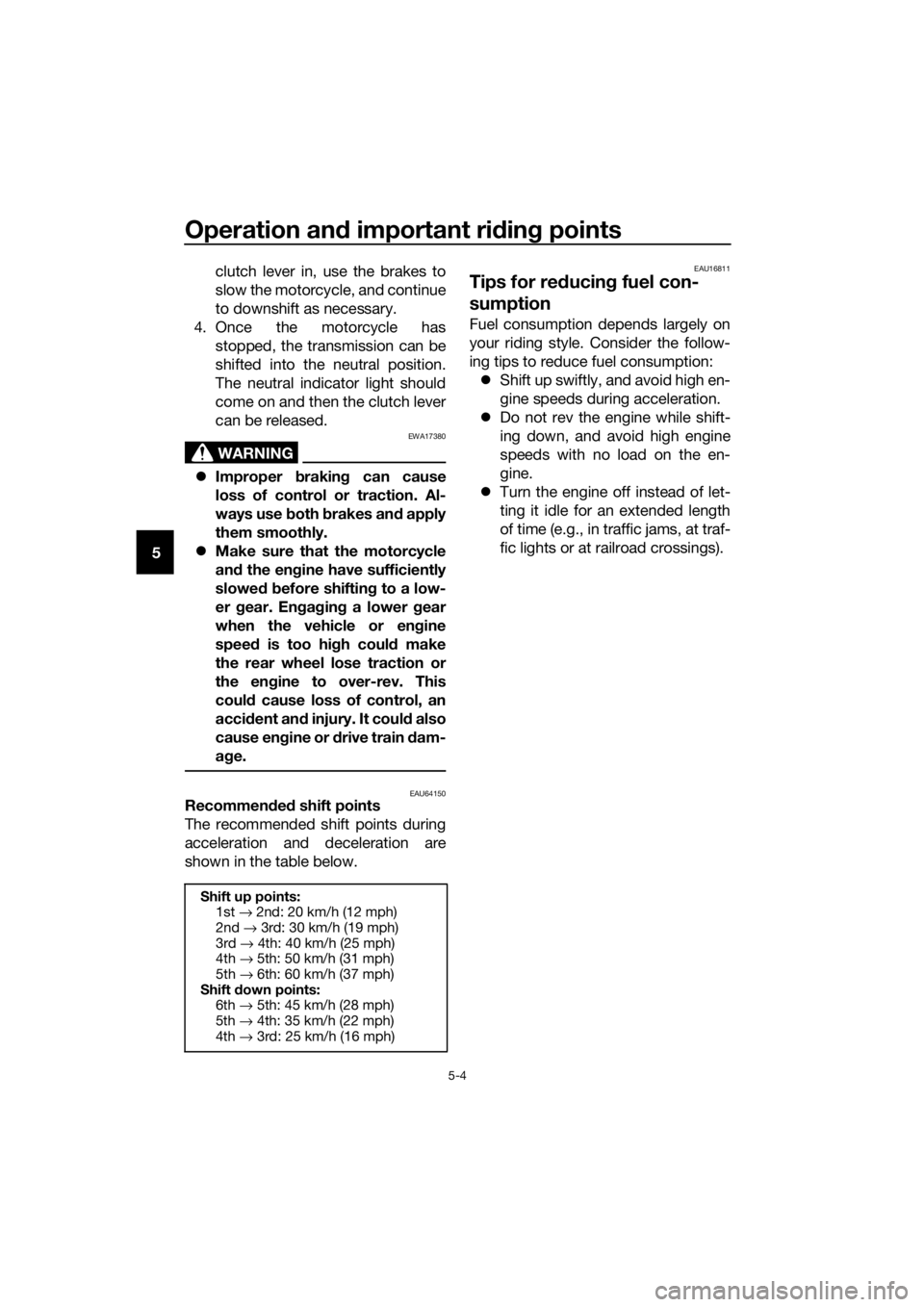
The recommended shift points during
acceleration and deceleration are
shown in the table below.
EAU16811
Tips for re ducin g fuel con-
sumption
Fuel consumption depends largely on
your riding style. Consider the follow-
ing tips to reduce fuel consumption:
Shift up swiftly, and avoid high en-
gine speeds during acceleration.
Do not rev the engine while shift-
ing down, and avoid high engine
speeds with no load on the en-
gine.
Turn the engine off instead of let-
ting it idle for an extended length
of time (e.g., in traffic jams, at traf-
fic lights or at railroad crossings).
Shift up points:
1st → 2nd: 20 km/h (12 mph)
2nd → 3rd: 30 km/h (19 mph)
3rd → 4th: 40 km/h (25 mph)
4th → 5th: 50 km/h (31 mph)
5th → 6th: 60 km/h (37 mph)
Shift down points:
6th → 5th: 45 km/h (28 mph)
5th → 4th: 35 km/h (22 mph)
4th → 3rd: 25 km/h (16 mph)
UB88E0E0.book Page 4 Friday, October 16, 2015 11:59 AM