2016 VOLVO XC70 trailer
[x] Cancel search: trailerPage 283 of 396

08 Starting and driving
08
}}
281
Towing a trailer
When towing a trailer, always observe the legal requirements of the state/province.
NOTE
For the maximum trailer and tongue weights recommended by Volvo, seeWeights (p. 372).
•All Volvo models are equipped with energy-absorbing shock-mounted bump-ers. Trailer hitch installation should notinterfere with the proper operation of thisbumper system.
Trailer towing does not normally present any particular problems, but take into considera-tion: • Increase tire pressure to recommended full pressure, see Tire inflation – pressuretable (p. 300).
• When your vehicle is new, avoid towingheavy trailers during the first 620 miles(1,000 km).
• Maximum speed when towing a trailer:50 mph (80 km/h).
• Engine and transmission are subject toincreased loads. Therefore, engine cool-ant temperature should be closelywatched when driving in hot climates orhilly terrain. Use a lower gear and turn offthe air conditioner if the temperaturegauge needle enters the red range. •
If the automatic transmission begins tooverheat, a message will be displayed inthe text window.
• Avoid overload and other abusive opera-tion.
• Hauling a trailer affects handling, durabil-ity, and economy.
• It is necessary to balance trailer brakeswith the towing vehicle brakes to providea safe stop (check and observe state/local regulations).
• Do not connect the trailer's brake systemdirectly to the vehicle's brake system.
• More frequent vehicle maintenance isrequired.
• Remove the ball holder when the hitch isnot being used.
NOTE
• When parking the vehicle with a trailer on a hill, apply the parking brakebefore putting the gear selector in
P.
Always follow the trailer manufactur-er's recommendations for wheelchocking.
• When starting on a hill, put the gearselector in
D before releasing the park-
ing brake.
• If you use the manual (Geartronic) shiftpositions while towing a trailer, makesure the gear you select does not puttoo much strain on the engine (usingtoo high a gear).
• The drawbar assembly/trailer hitchmay be rated for trailers heavier thanthe vehicle is designed to tow. Pleaseadhere to Volvo's recommended trailerweights.
• Avoid driving with a trailer on inclinesof more than 15%.
Page 284 of 396

||
08 Starting and driving
08
282
CAUTION
The maximum trailer weights listed are only applicable for altitudes up to 3,280 ft(1000 m) above sea level. With increasingaltitude the engine power and thereforethe car's climbing ability are impairedbecause of the reduced air density, so themaximum trailer weight has to be reducedaccordingly. The weight of the vehicle andtrailer must be reduced by 10% for everyfurther 3,280 ft (1000 m) (or part thereof).When towing 5,950 lbs (2,700kg) hill incli-nation is restricted to 14%.
WARNING
•Bumper-attached trailer hitches must not be used on Volvos, nor shouldsafety chains be attached to thebumper.
• Trailer hitches attaching to the vehiclerear axle must not be used.
• Never connect a trailer's hydraulicbrake system directly to the vehiclebrake system, nor a trailer's lightingsystem directly to the vehicle lightingsystem. Consult your nearest author-ized Volvo retailer for correct installa-tion.
• When towing a trailer, the trailer'ssafety chains or wire must be correctlyfastened to the attachment points pro-vided in the trailer hitch on the vehicle.The safety chain or wire must never befastened to or wound around the tow-ing ball.
Trailer cableAn adapter is required if the vehicle's trailer hitch has a 13-pin connector and the trailerhas 7 pins. Use an adapter cable approvedby Volvo. Make sure the cable does not dragon the ground.
Related information
•
Detachable trailer hitch (p. 282)
• Loading – general (p. 142)
Detachable trailer hitch
Volvo recommends the use of Volvo trailer hitches that are specially designed for thevehicle.
A
C
EDBG010496
Ball holder
Locking bolt
Cotter pin
Hitch assembly
Safety wire attachment
Installing the ball holder1. If necessary, remove the cotter pin from
the locking bolt and slide the locking bolt out of the hitch assembly.
2. Slide the ball holder into the hitch assem- bly.
Page 285 of 396

08 Starting and driving
08
283
3. Align the hole in the ball holder with the
one in the hitch assembly.
4. Slide the locking bolt through the hitch assembly/ball holder.
5. Insert the cotter pin in the hole at the end of the locking bolt.
Removing the ball holder1. Remove the cotter pin from the lockingbolt and slide the locking bolt out of the ball holder/hitch assembly.
2. Pull the ball holder out of the hitch assembly.
NOTE
A cover for the hitch assembly is also included in the kit.
Related information
• Towing a trailer (p. 281)
Trailer Stability Assist (TSA)
Trailer Stability Assist is a system designed to help stabilize a vehicle that is towing a trailerwhen the vehicle and trailer have begun tosway and is part of the stability system. Forinformation on the stability system, see Stabil-ity system – introduction (p. 175)
FunctionA vehicle towing a trailer may begin to swayfor various reasons. Normally this only occursat high speeds but, for example, if the traileris overloaded or if the load is unevenly dis-tributed in the trailer, there is risk of swayingat speeds between approximately 45-55 mph(70-90 km/h). Swaying may be caused by factors such as: •The vehicle and trailer are hit by a sud- den, strong crosswind
• The vehicle and trailer are traveling on anuneven road surface or drive over a bump
• Sudden movements of the steering wheel
Facts about TSA
• TSA intervenes at speeds above approxi-mately 40 mph (60 km/h)
• The stability system symbol in the instru-ment panel will flash when TSA is working
• If the driver switches off the stability sys-tem's Spin Control function, TSA will alsobe switched off (but will be on again thenext time the engine is started) •
TSA may not intervene when the vehicleand trailer begin to sway if the driver triesto compensate for the swaying motion bymoving the steering wheel rapidly
How TSA worksOnce swaying has begun, it can be very diffi- cult to stop, which makes it difficult to controlthe vehicle and trailer. The TSA system continuously monitors the vehicle's movements, particularly lateralmovement. If the system detects a tendencyto sway, the brakes are applied individuallyon the front wheels, which has a stabilizingeffect on the vehicle and trailer. This is oftenenough to enable the driver to regain controlof the vehicle. If this is not adequate to stop the swaying motion, the brakes are applied to all of thewheels on the vehicle and on the trailer if it isequipped with brakes, and engine power istemporarily reduced. As the swaying motionbegins to decrease and the vehicle-trailerhave once again become stable, TSA will nowstop regulating the brakes/engine power andthe driver regains control of the vehicle.
Related information
• Towing a trailer (p. 281)
• Loading – general (p. 142)
Page 303 of 396

09 Wheels and tires
09
}}
301
Loading specifications
Properly loading your vehicle will provide maximum return of vehicle design perform-ance. Before loading your vehicle, familiarize your- self with the following terms for determiningyour vehicle's weight ratings, with or withouta trailer, from the vehicle's Federal/CanadianMotor Vehicle Safety Standards (FMVSS/CMVSS) label, and the vehicle's tire informa-tion placard:
Curb weightThe weight of the vehicle including a full tankof fuel and all standard equipment. It doesnot include passengers, cargo, or optionalequipment.
Capacity weightAll weight added to the curb weight, includingcargo and optional equipment. When towing,trailer hitch tongue load is also part of cargoweight.
Permissible axle weightThe maximum allowable weight that can becarried by a single axle (front or rear). Thesenumbers are shown on the Federal/CanadianMotor Vehicle Safety Standards (FMVSS/CMVSS) label. The total load on each axlemust never exceed its maximum permissibleweight.
Gross vehicle weight (GVW)The vehicle's curb weight + cargo + passen-gers.
NOTE
•The location of the various labels in your vehicle, see Label information(p. 367).
• A table listing important weight limitsfor your vehicle, see Weights (p. 372).
Loading specifications – load limit
The load limit of your vehicle is the combined weight of the occupants and cargo.
Steps for Determining Correct Load
Limit
1. Locate the statement "the combined weight of occupants and cargo shouldnever exceed XXX pounds" on your vehi-cle's placard.
2. Determine the combined weight of the driver and passengers that will be ridingin your vehicle.
3. Subtract the combined weight of the driver and passengers from XXX kilo-grams or XXX pounds.
4. The resulting figure equals the available amount of cargo and luggage loadcapacity. For example, if the "XXX"amount equals 1400 lbs. and there will befive 150 lb. passengers in your vehicle,the amount of available cargo and lug-gage load capacity is 650 lbs. (1400 – 750 (5 × 150) = 650 lbs.)
5. Determine the combined weight of lug- gage and cargo being loaded on the vehi-cle. That weight may not safely exceedthe available cargo and luggage loadcapacity calculated in Step 4.
Page 304 of 396

09 Wheels and tires
09
302
6. If your vehicle will be towing a trailer, loadfrom your trailer will be transferred to your vehicle.
WARNING
•Exceeding the permissible axle weight, gross vehicle weight, or any otherweight rating limits can cause tireoverheating resulting in permanentdeformation or catastrophic failure.
• Do not use replacement tires withlower load carrying capacities than thetires that were original equipment onthe vehicle because this will lower thevehicle's GVW rating. Use only tireswith the correct load carrying capacity.Consult your Volvo retailer for informa-tion.
Tire specifications – terminology
The following is a glossary of tire-related terms. The tire suppliers may have additional mark- ings, notes or warnings such as standardload, radial tubeless, etc.
• Tire information placard
: A placard
showing the OE (Original Equipment) tire sizes, recommended inflation pressure,and the maximum weight the vehicle cancarry.
• Tire Identification Number (TIN)
: A
number on the sidewall of each tire pro-viding information about the tire brandand manufacturing plant, tire size anddate of manufacturer.
• Inflation pressure
: A measure of the
amount of air in a tire.
• Standard load
: A class of P-metric or
Metric tires designed to carry a maximumload at 35 psi [37 psi (2.5 bar) for Metrictires]. Increasing the inflation pressurebeyond this pressure will not increase thetires load carrying capability.
• Extra load
: A class of P-metric or Metric
tires designed to carry a heavier maxi-mum load at 41 psi [43 psi (2.9 bar) forMetric tires]. Increasing the inflation pres-sure beyond this pressure will notincrease the tire's load carrying capabil-ity. •
kPa
: Kilopascal, a metric unit of air pres-
sure.
• PSI
: Pounds per square inch, a standard
unit of air pressure.
• B-pillar
: The structural member at the
side of the vehicle behind the front door.
• Bead area of the tire
: Area of the tire
next to the rim.
• Sidewall of the tire
: Area between the
bead area and the tread.
• Tread area of the tire
: Area of the perim-
eter of the tire that contacts the roadwhen mounted on the vehicle.
• Rim
: The metal support (wheel) for a tire
or a tire and tube assembly upon whichthe tire beads are seated.
• Maximum load rating
: a figure indicating
the maximum load in pounds and kilo-grams that can be carried by the tire. Thisrating is established by the tire manufac-turer.
• Maximum permissible inflation pressure
: the greatest amount of air
pressure that should ever be put in the tire. This limit is set by the tire manufac-turer.
• Recommended tire inflation pressure
:
inflation pressure, established by Volvo,which is based on the type of tires thatare mounted on a vehicle at the factory.This information can be found on the tireinflation placard(s) located on the driver's
Page 359 of 396

10 Maintenance and servicing
10
* Option/accessory, for more information, see Introduction.357
Fuses – cargo area/trunk
The fuses in the cargo area/trunk protect components such as trailer connections, theparking brake, etc.
Located behind the upholstery on the left side of the cargo area
Positions
PosFunctionA
Electric parking brake (left side)30
Electric parking brake (right side)30
Heated rear window30
Trailer socket 2*15
PosFunctionA
Power tailgate*20
-
-
-
-
-
PosFunctionA
Trailer socket 1*40
-
Related information
• Fuses – engine compartment (p. 350)
• Fuses – glove compartment (p. 354)
• Fuses – engine compartment cold zone (Start/Stop only) (p. 358)
Page 374 of 396
11 Specifications
11
372
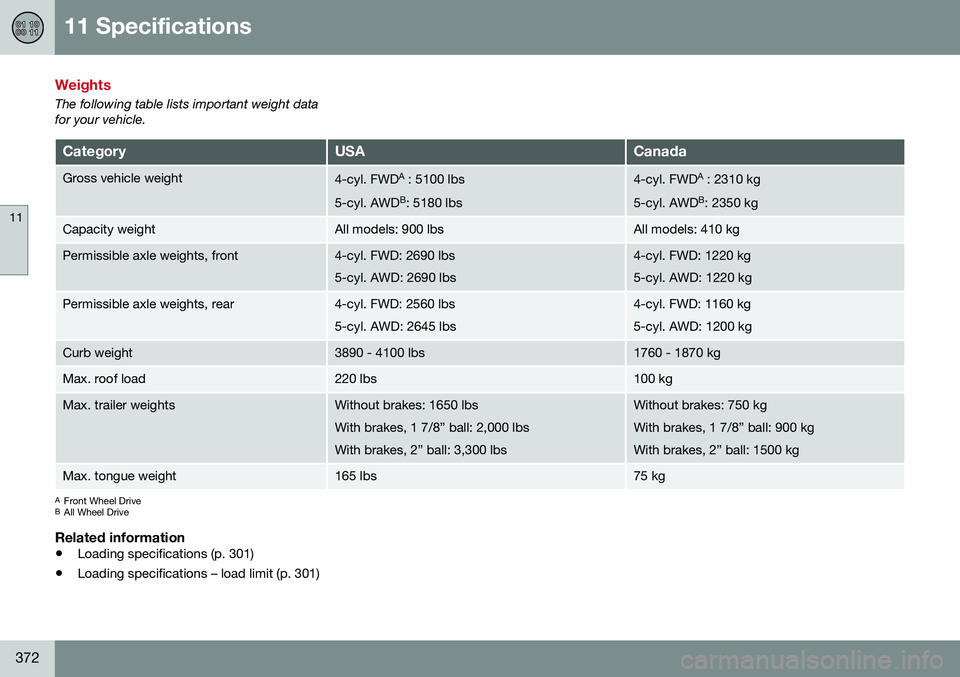
Weights
The following table lists important weight data for your vehicle.
CategoryUSACanada
Gross vehicle weight4-cyl. FWDA
: 5100 lbs
5-cyl. AWD B
: 5180 lbs4-cyl. FWD A
: 2310 kg
5-cyl. AWD B
: 2350 kg
Capacity weightAll models: 900 lbsAll models: 410 kg
Permissible axle weights, front4-cyl. FWD: 2690 lbs 5-cyl. AWD: 2690 lbs4-cyl. FWD: 1220 kg 5-cyl. AWD: 1220 kg
Permissible axle weights, rear4-cyl. FWD: 2560 lbs 5-cyl. AWD: 2645 lbs4-cyl. FWD: 1160 kg 5-cyl. AWD: 1200 kg
Curb weight3890 - 4100 lbs1760 - 1870 kg
Max. roof load220 lbs100 kg
Max. trailer weightsWithout brakes: 1650 lbs With brakes, 1 7/8” ball: 2,000 lbsWith brakes, 2” ball: 3,300 lbsWithout brakes: 750 kg With brakes, 1 7/8” ball: 900 kgWith brakes, 2” ball: 1500 kg
Max. tongue weight165 lbs75 kg
A Front Wheel Drive
B All Wheel Drive
Related information
• Loading specifications (p. 301)
• Loading specifications – load limit (p. 301)
Page 382 of 396

||
11 Specifications
11
380* Option/accessory, for more information, see Introduction.
Symbols in the main instrument panel
Warning symbols in the instrument panel
SymbolDescriptionSee
Low oil pressure(p. 74)
Parking brake A(p. 74)
SRS airbags(p. 74)
Seat belt reminder(p. 74)
Generator not charg- ing(p. 74)
Fault in the brake sys- tem(p. 74)
Warning symbol(p. 74)
A
The symbol is Park only on models with the optional digital
instrument panel.
Related information
• Information displays – indicator symbols (p. 72)
• Information displays – warning symbols(p. 74)
• Information display – messages (p. 113)
Indicator symbols
The following tables list the most common warning and indicator lights and symbols anda reference to where more detailed informa-tion can be found.
: The red warning symbol illuminates to
indicate a problem related to safety and/or drivability. A message will also appear in themain instruments panel's display.
: The information symbol illuminates and
a text message is displayed to provide the driver with necessary information about oneof the vehicle's systems.
Indicator symbols in the instrument
panel
SymbolDescriptionSee
Fault in the Active Bending Light(ABL)*system(p. 72)
Malfunction indicator light(p. 72)
Anti-lock brake sys- tem (ABS)(p. 72)
Rear fog lights on(p. 72)
SymbolDescriptionSee
Stability system, Hill Descent Control,Trailer StabilityAssist*(p. 72)
Tire pressure moni- toring sensor (TPMS)(p. 72)
Low fuel level(p. 72)
Information symbol, see text in informa-tion display(p. 72)
High beam indicator(p. 72)
Left turn signal indi- cator(p. 72)
Right turn signal indi- cator(p. 72)
Stability system , Sport mode(p. 176)
Related information
• Information displays – indicator symbols (p. 72)
• Information displays – warning symbols(p. 74)
• Information display – messages (p. 113)