2016 VOLVO XC60 Parking
[x] Cancel search: ParkingPage 167 of 398

06 Locks and alarm
06
165
Locking
•Press the lock button after the front
doors have been closed.
• Each door can be locked individually with the lock button on the respective doors.The door must be closed first.
Alternative locking when parkingThe central locking button on the driver's door can also be used to lock the vehiclewhen you leave it. To do so:
1. Open the door.
2. Press the lock section of the button.
3. Close the door. This will lock the vehicle
completely and arm the alarm.
NOTE
Please be aware that locking the vehicle in this way makes it possible to lock theremote key in the passenger compartment.To help avoid this, lock the vehicle fromthe outside by pressing the lock button onthe remote key. If the vehicle is locked using the central locking button, be sure that the remote keyis in your possession before closing thedoor.
Automatic relockingIf the doors are unlocked, the locks will auto- matically reengage (re-lock) and the alarm willre-arm after 2 minutes unless a door or thetailgate has been opened.
Automatic lockingWhen the vehicle starts to move, the doorsand tailgate can be locked automatically. Thisfeature can be turned on or off by pressing MY CAR and going to
Car settingsLock
settings
Automatic door locking.
Related information
• Locking/unlocking – from the outside (p. 163)
• Alarm – general information (p. 169)
• Remote key – functions (p. 153)
Locking/unlocking – glove compartment
The glove compartment can only be locked and unlocked using the detachable key bladein the remote key. For information on remov-ing the key blade from the remote key, seeDetachable key blade – detaching/reinserting(p. 155).
Insert the key blade in the glove compart- ment lock.
Turn the key blade 90 degrees clockwise.
Remove the key blade from the lock.
Page 181 of 398

07 Driver support
07
* Option/accessory, for more information, see Introduction.179
Adjustable steering force*
Steering force increases with the speed of the vehicle to give the driver enhanced sense ofcontrol and stability. At low speed the vehicleis easy to steer in order to facilitate parking,etc.
Adjustable steering force*Steering force can be changed under MY
CAR
Car settingsSteering wheel
force
. Select Low, Medium or High. For a
description of the menu system, My Car – introduction (p. 76).
NOTE
This steering force level menu function cannot be accessed when the vehicle is inmotion.
NOTE
In certain situations, the power steering may become too warm and will have to betemporarily cooled down. While this ishappening, the power steering effect willbe reduced slightly and somewhat moreeffort may be required to turn the steeringwheel. If this occurs, a message will be displayed in the instrument panel.
Related information
• Active chassis* (Four C) (p. 174)
Road Sign Information (RSI)* – introduction
RSI is a feature that helps the driver see road signs with the posted speed limit.
Introduction
Examples of readable road signs If the vehicle passes a sign showing the speed limit, this will be displayed in the centerconsole.
WARNING
RSI does not function in all situations and is only intended to provide supplementaryinformation. The driver is always responsible for oper- ating the vehicle safely.
Related information
•Road Sign Information (RSI) – operation (p. 180)
• Road Sign Information (RSI) – limitations(p. 180)
Page 193 of 398

07 Driver support
07
}}
191
Adaptive Cruise Control – passing another vehicle
Passing another vehicleIf your vehicle’s speed is being regulated by ACC and the driver indicates that he/shewould like to pass the vehicle ahead by usingthe left turn signal, ACC can assist by accel-
erating briefly. This function is active at speeds above approximately 45 mph (70 km/h).
WARNING
Please be aware that this function will also cause the vehicle to accelerate briefly incertain situations other than passinganother vehicle, for example using the leftturn signal to indicate a lane change or aturn toward a highway exit at speedsabove approximately 45 mph (70 km/h).
Related information
• Adaptive Cruise Control – introduction (p. 184)
Adaptive Cruise Control (ACC) – Queue Assist
Queue Assist is an added ACC feature that is linked to your vehicle's automatic transmis-sion.
IntroductionQueue Assist is an added ACC feature that islinked to your vehicle's automatic transmis-sion. Queue Assist consists of the following func- tions: •Enhanced speed interval (including when the vehicle is at a complete stop or ismoving at speed below 18 mph(30 km/h))
• Automatic standby mode when ACCchanges target vehicles
• No automatic braking when at a standstill
• The parking brake is applied automati-cally
Please note that the lowest speed that can be set is 18 mph (30 km/h), although ACC canmaintain a set speed/distance to a vehicleahead down to a standstill. Queue Assistconsists of the following features:
Enhanced speed interval
NOTE
The driver's door must be closed and the driver's seat belt must be fastened beforeACC can be put in active mode. If the driv-er's seat belt is taken off or if the driver'sdoor is opened, ACC will return to standbymode.
Your vehicle can maintain the set time interval to the vehicle ahead at any permissiblespeed, including a complete stop. In order to activate ACC at speeds below 18 mph (30 km/h):
• The vehicle ahead must be within a rea- sonable distance (not farther away thanapprox. 100 ft/30 meters)
• The lowest speed that can be selected is18 mph (30 km/h), although ACC will alsohelp maintain the set time interval to thevehicle ahead at lower speeds, includinga complete stop.
During short stops (less than approximately 3 seconds) in slow-moving traffic, your vehi-cle will begin moving again automatically assoon as the vehicle ahead begins to move. If it takes more than 3 seconds for the vehicle ahead to begin moving, ACC will be automat-ically go into standby mode.
Page 194 of 398

||
07 Driver support
07
192
The driver will then have to reactivate ACC in one of the following ways:• By pressing
•By accelerating up to at least 3 mph (4 km/h). ACC will then resume followingthe vehicle ahead.
Your vehicle will then resume following the vehicle ahead at the set time interval.
NOTE
ACC can remain active and keep your vehicle at a standstill for up to 4 minutes.After 4 minutes have elapsed, the parkingbrake will be engaged and ACC will go intostandby mode. To reactivate ACC, the driver must release the parking brake (see Parking brake –general information (p. 269)).
Automatic standby mode when ACC changes target vehicles
If the vehicle ahead turns suddenly, there may be a stationary vehicle ahead The following only applies at speeds below approximately 18 mph (30 km/h)
:
If ACC changes target vehicles (the vehicle that the radar sensor has detected) from amoving vehicle to a stationary one, the sys-tem will apply the brakes in your vehicle.
WARNING
At speeds above 18 mph (30 km/h), ACC
will not react to a stationary vehicle and apply the brakes but will instead acceler-ate to the previously set speed. The drivermust actively apply the brakes to stop thevehicle.
ACC disengages and goes into standby mode if:
• Your vehicle's speed goes below 10 mph (15 km/h) and ACC cannot determine ifthe target object is a stationary vehicle orsome other type of object such as e.g., aspeed bump.
• Your vehicle's speed goes below 10 mph(15 km/h) and the vehicle ahead turns sothat ACC no longer has a target vehicle tofollow.
No automatic braking when at a standstill
In certain situations, ACC will no longer apply the brakes and go into standby mode whilethe vehicle is not moving. This means that thedriver will have to apply the brakes. This happens if:
• The driver presses the brake pedal
• The parking brake is activated
• The gear selected is moved to
P, N or R
• The driver presses the
button to put
ACC in standby mode
The parking brake is applied automatically
In certain situations, ACC will apply the park- ing brake in order to continue keeping thevehicle at a standstill. This happens if:
• The driver opens the door or takes off his/her seat belt
• The stability system is put in Sport mode(see Stability system – operation (p. 175))
• ACC has kept the vehicle at a standstillfor more than 2 minutes
• The engine has been switched off
• The brakes have overheated
Related information
•
Adaptive Cruise Control – introduction(p. 184)
Page 198 of 398

||
07 Driver support
07
196
SymbolMessageDescription
-Cruise control Service requiredACC is not functioning. Contact a trained and qualified Volvo service technician.
-Press Brake To hold +
an audible signalThe vehicle is at a standstill and ACC will release the brakes before the parking brake engages to keep the vehicle stopped but a problem with the parking brake means that the vehicle may begin to roll. The driver will have to apply the brakes. The message will remain in the display and the audible signal will continue until the driver applies the brakes or presses the accelerator pedal.
-Below 30 km/h Only followingThis is displayed if you try to activate ACC at speeds below approx. 18 mph (30 km/h) without a vehicle ahead within range (approx. 100 ft/30 meters).
Related information
• Adaptive Cruise Control – introduction (p. 184)
Page 204 of 398

07 Driver support
07
202
City Safety – introduction
City Safety™5
is a support system designed
to help the driver avoid low speed collisions when driving in slow-moving, stop-and-gotraffic. City Safety™ is not active if your vehicle’s speed is below approximately 2 mph(4 km/h). This means that City Safety™ willnot react if your vehicle approaches anothervehicle at very low speed, for example, whenparking. The function is active at speeds up to approximately 30 mph (50 km/h) and assiststhe driver by applying the brakes automati-cally, thereby avoiding or helping to reducethe effects of a collision. City Safety™ is designed to intervene as late as possible to help avoid unnecessary activa-tion. City Safety™ triggers brief, forceful braking if a low-speed collision is imminent. However,the system will not intervene in situationswhere the driver actively steers the vehicle orapplies the brakes, even if a collision cannotbe avoided. This is done in order to alwaysgive the driver’s actions highest priority. City Safety™ activates in situations where the driver has not applied the brakes in time, which means that the system cannot help thedriver in all situations. City Safety™ should not be used to alter the way in which the driver operates the vehicle.The driver should never rely solely on thissystem to safely stop the vehicle. Normally, the occupants of the vehicle will not be aware of City Safety™ except whenthe system intervenes when a low-speed col-lision is imminent. If the vehicle is also equipped with the optional Collision Warning with Full Auto-brake and Pedestrian Detection system, thetwo systems interact. For more informationabout the Collision Warning with Auto-brakesystem, see Collision warning – introduction(p. 209) .
WARNING
•
City Safety™ is a supplemental aid to the driver. It can never replace thedriver’s attention to traffic conditionsor his/her responsibility for operatingthe vehicle in a safe manner.
• City Safety™ does not function in alldriving situations or in all traffic,weather or road conditions.
WARNING
•
City Safety™ only reacts to vehicles traveling in the same direction as yourvehicle and does not react to smallvehicles or motorcycles or to people oranimals.
• City Safety™ is not activated whenyour vehicle is backing up.
• City Safety™ functions at speeds upto 30 mph (50 km/h). This system canhelp prevent a collision if the
differ-
ence in speed between your vehicle
and the vehicle ahead is less than9 mph (15 km/h). If the difference inspeed is greater, a collision cannot beavoided but the speed at which thecollision occurs can be reduced. Thedriver must apply the vehicle’s brakesfor full braking effect.
• City Safety™ will not intervene in apotential collision situation if the vehi-cle is being driven actively. The driveris always responsible for maintaining asafe distance to a vehicle or objectahead.
Related information
•
City Safety – function (p. 203)
• City Safety – operation (p. 204)
• City Safety – limitations (p. 204)
5
City Safety is a registered trademark of the Volvo Car Corporation
Page 218 of 398

||
07 Driver support
07
216* Option/accessory, for more information, see Introduction.
WARNING
• In certain situations, the system can- not provide warnings or warnings maybe delayed if traffic conditions or otherexternal factors make it impossible forthe radar sensor or camera to detect apedestrian, a cyclist or a vehicleahead.
• Warnings may not be provided if thedistance to the vehicle ahead is short,or if movements of the steering wheel/brake pedal are great, such as duringactive driving.
• The sensor system has a limited rangefor pedestrians/cyclists and provideswarnings and braking effect mosteffectively at speeds up to 30 mph(50 km/h). For stationary or slow-mov-ing vehicles, the system functions bestif your vehicle’s speed is belowapproximately 45 mph (70 km/h).
• Warnings for stationary or slow-mov-ing vehicles may not be provided indark conditions or in poor visibility.
The Pedestrian and Cyclist Detection with Full Auto Brake system uses the same radar sen-sors as Adaptive Cruise Control. For moreinformation on the radar sensor and its limita-tions, see Adaptive Cruise Control – limita-tions (p. 193).
NOTE
If warnings are given too frequently, the warning distance can be reduced (see Col-lision warning* – operation (p. 212)). Thiscauses the system to provide later warn-ings, which decreases the total number ofwarnings provided.
WARNING
•The system is not activated at speeds under approx. 2 mph (4 km/h). There-fore, it will not brake your vehicle if youapproach a vehicle ahead at very lowspeed, such as when parking.
• The driver's actions always have high-est priority and override the Pedestrianand Cyclist Detection with Full AutoBrake system. This means that thesystem will not intervene in situationswhere the driver is actively steering,braking or pressing the acceleratorpedal, even if a collision is imminent.
• When Auto-brake has prevented a col-lision with a stationary object, yourvehicle will remain at a standstill forapprox. 1.5 seconds. If your vehiclehas been braked for a moving vehicleahead, your vehicle's speed will bereduced to the same speed as thatvehicle's.
Related information
•
Collision warning – introduction (p. 209)
• Collision warning* – operation (p. 212)
• Collision warning* – function (p. 211)
• Collision warning* – Pedestrian detection (p. 214)
• Collision warning* – Cyclist detection(p. 213)
• The camera’s limitations (p. 217)
• Collision warning – symbols and mes-sages (p. 220)
• Collision warning – troubleshooting(p. 218)
Page 234 of 398
07 Driver support
07
232
Park assist – introduction
The park assist system is designed to assist you when driving into parking spaces,garages, etc. An audible signal and symbolsin the audio system’s display indicate the dis-tance to the object. The park assist system utilizes ultrasound sensors in the front bumper and rearbumper(s) to measure the distance to a vehi-cle or an object that may be close to the frontor rear of your vehicle.
NOTE
A trailer hitch whose wiring is integrated with the vehicle's electrical system will beincluded in the measurement of the availa-ble space behind the vehicle.
WARNING
Park Assist is an information system, NOT a safety system. This system is designedto be a supplementary aid when parkingthe vehicle. It is not, however, intended toreplace the driver's attention and judge-ment.
Related information
•Park assist – limitations (p. 235)
• Park assist – function (p. 232)
• Park assist – operation (p. 234)
• Park assist – troubleshooting (p. 236) •
Rear Park Assist Camera (PAC) – function (p. 237)
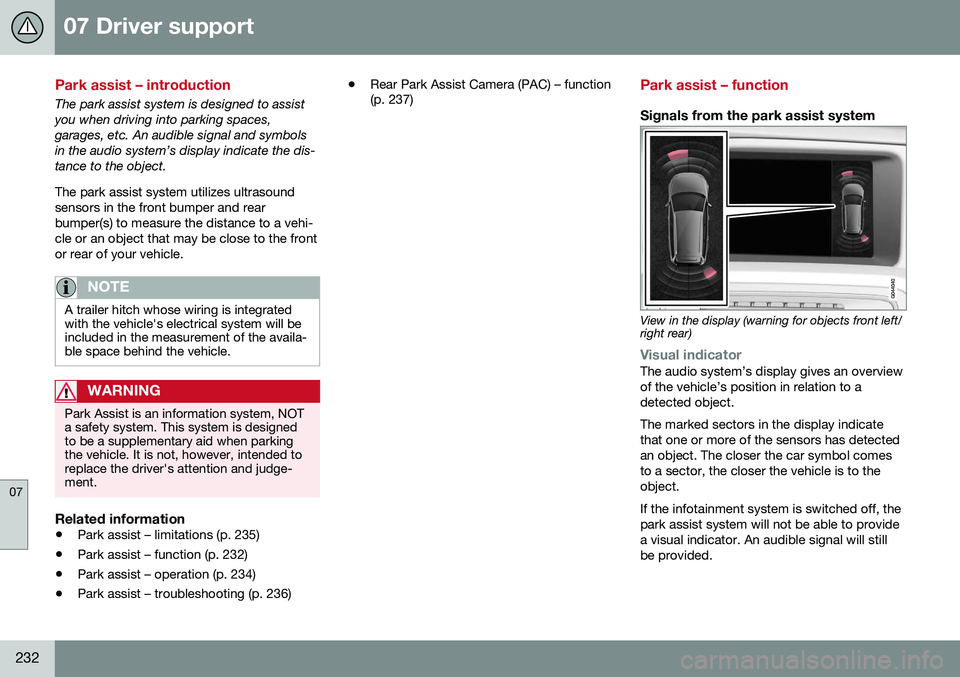
Park assist – function
Signals from the park assist system
View in the display (warning for objects front left/ right rear)
Visual indicatorThe audio system’s display gives an overview of the vehicle’s position in relation to adetected object. The marked sectors in the display indicate that one or more of the sensors has detectedan object. The closer the car symbol comesto a sector, the closer the vehicle is to theobject. If the infotainment system is switched off, the park assist system will not be able to providea visual indicator. An audible signal will stillbe provided.