2016 VOLVO V60 CROSS COUNTRY steering wheel
[x] Cancel search: steering wheelPage 226 of 402
07 Driver support
07
224
•Lane Departure Warning (LDW) – intro- duction (p. 222)
• Lane Departure Warning (LDW) - limita-tions (p. 224)Lane Departure Warning (LDW) - limitations
LimitationsThe camera used by LDW has the same limi- tations as the human eye. See The camera’slimitations (p. 212) for more information aboutthe camera's limitations.
NOTE
No warning signal
will be given in the cer-
tain situations, such as:
• If the turn signal is being used
• The driver’s foot is on the brake pedal 10
• The accelerator pedal is pressedquickly 10
• If the steering wheel is movedquickly 10
• In sharp turns that cause the vehicle’s body to sway
Related information
•
Driver Alert System (p. 217)
• Lane Departure Warning (LDW) – symbols and messages (p. 225)
• Lane Departure Warning (LDW) – opera-tion (p. 223)
• Lane Departure Warning (LDW) – intro-duction (p. 222)
10
When Increased sensitivity has been selected, a warning will be issued if a side marker line is crossed in this situation.
Page 229 of 402
07 Driver support
07
227
Lane Keeping Aid (LKA) – introduction
The LKA function is designed to help reduce the risk of accidents in situations where thevehicle unintentionally leaves its lane andthere is a risk of driving off the road or into theopposite lane.
LDW or LKAYour vehicle may be equipped with LaneDeparture Warning (LDW) or Lane KeepingAid (LKA), depending on your choice of engine. If you are uncertain as to which of
these optional systems is in your vehicle:
• Press the
MY CAR button on the center
console to open the menu system. Scroll to
SettingsDriver support system.
The system in your vehicle (Lane
Departure Warning or Lane Keeping
Aid) will be displayed there.
If your vehicle is equipped with Lane Departure Warning (LDW), see Lane Depar-ture Warning (LDW) – introduction (p. 222) fordetailed information.
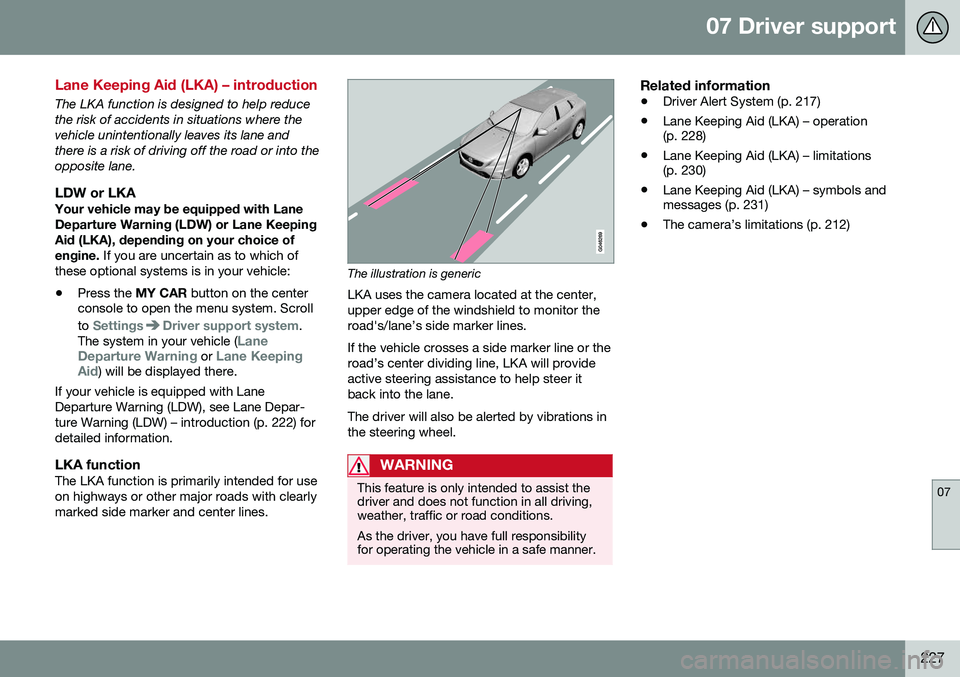
LKA functionThe LKA function is primarily intended for useon highways or other major roads with clearlymarked side marker and center lines.
The illustration is generic
LKA uses the camera located at the center, upper edge of the windshield to monitor theroad's/lane’s side marker lines. If the vehicle crosses a side marker line or the road’s center dividing line, LKA will provideactive steering assistance to help steer itback into the lane. The driver will also be alerted by vibrations in the steering wheel.
WARNING
This feature is only intended to assist the driver and does not function in all driving,weather, traffic or road conditions. As the driver, you have full responsibility for operating the vehicle in a safe manner.
Related information
• Driver Alert System (p. 217)
• Lane Keeping Aid (LKA) – operation (p. 228)
• Lane Keeping Aid (LKA) – limitations(p. 230)
• Lane Keeping Aid (LKA) – symbols andmessages (p. 231)
• The camera’s limitations (p. 212)
Page 230 of 402
07 Driver support
07
228
Lane Keeping Aid (LKA) – operation
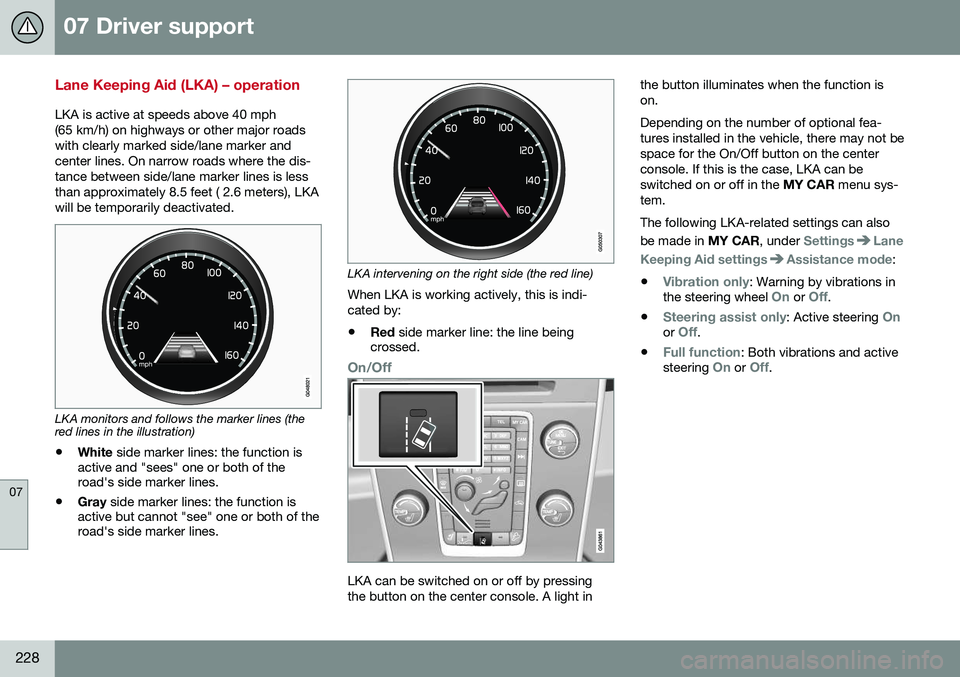
LKA is active at speeds above 40 mph (65 km/h) on highways or other major roadswith clearly marked side/lane marker andcenter lines. On narrow roads where the dis-tance between side/lane marker lines is lessthan approximately 8.5 feet ( 2.6 meters), LKAwill be temporarily deactivated.
LKA monitors and follows the marker lines (the red lines in the illustration)• White
side marker lines: the function is
active and "sees" one or both of the road's side marker lines.
• Gray
side marker lines: the function is
active but cannot "see" one or both of theroad's side marker lines.
LKA intervening on the right side (the red line)
When LKA is working actively, this is indi- cated by:
• Red
side marker line: the line being
crossed.
On/Off
LKA can be switched on or off by pressing the button on the center console. A light in the button illuminates when the function ison. Depending on the number of optional fea- tures installed in the vehicle, there may not bespace for the On/Off button on the centerconsole. If this is the case, LKA can beswitched on or off in the
MY CAR menu sys-
tem. The following LKA-related settings can also be made in MY CAR, under
SettingsLane
Keeping Aid settings
Assistance mode:
•
Vibration only: Warning by vibrations in
the steering wheel On or Off.
•
Steering assist only: Active steering Onor Off.
•
Full function: Both vibrations and active
steering On or Off.
Page 231 of 402
07 Driver support
07
229
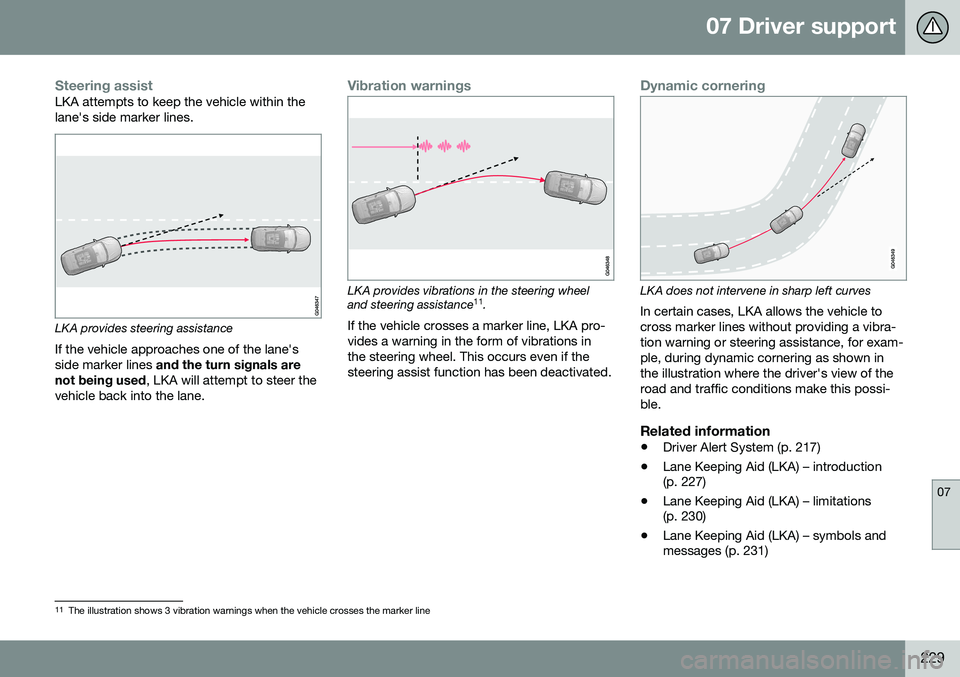
Steering assistLKA attempts to keep the vehicle within the lane's side marker lines.
LKA provides steering assistance
If the vehicle approaches one of the lane's side marker lines and the turn signals are
not being used , LKA will attempt to steer the
vehicle back into the lane.
Vibration warnings
LKA provides vibrations in the steering wheel and steering assistance 11
.
If the vehicle crosses a marker line, LKA pro- vides a warning in the form of vibrations inthe steering wheel. This occurs even if thesteering assist function has been deactivated.
Dynamic cornering
LKA does not intervene in sharp left curves
In certain cases, LKA allows the vehicle to cross marker lines without providing a vibra-tion warning or steering assistance, for exam-ple, during dynamic cornering as shown inthe illustration where the driver's view of theroad and traffic conditions make this possi-ble.
Related information
• Driver Alert System (p. 217)
• Lane Keeping Aid (LKA) – introduction (p. 227)
• Lane Keeping Aid (LKA) – limitations(p. 230)
• Lane Keeping Aid (LKA) – symbols andmessages (p. 231)
11
The illustration shows 3 vibration warnings when the vehicle crosses the marker line
Page 232 of 402
07 Driver support
07
230
Lane Keeping Aid (LKA) – limitations
The camera used by LKA has the same limi- tations as the human eye. See The camera’slimitations (p. 212) for more information aboutthe camera's limitations.
NOTE
In certain cases, it may be difficult for LKA to assist the driver correctly. In the follow-ing conditions, it may be preferable to turnLKA off:• Road construction areas
• Winter road conditions
• Poor road surfaces
• A very sporty driving style
• Bad weather conditions with poor visi- bility
WARNING
Hands on the steering wheel
: In order for
LKA to function correctly, the driver's hands have to be on the steering wheel,which LKA monitors steadily. If this is notthe case, the driver will be alerted by a textmessage to actively steer the vehicle. If this is not done, LKA will go into standby mode and will remain disengaged until thedriver begins to actively steer the vehicleagain.
Related information
• Driver Alert System (p. 217)
• Lane Keeping Aid (LKA) – introduction (p. 227)
• Lane Keeping Aid (LKA) – operation(p. 228)
• Lane Keeping Aid (LKA) – symbols andmessages (p. 231)
Page 238 of 402
07 Driver support
07
236* Option/accessory, for more information, see Introduction.
Park Assist Pilot (PAP)* – introduction
The Park Assist Pilot provides assistance when parallel parking by measuring the park-ing space and turning the steering wheel.
Introduction
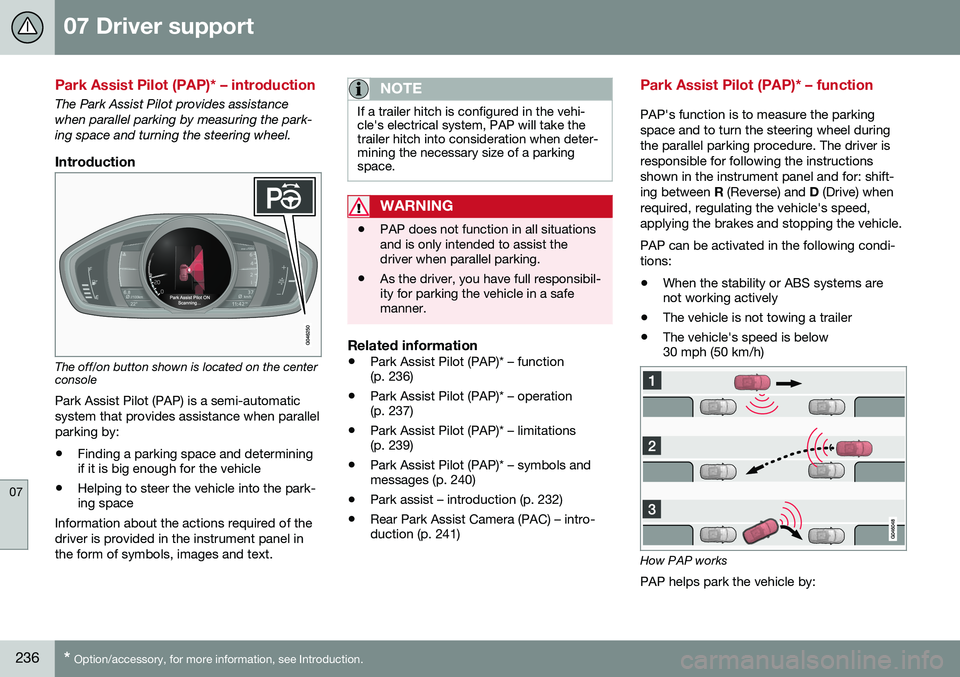
The off/on button shown is located on the center console
Park Assist Pilot (PAP) is a semi-automatic system that provides assistance when parallelparking by:
• Finding a parking space and determining if it is big enough for the vehicle
• Helping to steer the vehicle into the park-ing space
Information about the actions required of the driver is provided in the instrument panel inthe form of symbols, images and text.
NOTE
If a trailer hitch is configured in the vehi- cle's electrical system, PAP will take thetrailer hitch into consideration when deter-mining the necessary size of a parkingspace.
WARNING
• PAP does not function in all situations and is only intended to assist thedriver when parallel parking.
• As the driver, you have full responsibil-ity for parking the vehicle in a safemanner.
Related information
•
Park Assist Pilot (PAP)* – function (p. 236)
• Park Assist Pilot (PAP)* – operation(p. 237)
• Park Assist Pilot (PAP)* – limitations(p. 239)
• Park Assist Pilot (PAP)* – symbols andmessages (p. 240)
• Park assist – introduction (p. 232)
• Rear Park Assist Camera (PAC) – intro-duction (p. 241)
Park Assist Pilot (PAP)* – function
PAP's function is to measure the parking space and to turn the steering wheel duringthe parallel parking procedure. The driver isresponsible for following the instructionsshown in the instrument panel and for: shift-ing between
R (Reverse) and D (Drive) when
required, regulating the vehicle's speed,applying the brakes and stopping the vehicle. PAP can be activated in the following condi- tions: • When the stability or ABS systems are not working actively
• The vehicle is not towing a trailer
• The vehicle's speed is below30 mph (50 km/h)
How PAP works
PAP helps park the vehicle by:
Page 240 of 402
||
07 Driver support
07
238* Option/accessory, for more information, see Introduction.
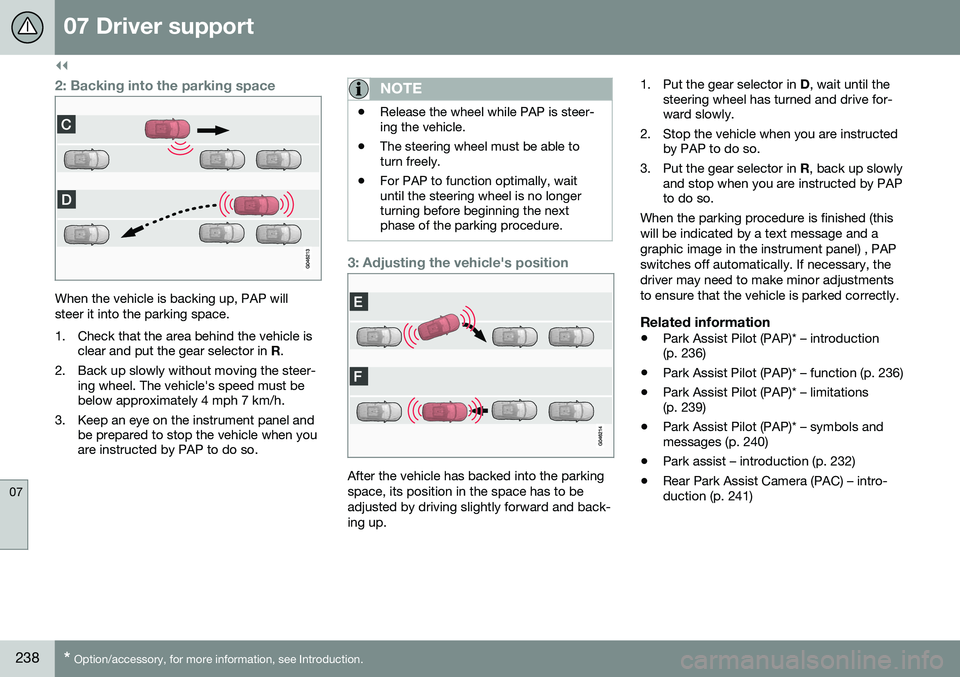
2: Backing into the parking space
When the vehicle is backing up, PAP will steer it into the parking space.
1. Check that the area behind the vehicle is
clear and put the gear selector in R.
2. Back up slowly without moving the steer- ing wheel. The vehicle's speed must be below approximately 4 mph 7 km/h.
3. Keep an eye on the instrument panel and be prepared to stop the vehicle when youare instructed by PAP to do so.
NOTE
•Release the wheel while PAP is steer- ing the vehicle.
• The steering wheel must be able toturn freely.
• For PAP to function optimally, waituntil the steering wheel is no longerturning before beginning the nextphase of the parking procedure.
3: Adjusting the vehicle's position
After the vehicle has backed into the parking space, its position in the space has to beadjusted by driving slightly forward and back-ing up. 1. Put the gear selector in
D, wait until the
steering wheel has turned and drive for- ward slowly.
2. Stop the vehicle when you are instructed by PAP to do so.
3. Put the gear selector in R, back up slowly
and stop when you are instructed by PAPto do so.
When the parking procedure is finished (this will be indicated by a text message and agraphic image in the instrument panel) , PAPswitches off automatically. If necessary, thedriver may need to make minor adjustmentsto ensure that the vehicle is parked correctly.
Related information
• Park Assist Pilot (PAP)* – introduction (p. 236)
• Park Assist Pilot (PAP)* – function (p. 236)
• Park Assist Pilot (PAP)* – limitations(p. 239)
• Park Assist Pilot (PAP)* – symbols andmessages (p. 240)
• Park assist – introduction (p. 232)
• Rear Park Assist Camera (PAC) – intro-duction (p. 241)
Page 241 of 402

07 Driver support
07
}}
* Option/accessory, for more information, see Introduction.239
Park Assist Pilot (PAP)* – limitations
The PAP parking procedure will be cancelled if.
• The vehicle's speed goes above approxi- mately 4 mph 7 km/h
• The driver moves the steering wheel
• If the stability or ABS systems are acti-vated (e.g., if a wheel starts to spinbecause of a slippery road surface
If the system has been switched off, this will be indicated by a text message in the instru-ment panel.
NOTE
• PAP will not function correctly if its sensors are obstructed by dirt, snow,etc.
• In certain situations, PAP may not beable to measure a parking space. Thiscould be due to external sources ofsound (e.g., a vehicle's horn, tires onwet asphalt, pneumatic brakes, noisefrom a motorcycle's exhaust, etc.)emitting ultrasound using approxi-mately the same frequencies as PAP.
Information to keep in mindPAP is only intended to provide parallel park- ing assistance but may not be able to func-tion fully in all situations. •
PAP's function is based on the way that the vehicles are parked behind and infront of your parking space. If they are,for example, parked too close to the curb,there is a risk that your vehicle's tires orwheel rims could be damaged by thecurb during the parking procedure.
• PAP is intended to provide parking assis-tance on straight streets, not sections ofstreet with curved or irregular curbs. Besure that your vehicle is parallel to thecurb when PAP measures the parkingspace.
• PAP may not be able to provide parkingassistance on narrow streets due to lackof space to maneuver the vehicle. In sit-uations like this, it may help to drive asclose to the side of the road as possiblewhere the parking space is located.
• Use only approved tires with the correctinflation pressure because this affectsPAP's capacity to provide parking assis-tance. See the table in Tire inflation –pressure table (p. 305). Changing to adifferent approved tire size may affectPAP's parameters. Consult a trained andqualified Volvo service technician.
• Heavy rain or snow may inhibit PAP'scapacity to correctly measure a parkingspace.
• Do not use PAP if snow chains or a tem-porary spare tire is being used.
• Do not use PAP if there are any objectsprotruding from the vehicle.
WARNING
• The front end of your vehicle may turn out toward oncoming traffic during theparking procedure.
• Objects located above the parkingsensors' field of vision are not includedwhen PAP measures a parking space.For this reason, PAP may turn into theparking space too soon. Avoid parkingspaces of this type.
• The driver is always responsible fordetermining if PAP has selected a suit-able parking space.
Maintenance
Generic illustration. The PAP sensors are located in the front and rear bumpers
PAP uses the same sensors as the Park assist system, see Park assist – limitations(p. 235)).