2016 VOLVO S60 warning sign
[x] Cancel search: warning signPage 235 of 392

07 Driver support
07
* Option/accessory, for more information, see Introduction.233
The sensors must be cleaned regularly to ensure that they work properly. Clean themwith water and a suitable car washing deter-gent.
Related information
•
Park Assist Pilot (PAP)* – introduction (p. 229)
• Park Assist Pilot (PAP)* – function (p. 229)
• Park Assist Pilot (PAP)* – operation(p. 230)
• Park Assist Pilot (PAP)* – symbols andmessages (p. 233)
• Park assist – introduction (p. 225)
• Rear Park Assist Camera (PAC) – intro-duction (p. 234)
Park Assist Pilot (PAP)* – symbols and messages
Various PAP-related combinations of sym- bols, graphics and text messages are dis-played in the instrument panel and some-times also include suitable actions. A text message can be erased by pressing briefly on the
OK button on the turn signal
lever. Contact a Volvo retailer or a trained and qualified Volvo service technician If a mes-sage indicating that PAP is not functioningproperly is displayed.
Related information
• Park Assist Pilot (PAP)* – introduction (p. 229)
• Park Assist Pilot (PAP)* – function (p. 229)
• Park Assist Pilot (PAP)* – operation(p. 230)
• Park Assist Pilot (PAP)* – limitations(p. 232)
• Park assist – introduction (p. 225)
• Rear Park Assist Camera (PAC) – intro-duction (p. 234)
Park assist – troubleshooting
Faults in the systemIf the information symbol illuminates andPark assist syst Service required is shown
on the information display, this indicates that the system is not functioning properly andhas been disengaged. Consult a trained andqualified Volvo service technician.
CAUTION
In certain circumstances, the park assist system may give unexpected warning sig-nals that can be caused by external soundsources that use the same ultrasound fre-quencies as the system. This may includesuch things as the horns of other vehicles,wet tires on asphalt, pneumatic brakes,motorcycle exhaust pipes, etc. This doesnot indicate a fault in the system.
Related information
• Park assist – introduction (p. 225)
• Park assist – limitations (p. 228)
• Park assist – function (p. 225)
• Park assist – operation (p. 227)
• Rear Park Assist Camera (PAC) – function (p. 234)
Page 236 of 392

07 Driver support
07
234
Rear Park Assist Camera (PAC) – introduction
The Park Assist Camera is designed to pro- vide the driver with a view of the area behindthe vehicle when backing up.
IntroductionPAC uses the display in the center console toshow the area behind the car while you arebacking up. PAC also shows guiding lines in the on- screen image to indicate the direction that thevehicle will take as it moves rearward, whichhelps simplify parallel parking, backing into atight space or when attaching a trailer to thevehicle. The images of vehicles in this section are generic and may not depict your specificmodel.
NOTE
A trailer hitch whose wiring is integrated with the vehicle's electrical system will beincluded in the measurement of the availa-ble space behind the vehicle.
WARNING
•PAC is designed to be a supplemen- tary aid when parking the vehicle. It isnot, however, intended to replace thedriver’s attention and judgment.
• The camera has blind spots where itcannot detect objects or peoplebehind the vehicle.
• Pay particular attention to people oranimals that are close to the vehicle.
• Objects seen on the screen may becloser than they appear to be.
Related information
•
Rear Park Assist Camera (PAC) – opera- tion (p. 235)
• Rear Park Assist Camera (PAC) – limita-tions (p. 238)
Rear Park Assist Camera (PAC) – function
Function
The driver sees what is behind the vehicle and if a person or animal should suddenlyappear from the side. PAC is mounted on the rear of the trunk lid, near the opening handle. The camera has built-in electronics that help reduce the “fish-eye” effect so that the imageshown on the screen is as natural as possi-ble. This may cause some objects on thescreen to “lean,” which is normal.
Page 241 of 392
07 Driver support
07
* Option/accessory, for more information, see Introduction.239
WARNING
• BLIS and CTA are information sys- tems, NOT warning or safety systemsand do not function in all situations.
• BLIS and CTA do not eliminate theneed for you to visually confirm theconditions around you, and the needfor you to turn your head and should-ers to make sure that you can safelychange lanes or back up.
• As the driver, you have full responsibil-ity for changing lanes/backing up in asafe manner.
Related information
•
BLIS* – function (p. 239)
• BLIS* – operation (p. 240)
• BLIS* – Cross Traffic Alert (CTA) (p. 240)
• BLIS* – limitations (p. 242)
• BLIS* – messages (p. 243)
BLIS* – function
When does BLIS functionThe system functions when your vehicle is moving at speeds above 6 mph (10 km/h).
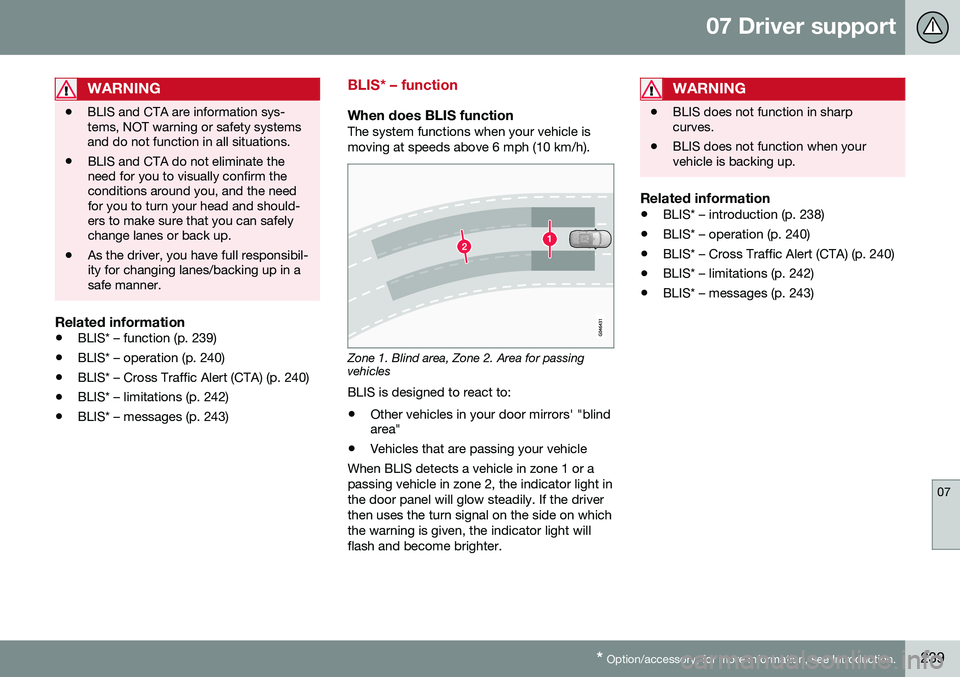
Zone 1. Blind area, Zone 2. Area for passing vehicles
BLIS is designed to react to:
• Other vehicles in your door mirrors' "blind area"
• Vehicles that are passing your vehicle
When BLIS detects a vehicle in zone 1 or a passing vehicle in zone 2, the indicator light inthe door panel will glow steadily. If the driverthen uses the turn signal on the side on whichthe warning is given, the indicator light willflash and become brighter.
WARNING
• BLIS does not function in sharp curves.
• BLIS does not function when yourvehicle is backing up.
Related information
•
BLIS* – introduction (p. 238)
• BLIS* – operation (p. 240)
• BLIS* – Cross Traffic Alert (CTA) (p. 240)
• BLIS* – limitations (p. 242)
• BLIS* – messages (p. 243)
Page 243 of 392
07 Driver support
07
}}
241
WARNING
•BLIS and CTA are information sys- tems, NOT warning or safety systemsand do not function in all situations.
• BLIS and CTA do not eliminate theneed for you to visually confirm theconditions around you, and the needfor you to turn your head and should-ers to make sure that you can safelychange lanes or back up.
• As the driver, you have full responsibil-ity for changing lanes/backing up in asafe manner.
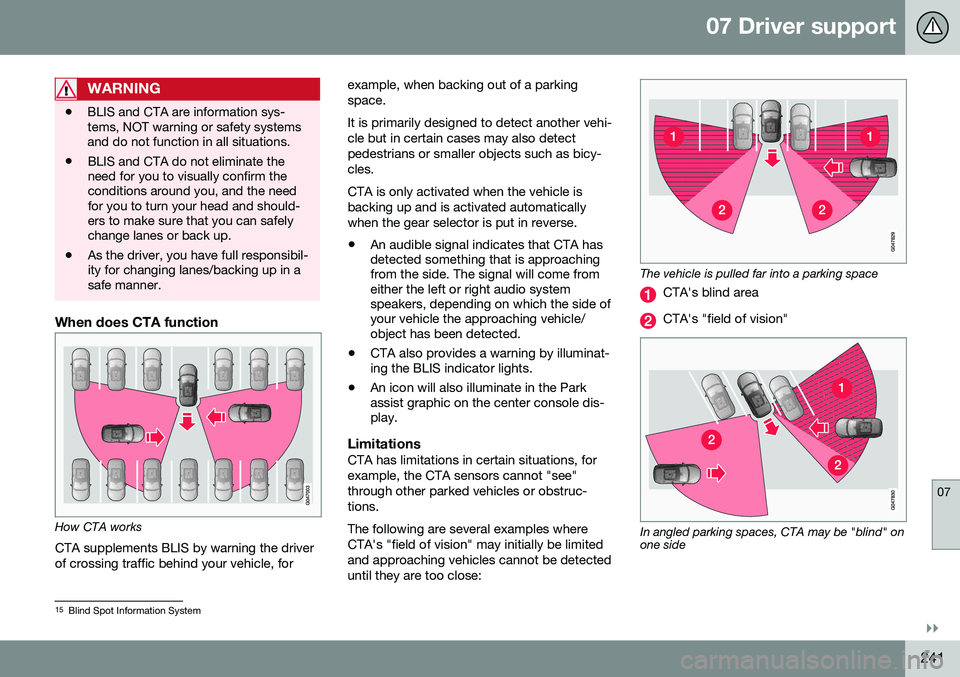
When does CTA function
How CTA works
CTA supplements BLIS by warning the driver of crossing traffic behind your vehicle, for example, when backing out of a parkingspace. It is primarily designed to detect another vehi- cle but in certain cases may also detectpedestrians or smaller objects such as bicy-cles. CTA is only activated when the vehicle is backing up and is activated automaticallywhen the gear selector is put in reverse.
• An audible signal indicates that CTA has detected something that is approachingfrom the side. The signal will come fromeither the left or right audio systemspeakers, depending on which the side ofyour vehicle the approaching vehicle/object has been detected.
• CTA also provides a warning by illuminat-ing the BLIS indicator lights.
• An icon will also illuminate in the Parkassist graphic on the center console dis-play.
LimitationsCTA has limitations in certain situations, for example, the CTA sensors cannot "see"through other parked vehicles or obstruc-tions. The following are several examples where CTA's "field of vision" may initially be limitedand approaching vehicles cannot be detecteduntil they are too close:
The vehicle is pulled far into a parking space
CTA's blind area
CTA's "field of vision"
In angled parking spaces, CTA may be "blind" on one side
15
Blind Spot Information System
Page 251 of 392

08 Starting and driving
08
249
Jump starting
Follow these instructions to jump start your vehicle's dead battery or to jump start anothervehicle's dead battery using your vehicle.
G021347
Connecting the jumper cablesIf the 12-volt auxiliary battery to be used is in another vehicle, check that the vehicles arenot touching to prevent premature comple-tion of a circuit. Be sure to follow jump star-ting instructions provided for the other vehi-cle. To jump start your vehicle:
1. Switch off the ignition (set the ignition to mode 0, see Ignition modes (p. 73)).
2. First connect the red jumper cable to the auxiliary battery's positive (+) terminal (1). 3. Fold back the cover over the positive (+)
terminal on your vehicle's battery (2), marked with a "+" sign, located under afolding cover.
4. Connect the black jumper cable to the auxiliary battery's negative (–) terminal (3)and to the ground point in your vehicle'sengine compartment (right engine mountat the top, on the outer screw) (4).
5. Start the engine in the assisting vehicle, then start the engine in the vehicle withdead battery.
6. After the engine has started, first remove the negative (–) terminal jumper cable(black). Then remove the positive (+) ter-minal jumper cable (red).
WARNING
PROPOSITION 65 WARNING! Battery posts, terminals, and related accessories contain lead and lead com-pounds, chemicals known to the state ofCalifornia to cause cancer and reproduc-tive harm. Wash hands after handling.
CAUTION
Connect the jumper cables carefully to avoid short circuits with other componentsin the engine compartment.
WARNING
•Do not connect the jumper cable to any part of the fuel system or to anymoving parts. Avoid touching hotmanifolds.
• Batteries generate hydrogen gas,which is flammable and explosive.
• Battery fluid contains sulfuric acid. Donot allow battery fluid to contact eyes,skin, fabrics or painted surfaces. Ifcontact occurs, flush the affected areaimmediately with water. Obtain medi-cal help immediately if eyes are affec-ted.
• Never expose the battery to openflame or electric spark.
• Do not smoke near the battery.
• Failure to follow the instructions forjump starting can lead to injury.
Related information
•
Starting the engine (p. 245)
Page 260 of 392
||
08 Starting and driving
08
258
Condition/situation
The gear selector is moved from D to SB
, R
or " +/–".
The driver's door is opened with the gear selector in D – an audible signal and a text
message will inform the driver thatStart/Stop is active.
A Certain engines only
B Sport mode (where applicable)
WARNING
Do not open the hood if the engine has auto-stopped. The engine could suddenlyauto-start. Before opening the hood:
• Switch off the ignition using the START/STOP ENGINE
button.
• Be aware that if the engine has beenrunning, components in the enginecompartment will be very hot.
If the engine does not auto-start, this could be due to
:
• The driver's seat belt is not fastened
• The gear selector is in
P and the driver's
door is opened
In these cases, the driver will have to restart the engine by pressing the START/STOP
ENGINE button.
Related information
•Start/Stop – introduction (p. 255)
• Start/Stop – function (p. 255)
• Start/Stop – settings (p. 258)
• Start/Stop – Auto-stop exceptions (p. 256)
• Start/Stop – Hill Start Assist (HSA)(p. 255)
• Start/Stop – symbols and messages(p. 259)
Start/Stop – settings
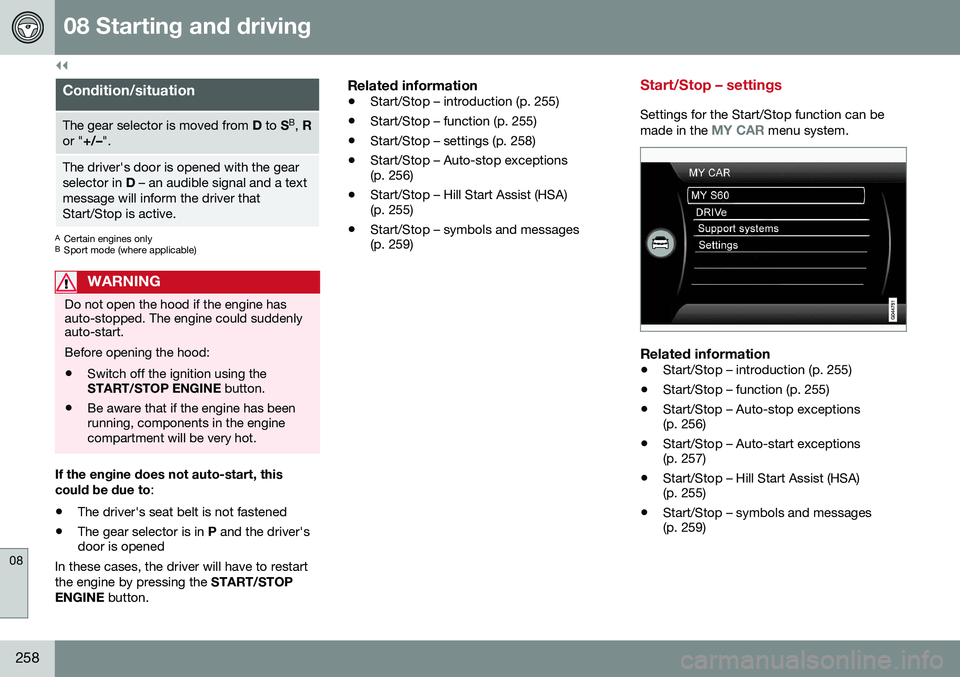
Settings for the Start/Stop function can be
made in the MY CAR menu system.
Related information
• Start/Stop – introduction (p. 255)
• Start/Stop – function (p. 255)
• Start/Stop – Auto-stop exceptions (p. 256)
• Start/Stop – Auto-start exceptions(p. 257)
• Start/Stop – Hill Start Assist (HSA)(p. 255)
• Start/Stop – symbols and messages(p. 259)
Page 271 of 392

08 Starting and driving
08
269
Parking brake – symbols and messages
A text message can be erased by pressing briefly on the OK button on the turn signal
lever.
Symbol and messages in the instrument panel
SymbolMessageDescription/action
"Message"Read the message in the information display
A flashing symbol indicates that the parking brake is being applied. If the symbol flashes in any other situation then this means that a fault has arisen. Read the message on the information display.
-Park brake not fully releasedA fault is preventing the parking brake from being released. Try to apply the parking brake and release it sev- eral times. If the problem persists, contact an authorized Volvo workshop. If you drive off with this error mes-sage showing, a warning signal sounds.
-Parking brake not appliedA fault is preventing the parking brake from being applied. Try to apply the parking brake and release it several times. If the problem persists, contact an authorized Volvo workshop. If you drive off with this error messageshowing, a warning signal sounds.
-Parking brake Service requiredA fault has occurred. Try to apply and release. Contact a Volvo workshop if the fault remains
WARNING
If the vehicle must be parked before the fault has been corrected, always put thegear selector in P and turn the wheels so
that they point away from the curb if thevehicle is pointing uphill or toward the curbif it is pointing downhill.
Related information
• Parking brake – general information (p. 266)
• Parking brake – applying (p. 266)
• Parking brake – releasing (p. 267)
• Brakes – general (p. 262)
Page 280 of 392

||
08 Starting and driving
08
278* Option/accessory, for more information, see Introduction.
•
Using the transmission's Sport mode 14
may increase fuel consumption some- what. Use the transmission's Drive ( D)
position as often as possible. For addi-tional information about Sport mode, seeTransmission – Geartronic (p. 252).
• Using the engine's optional Eco func- tion15
can help improve fuel economy. For
additional information, see ECO* (p. 260).
• Do not exceed posted speed limits.
• Avoid carrying unnecessary items (extra load) in the vehicle.
• Maintain correct tire pressure. Check tirepressure regularly (when tires are cold).
• Remove snow tires when threat of snowor ice has ended.
• Note that roof racks, ski racks, etc,increase air resistance and also fuel con-sumption.
• At highway driving speeds, fuel consump-tion will be lower with the air conditioningon and the windows closed than with theair conditioning off and the windowsopen.
• Using the onboard trip computer's fuelconsumption modes can help you learnhow to drive more economically.
Other factors that decrease gas mileage are: •
Dirty air cleaner
• Dirty engine oil and clogged oil filter
• Dragging brakes
• Incorrect front end alignment
Some of the above mentioned items and oth-ers are checked at the standard maintenanceintervals.
WARNING
Driving with the trunk open: Driving with
the trunk open could lead to poisonous exhaust gases entering the passengercompartment. If the trunk must be keptopen for any reason, proceed as follows:
• Close the windows
• Set the ventilation system control to air flow to floor, windshield and side win-dows and the blower control to itshighest setting.
Handling and roadholdingAt the specified curb weight your vehicle has a tendency to understeer, which means thatthe steering wheel has to be turned morethan might seem appropriate for the curva-ture of a bend. This ensures good stabilityand reduces the risk of rear wheel skid.Remember that these properties can alterwith the vehicle load. The heavier the load in the trunk, the less the tendency to under-steer. •
Vehicle load, tire design and inflation pressure all affect vehicle handling.Therefore, check that the tires are inflatedto the recommended pressure accordingto the vehicle load. Loads should be dis-tributed so that capacity weight or maxi-mum permissible axle loads are notexceeded.
• At the specified curb weight your vehiclehas a tendency to understeer, whichmeans that the steering wheel has to beturned more than might seem appropriatefor the curvature of a bend. This ensuresgood stability and reduces the risk of rearwheel skid. Remember that these proper-ties can alter with the vehicle load. Theheavier the load in the trunk, the less thetendency to understeer.
Related information
• Climate – general information (p. 118)
14
Certain models only.
15 Available on certain 4-cyl. engines