Page 2 of 412
Front view
Fig. 2 Vehicle front overview.
Key to fig. 2:
(1) Inside mirror with sensor on mirror base for:
– Rain sensor (if equipped)
– Low-light sensor (if equipped)
– Light Assist (if equipped)
(2) Windshield wipers
(3) Engine hood release
(4) Headlights (on left and right)
(5) Fog lights (on left and right, if equipped) ,
(6) Threaded hole for the front towing eye (behind cover)
(7) Side marker lights (on left and right)
(8) Sensor for the Forward Collision Warning system (behind the Volkswagen emblem)
Page 3 of 412
Rear view
Fig. 3 Vehicle rear overview.
Key to fig. 3:
(1) Rear window:
– Rear window defroster
(2) High-mounted brake light
(3) Taillights (on left and right)
(4) Area for:
– Luggage compartment release
– Rear View Camera system (if equipped)
(5) License plate lights
(6) Threaded hole for the rear towing eye (behind cover)
(7) Roof antenna (if equipped)
(8) Sensors for the Blind Spot Monitor with Rear Traffic Alert (on left and right, if equipped)
Page 76 of 412
Please carry out each step only in the order specified:
4.
Press and hold the programmed HomeLink button and watch the indicator light. If the indicator light comes on and does not flash, programming is complete and your garage door opener or other device should activate when the HomeLink button is pressed and released. If the indicator light blinks rapidly for 2 seconds and then stays on, proceed with the follow-ing programming instructions for a rolling code device. A second person may make the following steps quicker and easier. Please use a ladder or other device. Do not stand on
your vehicle to perform the next steps ⇒ in Operating the HomeLink® Universal Transmitter
5.
At the garage door opener receiver (overhead unit) in the garage, locate the “learn” or “training” button. The name and color of the button may vary by manufacturer. This button is usually located near the hanging antenna wire attachment point on the unit. If you cannot locate the “training” button, refer to the garage door opener’s user manual.
6. Press and release the “training” button. Once the button is pressed, you have 30 seconds to initiate the next step.
7. Return to the vehicle. Firmly press and hold the programmed HomeLink button for 2 se-conds and release.
8. Repeat the “press/hold/release” sequence up to 3 times to complete the programming process for that button.
Repeat the steps to program the other buttons for the HomeLink® Universal Transmitter on the sun visor keypad to control other devices.
Deleting programming for all buttons
Be sure to delete programming on all buttons on the sun visor keypad before selling the vehicle or turning it over to people you do not know.
x Complete the programming preparation steps described above.
x Press and hold buttons 1 and 3 at the same time, for about 20 seconds.
x When the indicator light above button 2 begins to flash, immediately release buttons 1 and 3. This step deletes all old settings.
After programming
Test the garage door opener
Operating the HomeLink® Universal Transmitter
Page 85 of 412
fig. 41,
⇒ fig. 42 Function Action
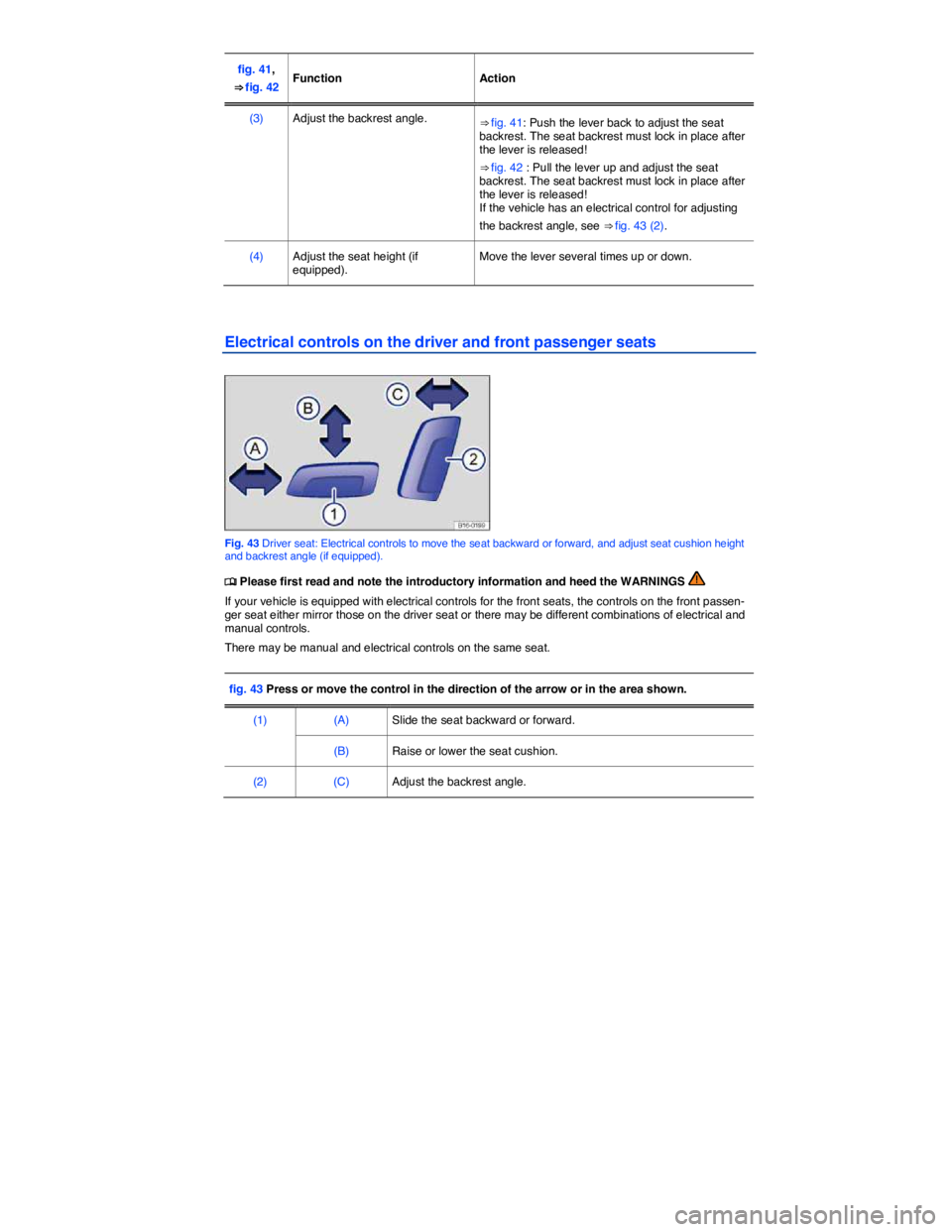
(3) Adjust the backrest angle. ⇒ fig. 41: Push the lever back to adjust the seat backrest. The seat backrest must lock in place after the lever is released!
⇒ fig. 42 : Pull the lever up and adjust the seat backrest. The seat backrest must lock in place after the lever is released! If the vehicle has an electrical control for adjusting
the backrest angle, see ⇒ fig. 43 (2).
(4) Adjust the seat height (if equipped). Move the lever several times up or down.
Electrical controls on the driver and front passenger seats
Fig. 43 Driver seat: Electrical controls to move the seat backward or forward, and adjust seat cushion height and backrest angle (if equipped).
Page 116 of 412

Daytime running lights (DRL)
Separate lamps are installed in the headlights or in the front bumper for the daytime running lights (DRL).
The daytime running lights are switched on whenever the ignition is switched on and the light switch is in position / or !54/.
When the daytime running lights are switched on, only these separate lamps come on ⇒ .
If the light switch is in position !54/, a low-light sensor switches the low beams as well as the instru-ment and switch lighting on and off automatically.
Daytime running lights (DRL) parking feature
Some models are equipped with a daytime running lights (DRL) parking feature that switches the daytime running lights off when the parking brake is engaged and the ignition is switched on.
Function Action
Switching the DRL off: – Switch the ignition on. – Turn the light switch to the / position. – Set the parking brake.
Switching the DRL back on: – Release the parking brake.
Static cornering lights
Your vehicle may have fog lights under the front bumper, which on some models are also static cor-nering lights. On some models the static cornering lights may be integrated in the headlights. At speeds below about 25 mph (40 km/h), the light on one side of the vehicle will come on automatically when you turn a corner. If you turn to the right, the right fog light comes on; turn left and the left fog light comes on. The light dims and goes out when the steering wheel is straightened out again.
When you move the selector lever to Reverse (R), the static cornering lights on both sides of the vehicle may come on so that you can see the area around the vehicle better when backing up.
The static cornering lights work only when the headlights are on. If you are using automatic headlights
(headlight switch in the !54/ position ⇒ fig. 80), they work only when the headlights have been auto-matically switched on. The static cornering lights do not come on when the headlight switch is in the /
position or when the fog lights themselves have been switched on ⇒ Switching lights on and off.
Automatic headlights (!54/)
Your vehicle may be equipped with automatic headlights (!54/), which are a convenience feature only and cannot always recognize all lighting and driving situations.
If the light switch is in the !54/ position, both vehicle lighting and instrument and switch lighting are
automatically switched on and off in the following situations ⇒ :
Automatic activation: Automatic deactivation:
If the low-light sensor registers darkness, for example when driving through a tunnel. If sufficient brightness is registered.
If the rain sensor recognizes rain and switches the windshield wipers on. If the windshield wipers have not moved for several minutes.
Page 142 of 412
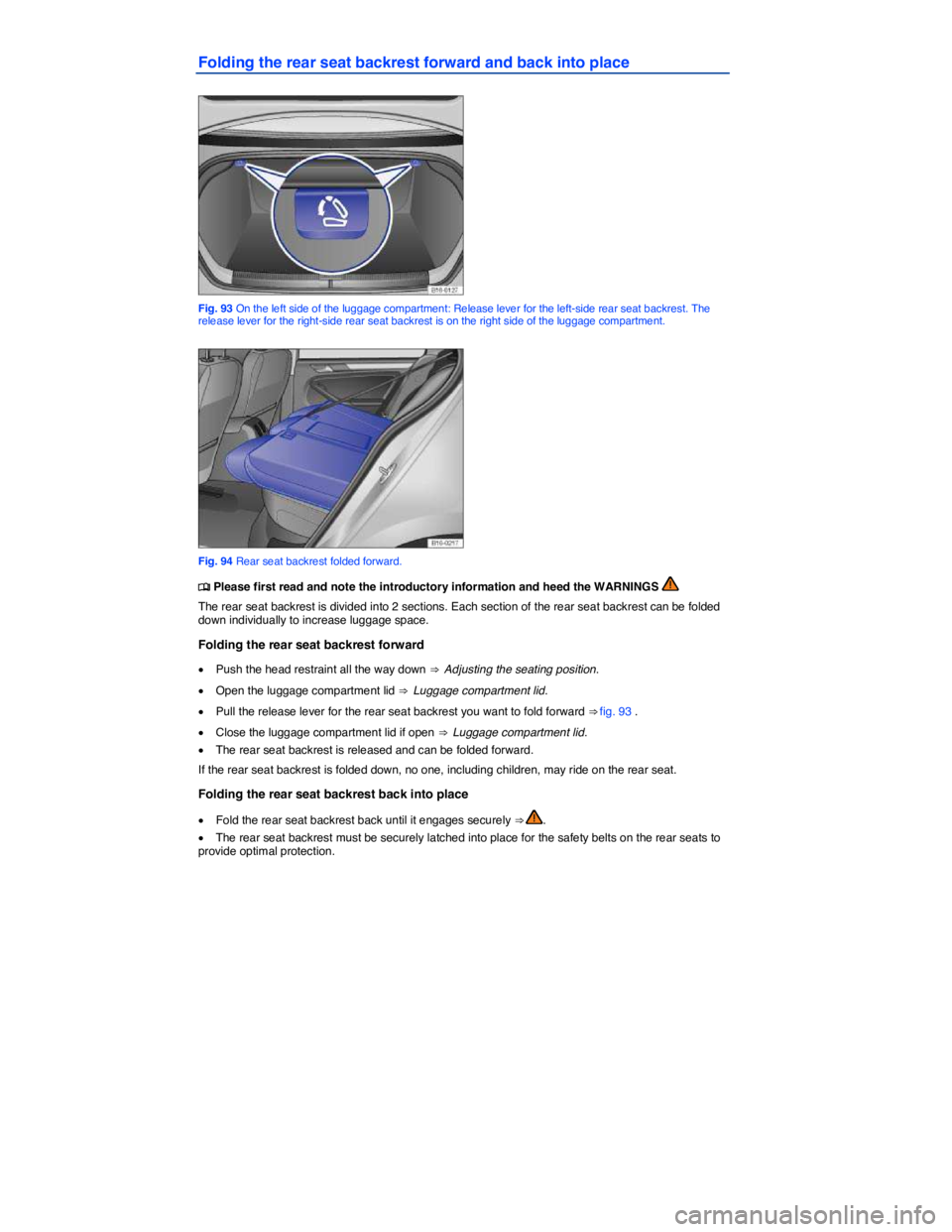
Folding the rear seat backrest forward and back into place
Fig. 93 On the left side of the luggage compartment: Release lever for the left-side rear seat backrest. The release lever for the right-side rear seat backrest is on the right side of the luggage compartment.
Fig. 94 Rear seat backrest folded forward.
Page 143 of 412
WARNING
Improper folding and improper latching of the rear seat backrest can cause serious personal injury.
x Always make sure there are no people or animals in the area around the rear seat backrest when folding it forward.
x Never fold the rear seat backrest forward or back while the vehicle is moving.
x When folding the rear seat backrest back up, make sure that the safety belt does not get caught or damaged.
x Keep hands, fingers, feet and other body parts out of the way when folding the rear seat backrest forward or back.
x Each rear seat backrest must be securely latched in the upright position so that the safety belts on the rear seats can provide protection. This is particularly the case for the middle seat on the rear seat bench.
x If a seat is used with an unsecured backrest, the passenger will move forward together with the rear seat backrest during sudden braking, driving maneuvers, or in a collision.
x No one, including children, may ride on the rear seats if the rear seat backrest is folded down or not correctly latched.
NOTICE
Before folding the rear seat backrest forward, adjust the front seats so that the rear seat's head restraint or backrest cushion will not touch the front seats.
There is a separate release lever in the luggage compartment for each rear seat backrest sec-tion.
Luggage compartment pass-through
Fig. 95 In the rear seat backrest: Opening the luggage compartment pass-through (if equipped).
Page 144 of 412
If the center armrest is folded down, no one can sit on the middle seat of the rear bench.
Opening the pass-through
x Fold down the rear center armrest ⇒ Adjusting the seating position.
x Push down the release button ⇒ fig. 95 (A) and fold the pass-through cover (1) down into the luggage compartment (B).
x Take the cover out of its bracket and bring it forward into the passenger compartment.
x Stow the cover securely in the luggage compartment.
x Slide long objects from the luggage compartment through the pass-through.
x Secure objects with the safety belt.
x Close the luggage compartment lid.
Closing the pass-through
x Working from the vehicle passenger compartment, guide the pass-through cover (1) into the lug-gage compartment and push the release button to engage it in its bracket.
x Pull the cover shut until it locks into place. Make sure it is securely locked into place.
x If necessary, fold the center armrest up.
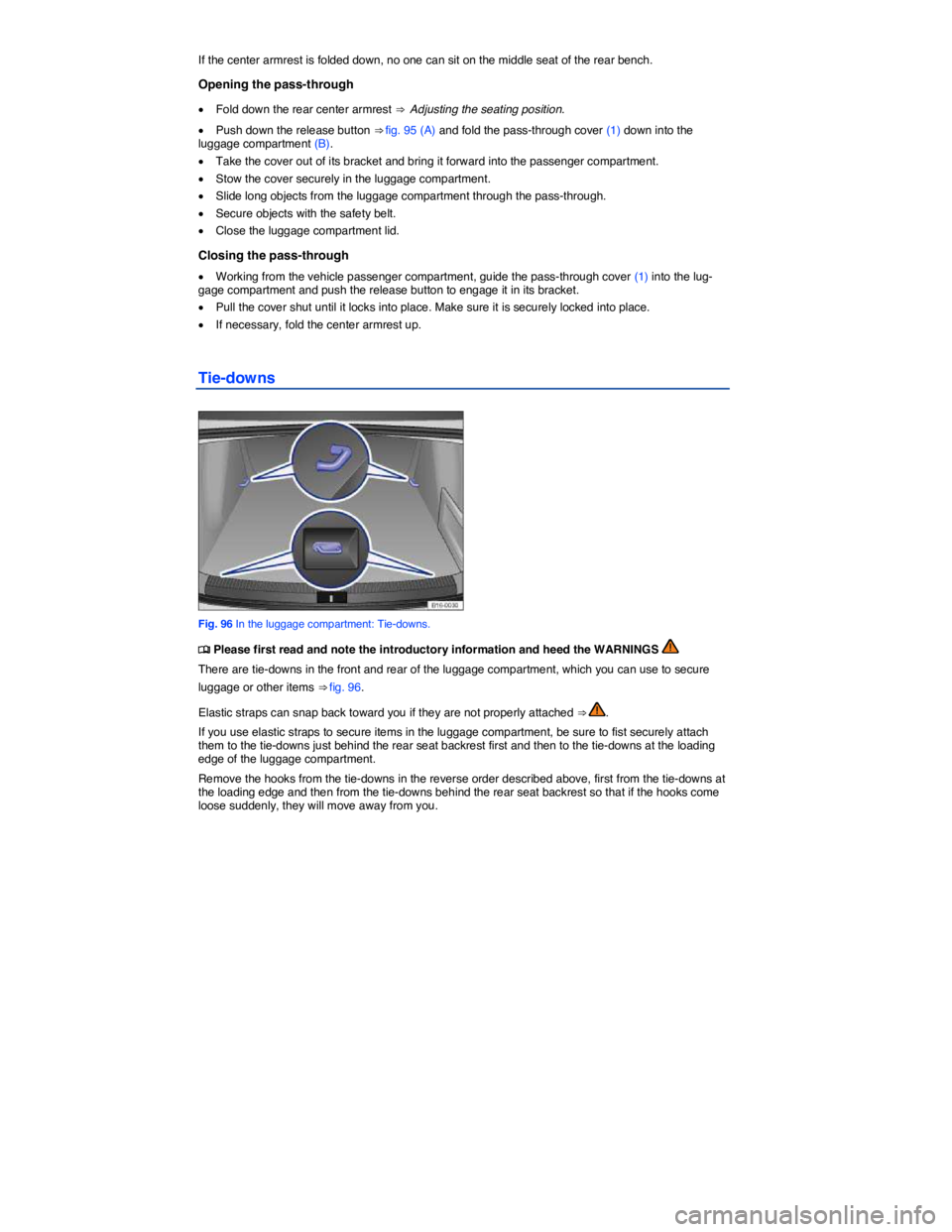
Tie-downs
Fig. 96 In the luggage compartment: Tie-downs.