2016 VOLKSWAGEN JETTA o ring
[x] Cancel search: o ringPage 20 of 412

Using the instrument cluster menus
Fig. 15 On the right side of the steering column (vehicles without a multi-function steering wheel): Windshield wiper lever with controls for instrument cluster menus and displays.
Fig. 16 Right side of the multi-function steering wheel (if equipped): Controls for the menus in the instrument cluster display.
Page 24 of 412

Display Function
Route -- mi Distance driven in miles (km) per trip memories 1 and 2 (toggle).
Route -- km
Average speed -- mph Average speed on trips per trip memories 1 and 2 (toggle). Displayed once the vehicle has been driven about 300 feet (100 m). Until then, dashes may appear instead of a number. The value displayed is updated every 5 seconds. Average speed -- km/h
-- mph Digital display of the current vehicle speed.
-- km/h
Oil temperature ---°F Current engine oil temperature.
Oil temperature ---°C
Speed warning --- mph When the set speed (from 20–155 mph or 30–250 km/h) is exceeded, an acoustic warning sounds and a visual message may also appear in the instrument cluster display. Speed warning --- km/h
Switching between the displays
x Use the arrow up and down buttons (* and +) on the multi-function steering wheel or use the 42)0
rocker switch on the windshield wiper lever ⇒ fig. 15 (2).
Storing speed for the speed warning
x Select the Speed warning or c display.
x Press the /+ button to save the current speed and to activate the warning.
x If the speed is not right, press buttons * or + on the multi-function steering wheel or use the 42)0
rocker switch ⇒ fig. 15 (2) to set a different speed within about 5 seconds. Then press the /+ button a second time or just wait a few seconds. The speed is saved and the warning is activated.
x To deactivate, toggle to Speed warning or c and press the /+ button. The set speed is deleted.
Manually erasing trip memory 1 or 2
x Select the trip memory to be erased.
x Press the /+ button for about 2 seconds.
Enabling and disabling displays (Premium version)
Use the Settings menu, submenu MFI data to enable displays you want to be available under the MFI menu in the instrument cluster display. The units in which data is displayed can also be changed
⇒ Settings menu.
Page 33 of 412
NOTICE
Volkswagen is not responsible for vehicle damage caused by inferior-quality or malicious application software, poorly programmed application software, insufficient wireless service reception, data loss during transmission or misuse of mobile devices.
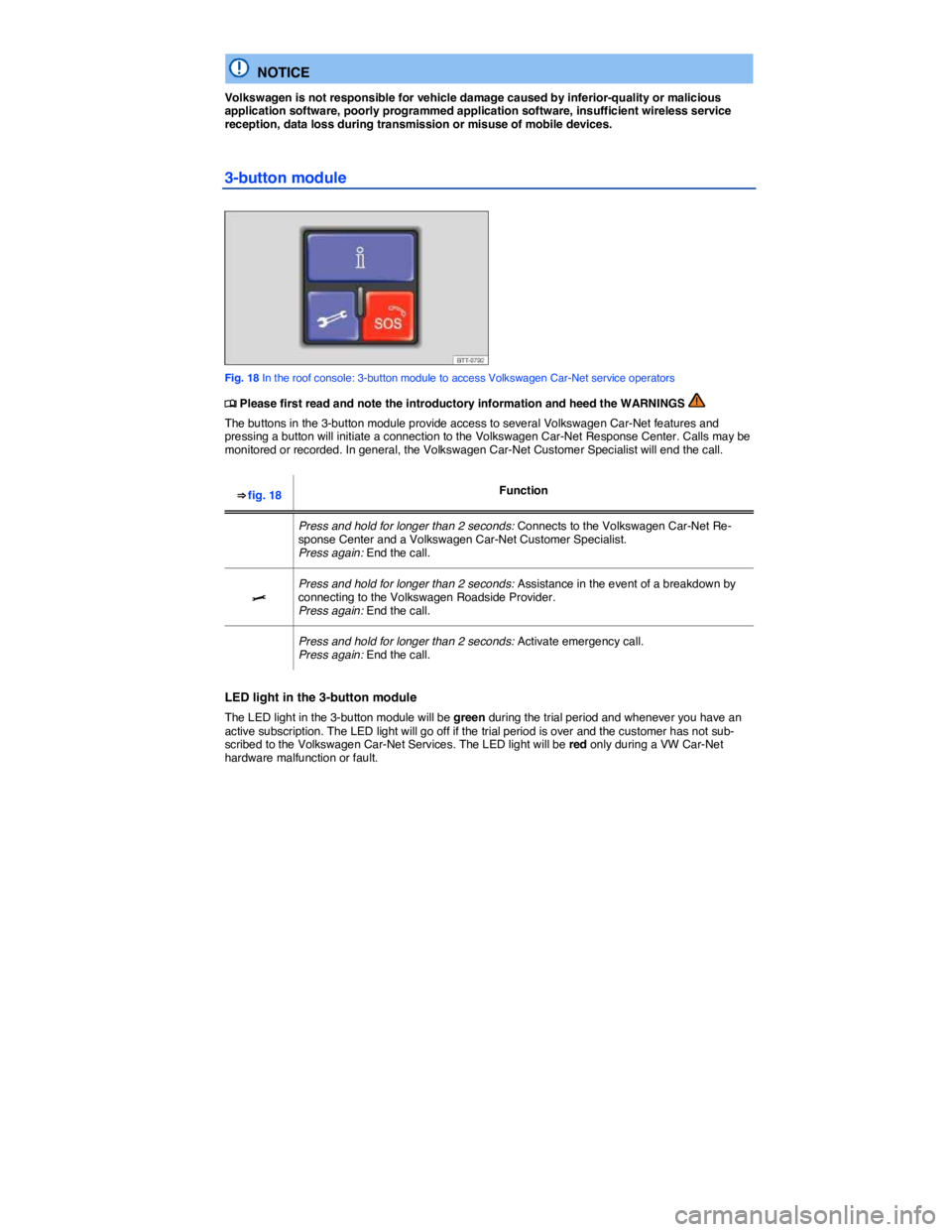
3-button module
Fig. 18 In the roof console: 3-button module to access Volkswagen Car-Net service operators
Page 34 of 412
WARNING
Application software and Volkswagen Car-Net services that are unsuitable or improperly used can cause accidents, serious personal injury and vehicle damage.
x Volkswagen Car-Net services can be used only where adequate cellular and GPS signals are available
x Volkswagen recommends using only services and application software that are provided by Volkswagen or Verizon Telematics, Inc. (VzT) specifically for your vehicle.
x Protect the mobile device and its application software from misuse.
x Never modify application software and Volkswagen Car-Net services.
x Always read and heed the operating instructions for the mobile device.
WARNING
Driver distraction causes accidents, collisions and serious personal injury! Using application software and Volkswagen Car-Net services while driving can distract the driver from traffic.
x Always drive attentively and responsibly.
NOTICE
The system does not support simultaneous Volkswagen Car-Net and mobile phone calls via the mobile phone package.
x When a Volkswagen Car-Net service is accessed through the 3-button module call buttons any calls on a mobile device connected to the vehicle’s mobile phone package will be automat-ically disconnected.
x Initiating or accepting a call on a mobile device connected to the vehicle's mobile phone package could end any connection to the Volkswagen Car-Net Response Center made through the , > or buttons.
x Calls on a mobile device connected to the vehicle's mobile phone package cannot be ac-cepted or initiated during an automated emergency connection to the Volkswagen Car-Net Response Center; for example, because an airbag has deployed.
Page 48 of 412

WARNING
Improper use of power locks can result in serious personal injury.
x The power locking button locks all doors. Locking the doors from the inside can help prevent unintended door opening during a collision and can also prevent unwanted entry from the outside. Locked doors can, however, delay assistance to vehicle occupants and rescue from the outside in an accident or other emergency.
x Never leave children or anyone who cannot help themselves behind in the vehicle. All doors can be locked from the inside with the power lock button. This could leave people trapped in the vehicle in an emergency. Depending on the time of year, people trapped in the vehicle can be exposed to very high or very low temperatures.
x A closed vehicle can become very hot or very cold, depending on the season. Particularly in the summer, heat buildup in the passenger and luggage compartment of a parked vehicle can result in temperatures in the vehicle that are much higher than the outside temperatures. Temperatures can quickly reach levels that can cause unconsciousness and death, particu-larly to small children.
x Never allow passengers to remain in a locked vehicle. In an emergency any person still inside the vehicle might not be able to get out.
Indicator light in the driver door
Page 54 of 412

To use the convenience closing feature to close all power windows and the sunroof, hold your finger on the lock sensor surface on the outside of the door handle for a few seconds until the windows and sunroof close.
Remove your finger from the lock sensor surface ⇒ fig. 28 (B) to stop the function. If you touch the unlock sensor surface (A) on the inside of the door handle immediately after releasing the lock sensor surface (B), all of the windows will open (safety function).
Pinch protection is active during convenience closing of the windows and the power sunroof.
NOTICE
The door handle sensor surfaces can be activated by a strong stream of water or steam if a valid vehicle key is within range of the vehicle.
x All windows may open if you turn the spray of water or steam away from and then back onto the door handle sensor surface in quick succession. If at least one power window is opened and the sensor is continuously activated, convenience closing is started.
The door may not open if the outside and inside door handles are used at the same time.
If the vehicle battery or the battery in the remote control vehicle key is weak or dead, it might not be possible to unlock and lock the vehicle using Keyless Access. The vehicle can still be manually
locked or unlocked with the key bit ⇒ Manually unlocking and locking the driver door.
A driver message appears in the instrument cluster display if there is no remote control vehicle key inside the vehicle or if the system does not recognize the remote control vehicle key. The key may not be recognized, for example, if it is covered by something that interferes with the signal (such as a briefcase), or if the remote control vehicle key battery is weak. Electronic devices such as mobile phones can also interfere with the signal.
Dirt on the door handles that contains a lot of salt (especially in winter) can affect the way the
door handle sensors work. Cleaning the door handles can help with this problem ⇒ Exterior care and cleaning.
If the automatic transmission is not in Park (P) position, the electronic steering column lock will not lock and the vehicle will not lock via sensors in the front door handles or the remote control vehicle key.
Anti-theft alarm system
Page 55 of 412

When is the alarm triggered?
The anti-theft alarm system sounds for about 30 seconds and the turn signals flash for up to 5 minutes if the following occurs with respect to the locked vehicle:
x Opening a door that has been mechanically unlocked.
x Forcibly opening a door.
x Forcibly opening the engine hood.
x Forcibly opening the luggage compartment lid.
x Switching on the ignition with an invalid key.
x Disconnecting the vehicle battery.
Deactivating the alarm
Unlock the vehicle with the unlock button on the remote control vehicle key or switch on the ignition with a valid remote control vehicle key.
For vehicles with Keyless Access, the alarm can be deactivated by grasping one of the front door handles when a valid vehicle key is in range or by holding the remote control vehicle key to the right of
the steering column trim and pressing the starter button ⇒ Starter button.
After the alarm has stopped and the vehicle is opened again in the same or a different area that is protected by the alarm, the alarm is triggered again. For example, the alarm will sound again if the luggage compartment lid is opened after one of the doors has been opened.
The anti-theft alarm system is not activated when the vehicle is locked with the power lock switch
Page 67 of 412

Closing the window without pinch protection
x Try to close the window again within 10 seconds by holding the switch. Pinch protection is turned off for a short distance in the window track!
x If closing takes longer than about 10 seconds, pinch protection is turned on again. The window stops again if there is resistance.
x If the window still will not close, please see an authorized Volkswagen dealer or an authorized Volkswagen Service Facility.
WARNING
Without pinch protection, power windows will close with enough force to cause serious per-sonal injury.
x Always be careful when closing power windows.
x Always make sure that no one is in the way when overriding pinch protection to close power windows!
x Pinch protection cannot prevent fingers or other parts of the body from being pressed against the window frame; injuries may result.
Pinch protection is also active during convenience closing of the windows and the power sunroof
⇒ Power windows – features.