2016 VAUXHALL MOVANO_B lock
[x] Cancel search: lockPage 88 of 233

86Instruments and controlsControl indicator R remains
illuminated after the ignition is
switched on if the parking brake is
applied 3 135.
When the parking brake is released,
R illuminates (possibly in
combination with C) if the brake fluid
level is too low 3 159.9 Warning
Stop. Do not continue your
journey. Consult a workshop.
Brake system 3 134.
Antilock brake system (ABS)
u illuminates yellow.
Illuminates briefly when the ignition is
switched on. The system is ready for
operation when u extinguishes.
If control indicators u and A
illuminate with the messages CHECK
ABS and CHECK ESP in the Driver
Information Centre (DIC) 3 89,
there is a fault in the ABS. The brake
system remains operational but
without ABS regulation.
If control indicators u, A , R and
C illuminate, the ABS and ESP are
deactivated and the message
BRAKING FAULT is displayed. Seek
the assistance of a workshop.
Antilock brake system 3 134.
Upshift
k or j illuminates yellow.
Illuminates when gearshifting is
recommended for fuel saving
reasons.
ECO mode 3 116.
Lane departure warning
ì illuminates when the system is
switched on and ready to operate.
A warning chime sounds in
conjunction with ì when the system
recognises an unintended lane
change.
Lane departure warning 3 146.Electronic Stability Program
b flashes or illuminates yellow.
Illuminates briefly when the ignition is
switched on.
Flashing during driving
The system is actively engaged.
Engine output may be reduced and the vehicle may be braked
automatically to a small degree
3 137.
Illuminates during driving The system is unavailable.
May illuminate together with control
indicator A 3 85. A corresponding
message also appears in the Driver Information Centre (DIC) 3 89.
ESP® Plus
3 137, Traction Control
system 3 136.
Electronic Stability Program off
Ø illuminates green.
Page 90 of 233

88Instruments and controlsIlluminates briefly when the ignition is
switched on.
Illuminates when the engine is
runningCaution
Engine lubrication may be
interrupted. This may result in
damage to the engine and/or
locking of the drive wheels.
1. Depress clutch.
2. Select neutral gear, set selector lever to N.
3. Move out of the flow of traffic as quickly as possible without
impeding other vehicles.
4. Switch off ignition.
9 Warning
When the engine is off,
considerably more force is needed
to brake and steer. During an
Autostop the brake servo unit will still be operational.
Do not remove key until vehicle isstationary, otherwise the steeringwheel lock could engage
unexpectedly.
Check oil level before seeking
assistance of a workshop 3 156.
Low fuel
Y illuminates yellow.
Illuminates when the ignition is
switched on and extinguishes shortly
after the engine starts.
Illuminates when the engine is
running
Fuel level in the tank is too low. Refuel
immediately.
Never run the tank dry.
Refuelling 3 148.
Catalytic converter 3 124.
Bleeding the diesel fuel system
3 161.
Stop-start system
\
Illuminates when an Autostop is
inhibited when certain conditions are
not fulfilled.
Ï illuminates or flashes yellow /
green.
Illuminates
Illuminates green during an Autostop.
If Ï illuminates yellow there is a fault
in the stop-start system. Seek the
assistance of a workshop.
Flashes
Flashes green during an automatic
restart.
Stop-start system 3 119.
Exterior light
9 illuminates green.
Illuminated when the exterior lights
are on 3 95.
High beam
P illuminates blue.
Illuminated when high beam is on and during headlight flash 3 96.
Page 91 of 233

Instruments and controls89High beam assistí illuminates when the high beam
assist is activated 3 96.
Fog light > illuminates green.
Illuminated when the front fog lights are on 3 98.
Rear fog light r illuminates yellow.
Illuminated when the rear fog light is
on 3 99.
Cruise control m , U illuminates green or yellow.
m illuminates green when a certain
speed is stored.
U illuminates green when the system
is on.
Speed limiter U illuminates yellow.
U illuminates yellow when the
system is on.Cruise control, Speed limiter 3 139.
Tachograph
& illuminates when there is a fault
3 94.
Door open y illuminates yellow.
Illuminates with the ignition switched
on when a door or the load
compartment is open.
Depending on version, control
indicator also illuminates in
transmission display, indicating
relevant open door.Information displays
Driver Information Centre The Driver Information Centre (DIC)
is located in the instrument cluster
below the speedometer.
Depending on vehicle configuration,
the following items appear in the
display:
● outside temperature 3 75
● clock 3 75
● odometer, trip odometer 3 78
● engine oil level monitor 3 80
● service display 3 80
Page 93 of 233

Instruments and controls91Tyre pressure monitoring system
3 177.
Warning chimes
When starting the engine or whilst driving
Only one warning chime will sound at
a time.
The warning chime regarding
unfastened seat belts has priority
over any other warning chime.
● If seat belt is not fastened 3 47.
● If a certain speed is exceeded with the parking brake applied
3 135.
● If the parking assist detects an object or a fault is present
3 142.
● If the vehicle has manual transmission automated and the
clutch temperature is too high 3 130.
● If the vehicle speed briefly exceeds a set limit 3 77.
● During closing of the power sliding door 3 26.● If the sliding door is open and the
parking brake is released 3 26.
● During activation and deactivation of alarm monitoring
of vehicle inclination 3 31.
● If the AdBlue level falls below a certain amount or a fault is
present 3 125.
● If the lane departure warning system detects an unintended
lane change and when the
system is activated 3 146.
When the vehicle is parked and/or the driver's door is opened
● When the key is in the ignition switch.
● With exterior lights on.
● If the vehicle has manual transmission automated 3 130;
the parking brake has not been
applied, neutral is not selected or the brake pedal has not been
depressed. A corresponding
message may also appear in the
Driver Information Centre (DIC)
3 89.● If the sliding side door exterior
handle is in the open position
when unlocking the vehicle 3 26.
● If the engine is in an Autostop but
not switched off. Stop-start
system 3 119.
Page 94 of 233

92Instruments and controlsTrip computerThe trip computer provides
information on driving data, which is
continually recorded and evaluated electronically.
Depending on vehicle, the following
functions can be selected by pressing button repeatedly on end of wiper
lever:
● fuel used
● average consumption
● instantaneous consumption
● range
● distance travelled
● average speed
● distance before service 3 80
● clock 3 75
● odometer 3 78, trip odometer
3 78
● cruise control and speed limiter stored speed 3 139
● tyre pressures 3 177
● fault and information messages
Fuel used Displays the amount of fuel
consumed since the last reset.
The measurement can be restarted at any time by pressing and holding the
button on the end of the wiper lever.
Average consumption
The value is displayed after driving a distance of 0.25 miles.
Average consumption is displayed,
taking into consideration the distance
travelled and the fuel used since the
last reset.
The measurement can be restarted at
any time.Instantaneous consumption
The value is displayed after reaching
a speed of 20 mph.
Range
The value is displayed after driving a distance of 0.25 miles.
The range is calculated from the
current contents of the fuel tank and
the average consumption since the
last reset.
The range will not display if control
indicator Y is illuminated in the
instrument cluster 3 88.
The measurement can be restarted at
any time.
Distance travelled
Displays the distance driven since the
last reset.
The measurement can be restarted at
any time.
Average speedThe value is displayed after driving a
distance of 0.25 miles.
Page 101 of 233
Lighting99Front fog lights operate with engine
running and headlights switched on.
Rear fog lights
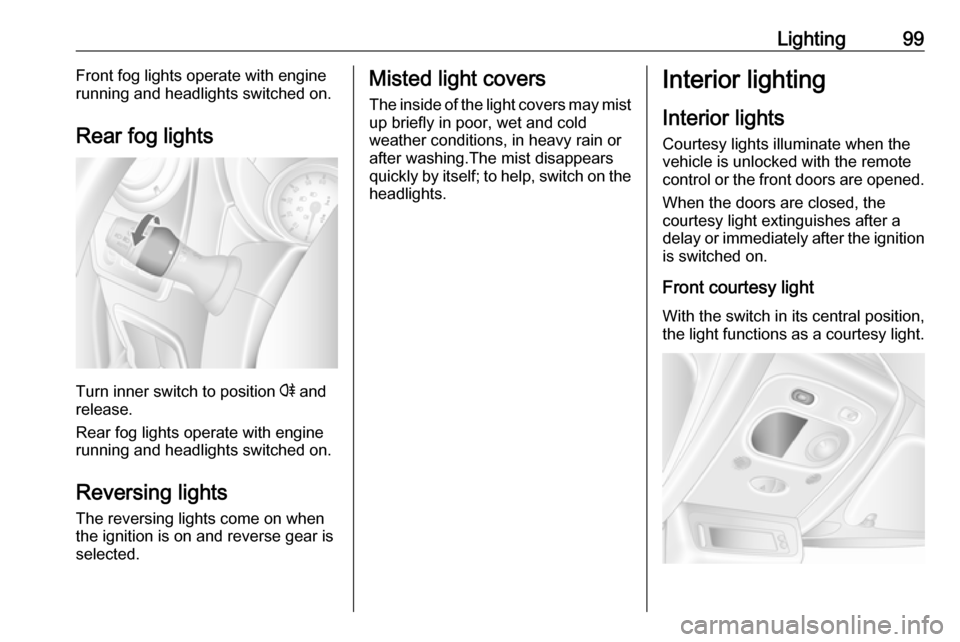
Turn inner switch to position r and
release.
Rear fog lights operate with engine
running and headlights switched on.
Reversing lights
The reversing lights come on when
the ignition is on and reverse gear is
selected.
Misted light covers
The inside of the light covers may mist up briefly in poor, wet and cold
weather conditions, in heavy rain or
after washing.The mist disappears
quickly by itself; to help, switch on the
headlights.Interior lighting
Interior lights
Courtesy lights illuminate when the vehicle is unlocked with the remote
control or the front doors are opened.
When the doors are closed, the
courtesy light extinguishes after a
delay or immediately after the ignition
is switched on.
Front courtesy light
With the switch in its central position,
the light functions as a courtesy light.
Page 102 of 233
100LightingOperated by pressing the switch c:
● on constantly
● on when the doors are unlocked and opened
● off constantly
Rear courtesy lights
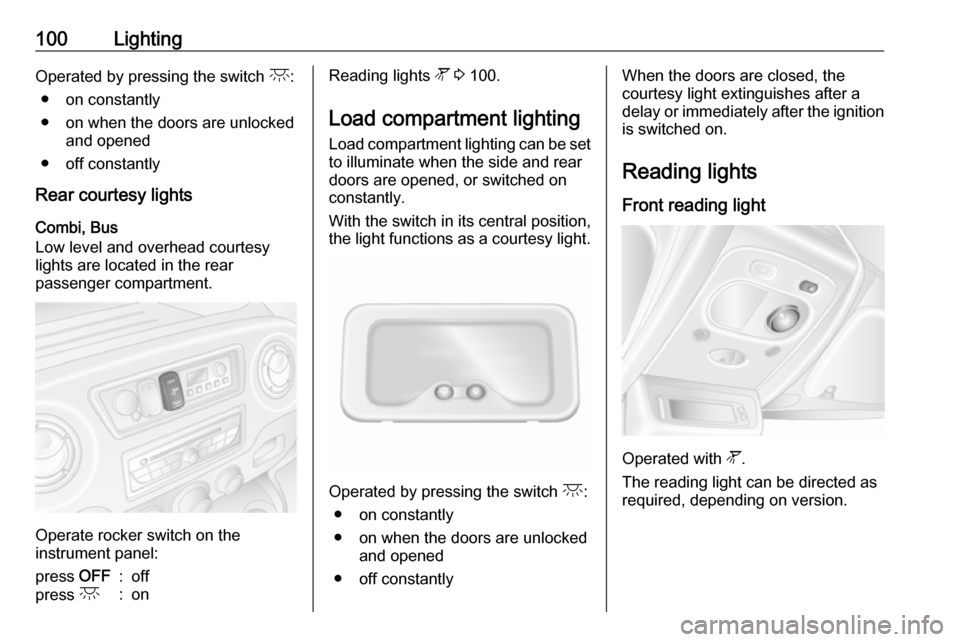
Combi, Bus
Low level and overhead courtesy
lights are located in the rear
passenger compartment.
Operate rocker switch on the
instrument panel:
press OFF:offpress c:onReading lights l 3 100.
Load compartment lighting Load compartment lighting can be setto illuminate when the side and rear
doors are opened, or switched on
constantly.
With the switch in its central position,
the light functions as a courtesy light.
Operated by pressing the switch c:
● on constantly
● on when the doors are unlocked and opened
● off constantly
When the doors are closed, the
courtesy light extinguishes after a
delay or immediately after the ignition
is switched on.
Reading lights
Front reading light
Operated with l.
The reading light can be directed as
required, depending on version.
Page 110 of 233

108Climate controlThe display will remain illuminated forapprox. 15 seconds after the ignition
is switched off.
Operating the rear compartment
additional heating
Press Y to operate heating. Y will
appear in the display to indicate that
the heating is operating.
Changing the period for which
heating is operating
With the heating switched off ( Y
extinguished in display), press m for
approx. 3 seconds until the time
period for which heating is provided
flashes in the display.
Press m or n to adjust the heating
duration. The duration is set when the
display extinguishes.
Programming the heating mode
It is possible to store up to three
programmes which allow the heating
to be switched on.
Press P the appropriate number of
times to select the desired stored programme.Press m or n briefly; the
programming time flashes in the
display.
Press m or n to adjust to the
desired time, then, as soon as the
time display stops flashing, adjust the day by pressing m or n .
The time and day are set when the
display stops flashing and the clock is displayed.
Recalling a programming mode
To activate a stored programme,
press P the appropriate number of
times until the corresponding number appears on the display.
Neutral position or no stored
programme activated
Press P until there is no stored
programme number visible in the
display.
Adjusting the temperature To adjust the temperature of the
heating, turn the rotary knob located
on the control panel.turn clockwise:increase
temperatureturn anti-clock‐
wise:decrease
temperature
Rear air conditioning
system
The rear air conditioning system is
actuated in conjunction with the front
passenger compartment air
conditioning system.
Bus
Rear air vents