2016 VAUXHALL INSIGNIA door lock
[x] Cancel search: door lockPage 40 of 327

38Keys, doors and windowsFolding mirrors with remote
control
This function is only available if thevehicle is equipped with electrical
seat memory.
Press e again after locking for
one second to fold in mirrors.
Press c again after unlocking for
one second to fold out mirrors.
Pressing for three seconds activates
window operation. Power windows
3 40. Sunroof 3 43.
If the mirrors were folded in using the
control in the driver's door, they are
not folded out by pressing c.
This function can be activated or
deactivated in the Vehicle
personalisation.
Select the relevant setting in Settings,
I Vehicle in the Colour-Info-Display.
Colour-Info-Display 3 117.
Vehicle personalisation 3 121.
The settings are automatically stored
for the key being used 3 23.
Heated mirrors
Operated by pressing Ü.
The LED in the button indicates
activation.
Heating works with the engine
running and is switched off
automatically after a short time.
Automatic dimming Dazzling by following vehicles at night
is automatically reduced by dimming
the exterior mirror on the driver's side.
Parking assist For mirrors with position memory, theexterior mirror on the passenger side
is automatically aimed at the rear
tyres as a parking aid when reverse
gear is selected, except during trailer
operation.
Position memory 3 50.
Activation or deactivation of this
function can be changed in the menu Settings in the Info-Display. Vehicle
personalisation 3 121.
Page 43 of 327

Keys, doors and windows41Safety function
If the window glass encounters
resistance above the middle of the
window during automatic closing, it is immediately stopped and opened
again.
Override safety function In the event of closing difficulties due
to frost or the like, switch on the
ignition, then pull the switch to the first
detent and hold. The window moves
up without safety function enabled.
To stop movement, release the
switch.Child safety system for rear
windows
Press z to deactivate rear door
power windows; the LED illuminates.
To activate, press z again.
Comfort operating with the
remote control
Front windows or all windows can be
operated remotely from outside the
vehicle.
Press c again for three seconds after
unlocking: windows will be opened.
Press e again for three seconds after
locking: windows will be closed.
Press any button to stop window
movement.
Folding mirrors 3 37.
Closing sunroof 3 43.
Confirmation
Complete opening or closing of the
windows is confirmed by the hazard
warning flashers.
Page 54 of 327
52Seats, restraintsStoring positions by remote control
Actual driver's seat and exterior
mirror positions are automatically
stored by the radio remote control key each time the ignition is switched off.
These stored positions are
independent of the memory positions
stored by the buttons 1 or 2.
The stored positions are
automatically recalled by unlocking
and opening the driver's door with the
memorised radio remote control key.
If the door is already open, press c on
remote control to activate the recall.
To stop recall movement, press one
of the memory-, power mirror- or
power seat controls.
This function can be activated or
deactivated in the vehicle
personalisation.
Select the relevant setting in Settings,
I Vehicle in the Colour-Info-Display.
Colour-Info-Display 3 117.
Vehicle personalisation 3 121.Easy exit function
For a convenient exit out of the
vehicle, the power driver seat moves
rearwards when vehicle is stationary.
To activate, switch off ignition,
remove key from the ignition switch
and open the driver's door. If the door
is already open, switch off ignition to
activate the recall.
To stop recall movement, press one
of the memory- or power seat
controls.
This function can be activated or
deactivated in the vehicle
personalisation.
Select the relevant setting in Settings,
I Vehicle in the Colour-Info-Display.
Colour-Info-Display 3 117.
Vehicle personalisation 3 121.
Safety function
If the driver's seat encounters
resistance during movement, the
recall may stop. After removing the
obstruction, press and hold the
appropriate power seat position
button for the memory item for
two seconds. Try recalling thememory position again. If the recall
does not operate, consult a
workshop.
Overload
If the seat setting is electrically
overloaded, the power supply is
automatically cut-off for a short time.
Notice
After an accident in which airbags have been deployed, the memorised
settings for each position button will
be deactivated.
Armrest
Page 86 of 327

84Instruments and controlsInstruments and
controlsControls ....................................... 85
Steering wheel adjustment ........85
Steering wheel controls .............85
Heated steering wheel ...............85
Horn ........................................... 86
Windscreen wiper/washer .........86
Rear window wiper/washer .......88
Outside temperature ..................89
Clock ......................................... 89
Power outlets ............................. 91
Ashtrays .................................... 92
Warning lights, gauges and indi‐ cators ........................................... 93
Instrument cluster ......................93
Speedometer ............................. 99
Odometer .................................. 99
Trip odometer ............................ 99
Tachometer ............................. 100
Fuel gauge .............................. 100
Fuel selector ............................ 101
Engine coolant temperature gauge ..................................... 101
Service display ........................ 101
Control indicators ....................103Turn signal............................... 103
Seat belt reminder ...................103
Airbag and belt tensioners .......104
Airbag deactivation ..................104
Charging system .....................104
Malfunction indicator light ........105
Brake and clutch system .........105
Operate pedal .......................... 105
Electric parking brake ..............105
Electric parking brake fault ......105
Antilock brake system (ABS) ...106
Upshift ..................................... 106
Gear shifting ............................ 106
Variable effort steering ............106
Following distance ...................106
Lane departure warning ..........106
Ultrasonic parking assist .........106
Electronic Stability Control off . 107
Electronic Stability Control and Traction Control system .........107
Traction Control system off .....107
Engine coolant temperature ....107
Preheating ............................... 107
Diesel particle filter ..................107
AdBlue ..................................... 108
Tyre pressure monitoring system .................................... 108
Engine oil pressure ..................108
Low fuel ................................... 108
Immobiliser .............................. 109Autostop.................................. 109
Exterior light ............................ 109
High beam ............................... 109
High beam assist .....................109
Adaptive forward lighting .........109
Fog light ................................... 109
Rear fog light ........................... 109
Cruise control .......................... 109
Adaptive cruise control ............109
Vehicle detected ahead ...........110
Speed limiter ........................... 110
Traffic sign assistant ................110
Door open ................................ 110
Information displays ...................110
Driver Information Centre ........110
Colour-Info-Display ..................117
Smartphone controller .............118
Vehicle messages ......................119
Warning chimes .......................120
Battery voltage ........................ 120
Vehicle personalisation ..............121
OnStar® system ........................124
Page 125 of 327

Instruments and controls123Rainsense Wipers: Activates or
deactivates automatic wiping
with rain sensor.
Auto Wipe in Reverse Gear :
Activates or deactivates
automatic switching on of the
rear window wiper when reverse
gear is engaged.
● Lighting
Vehicle Locator Lights : Activates
or deactivates the welcome
lighting.
Exit Lighting : Activates or
deactivates and changes the
duration of exit lighting.
Left or Right Hand Traffic :
Changes between lighting for left or right hand traffic.
Adaptive Forward Lighting :
Changes the settings of the
functions of the adaptive forward
lighting.
● Power Door Locks
Unlocked Door Anti-Lockout :
Activates or deactivates the
automatic driver's door locking
function when the door is open.Auto Door Lock : Activates or
deactivates the automatic door locking function after switching
on ignition.
Auto Door Unlock : Changes the
configuration to unlock only the
driver's door or the whole vehicle after switching off ignition.
Delayed Door Lock : Activates or
deactivates the delayed door
locking function. This feature
delays the actual locking of the
doors until all doors are closed.
● Remote Lock, Unlock, Start
Remote Unlock Light Feedback :
Activates or deactivates the
hazard warning flasher feedback whilst unlocking.
Remote Lock Feedback :
Changes what kind of feedback
is given when locking the vehicle.
Remote Door Unlock : Changes
the configuration to unlock only
the driver's door or the whole
vehicle whilst unlocking.
Relock Remote Unlocked Doors :
Activates or deactivates the
automatic relock function afterunlocking without opening the
vehicle.
Passive Door Lock : Activates or
deactivates the passive locking
function. This feature locks the
vehicle automatically after
several seconds if all doors have
been closed and an electronic
key has been removed from the
vehicle.
Remote Left in Vehicle Alert :
Activates or deactivates the
warning chime when the
electronic key remains in the
vehicle.
Bluetooth
See Infotainment manual.
Voice
See Infotainment manual.
Display
See Infotainment manual.
Rear Camera
Guidance Lines : Activates or
deactivates the guiding lines.
Page 128 of 327

126Instruments and controlsSmartphone app
With the My Vauxhall smartphone
app, some vehicle functions can be
operated via a smartphone.
The following functions are available: ● Lock or unlock doors.
● Honk horn or flash lights.
● Check fuel level, engine oil life and tyre pressure (only with tyre
pressure monitoring system).
● Send navigation destination to the vehicle, if equipped with a
built-in navigation system.
● Locate vehicle on a map.
● Manage Wi-Fi settings.
To operate these functions, download the app from the respective app store.
Remote service
If desired, use any phone to call an
OnStar advisor, who can remotely
operate specific vehicle functions.
Find the respective OnStar phone
number on our country-specific
website.The following functions are available:
● Lock or unlock doors.
● Provide information on the vehicle location.
● Honk horn or flash lights.
Stolen vehicle assistance
If a vehicle is stolen, the OnStar
stolen vehicle assistance service can
provide support in locating and
recovering the vehicle.Theft alert
When the anti-theft alarm system is
triggered, a notification is sent to
OnStar. You are then informed about
this event by text message or email.
If required, report the theft to the
authorities and request OnStar stolen
vehicle assistance. Use any phone to call an OnStar advisor. Find the
respective OnStar phone number on
our country-specific website.Remote ignition block
By sending remote signals, OnStar
can block the ignition cycle
preventing the vehicle from restarting once it has been turned off.On-demand diagnostics
At any time e.g. if the vehicle displays a service message, press Z to
contact an OnStar advisor and ask to complete a real-time diagnostic check
to directly determine the issue.
Depending on the results, the advisor
will provide further support.
Monthly vehicle diagnostics
The vehicle automatically transmits
diagnostic data to OnStar which
sends a monthly email report to you
and your preferred workshop.
Notice
The workshop notification function
can be disabled in your account.
The report contains the status of key
operating systems of the vehicle like
engine, transmission, airbags,
antilock brakes, and other major
systems. It also provides information
on possible maintenance items and
tyre pressure (only with tyre pressure
monitoring system).
To look at the information in greater
detail, select the link within the email
and log into your account.
Page 140 of 327
138LightingLighting featuresCentre console lighting Spotlight incorporated in the interior
lighting comes on when headlights
are switched on.
Entry lighting
Welcome lighting Headlights, tail lights, number plate
lights, instrument panel light, interior
lights and puddle lights are switched
on for a short time by unlocking the
vehicle with the radio remote control.
This function works only in the dark
and facilitates locating the vehicle.
The lighting switches off immediately
when the ignition is switched on.
Starting off 3 16.
This function can be activated or
deactivated in the Vehicle
personalisation.
Select the relevant setting in Settings,
I Vehicle in the Colour-Info-Display.
Colour-Info-Display 3 117.
Vehicle personalisation 3 121.The settings can be saved for the key
being used 3 23.
The following lights will additionally
switch on when the driver's door is
opened:
● all switches
● Driver Information Centre ● door pocket lights
Exit lighting The following lights switch on if the
key is removed from the ignition
switch:
● interior lights
● instrument panel light
● puddle lights
They will switch off automatically after
a delay. This function works only in
the dark. Theatre lighting is activated
if the driver's door is opened during
this time.
Path lighting
Headlights, tail lights and number
plate lights illuminate the surrounding area for an adjustable time after
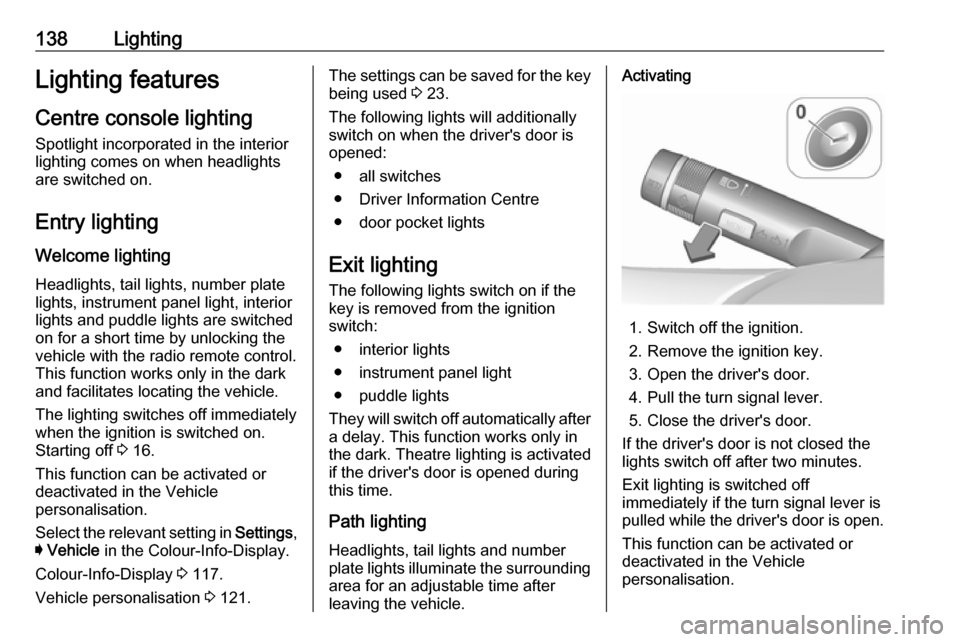
leaving the vehicle.Activating
1. Switch off the ignition.
2. Remove the ignition key.
3. Open the driver's door.
4. Pull the turn signal lever.
5. Close the driver's door.
If the driver's door is not closed the
lights switch off after two minutes.
Exit lighting is switched off
immediately if the turn signal lever is
pulled while the driver's door is open.
This function can be activated or
deactivated in the Vehicle
personalisation.
Page 144 of 327

142Climate controlStop-start system 3 159.
Demisting and defrosting the
windows V
●
Press V: fan automatically
switches to higher speed, the air
distribution is directed towards
the windscreen.
● Set temperature controller TEMP to warmest level.
● Switch on heated rear window Ü.
● Open side air vents as required and direct them towards the doorwindows.
Notice
If V is pressed while the engine is
running, an Autostop will be inhibited
until V is pressed again.
If V is pressed while the engine is
in an Autostop, the engine will restart
automatically.
Stop-start system 3 159.
Maximum cooling
Briefly open the windows so that hot
air can disperse quickly.
● Switch on cooling A/C.
● Press M for air distribution.
● Set temperature controller TEMP to coldest level.
● Set fan speed controller Z to
highest level.
● Open all vents.
Air recirculation system 4
Press 4 to activate air recirculation
mode. Activation is indicated by the
LED in the button.
Select air recirculation to assist in cooling the interior or in blocking
outside odors or exhaust. Whenrecirculation is selected, a partial
ventilation to refresh the interior air
will occur every 10 minutes.
Press 4 again to deactivate
recirculation mode.
In warm and very humid ambient air conditions, the windscreen might mist up from outside, when cold air is
directed to it. If windscreen mists up
from outside, activate windscreen
wiper and deactivate l.
Air distribution to l: Air recirculation
is deactivated.
Automatic climate control
system
In Automatic mode, temperature, fan
speed and air distribution are
regulated automatically.