Page 167 of 368
1674-6. Driving tips
4
Driving
Winter driving tips
●Use fluids that are appropriate to the prevailing outside tempera-
tures.
• Engine oil
• Engine coolant
• Washer fluid
● Have a service technician ins pect the condition of the battery.
● Have the vehicle fitted with four snow tires or purchase a set of tire
chains for the front tires.
Ensure that all tires are the same size and brand and that their wear
level is not noticeably different with each other. Also make sure that
chains match the size of the tires.
Perform the following accordin g to the driving conditions:
● Do not try to forcibly open a window or move a wiper that is frozen.
Pour warm water over the frozen area to melt the ice. Wipe away
the water immediately to prevent it from freezing.
● To ensure proper operation of the climate control system fan,
remove any snow that has accumulated on the air inlet vents in
front of the windshield.
● Check for and remove any excess ice or snow that may have accu-
mulated on the exterior lights, ve hicle’s roof, chassis, around the
tires or on the brakes.
● Remove any snow or mud from the bottom of your shoes before
getting in the vehicle.
Carry out the necessary preparations and inspections before
driving the vehicle in winter. Always drive the vehicle in a man-
ner appropriate to the prevailing weather conditions.
Preparation for winter
Before driving the vehicle
Page 171 of 368
171
5Interior features
5-1. Using the air conditioning system and defogger
Air conditioning system ..... 172
5-2. Using the audio system Steering wheel audio switches .......................... 180
AUX port/USB port ............ 181
5-3. Using the interior lights Interior lights list ................ 182• Interior light ................... 182
• Personal lights .............. 183
5-4. Using the storage features List of storage features ..... 184• Glove box...................... 185
• Cup holders .................. 185
• Bottle holders ................ 186
• Auxiliary box ................. 187
Luggage compartment features ........................... 188
5-5. Using the other interior features
Other interior features ....... 190 • Sun visors ..................... 190
• Vanity mirrors................ 190
• Power outlet .................. 191
• Assist grips ................... 192
Page 172 of 368
1725-1. Using the air conditioning system and defogger
Air conditioning system
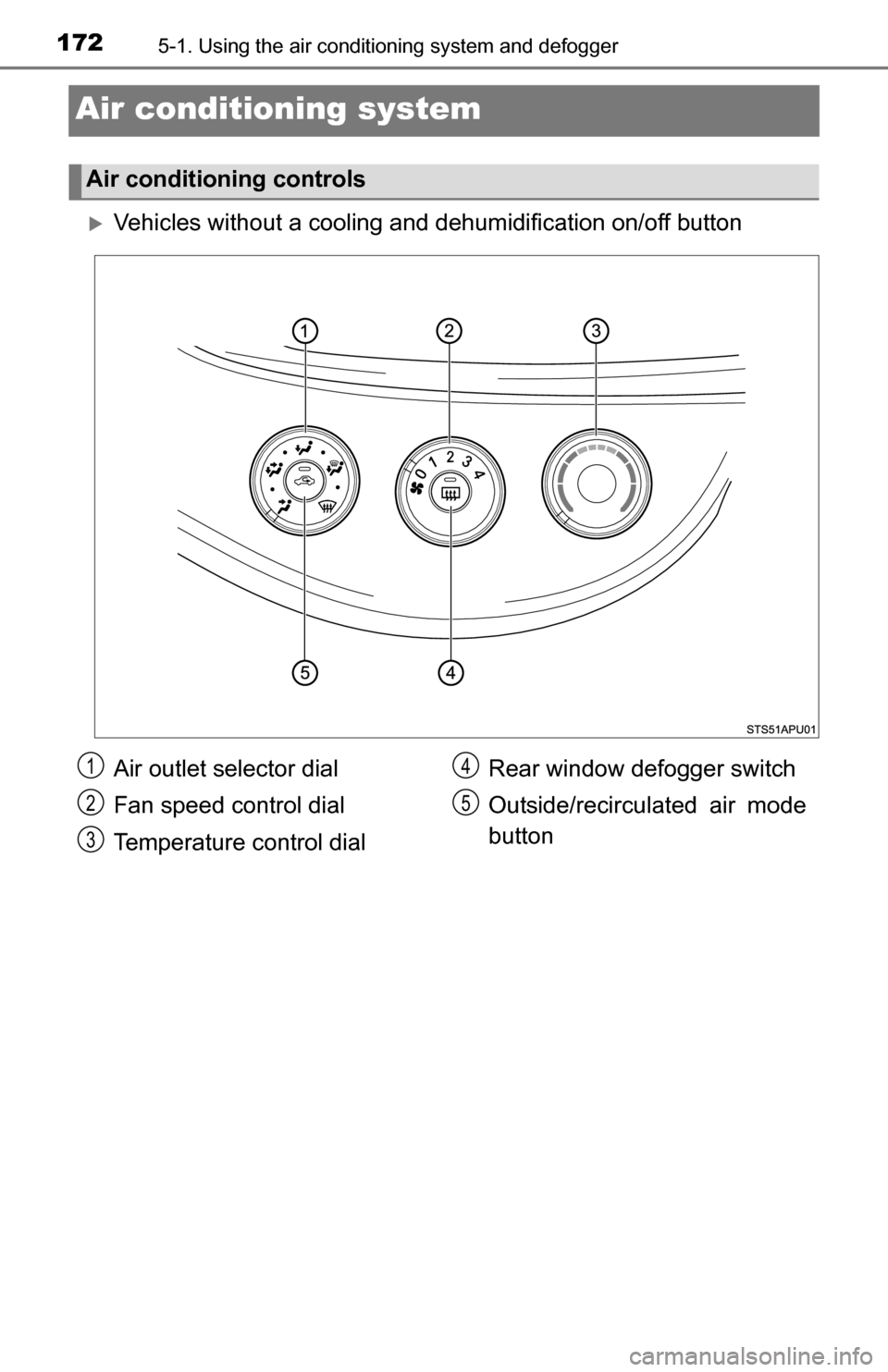
Vehicles without a cooling a nd dehumidification on/off button
Air conditioning controls
Air outlet selector dial
Fan speed control dial
Temperature control dial Rear window defogger switch
Outside/recirculated air mode
button1
2
3
4
5
Page 173 of 368
1735-1. Using the air conditioning system and defogger
5
Interior features
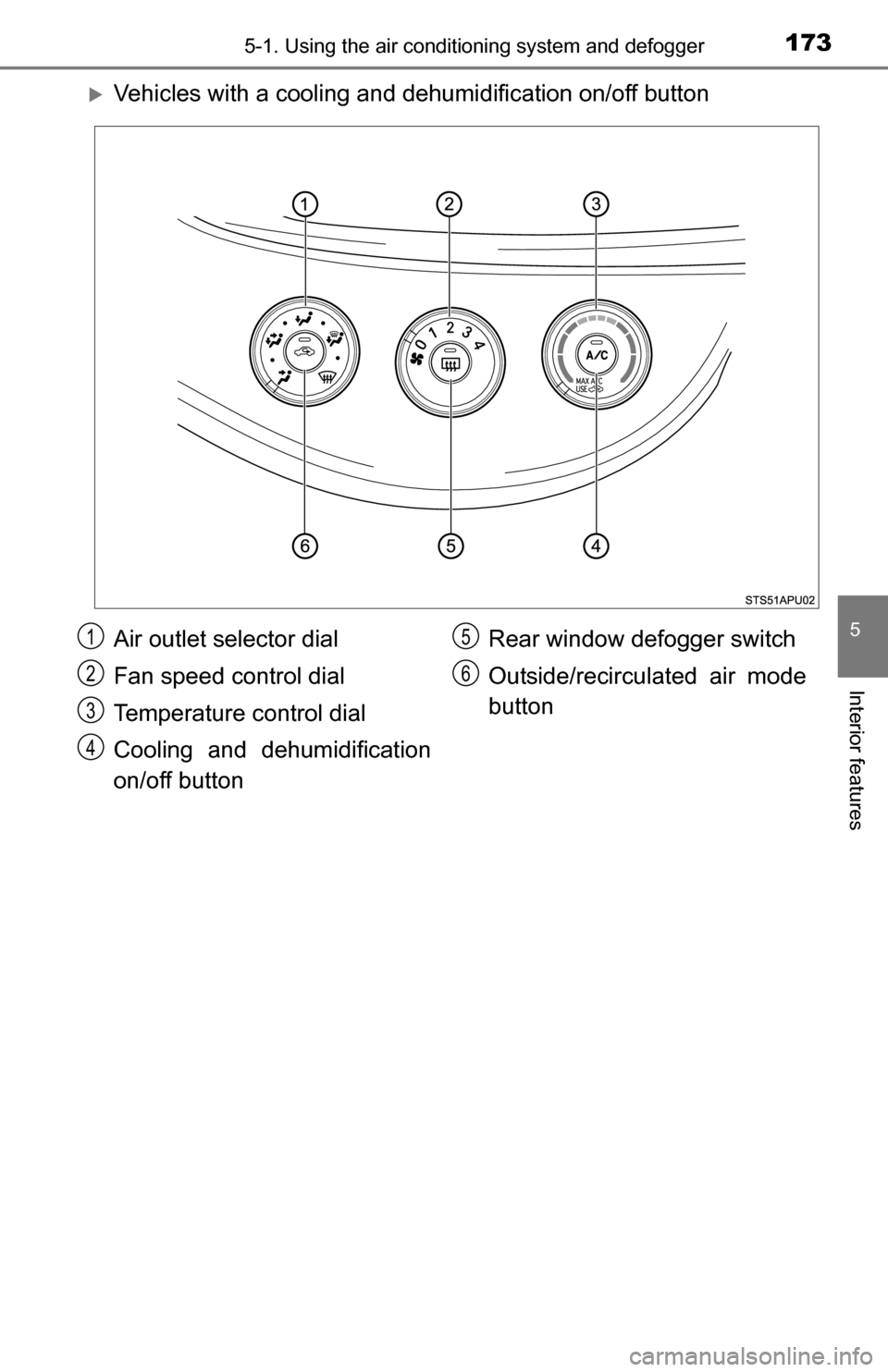
Vehicles with a cooling and dehumidification on/off button
Air outlet selector dial
Fan speed control dial
Temperature control dial
Cooling and dehumidification
on/off button Rear window defogger switch
Outside/recirculated air mode
button
1
2
3
4
5
6
Page 174 of 368

1745-1. Using the air conditioning system and defogger
■Adjusting the temperature setting
Vehicles without the button
Turn the temperature control dial clockwise to increase the temper-
ature.
Vehicles with the button
To adjust the temperature setting, turn the temperature control dial
clockwise (warm) or counterclockwise (cool).
If is not pressed, the system will blow ambient temperature air or
heated air.
For quick cooling, turn the temperature control dial to “MAX A/C” posi-
tion and set the outside/recirculated ai r mode button to recirculated air
mode.
■
Fan speed setting
To adjust the fan speed, turn the fan speed control dial clockwise
(increase) or counterclockwise (decrease).
Turning the dial to “0” turns off the fan.
■
Change the airflow mode
To select the air outlets, set the
air outlet selector dial to the
desired position.
The positions between the air
outlet selections can also be
selected for more delicate
adjustment.
Air flows to the upper body
Air flows to the upper body
and feet
Air flows to the feet
Air flows to the feet and the windshield defogger operates
The windshield defogger operates1
2
3
4
5
Page 175 of 368

1755-1. Using the air conditioning system and defogger
5
Interior features
■Other functions
●Switching between outside air and recirculated air modes
( P. 175)
● Defogging the windshield ( P. 175)
● Defogging the rear window and outside rear view mirrors
( P. 176)
■Switching between outside air and recirculated air modes
Press .
The mode switches between outside air mode (introduces air from
outside the vehicle) (indicator off) and recirculated air mode (recy-
cles air inside the vehicle) (indicator on) each time the button is
pressed.
■Defogging the windshield
Defoggers are used to defog the windshield and front side win-
dows.
Set the air outlet selector dial to position.
If the recirculated air mode is used, it will automatically switch to the out-
side air mode.
In this position, the outside/recirculated air mode cannot be changed to
the recirculated air mode.
Perform the following operations accordingly:
● To adjust the fan speed, turn the fan speed control dial.
● To adjust the temperature setting, turn the temperature control
dial.
● Vehicles with the button: If the dehumidification function is
not operating, press to oper ate the dehumidification func-
tion.
To defog the windshield and the side windows early, turn the air flow and
temperature up.
Other functions
Page 176 of 368
1765-1. Using the air conditioning system and defogger
■Defogging the rear window and outside rear view mirrors
Vehicles with a rear window defogger
Defogger is used to defog the rear window.
Press .
The defogger will automatically turn off after a period of time.
Vehicles with rear window and outside rear view mirror defoggers
Defoggers are used to defog the rear window, and to remove rain-
drops, dew and frost from the outside rear view mirrors.
Press .
The defoggers will automatically turn off after a period of time.
■
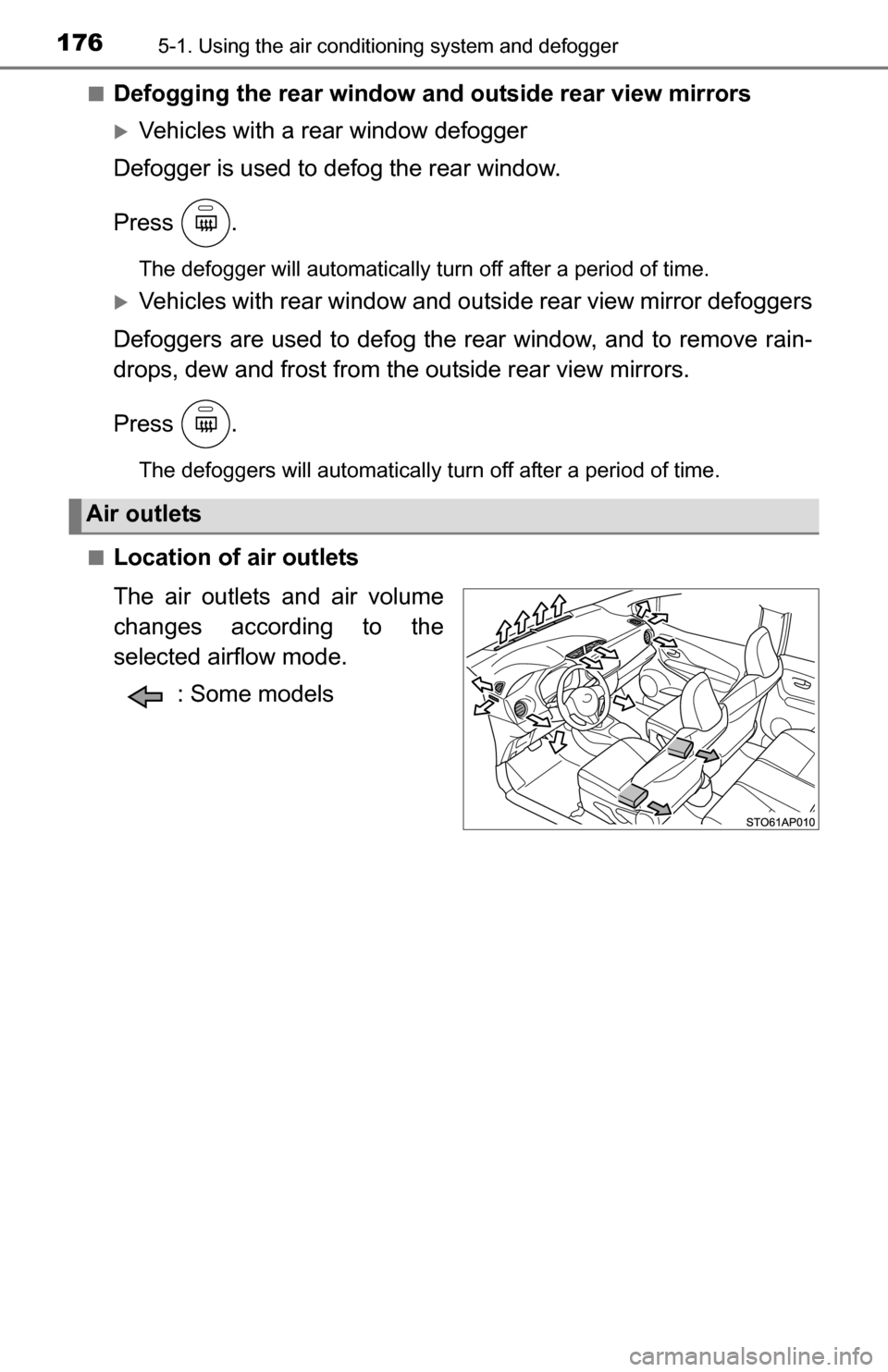
Location of air outlets
The air outlets and air volume
changes according to the
selected airflow mode. : Some models
Air outlets
Page 177 of 368
1775-1. Using the air conditioning system and defogger
5
Interior features
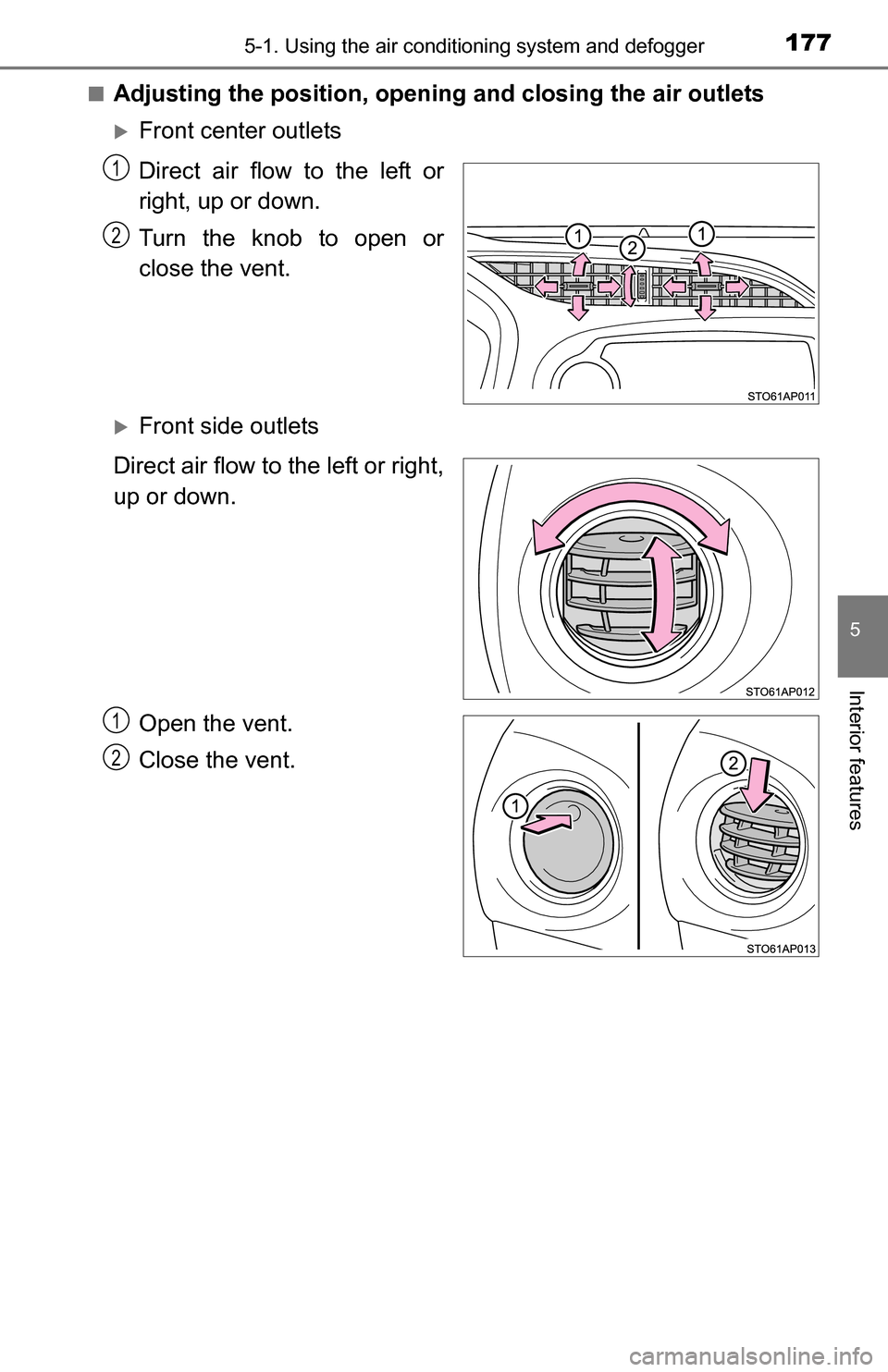
■Adjusting the position, openi ng and closing the air outlets
Front center outlets
Direct air flow to the left or
right, up or down.
Turn the knob to open or
close the vent.
Front side outlets
Direct air flow to the left or right,
up or down.
Open the vent.
Close the vent.
1
2
1
2