Page 483 of 664
483
4-3. Do-it-yourself maintenance
4
Maintenance and care
VERSO_EE_OM64590E
■ If the key battery is discharged
The following symptoms may occur.
● The smart entry & start system (if equipped) and wireless remote control
will not function properly.
● The operational range is reduced.
■ Use the following types of lithium battery
Vehicles without smart entry & start system: CR2016
Vehicles with smart entry & start system: CR1632
● Batteries can be purchased at any authorized Toyota dealer or repairer,
or another duly qualified and equipped professional, jewelers, or camera
stores.
● Replace only with the same or equivalent type recommended by any
authorized Toyota dealer or repairer, or another duly qualified and
equipped professional.
● Dispose of used batteries according to local laws.
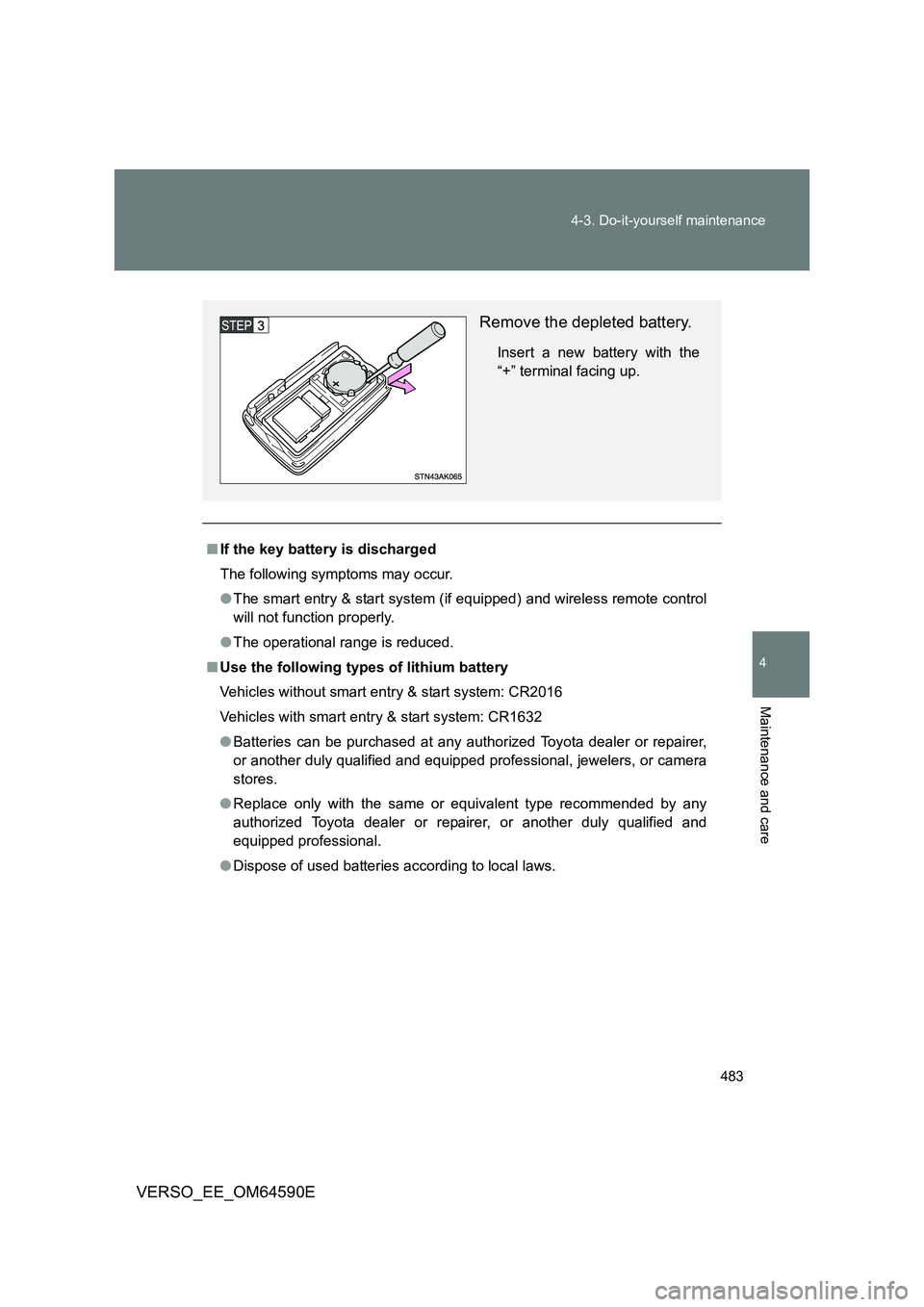
Remove the depleted battery.
Insert a new battery with the
“+” terminal facing up.
Page 484 of 664
484
4-3. Do-it-yourself maintenance
VERSO_EE_OM64590E
WARNING
■ Removed battery and other parts
These parts are small and if swallowed by a child, they can cause choking.
Keep away from children. Failure to do so could result in death or serious
injury.
■ Certification for the key battery
CAUTION: RISK OF EXPLOSION IF BATTERY IS REPLACED BY AN
INCORRECT TYPE. DISPOSE OF USED BATTERIES ACCORDING TO
THE INSTRUCTIONS
NOTICE
■ For normal operation after replacing the battery
Observe the following precautions to prevent accidents.
● Always work with dry hands.
Moisture may cause the battery to rust.
● Do not touch or move any other components inside the remote control.
● Do not bend the battery terminals.
Page 525 of 664
5When trouble arises
525
VERSO_EE_OM64590E
5-1. Essential information
Emergency flashers .......... 526
If your vehicle needs to
be towed ......................... 527
If you think something is
wrong .............................. 534
Fuel pump shut off system
(gasoline engine) ............ 535
5-2. Steps to take in an
emergency
If a warning light turns on
or a warning buzzer
sounds... ........................ 536
If a warning message is
displayed ........................ 545
If you have a flat tire
(vehicles with
spare tire) ....................... 560
If you have a flat tire
(vehicles with emergency
tire puncture repair kit).... 577
If the engine will not
start................................. 594
If the shift lever cannot be
shifted from “P” (vehicles
with a Multidrive)............. 597
If you lose your keys ......... 598
If you cannot operate
the back door opener...... 599
If the electronic key does
not operate properly
(vehicles with smart
entry & start system)....... 600
If the vehicle battery is
discharged ...................... 603
If your vehicle overheats ... 607
If the vehicle becomes
stuck ............................... 611
If your vehicle has to
be stopped in
an emergency ................. 613
Page 557 of 664
5
557
5-2. Steps to take in an emergency
When trouble arises
VERSO_EE_OM64590E
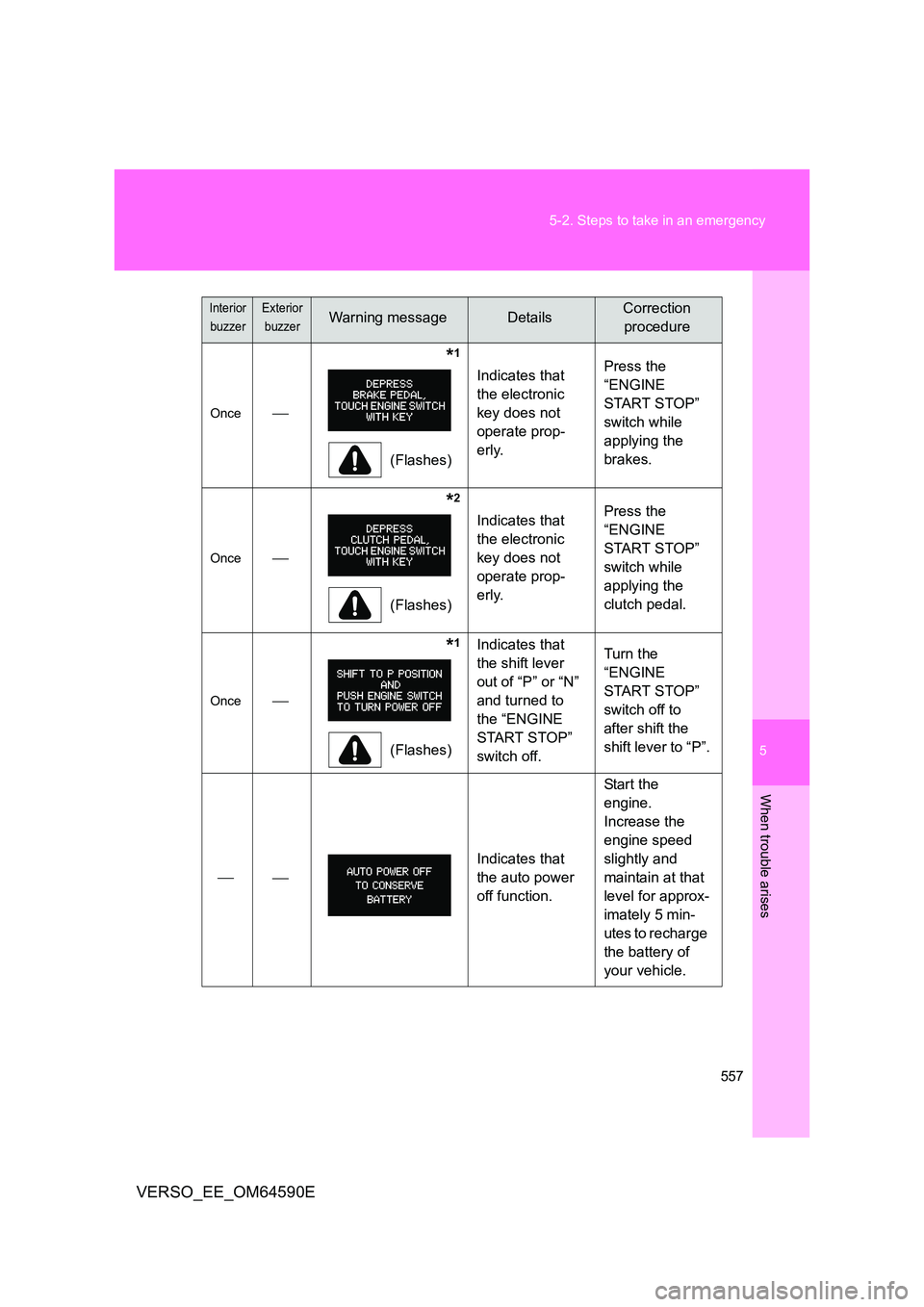
Once
*1
(Flashes)
Indicates that
the electronic
key does not
operate prop-
erly.
Press the
“ENGINE
START STOP”
switch while
applying the
brakes.
Once
*2
(Flashes)
Indicates that
the electronic
key does not
operate prop-
erly.
Press the
“ENGINE
START STOP”
switch while
applying the
clutch pedal.
Once
*1
(Flashes)
Indicates that
the shift lever
out of “P” or “N”
and turned to
the “ENGINE
START STOP”
switch off.
Turn the
“ENGINE
START STOP”
switch off to
after shift the
shift lever to “P”.
Indicates that
the auto power
off function.
Start the
engine.
Increase the
engine speed
slightly and
maintain at that
level for approx-
imately 5 min-
utes to recharge
the battery of
your vehicle.
Interior
buzzer
Exterior
buzzerWarning messageDetailsCorrection
procedure
Page 558 of 664
558
5-2. Steps to take in an emergency
VERSO_EE_OM64590E
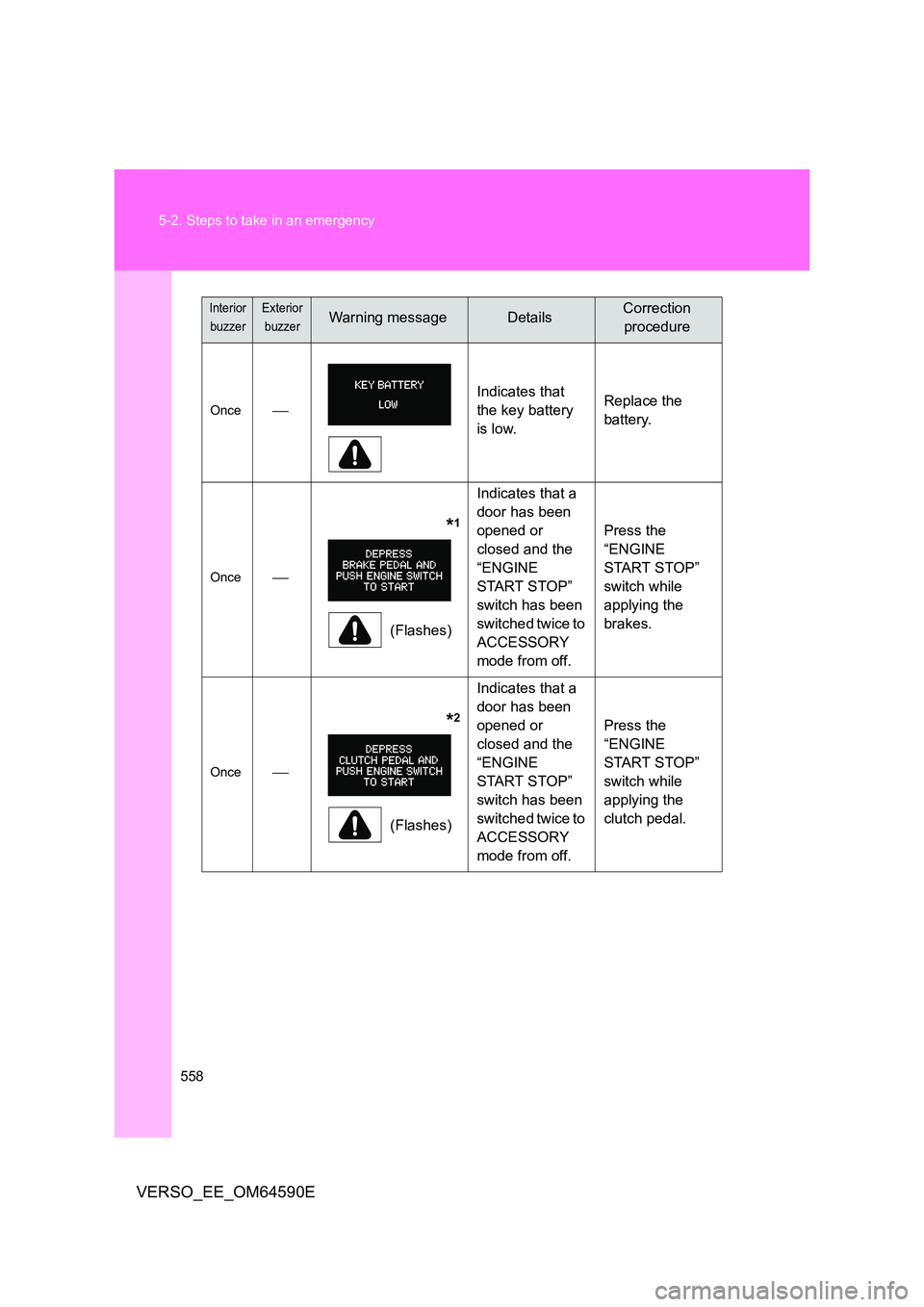
Once
Indicates that
the key battery
is low.
Replace the
battery.
Once
*1
(Flashes)
Indicates that a
door has been
opened or
closed and the
“ENGINE
START STOP”
switch has been
switched twice to
ACCESSORY
mode from off.
Press the
“ENGINE
START STOP”
switch while
applying the
brakes.
Once
*2
(Flashes)
Indicates that a
door has been
opened or
closed and the
“ENGINE
START STOP”
switch has been
switched twice to
ACCESSORY
mode from off.
Press the
“ENGINE
START STOP”
switch while
applying the
clutch pedal.
Interior
buzzer
Exterior
buzzerWarning messageDetailsCorrection
procedure
Page 594 of 664
594
5-2. Steps to take in an emergency
VERSO_EE_OM64590E
If the engine will not start
If the engine still does not start after following the correct starting
procedure ( P. 198, 202) or releasing the steering lock (P. 200,
205), confirm the following points.
■ The engine will not start even if you are carrying the correct
key
One of the following may be the cause of the problem.
● There may not be sufficient fuel in the vehicle’s tank.
Refuel the vehicle.
● The engine may be flooded. (gasoline engine)
Try to restart the engine once more following correct starting
procedures. ( P. 198, 202)
● There may be a malfunction in the engine immobilizer system.
( P. 124)
■ The starter motor turns over slowly, the personal/interior
lights and headlights are dim, or the horn does not sound or
sounds at a low volume
One of the following may be the cause of the problem.
● The battery may be discharged. (P. 603)
● The battery terminal connections may be loose or corroded.
Page 600 of 664
600
5-2. Steps to take in an emergency
VERSO_EE_OM64590E
If the electronic key does not operate properly (vehicles with smart entry & start system)
Locking and unlocking the doors and key linked functions
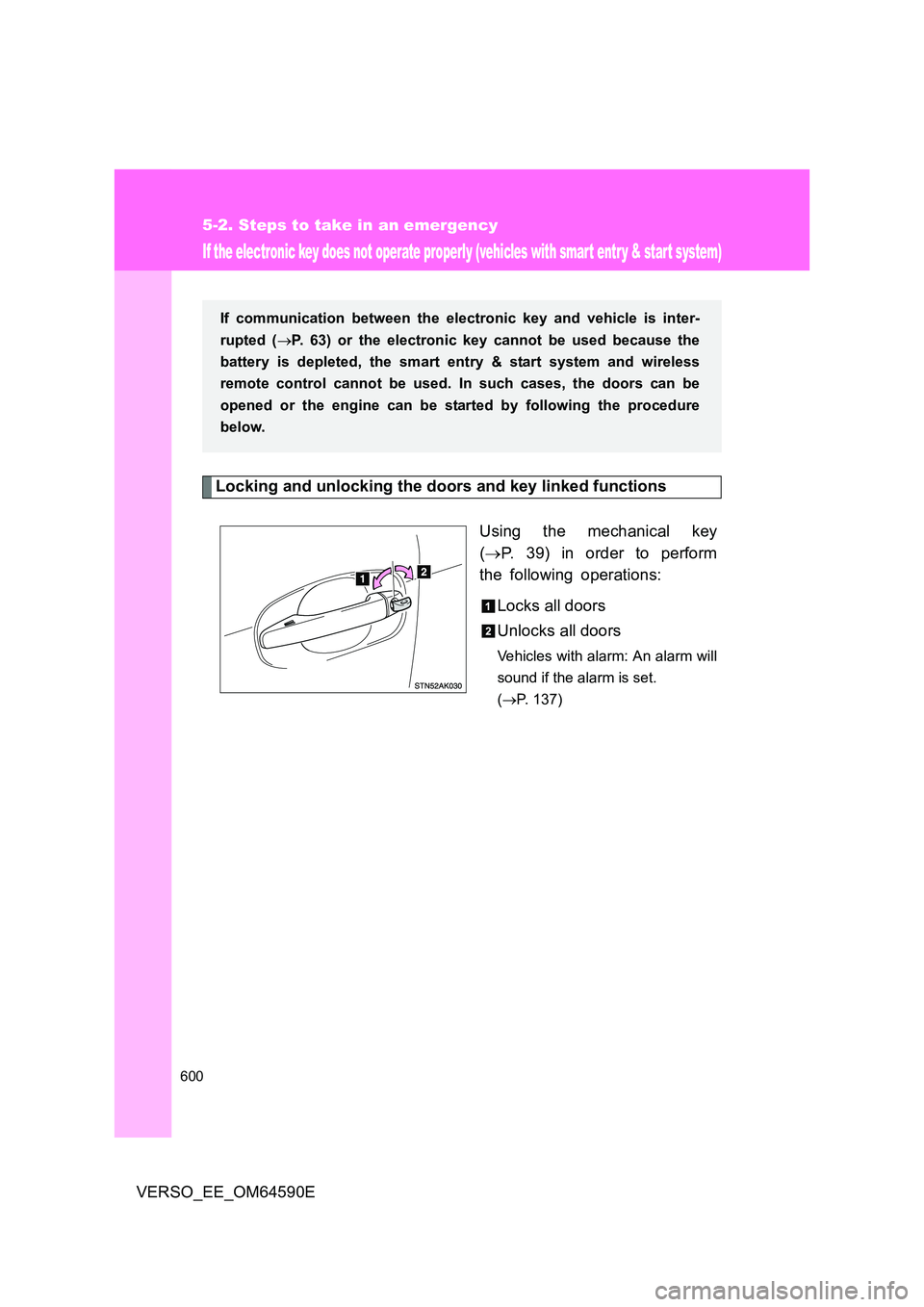
Using the mechanical key
( P. 39) in order to perform
the following operations:
Locks all doors
Unlocks all doors
Vehicles with alarm: An alarm will
sound if the alarm is set.
( P. 137)
If communication between the electronic key and vehicle is inter-
rupted ( P. 63) or the electronic key cannot be used because the
battery is depleted, the smart entry & start system and wireless
remote control cannot be used. In such cases, the doors can be
opened or the engine can be started by following the procedure
below.
Page 602 of 664
602
5-2. Steps to take in an emergency
VERSO_EE_OM64590E
■ Stopping the engine
Shift the shift lever to “P” (Multidrive) or “N” (manual transmission) and press
the “ENGINE START STOP” switch as you normally do when stopping the
engine.
■ Replacing the key battery
As the above procedure is the temporary measure, it is recommended that
the electronic key battery be replaced immediately when the battery
depletes. ( P. 481)
■ Alarm (if equipped)
Using the mechanical key to lock the doors will not set the alarm system.
If a door is unlocked using the mechanical key when the alarm system is set,
the alarm may be triggered. ( P. 137)
■ Changing “ENGINE START STOP” switch modes
Multidrive
Within 10 seconds of the buzzer sounding, release the brake pedal and
press the “ENGINE START STOP” switch.
The engine does not start and modes will be changed each time the
switch is pressed. ( P. 204)
Manual transmission
Within 10 seconds of the buzzer sounding, release the clutch pedal and
press the “ENGINE START STOP” switch.
The engine does not start and modes will be changed each time the
switch is pressed. ( P. 204)