2016 TOYOTA PRIUS V steering wheel
[x] Cancel search: steering wheelPage 250 of 620

250
PRIUS v_OM_OM47B12U_(U)
4-5. Using the driving support systems
■Reduced effectiveness of the EPS system
The effectiveness of the EPS system is reduced to prevent the system from
overheating when there is frequent steering input over an extended period of
time. The steering wheel may feel heavy as a result. Should this occur, refrain
from excessive steering input or stop the vehicle and turn the hybrid system
off. The EPS system should return to normal within 10 minutes.
■Automatic reactivation of TRAC system
After turning the TRAC system off, the system will be automatically re-
enabled in the following situations:
●When the power switch is turned off
●The TRAC will turn on when vehicle speed increases
■Electric power steering system warning light (warning buzzer)
P. 491
■Operating conditions of hill-start assist control
When the following four conditions are met, the hill-start assist control will
operate:
●The shift position is in a position other than P or N (when starting off forward/
backward on an upward incline).
●The vehicle is stopped.
●The accelerator pedal is not depressed.
●The parking brake is not engaged.
■Automatic system cancelation of hill-start assist control
The hill-start assist control will turn off in any of the following situations:
●Shift the shift position to P or N.
●The accelerator pedal is depressed.
●The parking brake is engaged.
●Approximately 2 seconds elapse after the brake pedal is released.
Page 256 of 620

256
PRIUS v_OM_OM47B12U_(U)
4-5. Using the driving support systems
■Conditions that may trigger the system even if there is no possibility of a
collision
If the following obstructs the front of the sensor, the system judges that a col-
lision may be possible and operates.
●When passing by a vehicle while making left or right turns or passing a vehi-
cle in an opposite lane.
●When the vehicle rapidly approaches an object in front of it (such as another
vehicle, toll gate, etc.)
●When climbing a steep hill, etc., and there are structures in the upper region
of the road (billboards, low ceilings, street lamps, etc.)
●When driving through narrow passages or places with low ceilings (bridges,
tunnels, overhead passes, etc.)
●When driving on an uneven road surface
●When metal objects are on the road surface causing level differences or
protrusions in the road
●When an extreme change in vehicle height occurs
●When the radar sensor moves off position due to its surrounding area being
subjected to a strong impact.
●When there is an obstacle (guardrails, etc.) on the roadside at a curve
entrance
●When the front of your vehicle is pointing upwards (caused by putting a
heavy load in the luggage compartment)
When the system is activated in the situations described above, there is also
a possibility that the brakes will be applied with a force greater than normal.
■Obstacles not detected
The sensor cannot detect plastic obstacles such as traffic cones. There may
also be occasions when the sensor cannot detect pedestrians, animals, bicy-
cles, motorcycles, trees, or snowdrifts.
■Situations in which the pre-collision system does not function properly
The system may not function effectively in situations such as the following:
●On roads with sharp bends or uneven surfaces
●If a vehicle suddenly moves in front of your vehicle, such as at an intersec-
tion
●If a vehicle suddenly cuts in front of your vehicle, such as when overtaking
●In inclement weather such as heavy rain, fog, snow or sand storms
●When your vehicle is skidding with the VSC system off
●When an extreme change in vehicle height occurs
●When the radar sensor moves off position due to its surrounding area being
subjected to a strong impact
●Due to greatly turning the steering wheel when an obstacle suddenly
appears ahead
Page 258 of 620

258
PRIUS v_OM_OM47B12U_(U)
4-5. Using the driving support systems
WARNING
■Limitations of the pre-collision system
It is the driver’s responsibility to drive safely. The driver should be aware of
the surroundings and strive for safe driving.
Do not rely on the pre-collision system instead of normal braking opera-
tions. This system does not avoid or reduce collisions in every situation.
Overly relying on the system and entrusting it with safety may cause an
unexpected accident which could lead to death or serious injury.
Although the system is designed for the purpose to support in avoiding colli-
sions or reducing the damage of a collision, the effect changes according to
various conditions. (P. 255)
Therefore, it does not always provide the same performance. Also, the pre-
collision braking does not work depending on the operating conditions of the
driver. When the driver has stepped on the brake pedal and is operating the
steering wheel, the system judges that the driver is taking avoiding action
and the automatic braking may not operate.
■Handling the radar sensor
Observe the following to ensure the pre-collision system can function effec-
tively.
Otherwise, the system may not function correctly and could result in an
accident.
●Keep the sensor and grille cover clean at all times.
Clean the sensor and grille cover with a soft cloth so you do not mark or
damage them.
●Do not subject the sensor or surrounding area to a strong impact.
If the sensor moves even slightly off position, the system may become
inaccurate or malfunction. If the sensor or surrounding area is subject to a
strong impact, always have the area inspected and adjusted by your
Toyota dealer.
●Do not disassemble the sensor.
●Do not attach accessories or stickers to the sensor, grille cover or sur-
rounding area.
●Do not modify or paint the sensor and grille cover.
●If the sensor needs to be replaced, contact your Toyota dealer.
Page 265 of 620
PRIUS v_OM_OM47B12U_(U)
2654-6. Driving tips
4
Driving
WARNING
■Driving with snow tires
Observe the following precautions to reduce the risk of accidents.
Failure to do so may result in a loss of vehicle control and cause death or
serious injury.
●Use tires of the specified size.
●Maintain the recommended level of air pressure.
●Do not drive in excess of 75 mph (120 km/h), regardless of the type of
snow tires being used.
●Use snow tires on all, not just some wheels.
■Driving with tire chains
Observe the following precautions to reduce the risk of accidents.
Failure to do so may result in the vehicle being unable to be driven safely,
and may cause death or serious injury.
●Do not drive in excess of the speed limit specified for the tire chains being
used, or 30 mph (50 km/h), whichever is lower.
●Avoid driving on bumpy road surfaces or over potholes.
●Avoid sudden acceleration, abrupt steering, sudden braking and shifting
operations that cause sudden engine braking.
●Slow down sufficiently before entering a curve to ensure that vehicle con-
trol is maintained.
●Do not use LDA (Lane departure alert).
■When parking the vehicle
When parking the vehicle without applying the parking brake, make sure to
chock the wheels. If you do not chock the wheels, the vehicle may move
unexpectedly, possibly resulting in an accident.
NOTICE
■Repairing or replacing snow tires
Request repairs or replacement of snow tires from Toyota dealers or legiti-
mate tire retailers.
This is because the removal and attachment of snow tires affects the opera-
tion of the tire pressure warning valves and transmitters.
■Fitting tire chains
The tire pressure warning valves and transmitters may not function correctly
when tire chains are fitted.
Page 266 of 620

266
PRIUS v_OM_OM47B12U_(U)
5-1. Basic OperationsAudio system types .......... 268
Audio system .................... 269
Using the steering wheel audio switches ................ 272
AUX Port/USB Port .......... 273
Basic audio operations ..... 274
5-2. Setup Setup menu ...................... 276
General settings ............... 277
Audio settings ................... 279
Display settings ................ 281
Voice settings ................... 284
5-3. Using the Multimedia system
Selecting the audio source............................. 285
List screen operation ........ 286
Optimal use of the audio system ............................ 288
Audio screen adjustment ...................... 289
5-4. Using the radio Radio operation ................ 290
5Audio system
Page 267 of 620

267
PRIUS v_OM_OM47B12U_(U)
5Audio system
5-5. Playing an audio CD and
MP3/WMA/AAC discs
CD player operation.......... 292
5-6. Using an external device
Listening to an iPod .......... 298
Listening to a USB
memory device ............... 303
Using the AUX .................. 308
VTR .................................. 309
5-7. Connecting Bluetooth
®
Preparations to
use wireless
communication ............... 310
Registering a Bluetooth
®
audio player for the
first time .......................... 313
Registering a Bluetooth
®
phone for the first time.... 314
Registering a
Bluetooth
® device ........... 315
Connecting a
Bluetooth
® device ........... 317
Displaying a Bluetooth®
device details.................. 319
Detailed Bluetooth
®
system settings............... 320
5-8. Bluetooth
® Audio
Listening to Bluetooth®
Audio .............................. 3215-9. Bluetooth
® phone
Using a Bluetooth®
Phone ............................. 323
Making a call .................... 326
Receiving a call ................ 329
Speaking on the phone .... 330
Bluetooth
® phone
message function ........... 333
Using the steering wheel
switches.......................... 337
Bluetooth
® phone
settings ........................... 338
Contact/Call History
Settings .......................... 339
What to do if...
(Troubleshooting) ........... 348
5-10. Bluetooth
®
Bluetooth®........................ 352
5-11. Using the voice
command system
Voice command system ... 358
Page 272 of 620

272
PRIUS v_OM_OM47B12U_(U)
5-1. Basic Operations
Using the steering wheel audio switches
Vo l u m e s w i t c h
• Press: Increases/decreases
volume
• Press and hold: Continuously
increases/decreases volume
Cursor switch (Radio mode)
• Press: Selects a radio station
• Press and hold: Seeks up/
down
Cursor switch (CD, MP3/WMA disc, Bluetooth
®, iPod or USB
mode)
• Press: Selects a track/file/song
• Press and hold: Fast up/down
“MODE” switch
• Press: Turns the power on, selects an audio source
• Press and hold: Turns the power off
■Canceling automatic selection of a radio station
Press the “” or “” button again.
Some audio features can be controlled using the switches on
the steering wheel.
Operation may differ depending on the type of audio system or
navigation system. For details, refer to the manual provided with
the audio system or navigation system.
1
2
WARNING
Exercise care when operating the audio switches on the steering wheel.
3
Page 285 of 620
285
PRIUS v_OM_OM47B12U_(U)
5-3. Using the Multimedia system
5
Audio system
Selecting the audio source
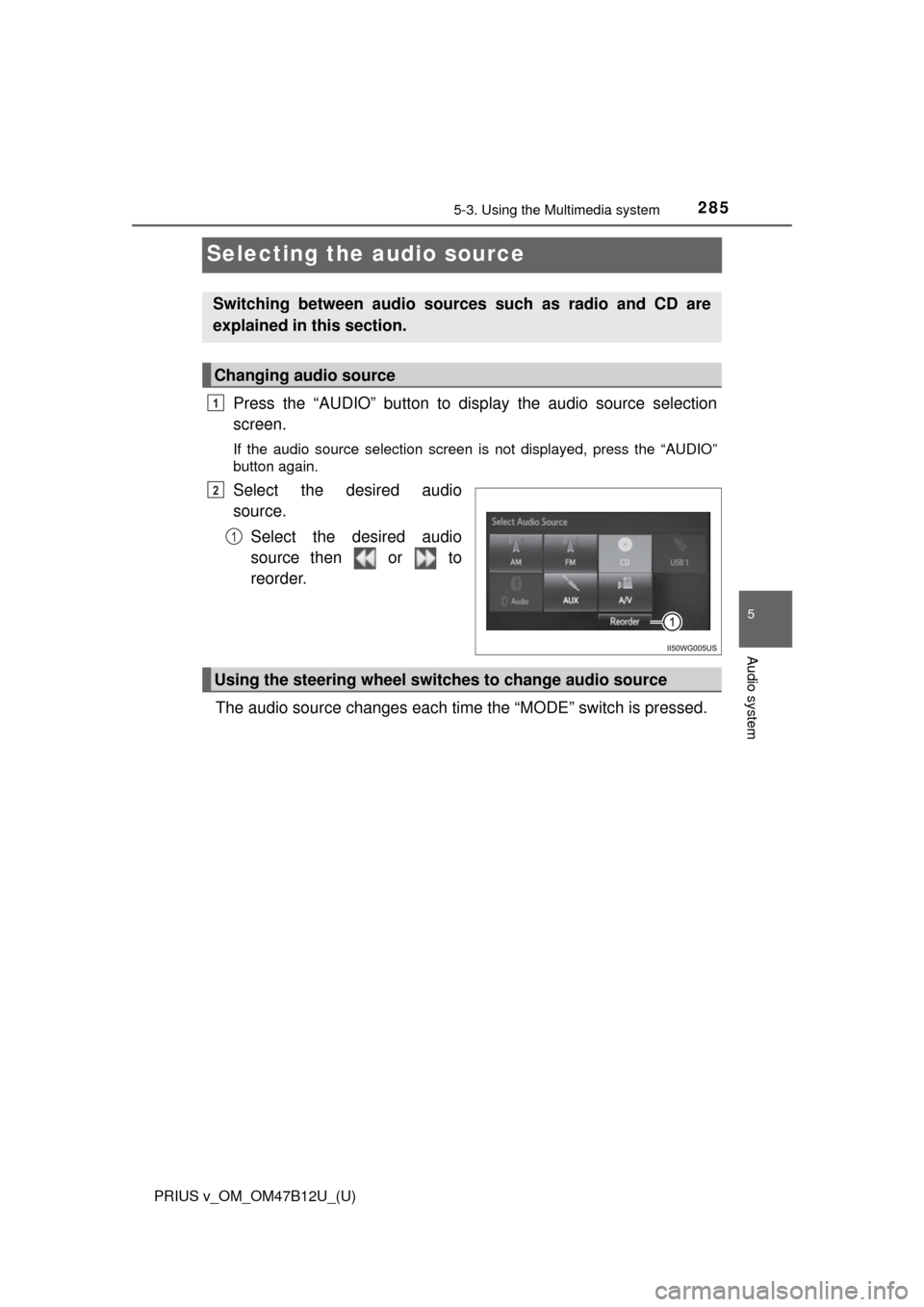
Press the “AUDIO” button to display the audio source selection
screen.
If the audio source selection screen is not displayed, press the “AUDIO”
button again.
Select the desired audio
source.
Select the desired audio
source then or to
reorder.
The audio source changes each time the “MODE” switch is pressed.
Switching between audio sources such as radio and CD are
explained in this section.
Changing audio source
1
2
1
Using the steering wheel switches to change audio source