Page 207 of 620
207
PRIUS v_OM_OM47B12U_(U)
4-4. Refueling
4
Driving
Opening the fuel tank cap
●Close all the doors and windows, and turn the power switch off.
●Confirm the type of fuel.
■Fuel types
P. 561
■Fuel tank opening for unleaded gasoline
To help prevent incorrect fueling, your vehicle has a fuel tank opening that
only accommodates the special nozzle on unleaded fuel pumps.
Perform the following steps to open the fuel tank cap.
Before refueling the vehicle
WARNING
■When refueling the vehicle
Observe the following precautions while refueling the vehicle. Failure to do
so may result in death or serious injury.
●After exiting the vehicle and before opening the fuel door, touch an
unpainted metal surface to discharge any static electricity. It is important to
discharge static electricity before refueling because sparks resulting from
static electricity can cause fuel vapors to ignite while refueling.
●Always hold the grips on the fuel tank cap and turn it slowly to remove it.
A whooshing sound may be heard when the fuel tank cap is loosened.
Wait until the sound cannot be heard before fully removing the cap. In hot
weather, pressurized fuel may spray out of the filler neck and cause injury.
●Do not allow anyone that has not discharged static electricity from their
body to come close to an open fuel tank.
●Do not inhale vaporized fuel.
Fuel contains substances that are harmful if inhaled.
●Do not smoke while refueling the vehicle.
Doing so may cause the fuel to ignite and cause a fire.
●Do not return to the vehicle or touch any person or object that is statically
charged.
This may cause static electricity to build up, resulting in a possible ignition
hazard.
Page 240 of 620
240
PRIUS v_OM_OM47B12U_(U)
4-5. Using the driving support systems
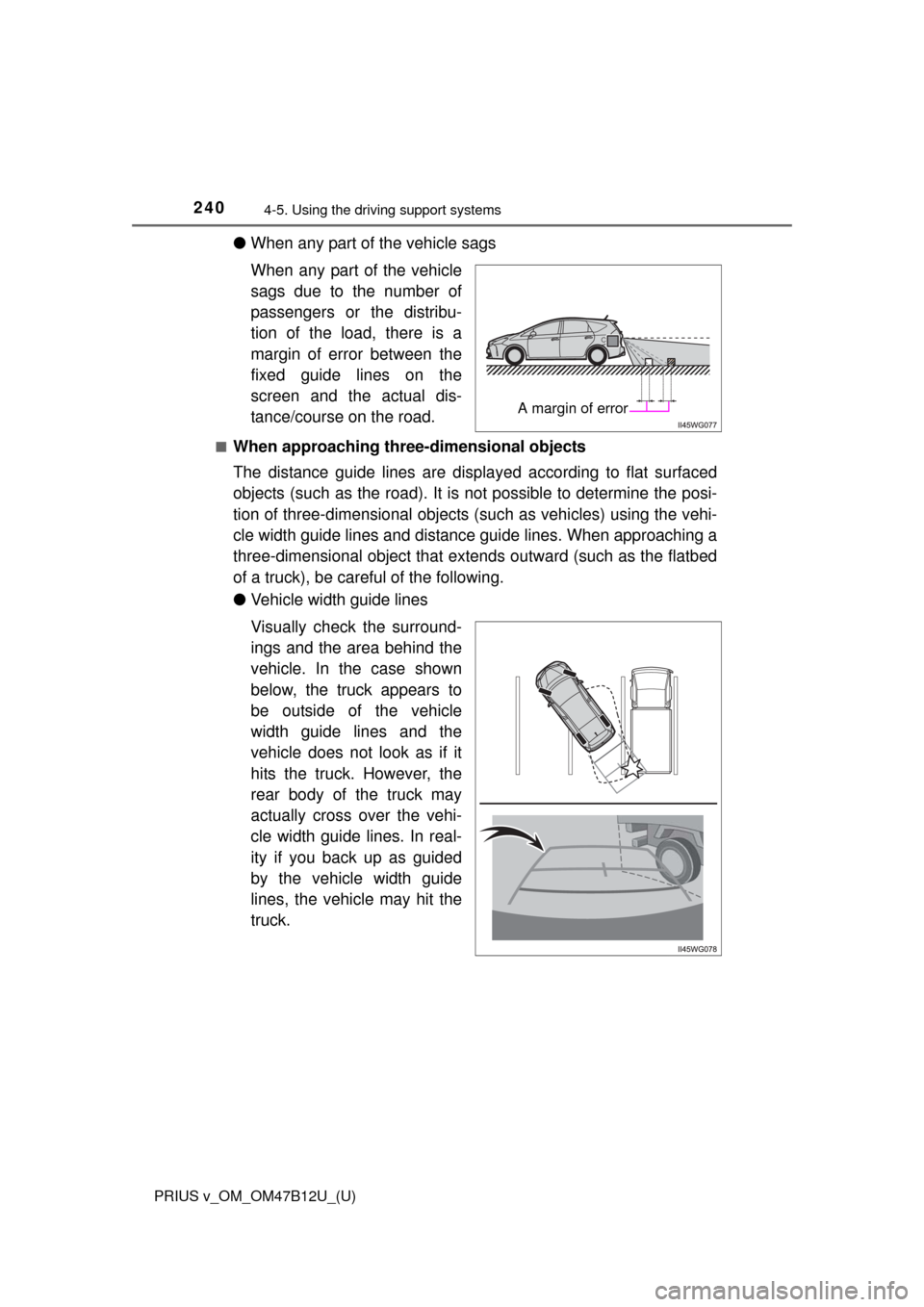
●When any part of the vehicle sags
When any part of the vehicle
sags due to the number of
passengers or the distribu-
tion of the load, there is a
margin of error between the
fixed guide lines on the
screen and the actual dis-
tance/course on the road.
■When approaching three-dimensional objects
The distance guide lines are displayed according to flat surfaced
objects (such as the road). It is not possible to determine the posi-
tion of three-dimensional objects (such as vehicles) using the vehi-
cle width guide lines and distance guide lines. When approaching a
three-dimensional object that extends outward (such as the flatbed
of a truck), be careful of the following.
●Vehicle width guide lines
Visually check the surround-
ings and the area behind the
vehicle. In the case shown
below, the truck appears to
be outside of the vehicle
width guide lines and the
vehicle does not look as if it
hits the truck. However, the
rear body of the truck may
actually cross over the vehi-
cle width guide lines. In real-
ity if you back up as guided
by the vehicle width guide
lines, the vehicle may hit the
truck.
A margin of error
Page 249 of 620
PRIUS v_OM_OM47B12U_(U)
2494-5. Using the driving support systems
4
Driving
■Turning off both TRAC/VSC systems
To turn the TRAC/VSC systems off, press and hold for more than 3 sec-
onds while the vehicle is stopped.
Vehicles without multi-information display
The “TRAC OFF” and VSC OFF indicator lights will come on.
Vehicles with multi-information display
The VSC OFF indicator light will come on and the message will be shown on
the multi-information display.
*
Press again to turn the systems back on.
*: On vehicles with pre-collision system, pre-collision brake assist and pre-
collision braking will also be disabled. The PCS warning light will come on
and the message will be shown on the multi-information display. (P. 491)
■When the “TRAC OFF” indicator comes on/message is displayed on the
multi-information display showing that TRAC has been disabled even if
the VSC OFF switch has not been pressed
TRAC cannot be operated. Contact your Toyota dealer.
■Sounds and vibrations caused by the ABS, brake assist, VSC, TRAC and
hill-start assist control systems
Any of the following conditions may occur when the above systems are oper-
ating. None of these indicates that a malfunction has occurred.
●Vibrations may be felt through the vehicle body and steering.
●A motor sound may be heard after the vehicle comes to a stop.
●The brake pedal may pulsate slightly after the ABS is activated.
●The brake pedal may move down slightly after the ABS is activated.
■ECB operating sound
ECB operating sound may be heard in the following cases, but it does not
indicate that a malfunction has occurred.
●Operating sound heard from the engine compartment when the brake pedal
is operated.
●Motor sound of the brake system heard from the front part of the vehicle
when the driver’s door is opened.
●Operating sound heard from the engine compartment when 1 or 2 minutes
passed after the stop of the hybrid system.
■EPS operation sound
When the steering wheel is operated, a motor sound (whirring sound) may be
heard. This does not indicate a malfunction.
Page 365 of 620
PRIUS v_OM_OM47B12U_(U)
3656-1. Using the air conditioning system and defogger
6
Interior features
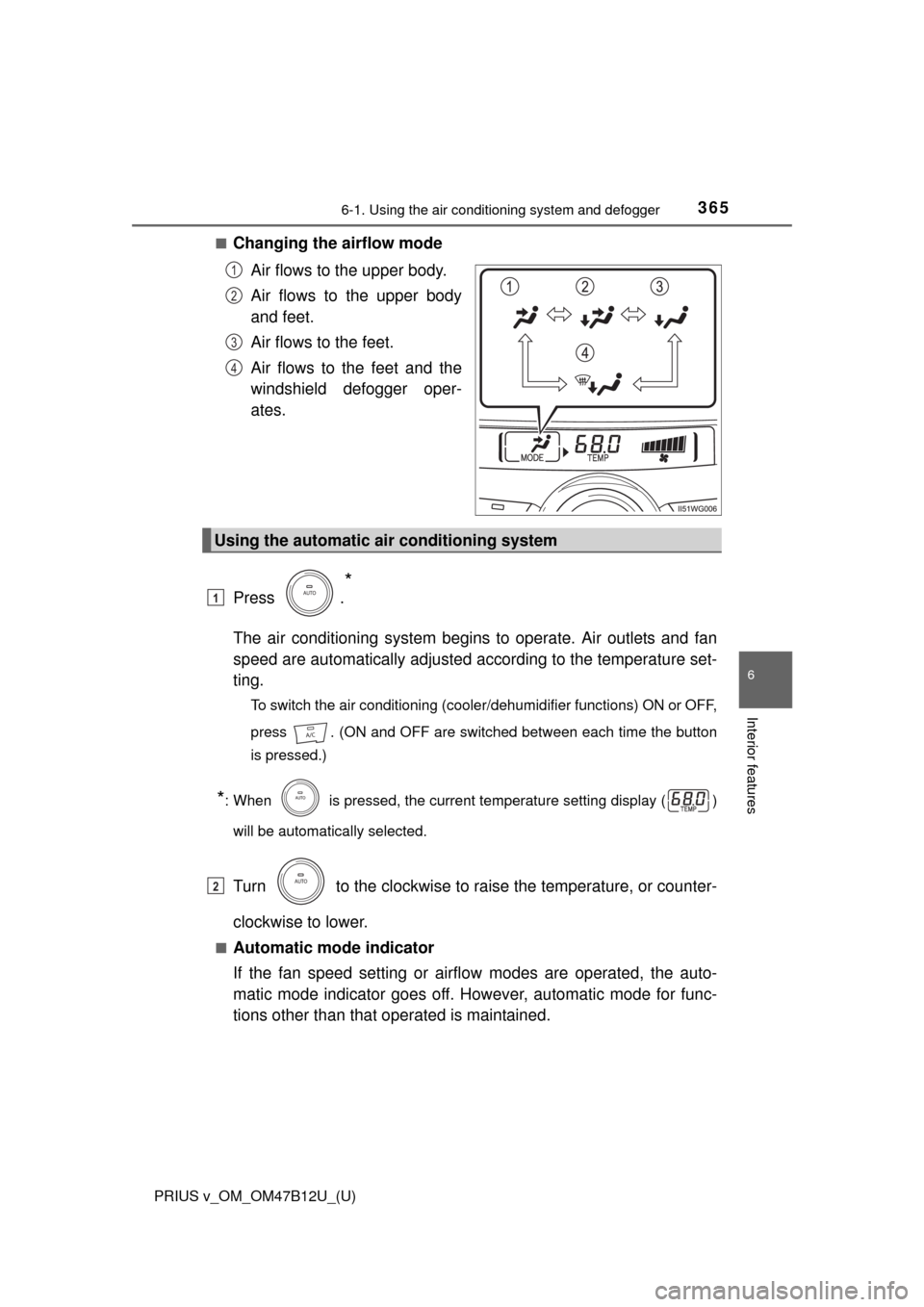
■Changing the airflow mode
Air flows to the upper body.
Air flows to the upper body
and feet.
Air flows to the feet.
Air flows to the feet and the
windshield defogger oper-
ates.
Press .
*
The air conditioning system begins to operate. Air outlets and fan
speed are automatically adjusted according to the temperature set-
ting.
To switch the air conditioning (cooler/dehumidifier functions) ON or OFF,
press . (ON and OFF are switched between each time the button
is pressed.)
*: When is pressed, the current temperature setting display ( )
will be automatically selected.
Turn to the clockwise to raise the temperature, or counter-
clockwise to lower.
■Automatic mode indicator
If the fan speed setting or airflow modes are operated, the auto-
matic mode indicator goes off. However, automatic mode for func-
tions other than that operated is maintained.
1
2
3
4
Using the automatic air conditioning system
1
2
Page 366 of 620
3666-1. Using the air conditioning system and defogger
PRIUS v_OM_OM47B12U_(U)■
Switching between outside air and recirculated air modes
Press .
The mode switches between recirculated air mode and outside air mode
each time the button is pressed.
The indicator on turns on when the recirculated air mode is
selected.
■
Defogging the windshield
Defoggers are used to defog the windshield and front side win-
dows.
Press .
Set to outside air mode if the recirculated air mode is used. (It
may switch automatically.)
To defog the windshield and the side windows early, turn the air flow and
temperature up.
To return to the previous mode, press again when the windshield
is defogged.
■
Defogging the rear window and outside rear view mirrors
Defoggers are used to defog the rear window and to remove rain-
drops, dew and frost from the outside rear view mirrors.
Press .
The defoggers will automatically turn off after a period of time.
■
Micro dust and pollen filter
Pollen is removed from the air and the air flows to the upper part of
the body.
Press .
In order to prevent the windshield from fogging up when the outside air
is cold, the dehumidification function may operate.
The pollens are filtered out even if the micro dust and pollen filter is
turned off.
Other functions
Page 388 of 620
388
PRIUS v_OM_OM47B12U_(U)
6-4. Using the other interior features
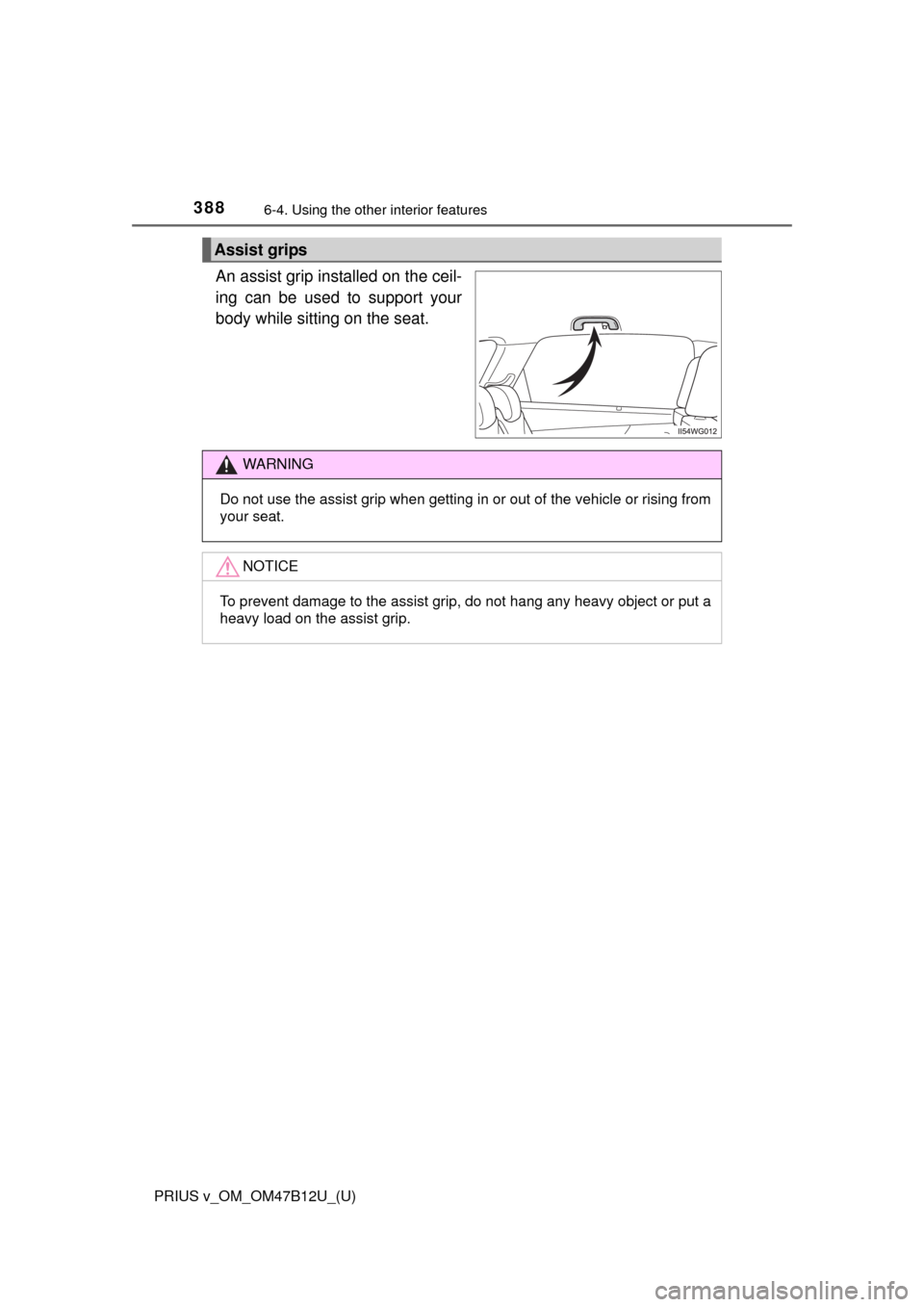
An assist grip installed on the ceil-
ing can be used to support your
body while sitting on the seat.
Assist grips
WARNING
Do not use the assist grip when getting in or out of the vehicle or rising from
your seat.
NOTICE
To prevent damage to the assist grip, do not hang any heavy object or put a
heavy load on the assist grip.
Page 390 of 620
390
PRIUS v_OM_OM47B12U_(U)
6-4. Using the other interior features
■Customization
The door lock linked automatic close function can be disabled.
(Customizable features: P. 575)
WARNING
Observe the following precautions.
Failing to do so may result in death or serious injury.
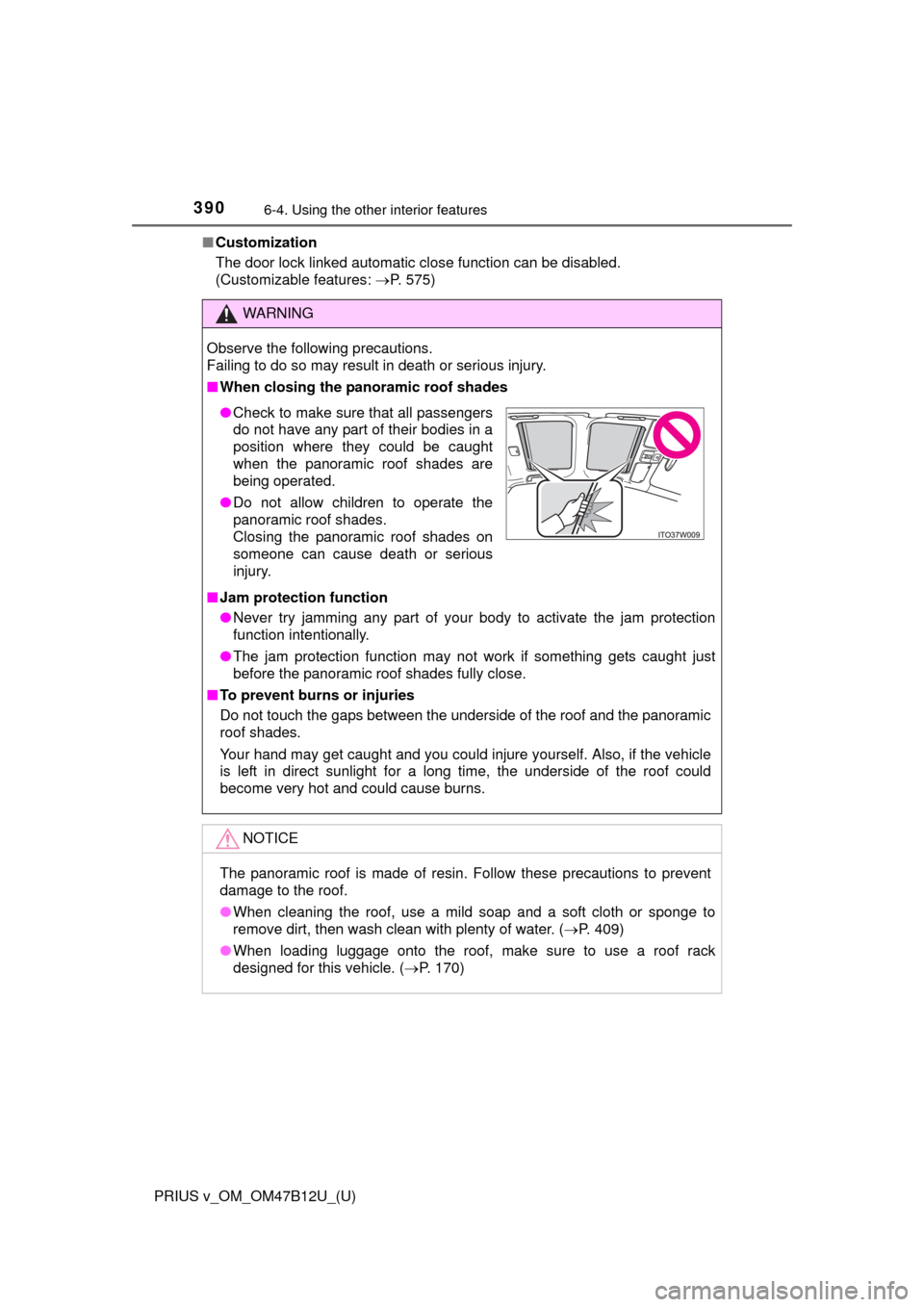
■When closing the panoramic roof shades
■Jam protection function
●Never try jamming any part of your body to activate the jam protection
function intentionally.
●The jam protection function may not work if something gets caught just
before the panoramic roof shades fully close.
■To prevent burns or injuries
Do not touch the gaps between the underside of the roof and the panoramic
roof shades.
Your hand may get caught and you could injure yourself. Also, if the vehicle
is left in direct sunlight for a long time, the underside of the roof could
become very hot and could cause burns.
NOTICE
The panoramic roof is made of resin. Follow these precautions to prevent
damage to the roof.
●When cleaning the roof, use a mild soap and a soft cloth or sponge to
remove dirt, then wash clean with plenty of water. (P. 409)
●When loading luggage onto the roof, make sure to use a roof rack
designed for this vehicle. (P. 170)
●Check to make sure that all passengers
do not have any part of their bodies in a
position where they could be caught
when the panoramic roof shades are
being operated.
●Do not allow children to operate the
panoramic roof shades.
Closing the panoramic roof shades on
someone can cause death or serious
injury.
Page 402 of 620
402
PRIUS v_OM_OM47B12U_(U)
6-4. Using the other interior features
■Enhanced Roadside Assistance
Enhanced Roadside Assistance adds GPS data to the already
included warranty-based Toyota roadside service.
Subscribers can press the “SOS” button to reach a Safety Connect
response-center agent, who can help with a wide range of needs,
such as: towing, flat tire, fuel delivery, etc. For a description of the
Roadside Assistance services and their limitations, please see the
Safety Connect Terms and Conditions, which are available at
To y o t a . c o m .
Important! Read this information before using Safety Connect.
■Exposure to radio frequency signals
The Safety Connect system installed in your vehicle is a low-power
radio transmitter and receiver. It receives and also sends out radio
frequency (RF) signals.
In August 1996, the Federal Communications Commission (FCC)
adopted RF exposure guidelines with safety levels for mobile wire-
less phones. Those guidelines are consistent with the safety stan-
dards previously set by the following U.S. and international
standards bodies.
●ANSI (American National Standards Institute) C95.1 [1992]
●NCRP (National Council on Radiation Protection and Measure-
ment) Report 86 [1986]
●ICNIRP (International Commission on Non-Ionizing Radiation
Protection) [1996]
Those standards were based on comprehensive and periodic eval-
uations of the relevant scientific literature. Over 120 scientists, engi-
neers, and physicians from universities, and government health
agencies and industries reviewed the available body of research to
develop the ANSI Standard (C95.1).
The design of Safety Connect complies with the FCC guidelines in
addition to those standards.
Safety information for Safety Connect