Page 669 of 800
6698-2. Steps to take in an emergency
PRIUS_OM_OM47A29U_(U)
8
When trouble arises
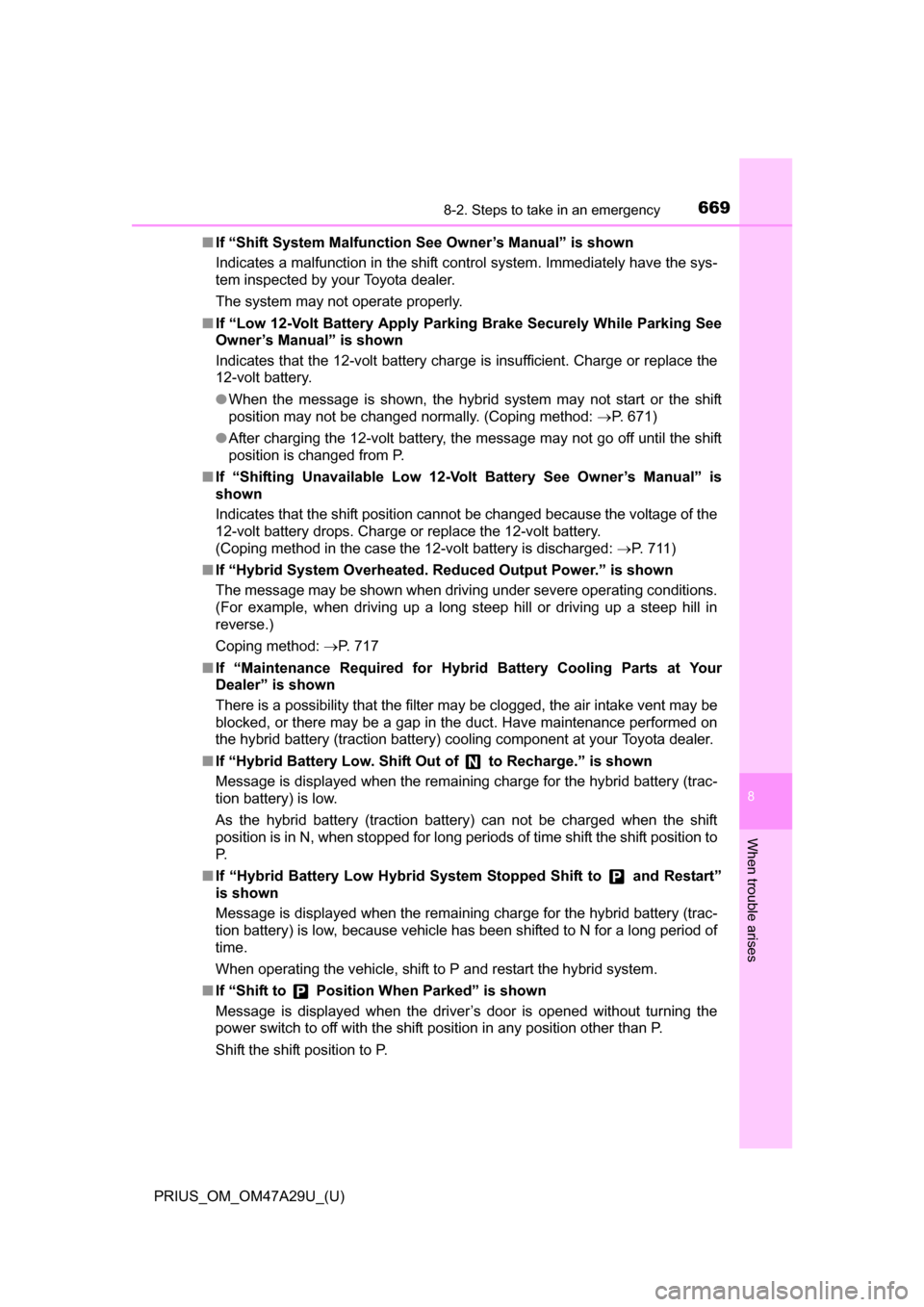
■If “Shift System Malfunction See Owner’s Manual” is shown
Indicates a malfunction in the shift control system. Immediately have the sys-
tem inspected by your Toyota dealer.
The system may not operate properly.
■ If “Low 12-Volt Battery Apply Park ing Brake Securely While Parking See
Owner’s Manual” is shown
Indicates that the 12-volt battery charge is insufficient. Charge or replace the
12-volt battery.
● When the message is shown, the hybrid system may not start or the shift
position may not be changed normally. (Coping method: P. 671)
● After charging the 12-volt battery, the message may not go off until the shift
position is changed from P.
■ If “Shifting Unavailable Low 12-Volt Battery See Owner’s Manual” is
shown
Indicates that the shift position cannot be changed because the voltage of the
12-volt battery drops. Charge or replace the 12-volt battery.
(Coping method in the case the 12-volt battery is discharged: P. 711)
■ If “Hybrid System Overheated. Re duced Output Power.” is shown
The message may be shown when driving under severe operating conditions.
(For example, when driving up a long steep hill or driving up a steep hill in
reverse.)
Coping method: P. 717
■ If “Maintenance Required for Hybr id Battery Cooling Parts at Your
Dealer” is shown
There is a possibility that the filter may be clogged, the air intake vent may be
blocked, or there may be a gap in the duct. Have maintenance performed on
the hybrid battery (traction battery) cooling component at your Toyota dealer.
■ If “Hybrid Battery Low. Shift Out of to Recharge.” is shown
Message is displayed when the remaining charge for the hybrid battery (trac-
tion battery) is low.
As the hybrid battery (traction battery) can not be charged when the shift
position is in N, when stopped for long periods of time shift the shift position to
P.
■ If “Hybrid Battery Low Hybrid Syst em Stopped Shift to and Restart”
is shown
Message is displayed when the remaining charge for the hybrid battery (trac-
tion battery) is low, because vehicle has been shifted to N for a long period of
time.
When operating the vehicle, shift to P and restart the hybrid system.
■ If “Shift to Position When Parked” is shown
Message is displayed when the driver’s door is opened without turning the
power switch to off with the shift position in any position other than P.
Shift the shift position to P.
Page 670 of 800
6708-2. Steps to take in an emergency
PRIUS_OM_OM47A29U_(U)■
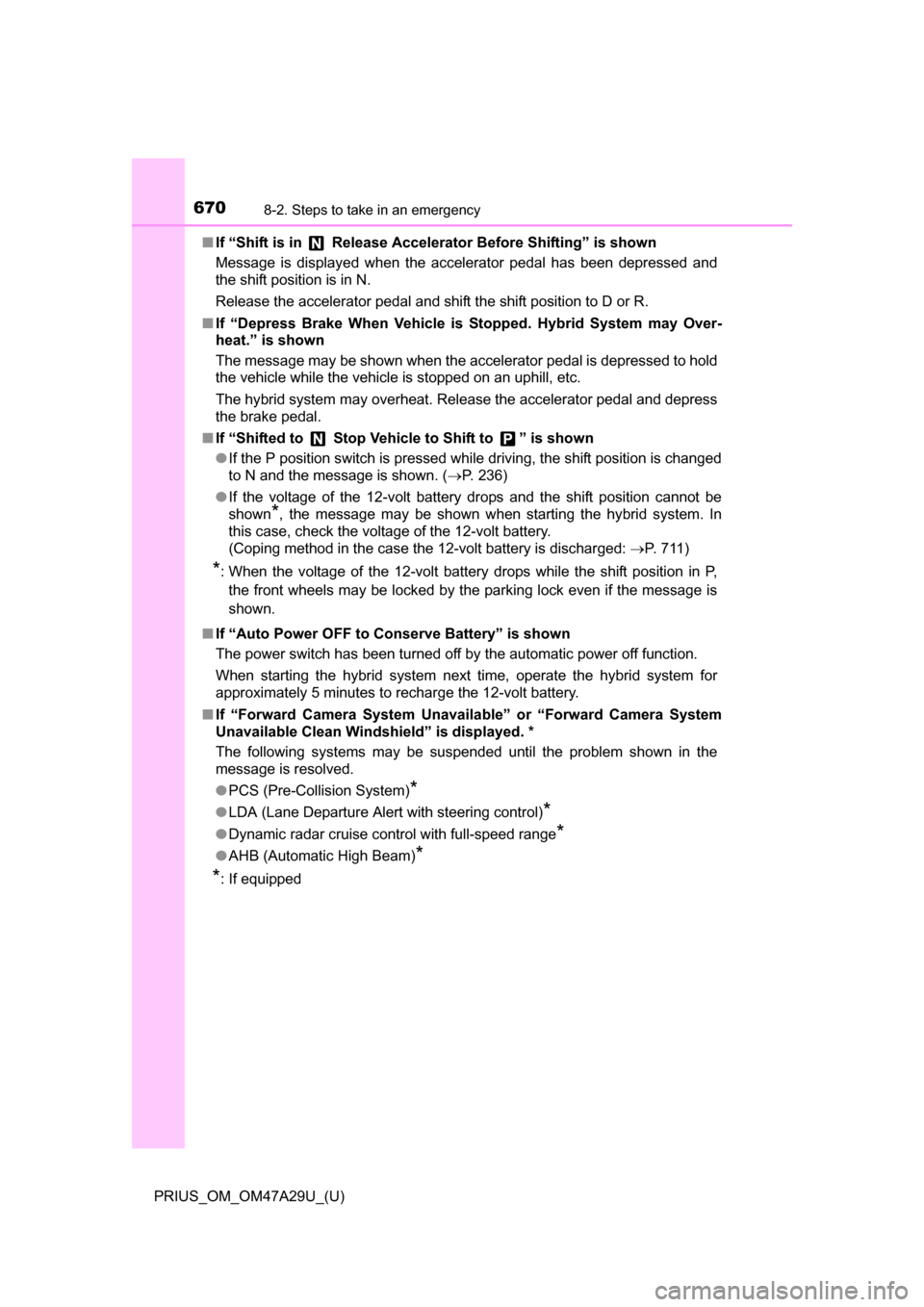
If “Shift is in Release Acceler ator Before Shifting” is shown
Message is displayed when the accelerator pedal has been depressed and
the shift position is in N.
Release the accelerator pedal and shift the shift position to D or R.
■ If “Depress Brake When Vehicle is Stopped. Hybrid System may Over-
heat.” is shown
The message may be shown when the accelerator pedal is depressed to hold
the vehicle while the vehicle is stopped on an uphill, etc.
The hybrid system may overheat. Release the accelerator pedal and depress
the brake pedal.
■ If “Shifted to Stop Vehicle to Shift to ” is shown
●If the P position switch is pressed while driving, the shift position is changed
to N and the message is shown. ( P. 236)
● If the voltage of the 12-volt battery drops and the shift position cannot be
shown
*, the message may be shown when starting the hybrid system. In
this case, check the voltage of the 12-volt battery.
(Coping method in the case the 12-volt battery is discharged: P. 711)
*: When the voltage of the 12-volt battery drops while the shift position in P,
the front wheels may be locked by the parking lock even if the message is
shown.
■ If “Auto Power OFF to Conserve Battery” is shown
The power switch has been turned off by the automatic power off function.
When starting the hybrid system next time, operate the hybrid system for
approximately 5 minutes to recharge the 12-volt battery.
■ If “Forward Camera System Unavaila ble” or “Forward Camera System
Unavailable Clean Windshield” is displayed. *
The following systems may be suspended until the problem shown in the
message is resolved.
● PCS (Pre-Collision System)
*
●LDA (Lane Departure Alert with steering control)*
●Dynamic radar cruise control with full-speed range*
●AHB (Automatic High Beam)*
*
: If equipped
Page 710 of 800
7108-2. Steps to take in an emergency
PRIUS_OM_OM47A29U_(U)
■Stopping the hybrid system
Set the parking brake, shift the shift position to P and press the power switch
as you normally do when stopping the hybrid system.
■ Replacing the key battery
As the above procedure is a temporary measure, it is recommended that the
electronic key battery be replaced immediately when the battery is depleted.
( P. 628)
■ Changing power switch modes
Release the brake pedal and press the power switch in step above. The
hybrid system does not start and modes will be changed each time the switch
is pressed. ( P. 227)
■ When the electronic key does not work properly
●Make sure that the smart key system has not been deactivated in the cus-
tomization setting. If it is off, turn the function on.
(Customizable features: P. 752)
● Check if battery-saving mode is set. If it is set, cancel the function.
(P. 178)
WARNING
■ When using the mechanical key an d operating the power windows or
moon roof (if equipped)
Operate the power window or moon roof after checking to make sure that
there is no possibility of any passenger having any of their body parts
caught in the window or moon roof.
Also, do not allow children to operate the mechanical key. It is possible for
children and other passengers to get caught in the power window or moon
roof.
3
Page 755 of 800
PRIUS_OM_OM47A29U_(U)
7559-2. Customization
9
Vehicle specifications
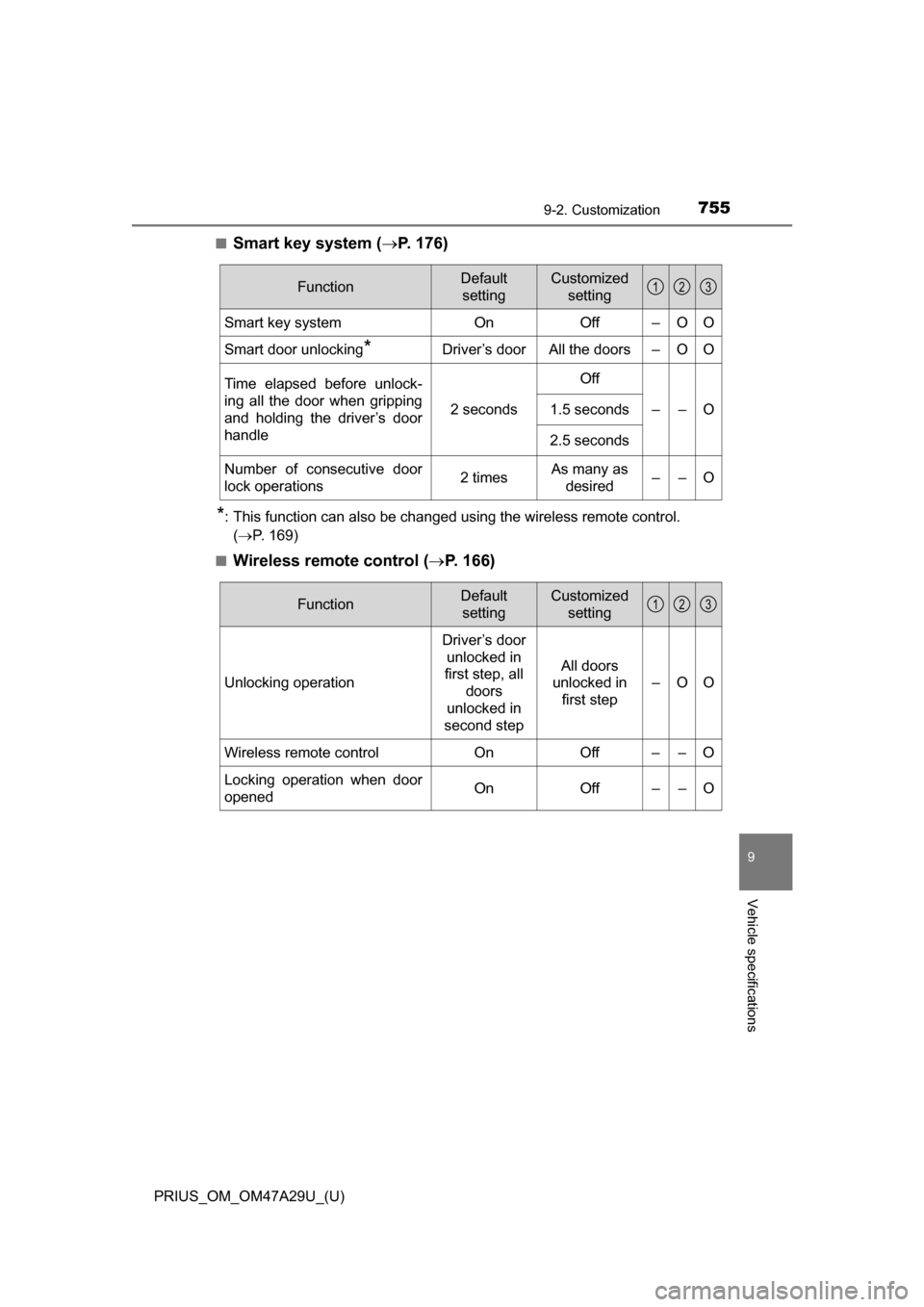
■Smart key system (P. 176)
*: This function can also be changed using the wireless remote control.
( P. 169)
■
Wireless remote control ( P. 166)
FunctionDefault
settingCustomized setting
Smart key systemOnOff–OO
Smart door unlocking*Driver’s doorAll the doors–OO
Time elapsed before unlock-
ing all the door when gripping
and holding the driver’s door
handle
2 seconds
Off
––O1.5 seconds
2.5 seconds
Number of consecutive door
lock operations2 timesAs many as
desired––O
123
FunctionDefault settingCustomized setting
Unlocking operation
Driver’s door unlocked in
first step, all
doors
unlocked in
second step
All doors
unlocked in first step
–OO
Wireless remote control On Off – – O
Locking operation when door
opened On Off – – O
123
Page 756 of 800
756
PRIUS_OM_OM47A29U_(U)
9-2. Customization
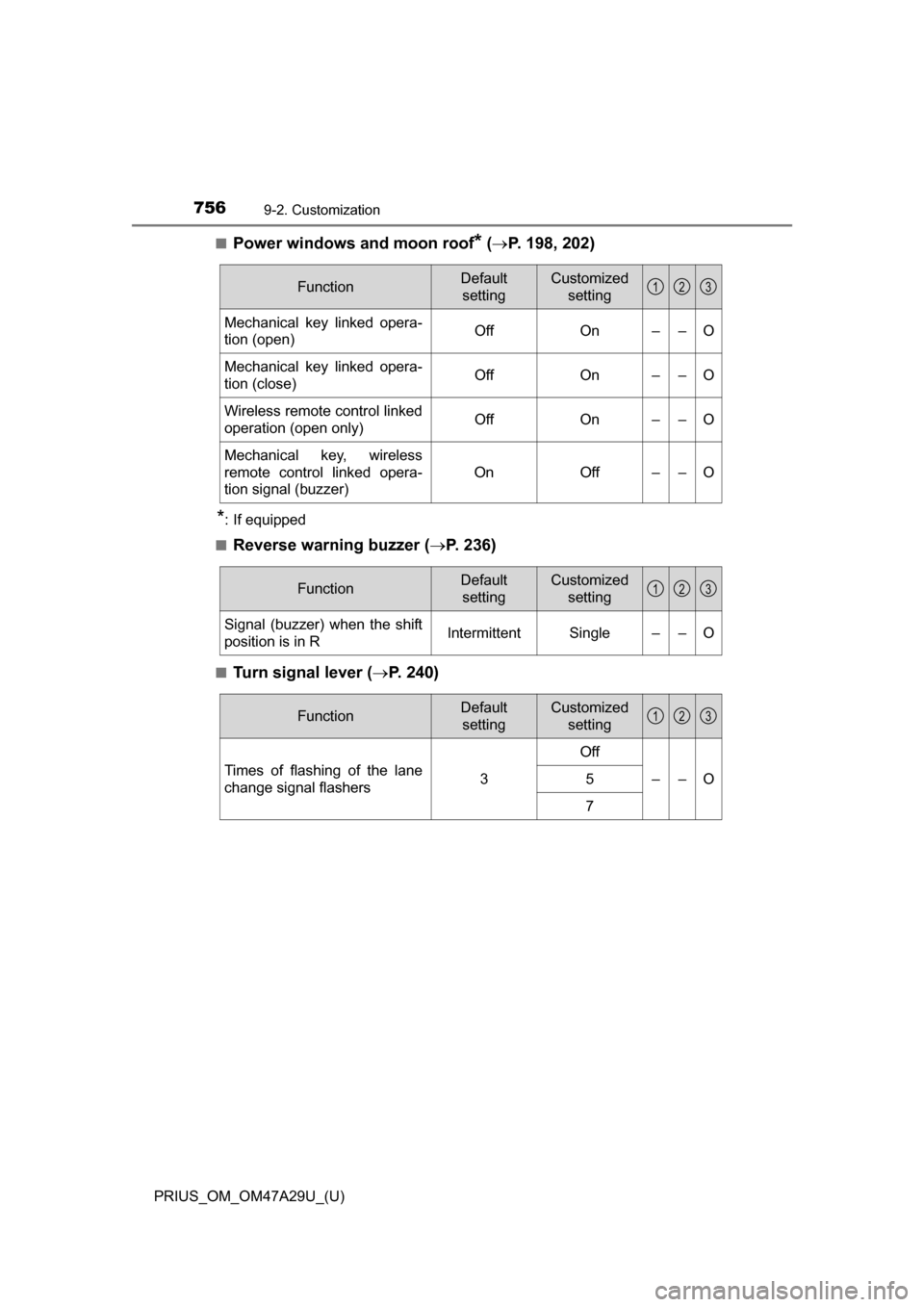
■Power windows and moon roof* ( P. 198, 202)
*: If equipped
■
Reverse warning buzzer ( P. 236)
■Turn signal lever (P. 240)
FunctionDefault
settingCustomized setting
Mechanical key linked opera-
tion (open)OffOn––O
Mechanical key linked opera-
tion (close)OffOn––O
Wireless remote control linked
operation (open only)OffOn––O
Mechanical key, wireless
remote control linked opera-
tion signal (buzzer)
OnOff––O
123
FunctionDefault
settingCustomized setting
Signal (buzzer) when the shift
position is in RIntermittentSingle––O
123
FunctionDefault settingCustomized setting
Times of flashing of the lane
change signal flashers3
Off
––O5
7
123