Page 431 of 800
431
PRIUS_OM_OM47A29U_(U)
5-2. Setup
5
Audio system
Audio settings
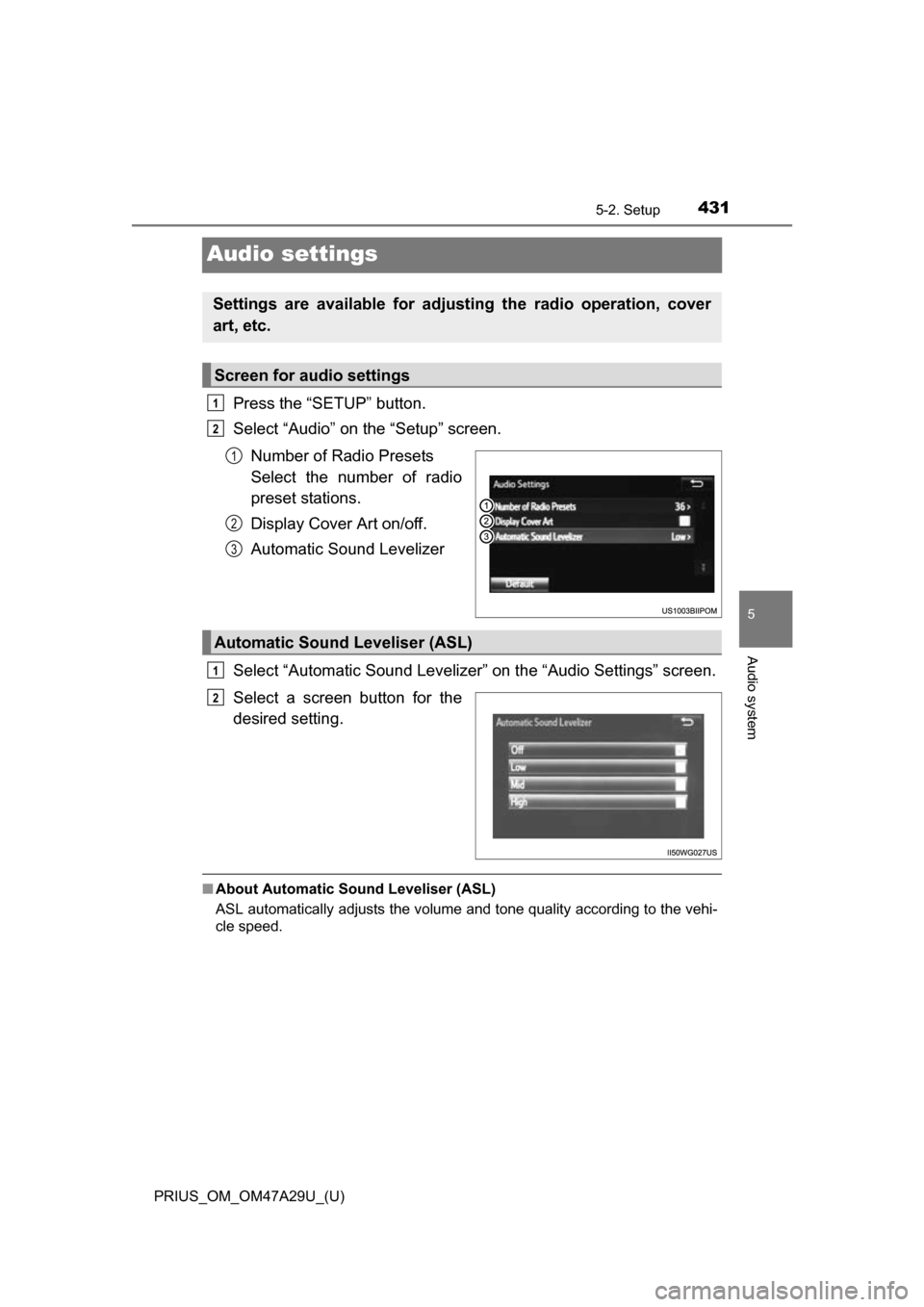
Press the “SETUP” button.
Select “Audio” on the “Setup” screen.Number of Radio Presets
Select the number of radio
preset stations.
Display Cover Art on/off.
Automatic Sound Levelizer
Select “Automatic Sound Levelizer” on the “Audio Settings” screen.
Select a screen button for the
desired setting.
■ About Automatic Sou nd Leveliser (ASL)
ASL automatically adjusts the volume and tone quality according to the vehi-
cle speed.
Settings are available for adjusting the radio operation, cover
art, etc.
Screen for audio settings
1
2
1
2
3
Automatic Sound Leveliser (ASL)
1
2
Page 434 of 800
434
PRIUS_OM_OM47A29U_(U)
5-3. Using the Multimedia system
Selecting the audio source
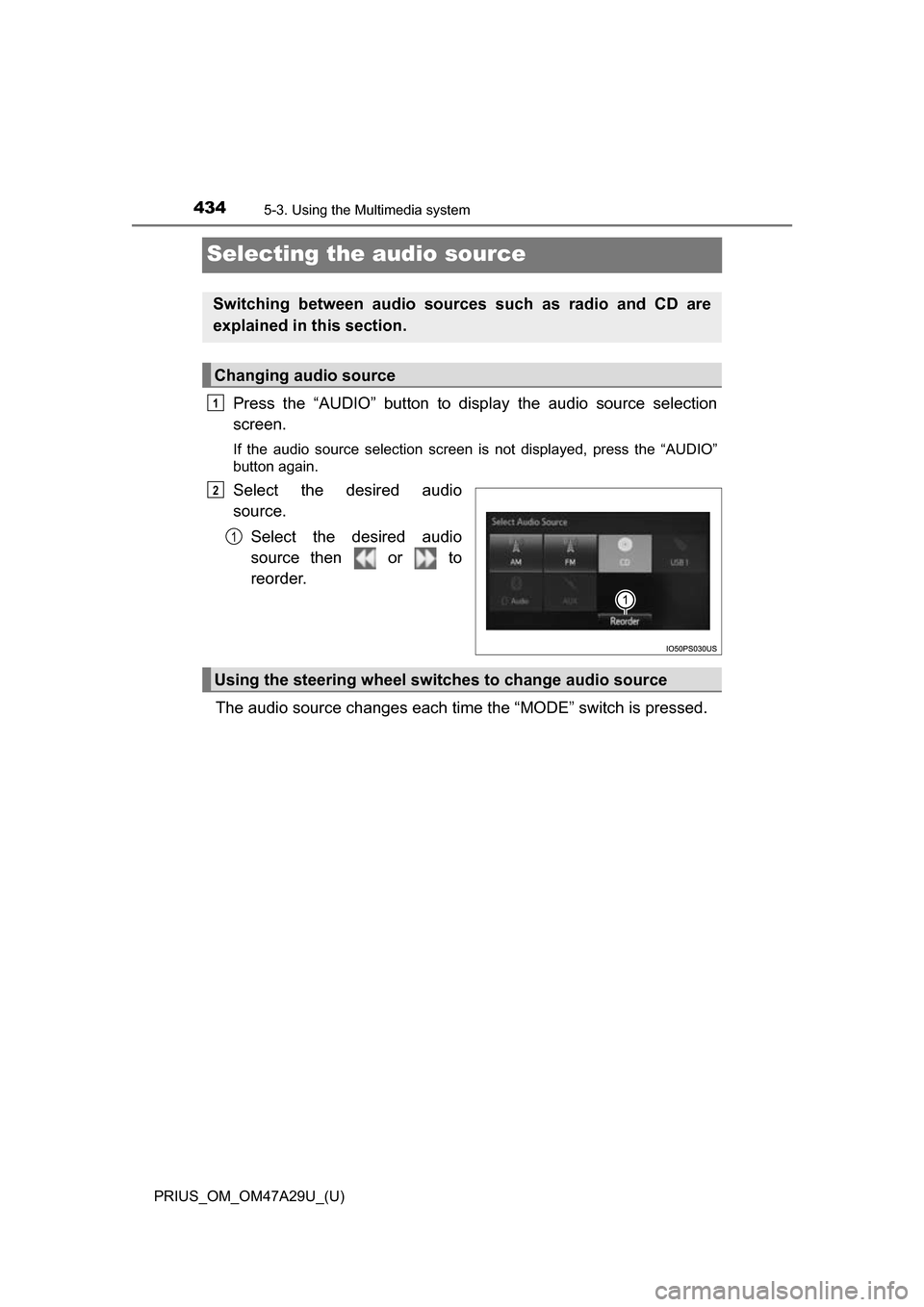
Press the “AUDIO” button to display the audio source selection
screen.
If the audio source selection screen is not displayed, press the “AUDIO”
button again.
Select the desired audio
source.
Select the desired audio
source then or to
reorder.
The audio source changes each time the “MODE” switch is pressed.
Switching between audio sources such as radio and CD are
explained in this section.
Changing audio source
1
2
1
Using the steering wheel switches to change audio source
Page 438 of 800
438
PRIUS_OM_OM47A29U_(U)
5-4. Using the radio
Radio operation
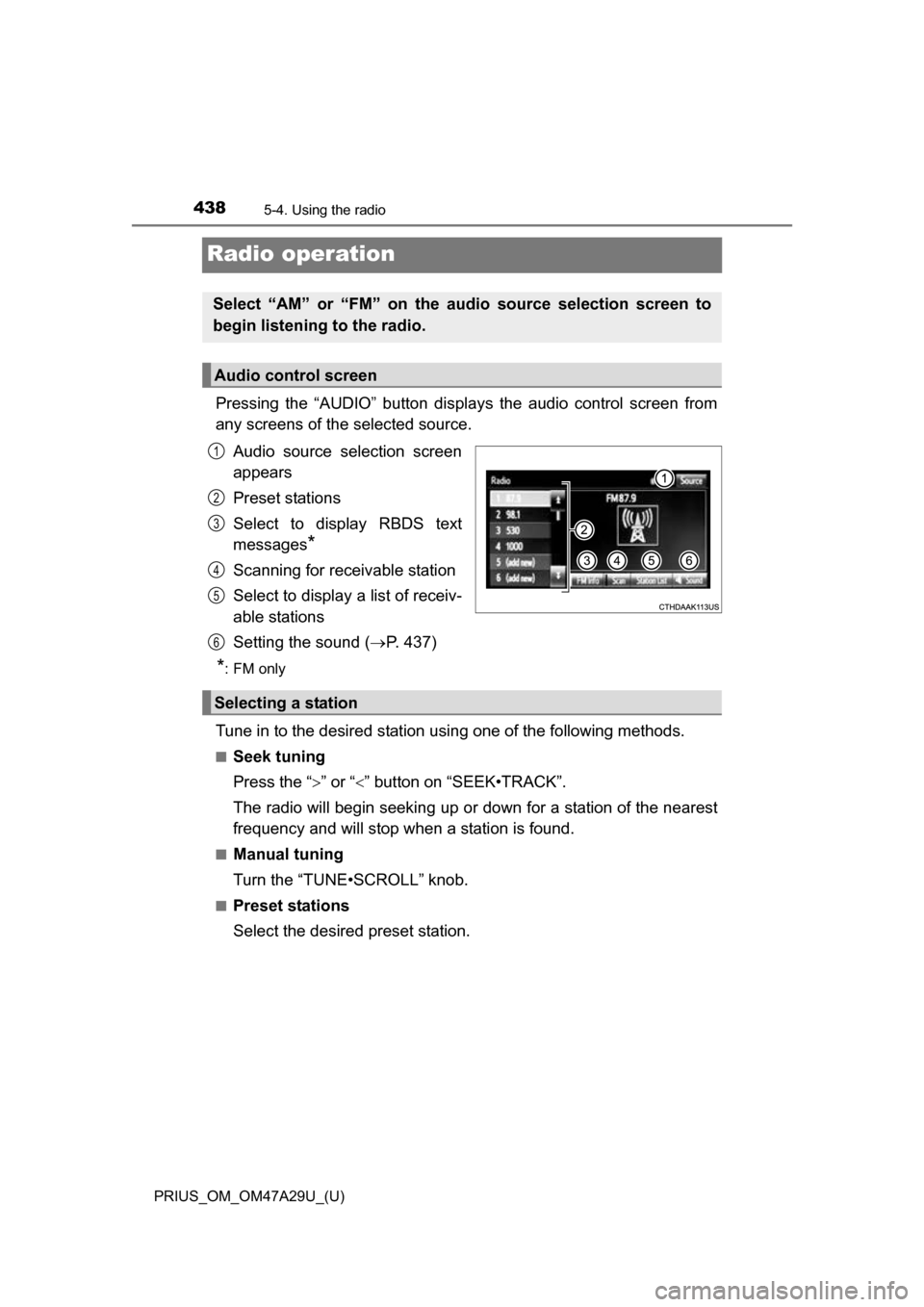
Pressing the “AUDIO” button displays the audio control screen from
any screens of the selected source.
Audio source selection screen
appears
Preset stations
Select to display RBDS text
messages
*
Scanning for receivable station
Select to display a list of receiv-
able stations
Setting the sound ( P. 437)
*:FM only
Tune in to the desired station using one of the following methods.
■Seek tuning
Press the “ ” or “” button on “SEEK•TRACK”.
The radio will begin seeking up or down for a station of the nearest
frequency and will stop when a station is found.
■Manual tuning
Turn the “TUNE•SCROLL” knob.
■Preset stations
Select the desired preset station.
Select “AM” or “FM” on the audio source selection screen to
begin listening to the radio.
Audio control screen
1
2
3
4
5
6
Selecting a station
Page 439 of 800
PRIUS_OM_OM47A29U_(U)
4395-4. Using the radio
5
Audio system
Search for desired stations by turning the “TUNE•SCROLL” knob or
pressing the “” or “” button on “SEEK•TRACK”.
Select “(add new)”.
To change the preset station to a different one, select and hold the preset
station.
Select “Yes”.
Select “OK” after setting the new preset station.
■Refreshing the station list
Select “Refresh” on the “Station List” screen.
To cancel the refresh, select “Cancel Refresh”.
■ Reception sensitivity
●Maintaining perfect radio reception at all times is difficult due to the continu-
ally changing position of the antenna, differences in signal strength and sur-
rounding objects, such as trains, transmitters, etc.
● The radio antenna is mounted on the roof. The antenna can be removed
from the base by turning it.
Setting station presets
1
2
3
4
Page 504 of 800
5045-10. Bluetooth®
PRIUS_OM_OM47A29U_(U)■
Reconnecting the portable audio player
If the portable audio player is disconnected due to poor reception, the system
automatically reconnects the portable audio player.
If you have switched off the portable audio player yourself, follow the instruc-
tions below to reconnect:
●Select the portable audio player again
● Enter the portable audio player
■ When you sell your car
Be sure to delete your personal data. ( P. 430)
WARNING
■While driving
Do not operate the portable audio player, cellular phone or connect a device
to the Bluetooth
® system.
■ Caution regarding interfer ence with electronic devices
● Your audio unit is fitted with Bluetooth
® antennas. People with implantable
cardiac pacemakers, cardiac resynchronization therapy-pacemakers or
implantable cardioverter defibrillators should maintain a reasonable dis-
tance between themselves and the Bluetooth
® antennas. The radio waves
may affect the operation of such devices.
● Before using Bluetooth
® devices, users of any electrical medical device
other than implantable cardiac pacemakers, cardiac resynchronization
therapy-pacemakers or implantable cardioverter defibrillators should con-
sult the manufacturer of the device for information about its operation
under the influence of radio waves. Radio waves could have unexpected
effects on the operation of such medical devices.
NOTICE
■ When leaving the vehicle
Do not leave your portable audio player or cellular phone in the vehicle. The
inside of the vehicle may become hot, causing damage to the portable
audio player or cellular phone.
Page 547 of 800
PRIUS_OM_OM47A29U_(U)
5476-4. Using the other interior features
6
Interior features
■The wireless charger can be operated when
The power switch is in ACCESSORY or ON mode.
■ Usable portable devices
Qi standard wireless charge standard can be used on compatible devices.
However, not all Qi standard devices and compatibility are guaranteed.
Starting with mobile phones and smart phones, it is aimed for low power elec-
trically supplied portable devices of no more than 5W.
■ When covers and accessories are attached to portable devices
Do not charge in situations where cover and accessories not able to handle
Qi are attached to the portable device. Depending on the type of cover and
accessory, it may not be possible to charge. When charging is not performed
even with the portable device placed on the charge area, remove the cover
and accessories.
■ While charging, noise enters the AM radio
Turn off the wireless charger and confirm that the noise has decreased. If the
noise decreases, continuously pushing the power supply switch of the wire-
less charger for 2 seconds, the frequency of the charger can be changed and
the noise can be reduced.
Also, on that occasion, the operation indicator light will flash orange 2 times.
■ Important points of the wireless charger
●If the electronic key cannot be detected within the vehicle interior, charging
cannot be done. When the door is opened and closed, charging may be
temporarily suspended.
● When charging, the wireless charging device and portable device will get
warmer, however this is not a malfunction.
When a portable device gets warm while charging, charging may stop due
to the protection function on the portable device side. In this case, when the
temperature of the portable device drops significantly, charge again.
■ Operation sounds
When the power supply is turned on, while searching for the portable device a
sound will be produced, however this is not a malfunction.
Page 551 of 800
PRIUS_OM_OM47A29U_(U)
5516-4. Using the other interior features
6
Interior features
WARNING
■Conditions in which the function may not operate correctly
In the following conditions, it may not operate correctly
●The portable device is fully charged
● There is foreign matter between the charge area and portable device
● The temperature of the portable device gets higher from charging
● The charging surface of the portable device is facing up
● The placement of the portable device is out of alignment with the charge
area
● Near a TV tower, electric power plant, gas station, radio station, large dis-
play, airport or other facility that generates strong radio waves or electrical
noise
● When the electronic key is in contact with, or is covered by the following
metallic objects
• Cards to which aluminum foil is attached
• Cigarette boxes that have aluminum foil inside
• Metallic wallets or bags
• Coins
• Hand warmers made of metal
• Media such as CDs and DVDs
● When other wireless keys (that emit radio waves) are being used nearby
In addition, excluding the above-mentioned, when the charger does not per-
form normally or the operation display lamp is flashing continuously, it is
considered that the wireless charger is malfunctioning. Contact your Toyota
dealer.
■ To prevent failure or damage to data
●Do not bring magnetic cards, such as credit cards, or magnetic recording
media, etc., close to the charger while charging, otherwise, data may dis-
appear under the influence of magnetism. Also, do not bring precision
instruments such as wrist watches, etc., close to the charger, as such
objects may break.
● Do not leave portable devices in the cabin. The temperature inside the
cabin may become high, when under the sun, and cause damage to the
device.
■ To prevent 12-volt battery discharge
When the hybrid system is stopped, do not use the wireless charger for a
long time.
Page 565 of 800
PRIUS_OM_OM47A29U_(U)
5656-4. Using the other interior features
6
Interior features
■Enhanced Roadside Assistance
Enhanced Roadside Assistance adds GPS data to the already
included warranty-based Toyota roadside service.
Subscribers can press the “SOS” bu tton to reach a Safety Connect
response-center agent, who can help with a wide range of needs,
such as: towing, flat tire, fuel deli very, etc. For a description of the
Roadside Assistance services and their limitations, please see the
Safety Connect Terms and Conditions, which are available at
To y o t a . c o m .
Important! Read this informati on before using Safety Connect.
■Exposure to radio frequency signals
The Safety Connect system installed in your vehicle is a low-power
radio transmitter and receiver. It receives and also sends out radio
frequency (RF) signals.
In August 1996, the Federal Communications Commission (FCC)
adopted RF exposure gui delines with safety levels for mobile wire-
less phones. Those guidelines are consistent with the safety stan-
dards previously set by the fo llowing U.S. and international
standards bodies.
● ANSI (American National Stan dards Institute) C95.1 [1992]
● NCRP (National Council on Radiation Protection and Measure-
ment) Report 86 [1986]
● ICNIRP (Internationa l Commission on Non-Ionizing Radiation
Protection) [1996]
Those standards were based on comprehensive and periodic eval-
uations of the relevant scientific lit erature. Over 120 scientists, engi-
neers, and physicians from uni versities, and government health
agencies and industries reviewed t he available body of research to
develop the ANSI Standard (C95.1).
The design of Safety Connect complies with the FCC guidelines in
addition to those standards.
Safety information for Safety Connect