Page 101 of 800
PRIUS_OM_OM47A29U_(U)
1012. Instrument cluster
2
Instrument cluster
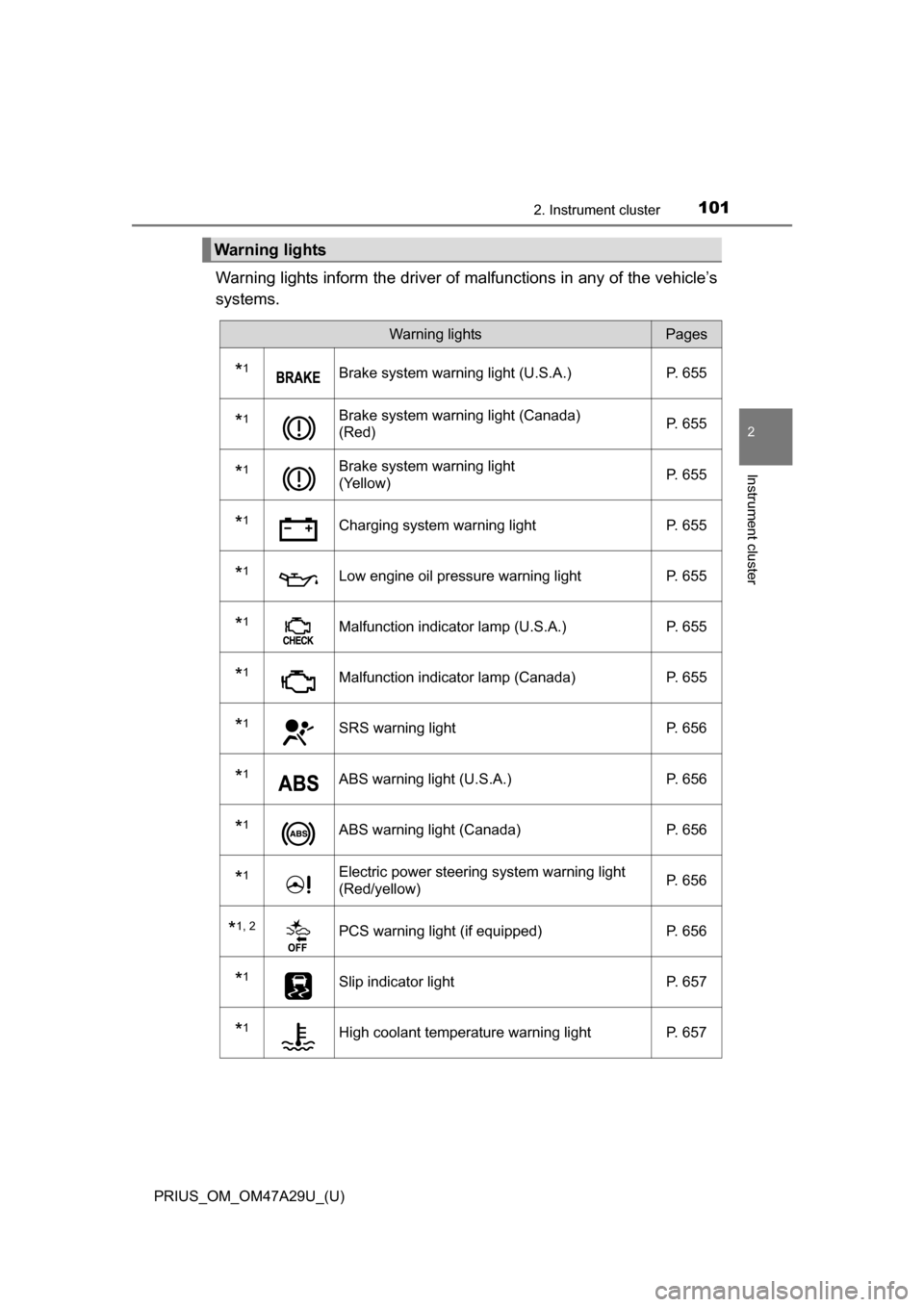
Warning lights inform the driver of malfunctions in any of the vehicle’s
systems.
Warning lights
Warning lightsPages
*1Brake system warning light (U.S.A.) P. 655
*1Brake system warning light (Canada)
(Red)P. 655
*1Brake system warning light
(Yellow)P. 655
*1Charging system warning light
P. 655
*1Low engine oil pressure warning lightP. 655
*1Malfunction indicator lamp (U.S.A.) P. 655
*1Malfunction indicator lamp (Canada) P. 655
*1SRS warning lightP. 656
*1ABS warning light (U.S.A.) P. 656
*1ABS warning light (Canada)P. 656
*1Electric power steering system warning light
(Red/yellow)P. 656
*1, 2PCS warning light (if equipped)
P. 656
*1Slip indicator light P. 657
*1High coolant temperature warning lightP. 657
Page 103 of 800
PRIUS_OM_OM47A29U_(U)
1032. Instrument cluster
2
Instrument cluster
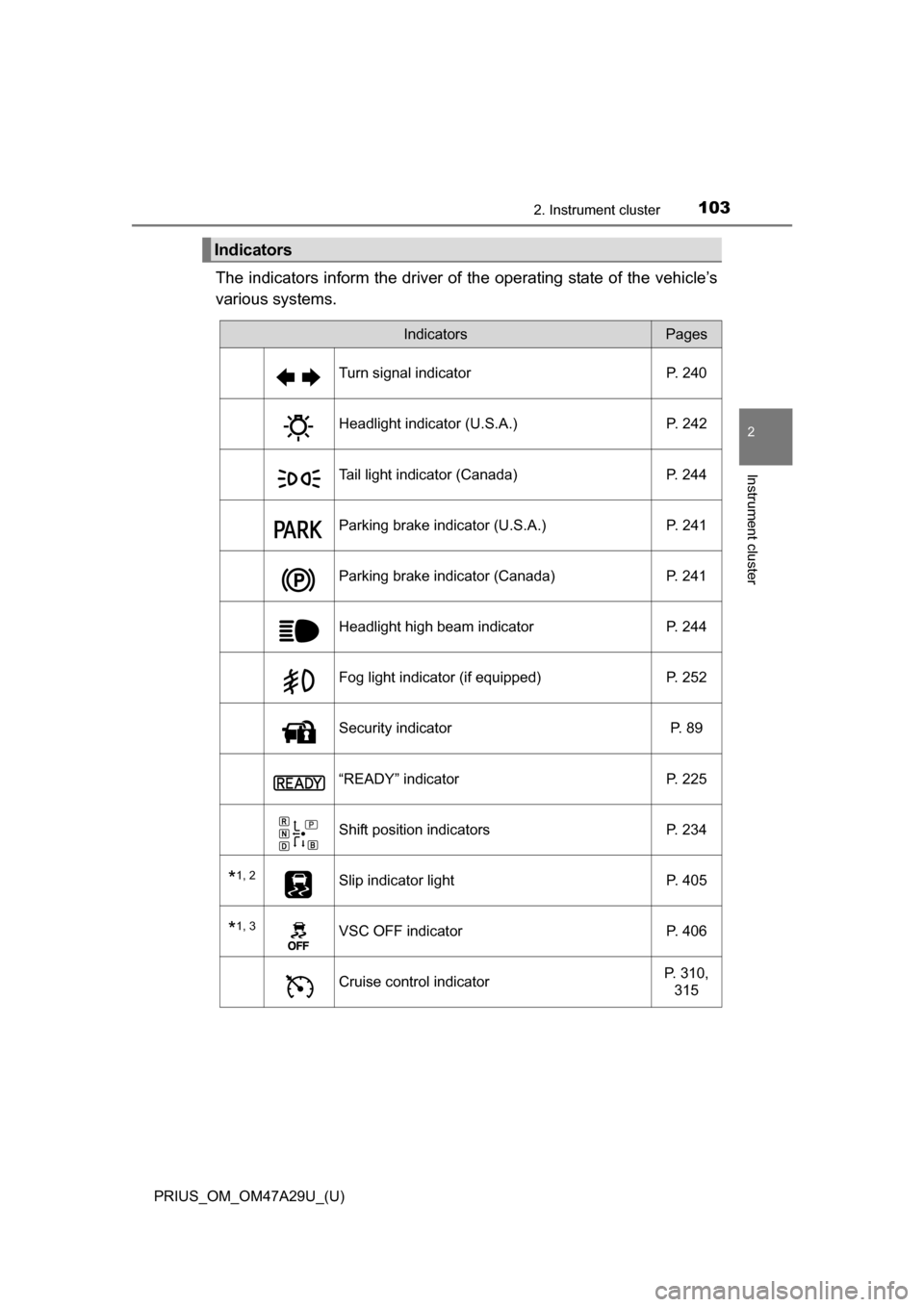
The indicators inform the driver of the operating state of the vehicle’s
various systems.
Indicators
IndicatorsPages
Turn signal indicator P. 240
Headlight indicator (U.S.A.) P. 242
Tail light indicator (Canada) P. 244
Parking brake indicator (U.S.A.) P. 241
Parking brake indicator (Canada)P. 241
Headlight high beam indicatorP. 244
Fog light indicator (if equipped) P. 252
Security indicator P. 89
“READY” indicatorP. 225
Shift position indicatorsP. 234
*1, 2Slip indicator light P. 405
*1, 3VSC OFF indicatorP. 406
Cruise control indicatorP. 310,
315
Page 105 of 800
PRIUS_OM_OM47A29U_(U)
1052. Instrument cluster
2
Instrument cluster
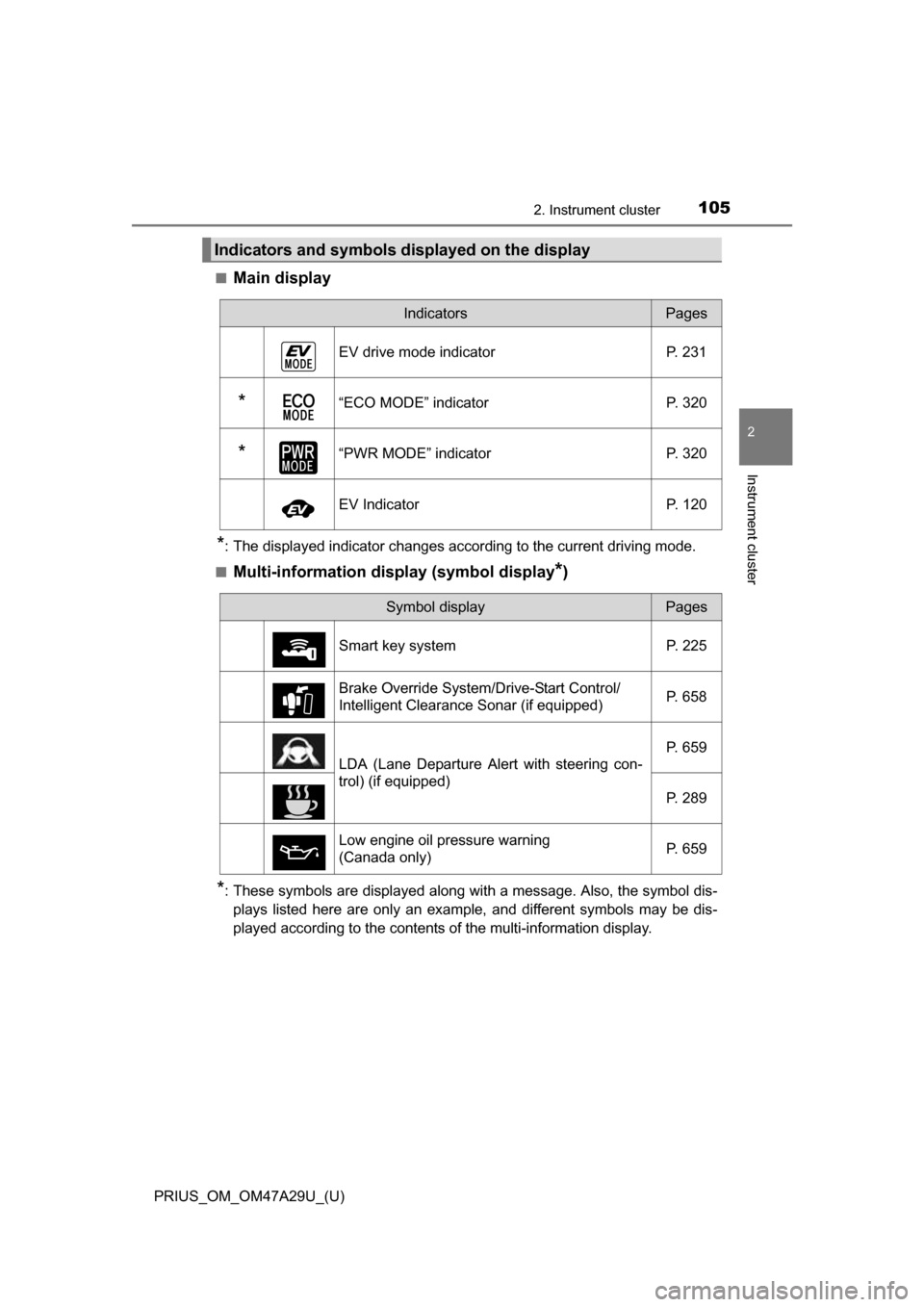
■Main display
*: The displayed indicator changes according to the current driving mode.
■
Multi-information display (symbol display*)
*: These symbols are displayed along with a message. Also, the symbol dis- plays listed here are only an example, and different symbols may be dis-
played according to the contents of the multi-information display.
Indicators and symbols displayed on the display
IndicatorsPages
EV drive mode indicator P. 231
*“ECO MODE” indicator P. 320
*“PWR MODE” indicatorP. 320
EV IndicatorP. 120
Symbol displayPages
Smart key system P. 225
Brake Override System/Drive-Start Control/
Intelligent Clearance Sonar (if equipped) P. 658
LDA (Lane Departure Alert with steering con-
trol) (if equipped)P. 659
P. 289
Low engine oil pressure warning
(Canada only) P. 659
Page 186 of 800
186
PRIUS_OM_OM47A29U_(U)
3-3. Adjusting the seats
Rear seats
Park the vehicle in a safe place.
Apply the parking brake firmly and shift the shift position to P. (P. 235)
Adjust the position of the front seat and the angle of the seatback.
(
P. 184)
Depending on the position of the front seat, if the seatback is folded back-
ward, it may interfere with the operation of the rear seat.
Lift up and push down the head restraints of the rear outboard
seats, and lower the head restraint of the rear center seat.
(
P. 189)
Stow the armrest of the rear seat if it is pulled out. (P. 552)
This step is not necessary when operating the left side seat only.
The seatbacks can be folded down.
Before folding down the seatbacks
1
2
3
4
Page 187 of 800
PRIUS_OM_OM47A29U_(U)
1873-3. Adjusting the seats
3
Operation of each component
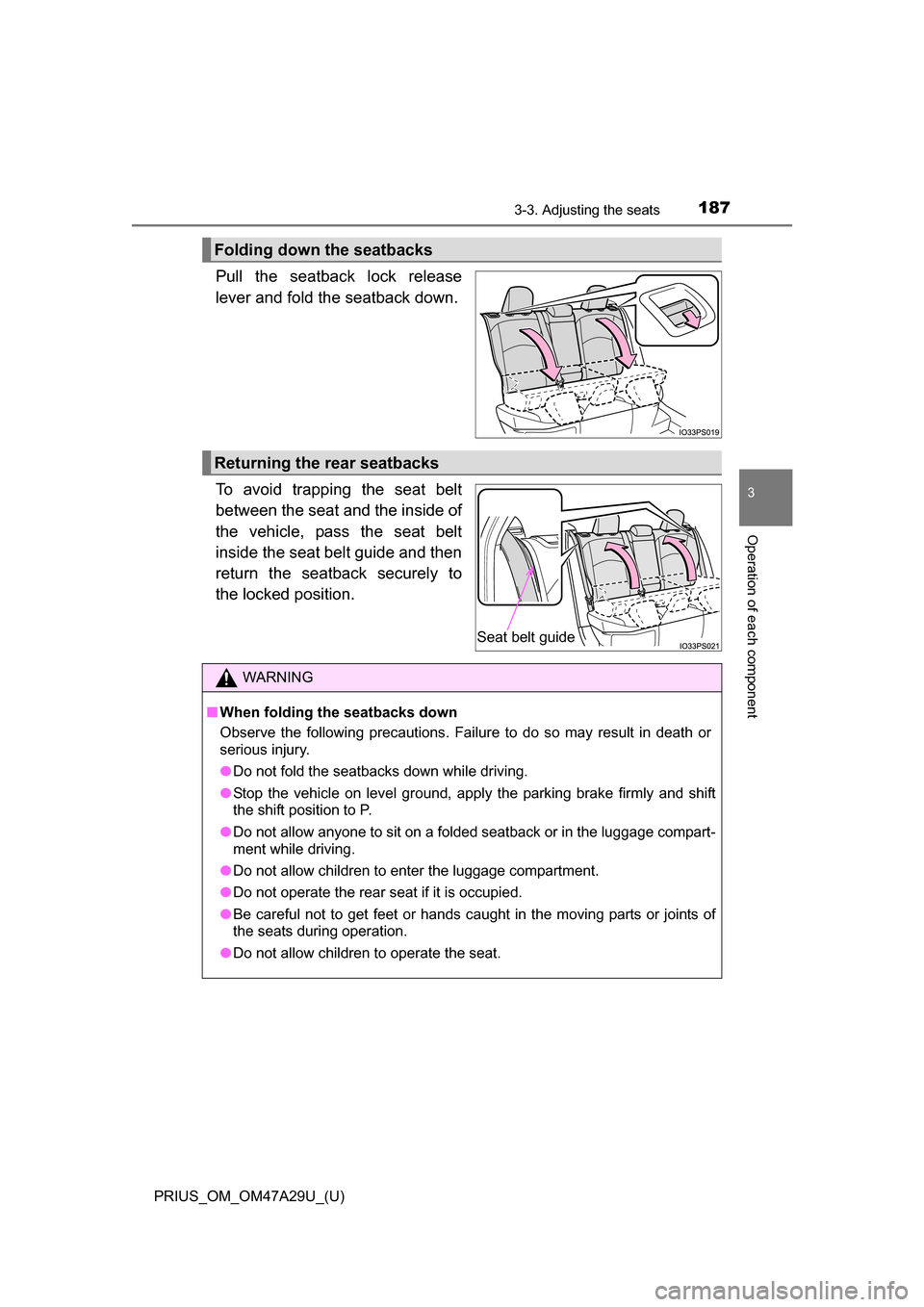
Pull the seatback lock release
lever and fold the seatback down.
To avoid trapping the seat belt
between the seat and the inside of
the vehicle, pass the seat belt
inside the seat belt guide and then
return the seatback securely to
the locked position.
Folding down the seatbacks
Returning the rear seatbacks
Seat belt guide
WARNING
■When folding the seatbacks down
Observe the following precautions. Failure to do so may result in death or
serious injury.
●Do not fold the seatbacks down while driving.
● Stop the vehicle on level ground, apply the parking brake firmly and shift
the shift position to P.
● Do not allow anyone to sit on a folded seatback or in the luggage compart-
ment while driving.
● Do not allow children to enter the luggage compartment.
● Do not operate the rear seat if it is occupied.
● Be careful not to get feet or hands caught in the moving parts or joints of
the seats during operation.
● Do not allow children to operate the seat.
Page 207 of 800
207
PRIUS_OM_OM47A29U_(U)
4Driving
4-1. Before drivingDriving the vehicle ............. 208
Cargo and luggage ........... 219
Vehicle load limits ............. 222
Trailer towing..................... 223
Dinghy towing ................... 224
4-2. Driving procedures Power (ignition) switch ...... 225
EV drive mode .................. 231
Hybrid transmission........... 234
Turn signal lever................ 240
Parking brake .................... 241
4-3. Operating the lights and wipers
Headlight switch ................ 242
Automatic High Beam ....... 247
Fog light switch ................. 252
Windshield wipers and washer ............................ 254
Rear window wiper and washer ............................ 260 4-4. Refueling
Opening the fuel tank cap .................................. 262
4-5. Using the driving support systems
Toyota Safety Sense P ..... 267
PCS (Pre-Collision System) ........................... 275
LDA (Lane Departure Alert with steering
control) ............................ 289
Dynamic radar cruise control with full-speed
range ............................... 300
Cruise control .................... 315
Driving mode select switch .............................. 320
BSM (Blind Spot Monitor) ........ 322
Intuitive parking assist....... 335
Intelligent Clearance Sonar .............................. 346
S-APGS (Simple Advanced Parking
Guidance System) .......... 359
Rear view monitor system ............................ 394
Driving assist systems ...... 404
4-6. Driving tips Hybrid vehicle driving tips .................................. 411
Winter driving tips ............. 414
Page 208 of 800
208
PRIUS_OM_OM47A29U_(U)
4-1. Before driving
Driving the vehicle
P. 2 2 5
With the brake pedal depressed, shift the shift position to D.
( P. 234)
Check that the shift position indicator shows D.
Release the parking brake. ( P. 241)
Gradually release the brake pedal and gently depress the accelera-
tor pedal to accelerate the vehicle.
With the shift position in D, depress the brake pedal.
If necessary, set the parking brake.
If the vehicle is to be stopped for an extended period of time, shift the shift
position to P. (
P. 235)
Stop the vehicle completely.
Set the parking brake. ( P. 241)
Shift the shift position to P. ( P. 235)
Check that the shift position indicator shows P.
Press the power switch to stop the hybrid system.
Slowly release the brake pedal.
Lock the door, making sure that you have the electronic key on your
person.
If parking on a hill, block the wheels as needed.
The following procedures should be observed to ensure safe
driving:
Starting the hybrid system
Driving
Stopping
Parking the vehicle
1
2
3
1
2
1
2
3
4
5
6
Page 209 of 800
PRIUS_OM_OM47A29U_(U)
2094-1. Before driving
4
Driving
Firmly set the parking brake with the brake pedal depressed, and
then shift the shift position to D.
Release the brake pedal and gently depress the accelerator pedal.
Release the parking brake.
■ When starting off on a uphill
The hill-start assist control will activate. ( P. 405)
■ For fuel-efficient driving
Keep in mind that hybrid vehicles are similar to conventional vehicles, and it
is necessary to refrain from activities such as sudden acceleration. ( P. 411)
■ Driving in the rain
●Drive carefully when it is raining, because visibility will be reduced, the win-
dows may become fogged-up, and the road will be slippery.
● Drive carefully when it starts to rain, because the road surface will be espe-
cially slippery.
● Refrain from high speeds when driving on an expressway in the rain,
because there may be a layer of water between the tires and the road sur-
face, preventing the steering and brakes from operating properly.
■ Restraining hybrid system outp ut (Brake Override System)
● When the accelerator and brake pedals are depressed at the same time, the
hybrid system output may be restrained.
● A warning message is displayed on the multi-information display while the
system is operating. If a warning message is shown on the multi-information
display, read the message and follow the instructions.
■ “ECO Accelerator Guidance” ( P. 120)
It is easier to drive in an Eco-friendly manner by driving while referring to the
“ECO Accelerator Guidance” display. Also, by using the “ECO Accelerator
Guidance”, it is easier to increase the Eco score evaluation.
● When starting off:
While staying within the “ECO Accelerator Guidance” range, gradually
depress the accelerator pedal and accelerate to the desired speed. If exces-
sive acceleration is avoided, the “Eco-Start” score will increase.
● When driving:
After accelerating to the desired speed, release the accelerator pedal and
drive at a stable speed within the “ECO Accelerator Guidance” range. By
keeping the vehicle within the “ECO Accelerator Guidance” range, t\
he “Eco-
Cruise” score will increase.
● When stopping:
When stopping the vehicle, early releasing the accelerator pedal will cause
the “Eco-Stop” score to increase.
Starting off on a steep uphill
1
2
3