Page 82 of 800
821-3. Hybrid system
PRIUS_OM_OM47A29U_(U)
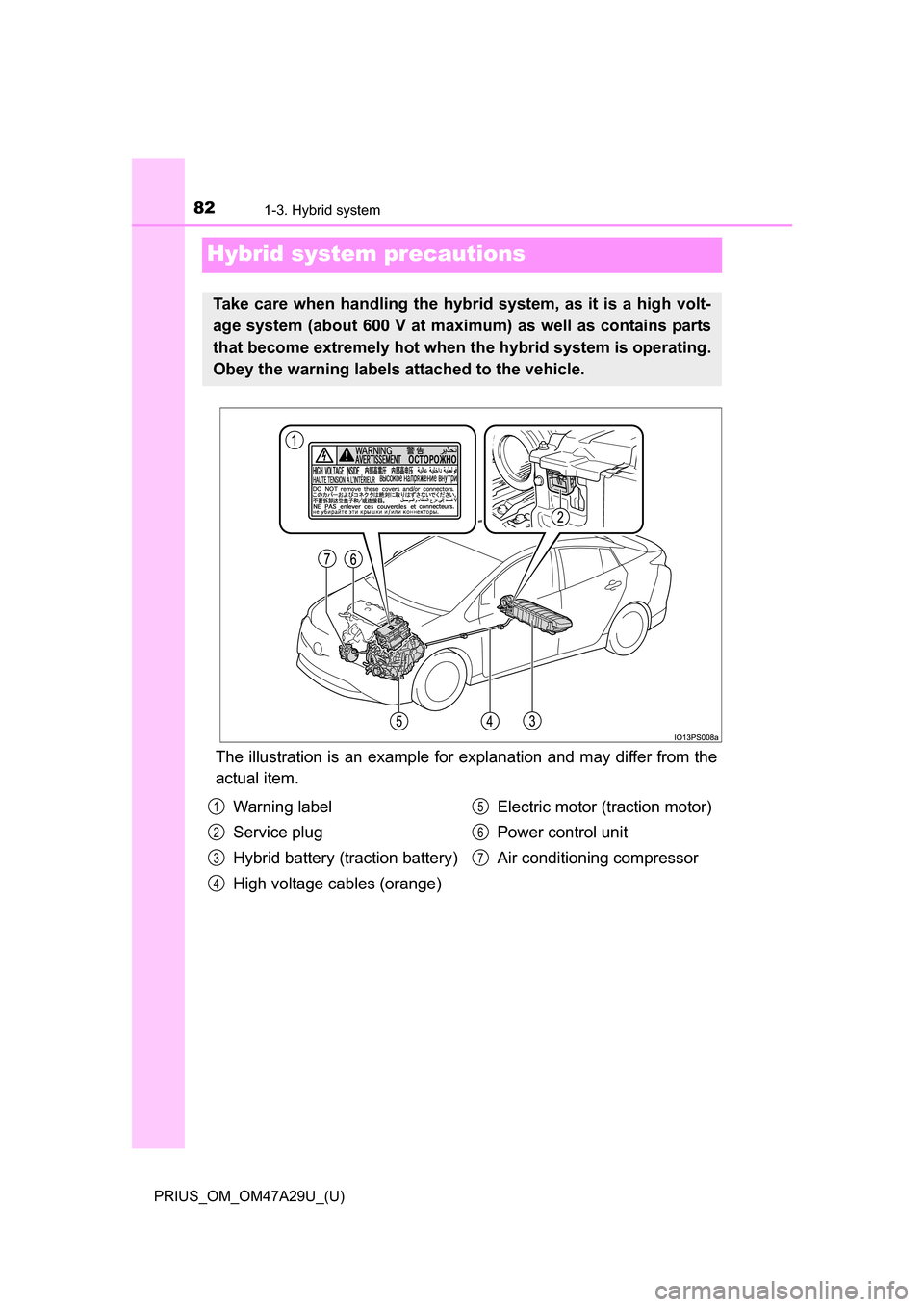
Hybrid system precautions
The illustration is an example for explanation and may differ from the
actual item.
Take care when handling the hybrid system, as it is a high volt-
age system (about 600 V at maximum) as well as contains parts
that become extremely hot when the hybrid system is operating.
Obey the warning labels attached to the vehicle.
Warning label
Service plug
Hybrid battery (traction battery)
High voltage cables (orange)Electric motor (traction motor)
Power control unit
Air conditioning compressor1
2
3
4
5
6
7
Page 99 of 800
PRIUS_OM_OM47A29U_(U)
992. Instrument cluster
2
Instrument cluster
■Liquid crystal display
Small spots or light spots may appear on the display. This phenomenon is
characteristic of liquid crystal displays, and there is no problem continuing to
use the display.
■ Pop-up display
Some functions, such as the driving mode select switch and air conditioning
system, are operation-linked and display pop-up screens on the multi-infor-
mation display. If the pop-up screens of these functions are not desired, they
can be turned off in the “Meter Customize” settings. ( P. 142)
WARNING
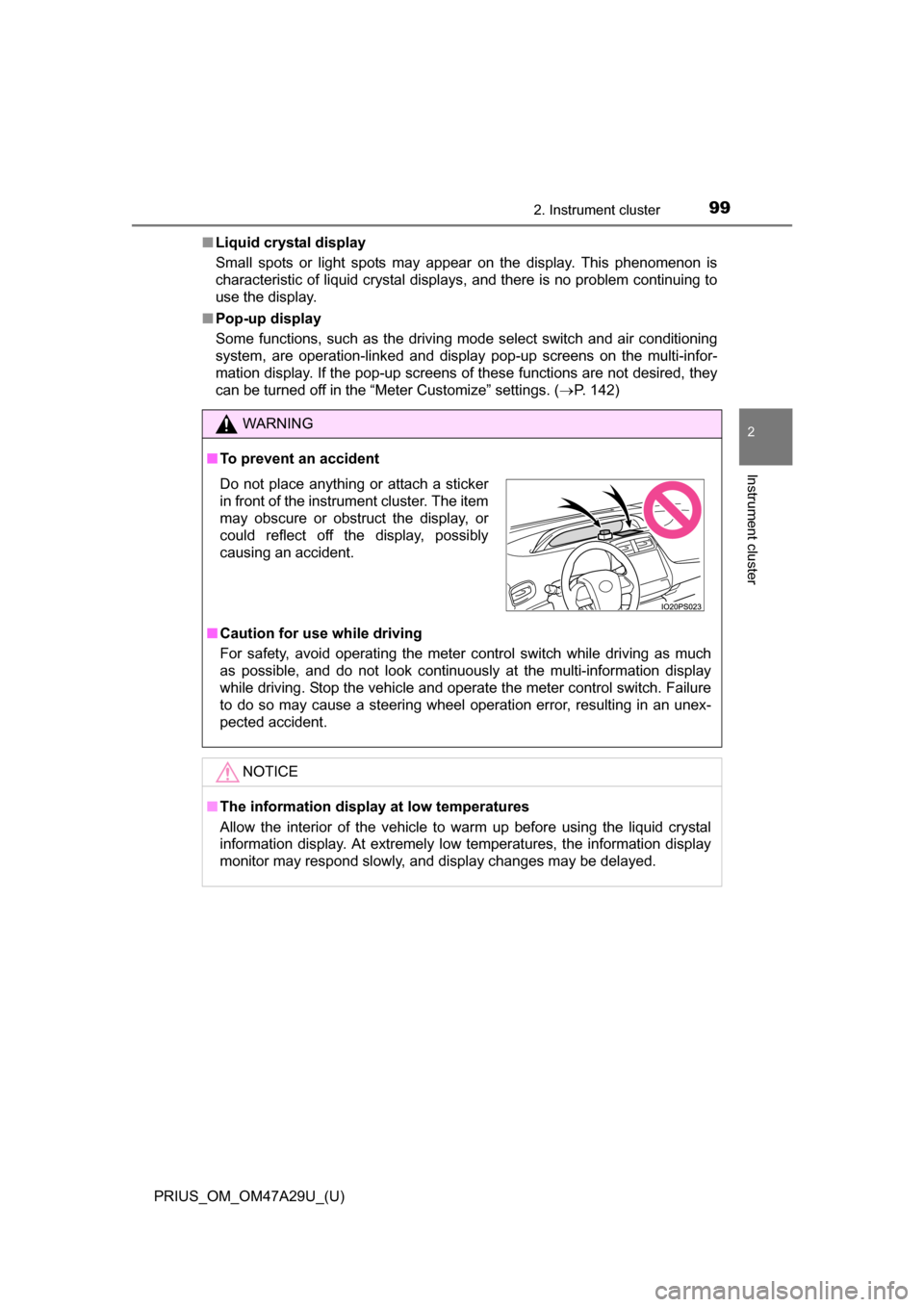
■To prevent an accident
■ Caution for use while driving
For safety, avoid operating the meter control switch while driving as much
as possible, and do not look continuously at the multi-information display
while driving. Stop the vehicle and operate the meter control switch. Failure
to do so may cause a steering wheel operation error, resulting in an unex-
pected accident.
NOTICE
■The information display at low temperatures
Allow the interior of the vehicle to warm up before using the liquid crystal
information display. At extremely low temperatures, the information display
monitor may respond slowly, and display changes may be delayed.
Do not place anything or attach a sticker
in front of the instrument cluster. The item
may obscure or obstruct the display, or
could reflect off the display, possibly
causing an accident.
Page 115 of 800
PRIUS_OM_OM47A29U_(U)
1152. Instrument cluster
2
Instrument cluster
*1: If equipped
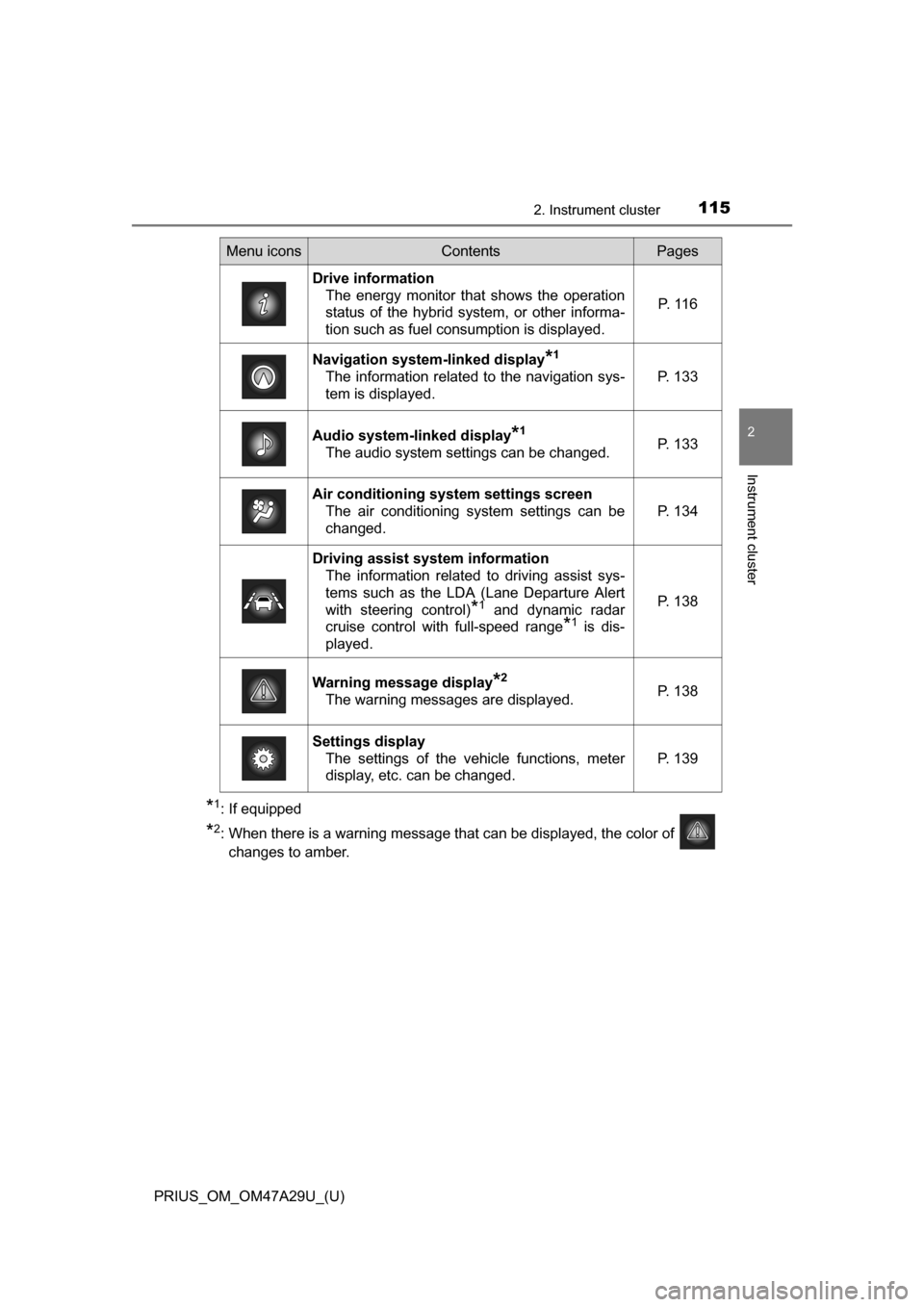
*2: When there is a warning message that can be displayed, the color of changes to amber.
Menu iconsContentsPages
Drive information The energy monitor that shows the operation
status of the hybrid system, or other informa-
tion such as fuel consumption is displayed. P. 1 1 6
Navigation system-linked display*1
The information related to the navigation sys-
tem is displayed.P. 133
Audio system-linked display*1
The audio system settings can be changed.P. 133
Air conditioning system settings screen
The air conditioning system settings can be
changed.
P. 134
Driving assist system informationThe information related to driving assist sys-
tems such as the LDA (Lane Departure Alert
with steering control)
*1 and dynamic radar
cruise control with full-speed range
*1 is dis-
played.
P. 138
Warning message display*2
The warning messages are displayed.P. 138
Settings display The settings of the vehicle functions, meter
display, etc. can be changed.
P. 139
Page 122 of 800
122
PRIUS_OM_OM47A29U_(U)
2. Instrument cluster
■When operation of each function stops
● The Hybrid System Indicator stops operating in the following situations.
• The “READY” indicator is not illuminated.
• The shift position is not D or B.
● The Eco score and “ECO Accelerator Guidance” stop operating in the fol-
lowing situations.
• The Hybrid System Indicator is not operating.
• Cruise control (if equipped) or dynamic radar cruise control with full-
speed range (if equipped) is being used.
■ About the Eco score
●After starting off, Eco score display does not start until the vehicle speed
exceeds approximately 12 mph (20 km/h).
● In addition to the vehicle driving status, the Eco score also evaluates the air
conditioning system usage condition ( P. 136). The score displayed when
the hybrid system stops is the total result of the driving status after the
hybrid system starts and the air conditioning usage condition.
Page 134 of 800
134
PRIUS_OM_OM47A29U_(U)
2. Instrument cluster
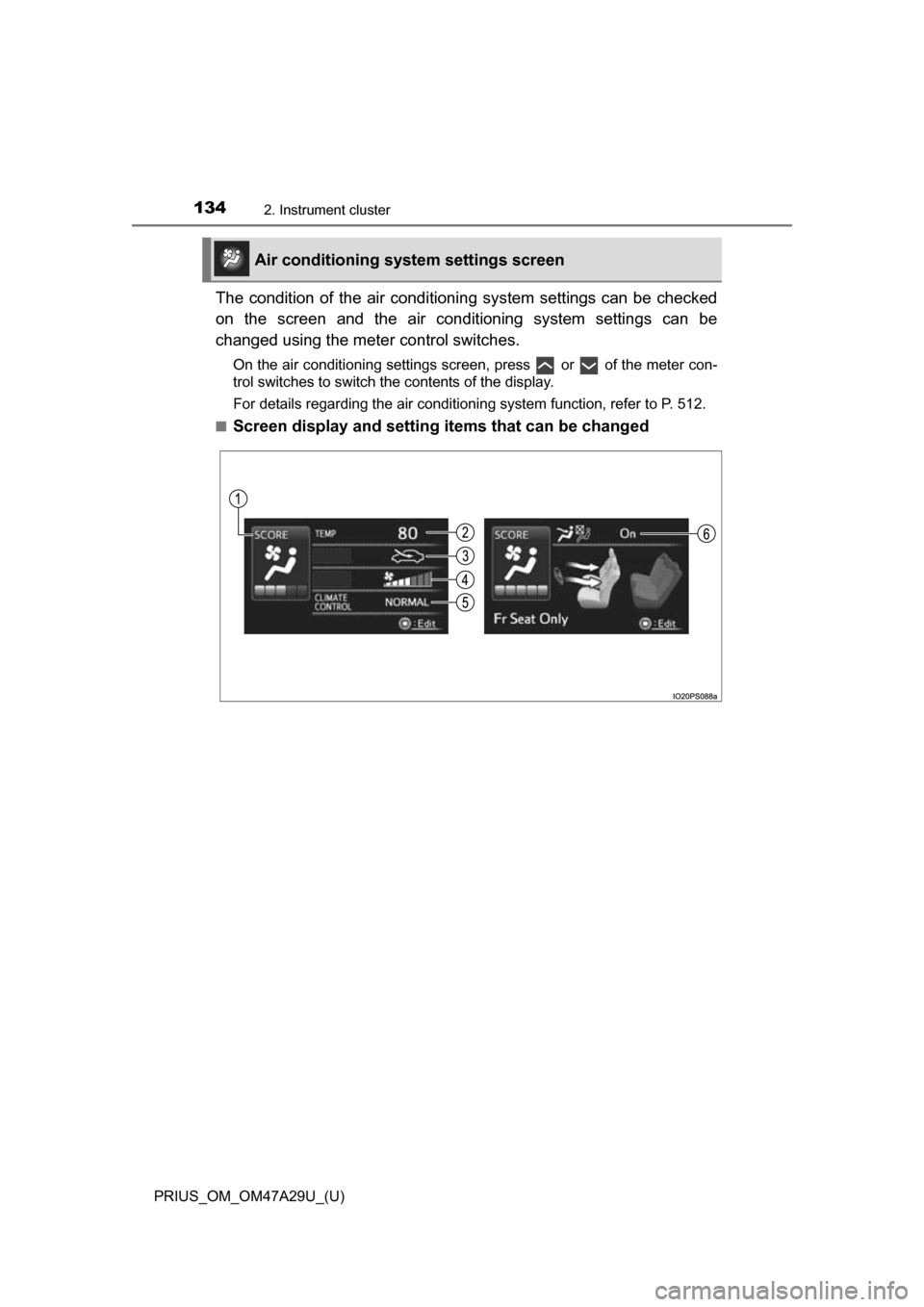
The condition of the air conditioning system settings can be checked
on the screen and the air conditioning system settings can be
changed using the meter control switches.
On the air conditioning settings screen, press or of the meter con-
trol switches to switch the contents of the display.
For details regarding the air conditioning system function, refer to P. 512.
■
Screen display and setting items that can be changed
Air conditioning system settings screen
Page 136 of 800
136
PRIUS_OM_OM47A29U_(U)
2. Instrument cluster
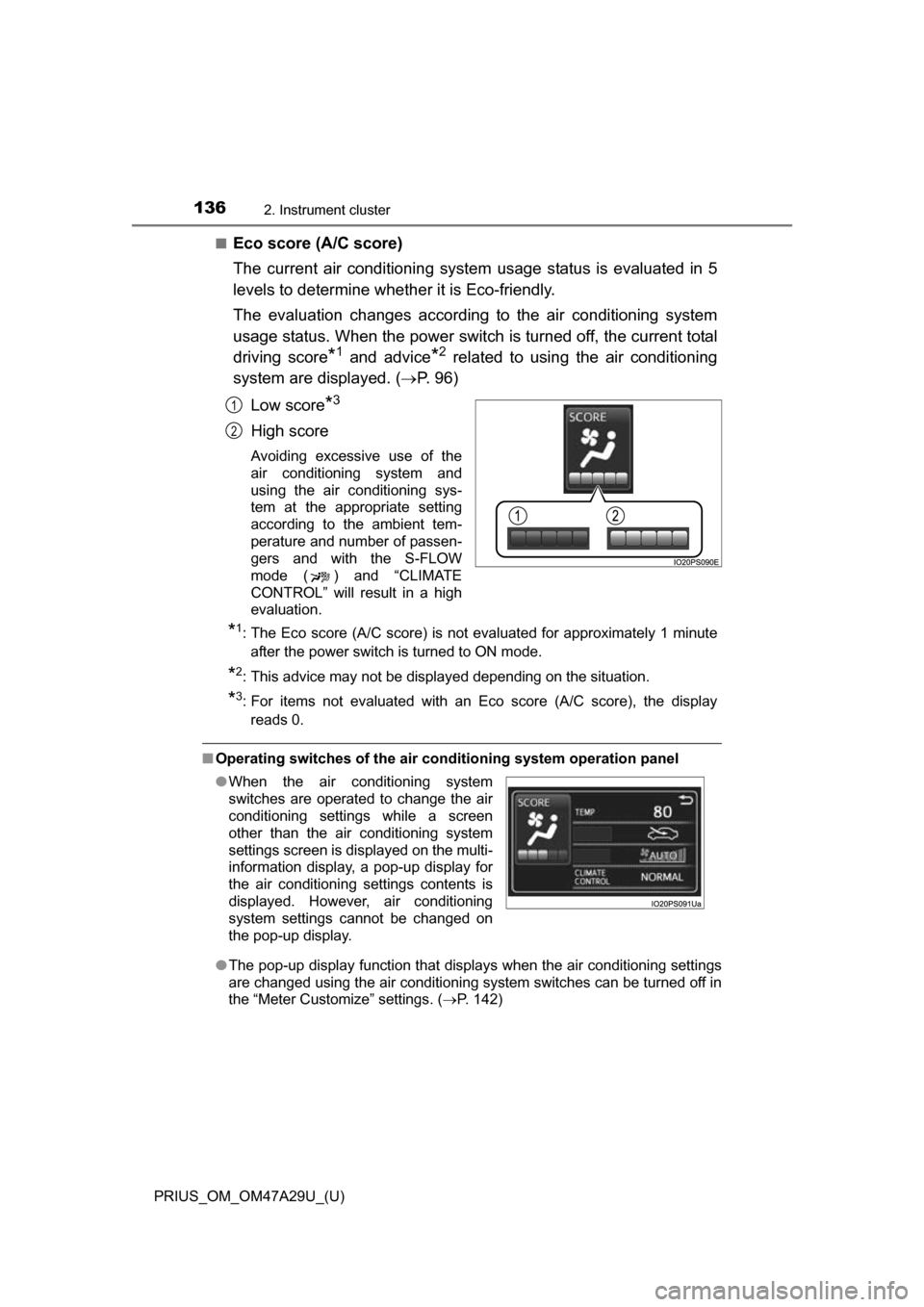
■Eco score (A/C score)
The current air conditioning system usage status is evaluated in 5
levels to determine whether it is Eco-friendly.
The evaluation changes according to the air conditioning system
usage status. When the power switch is turned off, the current total
driving score
*1 and advice*2 related to using the air conditioning
system are displayed. ( P. 9 6 )
Low score
*3
High score
Avoiding excessive use of the
air conditioning system and
using the air conditioning sys-
tem at the appropriate setting
according to the ambient tem-
perature and number of passen-
gers and with the S-FLOW
mode ( ) and “CLIMATE
CONTROL” will result in a high
evaluation.
*1: The Eco score (A/C score) is not evaluated for approximately 1 minute after the power switch is turned to ON mode.
*2: This advice may not be displayed depending on the situation.
*3: For items not evaluated with an Eco score (A/C score), the displayreads 0.
■ Operating switches of the air c onditioning system operation panel
● The pop-up display function that displays when the air conditioning settings
are changed using the air conditioning system switches can be turned off in
the “Meter Customize” settings. ( P. 142)
1
2
●When the air conditioning system
switches are operated to change the air
conditioning settings while a screen
other than the air conditioning system
settings screen is displayed on the multi-
information display, a pop-up display for
the air conditioning settings contents is
displayed. However, air conditioning
system settings cannot be changed on
the pop-up display.
Page 137 of 800
PRIUS_OM_OM47A29U_(U)
1372. Instrument cluster
2
Instrument cluster
■Eco score (A/C score)
●The setting status of the following air conditioning system functions are
reflected in the score.
• Temperature setting
• Fan speed setting
• Outside air and recirculated air modes
• “A/C” button
• S-FLOW mode
• “CLIMATE CONTROL”
● The Eco score (A/C score) is evaluated according to the ambient tempera-
ture and cabin temperature. Accordingly, even if the same settings are
always used for the air conditioning system, the evaluation will change
according to such factors as the season and weather.
● When the air conditioning system is not being used or the airflow mode is
set to or , the Eco score (A/C score) is not evaluated. (While the
air conditioning system is not evaluated, its usage status is not reflected in
the total Eco score result.)
● The Eco score (A/C score) is a function that helps select an air conditioning
system setting which reduces fuel consumption, not a function that satisfies
both comfortability and low fuel consumption.
Page 178 of 800

178
PRIUS_OM_OM47A29U_(U)
3-2. Opening, closing and locking the doors
■Electronic Key Battery-Saving Function
When battery-saving mode is set, battery depletion is minimized by stopping
the electronic key from receiving radio waves.
■ Conditions affecting operation
The smart key system, wireless remote control and immobilizer system use
weak radio waves. In the following situations, the communication between\
the electronic key and the vehicle may be affected, preventing the smart key
system, wireless remote control and immobilizer system from operating prop-
erly. (Ways of coping: P. 708)
● When the electronic key battery is depleted
● Near a TV tower, electric power plant, gas station, radio station, large dis-
play, airport or other facility that generates strong radio waves or electrical
noise
● When the electronic key is in contact with, or is covered by the following
metallic objects
• Cards to which aluminum foil is attached
• Cigarette boxes that have aluminum foil inside
• Metallic wallets or bags
• Coins
• Hand warmers made of metal
• Media such as CDs and DVDs
● When other wireless key (that emit radio waves) is being used nearby
● When carrying the electronic key together with the following devices that
emit radio waves
• Portable radio, cellular phone, cordless phone or other wireless commu-
nication devices
• Another vehicle’s electronic key or a wireless key that emits radio waves
• Personal computers or personal digital assistants (PDAs)
• Digital audio players
• Portable game systems
● If window tint with a metallic content or metallic objects are attached to the
rear window
● When the electronic key is placed near a battery charger or electronic
devices
Press twice while pressing and
holding . Confirm that the electronic
key indicator flashes 4 times.
While the battery-saving mode is set, the
smart key system cannot be used. To
cancel the function, press any of the elec-
tronic key buttons.