Page 303 of 608
LC200_OM_OM60M88U_(U)
3034-5. Using the driving support systems
4
Driving
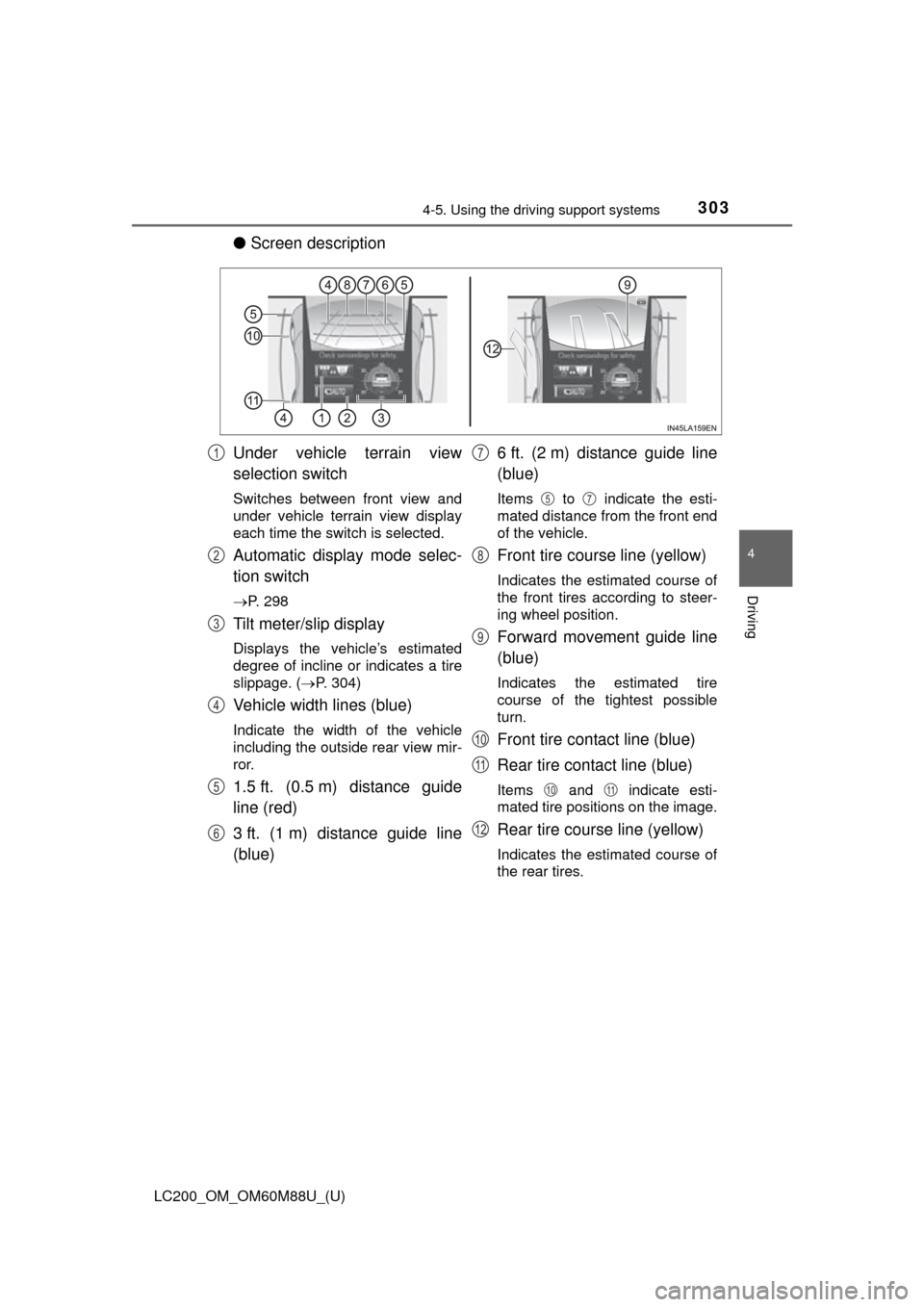
●Screen description
Under vehicle terrain view
selection switch
Switches between front view and
under vehicle terrain view display
each time the switch is selected.
Automatic display mode selec-
tion switch
P. 298
Tilt meter/slip display
Displays the vehicle’s estimated
degree of incline or indicates a tire
slippage. ( P. 304)
Vehicle width lines (blue)
Indicate the width of the vehicle
including the outside rear view mir-
ror.
1.5 ft. (0.5 m) distance guide
line (red)
3 ft. (1 m) distance guide line
(blue) 6 ft. (2 m) distance guide line
(blue)
Items to indicate the esti-
mated distance from the front end
of the vehicle.
Front tire course line (yellow)
Indicates the estimated course of
the front tires according to steer-
ing wheel position.
Forward movement guide line
(blue)
Indicates the estimated tire
course of the tightest possible
turn.
Front tire contact line (blue)
Rear tire contact line (blue)
Items and indicate esti-
mated tire positions on the image.
Rear tire course line (yellow)
Indicates the estimated course of
the rear tires.
1
2
3
4
5
6
7
57
8
9
10
11
1011
12
Page 306 of 608
306
LC200_OM_OM60M88U_(U)
4-5. Using the driving support systems
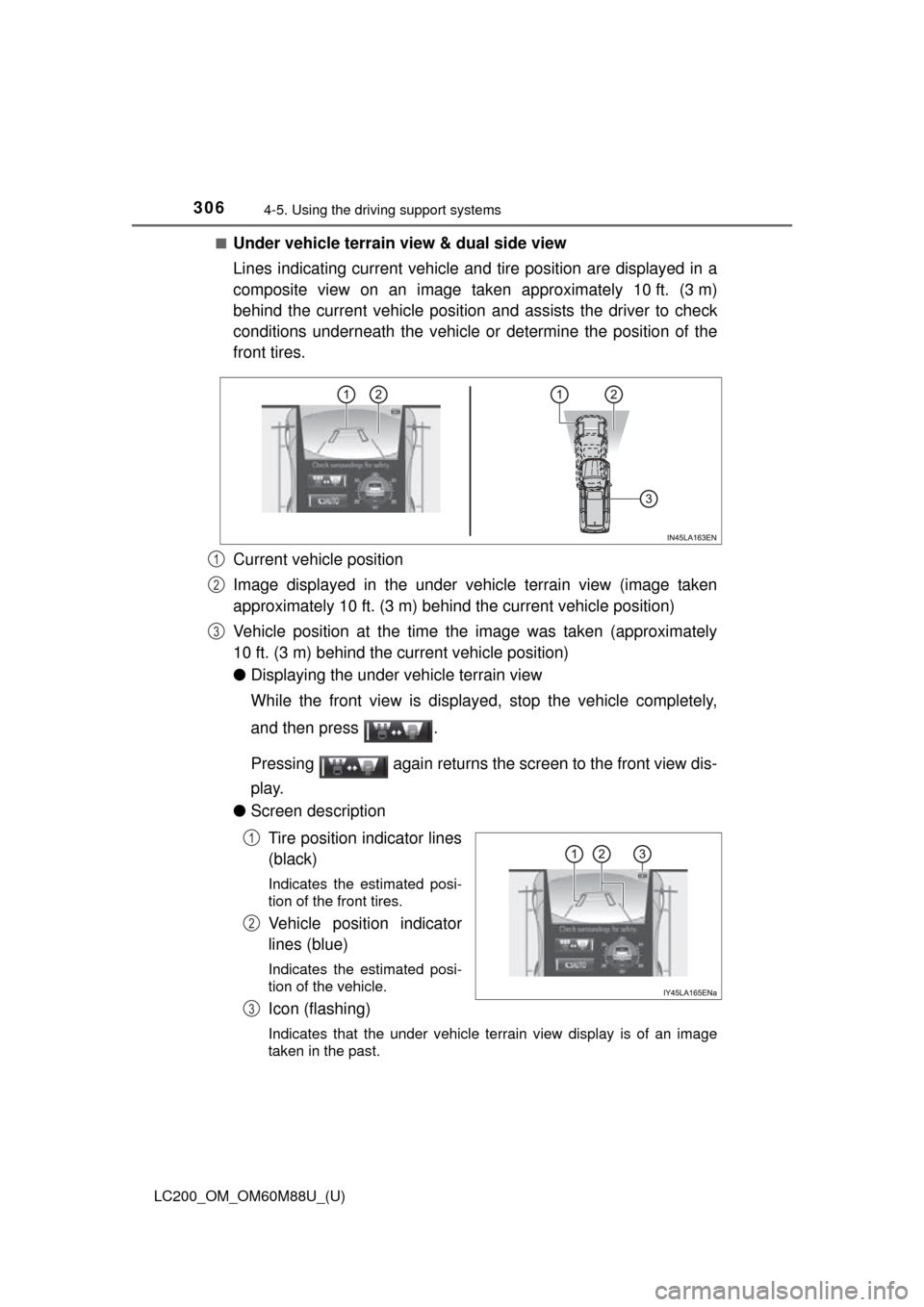
■Under vehicle terrain view & dual side view
Lines indicating current vehicle and tire position are displayed in a
composite view on an image taken approximately 10 ft. (3 m)
behind the current vehicle position and assists the driver to check
conditions underneath t he vehicle or determine the position of the
front tires.
Current vehicle position
Image displayed in the under vehicle terrain view (image taken
approximately 10 ft. (3 m) behind the current vehicle position)
Vehicle position at the time the image was taken (approximately
10 ft. (3 m) behind the current vehicle position)
● Displaying the under vehicle terrain view
While the front view is displayed, stop the vehicle completely,
and then press .
Pressing again returns the screen to the front view dis-
play.
● Screen description
Tire position indicator lines
(black)
Indicates the estimated posi-
tion of the front tires.
Vehicle position indicator
lines (blue)
Indicates the estimated posi-
tion of the vehicle.
Icon (flashing)
Indicates that the under vehicle terrain view display is of an image
taken in the past.
1
2
3
1
2
3
Page 309 of 608
LC200_OM_OM60M88U_(U)
3094-5. Using the driving support systems
4
Driving
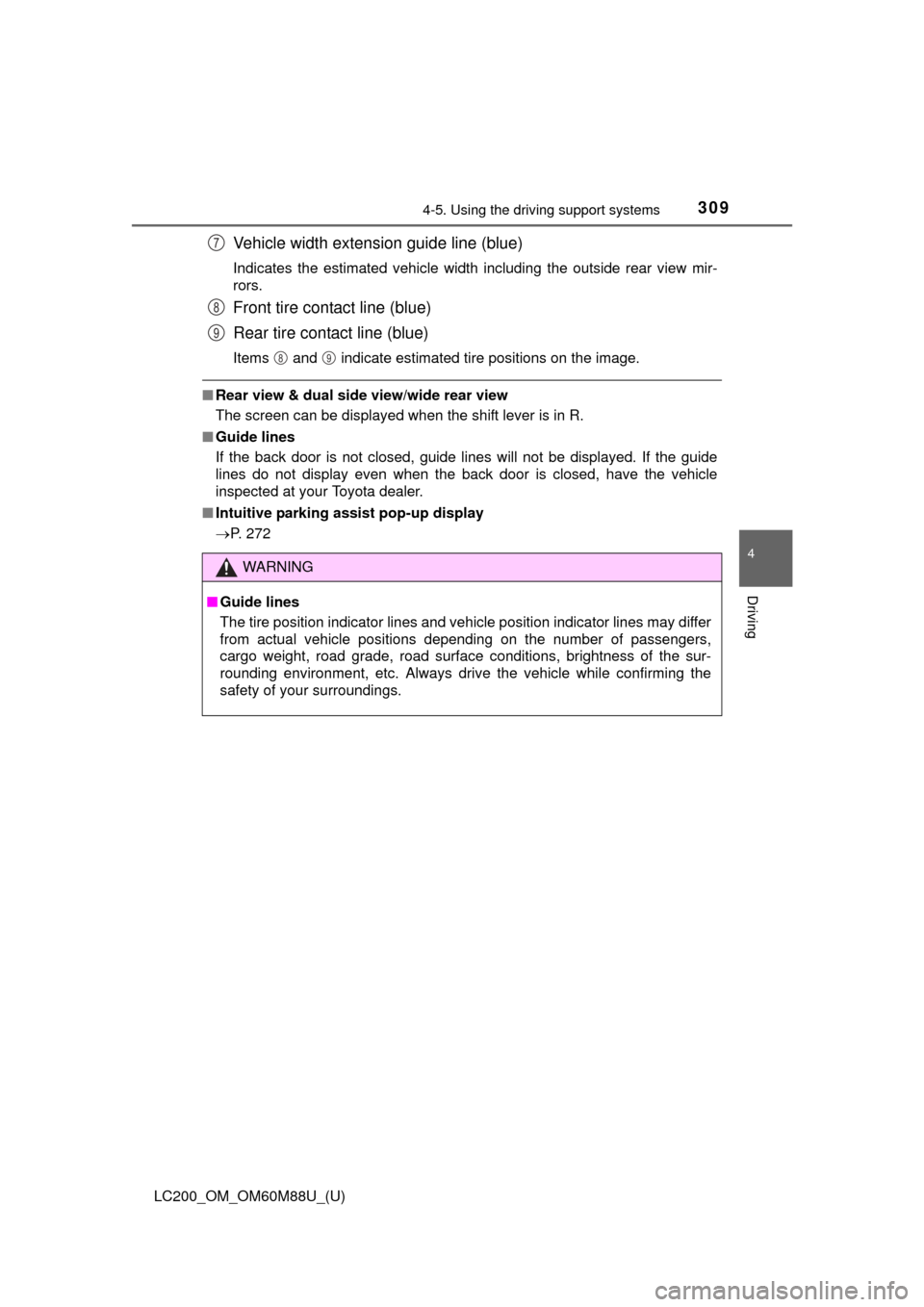
Vehicle width extension guide line (blue)
Indicates the estimated vehicle width including the outside rear view mir-
rors.
Front tire contact line (blue)
Rear tire contact line (blue)
Items and indicate estimated tire positions on the image.
■Rear view & dual side view/wide rear view
The screen can be displayed when the shift lever is in R.
■ Guide lines
If the back door is not closed, guide lines will not be displayed. If the guide
lines do not display even when the back door is closed, have the vehicle
inspected at your Toyota dealer.
■ Intuitive parking assist pop-up display
P. 272
WARNING
■Guide lines
The tire position indicator lines and vehicle position indicator lines m\
ay differ
from actual vehicle positions depending on the number of passengers,
cargo weight, road grade, road surface conditions, brightness of the sur-
rounding environment, etc. Always drive the vehicle while confirming the
safety of your surroundings.
7
8
9
89
Page 310 of 608
310
LC200_OM_OM60M88U_(U)
4-5. Using the driving support systems
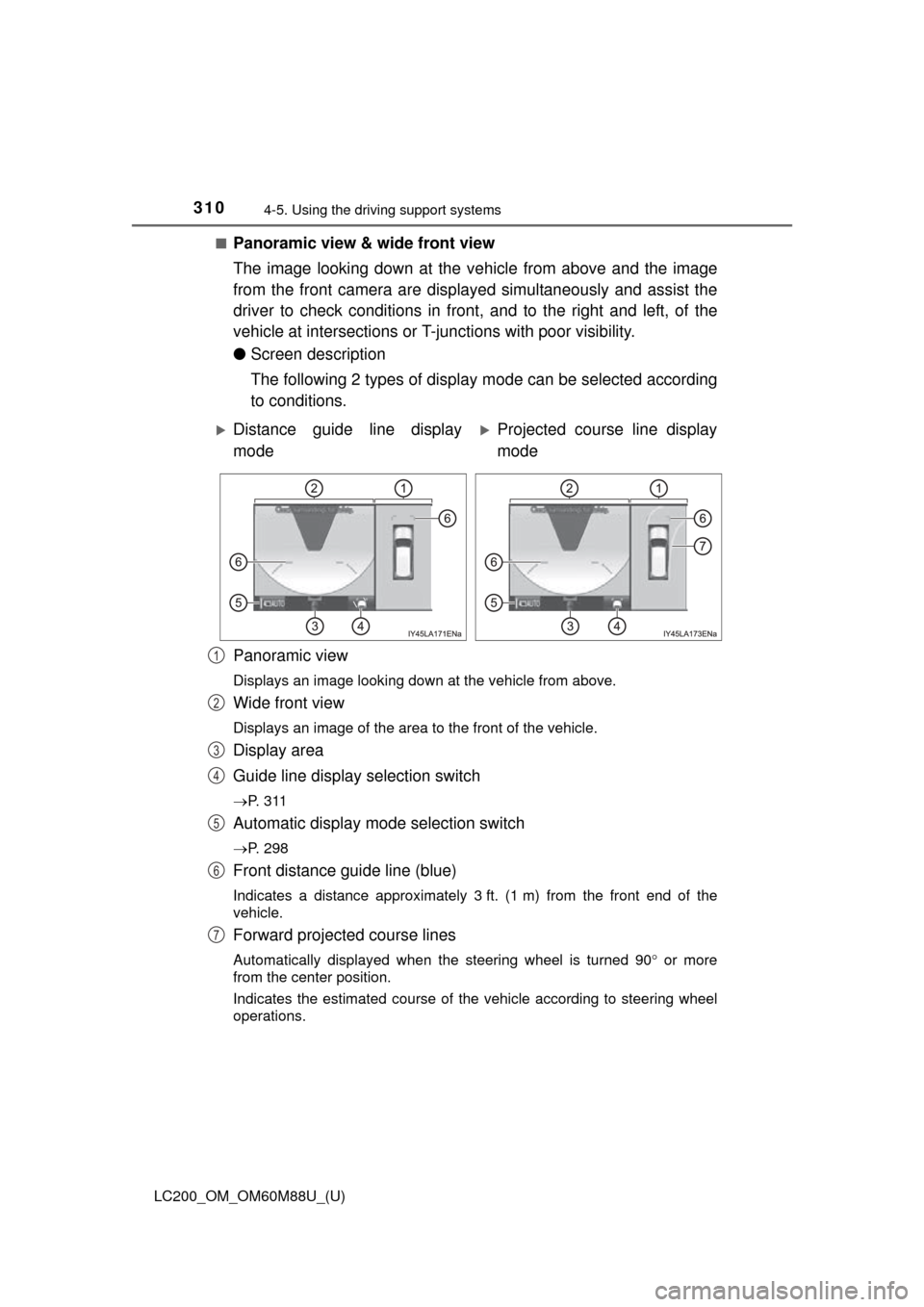
■Panoramic view & wide front view
The image looking down at the ve hicle from above and the image
from the front camera are displayed simultaneously and assist the
driver to check conditions in front, and to the right and left, of the
vehicle at intersections or T- junctions with poor visibility.
● Screen description
The following 2 types of display mode can be selected according
to conditions.
Panoramic view
Displays an image looking down at the vehicle from above.
Wide front view
Displays an image of the area to the front of the vehicle.
Display area
Guide line display selection switch
P. 3 1 1
Automatic display mode selection switch
P. 298
Front distance guide line (blue)
Indicates a distance approximately 3 ft. (1 m) from the front end of the
vehicle.
Forward projected course lines
Automatically displayed when the steering wheel is turned 90 or more
from the center position.
Indicates the estimated course of the vehicle according to steering wheel
operations.
Distance guide line display
modeProjected course line display
mode
1
2
3
4
5
6
7
Page 312 of 608
312
LC200_OM_OM60M88U_(U)
4-5. Using the driving support systems
■Dual side view
The image from the both side came ras is displayed and assists the
driver to check conditions on the sides of the vehicle or to confirm
the safety of narrow roads.
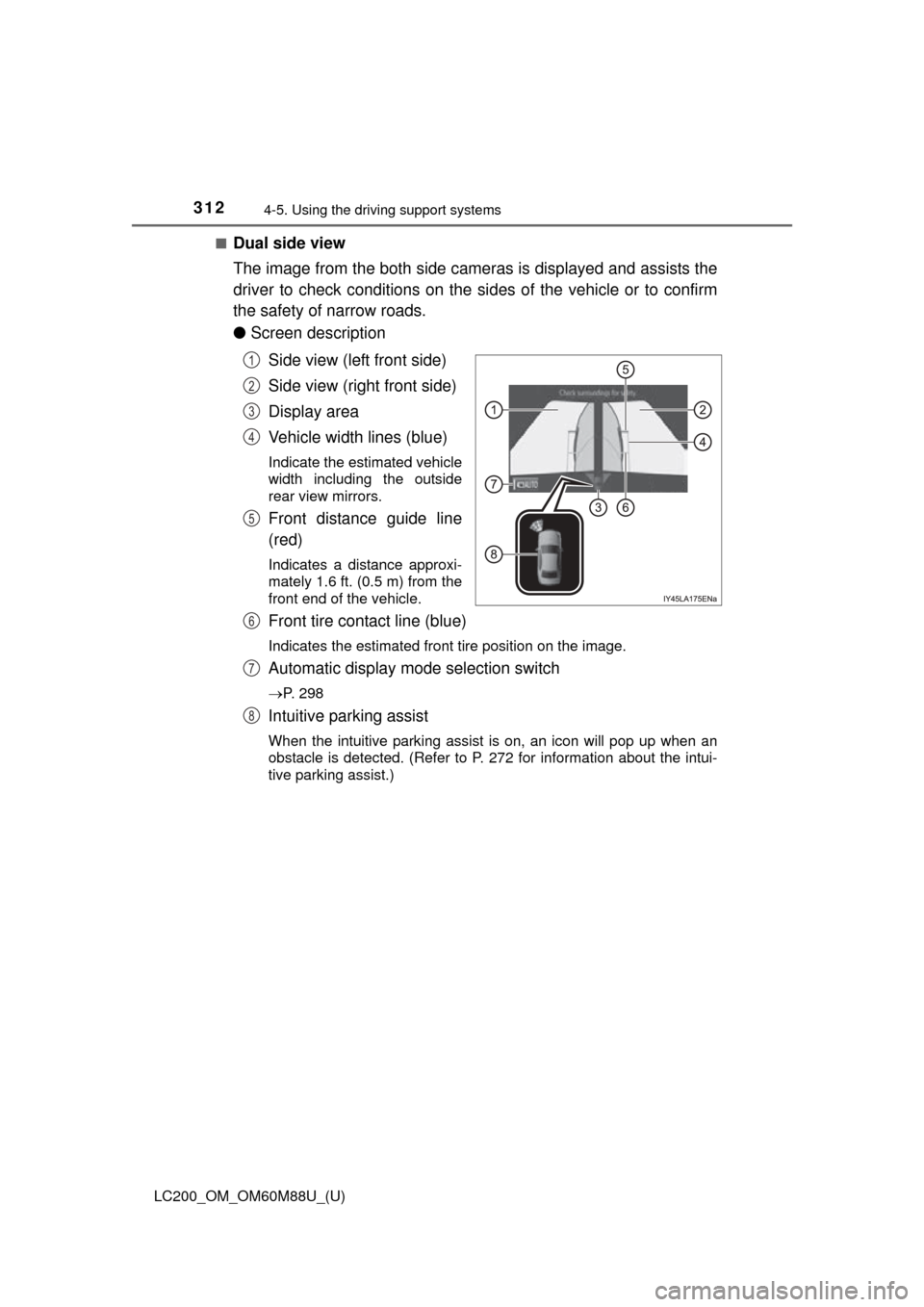
● Screen description
Side view (left front side)
Side view (right front side)
Display area
Vehicle width lines (blue)
Indicate the estimated vehicle
width including the outside
rear view mirrors.
Front distance guide line
(red)
Indicates a distance approxi-
mately 1.6 ft. (0.5 m) from the
front end of the vehicle.
Front tire contact line (blue)
Indicates the estimated front tire position on the image.
Automatic display mode selection switch
P. 298
Intuitive parking assist
When the intuitive parking assist is on, an icon will pop up when an
obstacle is detected. (Refer to P. 272 for information about the intui-
tive parking assist.)
1
2
3
4
5
6
7
8
Page 317 of 608
LC200_OM_OM60M88U_(U)
3174-5. Using the driving support systems
4
Driving
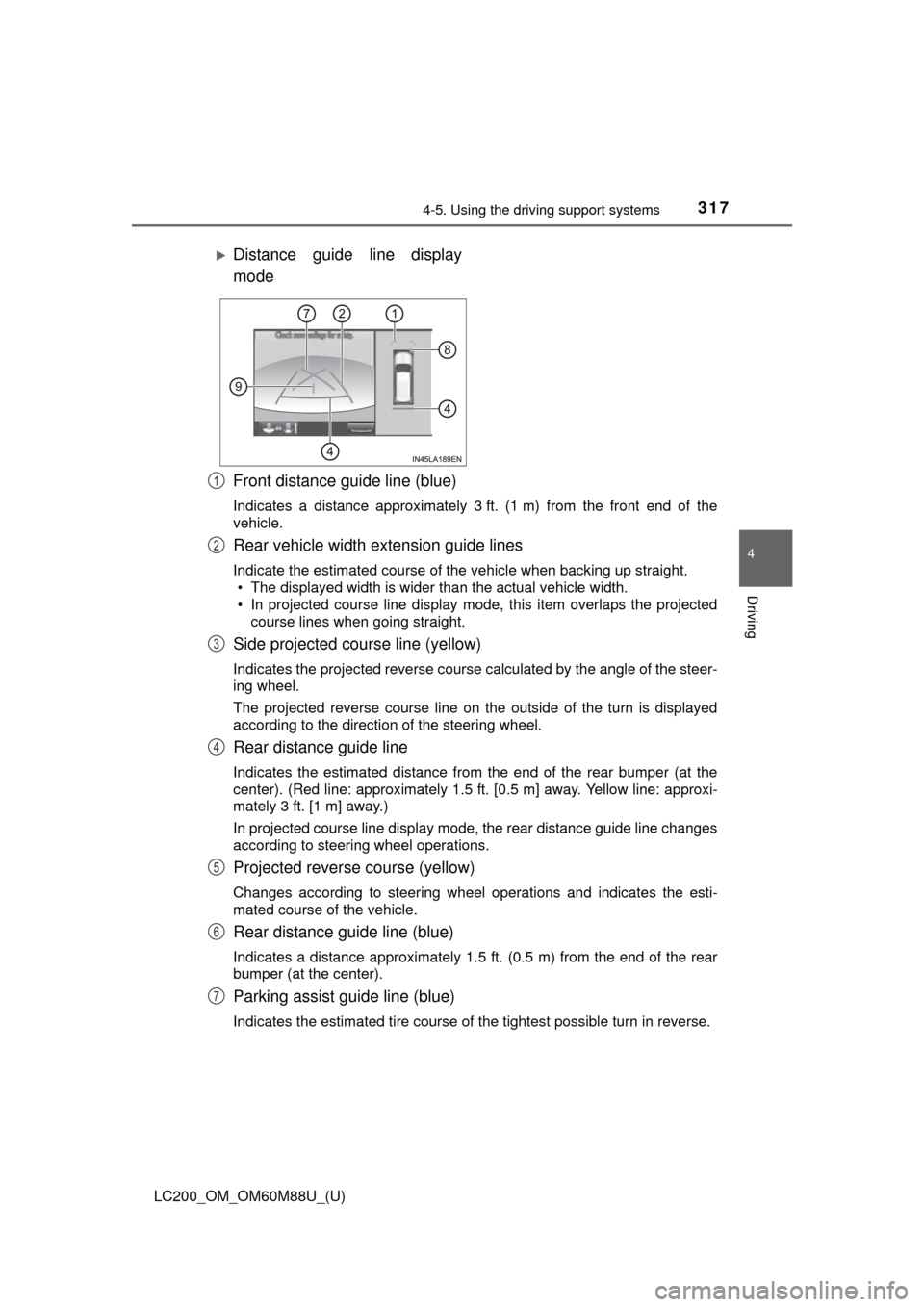
Front distance guide line (blue)
Indicates a distance approximately 3 ft. (1 m) from the front end of the
vehicle.
Rear vehicle width extension guide lines
Indicate the estimated course of the vehicle when backing up straight.
• The displayed width is wider than the actual vehicle width.
• In projected course line display mode, this item overlaps the projected
course lines when going straight.
Side projected course line (yellow)
Indicates the projected reverse course calculated by the angle of the steer-
ing wheel.
The projected reverse course line on the outside of the turn is displayed
according to the direction of the steering wheel.
Rear distance guide line
Indicates the estimated distance from the end of the rear bumper (at the
center). (Red line: approximately 1.5 ft. [0.5 m] away. Yellow line: approxi-
mately 3 ft. [1 m] away.)
In projected course line display mode, the rear distance guide line changes
according to steering wheel operations.
Projected reverse course (yellow)
Changes according to steering wheel operations and indicates the esti-
mated course of the vehicle.
Rear distance guide line (blue)
Indicates a distance approximately 1.5 ft. (0.5 m) from the end of the rear
bumper (at the center).
Parking assist guide line (blue)
Indicates the estimated tire course of the tightest possible turn in rev\
erse.
Distance guide line display
mode
1
2
3
4
5
6
7
Page 318 of 608
318
LC200_OM_OM60M88U_(U)
4-5. Using the driving support systems
Intuitive parking assist
When the intuitive parking assist is on, an icon will be displayed when an
obstacle is detected. (Refer to P. 272 for information about the intuitive
parking assist.)
Vehicle center line (blue)
Indicates the estimated vehicle center on the ground.
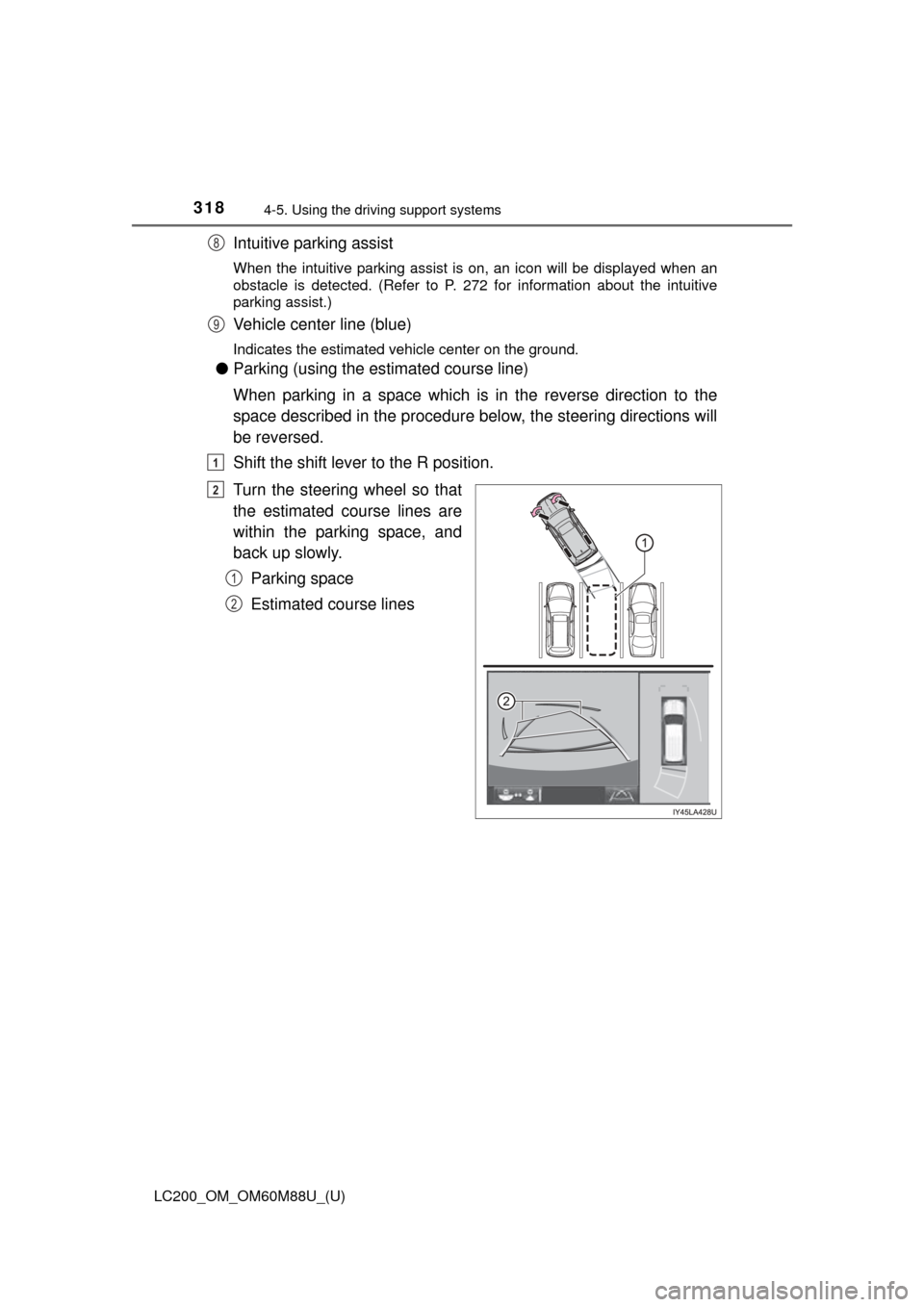
●Parking (using the es timated course line)
When parking in a space which is in the reverse direction to the
space described in the procedure below, the steering directions will
be reversed.
Shift the shift lever to the R position.
Turn the steering wheel so that
the estimated course lines are
within the parking space, and
back up slowly. Parking space
Estimated course lines
8
9
1
2
1
2
Page 322 of 608
322
LC200_OM_OM60M88U_(U)
4-5. Using the driving support systems
For information about other than the side view and dual side view dis-
play area, refer to the page for the respective screen.
Front distance guide line (red)
Indicates a distance approximately 1.5 ft. (0.5 m) from the front end of the
vehicle.
Front tire contact line (blue)
Indicates the estimated front tire position on the image.
Vehicle width lines (blue)
Indicate the estimated vehicle width including the outside rear view mir-
rors.
Rear tire contact line (blue)
Indicates the estimated rear tire position on the image.
1
2
3
4