Page 3 of 52

OVERVIEW
FEATURES/OPERATIONS
SAFETY AND EMERGENCY FEATURES
Engine maintenance 9
Fuel tank door release and cap 8
Hood release 8
Indicator symbols 5
Instrument cluster 4
Instrument panel 2-3
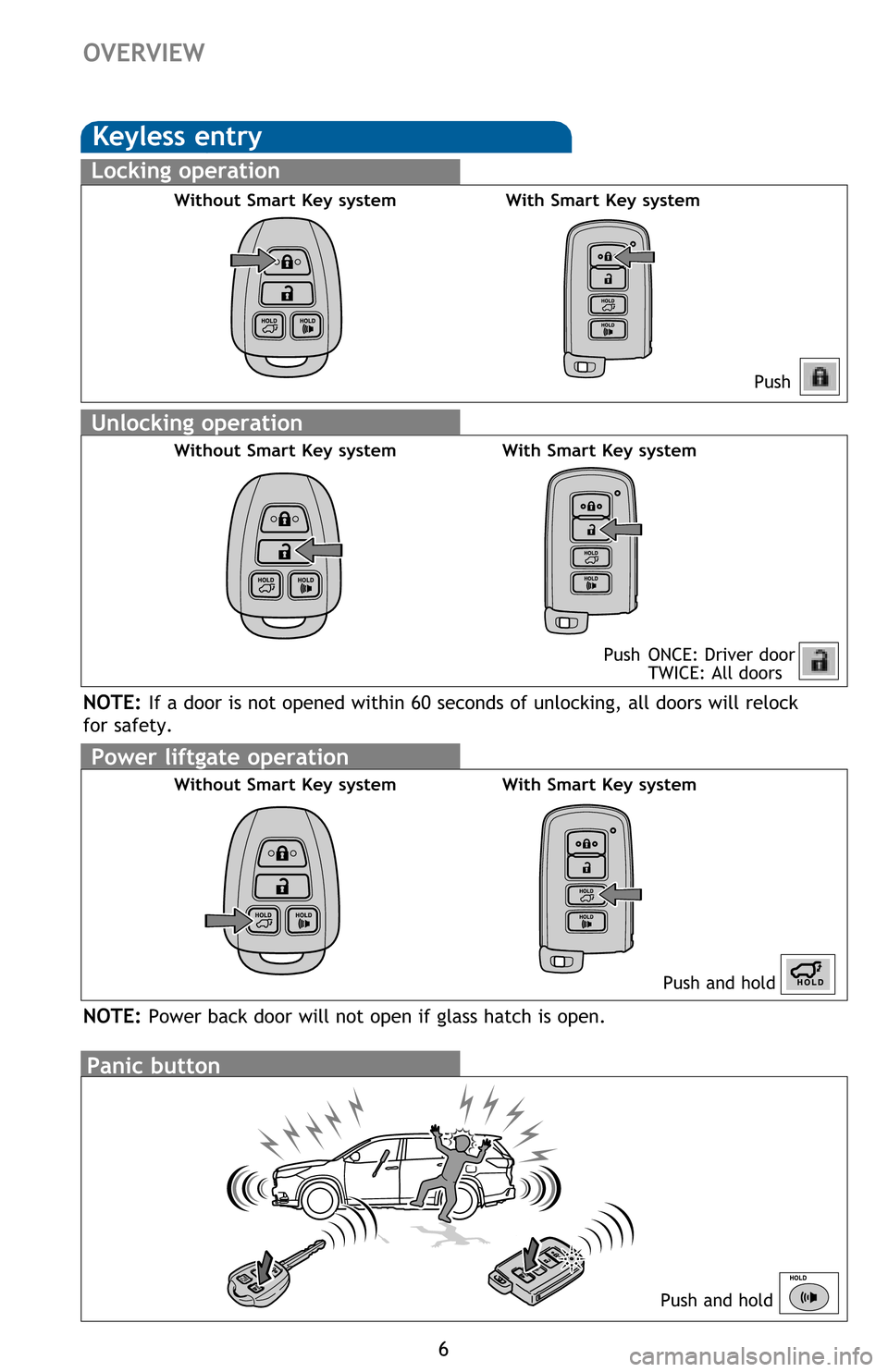
Keyless entry
1,2
6
Light control-Instrument cluster 9
Smart Key system
1,2
7
Air conditioning1,2/heating 29-30
Audio 28
Auto lock/unlock
1 11
Automatic High Beam (AHB) 18
Automatic transmission 10
Bluetooth
® Device Pairing Section 38-47
Clock 31
Cruise control 21
Door locks
1,2 10
Door-Power Liftgate (back door)1,2 13
Downhill assist control system (DAC) 32
Driver Easy Speak 27
Dynamic Radar Cruise Control
(DRCC) 19-21
Garage door opener (HomeLink
®)3
23
Lane Deparature Alert (LDA) 22-23
Lights
1,2 & turn signals1 17
Moon roof1 12
Multi-Information Display (MID)2 25
Panoramic moon roof 12
Parking brake 11
Power outlets-12V DC & 120V AC 16
Pre-Collision System (PCS) 24
Rear seat entertainment system 27
Seat adjustments-Front 14
Seat adjustments-Rear 15
Seat heaters/ventilators 31
Seats-Head restraints 15
Seats-Stowing & returning
third row seats 15
1
INDEX
OVERVIEW
SAFETY AND
EMERGENCY FEATURESFEATURES/OPERATIONS
FEATURES/OPERATIONS
1 Visit your Toyota dealer for information on customizing this feature.2 Programmable by customer. Refer to the Owner’s Manual for instructions and more information.3 HomeLink® is a registered trademark of Gentex Corporation.
Doors-Child safety locks 34
Floor mat installation 37
Seat belts
1 33
Seat belts-Shoulder belt anchor 34
Spare tire & tools 35
Star Safety System
TM 36-37
Third row center seat belt 34
Tire Pressure Monitoring
(warning) System 33
Steering lock release 11
Steering wheel switches and
telephone controls (Bluetooth
®) 26
Snow mode button 32
Tilt and telescopic steering wheel 14
USB/AUX port 27
Vehicle Stability Control (VSC)/
TRAC OFF switch 32
Windows-Power
1 26
Windshield wipers & washers1 16
Page 5 of 52
OVERVIEW
FEATURES/OPERATIONS
SAFETY AND EMERGENCY FEATURES
3
Automatic air conditioning
Type A
Type B
Lower center console switches
Seat heater/ventilator switches1
Power Liftgate (back door) main switch (inside glove box)1
“ENGINE START STOP” button (Smart Key)1
Ignition (standard key)1
Tilt and telescopic steering lock release
Fuel tank door opener
Hood lock release lever
Automatic High Beam (AHB) switch
1
Blind Spot Monitor (BSM) switch1
Lane Departure Alert (LDA) switch1
Power Liftgate (back door) switch
Intuitive parking assist switch (rear parking sonar)1
Heated steering wheel switch1
Windshield wiper de-icer switch1
1
If equipped 2 Refer to the “Navigation System Owner’s Manual.”3
Refer to the “2016 Entune™ Audio Quick Reference Guide.”
Page 8 of 52
Power liftgate operation
Without Smart Key system
6
OVERVIEW
Keyless entry
Push
Push ONCE: Driver door
TWICE: All doors
Locking operation
Unlocking operation
Without Smart Key system With Smart Key system
Without Smart Key system With Smart Key system
Panic button
Push and hold
Push and hold
NOTE: If a door is not opened within 60 seconds of unlocking, all doors will relock
for safety.
With Smart Key system
NOTE: Power back door will not open if glass hatch is open.
Page 15 of 52

OVERVIEW
FEATURES/OPERATIONS
SAFETY AND EMERGENCY FEATURES
13
Door-Power Liftgate (back door) (if equipped)
PushPush and hold
Instrument panel Open and close
Open: Push and hold
Close: Push and hold again
NOTE: If battery is disconnected, the power back door needs to be reinitialized.
Refer to the Owner’s Manual for more details.
Open onlyRemote
control
(without
Smartkey)Remote
control
(with
Smartkey)
Programmable Power Liftgate
1. When the liftgate reaches the desired height, push the rear liftgate close-
button (on the door jam of the liftgate) once. Press and hold the button until
the buzzer sounds.
2. To reset the height, with the liftgate open and not moving, press and hold the
rear liftgate close-button until it buzzes, and continue to hold until it buzzes
again -then let go. Push the same button to close the liftgate. When you next
open the liftgate it will open to the maximum height.
3. The height can also be set through the “Setup” screen on the audio display.
Setup > Vehicle Customization > Other Vehicle Settings > Power Back Door
Opening Adjust. Through this screen, there are 5 height options to choose
from.
NOTE: If the liftgate has stopped operating, check inside the glove box, on the
left side, to ensure the PWR DOOR OFF button has not been pushed.
For detailed instructions, see Owner’s Manual.
Page 29 of 52
OVERVIEW
FEATURES/OPERATIONS
SAFETY AND EMERGENCY FEATURES
27 Refer to Section 3-7 of the Navigation System Owner’s Manual for more
information.Audio System
Rear seat entertainment system (DVD player)
Remote control
AV input port
Rear seat entertainment system
(if equipped)
By inserting a mini plug into the USB/AUX port, you can listen to music from a
portable audio device through the vehicle’s speaker system while in USB/AUX mode.
USB / AUX port
Driver Easy Speak (Limited grades)
This feature utilizes the vehicle’s built-in microphone to amplify the driver’s
voice through the rear speakers. To activate this feature, select “Driver Easy
Speak” from the Apps screen on the audio unit. The feature must be turned on
every time you enter the vehicle, and automatically turns off when any door
(including the liftgate) is opened. There are 7 volume settings.